📅 Today’s Picks
Swap AI Prompts Instantly with MLflow Prompt Registry
Problem
Finding the right prompt often takes experimentation: tweaking wording, adjusting tone, testing different instructions.
But with prompts hardcoded in your codebase, each test requires a code change and redeployment.
Solution
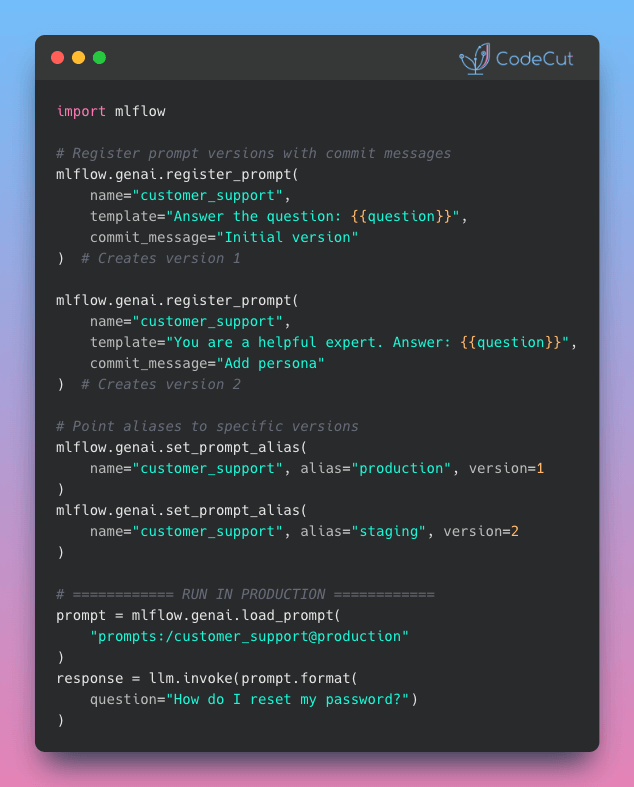
MLflow Prompt Registry solves this with aliases. Your code references an alias like “production” instead of a version number, so you can swap versions without changing it.
Here’s how it works:
- Every prompt edit creates a new immutable version with a commit message
- Register prompts once, then assign aliases to specific versions
- Deploy to different environments by creating aliases like “staging” and “production”
- Track full version history with metadata and tags for each prompt
🔄 Worth Revisiting
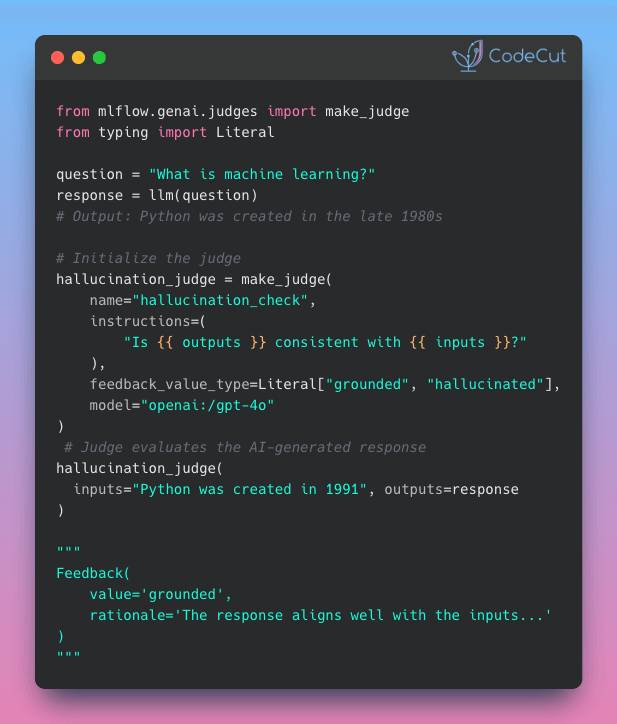
Automate LLM Evaluation at Scale with MLflow make_judge()
Problem
When you ship LLM features without evaluating them, models might hallucinate, violate safety guidelines, or return incorrectly formatted responses.
Manual review doesn’t scale. Reviewers might miss subtle issues when evaluating thousands of outputs, and scoring standards often vary between people.
Solution
MLflow make_judge() applies the same evaluation standards to every output, whether you’re checking 10 or 10,000 responses.
Key capabilities:
- Define evaluation criteria once, reuse everywhere
- Automatic rationale explaining each judgment
- Built-in judges for safety, toxicity, and hallucination detection
- Typed outputs that never return unexpected formats
☕️ Weekly Finds
gspread [Data Processing] – Google Sheets Python API for reading, writing, and formatting spreadsheets
zeppelin [Data Analysis] – Web-based notebook for interactive data analytics with SQL, Scala, and more
vectorbt [Data Science] – Fast engine for backtesting, algorithmic trading, and research in Python
Looking for a specific tool? Explore 70+ Python tools →
Stay Current with CodeCut
Actionable Python tips, curated for busy data pros. Skim in under 2 minutes, three times a week.