Grab your coffee. Here are this week’s highlights.
📅 Today’s Picks
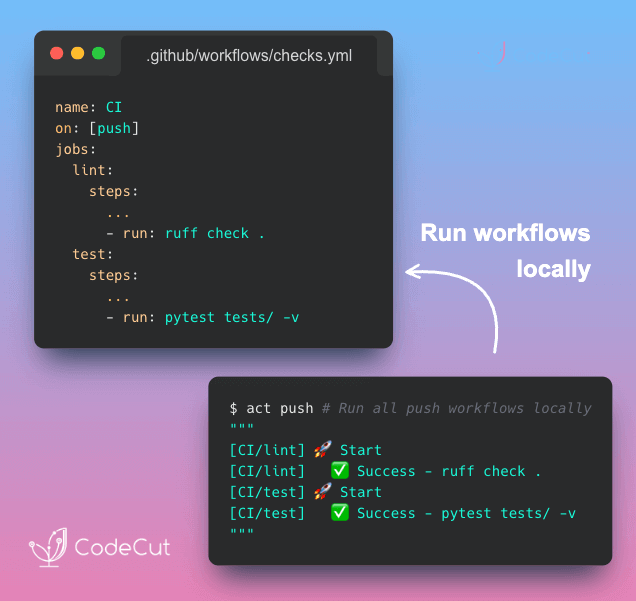
act: Run GitHub Actions Locally with Docker
Problem
GitHub Actions has no local execution mode. You can’t test a step, inspect an environment variable, or reproduce a runner-specific failure on your own machine.
Each change requires a commit and a wait for the cloud runner. A small mistake like a missing secret means starting the loop again.
Solution
With act, you can execute workflows locally using Docker. Failures surface immediately, making it easier to iterate and commit only when the workflow passes.
ScrapeGraphAI: Research Multiple Sites with One Prompt
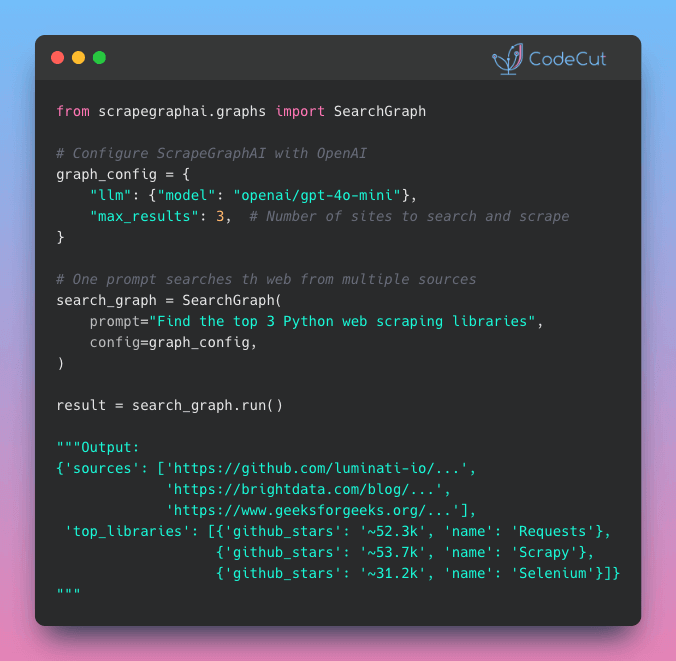
Problem
With BeautifulSoup, every site needs its own selectors, and you need to manually combine the results into a unified format.
When any site redesigns its layout, those selectors break and you are back to fixing code.
Solution
ScrapeGraphAI‘s SearchGraph fixes this by replacing selectors with a natural language prompt.
Here’s what it handles:
- Automatic web search for relevant pages
- AI-powered scraping that adapts to any layout
- Structured output with source URLs for verification
- Works with any LLM provider (OpenAI, Ollama, etc.)
🎓 Latest Interactive Course
Python Data Modeling with Dataclasses and Pydantic
Choosing between dict, NamedTuple, dataclass, and Pydantic comes down to how much safety you need. In this free interactive course, you’ll learn when to use each:
- Dictionary: Flexible, but no built-in field checks. Typos and missing keys only show up at runtime.
- NamedTuple: Immutable with fixed fields, helping catch mistakes early.
- dataclass: Mutable data containers with defaults and optional validation logic.
- Pydantic: Strong type validation, automatic coercion, and detailed error reporting.
All exercises run directly in your browser. No installation required.
☕️ Weekly Finds
agent-browser [Agents] – Headless browser automation CLI for AI agents, built on Playwright
pyscn [Code Quality] – Intelligent Python code quality analyzer with dead code detection and complexity analysis
pyupgrade [Code Quality] – Automatically upgrade Python syntax to newer versions of the language
Looking for a specific tool? Explore 70+ Python tools →
Stay Current with CodeCut
Actionable Python tips, curated for busy data pros. Skim in under 2 minutes, three times a week.