Grab your coffee. Here are this week’s highlights.
📅 Today’s Picks
pandas 3.0: 5-10x Faster String Operations with PyArrow
Problem
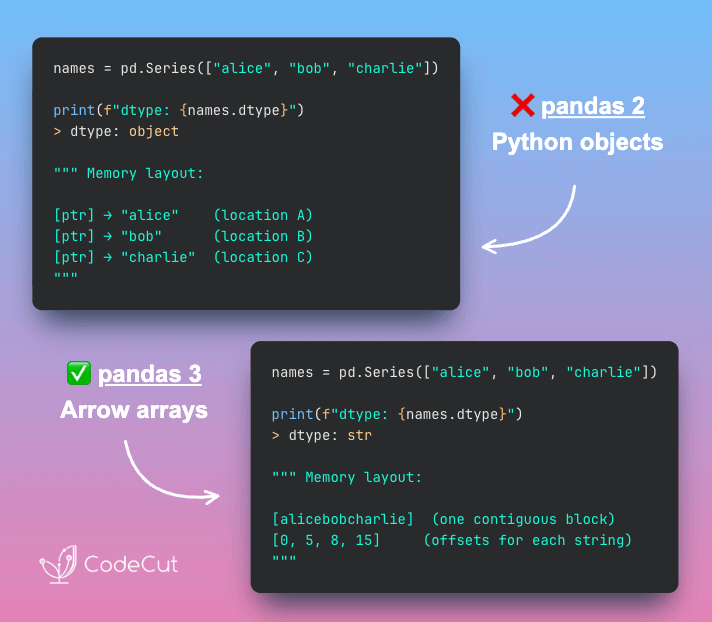
Traditionally, pandas stores strings as object dtype, where each string is a separate Python object scattered across memory.
This makes string operations slow and the dtype ambiguous, since both pure string columns and mixed-type columns show up as object.
Solution
pandas 3.0 introduces a dedicated str dtype backed by PyArrow, which stores strings in contiguous memory blocks instead of individual Python objects.
Key benefits:
- 5-10x faster string operations because data is stored contiguously
- 50% lower memory by eliminating Python object overhead
- Clear distinction between string and mixed-type columns
Build Self-Documenting Regex with Pregex
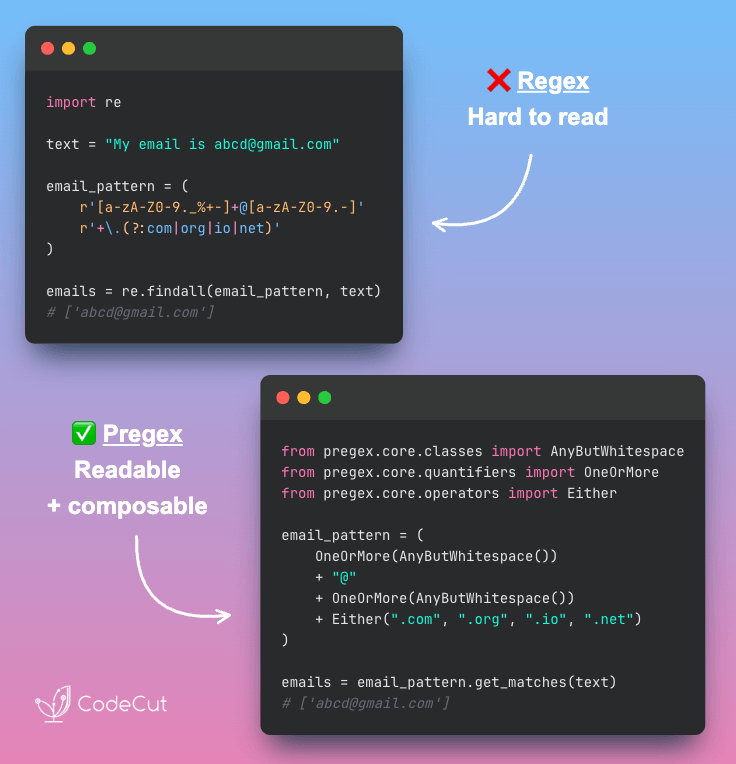
Problem
Regex patterns like [a-zA-Z0-9._%+-]+@[a-zA-Z0-9.-]+\.[a-zA-Z]{2,} are difficult to read and intimidating.
Team members without regex expertise might struggle to understand and modify these validation patterns.
Solution
Team members without regex expertise might struggle to understand and modify these validation patterns.
Pregex transforms regex into readable Python code using descriptive components.
Key benefits:
- Code that explains its intent without comments
- Easy modification without regex expertise
- Composable patterns for complex validation
- Export to regex format when needed
📚 Latest Deep Dives
PDF Table Extraction: Docling vs Marker vs LlamaParse Compared
PDF files do not store tables as structured data. Instead, they position text at specific coordinates on the page.
Table extraction tools must reconstruct the structure by determining which values belong in which rows and columns.
The problem becomes even harder when tables include multi-level headers, merged cells, or complex layouts.
To explore this problem, I experimented with three tools designed for PDF table extraction: LlamaParse, Marker, and Docling. Each tool takes a different approach.
Performance overview:
- Docling: Fastest local option, but struggles with complex tables
- Marker: Handles complex layouts well and runs locally, but is much slower
- LlamaParse: Most accurate on complex tables and fastest overall, but requires a cloud API
In this article, I share the code, examples, and results from testing each tool.
☕️ Weekly Finds
Lance [Data Processing] – Modern columnar data format for ML with 100x faster random access than Parquet
Mathesar [Dashboard] – Spreadsheet-like interface for PostgreSQL that lets anyone view, edit, and query data
dotenvx [DevOps] – A better dotenv with encryption, multiple environments, and cross-platform support
Looking for a specific tool? Explore 70+ Python tools →
Stay Current with CodeCut
Actionable Python tips, curated for busy data pros. Skim in under 2 minutes, three times a week.