Grab your coffee. Here are this week’s highlights.
📅 Today’s Picks
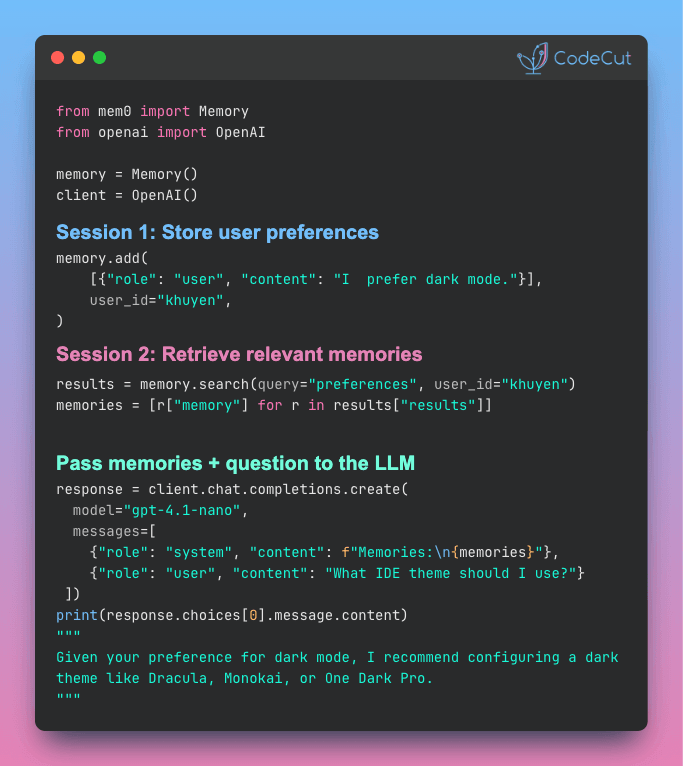
mem0: Give Your AI Memory Without Building a Vector DB
Problem
When you build an AI app using the OpenAI or Anthropic API, every conversation starts from scratch with no built-in memory between sessions.
Adding memory yourself with a vector database like ChromaDB requires writing custom extraction, deduplication, and scoping logic on top of the storage layer.
Solution
mem0 handles all of that in a single function call. Just pass in conversations and retrieve relevant memories when needed.
Key features:
- Automatic fact extraction from raw conversations via
memory.add() - Cross-session retrieval with
memory.search()in any future conversation - Automatic conflict resolution when user preferences change over time
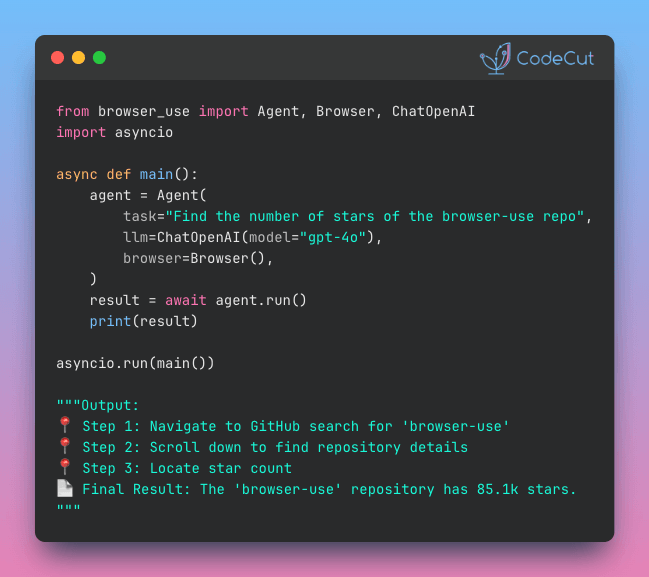
Browser-Use: Automate Any Browser Task with Plain English
Problem
Most data collection tasks go beyond simple extraction. You need to log in, apply filters, navigate pagination, and then gather results.
Selenium can handle navigation, but it requires maintaining CSS selectors that can easily break when a site changes.
Solution
Browser Use simplifies the entire process. Describe what you want, and it navigates, clicks, types, and extracts automatically.
Key features:
- Natural language task descriptions
- Works with GPT-4, Claude, Gemini, and local models via Ollama
- Structured output with Pydantic models
📚 Latest Deep Dives
How to Test GitHub Actions Locally with act
Debugging GitHub Actions is painfully slow. Every YAML change requires a commit, a push, and a 2-5 minute wait just to find out you missed a colon.
This article introduces act, a CLI tool that runs GitHub Actions workflows locally in Docker containers.
You’ll set up an ML testing pipeline and learn to pass secrets, run specific jobs, and validate workflows in seconds.
☕️ Weekly Finds
open-webui [LLM] – A self-hosted AI platform with built-in RAG, model builder, and support for Ollama and OpenAI-compatible APIs
ragflow [RAG] – An open-source RAG engine with deep document understanding for unstructured data in any format
vllm [MLOps] – A high-throughput, memory-efficient inference and serving engine for LLMs with multi-GPU support
Looking for a specific tool? Explore 70+ Python tools →
Stay Current with CodeCut
Actionable Python tips, curated for busy data pros. Skim in under 2 minutes, three times a week.