Generic selectors
Exact matches only
Search in title
Search in content
Post Type Selectors
Filter by Categories
About Article
Analyze Data
Archive
Best Practices
Better Outputs
Blog
Code Optimization
Code Quality
Command Line
Course
Daily tips
Dashboard
Data Analysis & Manipulation
Data Engineer
Data Visualization
DataFrame
Delta Lake
DevOps
DuckDB
Environment Management
Feature Engineer
Git
Jupyter Notebook
LLM
LLM Tools
Machine Learning
Machine Learning & AI
Machine Learning Tools
Manage Data
MLOps
Natural Language Processing
Newsletter Archive
NumPy
Pandas
Polars
PySpark
Python Helpers
Python Tips
Python Utilities
Scrape Data
SQL
Testing
Time Series
Tools
Visualization
Visualization & Reporting
Workflow & Automation
Workflow Automation

Natural Language Processing

FlashText: Extract and Replace Keywords in Sentences

Have you ever wanted to extract similar keywords and turn them into one standard keyword? If so, try FlashText.

FlashText allows you to extract or replace keywords in sentences.

In the code above, we use FlashText to extract the keywords CEO and Python programming language from a sentence that contains only the keywords ceo and Python.

Link to FlashText.

FlashText: Extract and Replace Keywords in Sentences Read More »

texthero: Reduce Dimension and Visualize Text in One Line of Code

Visualizing text data in 2D typically requires several steps: cleaning, encoding, and dimensionality reduction. These processes can be time-consuming. 

texthero library simplifies this task, allowing you to perform all these steps efficiently.

The following example demonstrates how to use texthero to visualize CNN news article descriptions from a Kaggle dataset. Each point in the resulting plot represents an article, color-coded by its category.

import pandas as pd
import texthero as hero
import matplotlib.pyplot as plt

# Load the data
df = pd.read_csv("small_CNN.csv")

# Process and reduce dimensionality of the text data
df["pca"] = (df["Description"]
.pipe(hero.clean)
.pipe(hero.tfidf)
.pipe(hero.pca))

# Create the visualization
plt.figure(figsize=(10, 3))
hero.scatterplot(df, col="pca", color="Category", title="CNN News")
plt.show()

This code efficiently cleans the text, applies TF-IDF encoding, performs PCA, and creates a 2D scatter plot of the articles, all in just a few lines of code.

Link to texthero.

texthero: Reduce Dimension and Visualize Text in One Line of Code Read More »

sumy: Summarize Text in One Line of Code

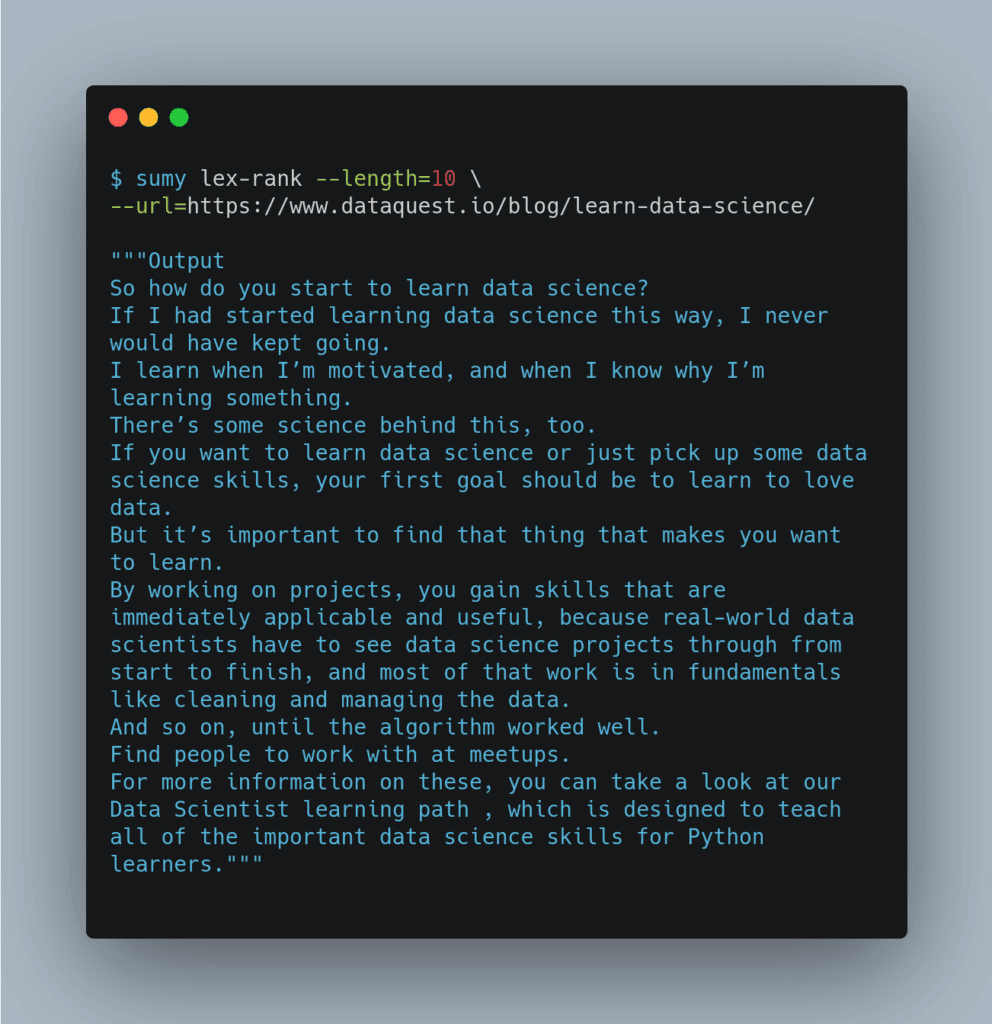
If you want to summarize text using Python or command line, try sumy.
The great things about sumy compared to other summarization tools are that it is easy to use and it allows you to use 7 different methods to summarize the text.
Above is how sumy summarizes the article How to Learn Data Science (Step-By-Step) in 2020 at DataQuest.
Check out the outputs of other algorithms here.
Link to Sumy.

sumy: Summarize Text in One Line of Code Read More »

Scroll to Top

Work with Khuyen Tran

Work with Khuyen Tran