Generic selectors
Exact matches only
Search in title
Search in content
Post Type Selectors
Filter by Categories
About Article
Analyze Data
Archive
Best Practices
Better Outputs
Blog
Code Optimization
Code Quality
Command Line
Course
Daily tips
Dashboard
Data Analysis & Manipulation
Data Engineer
Data Visualization
DataFrame
Delta Lake
DevOps
DuckDB
Environment Management
Feature Engineer
Git
Jupyter Notebook
LLM
LLM Tools
Machine Learning
Machine Learning & AI
Machine Learning Tools
Manage Data
MLOps
Natural Language Processing
Newsletter Archive
NumPy
Pandas
Polars
PySpark
Python Helpers
Python Tips
Python Utilities
Scrape Data
SQL
Testing
Time Series
Tools
Visualization
Visualization & Reporting
Workflow & Automation
Workflow Automation

regex

Auto-created tag for regex

Choose the Right Text Pattern Tool: Regex, Pregex, or Pyparsing

Table of Contents

Introduction
Dataset Generation
Simple Regex: Basic Pattern Extraction
pregex: Build Readable Patterns
pyparsing: Parse Structured Ticket Headers
Conclusion

Introduction
Imagine you’re analyzing customer support tickets to extract contact information and error details. Tickets contain customer messages with email addresses in various formats, phone numbers with inconsistent formatting (some (555) 123-4567, others 555-123-4567).

ticket_id
message

0
Contact me at nichole70@kemp.com or (798)034-325 to resolve this issue.

1
You can reach me by phone (970-295-1452) or email (russellbrandon@simon-rogers.org) anytime.

2
My contact details: ehamilton@silva.io and 242 844 7293.

3
Feel free to call 901.794.1337 or email ogarcia@howell-chavez.net for assistance.

How do you extract the email addresses and phone numbers from the tickets?
This article shows three approaches to text pattern matching: regex, pregex, and pyparsing.

Stay Current with CodeCut
Actionable Python tips, curated for busy data pros. Skim in under 2 minutes, three times a week.

.codecut-subscribe-form .codecut-input {
background: #2F2D2E !important;
border: 1px solid #72BEFA !important;
color: #FFFFFF !important;
}
.codecut-subscribe-form .codecut-input::placeholder {
color: #999999 !important;
}
.codecut-subscribe-form .codecut-subscribe-btn {
background: #72BEFA !important;
color: #2F2D2E !important;
}
.codecut-subscribe-form .codecut-subscribe-btn:hover {
background: #5aa8e8 !important;
}

.codecut-subscribe-form {
max-width: 650px;
display: flex;
flex-direction: column;
gap: 8px;
}

.codecut-input {
-webkit-appearance: none;
-moz-appearance: none;
appearance: none;
background: #FFFFFF;
border-radius: 8px !important;
padding: 8px 12px;
font-family: ‘Comfortaa’, sans-serif !important;
font-size: 14px !important;
color: #333333;
border: none !important;
outline: none;
width: 100%;
box-sizing: border-box;
}

input[type=”email”].codecut-input {
border-radius: 8px !important;
}

.codecut-input::placeholder {
color: #666666;
}

.codecut-email-row {
display: flex;
align-items: stretch;
height: 36px;
gap: 8px;
}

.codecut-email-row .codecut-input {
flex: 1;
}

.codecut-subscribe-btn {
background: #72BEFA;
color: #2F2D2E;
border: none;
border-radius: 8px;
padding: 8px 14px;
font-family: ‘Comfortaa’, sans-serif;
font-size: 14px;
font-weight: 500;
cursor: pointer;
text-decoration: none;
display: flex;
align-items: center;
justify-content: center;
transition: background 0.3s ease;
}

.codecut-subscribe-btn:hover {
background: #5aa8e8;
}

.codecut-subscribe-btn:disabled {
background: #999;
cursor: not-allowed;
}

.codecut-message {
font-family: ‘Comfortaa’, sans-serif;
font-size: 12px;
padding: 8px;
border-radius: 6px;
display: none;
}

.codecut-message.success {
background: #d4edda;
color: #155724;
display: block;
}

/* Mobile responsive */
@media (max-width: 480px) {
.codecut-email-row {
flex-direction: column;
height: auto;
gap: 8px;
}

.codecut-input {
border-radius: 8px;
height: 36px;
}

.codecut-subscribe-btn {
width: 100%;
text-align: center;
border-radius: 8px;
height: 36px;
}
}

Subscribe

Key Takeaways
Here’s what you’ll learn:

Understand when regex patterns are sufficient and when they fall short
Write maintainable text extraction code using pregex’s readable components
Parse structured text with inconsistent formatting using pyparsing

💻 Get the Code: The complete source code and Jupyter notebook for this tutorial are available on GitHub. Clone it to follow along!

Dataset Generation
Let’s create sample datasets that will be used throughout the article. We’ll generate customer support ticket data using the Faker library:
Install Faker:
pip install faker

First, let’s generate customer support tickets with simple contact information:
from faker import Faker
import csv
import pandas as pd
import random

fake = Faker()
Faker.seed(40)

# Define phone patterns
phone_patterns = ["(###)###-####", "###-###-####", "### ### ####", "###.###.####"]

# Define email TLDs
email_tlds = [".com", ".org", ".io", ".net"]

# Generate phone numbers and emails
phones = []
emails = []

for i in range(4):
# Generate phone with specific pattern
phone = fake.numerify(text=phone_patterns[i])
phones.append(phone)

# Generate email with specific TLD
email = fake.user_name() + "@" + fake.domain_word() + email_tlds[i]
emails.append(email)

# Define sentence structures
sentence_structures = [
lambda p, e: f"Contact me at {e} or {p} to resolve this issue.",
lambda p, e: f"You can reach me by phone ({p}) or email ({e}) anytime.",
lambda p, e: f"My contact details: {e} and {p}.",
lambda p, e: f"Feel free to call {p} or email {e} for assistance."
]

# Create CSV with 4 rows
with open("data/tickets.csv", "w", newline="") as f:
writer = csv.writer(f)
writer.writerow(["ticket_id", "message"])

for i in range(4):
message = sentence_structures[i](phones[i], emails[i])
writer.writerow([i, message])

Set the display option to show the full width of the columns:
pd.set_option("display.max_colwidth", None)

Load and preview the tickets dataset:
df_tickets = pd.read_csv("data/tickets.csv")
df_tickets.head()

ticket_id
message

0
Contact me at nichole70@kemp.com or (798)034-325 to resolve this issue.

1
You can reach me by phone (970-295-1452) or email (russellbrandon@simon-rogers.org) anytime.

2
My contact details: ehamilton@silva.io and 242 844 7293.

3
Feel free to call 901.794.1337 or email ogarcia@howell-chavez.net for assistance.

Simple Regex: Basic Pattern Extraction
Regular expressions (regex) are patterns that match text based on rules. They excel at finding structured data like emails, phone numbers, and dates in unstructured text.
Extract Email Addresses
Start with a simple pattern that matches basic email formats, including:

Username: [a-z]+ – One or more lowercase letters (e.g. maria95)
Separator: @ – Literal @ symbol
Domain: [a-z]+ – One or more lowercase letters (e.g. gmail or outlook)
Dot: \. – Literal dot (escaped)
Extension: (?:org|net|com|io) – Match specific extensions (e.g. .com, .org, .io, .net)

import re

# Match basic email format: letters@domain.extension
email_pattern = r'[a-z]+@[a-z]+\.(?:org|net|com|io)'

df_tickets['emails'] = df_tickets['message'].apply(
lambda x: re.findall(email_pattern, x)
)

df_tickets[['message', 'emails']].head()

message
emails

0
Contact me at nichole70@kemp.com or (798)034-325 to resolve this issue.

1
You can reach me by phone (970-295-1452) or email (russellbrandon@simon-rogers.org) anytime.

2
My contact details: ehamilton@silva.io and 242 844 7293.

3
Feel free to call 901.794.1337 or email ogarcia@howell-chavez.net for assistance.

This pattern works for simple emails but misses variations with:

Other characters in the username such as numbers, dots, underscores, plus signs, or hyphens
Other characters in the domain such as numbers, dots, or hyphens
Other extensions that are not .com, .org, .io, or .net

Let’s expand the pattern to handle more formats:
# Handle emails with numbers, dots, underscores, hyphens, plus signs
improved_email = r'[a-zA-Z0-9._%+-]+@[a-zA-Z0-9.-]+\.[a-zA-Z]{2,}'

df_tickets['emails_improved'] = df_tickets['message'].apply(
lambda x: re.findall(improved_email, x)
)

df_tickets[['message', 'emails_improved']].head()

message
emails_improved

0
Contact me at nichole70@kemp.com or (798)034-325 to resolve this issue.

1
You can reach me by phone (970-295-1452) or email (russellbrandon@simon-rogers.org) anytime.

2
My contact details: ehamilton@silva.io and 242 844 7293.

3
Feel free to call 901.794.1337 or email ogarcia@howell-chavez.net for assistance.

The improved pattern successfully extracts all emails from the tickets! Let’s move on to extracting phone numbers.
Extract Phone Numbers
Common phone number formats are:

(XXX)XXX-XXXX – With parentheses
XXX-XXX-XXXX – Without parentheses
XXX XXX XXXX – With spaces
XXX.XXX.XXXX – With dots

To handle all four phone formats, we can use the following pattern:

\(? – Optional opening parenthesis
\d{3} – Exactly 3 digits (area code)
[-.\s]? – Optional hyphen, dot, or space
\)? – Optional closing parenthesis
\d{3} – Exactly 3 digits (prefix)
[-.\s]? – Optional hyphen, dot, or space
\d{3,4} – Exactly 3 or 4 digits

# Define phone pattern
phone_pattern = r'\(?\d{3}\)?[-.\s]?\d{3}[-.\s]\d{4}'

df_tickets['phones'] = df_tickets['message'].apply(
lambda x: re.findall(phone_pattern, x)
)

df_tickets[['message', 'phones']].head()

message
phones

0
Contact me at hfuentes@anderson.com or (798)034-3254 to resolve this issue.

1
You can reach me by phone (702-951-4528) or email (russellbrandon@simon-rogers.org) anytime.

2
My contact details: ehamilton@silva.io and 242 844 7293.

3
Feel free to call 901.794.1337 or email ogarcia@howell-chavez.net for assistance.

Awesome! We are able to extract all phone numbers from the tickets!
While these patterns works, they are difficult to understand and modify for someone who is not familiar with regex.

📖 Readable code reduces maintenance burden and improves team productivity. Check out Production-Ready Data Science for detailed guidance on writing production-quality code.

In the next section, we will use pregex to build more readable patterns.
pregex: Build Readable Patterns
pregex is a Python library that lets you build regex patterns using readable Python syntax instead of regex symbols. It breaks complex patterns into self-documenting components that clearly express validation logic.
Install pregex:
pip install pregex

Extract Email Addresses
Let’s extract emails using pregex’s readable components.
In the code, we will use the following components:

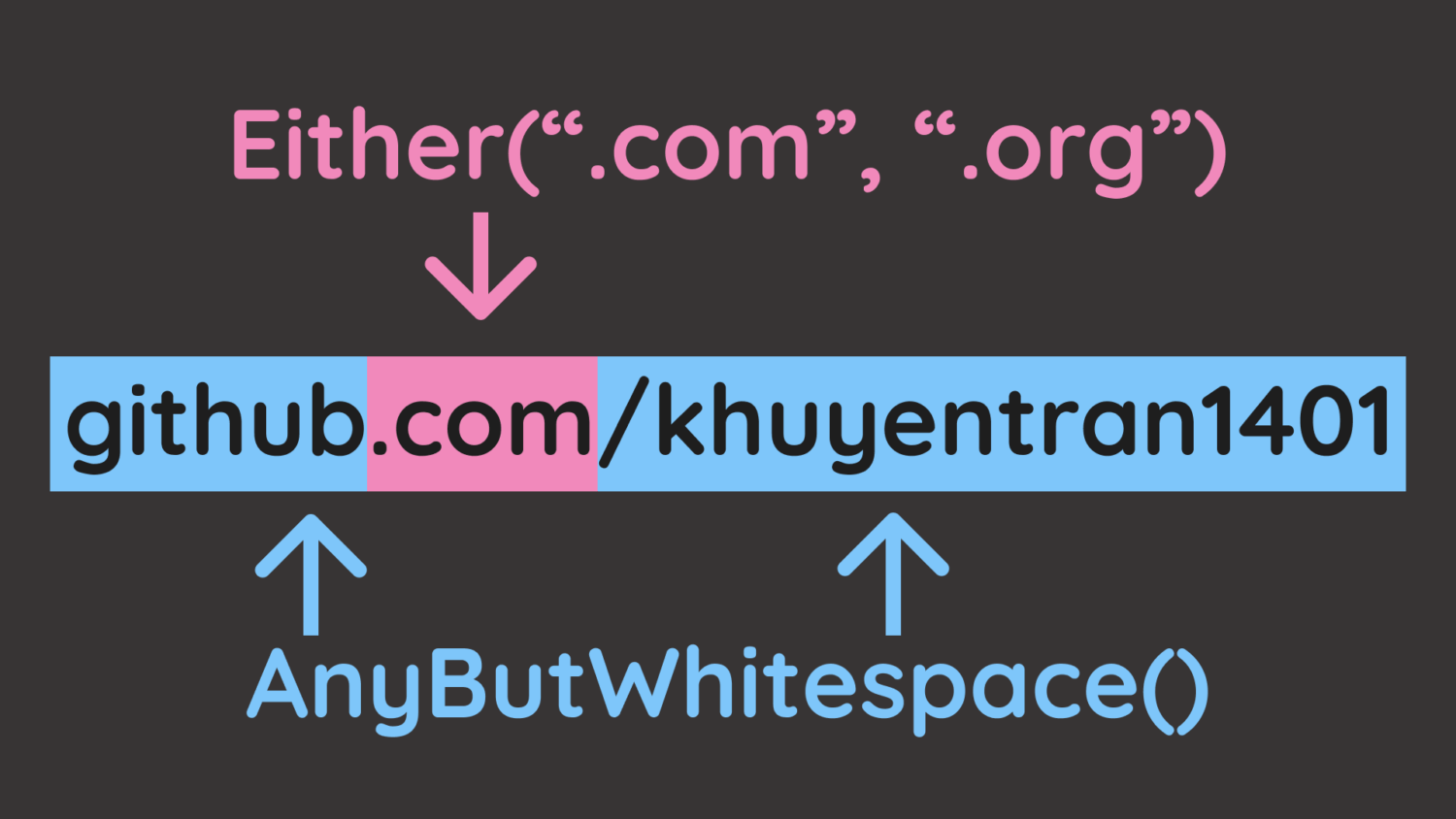
Username: OneOrMore(AnyButWhitespace()) – Any letters but whitespace (maria95)
Separator: @ – Literal @ symbol
Domain name: OneOrMore(AnyButWhitespace()) – Any letters but whitespace (gmail or outlook)
Extension: Either(".com", ".org", ".io", ".net") – Match specific extensions (.com, .org, .io, .net)

from pregex.core.classes import AnyButWhitespace
from pregex.core.quantifiers import OneOrMore
from pregex.core.operators import Either

username = OneOrMore(AnyButWhitespace())
at_symbol = "@"
domain_name = OneOrMore(AnyButWhitespace())
extension = Either(".com", ".org", ".io", ".net")

email_pattern = username + at_symbol + domain_name + extension

# Extract emails
df_tickets["emails_pregex"] = df_tickets["message"].apply(
lambda x: email_pattern.get_matches(x)
)

df_tickets[["message", "emails_pregex"]].head()

message
emails_pregex

0
Contact me at hfuentes@anderson.com or (798)034-3254 to resolve this issue.
[hfuentes@anderson.com]

1
You can reach me by phone (702-951-4528) or email (russellbrandon@simon-rogers.org) anytime.
[(russellbrandon@simon-rogers.org]

2
My contact details: ehamilton@silva.io and 242 844 7293.
[ehamilton@silva.io]

3
Feel free to call 901.794.1337 or email ogarcia@howell-chavez.net for assistance.
[ogarcia@howell-chavez.net]

The output shows that we are able to extract the emails from the tickets!
pregex transforms pattern matching from symbol decoding into readable code. OneOrMore(username_chars) communicates intent more clearly than [a-zA-Z0-9._%+-]+, reducing the time teammates spend understanding and modifying validation logic.
Extract Phone Numbers
Now extract phone numbers with multiple components:

First three digits: Optional("(") + Exactly(AnyDigit(), 3) + Optional(")")
Separator: Either(" ", "-", ".")
Second three digits: Exactly(AnyDigit(), 3)
Last four digits: Exactly(AnyDigit(), 4)

from pregex.core.classes import AnyDigit
from pregex.core.quantifiers import Optional, Exactly
from pregex.core.operators import Either

# Build phone pattern using pregex
first_three = Optional("(") + Exactly(AnyDigit(), 3) + Optional(")")
separator = Either(" ", "-", ".")
second_three = Exactly(AnyDigit(), 3)
last_four = Exactly(AnyDigit(), 4)

phone_pattern = first_three + Optional(separator) + second_three + separator + last_four

# Extract phone numbers
df_tickets['phones_pregex'] = df_tickets['message'].apply(
lambda x: phone_pattern.get_matches(x)
)

df_tickets[['message', 'phones_pregex']].head()

message
phones_pregex

0
Contact me at hfuentes@anderson.com or (798)034-3254 to resolve this issue.
[(798)034-3254]

1
You can reach me by phone (702-951-4528) or email (russellbrandon@simon-rogers.org) anytime.
[(702-951-4528]

2
My contact details: ehamilton@silva.io and 242 844 7293.
[242 844 7293]

3
Feel free to call 901.794.1337 or email ogarcia@howell-chavez.net for assistance.
[901.794.1337]

If your system requires the raw regex pattern, you can get it with get_compiled_pattern():
print("Compiled email pattern:", email_pattern.get_compiled_pattern().pattern)
print("Compiled phone pattern:", phone_pattern.get_compiled_pattern().pattern)

Compiled email pattern: \S+@\S+(?:\.com|\.org|\.io|\.net)
Compiled phone pattern: \(?\d{3}\)?(?: |-|\.)?\d{3}(?: |-|\.)\d{4}

For more pregex examples including URLs and time patterns, see PRegEx: Write Human-Readable Regular Expressions in Python.

Parse Structured Ticket Headers
Now let’s tackle a more complex task: parsing structured ticket headers that contain multiple fields:
Ticket: 1000 | Priority: High | Assigned: John Doe # escalated

We will use Capture to extract just the values we need from each ticket:
from pregex.core.quantifiers import OneOrMore
from pregex.core.classes import AnyDigit, AnyLetter, AnyWhitespace
from pregex.core.groups import Capture

sample_ticket = "Ticket: 1000 | Priority: High | Assigned: John Doe # escalated"

# Define patterns with Capture to extract just the values
whitespace = AnyWhitespace()
ticket_id_pattern = "Ticket:" + whitespace + Capture(OneOrMore(AnyDigit()))
priority_pattern = "Priority:" + whitespace + Capture(OneOrMore(AnyLetter()))
name_pattern = (
"Assigned:"
+ whitespace
+ Capture(OneOrMore(AnyLetter()) + " " + OneOrMore(AnyLetter()))
)

# Define separator pattern (whitespace around pipe)
separator = whitespace + "|" + whitespace

# Combine all patterns with separators
ticket_pattern = (
ticket_id_pattern
+ separator
+ priority_pattern
+ separator
+ name_pattern
)
“`text
Next, define a function to extract the ticket components from the captured components:

“`python
def get_ticket_components(ticket_string, ticket_pattern):
"""Extract ticket components from a ticket string."""
try:
captures = ticket_pattern.get_captures(ticket_string)[0]
return pd.Series(
{
"ticket_id": captures[0],
"priority": captures[1],
"assigned": captures[2],
}
)
except IndexError:
return pd.Series(
{"ticket_id": None, "priority": None, "assigned": None}
)

Apply the function with the pattern defined above to the sample ticket.

components = get_ticket_components(sample_ticket, ticket_pattern)
print(components.to_dict())

{'ticket_id': '1000', 'priority': 'High', 'assigned': 'John Doe'}

This looks good! Let’s apply to ticket headers with inconsistent whitespace around the separators. Start by creating the dataset:
import pandas as pd

# Create tickets with embedded comments and variable whitespace
tickets = [
"Ticket: 1000 | Priority: High | Assigned: John Doe # escalated",
"Ticket: 1001 | Priority: Medium | Assigned: Maria Garcia # team lead",
"Ticket:1002| Priority:Low |Assigned:Alice Smith # non-urgent",
"Ticket: 1003 | Priority: High | Assigned: Bob Johnson # on-call"
]

df_tickets = pd.DataFrame({'ticket': tickets})
df_tickets.head()

ticket

0

1

2

3

# Extract individual components using the function
df_pregex = df_tickets.copy()
components_df = df_pregex["ticket"].apply(get_ticket_components, ticket_pattern=ticket_pattern)

df_pregex = df_pregex.assign(**components_df)

df_pregex[["ticket_id", "priority", "assigned"]].head()

ticket_id
priority
assigned

0
1000
High
John Doe

1
None
None
None

2
None
None
None

3
1003
High
Bob Johnson

We can see that pregex misses Tickets 1 and 2 because AnyWhitespace() only matches a single space, while those rows use inconsistent spacing around the separators.
Making pregex patterns flexible enough for variable formatting requires adding optional quantifiers to the whitespace pattern so that it can match zero or more spaces around the separators.
As these fixes accumulate, pregex’s readability advantage diminishes, and you end up with code that’s as hard to understand as raw regex but more verbose.
When parsing structured data with consistent patterns but varying details, pyparsing provides more robust handling than regex.
pyparsing: Parse Structured Ticket Headers
Unlike regex’s pattern matching approach, pyparsing lets you define grammar rules using Python classes, making parsing logic explicit and maintainable.
Install pyparsing:
pip install pyparsing

Let’s parse the complete structure with pyparsing, including:

Ticket ID: Word(nums) – One or more digits (e.g. 1000)
Priority: Word(alphas) – One or more letters (e.g. High)
Name: Word(alphas) + Word(alphas) – First and last name (e.g. John Doe)

We will also use the pythonStyleComment to ignore Python-style comments throughout parsing.
from pyparsing import Word, alphas, nums, Literal, pythonStyleComment

# Define grammar components
ticket_num = Word(nums)
priority = Word(alphas)
name = Word(alphas) + Word(alphas)

# Define complete structure
ticket_grammar = (
"Ticket:"
+ ticket_num
+ "|"
+ "Priority:"
+ priority
+ "|"
+ "Assigned:"
+ name
)

# Automatically ignore Python-style comments throughout parsing
ticket_grammar.ignore(pythonStyleComment)

sample_ticket = "Ticket: 1000 | Priority: High | Assigned: John Doe # escalated"
sample_result = ticket_grammar.parse_string(sample_ticket)
print(sample_result)

['Ticket:', '1000', '|', 'Priority:', 'High', '|', 'Assigned:', 'John', 'Doe']

Awesome! We are able to extract the ticket components from the ticket with a much simpler pattern!
Compare this to the pregex implementation:
ticket_pattern = (
"Ticket:" + whitespace + Capture(OneOrMore(AnyDigit()))
+ whitespace + "|" + whitespace
+ "Priority:" + whitespace + Capture(OneOrMore(AnyLetter()))
+ whitespace + "|" + whitespace
+ "Assigned:"
+ whitespace
+ Capture(OneOrMore(AnyLetter()) + " " + OneOrMore(AnyLetter()))
)

We can see that pyparsing handles structured data better than pregex for the following reasons:

No whitespace boilerplate: pyparsing handles spacing automatically while pregex requires + whitespace + between every component
Self-documenting: Word(alphas) clearly means “letters” while pregex’s nested Capture(OneOrMore(AnyLetter())) is less readable

To extract ticket components, assign names using () syntax and access them via dot notation:
# Define complete structure
ticket_grammar = (
"Ticket:"
+ ticket_num("ticket_id")
+ "|"
+ "Priority:"
+ priority("priority")
+ "|"
+ "Assigned:"
+ name("assigned")
)

# Automatically ignore Python-style comments throughout parsing
ticket_grammar.ignore(pythonStyleComment)

sample_ticket = "Ticket: 1000 | Priority: High | Assigned: John Doe # escalated"
sample_result = ticket_grammar.parse_string(sample_ticket)

# Access the components by name
print(
f"Ticket ID: {sample_result.ticket_id}",
f"Priority: {sample_result.priority}",
f"Assigned: {' '.join(sample_result.assigned)}",
)

Ticket ID: 1000 Priority: High Assigned: John Doe

Let’s apply this to the entire dataset.
# Parse all tickets and create columns
def parse_ticket(ticket, ticket_grammar):
result = ticket_grammar.parse_string(ticket)
return pd.Series(
{
"ticket_id": result.ticket_id,
"priority": result.priority,
"assigned": " ".join(result.assigned),
}
)

df_pyparsing = df_tickets.copy()
components_df_pyparsing = df_pyparsing["ticket"].apply(parse_ticket, ticket_grammar=ticket_grammar)
df_pyparsing = df_pyparsing.assign(**components_df_pyparsing)

df_pyparsing[["ticket_id", "priority", "assigned"]].head()

ticket_id
priority
assigned

0
1000
High
John Doe

1
1001
Medium
Maria Garcia

2
1002
Low
Alice Smith

3
1003
High
Bob Johnson

The output looks good!
Let’s try to parse some more structured data with pyparsing.
Extract Code Blocks from Markdown
Use SkipTo to extract Python code between code block markers without complex regex patterns like r'“`python(.*?)“`':
from pyparsing import Literal, SkipTo

code_start = Literal("“`python")
code_end = Literal("“`")

code_block = code_start + SkipTo(code_end)("code") + code_end

markdown = """“`python
def hello():
print("world")
“`"""

result = code_block.parse_string(markdown)
print(result.code)

def hello():
print("world")

Parse Nested Structures
nested_expr handles arbitrary nesting depth, which regex fundamentally cannot parse:
from pyparsing import nested_expr

# Default: parentheses
nested_list = nested_expr()
result = nested_list.parse_string("((2 + 3) * (4 – 1))")
print(result.as_list())

[[['2', '+', '3'], '*', ['4', '-', '1']]]

Conclusion
So how do you know when to use each tool? Choose your tool based on your needs:
Use simple regex when:

Extracting simple, well-defined patterns (emails, phone numbers with consistent format)
Pattern won’t need frequent modifications

Use pregex when:

Pattern has multiple variations (different phone number formats)
Need to document pattern logic through readable code

Use pyparsing when:

Need to extract multiple fields from structured text (ticket headers, configuration files)
Must handle variable formatting (inconsistent whitespace, embedded comments)

In summary, start with simple regex, adopt pregex when readability matters, and switch to pyparsing when structure becomes complex.
Related Tutorials
Here are some related text processing tools:

Text similarity matching: 4 Text Similarity Tools: When Regex Isn’t Enough compares regex preprocessing, difflib, RapidFuzz, and Sentence Transformers for matching product names and handling data variations
Business entity extraction: langextract vs spaCy: AI-Powered vs Rule-Based Entity Extraction evaluates regex, spaCy, GLiNER, and langextract for extracting structured information from financial documents

📚 Want to go deeper? Learning new techniques is the easy part. Knowing how to structure, test, and deploy them is what separates side projects from real work. My book shows you how to build data science projects that actually make it to production. Get the book →

Stay Current with CodeCut
Actionable Python tips, curated for busy data pros. Skim in under 2 minutes, three times a week.

.codecut-subscribe-form .codecut-input {
background: #2F2D2E !important;
border: 1px solid #72BEFA !important;
color: #FFFFFF !important;
}
.codecut-subscribe-form .codecut-input::placeholder {
color: #999999 !important;
}
.codecut-subscribe-form .codecut-subscribe-btn {
background: #72BEFA !important;
color: #2F2D2E !important;
}
.codecut-subscribe-form .codecut-subscribe-btn:hover {
background: #5aa8e8 !important;
}

.codecut-subscribe-form {
max-width: 650px;
display: flex;
flex-direction: column;
gap: 8px;
}

.codecut-input {
-webkit-appearance: none;
-moz-appearance: none;
appearance: none;
background: #FFFFFF;
border-radius: 8px !important;
padding: 8px 12px;
font-family: ‘Comfortaa’, sans-serif !important;
font-size: 14px !important;
color: #333333;
border: none !important;
outline: none;
width: 100%;
box-sizing: border-box;
}

input[type=”email”].codecut-input {
border-radius: 8px !important;
}

.codecut-input::placeholder {
color: #666666;
}

.codecut-email-row {
display: flex;
align-items: stretch;
height: 36px;
gap: 8px;
}

.codecut-email-row .codecut-input {
flex: 1;
}

.codecut-subscribe-btn {
background: #72BEFA;
color: #2F2D2E;
border: none;
border-radius: 8px;
padding: 8px 14px;
font-family: ‘Comfortaa’, sans-serif;
font-size: 14px;
font-weight: 500;
cursor: pointer;
text-decoration: none;
display: flex;
align-items: center;
justify-content: center;
transition: background 0.3s ease;
}

.codecut-subscribe-btn:hover {
background: #5aa8e8;
}

.codecut-subscribe-btn:disabled {
background: #999;
cursor: not-allowed;
}

.codecut-message {
font-family: ‘Comfortaa’, sans-serif;
font-size: 12px;
padding: 8px;
border-radius: 6px;
display: none;
}

.codecut-message.success {
background: #d4edda;
color: #155724;
display: block;
}

/* Mobile responsive */
@media (max-width: 480px) {
.codecut-email-row {
flex-direction: column;
height: auto;
gap: 8px;
}

.codecut-input {
border-radius: 8px;
height: 36px;
}

.codecut-subscribe-btn {
width: 100%;
text-align: center;
border-radius: 8px;
height: 36px;
}
}

Subscribe

Choose the Right Text Pattern Tool: Regex, Pregex, or Pyparsing Read More »
langextract vs spaCy: AI-Powered vs Rule-Based Entity Extraction

Table of Contents

Introduction
Tool Selection Criteria
Regular Expressions: Pattern-Based Recognition
spaCy: Production-Grade NER
GLiNER: Zero-Shot Entity Extraction
langextract: AI-Powered Extraction with Source Grounding
Conclusion

Introduction
Unstructured text often hides rich structured information. For instance, financial reports contain company names, monetary figures, executives, dates, and locations used for competitive analysis and executive tracking.
However, extracting these entities manually is time-consuming and error-prone.
A better approach is to use an automated approach to extract the entities. There are several tools that can be used to extract the entities. In this article, we will compare four tools: regular expressions, spaCy, GLiNER, and langextract.
We will start with a straightforward approach then gradually move to more advanced approaches depending on the complexity of the entities.

Interactive Course: Master entity extraction with spaCy and LLMs through hands-on exercises in our interactive entity extraction course.

Tool Selection Criteria
Select your entity extraction method based on these core differentiators:
Regular Expressions: Pattern Matching

Strength: Microsecond latency with zero dependencies
Best for: Structured data with consistent formats (dates, IDs, phone numbers)

spaCy: Production-Ready NER

Strength: 10,000+ entities/second with enterprise reliability
Best for: Standard business entities in high-volume production systems

GLiNER: Custom Entity Flexibility

Strength: Zero-shot custom entity recognition without training data
Best for: Dynamic entity requirements and specialized domains

langextract: Context-Aware AI

Strength: Finds entity relationships (CEO → company) with source citations for verification
Best for: Document analysis requiring transparent, traceable entity extraction

Regular Expressions: Pattern-Based Recognition
Regular expressions excel at extracting entities with consistent formats. Financial documents contain structured patterns perfect for regex recognition. Let’s see how regular expressions can extract these entities.

💡 Tip: While regex is powerful for structured patterns, complex expressions can be hard to read and maintain. For a more intuitive approach, check out PRegEx: Write Human-Readable Regular Expressions in Python to build regex patterns with readable Python syntax.

First, let’s define the earnings report that we will use for extraction:
import re
from pathlib import Path

# Define the earnings report locally for this section
earning_report = """
Apple Inc. (NASDAQ: AAPL) reported third quarter revenue of $81.4 billion,
up 2% year over year. CEO Tim Cook stated that Services revenue reached
a new all-time high of $21.2 billion. The company's board of directors
declared a cash dividend of $0.24 per share.

CFO Luca Maestri mentioned that iPhone revenue was $39.3 billion for
the quarter ending June 30, 2023. The company expects total revenue
between $89 billion and $93 billion for the fourth quarter.

Apple's Cupertino headquarters announced the acquisition of AI startup
WaveOne for an undisclosed amount. The deal is expected to close in
Q4 2023, pending regulatory approval from the SEC.
"""

Define the extraction functions, including:

Financial amounts ($1.2 billion, $39.3 million)
Dates (June 30, 2023)
Stock symbols (NASDAQ: AAPL, NYSE: MSFT)
Percentages (2%, 15%)
Quarters (Q3 2023, Q4 2023)

def extract_financial_amounts(text):
"""Extract financial amounts like $1.2 billion, $39.3 million."""
financial_pattern = r"\$(?:\d{1,3}(?:,\d{3})+|\d+)(?:\.[0-9]+)?(?:\s*(?:billion|million|trillion))?"
return re.findall(financial_pattern, text, re.IGNORECASE)

def extract_dates(text):
"""Extract formatted dates like June 30, 2023."""
date_pattern = r"\b(?:January|February|March|April|May|June|July|August|September|October|November|December)\s+\d{1,2},\s+\d{4}"
return re.findall(date_pattern, text)

def extract_stock_symbols(text):
"""Extract stock symbols like NASDAQ: AAPL, NYSE: MSFT."""
stock_pattern = r"\b(?:NASDAQ|NYSE|NYSEARCA):\s*[A-Z]{2,5}\b"
return re.findall(stock_pattern, text)

def extract_percentages(text):
"""Extract percentage values like 2%, 15.5%."""
percentage_pattern = r"\b\d+(?:\.\d+)?%"
return re.findall(percentage_pattern, text)

def extract_quarters(text):
"""Extract quarterly periods like Q1 2023, Q4 2024."""
quarter_pattern = r"\b(Q[1-4]\s+\d{4})\b"
return re.findall(quarter_pattern, text)

def extract_entities_regex(text):
"""Extract business entities using regular expressions."""
entities = {
"financial_amounts": extract_financial_amounts(text),
"dates": extract_dates(text),
"stock_symbols": extract_stock_symbols(text),
"percentages": extract_percentages(text),
"quarters": extract_quarters(text),
}
return entities

Extract entities:
# Extract entities
regex_entities = extract_entities_regex(earning_report)

print("Regular Expression Entity Extraction:")
for entity_type, values in regex_entities.items():
if values:
print(f" {entity_type}: {values}")

Output:
Regular Expression Entity Extraction:
financial_amounts: ['$81.4 billion', '$21.2 billion', '$39.3 billion', '$89 billion', '$93 billion']
dates: ['June 30, 2023']
stock_symbols: ['AAPL']
percentages: ['2%']
quarters: ['Q4 2023']

Regex reliably captures structured patterns such as financial amounts, dates, stock symbols, percentages, and quarters. However, it only matches numeric quarter formats like “Q4 2023” and misses textual forms such as “third quarter” unless additional exact-match patterns are added.
spaCy: Production-Grade NER
Regex handles fixed formats, but for context-driven entities we use spaCy. With pretrained pipelines, spaCy’s NER identifies and labels types such as PERSON, ORG, MONEY, DATE, and PERCENT.
Let’s start by installing spaCy and downloading a pre-trained English model:
pip install spacy
python -m spacy download en_core_web_sm

First, let’s see how spaCy processes text and identifies entities:
import spacy

# Load the English language model
nlp = spacy.load("en_core_web_sm")

# Process a simple sentence to see how spaCy works
sample_text = "Apple Inc. reported revenue of $81.4 billion with CEO Tim Cook."
doc = nlp(sample_text)

print("Entities found in sample text:")
for ent in doc.ents:
print(f"'{ent.text}' -> {ent.label_} ({ent.label_})")

Output:
Entities found in sample text:
'Apple Inc.' -> ORG (ORG)
'$81.4 billion' -> MONEY (MONEY)
'Tim Cook' -> PERSON (PERSON)

spaCy automatically identified three different entity types from context alone:

Apple Inc. (ORG): Recognized as an organization based on the company suffix and context (subject of “reported”).
$81.4 billion (MONEY): Identified as a monetary value from the currency symbol, number, and magnitude word.
Tim Cook (PERSON): Labeled as a person using proper name patterns, reinforced by nearby role noun “CEO”.

Now let’s build a comprehensive extraction function for our full business document:
from collections import defaultdict

def extract_entities_spacy(text):
"""Extract business entities using spaCy NER with detailed information."""
doc = nlp(text)
entities = defaultdict(list)
for ent in doc.ents:
entities[ent.label_].append(ent.text)
return dict(entities)

Now let’s apply this to our complete business document:
# Define the earnings report locally for this section
earning_report = """
Apple Inc. (NASDAQ: AAPL) reported third quarter revenue of $81.4 billion,
up 2% year over year. CEO Tim Cook stated that Services revenue reached
a new all-time high of $21.2 billion. The company's board of directors
declared a cash dividend of $0.24 per share.

CFO Luca Maestri mentioned that iPhone revenue was $39.3 billion for
the quarter ending June 30, 2023. The company expects total revenue
between $89 billion and $93 billion for the fourth quarter.

Apple's Cupertino headquarters announced the acquisition of AI startup
WaveOne for an undisclosed amount. The deal is expected to close in
Q4 2023, pending regulatory approval from the SEC.
"""

# Extract entities from the full text
spacy_entities = extract_entities_spacy(earning_report)

print("spaCy NER Entity Extraction:")
for entity_type, entities_list in spacy_entities.items():
print(f"\n{entity_type} ({len(entities_list)} found):")
for entity in entities_list:
print(f" {entity}")

Output:
spaCy NER Entity Extraction:

ORG (7 found):
Apple Inc.
NASDAQ
Services
iPhone
Apple
WaveOne
SEC

DATE (4 found):
third quarter
the quarter ending June 30, 2023
the fourth quarter
Q4 2023

MONEY (5 found):
$81.4 billion
$21.2 billion
0.24
$39.3 billion
between $89 billion and $93 billion

PERCENT (1 found):
2%

PERSON (1 found):
Tim Cook

GPE (2 found):
Cupertino
AI

The model correctly identifies key financial entities like revenue figures and dates, but misclassifies some technical terms:

“AI” as GPE (Geopolitical Entity): In the phrase “AI startup WaveOne,” the model treats “AI” as a modifier that could resemble a geographic descriptor, similar to how “Silicon Valley startup” would be parsed
“Services” as ORG: Appearing in “Services revenue reached,” the model lacks context that this refers to Apple’s services division and interprets the capitalized “Services” as a standalone company name
“iPhone” as ORG: Should be classified as a product, but the model sees a capitalized term in a financial context and defaults to organization classification
“WaveOne” as ORG: While technically correct as a startup company, this could also be considered a misclassification if we expect more specific entity types for acquisition targets or startups

These limitations highlight a fundamental challenge: pre-trained models are constrained by their fixed entity categories and training data.
Business documents require more nuanced classifications, distinguishing between products and companies, or identifying specific business roles like “startup” or “regulatory body.”

📚 For taking your data science projects from prototype to production, check out Production-Ready Data Science.

GLiNER: Zero-Shot Entity Extraction
GLiNER (Generalist and Lightweight Named Entity Recognition) addresses these exact limitations through zero-shot learning. Instead of being locked into predetermined categories like ORG or GPE, GLiNER interprets natural language descriptions.
You can define custom entity types like “startup_company” or “product_name” and GLiNER will find them without any training examples.
Let’s install GLiNER and see how zero-shot entity extraction works:
pip install gliner

First, let’s load the GLiNER model and test it with a simple custom entity type:
from gliner import GLiNER

# Load the pre-trained GLiNER model from Hugging Face
model = GLiNER.from_pretrained("urchade/gliner_mediumv2.1")

# Test with a simple example to understand zero-shot capabilities
test_text = "Apple Inc. CEO Tim Cook announced quarterly revenue of $81.4 billion."
simple_entities = ["technology_company", "executive_role"]

# Extract entities using custom descriptions
entities = model.predict_entities(test_text, simple_entities)

for entity in entities:
print(f"'{entity['text']}' -> {entity['label']} (confidence: {entity['score']:.3f})")

Output:
'Apple Inc.' -> technology_company (confidence: 0.959)
'Tim Cook' -> executive_role (confidence: 0.884)

GLiNER excels at zero-shot extraction by understanding descriptive label names like “technology_company” and “executive_role” without additional training. Next, we define a helper to group results by label with offsets and confidence.
from collections import defaultdict

def extract_entities_gliner(text, entity_types):
"""Extract custom business entities using GLiNER zero-shot learning."""
entities = model.predict_entities(text, entity_types)

grouped_entities = defaultdict(list)
for entity in entities:
grouped_entities[entity['label']].append({
'text': entity['text'],
'start': entity['start'],
'end': entity['end'],
'confidence': round(entity['score'], 3)
})

return dict(grouped_entities)

Now declare the custom business entity types and the input text used for extraction.
business_entities = [
"company",
"executive",
"financial_figure",
"product",
"startup",
"regulatory_body",
"quarter",
"location",
"percentage",
"stock_symbol",
"market_reaction",
]

earning_report = """
Apple Inc. (NASDAQ: AAPL) reported third quarter revenue of $81.4 billion,
up 2% year over year. CEO Tim Cook stated that Services revenue reached
a new all-time high of $21.2 billion. The company's board of directors
declared a cash dividend of $0.24 per share.

CFO Luca Maestri mentioned that iPhone revenue was $39.3 billion for
the quarter ending June 30, 2023. The company expects total revenue
between $89 billion and $93 billion for the fourth quarter.

Apple's Cupertino headquarters announced the acquisition of AI startup
WaveOne for an undisclosed amount. The deal is expected to close in
Q4 2023, pending regulatory approval from the SEC.
"""

Finally, run the extraction and print the grouped results with confidence scores.
gliner_entities = extract_entities_gliner(earning_report, business_entities)

print("GLiNER Zero-Shot Entity Extraction:")
for entity_type, entities_list in gliner_entities.items():
if entities_list:
print(f"\n{entity_type.upper()} ({len(entities_list)} found):")
for entity in entities_list:
print(f" '{entity['text']}' (confidence: {entity['confidence']})")

Output:
GLiNER Zero-Shot Entity Extraction:

COMPANY (2 found):
'Apple Inc.' (confidence: 0.94)
'Apple' (confidence: 0.62)

QUARTER (3 found):
'third quarter' (confidence: 0.929)
'fourth quarter' (confidence: 0.948)
'Q4 2023' (confidence: 0.569)

FINANCIAL_FIGURE (5 found):
'$81.4 billion' (confidence: 0.908)
'$21.2 billion' (confidence: 0.827)
'$39.3 billion' (confidence: 0.875)
'$89 billion' (confidence: 0.827)
'$93 billion' (confidence: 0.817)

PERCENTAGE (1 found):
'2%' (confidence: 0.807)

EXECUTIVE (3 found):
'CEO' (confidence: 0.606)
'Tim Cook' (confidence: 0.933)
'Luca Maestri' (confidence: 0.813)

PRODUCT (1 found):
'iPhone' (confidence: 0.697)

LOCATION (1 found):
'Cupertino headquarters' (confidence: 0.657)

STARTUP (1 found):
'WaveOne' (confidence: 0.767)

REGULATORY_BODY (1 found):
'SEC' (confidence: 0.878)

GLiNER outperformed standard NER through zero-shot learning:

Extraction coverage: 18 entities vs spaCy’s mixed-category results
Classification accuracy: correctly distinguished companies from products/services/agencies
Domain adaptation: business-specific categories (startup, regulatory_body) vs generic classifications
Label flexibility: custom entity types defined through natural language descriptions

However, GLiNER missed some complex financial entities that span multiple words:

Stock symbols: Failed to recognize “NASDAQ: AAPL” as a structured financial identifier
Market trends: Captured “2%” but missed the complete context “up 2% year over year” as market_reaction

langextract: AI-Powered Extraction with Source Grounding
GLiNER’s limitations with complex financial entities highlight the need for more sophisticated approaches. langextract addresses these exact challenges by using advanced AI models to understand entity relationships and provide transparent source attribution.
Unlike pattern-based extraction, langextract leverages modern LLMs (Gemini, GPT, or Vertex AI) to capture multi-token entities like “NASDAQ: AAPL” and contextual relationships like “up 2% year over year.”
Setup Instructions
First, install langextract and python-dotenv for environment management:
pip install langextract python-dotenv

Next, get an API key from one of these providers:

AI Studio for Gemini models (recommended for most users)
Vertex AI for enterprise use
OpenAI Platform for OpenAI models

Save your API key in a .env file in your project directory:
# .env file
LANGEXTRACT_API_KEY=your-api-key-here

Now let’s load our API key and define the extraction schema:
import os
from dotenv import load_dotenv
import langextract as lx
from langextract import extract

# Load environment variables from .env file
load_dotenv()

# Load API key
api_key = os.getenv('LANGEXTRACT_API_KEY')

Now we’ll create the extraction function using the real langextract API:
def extract_entities_langextract(text):
"""Extract entities using langextract with proper API usage."""
# Brief prompt – let examples guide the extraction
prompt_description = """Extract business entities: companies, executives, financial figures, quarters, locations, percentages, products, startups, regulatory bodies, stock_symbols, market_reaction. Use exact text."""

# Provide example data to guide extraction with all entity types
examples = [
lx.data.ExampleData(
text="Microsoft Corp. (NYSE: MSFT) CEO Satya Nadella reported Q2 2024 revenue of $65B, down 5% quarter-over-quarter. The Seattle campus announced Azure cloud grew $28B. The firm bought ML startup NeuralFlow pending FTC review.",
extractions=[
lx.data.Extraction(extraction_class="company", extraction_text="Microsoft Corp."),
lx.data.Extraction(extraction_class="executive", extraction_text="CEO Satya Nadella"),
lx.data.Extraction(extraction_class="quarter", extraction_text="Q2 2024"),
lx.data.Extraction(extraction_class="financial_figure", extraction_text="$65B"),
lx.data.Extraction(extraction_class="percentage", extraction_text="5%"),
lx.data.Extraction(extraction_class="market_reaction", extraction_text="down 5% quarter-over-quarter"),
lx.data.Extraction(extraction_class="location", extraction_text="Seattle campus"),
lx.data.Extraction(extraction_class="product", extraction_text="Azure cloud"),
lx.data.Extraction(extraction_class="financial_figure", extraction_text="$28B"),
lx.data.Extraction(extraction_class="startup", extraction_text="NeuralFlow"),
lx.data.Extraction(extraction_class="regulatory_body", extraction_text="FTC"),
lx.data.Extraction(extraction_class="stock_symbol", extraction_text="NYSE: MSFT")
]
)
]

# Extract using proper API
result = extract(
text_or_documents=text,
prompt_description=prompt_description,
examples=examples,
model_id="gemini-2.5-flash"
)
return result

The extract() function takes three key inputs:

text_or_documents: The text or documents to analyze
prompt_description: Brief instruction listing entity types to extract
examples: Training data showing the model exactly what each entity type looks like
model_id: Specifies which AI model to use (Gemini 2.5 Flash)

The function returns a result object containing:

extractions: List of found entities with their text and classification
char_interval: Character positions for each entity in the source text
Source grounding data for verification and visualization

Finally, let’s extract entities from our business document:
# Define the earnings report locally for this section
earning_report = """
Apple Inc. (NASDAQ: AAPL) reported third quarter revenue of $81.4 billion,
up 2% year over year. CEO Tim Cook stated that Services revenue reached
a new all-time high of $21.2 billion. The company's board of directors
declared a cash dividend of $0.24 per share.

CFO Luca Maestri mentioned that iPhone revenue was $39.3 billion for
the quarter ending June 30, 2023. The company expects total revenue
between $89 billion and $93 billion for the fourth quarter.

Apple's Cupertino headquarters announced the acquisition of AI startup
WaveOne for an undisclosed amount. The deal is expected to close in
Q4 2023, pending regulatory approval from the SEC.
"""

# Extract entities with langextract
langextract_entities = extract_entities_langextract(earning_report)

print(f"Extracted {len(langextract_entities.extractions)} entities:")

# Group extractions by class using defaultdict
grouped_extractions = defaultdict(list)
for extraction in langextract_entities.extractions:
grouped_extractions[extraction.extraction_class].append(extraction)

# Display grouped results
for entity_class, extractions in grouped_extractions.items():
print(f"\n{entity_class.upper()} ({len(extractions)} found):")
for extraction in extractions:
print(f" '{extraction.extraction_text}'")

Output:
Extracted 21 entities:

COMPANY (1 found):
'Apple Inc.'

STOCK_SYMBOL (1 found):
'NASDAQ: AAPL'

QUARTER (4 found):
'third quarter'
'quarter ending June 30, 2023'
'fourth quarter'
'Q4 2023'

FINANCIAL_FIGURE (6 found):
'$81.4 billion'
'$21.2 billion'
'$0.24 per share'
'$39.3 billion'
'$89 billion'
'$93 billion'

PERCENTAGE (1 found):
'2%'

MARKET_REACTION (1 found):
'up 2% year over year'

EXECUTIVE (2 found):
'CEO Tim Cook'
'CFO Luca Maestri'

PRODUCT (2 found):
'Services'
'iPhone'

LOCATION (1 found):
'Cupertino headquarters'

STARTUP (1 found):
'WaveOne'

REGULATORY_BODY (1 found):
'SEC'

langextract’s AI-powered approach delivered superior extraction results:

Entity count: 21 entities vs GLiNER’s 17, with richer contextual detail
Sophisticated parsing: Extracted “quarter ending June 30, 2023” for precise temporal context
Business semantics: Understood stock_symbol format and market trend relationships requiring domain knowledge

For visual business documents like charts and graphs, consider multimodal AI approaches that can extract structured data directly from images.
However, GLiNER offers practical advantages for certain use cases:

Local processing: No API calls or internet dependency required
Cost efficiency: Zero usage costs after model download vs API pricing per request
Speed: Faster inference for high-volume document processing
Privacy: Sensitive documents never leave your infrastructure

Conclusion
This article demonstrated four progressive approaches to entity extraction from business documents, each building upon the limitations of the previous method:

Regex: Handles structured patterns (dates, amounts) but fails with variable text formats
spaCy: Processes standard entities reliably but misclassifies business-specific terms
GLiNER: Enables custom entity types without training but misses multi-token relationships
langextract: Captures complex business context and relationships through AI understanding

I recommend starting with regex for simple extraction, spaCy for standard entities, GLiNER for custom categories, and langextract when business context and relationships matter most.

💻 Get the Code: The complete source code and Jupyter notebook for this tutorial are available on GitHub. Clone it to follow along!

Related Tutorials

Text Matching: Build Text Matching That Actually Works (4 Tools Compared) for fuzzy string matching when business entities have variations
Document Processing: Transform Any PDF into Searchable AI Data with Docling for preprocessing PDF business documents before extraction

📚 Want to go deeper? Learning new techniques is the easy part. Knowing how to structure, test, and deploy them is what separates side projects from real work. My book shows you how to build data science projects that actually make it to production. Get the book →

Stay Current with CodeCut
Actionable Python tips, curated for busy data pros. Skim in under 2 minutes, three times a week.

.codecut-subscribe-form .codecut-input {
background: #2F2D2E !important;
border: 1px solid #72BEFA !important;
color: #FFFFFF !important;
}
.codecut-subscribe-form .codecut-input::placeholder {
color: #999999 !important;
}
.codecut-subscribe-form .codecut-subscribe-btn {
background: #72BEFA !important;
color: #2F2D2E !important;
}
.codecut-subscribe-form .codecut-subscribe-btn:hover {
background: #5aa8e8 !important;
}

.codecut-subscribe-form {
max-width: 650px;
display: flex;
flex-direction: column;
gap: 8px;
}

.codecut-input {
-webkit-appearance: none;
-moz-appearance: none;
appearance: none;
background: #FFFFFF;
border-radius: 8px !important;
padding: 8px 12px;
font-family: ‘Comfortaa’, sans-serif !important;
font-size: 14px !important;
color: #333333;
border: none !important;
outline: none;
width: 100%;
box-sizing: border-box;
}

input[type=”email”].codecut-input {
border-radius: 8px !important;
}

.codecut-input::placeholder {
color: #666666;
}

.codecut-email-row {
display: flex;
align-items: stretch;
height: 36px;
gap: 8px;
}

.codecut-email-row .codecut-input {
flex: 1;
}

.codecut-subscribe-btn {
background: #72BEFA;
color: #2F2D2E;
border: none;
border-radius: 8px;
padding: 8px 14px;
font-family: ‘Comfortaa’, sans-serif;
font-size: 14px;
font-weight: 500;
cursor: pointer;
text-decoration: none;
display: flex;
align-items: center;
justify-content: center;
transition: background 0.3s ease;
}

.codecut-subscribe-btn:hover {
background: #5aa8e8;
}

.codecut-subscribe-btn:disabled {
background: #999;
cursor: not-allowed;
}

.codecut-message {
font-family: ‘Comfortaa’, sans-serif;
font-size: 12px;
padding: 8px;
border-radius: 6px;
display: none;
}

.codecut-message.success {
background: #d4edda;
color: #155724;
display: block;
}

/* Mobile responsive */
@media (max-width: 480px) {
.codecut-email-row {
flex-direction: column;
height: auto;
gap: 8px;
}

.codecut-input {
border-radius: 8px;
height: 36px;
}

.codecut-subscribe-btn {
width: 100%;
text-align: center;
border-radius: 8px;
height: 36px;
}
}

Subscribe

langextract vs spaCy: AI-Powered vs Rule-Based Entity Extraction Read More »

Scroll to Top

Work with Khuyen Tran

Work with Khuyen Tran