📅 Today’s Picks
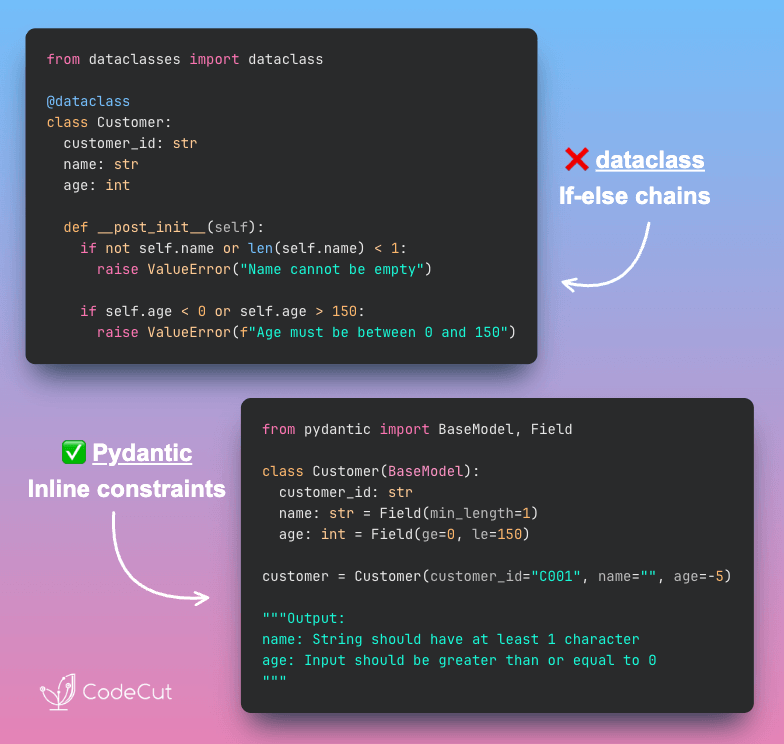
dataclass vs Pydantic Field(): Declarative Constraints
Problem
dataclass requires manual validation in __post_init__, separating validation rules from field definitions.
As your data model grows, the __post_init__ method fills with if-else statements, becoming harder to read and maintain.
Solution
Pydantic Field() puts constraints directly on field definitions, making your model self-documenting and easier to maintain.
What you can specify with Field():
- Numeric bounds (e.g., age must be >= 0 and <= 150)
- String length (e.g., name must have at least 1 character)
- Regex patterns (e.g., email format validation)
- Default values for optional fields
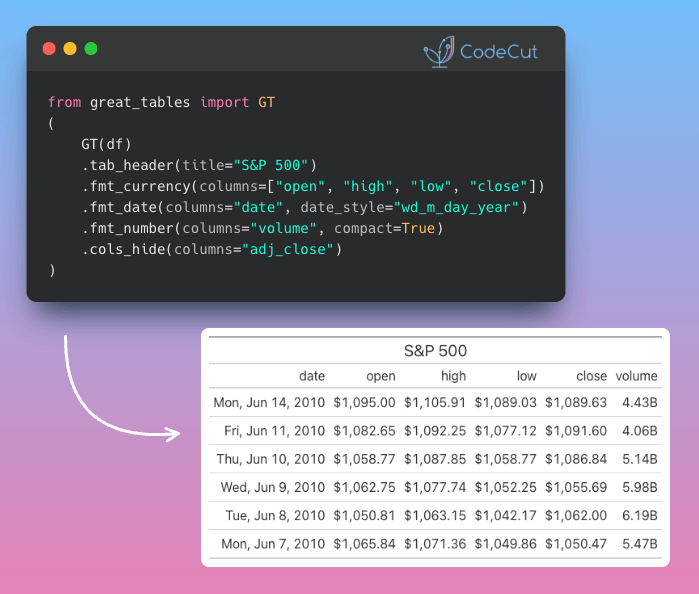
Great Tables: Transform DataFrames into Publication-Ready Reports
Problem
Standard DataFrame output can feel clunky and unfinished. Without clean headers, readable dates, or currency formatting, even great data can look unprofessional.
Solution
Great Tables elevates your DataFrames into polished tables built for reports, dashboards, and presentations, all through one chainable interface.
Key features:
- Number formatting: currency, dates, compact notation
- Visual enhancements: mini charts, color gradients, embedded images
- Table structure: headers, subtitles, column control
- Multi-format export: PNG, PDF, HTML
☕️ Weekly Finds
doxx [Python Utils] – Expose the contents of .docx files without leaving your terminal. Fast, safe, and smart – no Office required!
rendercv [Python Utils] – Version-control CVs/resumes as source code. A Typst-based Python package with CLI that allows you to manage your CV as code.
tstables [Data Processing] – A Python package to store time series data in HDF5 files using PyTables. Stores data into daily partitions for efficient access.
Looking for a specific tool? Explore 70+ Python tools →
Stay Current with CodeCut
Actionable Python tips, curated for busy data pros. Skim in under 2 minutes, three times a week.