📅 Today’s Picks
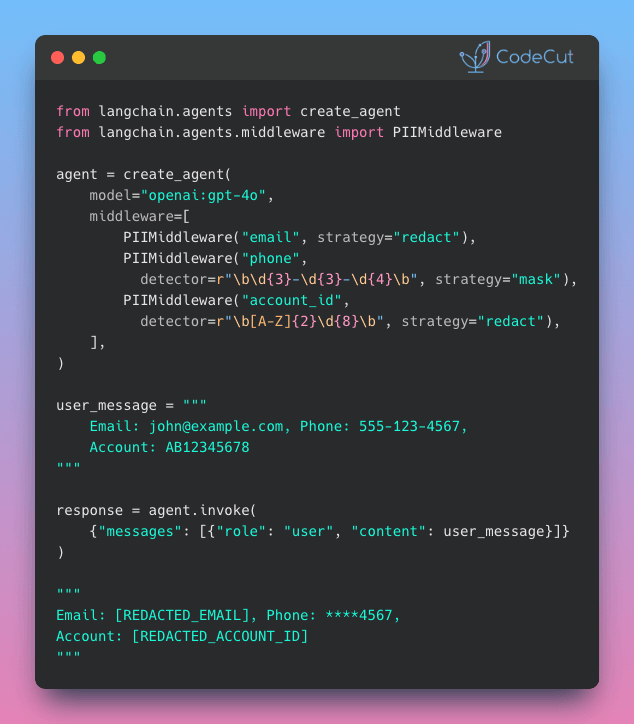
LangChain v1.0: Auto-Protect Sensitive Data with PIIMiddleware
Problem
User messages often contain sensitive information like emails and phone numbers.
Logging or storing this data without protection creates compliance and security risks.
Solution
LangChain v1.0 introduces PIIMiddleware to automatically protect sensitive data before model processing.
PIIMiddleware supports multiple protection modes:
- 5 built-in detectors (email, credit card, IP, MAC, URL)
- Custom regex for any PII pattern
- Replace with [REDACTED], mask as ****1234, or block entirely
Test File Operations Without Risk Using tmp_path
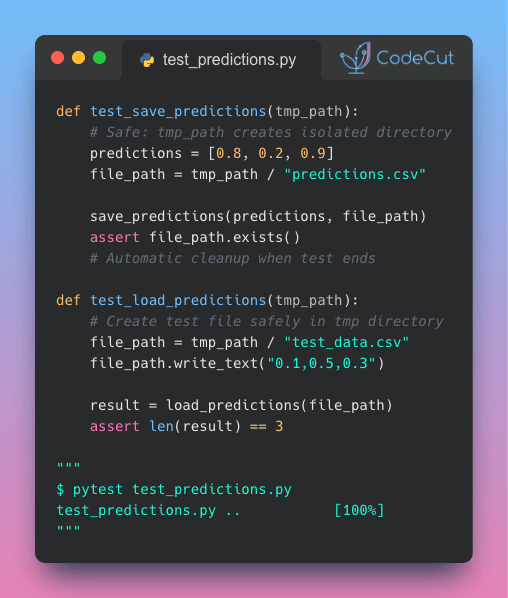
Problem
Testing file operations requires touching the actual file system, which can be dangerous if not handled carefully. Real data can be overwritten by mistake.
Tests can also leave behind unwanted files across your project.
Solution
The tmp_path fixture provides a safe alternative by creating temporary, isolated directories that clean up themselves after each test.
Here’s how to use tmp_path:
- Add tmp_path to your test function signature
- Work with it like any pathlib.Path object
- pytest handles the rest: isolated directories per test, automatic cleanup
☕️ Weekly Finds
quarkdown [Python Utils] – Modern Markdown-based typesetting system that compiles projects into print-ready books or interactive presentations with live preview and fast compilation
slim [MLOps] – Container optimization tool that makes Docker images 10-30x smaller without changing your development workflow
shapiq [ML] – Python package for approximating Shapley interactions and explaining feature interactions in machine learning model predictions
Looking for a specific tool? Explore 70+ Python tools →
📚 Latest Deep Dives
Great Tables: Publication-Ready Tables from Polars and Pandas DataFrames – Turn Polars and Pandas DataFrames into professional tables with automatic number formatting, visual heatmaps, and sparkline charts. Fully reproducible when data updates.
Stay Current with CodeCut
Actionable Python tips, curated for busy data pros. Skim in under 2 minutes, three times a week.