Grab your coffee. Here are this week’s highlights.
📅 Today’s Picks
Python contextlib – Reuse Context Managers as Function Decorators
Problem
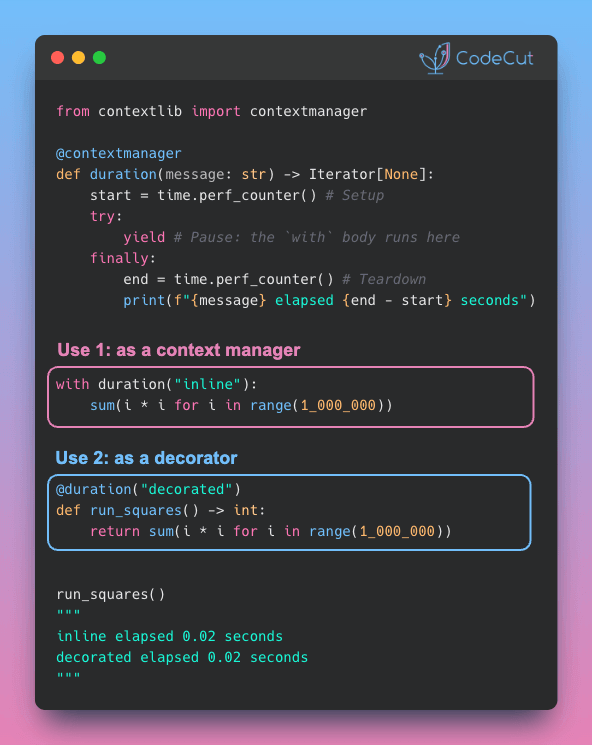
Many developers know @contextmanager as a convenient way to add setup and teardown logic around a with block.
But fewer realize it can also be used as a function decorator.
A common pattern for timing or logging functions is to write a separate decorator using functools.wraps. But this means maintaining two versions of the same logic, which can drift over time.
Solution
Since Python 3.3, any function decorated with @contextmanager can be used both ways:
- Need to time a code block?
with duration("..."): - Need to time a whole function?
@duration("...")
Claude Code – Move Session Context Across Folders with /export
Problem
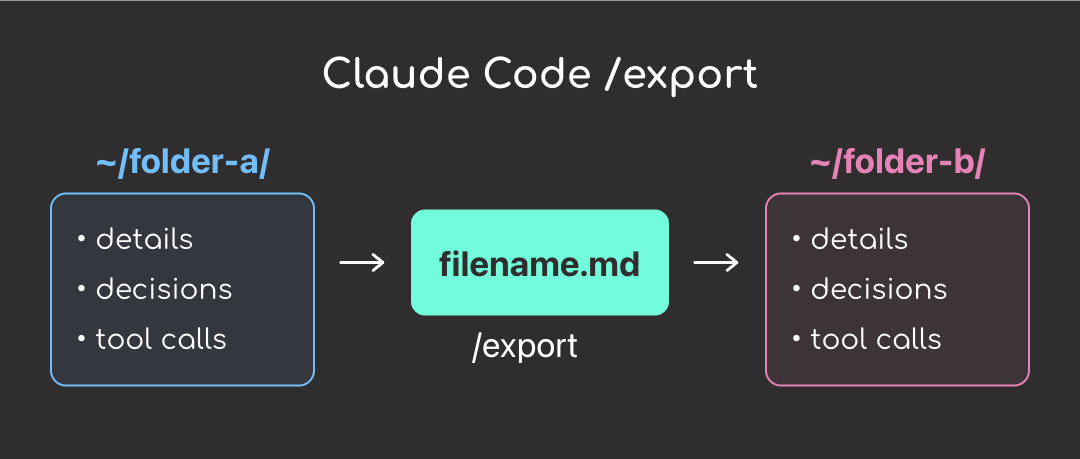
Each Claude session lives in the folder where it was started. When you open Claude somewhere else, the previous context does not carry over.
You could ask Claude to summarize the old session and paste it into the new one, but summaries can miss important details, decisions, or tool outputs.
Solution
Claude Code‘s /export command gives you the full conversation as a plain text file, including tool calls.
How to use it:
- Run
/export filename.mdin the original folder before switching - Open a new Claude session in the other folder
- Ask Claude to read filename.md and continue the task
Stay Current with CodeCut
Actionable Python tips, curated for busy data pros. Skim in under 2 minutes, three times a week.