Newsletter #249: prek: Faster, Leaner Pre-Commit Hooks (Rust-Powered)
📅 Today’s Picks
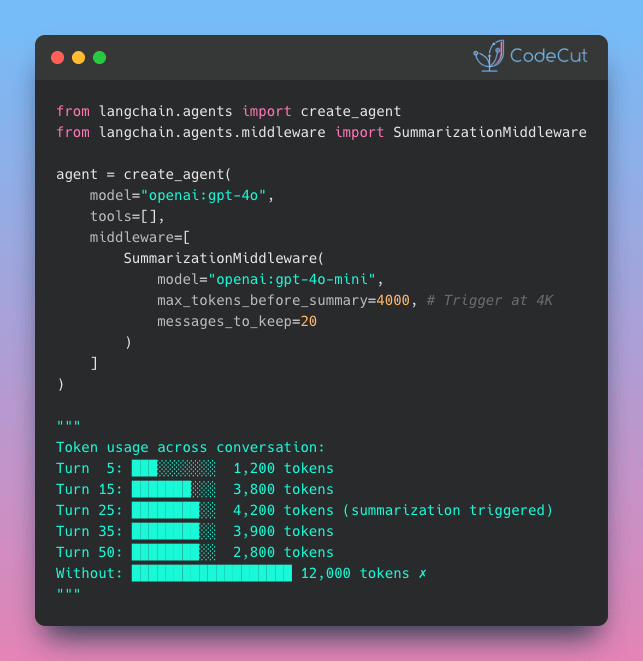
LangChain v1.0: Automate Tool Selection for Faster Agents
Problem
Agents with many tools waste tokens by sending all tool descriptions with every request.
This wastes tokens on irrelevant tool descriptions, making responses slower and more expensive.
Solution
LangChain v1.0 introduces LLMToolSelectorMiddleware that pre-filters relevant tools using a smaller model.
Key features:
Pre-filter tools using cheaper models like GPT-4o-mini
Limit tools sent to main agent (e.g., 3 most relevant)
Preserve critical tools with always_include parameter
prek: Faster, Leaner Pre-Commit Hooks (Rust-Powered)
Problem
pre-commit is a framework for managing Git hooks that automatically run code quality checks before commits.
However, installing these hook environments (linters, formatters, etc.) can be slow and disk-intensive, especially in CI/CD pipelines where speed matters.
Solution
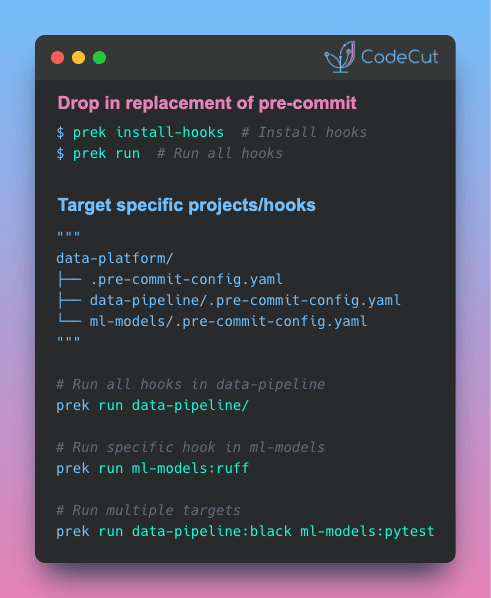
prek is a drop-in replacement for pre-commit that installs hook environments significantly faster while using 50% less disk space.
Built with Rust for maximum performance, prek reduces cache storage from 1.6GB to 810MB (benchmarked on Apache Airflow repository) without changing your workflow.
Key benefits:
Uses your existing .pre-commit-config.yaml files
Commands mirror pre-commit syntax (prek install-hooks, prek run)
Monorepo support with selector syntax for targeting specific projects or hooks
Install as a single binary with no dependencies
No configuration changes needed – just replace the command.
☕️ Weekly Finds
deepagents
[LLM]
– Build advanced AI agents with context isolation through sub-agent delegation. Features virtual file system for context offloading, specialized sub-agents with focused tool sets, and sophisticated agent architecture for real-world research and analysis tasks.
mcp-gateway
[MLOps]
– Docker MCP CLI plugin / MCP Gateway for production-grade AI agent stack. Enables multi-agent orchestration, intelligent interceptors, and enterprise security with Docker integration.
nbQA
[Python Utils]
– Run ruff, isort, pyupgrade, mypy, pylint, flake8, and more on Jupyter Notebooks. Command-line tool to run linters and formatters over Python code in Jupyter notebooks.
Looking for a specific tool? Explore 70+ Python tools →
Stay Current with CodeCut
Actionable Python tips, curated for busy data pros. Skim in under 2 minutes, three times a week.
.codecut-subscribe-form .codecut-input {
background: #2F2D2E !important;
border: 1px solid #72BEFA !important;
color: #FFFFFF !important;
}
.codecut-subscribe-form .codecut-input::placeholder {
color: #999999 !important;
}
.codecut-subscribe-form .codecut-subscribe-btn {
background: #72BEFA !important;
color: #2F2D2E !important;
}
.codecut-subscribe-form .codecut-subscribe-btn:hover {
background: #5aa8e8 !important;
}
.codecut-subscribe-form {
max-width: 650px;
display: flex;
flex-direction: column;
gap: 8px;
}
.codecut-input {
-webkit-appearance: none;
-moz-appearance: none;
appearance: none;
background: #FFFFFF;
border-radius: 8px !important;
padding: 8px 12px;
font-family: ‘Comfortaa’, sans-serif !important;
font-size: 14px !important;
color: #333333;
border: none !important;
outline: none;
width: 100%;
box-sizing: border-box;
}
input[type=”email”].codecut-input {
border-radius: 8px !important;
}
.codecut-input::placeholder {
color: #666666;
}
.codecut-email-row {
display: flex;
align-items: stretch;
height: 36px;
gap: 8px;
}
.codecut-email-row .codecut-input {
flex: 1;
}
.codecut-subscribe-btn {
background: #72BEFA;
color: #2F2D2E;
border: none;
border-radius: 8px;
padding: 8px 14px;
font-family: ‘Comfortaa’, sans-serif;
font-size: 14px;
font-weight: 500;
cursor: pointer;
text-decoration: none;
display: flex;
align-items: center;
justify-content: center;
transition: background 0.3s ease;
}
.codecut-subscribe-btn:hover {
background: #5aa8e8;
}
.codecut-subscribe-btn:disabled {
background: #999;
cursor: not-allowed;
}
.codecut-message {
font-family: ‘Comfortaa’, sans-serif;
font-size: 12px;
padding: 8px;
border-radius: 6px;
display: none;
}
.codecut-message.success {
background: #d4edda;
color: #155724;
display: block;
}
@media (max-width: 480px) {
.codecut-email-row {
flex-direction: column;
height: auto;
gap: 8px;
}
.codecut-input {
border-radius: 8px;
height: 36px;
}
.codecut-subscribe-btn {
width: 100%;
text-align: center;
border-radius: 8px;
height: 36px;
}
}
Subscribe
Newsletter #249: prek: Faster, Leaner Pre-Commit Hooks (Rust-Powered) Read More »