Generic selectors
Exact matches only
Search in title
Search in content
Post Type Selectors
Filter by Categories
About Article
Analyze Data
Archive
Best Practices
Better Outputs
Blog
Code Optimization
Code Quality
Command Line
Course
Daily tips
Dashboard
Data Analysis & Manipulation
Data Engineer
Data Visualization
DataFrame
Delta Lake
DevOps
DuckDB
Environment Management
Feature Engineer
Git
Jupyter Notebook
LLM
LLM Tools
Machine Learning
Machine Learning & AI
Machine Learning Tools
Manage Data
MLOps
Natural Language Processing
Newsletter Archive
NumPy
Pandas
Polars
PySpark
Python Helpers
Python Tips
Python Utilities
Scrape Data
SQL
Testing
Time Series
Tools
Visualization
Visualization & Reporting
Workflow & Automation
Workflow Automation

Machine Learning

Covalent: Pythonic Tool to Iterate Quickly on Large ML Models

It is challenging to iterate quickly on large ML models in a local environment.

Advanced computing hardware can help, but it may be expensive if only needed for a subset of the code.

With Covalent, you can:

Assign resource-intensive functions to advanced hardware.

Test these functions on local servers before deploying them to expensive hardware.

Covalent: Pythonic Tool to Iterate Quickly on Large ML Models Read More »
MLEM: Capture Your Machine Learning Model’s Metadata

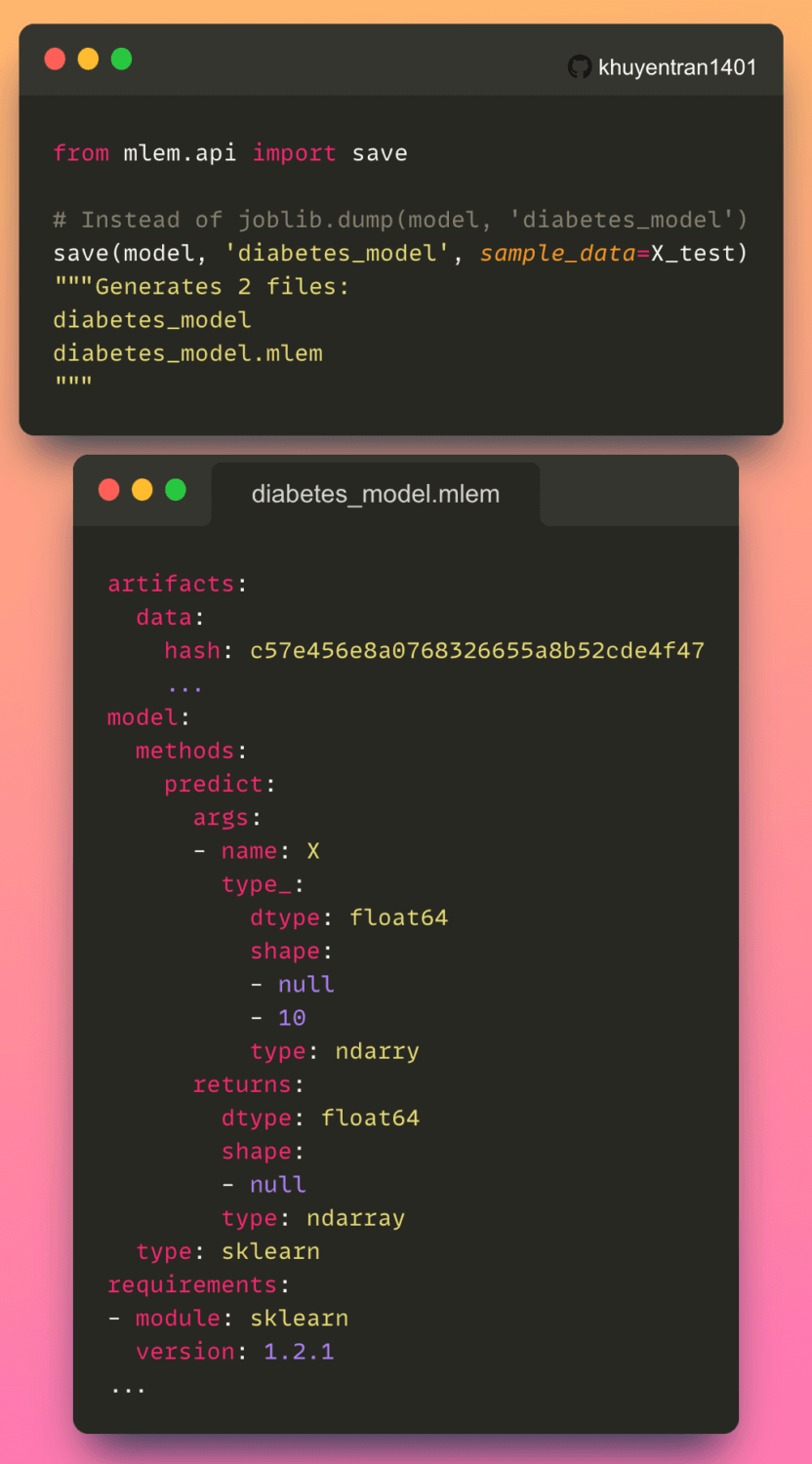
The metadata of a machine learning model provides important information about the model such as:

Hash value

Model methods

Input data schema

Python requirements used to train the model.

This information enables others to reproduce the model and its results.

With MLEM, you can save both the model and its metadata in a single line of code.

Link to MLEM.

Deploy your model with MLEM.

MLEM: Capture Your Machine Learning Model’s Metadata Read More »

Evaluate Your ML Model Performance with Simple Model Comparison

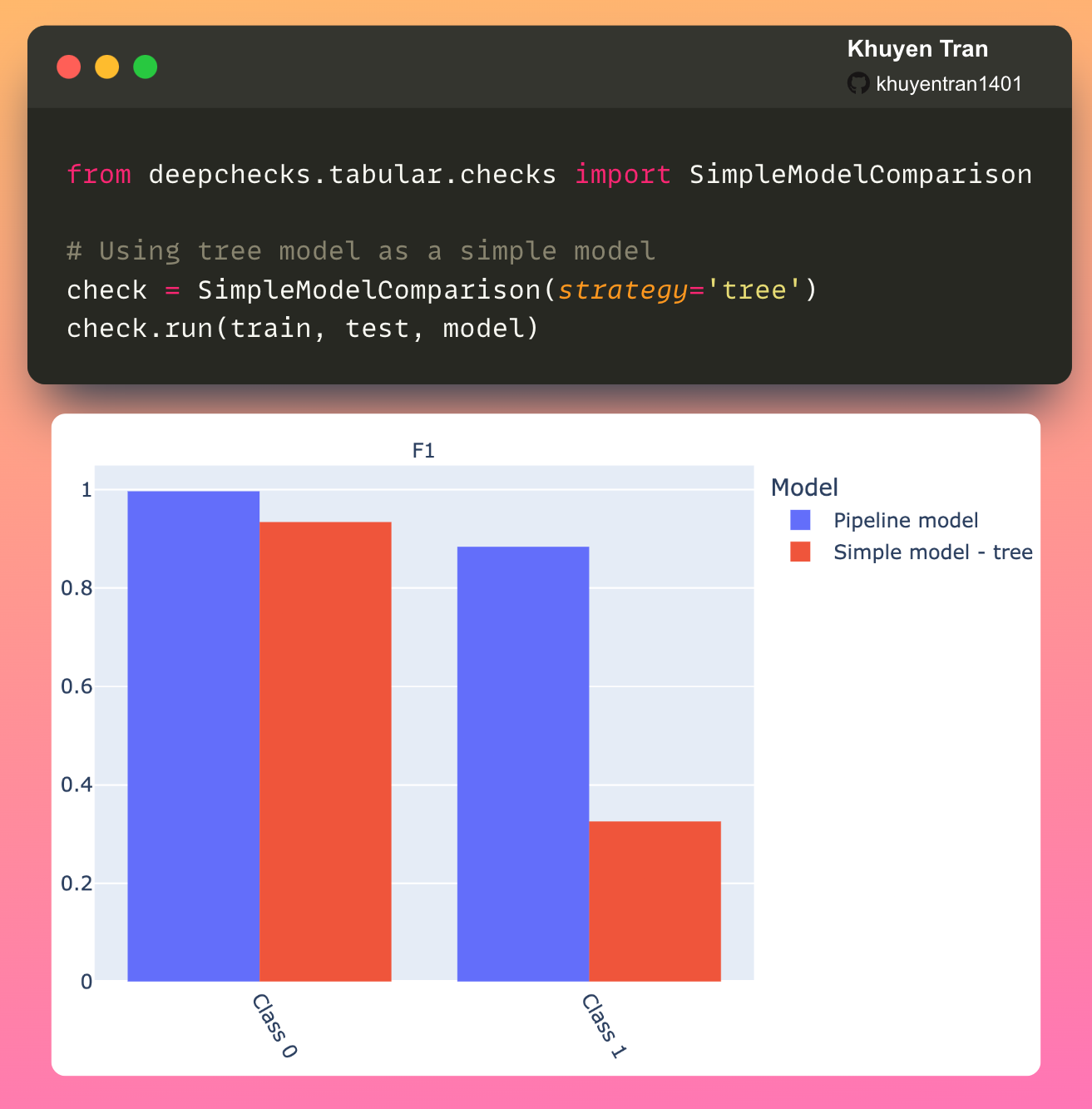
How do you check if your ML model is trained properly? One approach is to use a simple model for comparison.

A simple model establishes a minimum performance benchmark for the given task. A model achieving less or a similar score to the simple model indicates a possible problem with the model.

The code above shows how to evaluate a model’s performance using Deepchecks’ simple model comparison.

Link to Deepchecks.

My previous tips on testing.

Evaluate Your ML Model Performance with Simple Model Comparison Read More »

Validation Curve: Determine if an Estimator Is Underfitting Over Overfitting

To find the hyperparameter where the estimator is neither underfitting nor overfitting, use Yellowbrick’s validation curve.

As we can see from the plot above, although max_depth > 2 has a higher training score but a lower cross-validation score. This indicates that the model is overfitting.

Thus, the sweet spot will be where the cross-validation score neither increases nor decreases, which is 2.

Link to Yellowbrick.

My full article about Yellowbrick.

Validation Curve: Determine if an Estimator Is Underfitting Over Overfitting Read More »

River: Online Machine Learning in Python

Batch learning is the training of ML models in batch. As the data grows, training the model takes more time and resources.

In online learning, the model learns incrementally on a small group of observations instead of an entire dataset. 

Thus, each learning step is fast and cheap, which makes it ideal:

For applications that change rapidly

For companies with limited computing resources.

In my latest article, you will learn how to use River to do machine learning on streaming data.

Article.

Code.

River: Online Machine Learning in Python Read More »

Check Conflicting Labels with Deepchecks

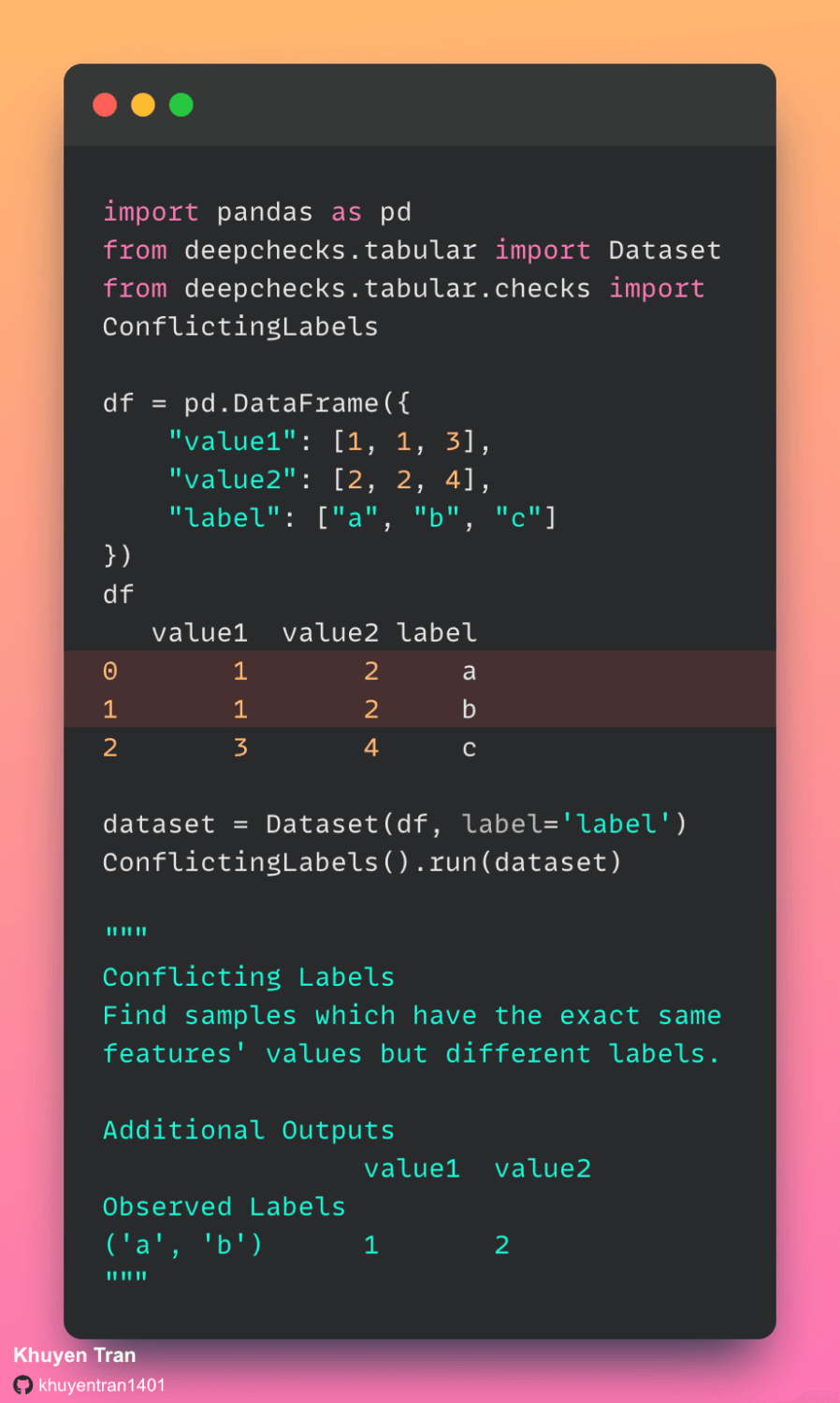
Sometimes, your data might have identical samples with different labels. This might be because the data was mislabeled.

It is good to identify these conflicting labels in your data before using the data to train your ML model. To check conflicting labels in your data, use deepchecks. 

In the example above, deepchecks identified that samples 0 and 1 have the same features but different labels. 

Link to deepchecks.

My previous tips on testing.

Check Conflicting Labels with Deepchecks Read More »

Deepchecks + Weights & Biases: Test and Track Your ML Model and Data

Weight and Biases is a tool to track and monitor your ML experiments. deepchecks is a tool that allows you to create test suites for your ML models & data with ease.

The checks in a suite includes:

🔎 model performance

🔎 data integrity

🔎 distribution mismatches

and more.

Now you can track deepchecks suite’s results with Weights & Biases as shown above.

Here is how to create and track a test suite.

Deepchecks + Weights & Biases: Test and Track Your ML Model and Data Read More »

Scroll to Top

Work with Khuyen Tran

Work with Khuyen Tran