Generic selectors
Exact matches only
Search in title
Search in content
Post Type Selectors
Filter by Categories
About Article
AI Tools
Analyze Data
Archive
Best Practices
Better Outputs
Blog
Code Optimization
Code Quality
Command Line
Course
Daily tips
Dashboard
Data Analysis & Manipulation
Data Engineer
Data Visualization
DataFrame
Delta Lake
DevOps
DuckDB
Environment Management
Feature Engineer
Git
Jupyter Notebook
LLM
LLM Tools
Machine Learning
Machine Learning & AI
Machine Learning Tools
Manage Data
MLOps
Natural Language Processing
Newsletter Archive
NumPy
Pandas
Polars
PySpark
Python Helpers
Python Tips
Python Utilities
Scrape Data
SQL
Testing
Time Series
Tools
Visualization
Visualization & Reporting
Workflow & Automation
Workflow Automation

Testing

Pytest: Shows only Failed Tests

What is pytest?
pytest is a popular Python testing framework designed to make writing and running tests simple, scalable, and expressive. It allows developers to create small, readable test functions using plain Python syntax, without requiring boilerplate code or complex setup. Pytest automatically discovers tests, provides detailed failure output, and supports powerful features like fixtures (for reusable test setup), parameterization (to test multiple inputs easily), and plugins for extended functionality. It is widely used in both small projects and large production systems because it helps ensure code reliability while keeping tests clean and easy to maintain.
When testing your function using Pytest, you might want to print only failed tests instead of both failed and successful tests. If so, add –lf to pytest. “lf” stands for “list fails”.
If you are not aware of Pytest, it is the framework that makes it easy to write small tests in Python. You can find more about Pytest from my article Pytest for Data Scientists: A Comprehensive Guide to Pytest for your Data Science Projects.
Conclusion
Filtering pytest output to show only failed tests keeps your feedback loop tight, especially as your test suite grows. Instead of scrolling through hundreds of passing tests, you can focus immediately on what needs fixing.
Read Next
Want a full CI/CD testing workflow? Read our deep dive: Build Reliable Machine Learning Pipelines with Continuous Integration. Automate your tests from local to production.
Pytest: Shows only Failed Tests Read More »

Pytest Fixtures: Use the same data for different tests

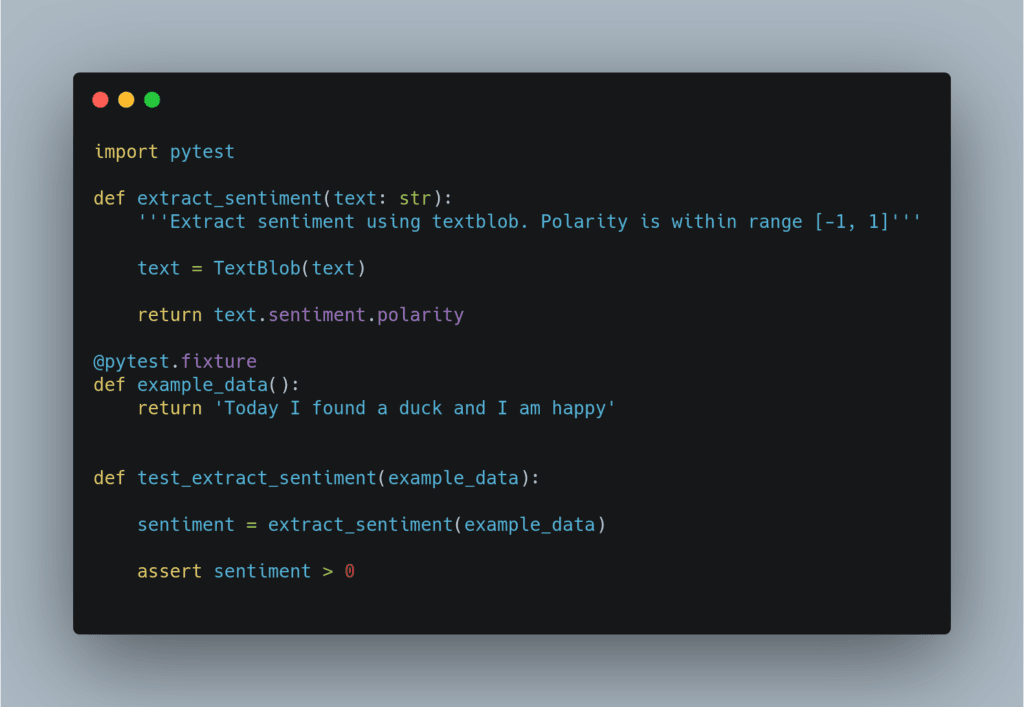
Sometimes, you might want to use the same data to test different functions. If you are using pytest, use pytest fixtures to provide data to different test functions instead.
In the code above, I used the decorator @pytest.fixture to create the data I want to use many times.
Have this data as the input for any test function that uses this data!

Pytest Fixtures: Use the same data for different tests Read More »

Pytest repeat

It is a good practice to test your functions to make sure they work as expected, but sometimes you need to test 100 times until you found the rare cases when the test fails. That is when pytest-repeat comes in handy.
Yesterday, I tested with 100 instances and found 2 failed tests! I’m glad that I didn’t settle down for 10 passed tests. You can find the doc for pytest-repeat here

Pytest repeat Read More »

Introduction to Schema: A Python Libary to Validate your Data

Your code might work with data at a certain state but might not work if your data changes. How do you detect the change in data before running into errors or encounter the drop in your model performance? That is when Schema comes in handy.
Below is the code snippet I used to validate the datatypes and the range of the values in a column. If this is what you are looking for, check out my article on how to use Schema here.

Introduction to Schema: A Python Libary to Validate your Data Read More »

Scroll to Top

Work with Khuyen Tran

Work with Khuyen Tran