Generic selectors
Exact matches only
Search in title
Search in content
Post Type Selectors
Filter by Categories
About Article
Analyze Data
Archive
Best Practices
Better Outputs
Blog
Code Optimization
Code Quality
Command Line
Course
Daily tips
Dashboard
Data Analysis & Manipulation
Data Engineer
Data Visualization
DataFrame
Delta Lake
DevOps
DuckDB
Environment Management
Feature Engineer
Git
Jupyter Notebook
LLM
LLM Tools
Machine Learning
Machine Learning & AI
Machine Learning Tools
Manage Data
MLOps
Natural Language Processing
Newsletter Archive
NumPy
Pandas
Polars
PySpark
Python Helpers
Python Tips
Python Utilities
Scrape Data
SQL
Testing
Time Series
Tools
Visualization
Visualization & Reporting
Workflow & Automation
Workflow Automation

Newsletter Archive

Automated newsletter archive from Klaviyo campaigns

Newsletter #244: Handle Large Data with Polars Streaming Mode

📅 Today’s Picks

Handle Large Data with Polars Streaming Mode

Problem
In Polars, the .collect() method executes a lazy query and loads the entire dataset into memory. This works well for smaller data, but once the dataset grows beyond your available RAM, it can easily crash your process.
Solution
Add engine=”streaming” to .collect() to process large datasets in small batches without running out of memory.
How it works:

Breaks the dataset into smaller, memory-friendly chunks
Processes one batch at a time while freeing memory as it goes
Combines all partial results into a single DataFrame

📖 View Full Article

🧪 Run code

⭐ View GitHub

Build Professional Python Packages with UV –package

Problem
Python packages turn your code into reusable modules you can share across projects.
But building them requires complex setup with setuptools, managing build systems, and understanding distribution mechanics.
Solution
UV, a fast Python package installer and resolver, reduces the entire process to 2 simple commands:

uv init –package sets up your package structure instantly
uv build and uv publish to create and distribute to PyPI

📖 Learn more

⭐ View GitHub

☕️ Weekly Finds

whenever
[Python Utils]
– Modern datetime library for Python that ensures correct and type-checked datetime manipulations. It is DST-safe and way faster than standard datetime libraries.

lancedb
[MLOps]
– Developer-friendly, embedded retrieval database for AI/ML applications. The ultimate multimodal data platform designed for fast, scalable, and production-ready vector search.

grip
[Python Utils]
– Preview GitHub README.md files locally before committing them. A command-line server that uses GitHub’s Markdown API to render local readme files.

Looking for a specific tool? Explore 70+ Python tools →

Stay Current with CodeCut

Actionable Python tips, curated for busy data pros. Skim in under 2 minutes, three times a week.

.codecut-subscribe-form .codecut-input {
background: #2F2D2E !important;
border: 1px solid #72BEFA !important;
color: #FFFFFF !important;
}
.codecut-subscribe-form .codecut-input::placeholder {
color: #999999 !important;
}
.codecut-subscribe-form .codecut-subscribe-btn {
background: #72BEFA !important;
color: #2F2D2E !important;
}
.codecut-subscribe-form .codecut-subscribe-btn:hover {
background: #5aa8e8 !important;
}

.codecut-subscribe-form {
max-width: 650px;
display: flex;
flex-direction: column;
gap: 8px;
}
.codecut-input {
-webkit-appearance: none;
-moz-appearance: none;
appearance: none;
background: #FFFFFF;
border-radius: 8px !important;
padding: 8px 12px;
font-family: ‘Comfortaa’, sans-serif !important;
font-size: 14px !important;
color: #333333;
border: none !important;
outline: none;
width: 100%;
box-sizing: border-box;
}
input[type=”email”].codecut-input {
border-radius: 8px !important;
}
.codecut-input::placeholder {
color: #666666;
}
.codecut-email-row {
display: flex;
align-items: stretch;
height: 36px;
gap: 8px;
}
.codecut-email-row .codecut-input {
flex: 1;
}
.codecut-subscribe-btn {
background: #72BEFA;
color: #2F2D2E;
border: none;
border-radius: 8px;
padding: 8px 14px;
font-family: ‘Comfortaa’, sans-serif;
font-size: 14px;
font-weight: 500;
cursor: pointer;
text-decoration: none;
display: flex;
align-items: center;
justify-content: center;
transition: background 0.3s ease;
}
.codecut-subscribe-btn:hover {
background: #5aa8e8;
}
.codecut-subscribe-btn:disabled {
background: #999;
cursor: not-allowed;
}
.codecut-message {
font-family: ‘Comfortaa’, sans-serif;
font-size: 12px;
padding: 8px;
border-radius: 6px;
display: none;
}
.codecut-message.success {
background: #d4edda;
color: #155724;
display: block;
}
@media (max-width: 480px) {
.codecut-email-row {
flex-direction: column;
height: auto;
gap: 8px;
}
.codecut-input {
border-radius: 8px;
height: 36px;
}
.codecut-subscribe-btn {
width: 100%;
text-align: center;
border-radius: 8px;
height: 36px;
}
}

Subscribe

Newsletter #244: Handle Large Data with Polars Streaming Mode Read More »

Newsletter #243: Turn Your ML Tests Into Plain English with Behave

📅 Today’s Picks

Turn Your ML Tests Into Plain English with Behave

Problem
Unit testing matters in data science, but writing tests that business stakeholders can actually understand is a challenge.
If they can’t read the tests, they can’t confirm the logic matches business expectations.
Solution
Behave turns test cases into plain-English specifications using the Given/When/Then format.
How to use Behave for readable tests:

Write .feature files with Given/When/Then syntax
Implement steps in Python using @given, @when, @then decorators
Run “behave” to execute tests

This lets technical and business teams stay aligned without confusion.

📖 View Full Article

🧪 Run code

⭐ View GitHub

Build Powerful Data Pipelines with DuckDB + pandas

Problem
Pandas is great for data cleaning and feature engineering, while SQL excels at complex aggregations.
But moving data from pandas to a database and back can be tedious.
Solution
DuckDB solves this by letting you run SQL directly on pandas DataFrames and return the results back into pandas for further analysis.

📖 View Full Article

🧪 Run code

⭐ View GitHub

☕️ Weekly Finds

feast
[MLOps]
– Open source feature store for machine learning that manages existing infrastructure to productionize ML models with fast data consistency and leakage prevention

git-who
[Python Utils]
– CLI tool for industrial-scale git blaming that shows who is responsible for entire components or subsystems in your codebase, not just individual lines

organize
[Python Utils]
– File management automation tool for safe moving, renaming, copying files with conflict resolution, duplicate detection, and Exif tag extraction

Looking for a specific tool? Explore 70+ Python tools →

Stay Current with CodeCut

Actionable Python tips, curated for busy data pros. Skim in under 2 minutes, three times a week.

.codecut-subscribe-form .codecut-input {
background: #2F2D2E !important;
border: 1px solid #72BEFA !important;
color: #FFFFFF !important;
}
.codecut-subscribe-form .codecut-input::placeholder {
color: #999999 !important;
}
.codecut-subscribe-form .codecut-subscribe-btn {
background: #72BEFA !important;
color: #2F2D2E !important;
}
.codecut-subscribe-form .codecut-subscribe-btn:hover {
background: #5aa8e8 !important;
}

.codecut-subscribe-form {
max-width: 650px;
display: flex;
flex-direction: column;
gap: 8px;
}
.codecut-input {
-webkit-appearance: none;
-moz-appearance: none;
appearance: none;
background: #FFFFFF;
border-radius: 8px !important;
padding: 8px 12px;
font-family: ‘Comfortaa’, sans-serif !important;
font-size: 14px !important;
color: #333333;
border: none !important;
outline: none;
width: 100%;
box-sizing: border-box;
}
input[type=”email”].codecut-input {
border-radius: 8px !important;
}
.codecut-input::placeholder {
color: #666666;
}
.codecut-email-row {
display: flex;
align-items: stretch;
height: 36px;
gap: 8px;
}
.codecut-email-row .codecut-input {
flex: 1;
}
.codecut-subscribe-btn {
background: #72BEFA;
color: #2F2D2E;
border: none;
border-radius: 8px;
padding: 8px 14px;
font-family: ‘Comfortaa’, sans-serif;
font-size: 14px;
font-weight: 500;
cursor: pointer;
text-decoration: none;
display: flex;
align-items: center;
justify-content: center;
transition: background 0.3s ease;
}
.codecut-subscribe-btn:hover {
background: #5aa8e8;
}
.codecut-subscribe-btn:disabled {
background: #999;
cursor: not-allowed;
}
.codecut-message {
font-family: ‘Comfortaa’, sans-serif;
font-size: 12px;
padding: 8px;
border-radius: 6px;
display: none;
}
.codecut-message.success {
background: #d4edda;
color: #155724;
display: block;
}
@media (max-width: 480px) {
.codecut-email-row {
flex-direction: column;
height: auto;
gap: 8px;
}
.codecut-input {
border-radius: 8px;
height: 36px;
}
.codecut-subscribe-btn {
width: 100%;
text-align: center;
border-radius: 8px;
height: 36px;
}
}

Subscribe

Newsletter #243: Turn Your ML Tests Into Plain English with Behave Read More »

Newsletter #242: Build Faster Test Workflows with pytest Markers

📅 Today’s Picks

Build Faster Test Workflows with pytest Markers

Problem
Large projects often contain hundreds of tests, and executing them all for every minor change quickly becomes inefficient.
Solution
Pytest markers let you group tests by type, speed, or resource usage so you can run only what matters for your current task.
Quick guide to pytest markers:

Define markers in pytest.ini
Tag tests, for example: @pytest.mark.fast
Run specific tests: pytest -m fast
Skip certain tests: pytest -m “not slow”

📖 Learn more

🧪 Run code

📢 ANNOUNCEMENTS

Production-Ready Data Science Is Now on Leanpub
I am excited to share that Production-Ready Data Science is now live on Leanpub!
On Leanpub, you can choose your price and get updates as more examples and chapters roll out.
This book dives into the real engineering skills behind dependable data systems, including:

Testing
CI and CD
Environments and packaging
Data validation and logging
Reproducible workflows

If you want to take your data work beyond notebooks and into reliable production environments, this is for you.

Get the Book

☕️ Weekly Finds

AutoViz
[Data Viz]
– Automatically Visualize any dataset, any size with a single line of code

cognee
[LLM]
– Memory for AI Agents in 6 lines of code

niquests
[Python Utils]
– Simple, yet elegant, Python HTTP library: a drop-in replacement for python-requests

Looking for a specific tool? Explore 70+ Python tools →

Stay Current with CodeCut

Actionable Python tips, curated for busy data pros. Skim in under 2 minutes, three times a week.

.codecut-subscribe-form .codecut-input {
background: #2F2D2E !important;
border: 1px solid #72BEFA !important;
color: #FFFFFF !important;
}
.codecut-subscribe-form .codecut-input::placeholder {
color: #999999 !important;
}
.codecut-subscribe-form .codecut-subscribe-btn {
background: #72BEFA !important;
color: #2F2D2E !important;
}
.codecut-subscribe-form .codecut-subscribe-btn:hover {
background: #5aa8e8 !important;
}

.codecut-subscribe-form {
max-width: 650px;
display: flex;
flex-direction: column;
gap: 8px;
}
.codecut-input {
-webkit-appearance: none;
-moz-appearance: none;
appearance: none;
background: #FFFFFF;
border-radius: 8px !important;
padding: 8px 12px;
font-family: ‘Comfortaa’, sans-serif !important;
font-size: 14px !important;
color: #333333;
border: none !important;
outline: none;
width: 100%;
box-sizing: border-box;
}
input[type=”email”].codecut-input {
border-radius: 8px !important;
}
.codecut-input::placeholder {
color: #666666;
}
.codecut-email-row {
display: flex;
align-items: stretch;
height: 36px;
gap: 8px;
}
.codecut-email-row .codecut-input {
flex: 1;
}
.codecut-subscribe-btn {
background: #72BEFA;
color: #2F2D2E;
border: none;
border-radius: 8px;
padding: 8px 14px;
font-family: ‘Comfortaa’, sans-serif;
font-size: 14px;
font-weight: 500;
cursor: pointer;
text-decoration: none;
display: flex;
align-items: center;
justify-content: center;
transition: background 0.3s ease;
}
.codecut-subscribe-btn:hover {
background: #5aa8e8;
}
.codecut-subscribe-btn:disabled {
background: #999;
cursor: not-allowed;
}
.codecut-message {
font-family: ‘Comfortaa’, sans-serif;
font-size: 12px;
padding: 8px;
border-radius: 6px;
display: none;
}
.codecut-message.success {
background: #d4edda;
color: #155724;
display: block;
}
@media (max-width: 480px) {
.codecut-email-row {
flex-direction: column;
height: auto;
gap: 8px;
}
.codecut-input {
border-radius: 8px;
height: 36px;
}
.codecut-subscribe-btn {
width: 100%;
text-align: center;
border-radius: 8px;
height: 36px;
}
}

Subscribe

Newsletter #242: Build Faster Test Workflows with pytest Markers Read More »

Newsletter #241: Polars: Lazy CSV Loading with Query Optimization

📅 Today’s Picks

Polars: Lazy CSV Loading with Query Optimization

Problem
Pandas loads entire CSV files into memory immediately, even when you only need filtered or aggregated results.
This eager evaluation wastes memory and processing time on data you’ll never use.
Solution
Polars’ scan_csv() uses lazy evaluation to optimize queries before loading data.
How scan_csv() works:

Analyzes your entire query before loading any data
Identifies which columns you actually need
Applies filters while reading the CSV file
Loads only the relevant data into memory

📖 View Full Article

🧪 Run code

⭐ View GitHub

Build Structured AI Agents with LangChain TodoList

Problem
Complex workflows require structured planning. Without it, agents may execute subtasks out of order or miss crucial ones entirely.
Solution
LangChain v1.0 introduces TodoListMiddleware, which gives agents automatic task planning and progress tracking.
Key benefits:

Decomposes complex requests into sequential steps
Marks each task as pending, in_progress, or completed
Ensures agents follow logical execution order

📖 View Full Article

🧪 Run code

⭐ View GitHub

☕️ Weekly Finds

RAGxplorer
[LLM]
– Open-source tool to visualize your RAG embeddings and document chunks

nbQA
[Python Utils]
– Run ruff, isort, pyupgrade, mypy, pylint, flake8, and more on Jupyter Notebooks

prometheus-eval
[LLM]
– Evaluate your LLM’s response with specialized language models for reproducible assessment

Looking for a specific tool? Explore 70+ Python tools →

Stay Current with CodeCut

Actionable Python tips, curated for busy data pros. Skim in under 2 minutes, three times a week.

.codecut-subscribe-form .codecut-input {
background: #2F2D2E !important;
border: 1px solid #72BEFA !important;
color: #FFFFFF !important;
}
.codecut-subscribe-form .codecut-input::placeholder {
color: #999999 !important;
}
.codecut-subscribe-form .codecut-subscribe-btn {
background: #72BEFA !important;
color: #2F2D2E !important;
}
.codecut-subscribe-form .codecut-subscribe-btn:hover {
background: #5aa8e8 !important;
}

.codecut-subscribe-form {
max-width: 650px;
display: flex;
flex-direction: column;
gap: 8px;
}
.codecut-input {
-webkit-appearance: none;
-moz-appearance: none;
appearance: none;
background: #FFFFFF;
border-radius: 8px !important;
padding: 8px 12px;
font-family: ‘Comfortaa’, sans-serif !important;
font-size: 14px !important;
color: #333333;
border: none !important;
outline: none;
width: 100%;
box-sizing: border-box;
}
input[type=”email”].codecut-input {
border-radius: 8px !important;
}
.codecut-input::placeholder {
color: #666666;
}
.codecut-email-row {
display: flex;
align-items: stretch;
height: 36px;
gap: 8px;
}
.codecut-email-row .codecut-input {
flex: 1;
}
.codecut-subscribe-btn {
background: #72BEFA;
color: #2F2D2E;
border: none;
border-radius: 8px;
padding: 8px 14px;
font-family: ‘Comfortaa’, sans-serif;
font-size: 14px;
font-weight: 500;
cursor: pointer;
text-decoration: none;
display: flex;
align-items: center;
justify-content: center;
transition: background 0.3s ease;
}
.codecut-subscribe-btn:hover {
background: #5aa8e8;
}
.codecut-subscribe-btn:disabled {
background: #999;
cursor: not-allowed;
}
.codecut-message {
font-family: ‘Comfortaa’, sans-serif;
font-size: 12px;
padding: 8px;
border-radius: 6px;
display: none;
}
.codecut-message.success {
background: #d4edda;
color: #155724;
display: block;
}
@media (max-width: 480px) {
.codecut-email-row {
flex-direction: column;
height: auto;
gap: 8px;
}
.codecut-input {
border-radius: 8px;
height: 36px;
}
.codecut-subscribe-btn {
width: 100%;
text-align: center;
border-radius: 8px;
height: 36px;
}
}

Subscribe

Newsletter #241: Polars: Lazy CSV Loading with Query Optimization Read More »

Newsletter #240: Auto-Summarize Chat History with LangChain Middleware

📅 Today’s Picks

Auto-Summarize Chat History with LangChain Middleware

Problem
Long chat histories can quickly increase token usage, leading to higher API costs and slower responses.
Solution
LangChain v1.0 introduces SummarizationMiddleware that automatically condenses older messages when token thresholds are exceeded.
Key features:

Integrates into existing LangChain agents with minimal code changes
Automatic summarization when token limits are reached
Preserves recent context with configurable message retention
Uses efficient models for summarization (e.g., gpt-4o-mini)

📖 View Full Article

🧪 Run code

⭐ View GitHub

Batch Process DataFrames with PySpark Pandas UDF Vectorization

Problem
Traditional UDFs (User-Defined Functions) run your custom Python function on each row individually, which can significantly slow down DataFrame operations.
Solution
Pandas UDFs solve this by batching data into chunks and applying vectorized pandas transformations across entire columns, rather than looping through rows.
As a result, they can be 10 to 100 times faster on large DataFrames.

📖 View Full Article

🧪 Run code

⭐ View GitHub

☕️ Weekly Finds

lifelines
[ML]
– Survival analysis in Python with Kaplan Meier, Cox regression, and parametric models

nb-clean
[Python Utils]
– Clean Jupyter notebooks for version control by removing outputs, metadata, and execution counts

FuzzTypes
[Python Utils]
– Pydantic extension for autocorrecting field values using fuzzy string matching

Looking for a specific tool? Explore 70+ Python tools →

Stay Current with CodeCut

Actionable Python tips, curated for busy data pros. Skim in under 2 minutes, three times a week.

.codecut-subscribe-form .codecut-input {
background: #2F2D2E !important;
border: 1px solid #72BEFA !important;
color: #FFFFFF !important;
}
.codecut-subscribe-form .codecut-input::placeholder {
color: #999999 !important;
}
.codecut-subscribe-form .codecut-subscribe-btn {
background: #72BEFA !important;
color: #2F2D2E !important;
}
.codecut-subscribe-form .codecut-subscribe-btn:hover {
background: #5aa8e8 !important;
}

.codecut-subscribe-form {
max-width: 650px;
display: flex;
flex-direction: column;
gap: 8px;
}
.codecut-input {
-webkit-appearance: none;
-moz-appearance: none;
appearance: none;
background: #FFFFFF;
border-radius: 8px !important;
padding: 8px 12px;
font-family: ‘Comfortaa’, sans-serif !important;
font-size: 14px !important;
color: #333333;
border: none !important;
outline: none;
width: 100%;
box-sizing: border-box;
}
input[type=”email”].codecut-input {
border-radius: 8px !important;
}
.codecut-input::placeholder {
color: #666666;
}
.codecut-email-row {
display: flex;
align-items: stretch;
height: 36px;
gap: 8px;
}
.codecut-email-row .codecut-input {
flex: 1;
}
.codecut-subscribe-btn {
background: #72BEFA;
color: #2F2D2E;
border: none;
border-radius: 8px;
padding: 8px 14px;
font-family: ‘Comfortaa’, sans-serif;
font-size: 14px;
font-weight: 500;
cursor: pointer;
text-decoration: none;
display: flex;
align-items: center;
justify-content: center;
transition: background 0.3s ease;
}
.codecut-subscribe-btn:hover {
background: #5aa8e8;
}
.codecut-subscribe-btn:disabled {
background: #999;
cursor: not-allowed;
}
.codecut-message {
font-family: ‘Comfortaa’, sans-serif;
font-size: 12px;
padding: 8px;
border-radius: 6px;
display: none;
}
.codecut-message.success {
background: #d4edda;
color: #155724;
display: block;
}
@media (max-width: 480px) {
.codecut-email-row {
flex-direction: column;
height: auto;
gap: 8px;
}
.codecut-input {
border-radius: 8px;
height: 36px;
}
.codecut-subscribe-btn {
width: 100%;
text-align: center;
border-radius: 8px;
height: 36px;
}
}

Subscribe

Newsletter #240: Auto-Summarize Chat History with LangChain Middleware Read More »

Newsletter #239: Delta Lake: Insert + Update in One Operation

📅 Today’s Picks

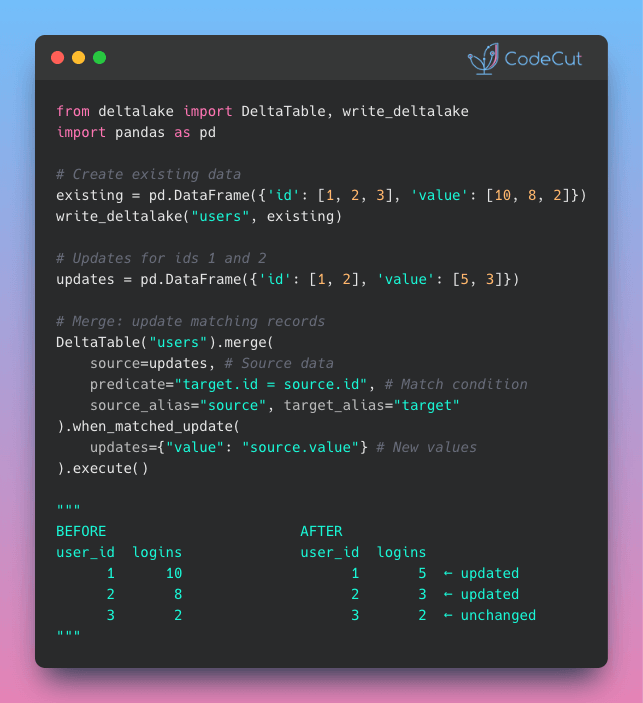
Delta Lake: Insert + Update in One Operation

Problem
In pandas, implementing upserts means running 3 separate operations: filter existing records, update matches, and append new ones.
Each step requires a full data scan, increasing both code complexity and execution time.
Solution
Delta Lake’s MERGE replaces this 3-step process with a single transaction that updates existing records and inserts new ones.
How it works:

Compares source data with existing table records
Updates matching records with new values
Inserts records that don’t exist yet
Executes all changes together with automatic rollback if any step fails

📖 View Full Article

🧪 Run code

⭐ View GitHub

☕️ Weekly Finds

Boruta-Shap
[ML]
– A tree-based feature selection tool combining the Boruta algorithm with SHAP values to identify the most important features for machine learning models.

a2a-python
[LLM]
– Official Python SDK for building agentic applications as A2A Servers following the Agent2Agent Protocol, with async support and optional integrations.

respx
[Python Utils]
– A Python library for mocking HTTPX and HTTP Core with request pattern matching and customizable response side effects for testing purposes.

Looking for a specific tool? Explore 70+ Python tools →

Stay Current with CodeCut

Actionable Python tips, curated for busy data pros. Skim in under 2 minutes, three times a week.

.codecut-subscribe-form .codecut-input {
background: #2F2D2E !important;
border: 1px solid #72BEFA !important;
color: #FFFFFF !important;
}
.codecut-subscribe-form .codecut-input::placeholder {
color: #999999 !important;
}
.codecut-subscribe-form .codecut-subscribe-btn {
background: #72BEFA !important;
color: #2F2D2E !important;
}
.codecut-subscribe-form .codecut-subscribe-btn:hover {
background: #5aa8e8 !important;
}

.codecut-subscribe-form {
max-width: 650px;
display: flex;
flex-direction: column;
gap: 8px;
}
.codecut-input {
-webkit-appearance: none;
-moz-appearance: none;
appearance: none;
background: #FFFFFF;
border-radius: 8px !important;
padding: 8px 12px;
font-family: ‘Comfortaa’, sans-serif !important;
font-size: 14px !important;
color: #333333;
border: none !important;
outline: none;
width: 100%;
box-sizing: border-box;
}
input[type=”email”].codecut-input {
border-radius: 8px !important;
}
.codecut-input::placeholder {
color: #666666;
}
.codecut-email-row {
display: flex;
align-items: stretch;
height: 36px;
gap: 8px;
}
.codecut-email-row .codecut-input {
flex: 1;
}
.codecut-subscribe-btn {
background: #72BEFA;
color: #2F2D2E;
border: none;
border-radius: 8px;
padding: 8px 14px;
font-family: ‘Comfortaa’, sans-serif;
font-size: 14px;
font-weight: 500;
cursor: pointer;
text-decoration: none;
display: flex;
align-items: center;
justify-content: center;
transition: background 0.3s ease;
}
.codecut-subscribe-btn:hover {
background: #5aa8e8;
}
.codecut-subscribe-btn:disabled {
background: #999;
cursor: not-allowed;
}
.codecut-message {
font-family: ‘Comfortaa’, sans-serif;
font-size: 12px;
padding: 8px;
border-radius: 6px;
display: none;
}
.codecut-message.success {
background: #d4edda;
color: #155724;
display: block;
}
@media (max-width: 480px) {
.codecut-email-row {
flex-direction: column;
height: auto;
gap: 8px;
}
.codecut-input {
border-radius: 8px;
height: 36px;
}
.codecut-subscribe-btn {
width: 100%;
text-align: center;
border-radius: 8px;
height: 36px;
}
}

Subscribe

Newsletter #239: Delta Lake: Insert + Update in One Operation Read More »

Newsletter #238: Build Human-in-the-Loop AI Agents with LangChain

📅 Today’s Picks

Generate Time-Sortable IDs with Python 3.14’s UUID v7

Problem
UUID4 generates purely random identifiers that lack chronological ordering.
Without embedded timestamps, you need separate timestamp fields and custom sorting logic to organize records by creation time.
Solution
Python 3.14 introduces UUID version 7 with built-in timestamp ordering.
Key features:

Determine creation order by comparing two UUIDs directly
Retrieve exact creation time by extracting the embedded timestamp

Build Human-in-the-Loop AI Agents with LangChain

Problem
Without human oversight, AI agents can make irreversible mistakes by executing risky operations like database deletions.
Solution
LangChain v1.0’s interrupt() function pauses agent execution at critical decision points for human review.
How it works:

interrupt() pauses tool execution for human review
MemorySaver checkpointer enables pause/resume functionality
Human reviews proposed action and approves or rejects
Command(resume=…) continues execution after approval

This gives you full control over critical AI decisions before they execute.

📖 View Full Article

🧪 Run code

⭐ View GitHub

☕️ Weekly Finds

formulas
[Data Processing]
– Excel formulas interpreter in Python that parses and compiles Excel formula expressions and workbooks

MindsDB
[ML]
– Open-source AI development platform that allows users to build, train and deploy machine learning models using SQL queries

TimescaleDB
[Data Engineer]
– PostgreSQL extension for high-performance real-time analytics on time-series and event data

Looking for a specific tool? Explore 70+ Python tools →

Stay Current with CodeCut

Actionable Python tips, curated for busy data pros. Skim in under 2 minutes, three times a week.

.codecut-subscribe-form .codecut-input {
background: #2F2D2E !important;
border: 1px solid #72BEFA !important;
color: #FFFFFF !important;
}
.codecut-subscribe-form .codecut-input::placeholder {
color: #999999 !important;
}
.codecut-subscribe-form .codecut-subscribe-btn {
background: #72BEFA !important;
color: #2F2D2E !important;
}
.codecut-subscribe-form .codecut-subscribe-btn:hover {
background: #5aa8e8 !important;
}

.codecut-subscribe-form {
max-width: 650px;
display: flex;
flex-direction: column;
gap: 8px;
}
.codecut-input {
-webkit-appearance: none;
-moz-appearance: none;
appearance: none;
background: #FFFFFF;
border-radius: 8px !important;
padding: 8px 12px;
font-family: ‘Comfortaa’, sans-serif !important;
font-size: 14px !important;
color: #333333;
border: none !important;
outline: none;
width: 100%;
box-sizing: border-box;
}
input[type=”email”].codecut-input {
border-radius: 8px !important;
}
.codecut-input::placeholder {
color: #666666;
}
.codecut-email-row {
display: flex;
align-items: stretch;
height: 36px;
gap: 8px;
}
.codecut-email-row .codecut-input {
flex: 1;
}
.codecut-subscribe-btn {
background: #72BEFA;
color: #2F2D2E;
border: none;
border-radius: 8px;
padding: 8px 14px;
font-family: ‘Comfortaa’, sans-serif;
font-size: 14px;
font-weight: 500;
cursor: pointer;
text-decoration: none;
display: flex;
align-items: center;
justify-content: center;
transition: background 0.3s ease;
}
.codecut-subscribe-btn:hover {
background: #5aa8e8;
}
.codecut-subscribe-btn:disabled {
background: #999;
cursor: not-allowed;
}
.codecut-message {
font-family: ‘Comfortaa’, sans-serif;
font-size: 12px;
padding: 8px;
border-radius: 6px;
display: none;
}
.codecut-message.success {
background: #d4edda;
color: #155724;
display: block;
}
@media (max-width: 480px) {
.codecut-email-row {
flex-direction: column;
height: auto;
gap: 8px;
}
.codecut-input {
border-radius: 8px;
height: 36px;
}
.codecut-subscribe-btn {
width: 100%;
text-align: center;
border-radius: 8px;
height: 36px;
}
}

Subscribe

Newsletter #238: Build Human-in-the-Loop AI Agents with LangChain Read More »

Newsletter #237: Build Clean Visualizations with Altair Grammar

📅 Today’s Picks

Faster Data Compression with Python 3.14 Zstandard

Problem
Compressing large datasets with gzip is slow and produces larger files.
Using external compression libraries adds dependency complexity to your data pipeline.
Solution
Python 3.14 includes built-in Zstandard compression that’s 2-3x faster than gzip with better compression ratios.
Key benefits:

Native Python module (no external dependencies)
Compression levels from 1-22 for speed vs. size tradeoffs
Stream-based API for memory-efficient processing
Perfect for data archival and transfer workflows

Ideal for data scientists working with large CSV files, model checkpoints, and dataset distributions.

🧪 Run code

Build Clean Visualizations with Altair Grammar

Problem
Matplotlib requires manual data transformation and explicit configuration for every visual element.
Solution
Altair uses declarative syntax based on Vega-Lite for intuitive, readable visualizations.
With Altair, you can describe what you want, not how to create it:

Automatic formatting with type encoding (:T, :Q, :N, :O)
Built-in aggregations: mean(), sum(), count()
No manual groupby or date conversion
Easy chart composition and layering
Interactive features with minimal code

📖 View Full Article

🧪 Run code

⭐ View GitHub

☕️ Weekly Finds

pyscn
[Python Utils]
– High-performance Python code quality analyzer built with Go. Designed for the AI-assisted development era

skills
[LLM]
– Example Skills repository to customize Claude with agent skills for workflows and automation

SeleniumBase
[Python Utils]
– Python framework for web automation, testing, and bypassing bot-detection mechanisms

Looking for a specific tool? Explore 70+ Python tools →

Stay Current with CodeCut

Actionable Python tips, curated for busy data pros. Skim in under 2 minutes, three times a week.

.codecut-subscribe-form .codecut-input {
background: #2F2D2E !important;
border: 1px solid #72BEFA !important;
color: #FFFFFF !important;
}
.codecut-subscribe-form .codecut-input::placeholder {
color: #999999 !important;
}
.codecut-subscribe-form .codecut-subscribe-btn {
background: #72BEFA !important;
color: #2F2D2E !important;
}
.codecut-subscribe-form .codecut-subscribe-btn:hover {
background: #5aa8e8 !important;
}

.codecut-subscribe-form {
max-width: 650px;
display: flex;
flex-direction: column;
gap: 8px;
}
.codecut-input {
-webkit-appearance: none;
-moz-appearance: none;
appearance: none;
background: #FFFFFF;
border-radius: 8px !important;
padding: 8px 12px;
font-family: ‘Comfortaa’, sans-serif !important;
font-size: 14px !important;
color: #333333;
border: none !important;
outline: none;
width: 100%;
box-sizing: border-box;
}
input[type=”email”].codecut-input {
border-radius: 8px !important;
}
.codecut-input::placeholder {
color: #666666;
}
.codecut-email-row {
display: flex;
align-items: stretch;
height: 36px;
gap: 8px;
}
.codecut-email-row .codecut-input {
flex: 1;
}
.codecut-subscribe-btn {
background: #72BEFA;
color: #2F2D2E;
border: none;
border-radius: 8px;
padding: 8px 14px;
font-family: ‘Comfortaa’, sans-serif;
font-size: 14px;
font-weight: 500;
cursor: pointer;
text-decoration: none;
display: flex;
align-items: center;
justify-content: center;
transition: background 0.3s ease;
}
.codecut-subscribe-btn:hover {
background: #5aa8e8;
}
.codecut-subscribe-btn:disabled {
background: #999;
cursor: not-allowed;
}
.codecut-message {
font-family: ‘Comfortaa’, sans-serif;
font-size: 12px;
padding: 8px;
border-radius: 6px;
display: none;
}
.codecut-message.success {
background: #d4edda;
color: #155724;
display: block;
}
@media (max-width: 480px) {
.codecut-email-row {
flex-direction: column;
height: auto;
gap: 8px;
}
.codecut-input {
border-radius: 8px;
height: 36px;
}
.codecut-subscribe-btn {
width: 100%;
text-align: center;
border-radius: 8px;
height: 36px;
}
}

Subscribe

Newsletter #237: Build Clean Visualizations with Altair Grammar Read More »

Newsletter #236: Build Grammar Rules with PyParsing Without Regex Maintenance

📅 Today’s Picks

Build Grammar Rules with PyParsing Without Regex Maintenance

Problem
Regular expressions can be powerful but often become verbose and hard to maintain, especially when accounting for variable whitespace or special characters.
Solution
PyParsing offers a cleaner alternative. It lets you define grammar rules using Python classes, making the parsing logic explicit and easier to maintain.
PyParsing advantages over regex:

Whitespace: Automatically handled without extra tokens
Readability: Self-documenting code structure
Data access: Use dot notation rather than numeric groups
Scalability: Combine reusable components to build complex grammars

📖 View Full Article

🧪 Run code

⭐ View GitHub

☕️ Weekly Finds

superduper
[LLM]
– End-to-end framework for building custom AI applications and agents

pgai
[LLM]
– A Python library that transforms PostgreSQL into a robust, production-ready retrieval engine for RAG and Agentic applications

lakeFS
[Data Engineer]
– An open-source tool that transforms your object storage into a Git-like repository, enabling you to manage your data lake the way you manage your code

Looking for a specific tool? Explore 70+ Python tools →

Stay Current with CodeCut

Actionable Python tips, curated for busy data pros. Skim in under 2 minutes, three times a week.

.codecut-subscribe-form .codecut-input {
background: #2F2D2E !important;
border: 1px solid #72BEFA !important;
color: #FFFFFF !important;
}
.codecut-subscribe-form .codecut-input::placeholder {
color: #999999 !important;
}
.codecut-subscribe-form .codecut-subscribe-btn {
background: #72BEFA !important;
color: #2F2D2E !important;
}
.codecut-subscribe-form .codecut-subscribe-btn:hover {
background: #5aa8e8 !important;
}

.codecut-subscribe-form {
max-width: 650px;
display: flex;
flex-direction: column;
gap: 8px;
}
.codecut-input {
-webkit-appearance: none;
-moz-appearance: none;
appearance: none;
background: #FFFFFF;
border-radius: 8px !important;
padding: 8px 12px;
font-family: ‘Comfortaa’, sans-serif !important;
font-size: 14px !important;
color: #333333;
border: none !important;
outline: none;
width: 100%;
box-sizing: border-box;
}
input[type=”email”].codecut-input {
border-radius: 8px !important;
}
.codecut-input::placeholder {
color: #666666;
}
.codecut-email-row {
display: flex;
align-items: stretch;
height: 36px;
gap: 8px;
}
.codecut-email-row .codecut-input {
flex: 1;
}
.codecut-subscribe-btn {
background: #72BEFA;
color: #2F2D2E;
border: none;
border-radius: 8px;
padding: 8px 14px;
font-family: ‘Comfortaa’, sans-serif;
font-size: 14px;
font-weight: 500;
cursor: pointer;
text-decoration: none;
display: flex;
align-items: center;
justify-content: center;
transition: background 0.3s ease;
}
.codecut-subscribe-btn:hover {
background: #5aa8e8;
}
.codecut-subscribe-btn:disabled {
background: #999;
cursor: not-allowed;
}
.codecut-message {
font-family: ‘Comfortaa’, sans-serif;
font-size: 12px;
padding: 8px;
border-radius: 6px;
display: none;
}
.codecut-message.success {
background: #d4edda;
color: #155724;
display: block;
}
@media (max-width: 480px) {
.codecut-email-row {
flex-direction: column;
height: auto;
gap: 8px;
}
.codecut-input {
border-radius: 8px;
height: 36px;
}
.codecut-subscribe-btn {
width: 100%;
text-align: center;
border-radius: 8px;
height: 36px;
}
}

Subscribe

Newsletter #236: Build Grammar Rules with PyParsing Without Regex Maintenance Read More »

Newsletter #235: Python 3.14: Type-Safe String Interpolation with t-strings

📅 Today’s Picks

Python 3.14: Type-Safe String Interpolation with t-strings

Problem
Building SQL queries with f-strings directly embeds user input into the query string, allowing attackers to inject malicious SQL commands.
Parameterized queries are secure but require you to maintain query templates and value lists separately.
Solution
Python 3.14 introduces template string literals (t-strings). Instead of returning strings, they return Template objects that safely expose interpolated values.
This lets you validate and sanitize interpolated values before building the final query.

🧪 Run code

Sync Only Changed Database Records with CloudQuery (Sponsored)

Problem
Syncing data frequently is essential for real-time analytics and data pipelines.
However, transferring large datasets between providers is resource-intensive and time-consuming, especially when syncing frequently.
Solution
However, transferring large datasets between providers is resource-intensive and time-consuming, especially when syncing frequently.
CloudQuery’s incremental sync tracks what’s already synced and fetches only the changes.
How incremental sync works:

Stores last sync timestamp in a state table
Queries the source for records modified after that timestamp
Updates only changed data in the destination database

In the example above, after the initial full sync of 33 seconds, incremental runs complete in just 5 seconds.

📖 View Full Article

🧪 Run code

⭐ View GitHub

☕️ Weekly Finds

pyscn
[Data Engineer]
– An Intelligent Python Code Quality Analyzer that performs structural analysis to help maintain code quality for AI-assisted development.

TradingAgents
[LLM]
– A multi-agent trading framework that uses LLM-powered agents to collaboratively evaluate market conditions and inform trading decisions.

vulture
[Data Engineer]
– Vulture finds unused code in Python programs to help clean up and improve code quality by identifying dead or unreachable code.

Looking for a specific tool? Explore 70+ Python tools →

Stay Current with CodeCut

Actionable Python tips, curated for busy data pros. Skim in under 2 minutes, three times a week.

.codecut-subscribe-form .codecut-input {
background: #2F2D2E !important;
border: 1px solid #72BEFA !important;
color: #FFFFFF !important;
}
.codecut-subscribe-form .codecut-input::placeholder {
color: #999999 !important;
}
.codecut-subscribe-form .codecut-subscribe-btn {
background: #72BEFA !important;
color: #2F2D2E !important;
}
.codecut-subscribe-form .codecut-subscribe-btn:hover {
background: #5aa8e8 !important;
}

.codecut-subscribe-form {
max-width: 650px;
display: flex;
flex-direction: column;
gap: 8px;
}
.codecut-input {
-webkit-appearance: none;
-moz-appearance: none;
appearance: none;
background: #FFFFFF;
border-radius: 8px !important;
padding: 8px 12px;
font-family: ‘Comfortaa’, sans-serif !important;
font-size: 14px !important;
color: #333333;
border: none !important;
outline: none;
width: 100%;
box-sizing: border-box;
}
input[type=”email”].codecut-input {
border-radius: 8px !important;
}
.codecut-input::placeholder {
color: #666666;
}
.codecut-email-row {
display: flex;
align-items: stretch;
height: 36px;
gap: 8px;
}
.codecut-email-row .codecut-input {
flex: 1;
}
.codecut-subscribe-btn {
background: #72BEFA;
color: #2F2D2E;
border: none;
border-radius: 8px;
padding: 8px 14px;
font-family: ‘Comfortaa’, sans-serif;
font-size: 14px;
font-weight: 500;
cursor: pointer;
text-decoration: none;
display: flex;
align-items: center;
justify-content: center;
transition: background 0.3s ease;
}
.codecut-subscribe-btn:hover {
background: #5aa8e8;
}
.codecut-subscribe-btn:disabled {
background: #999;
cursor: not-allowed;
}
.codecut-message {
font-family: ‘Comfortaa’, sans-serif;
font-size: 12px;
padding: 8px;
border-radius: 6px;
display: none;
}
.codecut-message.success {
background: #d4edda;
color: #155724;
display: block;
}
@media (max-width: 480px) {
.codecut-email-row {
flex-direction: column;
height: auto;
gap: 8px;
}
.codecut-input {
border-radius: 8px;
height: 36px;
}
.codecut-subscribe-btn {
width: 100%;
text-align: center;
border-radius: 8px;
height: 36px;
}
}

Subscribe

Newsletter #235: Python 3.14: Type-Safe String Interpolation with t-strings Read More »

0
    0
    Your Cart
    Your cart is empty
    Scroll to Top

    Work with Khuyen Tran

    Work with Khuyen Tran