Generic selectors
Exact matches only
Search in title
Search in content
Post Type Selectors
Filter by Categories
About Article
Analyze Data
Archive
Best Practices
Better Outputs
Blog
Code Optimization
Code Quality
Command Line
Course
Daily tips
Dashboard
Data Analysis & Manipulation
Data Engineer
Data Visualization
DataFrame
Delta Lake
DevOps
DuckDB
Environment Management
Feature Engineer
Git
Jupyter Notebook
LLM
LLM Tools
Machine Learning
Machine Learning & AI
Machine Learning Tools
Manage Data
MLOps
Natural Language Processing
Newsletter Archive
NumPy
Pandas
Polars
PySpark
Python Helpers
Python Tips
Python Utilities
Scrape Data
SQL
Testing
Time Series
Tools
Visualization
Visualization & Reporting
Workflow & Automation
Workflow Automation

Newsletter Archive

Automated newsletter archive from Klaviyo campaigns

Newsletter #209: Transform PDFs to Pandas with Docling’s Complete Pipeline

🤝 COLLABORATION

Learn ML Engineering for Free on ML Zoomcamp
Learn ML engineering for free on ML Zoomcamp and receive a certificate! Join online for practical, hands-on experience with the tech stack and workflows used in production ML. The next cohort of the course starts on September 15, 2025. Here’s what you’ll learn:
Core foundations:

Python ecosystem: Jupyter, NumPy, Pandas, Matplotlib, Seaborn
ML frameworks: Scikit-learn, TensorFlow, Keras

Applied projects:

Supervised learning with CRISP-DM framework
Classification/regression with evaluation metrics
Advanced models: decision trees, ensembles, neural nets, CNNs

Production deployment:

APIs and containers: Flask, Docker, Kubernetes
Cloud solutions: AWS Lambda, TensorFlow Serving/Lite

Register here

📅 Today’s Picks

Transform PDFs to Pandas with Docling’s Complete Pipeline

Problem
Most PDF processing tools force you to stitch together multiple solutions – one for extraction, another for parsing, and yet another for chunking.
Each step introduces potential data loss and format incompatibilities, making document processing complex and error-prone.
Solution
Docling handles the entire workflow from raw PDFs to structured, searchable content in a single solution.
Key features:

Universal format support for PDF, DOCX, PPTX, HTML, and images
AI-powered extraction with TableFormer and Vision models
Direct export to pandas DataFrames, JSON, and Markdown
RAG-ready output maintains context and structure

📖 View Full Article

☕️ Weekly Finds

semantic-kernel
[AI Orchestration]
– Model-agnostic SDK that empowers developers to build, orchestrate, and deploy AI agents and multi-agent systems with enterprise-grade reliability.

transformers
[Machine Learning]
– The model-definition framework for state-of-the-art machine learning models in text, vision, audio, and multimodal models, for both inference and training.

whisper
[Speech Recognition]
– Robust Speech Recognition via Large-Scale Weak Supervision. A multitasking model for multilingual speech recognition, translation, and language identification.

Looking for a specific tool? Explore 70+ Python tools →

Stay Current with CodeCut

Actionable Python tips, curated for busy data pros. Skim in under 2 minutes, three times a week.

.codecut-subscribe-form .codecut-input {
background: #2F2D2E !important;
border: 1px solid #72BEFA !important;
color: #FFFFFF !important;
}
.codecut-subscribe-form .codecut-input::placeholder {
color: #999999 !important;
}
.codecut-subscribe-form .codecut-subscribe-btn {
background: #72BEFA !important;
color: #2F2D2E !important;
}
.codecut-subscribe-form .codecut-subscribe-btn:hover {
background: #5aa8e8 !important;
}

.codecut-subscribe-form {
max-width: 650px;
display: flex;
flex-direction: column;
gap: 8px;
}
.codecut-input {
-webkit-appearance: none;
-moz-appearance: none;
appearance: none;
background: #FFFFFF;
border-radius: 8px !important;
padding: 8px 12px;
font-family: ‘Comfortaa’, sans-serif !important;
font-size: 14px !important;
color: #333333;
border: none !important;
outline: none;
width: 100%;
box-sizing: border-box;
}
input[type=”email”].codecut-input {
border-radius: 8px !important;
}
.codecut-input::placeholder {
color: #666666;
}
.codecut-email-row {
display: flex;
align-items: stretch;
height: 36px;
gap: 8px;
}
.codecut-email-row .codecut-input {
flex: 1;
}
.codecut-subscribe-btn {
background: #72BEFA;
color: #2F2D2E;
border: none;
border-radius: 8px;
padding: 8px 14px;
font-family: ‘Comfortaa’, sans-serif;
font-size: 14px;
font-weight: 500;
cursor: pointer;
text-decoration: none;
display: flex;
align-items: center;
justify-content: center;
transition: background 0.3s ease;
}
.codecut-subscribe-btn:hover {
background: #5aa8e8;
}
.codecut-subscribe-btn:disabled {
background: #999;
cursor: not-allowed;
}
.codecut-message {
font-family: ‘Comfortaa’, sans-serif;
font-size: 12px;
padding: 8px;
border-radius: 6px;
display: none;
}
.codecut-message.success {
background: #d4edda;
color: #155724;
display: block;
}
@media (max-width: 480px) {
.codecut-email-row {
flex-direction: column;
height: auto;
gap: 8px;
}
.codecut-input {
border-radius: 8px;
height: 36px;
}
.codecut-subscribe-btn {
width: 100%;
text-align: center;
border-radius: 8px;
height: 36px;
}
}

Subscribe

Newsletter #209: Transform PDFs to Pandas with Docling’s Complete Pipeline Read More »

Newsletter #208: Stop Loading Full Datasets: Use itertools.islice() for Smart Sampling

🤝 COLLABORATION

Learn ML Engineering for Free on ML Zoomcamp
Learn ML engineering for free on ML Zoomcamp and receive a certificate! Join online for practical, hands-on experience with the tech stack and workflows used in production ML. The next cohort of the course starts on September 15, 2025. Here’s what you’ll learn:
Core foundations:

Python ecosystem: Jupyter, NumPy, Pandas, Matplotlib, Seaborn
ML frameworks: Scikit-learn, TensorFlow, Keras

Applied projects:

Supervised learning with CRISP-DM framework
Classification/regression with evaluation metrics
Advanced models: decision trees, ensembles, neural nets, CNNs

Production deployment:

APIs and containers: Flask, Docker, Kubernetes
Cloud solutions: AWS Lambda, TensorFlow Serving/Lite

Register here

📅 Today’s Picks

Stop Loading Full Datasets: Use itertools.islice() for Smart Sampling

Problem
Data prototyping typically requires loading entire datasets into memory first before sampling.
A 1-million-row dataset consumes 7.6 MB of memory even when you only need 10 rows for initial feature exploration, creating unnecessary resource overhead.
Solution
Use itertools.islice() to extract slices from iterators without loading full datasets into memory first.
Key benefits:

Memory-efficient data sampling
Faster prototyping workflows
Less computational load on laptops

📖 View Full Article

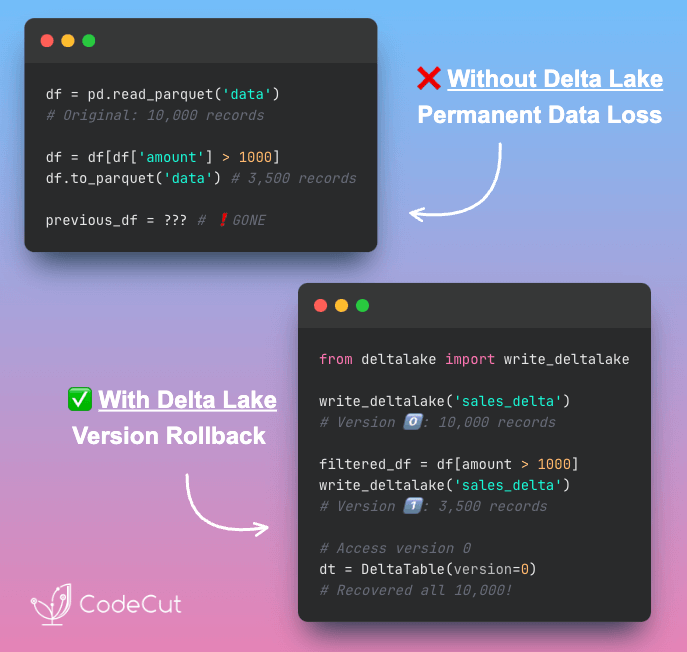
From pandas Full Reloads to Delta Lake Incremental Updates

Problem
Processing entire datasets when you only need to add a few new records wastes time and memory.
Pandas lacks incremental append capabilities, requiring full dataset reload for data updates.
Solution
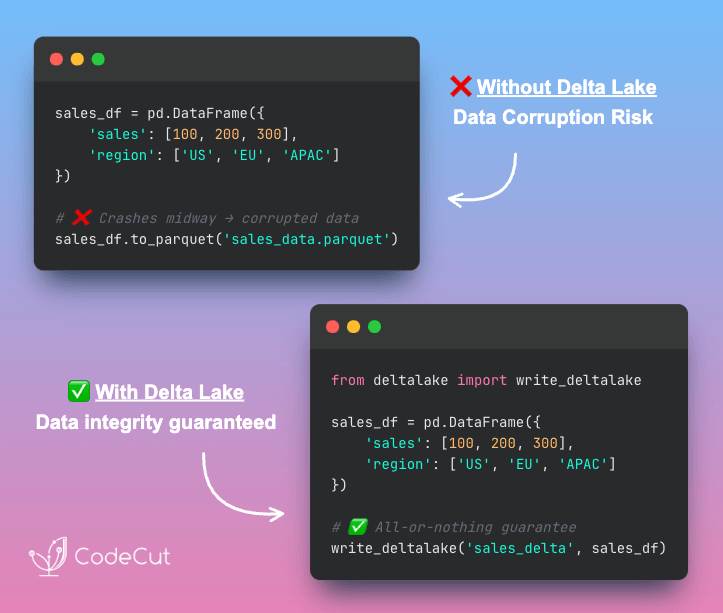
Delta Lake’s append mode processes only new data without touching existing records.
Key advantages:

Append new records without full dataset reload
Memory usage scales with new data size, not total dataset size
Automatic data protection prevents corruption during updates
Time travel enables rollback to previous dataset versions

Perfect for production data pipelines that need reliable incremental updates.

📖 View Full Article

⭐ View GitHub

☕️ Weekly Finds

Semantic Kernel
[AI Framework]
– Model-agnostic SDK that empowers developers to build, orchestrate, and deploy AI agents and multi-agent systems with enterprise-grade reliability

Ray
[Distributed Computing]
– AI compute engine with core distributed runtime and AI Libraries for accelerating ML workloads from laptop to cluster

Apache Airflow
[Workflow Orchestration]
– Platform for developing, scheduling, and monitoring workflows with powerful data pipeline orchestration capabilities

Looking for a specific tool? Explore 70+ Python tools →

Stay Current with CodeCut

Actionable Python tips, curated for busy data pros. Skim in under 2 minutes, three times a week.

.codecut-subscribe-form .codecut-input {
background: #2F2D2E !important;
border: 1px solid #72BEFA !important;
color: #FFFFFF !important;
}
.codecut-subscribe-form .codecut-input::placeholder {
color: #999999 !important;
}
.codecut-subscribe-form .codecut-subscribe-btn {
background: #72BEFA !important;
color: #2F2D2E !important;
}
.codecut-subscribe-form .codecut-subscribe-btn:hover {
background: #5aa8e8 !important;
}

.codecut-subscribe-form {
max-width: 650px;
display: flex;
flex-direction: column;
gap: 8px;
}
.codecut-input {
-webkit-appearance: none;
-moz-appearance: none;
appearance: none;
background: #FFFFFF;
border-radius: 8px !important;
padding: 8px 12px;
font-family: ‘Comfortaa’, sans-serif !important;
font-size: 14px !important;
color: #333333;
border: none !important;
outline: none;
width: 100%;
box-sizing: border-box;
}
input[type=”email”].codecut-input {
border-radius: 8px !important;
}
.codecut-input::placeholder {
color: #666666;
}
.codecut-email-row {
display: flex;
align-items: stretch;
height: 36px;
gap: 8px;
}
.codecut-email-row .codecut-input {
flex: 1;
}
.codecut-subscribe-btn {
background: #72BEFA;
color: #2F2D2E;
border: none;
border-radius: 8px;
padding: 8px 14px;
font-family: ‘Comfortaa’, sans-serif;
font-size: 14px;
font-weight: 500;
cursor: pointer;
text-decoration: none;
display: flex;
align-items: center;
justify-content: center;
transition: background 0.3s ease;
}
.codecut-subscribe-btn:hover {
background: #5aa8e8;
}
.codecut-subscribe-btn:disabled {
background: #999;
cursor: not-allowed;
}
.codecut-message {
font-family: ‘Comfortaa’, sans-serif;
font-size: 12px;
padding: 8px;
border-radius: 6px;
display: none;
}
.codecut-message.success {
background: #d4edda;
color: #155724;
display: block;
}
@media (max-width: 480px) {
.codecut-email-row {
flex-direction: column;
height: auto;
gap: 8px;
}
.codecut-input {
border-radius: 8px;
height: 36px;
}
.codecut-subscribe-btn {
width: 100%;
text-align: center;
border-radius: 8px;
height: 36px;
}
}

Subscribe

Newsletter #208: Stop Loading Full Datasets: Use itertools.islice() for Smart Sampling Read More »

Newsletter #207: Build Automated Chart Analysis with Hugging Face SmolVLM

📅 Today’s Picks

Build Automated Chart Analysis with Hugging Face SmolVLM

Problem
Data teams spend hours manually analyzing charts and extracting insights from complex visualizations.
Manual chart analysis creates bottlenecks in decision-making workflows and reduces time available for strategic insights.
Solution
Hugging Face’s SmolVLM transforms this workflow by instantly generating insights, allowing analysts to focus on validation, strategic context, and decision-making rather than basic pattern recognition.
The complete workflow could look like this:

Automated chart interpretation using vision language models
Expert review and validation of AI findings
Strategic context addition by domain specialists

📖 View Full Article

⭐ View GitHub

Hydra Multi-run: Test All Parameters in One Command

Problem
When you run a Python script with different preprocessing strategies and hyperparameter combinations, waiting for each variation to complete before testing the next is time-consuming.
Solution
Hydra multi-run executes all parameter combinations in a single command, saving you time and effort.
Plus, Hydra offers:

YAML-based configuration management
Override parameters from the command line
Compose configs from multiple files
Environment-specific configuration switching

📖 View Full Article

⭐ View GitHub

☕️ Weekly Finds

Scrapegraph-ai
[Data Extraction]
– Python scraper based on AI

Marker
[Document Processing]
– Convert PDF to markdown quickly with high accuracy

EdgeDB
[Database]
– A graph-relational database with declarative schema, built-in migration system, and a next-generation query language

Looking for a specific tool? Explore 70+ Python tools →

Stay Current with CodeCut

Actionable Python tips, curated for busy data pros. Skim in under 2 minutes, three times a week.

.codecut-subscribe-form .codecut-input {
background: #2F2D2E !important;
border: 1px solid #72BEFA !important;
color: #FFFFFF !important;
}
.codecut-subscribe-form .codecut-input::placeholder {
color: #999999 !important;
}
.codecut-subscribe-form .codecut-subscribe-btn {
background: #72BEFA !important;
color: #2F2D2E !important;
}
.codecut-subscribe-form .codecut-subscribe-btn:hover {
background: #5aa8e8 !important;
}

.codecut-subscribe-form {
max-width: 650px;
display: flex;
flex-direction: column;
gap: 8px;
}
.codecut-input {
-webkit-appearance: none;
-moz-appearance: none;
appearance: none;
background: #FFFFFF;
border-radius: 8px !important;
padding: 8px 12px;
font-family: ‘Comfortaa’, sans-serif !important;
font-size: 14px !important;
color: #333333;
border: none !important;
outline: none;
width: 100%;
box-sizing: border-box;
}
input[type=”email”].codecut-input {
border-radius: 8px !important;
}
.codecut-input::placeholder {
color: #666666;
}
.codecut-email-row {
display: flex;
align-items: stretch;
height: 36px;
gap: 8px;
}
.codecut-email-row .codecut-input {
flex: 1;
}
.codecut-subscribe-btn {
background: #72BEFA;
color: #2F2D2E;
border: none;
border-radius: 8px;
padding: 8px 14px;
font-family: ‘Comfortaa’, sans-serif;
font-size: 14px;
font-weight: 500;
cursor: pointer;
text-decoration: none;
display: flex;
align-items: center;
justify-content: center;
transition: background 0.3s ease;
}
.codecut-subscribe-btn:hover {
background: #5aa8e8;
}
.codecut-subscribe-btn:disabled {
background: #999;
cursor: not-allowed;
}
.codecut-message {
font-family: ‘Comfortaa’, sans-serif;
font-size: 12px;
padding: 8px;
border-radius: 6px;
display: none;
}
.codecut-message.success {
background: #d4edda;
color: #155724;
display: block;
}
@media (max-width: 480px) {
.codecut-email-row {
flex-direction: column;
height: auto;
gap: 8px;
}
.codecut-input {
border-radius: 8px;
height: 36px;
}
.codecut-subscribe-btn {
width: 100%;
text-align: center;
border-radius: 8px;
height: 36px;
}
}

Subscribe

Newsletter #207: Build Automated Chart Analysis with Hugging Face SmolVLM Read More »

Newsletter #206: Handle Messy Data with RapidFuzz Fuzzy Matching

📅 Today’s Picks

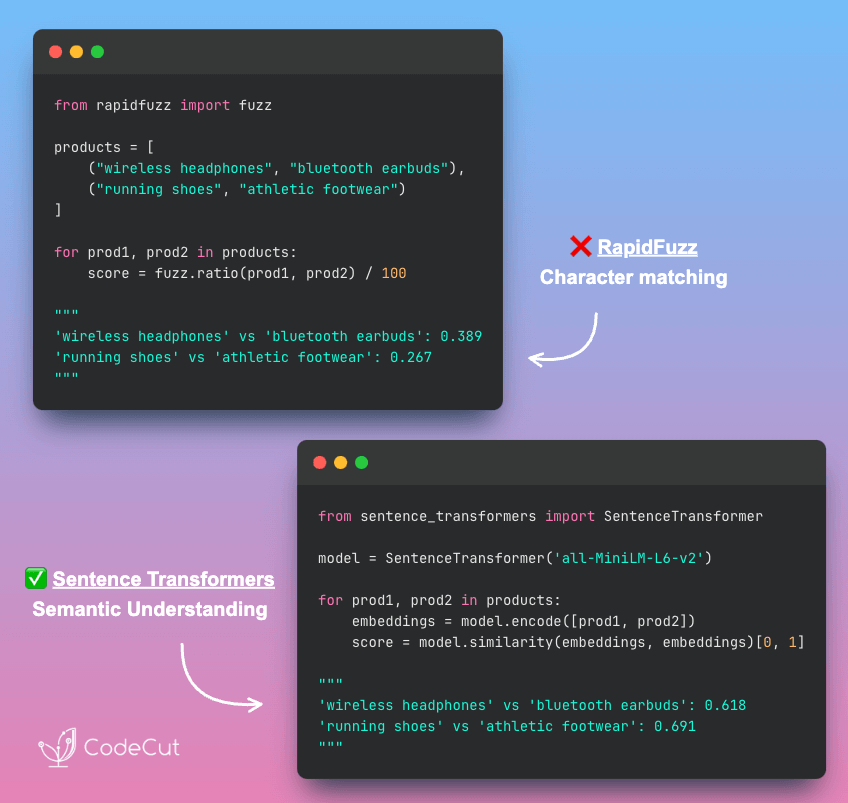
Handle Messy Data with RapidFuzz Fuzzy Matching

Problem
Traditional regex approaches require hours of preprocessing but still break with common data variations like missing spaces, typos, or inconsistent formatting.
Solution
RapidFuzz eliminates data cleaning overhead with intelligent fuzzy matching.
Key benefits:

Automatic handling of typos, spacing, and case variations
Production-ready C++ performance for large datasets
Full spectrum of fuzzy algorithms in one library

📖 View Full Article

⭐ View GitHub

Stay Current with CodeCut

Actionable Python tips, curated for busy data pros. Skim in under 2 minutes, three times a week.

.codecut-subscribe-form .codecut-input {
background: #2F2D2E !important;
border: 1px solid #72BEFA !important;
color: #FFFFFF !important;
}
.codecut-subscribe-form .codecut-input::placeholder {
color: #999999 !important;
}
.codecut-subscribe-form .codecut-subscribe-btn {
background: #72BEFA !important;
color: #2F2D2E !important;
}
.codecut-subscribe-form .codecut-subscribe-btn:hover {
background: #5aa8e8 !important;
}

.codecut-subscribe-form {
max-width: 650px;
display: flex;
flex-direction: column;
gap: 8px;
}
.codecut-input {
-webkit-appearance: none;
-moz-appearance: none;
appearance: none;
background: #FFFFFF;
border-radius: 8px !important;
padding: 8px 12px;
font-family: ‘Comfortaa’, sans-serif !important;
font-size: 14px !important;
color: #333333;
border: none !important;
outline: none;
width: 100%;
box-sizing: border-box;
}
input[type=”email”].codecut-input {
border-radius: 8px !important;
}
.codecut-input::placeholder {
color: #666666;
}
.codecut-email-row {
display: flex;
align-items: stretch;
height: 36px;
gap: 8px;
}
.codecut-email-row .codecut-input {
flex: 1;
}
.codecut-subscribe-btn {
background: #72BEFA;
color: #2F2D2E;
border: none;
border-radius: 8px;
padding: 8px 14px;
font-family: ‘Comfortaa’, sans-serif;
font-size: 14px;
font-weight: 500;
cursor: pointer;
text-decoration: none;
display: flex;
align-items: center;
justify-content: center;
transition: background 0.3s ease;
}
.codecut-subscribe-btn:hover {
background: #5aa8e8;
}
.codecut-subscribe-btn:disabled {
background: #999;
cursor: not-allowed;
}
.codecut-message {
font-family: ‘Comfortaa’, sans-serif;
font-size: 12px;
padding: 8px;
border-radius: 6px;
display: none;
}
.codecut-message.success {
background: #d4edda;
color: #155724;
display: block;
}
@media (max-width: 480px) {
.codecut-email-row {
flex-direction: column;
height: auto;
gap: 8px;
}
.codecut-input {
border-radius: 8px;
height: 36px;
}
.codecut-subscribe-btn {
width: 100%;
text-align: center;
border-radius: 8px;
height: 36px;
}
}

Subscribe

Newsletter #206: Handle Messy Data with RapidFuzz Fuzzy Matching Read More »

Newsletter #205: Build Debuggable Tests: One Assertion Per Function

🤝 COLLABORATION

Learn ML Engineering for Free on ML Zoomcamp
Learn ML engineering for free on ML Zoomcamp and receive a certificate! Join online for practical, hands-on experience with the tech stack and workflows used in production ML. The next cohort of the course starts on September 15, 2025. Here’s what you’ll learn:
Core foundations:

Python ecosystem: Jupyter, NumPy, Pandas, Matplotlib, Seaborn
ML frameworks: Scikit-learn, TensorFlow, Keras

Applied projects:

Supervised learning with CRISP-DM framework
Classification/regression with evaluation metrics
Advanced models: decision trees, ensembles, neural nets, CNNs

Production deployment:

APIs and containers: Flask, Docker, Kubernetes
Cloud solutions: AWS Lambda, TensorFlow Serving/Lite

Register here

📅 Today’s Picks

Ruff: Stop AI Code Complexity Before It Hits Production

Problem
AI agents often create overengineered code with multiple nested if/else and try/except blocks, increasing technical debt and making functions difficult to test.
However, it is time-consuming to check each function manually.
Solution
Ruff’s C901 complexity check automatically flags overly complex functions before they enter your codebase.
This tool counts decision points (if/else, loops) that create multiple execution paths in your code.
Key benefits:

Automatic detection of complex functions during development
Configurable complexity thresholds for your team standards
Integration with pre-commit hooks for automated validation
Clear error messages showing exact complexity scores

No more manual code reviews to catch overengineered functions.

📖 View Full Article

Build Debuggable Tests: One Assertion Per Function

Problem
Tests with multiple assertions make debugging harder.
When a test fails, you can’t tell which assertion broke without examining the code.
Solution
Create multiple specific test functions for different scenarios of the same function.
Follow these practices for focused test functions:

One assertion per test function for clear failure points
Use descriptive test names that explain the expected behavior
Maintain consistent naming patterns across your test suite

This approach makes your test suite more maintainable and failures easier to diagnose.

📖 View Full Article

Stay Current with CodeCut

Actionable Python tips, curated for busy data pros. Skim in under 2 minutes, three times a week.

.codecut-subscribe-form .codecut-input {
background: #2F2D2E !important;
border: 1px solid #72BEFA !important;
color: #FFFFFF !important;
}
.codecut-subscribe-form .codecut-input::placeholder {
color: #999999 !important;
}
.codecut-subscribe-form .codecut-subscribe-btn {
background: #72BEFA !important;
color: #2F2D2E !important;
}
.codecut-subscribe-form .codecut-subscribe-btn:hover {
background: #5aa8e8 !important;
}

.codecut-subscribe-form {
max-width: 650px;
display: flex;
flex-direction: column;
gap: 8px;
}
.codecut-input {
-webkit-appearance: none;
-moz-appearance: none;
appearance: none;
background: #FFFFFF;
border-radius: 8px !important;
padding: 8px 12px;
font-family: ‘Comfortaa’, sans-serif !important;
font-size: 14px !important;
color: #333333;
border: none !important;
outline: none;
width: 100%;
box-sizing: border-box;
}
input[type=”email”].codecut-input {
border-radius: 8px !important;
}
.codecut-input::placeholder {
color: #666666;
}
.codecut-email-row {
display: flex;
align-items: stretch;
height: 36px;
gap: 8px;
}
.codecut-email-row .codecut-input {
flex: 1;
}
.codecut-subscribe-btn {
background: #72BEFA;
color: #2F2D2E;
border: none;
border-radius: 8px;
padding: 8px 14px;
font-family: ‘Comfortaa’, sans-serif;
font-size: 14px;
font-weight: 500;
cursor: pointer;
text-decoration: none;
display: flex;
align-items: center;
justify-content: center;
transition: background 0.3s ease;
}
.codecut-subscribe-btn:hover {
background: #5aa8e8;
}
.codecut-subscribe-btn:disabled {
background: #999;
cursor: not-allowed;
}
.codecut-message {
font-family: ‘Comfortaa’, sans-serif;
font-size: 12px;
padding: 8px;
border-radius: 6px;
display: none;
}
.codecut-message.success {
background: #d4edda;
color: #155724;
display: block;
}
@media (max-width: 480px) {
.codecut-email-row {
flex-direction: column;
height: auto;
gap: 8px;
}
.codecut-input {
border-radius: 8px;
height: 36px;
}
.codecut-subscribe-btn {
width: 100%;
text-align: center;
border-radius: 8px;
height: 36px;
}
}

Subscribe

Newsletter #205: Build Debuggable Tests: One Assertion Per Function Read More »

Newsletter #204: Build Fuzzy Text Matching with difflib Over regex

📅 Today’s Picks

Build Fuzzy Text Matching with difflib Over regex

Problem
Have you ever spent hours cleaning text data with regex, only to find that “iPhone 14 Pro Max” still doesn’t match “iPhone 14 Prro Max”?
Regex preprocessing achieves only exact matching after cleaning, failing completely with typos and character variations that exact matching cannot handle.
Solution
difflib provides similarity scoring that tolerates typos and character variations, enabling approximate matching where regex fails.
The library calculates similarity ratios between strings:

Handles typos like “Prro” vs “Pro” automatically
Returns similarity scores from 0.0 to 1.0 for ranking matches
Works with character-level variations without preprocessing
Enables fuzzy matching for real-world messy data

Perfect for product matching, name deduplication, and any scenario where exact matches aren’t realistic.

📖 View Full Article

Build Portable Python Scripts with uv PEP 723

Problem
Python scripts break when moved between environments because dependencies are scattered across requirements.txt files, virtual environments, or undocumented assumptions.
Solution
uv enables PEP 723 inline script dependencies, embedding all requirements directly in the script header for true portability.
Use uv add –script script.py dependency to automatically add metadata to any Python file.
Key benefits:

Self-contained scripts with zero external files
Easy command-line dependency management
Perfect for sharing data analysis code across teams

📖 View Full Article

Stay Current with CodeCut

Actionable Python tips, curated for busy data pros. Skim in under 2 minutes, three times a week.

.codecut-subscribe-form .codecut-input {
background: #2F2D2E !important;
border: 1px solid #72BEFA !important;
color: #FFFFFF !important;
}
.codecut-subscribe-form .codecut-input::placeholder {
color: #999999 !important;
}
.codecut-subscribe-form .codecut-subscribe-btn {
background: #72BEFA !important;
color: #2F2D2E !important;
}
.codecut-subscribe-form .codecut-subscribe-btn:hover {
background: #5aa8e8 !important;
}

.codecut-subscribe-form {
max-width: 650px;
display: flex;
flex-direction: column;
gap: 8px;
}
.codecut-input {
-webkit-appearance: none;
-moz-appearance: none;
appearance: none;
background: #FFFFFF;
border-radius: 8px !important;
padding: 8px 12px;
font-family: ‘Comfortaa’, sans-serif !important;
font-size: 14px !important;
color: #333333;
border: none !important;
outline: none;
width: 100%;
box-sizing: border-box;
}
input[type=”email”].codecut-input {
border-radius: 8px !important;
}
.codecut-input::placeholder {
color: #666666;
}
.codecut-email-row {
display: flex;
align-items: stretch;
height: 36px;
gap: 8px;
}
.codecut-email-row .codecut-input {
flex: 1;
}
.codecut-subscribe-btn {
background: #72BEFA;
color: #2F2D2E;
border: none;
border-radius: 8px;
padding: 8px 14px;
font-family: ‘Comfortaa’, sans-serif;
font-size: 14px;
font-weight: 500;
cursor: pointer;
text-decoration: none;
display: flex;
align-items: center;
justify-content: center;
transition: background 0.3s ease;
}
.codecut-subscribe-btn:hover {
background: #5aa8e8;
}
.codecut-subscribe-btn:disabled {
background: #999;
cursor: not-allowed;
}
.codecut-message {
font-family: ‘Comfortaa’, sans-serif;
font-size: 12px;
padding: 8px;
border-radius: 6px;
display: none;
}
.codecut-message.success {
background: #d4edda;
color: #155724;
display: block;
}
@media (max-width: 480px) {
.codecut-email-row {
flex-direction: column;
height: auto;
gap: 8px;
}
.codecut-input {
border-radius: 8px;
height: 36px;
}
.codecut-subscribe-btn {
width: 100%;
text-align: center;
border-radius: 8px;
height: 36px;
}
}

Subscribe

Newsletter #204: Build Fuzzy Text Matching with difflib Over regex Read More »

Newsletter #203: Semantic Search Without Complex Setup Headaches

📅 Today’s Picks

Semantic Search Without Complex Setup Headaches

Problem
Have you ever found yourself looking up SQL syntax when you just want to query your database?
Complex joins and subqueries create friction between you and your data insights.
Solution
The semantic search workflow connects natural language questions to your existing PostgreSQL tables.
The complete workflow includes:

Database setup with PostgreSQL and pgvector extension
Content preprocessing for optimal embeddings
Embedding pipeline using Ollama models
Vector storage with SQLAlchemy integration
Query interface for natural language searches
Response generation combining retrieval and LLMs

Query your database with plain English instead of SQL syntax.

📖 View Full Article

Stay Current with CodeCut

Actionable Python tips, curated for busy data pros. Skim in under 2 minutes, three times a week.

.codecut-subscribe-form .codecut-input {
background: #2F2D2E !important;
border: 1px solid #72BEFA !important;
color: #FFFFFF !important;
}
.codecut-subscribe-form .codecut-input::placeholder {
color: #999999 !important;
}
.codecut-subscribe-form .codecut-subscribe-btn {
background: #72BEFA !important;
color: #2F2D2E !important;
}
.codecut-subscribe-form .codecut-subscribe-btn:hover {
background: #5aa8e8 !important;
}

.codecut-subscribe-form {
max-width: 650px;
display: flex;
flex-direction: column;
gap: 8px;
}
.codecut-input {
-webkit-appearance: none;
-moz-appearance: none;
appearance: none;
background: #FFFFFF;
border-radius: 8px !important;
padding: 8px 12px;
font-family: ‘Comfortaa’, sans-serif !important;
font-size: 14px !important;
color: #333333;
border: none !important;
outline: none;
width: 100%;
box-sizing: border-box;
}
input[type=”email”].codecut-input {
border-radius: 8px !important;
}
.codecut-input::placeholder {
color: #666666;
}
.codecut-email-row {
display: flex;
align-items: stretch;
height: 36px;
gap: 8px;
}
.codecut-email-row .codecut-input {
flex: 1;
}
.codecut-subscribe-btn {
background: #72BEFA;
color: #2F2D2E;
border: none;
border-radius: 8px;
padding: 8px 14px;
font-family: ‘Comfortaa’, sans-serif;
font-size: 14px;
font-weight: 500;
cursor: pointer;
text-decoration: none;
display: flex;
align-items: center;
justify-content: center;
transition: background 0.3s ease;
}
.codecut-subscribe-btn:hover {
background: #5aa8e8;
}
.codecut-subscribe-btn:disabled {
background: #999;
cursor: not-allowed;
}
.codecut-message {
font-family: ‘Comfortaa’, sans-serif;
font-size: 12px;
padding: 8px;
border-radius: 6px;
display: none;
}
.codecut-message.success {
background: #d4edda;
color: #155724;
display: block;
}
@media (max-width: 480px) {
.codecut-email-row {
flex-direction: column;
height: auto;
gap: 8px;
}
.codecut-input {
border-radius: 8px;
height: 36px;
}
.codecut-subscribe-btn {
width: 100%;
text-align: center;
border-radius: 8px;
height: 36px;
}
}

Subscribe

Newsletter #203: Semantic Search Without Complex Setup Headaches Read More »

Newsletter #202: Automate Code Quality Without Manual Checking

📅 Today’s Picks

Automate Code Quality Without Manual Checking

Problem
Code quality is essential for data science projects, but manual checking consumes valuable time that could be spent on analysis and insights.
Solution
Pre-commit automates code quality validation before every commit.
Key benefits:

Automatic formatting validation
Comprehensive linting checks
Type checking before commits

And all you need is a simple .pre-commit-config.yaml configuration file.

📖 View Full Article

Deploy ML Models Without Docker Hub Costs

Problem
Docker Hub forces you into an expensive choice: pay mounting fees for private repositories or risk exposing your proprietary code publicly.
Plus, Docker transfers entire multi-gigabyte images even for small code changes, wasting time and bandwidth.
Solution
Unregistry eliminates registries entirely with docker pussh – push images directly to remote servers over SSH.
Key benefits:

Smart transfers: only sends changed parts, not the whole image
No registry infrastructure to set up or maintain
Works with existing SSH connections
Faster deployments by avoiding duplicate data transfers

📖 View Full Article

Stay Current with CodeCut

Actionable Python tips, curated for busy data pros. Skim in under 2 minutes, three times a week.

.codecut-subscribe-form .codecut-input {
background: #2F2D2E !important;
border: 1px solid #72BEFA !important;
color: #FFFFFF !important;
}
.codecut-subscribe-form .codecut-input::placeholder {
color: #999999 !important;
}
.codecut-subscribe-form .codecut-subscribe-btn {
background: #72BEFA !important;
color: #2F2D2E !important;
}
.codecut-subscribe-form .codecut-subscribe-btn:hover {
background: #5aa8e8 !important;
}

.codecut-subscribe-form {
max-width: 650px;
display: flex;
flex-direction: column;
gap: 8px;
}
.codecut-input {
-webkit-appearance: none;
-moz-appearance: none;
appearance: none;
background: #FFFFFF;
border-radius: 8px !important;
padding: 8px 12px;
font-family: ‘Comfortaa’, sans-serif !important;
font-size: 14px !important;
color: #333333;
border: none !important;
outline: none;
width: 100%;
box-sizing: border-box;
}
input[type=”email”].codecut-input {
border-radius: 8px !important;
}
.codecut-input::placeholder {
color: #666666;
}
.codecut-email-row {
display: flex;
align-items: stretch;
height: 36px;
gap: 8px;
}
.codecut-email-row .codecut-input {
flex: 1;
}
.codecut-subscribe-btn {
background: #72BEFA;
color: #2F2D2E;
border: none;
border-radius: 8px;
padding: 8px 14px;
font-family: ‘Comfortaa’, sans-serif;
font-size: 14px;
font-weight: 500;
cursor: pointer;
text-decoration: none;
display: flex;
align-items: center;
justify-content: center;
transition: background 0.3s ease;
}
.codecut-subscribe-btn:hover {
background: #5aa8e8;
}
.codecut-subscribe-btn:disabled {
background: #999;
cursor: not-allowed;
}
.codecut-message {
font-family: ‘Comfortaa’, sans-serif;
font-size: 12px;
padding: 8px;
border-radius: 6px;
display: none;
}
.codecut-message.success {
background: #d4edda;
color: #155724;
display: block;
}
@media (max-width: 480px) {
.codecut-email-row {
flex-direction: column;
height: auto;
gap: 8px;
}
.codecut-input {
border-radius: 8px;
height: 36px;
}
.codecut-subscribe-btn {
width: 100%;
text-align: center;
border-radius: 8px;
height: 36px;
}
}

Subscribe

Newsletter #202: Automate Code Quality Without Manual Checking Read More »

Newsletter #201: itertools.combinations() for Feature Interactions

📅 Today’s Picks

itertools.combinations() for Feature Interactions

Problem
Writing nested loops for all feature pair combinations gets messy with more features and easily introduces bugs.
Solution
itertools.combinations() automatically generates all unique pairs without the complexity and bugs.

📖 View Full Article

Production-Ready RAG Evaluation Workflow

Problem
Many teams deploy RAG systems without systematic evaluation, missing critical quality issues that only become visible with real users.
Solution
MLflow evaluation framework validates RAG systems through systematic checks:

Faithfulness metrics – Ensures answers align with retrieved documents
Answer relevancy scoring – Matches responses to user queries
Context recall – Verifies all relevant information was retrieved from documents

📖 View Full Article

Stay Current with CodeCut

Actionable Python tips, curated for busy data pros. Skim in under 2 minutes, three times a week.

.codecut-subscribe-form .codecut-input {
background: #2F2D2E !important;
border: 1px solid #72BEFA !important;
color: #FFFFFF !important;
}
.codecut-subscribe-form .codecut-input::placeholder {
color: #999999 !important;
}
.codecut-subscribe-form .codecut-subscribe-btn {
background: #72BEFA !important;
color: #2F2D2E !important;
}
.codecut-subscribe-form .codecut-subscribe-btn:hover {
background: #5aa8e8 !important;
}

.codecut-subscribe-form {
max-width: 650px;
display: flex;
flex-direction: column;
gap: 8px;
}
.codecut-input {
-webkit-appearance: none;
-moz-appearance: none;
appearance: none;
background: #FFFFFF;
border-radius: 8px !important;
padding: 8px 12px;
font-family: ‘Comfortaa’, sans-serif !important;
font-size: 14px !important;
color: #333333;
border: none !important;
outline: none;
width: 100%;
box-sizing: border-box;
}
input[type=”email”].codecut-input {
border-radius: 8px !important;
}
.codecut-input::placeholder {
color: #666666;
}
.codecut-email-row {
display: flex;
align-items: stretch;
height: 36px;
gap: 8px;
}
.codecut-email-row .codecut-input {
flex: 1;
}
.codecut-subscribe-btn {
background: #72BEFA;
color: #2F2D2E;
border: none;
border-radius: 8px;
padding: 8px 14px;
font-family: ‘Comfortaa’, sans-serif;
font-size: 14px;
font-weight: 500;
cursor: pointer;
text-decoration: none;
display: flex;
align-items: center;
justify-content: center;
transition: background 0.3s ease;
}
.codecut-subscribe-btn:hover {
background: #5aa8e8;
}
.codecut-subscribe-btn:disabled {
background: #999;
cursor: not-allowed;
}
.codecut-message {
font-family: ‘Comfortaa’, sans-serif;
font-size: 12px;
padding: 8px;
border-radius: 6px;
display: none;
}
.codecut-message.success {
background: #d4edda;
color: #155724;
display: block;
}
@media (max-width: 480px) {
.codecut-email-row {
flex-direction: column;
height: auto;
gap: 8px;
}
.codecut-input {
border-radius: 8px;
height: 36px;
}
.codecut-subscribe-btn {
width: 100%;
text-align: center;
border-radius: 8px;
height: 36px;
}
}

Subscribe

Newsletter #201: itertools.combinations() for Feature Interactions Read More »

Scroll to Top

Work with Khuyen Tran

Work with Khuyen Tran