Generic selectors
Exact matches only
Search in title
Search in content
Post Type Selectors
Filter by Categories
About Article
Analyze Data
Archive
Best Practices
Better Outputs
Blog
Code Optimization
Code Quality
Command Line
Course
Daily tips
Dashboard
Data Analysis & Manipulation
Data Engineer
Data Visualization
DataFrame
Delta Lake
DevOps
DuckDB
Environment Management
Feature Engineer
Git
Jupyter Notebook
LLM
LLM Tools
Machine Learning
Machine Learning & AI
Machine Learning Tools
Manage Data
MLOps
Natural Language Processing
Newsletter Archive
NumPy
Pandas
Polars
PySpark
Python Helpers
Python Tips
Python Utilities
Scrape Data
SQL
Testing
Time Series
Tools
Visualization
Visualization & Reporting
Workflow & Automation
Workflow Automation

Natural Language Processing

RapidFuzz: Find Similar Strings Despite Typos and Variations

Motivation

When dealing with real-world data, exact string matching often fails to capture similar entries due to typos, inconsistent formatting, or data entry errors. For example, trying to match company names like “Apple Inc.” with “Apple Incorporated” or “APPLE INC” requires more sophisticated matching techniques.

Here’s an example showing the limitations of exact matching:

companies = ["Apple Inc.", "Microsoft Corp.", "Google LLC"]
search_term = "apple incorporated"

# Traditional exact matching
matches = [company for company in companies if company.lower() == search_term.lower()]
print(f"Exact matches: {matches}")

Output:

Exact matches: []

Introduction to RapidFuzz

RapidFuzz is a fast string matching library that provides various similarity metrics for fuzzy string matching. It’s designed as a faster, MIT-licensed alternative to FuzzyWuzzy, with additional string metrics and algorithmic improvements.

Installation is straightforward:

pip install rapidfuzz

Fuzzy String Matching

RapidFuzz provides several methods for fuzzy string matching. Here’s how to use them:

Compare two similar strings:

Simple ratio comparison:

from rapidfuzz import fuzz, process

similarity = fuzz.ratio("Apple Inc.", "APPLE INC")
print(f"Similarity score: {similarity:.3f}")

Output:

Similarity score: 31.579

Find best matches from a list:

# Sample company names with variations
companies = [
"Apple Inc.",
"Apple Incorporated",
"APPLE INC",
"Microsoft Corporation",
"Microsoft Corp.",
"Google LLC",
"Alphabet Inc.",
]

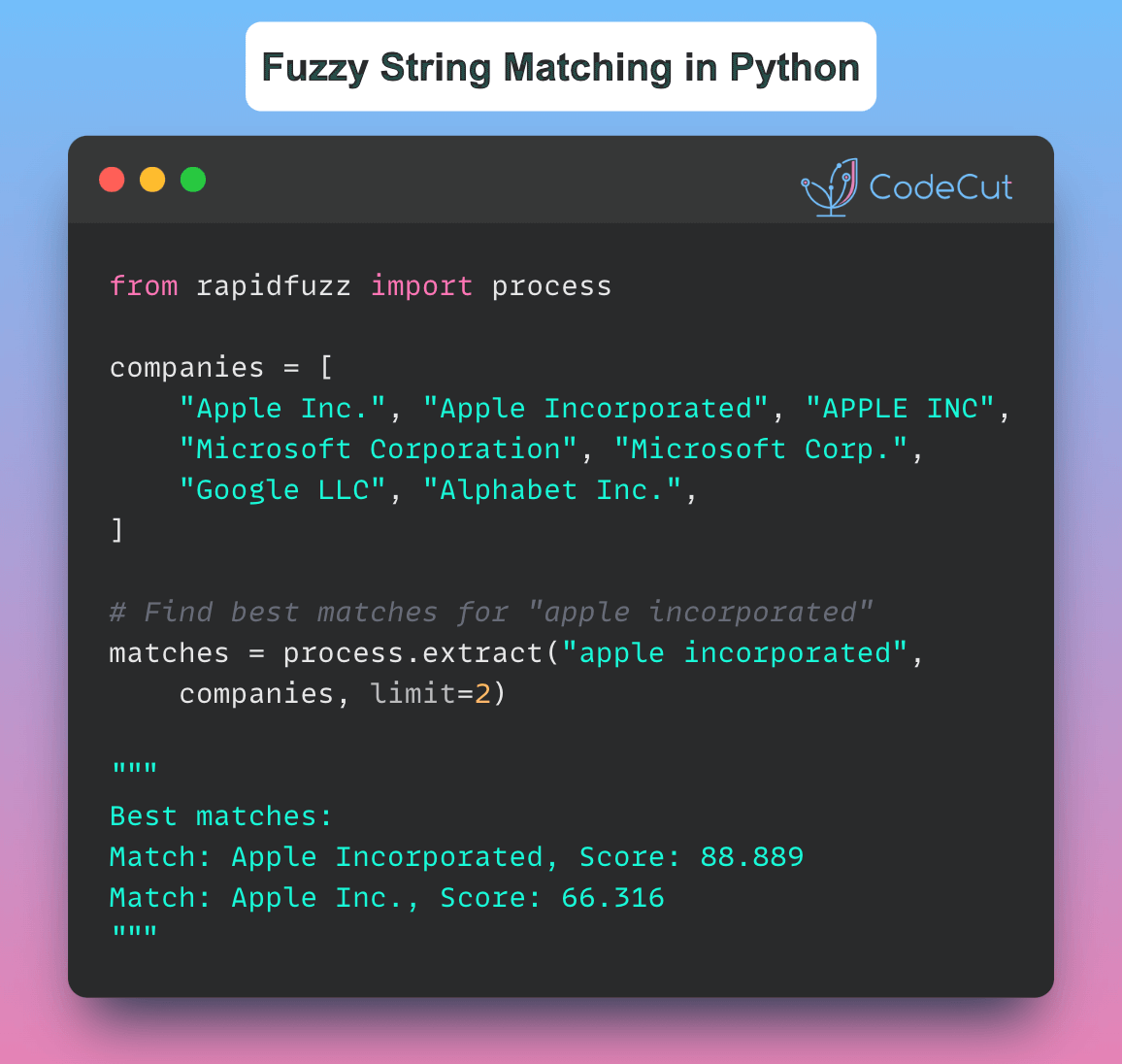
# Find best matches for "apple incorporated"
matches = process.extract("apple incorporated", companies, scorer=fuzz.WRatio, limit=2)

print("Best matches:")
for match in matches:
print(f"Match: {match[0]}, Score: {match[1]:.3f}")

Output:

Best matches:
Match: Apple Incorporated, Score: 88.889
Match: Apple Inc., Score: 66.316

RapidFuzz automatically:

Calculates similarity scores between strings

Handles case sensitivity

Provides multiple matching algorithms

Returns confidence scores for matches

Conclusion

RapidFuzz significantly simplifies the process of fuzzy string matching in Python, making it an excellent choice for data scientists and engineers who need to perform efficient and accurate string matching operations.

Link to RapidFuzz

RapidFuzz: Find Similar Strings Despite Typos and Variations Read More »
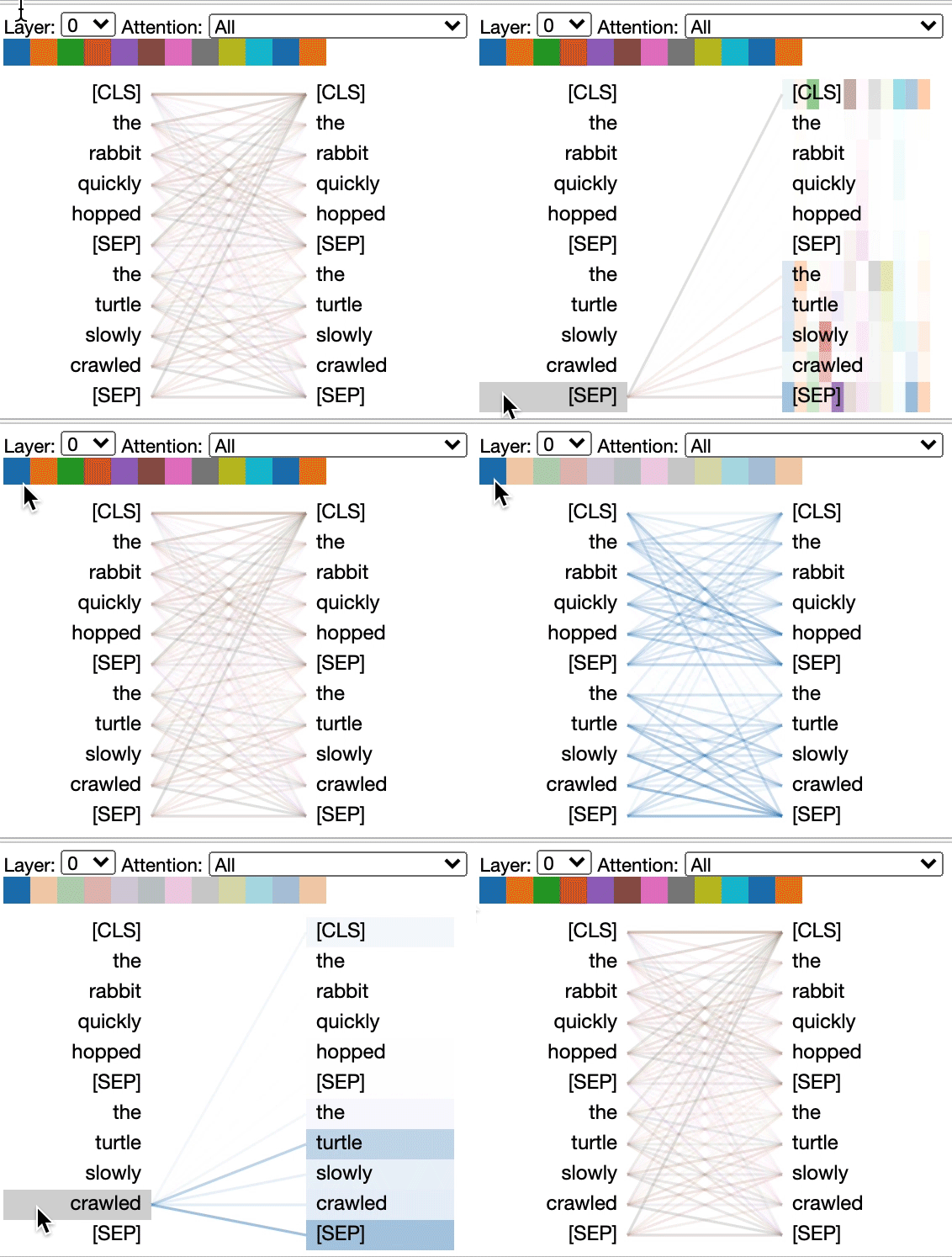
BertViz: Visualize Attention in Transformer Language Models

Understanding how attention mechanisms work in transformer models can be challenging due to the complex interactions between multiple attention heads across different layers.

BertViz is a tool that allows you to interactively visualize and explore attention patterns through multiple views.

Installing BertViz

To use BertViz, you can install it using pip:

!pip install bertviz

Loading a Pre-Trained Model and Tokenizer

First, we load a pre-trained model and tokenizer using the transformers library:

from transformers import AutoTokenizer, AutoModel, utils

utils.logging.set_verbosity_error() # Suppress standard warnings

model_name = "microsoft/xtremedistil-l12-h384-uncased"
input_text = "The cat sat on the mat"

model = AutoModel.from_pretrained(model_name, output_attentions=True)
tokenizer = AutoTokenizer.from_pretrained(model_name)

Tokenizing Input Text and Running the Model

Next, we tokenize the input text and run the model:

inputs = tokenizer.encode(input_text, return_tensors='pt')
outputs = model(inputs)
attention = outputs[-1]
tokens = tokenizer.convert_ids_to_tokens(inputs[0])

Visualizing Attention with BertViz

We can now use BertViz to visualize the attention patterns in the model. Here, we display the model view:

from bertviz import model_view, head_view

model_view(attention, tokens)

This will display an interactive visualization of the attention patterns in the model.

Displaying Head View

We can also display the head view:

head_view(attention, tokens)

This will display an interactive visualization of the attention patterns in a specific head.

Link to BertViz.

BertViz: Visualize Attention in Transformer Language Models Read More »

nlpaug: Enhancing NLP Model Performance with Data Augmentation

NLP models often overfit and generalize poorly with limited data. Expanding datasets with new, annotated real-world data is costly and slow.

nlpaug offers diverse NLP data augmentation techniques, which artificially expand existing datasets. This helps models generalize better and perform robustly on unseen data.

Let’s explore some of the augmentation techniques provided by nlpaug:

1. Character-level Augmentation

Keyboard Augmentation

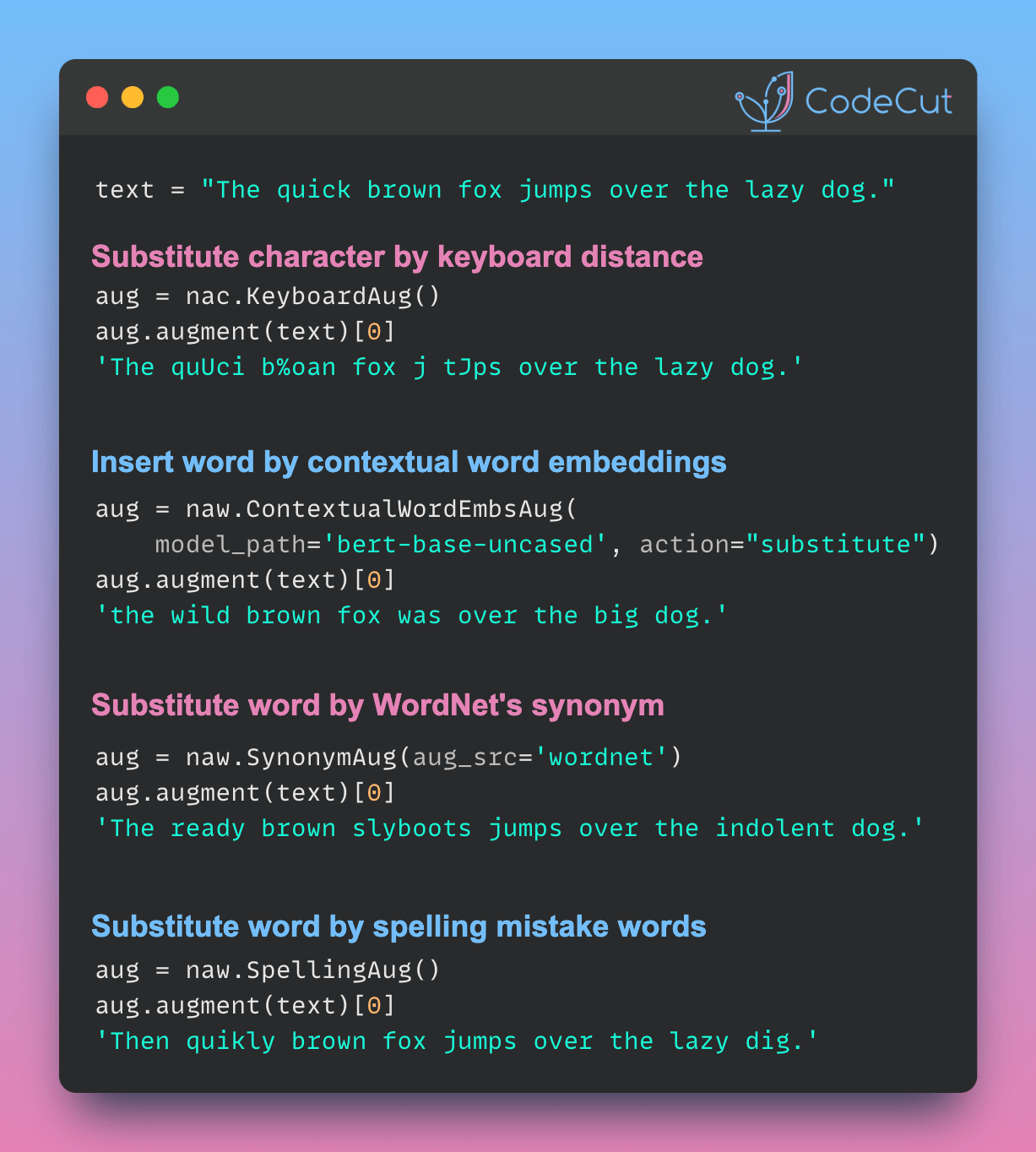
This technique simulates typos by substituting characters based on keyboard distance.

import nlpaug.augmenter.char as nac

text = "The quick brown fox jumps over the lazy dog."
aug = nac.KeyboardAug()
augmented_text = aug.augment(text)

print("Original:", text)
print("Augmented:", augmented_text[0])

Output:

Original: The quick brown fox jumps over the lazy dog.
Augmented: The quUci b%oan fox j tJps over the lazy dog.

Random Character Insertion

This method randomly inserts characters into the text.

aug = nac.RandomCharAug(action="insert")
augmented_text = aug.augment(text)

print("Original:", text)
print("Augmented:", augmented_text[0])

Output:

Original: The quick brown fox jumps over the lazy dog.
Augmented: The quick Hbr2own fox jumps Govner the slahzy dog.

2. Word-level Augmentation

Spelling Augmentation

This technique introduces common spelling mistakes.

import nlpaug.augmenter.word as naw

aug = naw.SpellingAug()
augmented_texts = aug.augment(text, n=3)

print("Original:", text)
print("Augmented:")
for aug_text in augmented_texts:
print(aug_text)

Output:

Original: The quick brown fox jumps over the lazy dog.
Augmented:
Then quikly brown fox jumps over the lazy dig.
Th quikly brown fox jumps over the lazy doy.
The quick brouwn fox jumps over the lizy doga.

Contextual Word Embeddings

This advanced method uses pre-trained language models to substitute words based on context.

aug = naw.ContextualWordEmbsAug(model_path='bert-base-uncased', action="substitute")
augmented_text = aug.augment(text)

print("Original:", text)
print("Augmented:", augmented_text[0])

Output:

Original: The quick brown fox jumps over the lazy dog.
Augmented: the wild brown fox was over the big dog.

Synonym Substitution

This technique replaces words with their synonyms using WordNet.

aug = naw.SynonymAug(aug_src='wordnet')
augmented_text = aug.augment(text)

print("Original:", text)
print("Augmented:", augmented_text[0])

Output:

Original: The quick brown fox jumps over the lazy dog.
Augmented: The ready brown slyboots jumps over the indolent dog.

Word Splitting

This method randomly splits words into two tokens.

aug = naw.SplitAug()
augmented_text = aug.augment(text)

print("Original:", text)
print("Augmented:", augmented_text[0])

Output:

Original: The quick brown fox jumps over the lazy dog.
Augmented: The qui ck br own fox jumps o ver the lazy dog.

By applying these augmentation techniques, you can significantly expand your training data, leading to more robust and generalizable NLP models.

Link to nlpaug.

nlpaug: Enhancing NLP Model Performance with Data Augmentation Read More »

SkillNER: Automating Skill Extraction in Python

Extracting skills from job postings, resumes, or other unstructured text can be time-consuming if done manually. SkillNER automates this process, making it faster and more efficient.

This tool can be useful for:

Recruiters to automate skill extraction for faster candidate screening.

Data scientists to extract structured data from unstructured job-related text.

Here’s a quick example:

import spacy
from spacy.matcher import PhraseMatcher
from skillNer.general_params import SKILL_DB
from skillNer.skill_extractor_class import SkillExtractor

# Load the spaCy model
nlp = spacy.load("en_core_web_lg")

# Initialize the SkillExtractor
skill_extractor = SkillExtractor(nlp, SKILL_DB, PhraseMatcher)

# Sample job description
job_description = """
You are a data scientist with strong expertise in Python. You have solid experience in
data analysis and visualization, and can manage end-to-end data science projects.
You quickly adapt to new tools and technologies, and are fluent in both English and SQL.
"""

# Extract skills from the job description
annotations = skill_extractor.annotate(job_description)
annotations

Output:

{'text': 'you are a data scientist with strong expertise in python you have solid experience in data analysis and visualization and can manage end to end data science projects you quickly adapt to new tools and technologies and are fluent in both english and sql',
'results': {'full_matches': [{'skill_id': 'KS120GV6C72JMSZKMTD7',
'doc_node_value': 'data analysis',
'score': 1,
'doc_node_id': [15, 16]}],
'ngram_scored': [{'skill_id': 'KS125LS6N7WP4S6SFTCK',
'doc_node_id': [9],
'doc_node_value': 'python',
'type': 'fullUni',
'score': 1,
'len': 1},
{'skill_id': 'KS1282T6STD9RJZ677XL',
'doc_node_id': [18],
'doc_node_value': 'visualization',
'type': 'fullUni',
'score': 1,
'len': 1},
{'skill_id': 'KS1218W78FGVPVP2KXPX',
'doc_node_id': [21],
'doc_node_value': 'manage',
'type': 'lowSurf',
'score': 0.63417345,
'len': 1},
{'skill_id': 'KS7LO8P3MXB93R3C9RWL',
'doc_node_id': [25, 26],
'doc_node_value': 'data science',
'type': 'lowSurf',
'score': 2,
'len': 2},
{'skill_id': 'KS120626HMWCXJWJC7VK',
'doc_node_id': [30],
'doc_node_value': 'adapt',
'type': 'lowSurf',
'score': 0.503605,
'len': 1},
{'skill_id': 'KS123K75YYK8VGH90NCS',
'doc_node_id': [41],
'doc_node_value': 'english',
'type': 'lowSurf',
'score': 1,
'len': 1},
{'skill_id': 'KS440W865GC4VRBW6LJP',
'doc_node_id': [43],
'doc_node_value': 'sql',
'type': 'fullUni',
'score': 1,
'len': 1}]}}

skill_extractor.describe(annotations)

Link to SkillNer.

SkillNER: Automating Skill Extraction in Python Read More »

Beyond Keywords: Building a Semantic Recipe Search Engine

Semantic search enables content discovery based on meaning rather than just keywords. This approach uses vector embeddings – numerical representations of text that capture semantic essence.

By converting text to vector embeddings, we can quantify semantic similarity between different pieces of content in a high-dimensional vector space. This allows for comparison and search based on underlying meaning, surpassing simple keyword matching.

Here’s a Python implementation of semantic search for recipe recommendations using sentence-transformers:

Import necessary libraries for creating sentence embeddings and calculating similarity:

from sentence_transformers import SentenceTransformer
from sklearn.metrics.pairwise import cosine_similarity

Create a list of recipe titles that we’ll use for our search:

recipes = [
"Banana and Date Sweetened Oatmeal Cookies",
"No-Bake Berry Chia Seed Pudding",
"Deep-Fried Oreo Sundae with Caramel Sauce",
"Loaded Bacon Cheeseburger Pizza",
]

Load a pre-trained model for creating sentence embeddings

model = SentenceTransformer('all-MiniLM-L6-v2')

Create vector representations (embeddings) for all the recipe titles.

recipe_embeddings = model.encode(recipes)

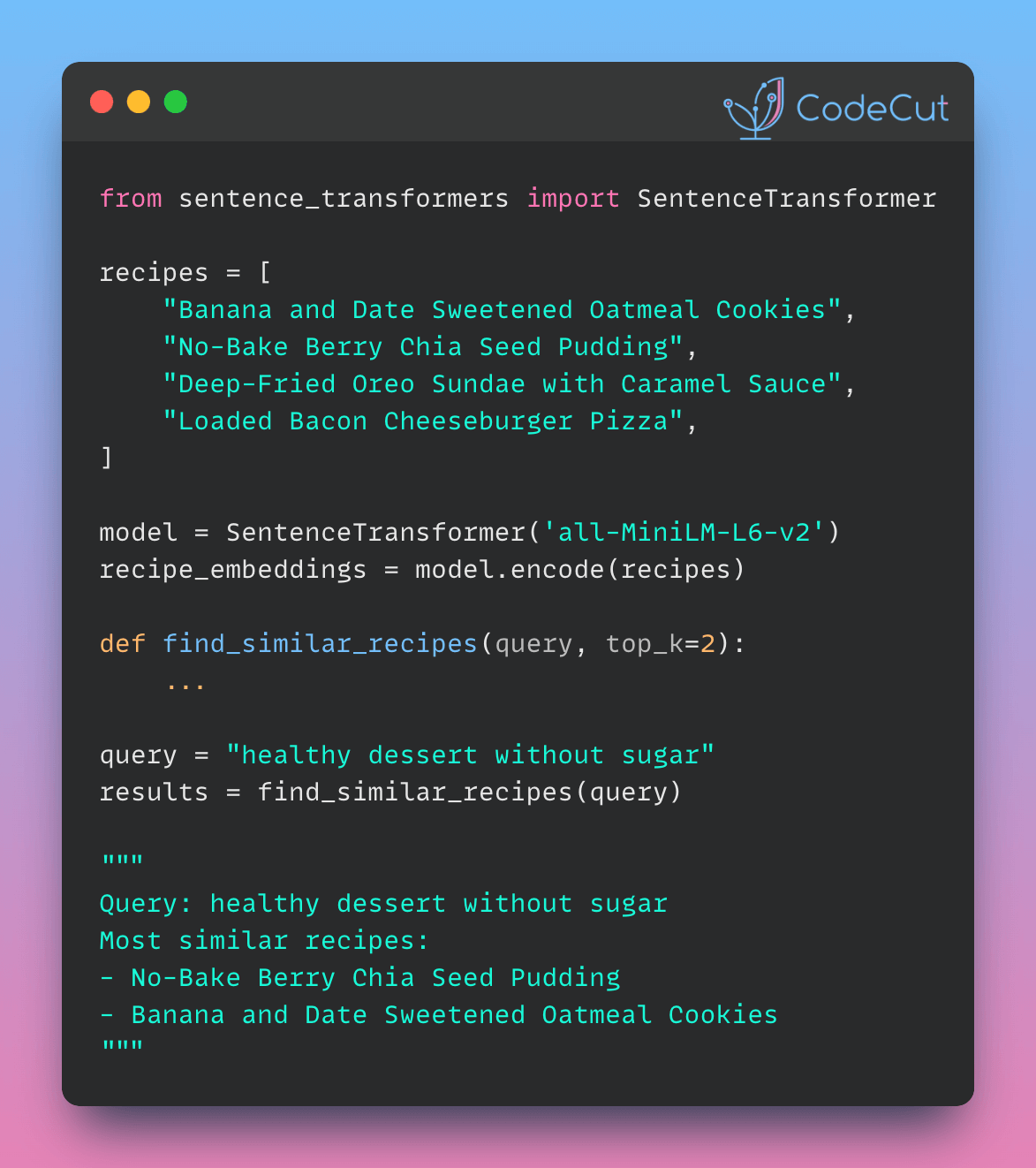
Define search function that takes a query and number of results to return. It creates an embedding for the query, calculates similarities with all recipes, and returns the top k similar recipes.

def find_similar_recipes(query, top_k=2):
query_embedding = model.encode([query])
similarities = cosine_similarity(query_embedding, recipe_embeddings)[0]
top_indices = similarities.argsort()[-top_k:][::-1]
return [(recipes[i], similarities[i]) for i in top_indices]

Set up a test query and calls the function to find similar recipes.

query = "healthy dessert without sugar"
results = find_similar_recipes(query)

Print the query and the most similar recipes with their similarity scores.

print(f"Query: {query}")
print("Most similar recipes:")
for recipe, score in results:
print(f"- {recipe} (Similarity: {score:.2f})")

Output:

Query: healthy dessert without sugar
Most similar recipes:
– No-Bake Berry Chia Seed Pudding (Similarity: 0.55)
– Banana and Date Sweetened Oatmeal Cookies (Similarity: 0.43)

This implementation successfully identifies healthier dessert options, understanding that ingredients like berries, chia seeds, bananas, and dates are often used in healthy, sugar-free desserts. It excludes clearly unhealthy options, demonstrating comprehension of “healthy” in the dessert context. The score difference (0.55 vs 0.43) indicates that the model considers the chia seed pudding a closer match to the concept of a healthy, sugar-free dessert than the oatmeal cookies.

Beyond Keywords: Building a Semantic Recipe Search Engine Read More »

BERTopic: Harnessing BERT for Interpretable Topic Modeling

Topic modeling is a popular technique in NLP for discovering abstract topics that occur in a collection of documents.

BERTopic leverages BERT to generate contextualized document embeddings, capturing semantics better than bag-of-words. It also provides excellent topic visualization capabilities and allows fine-tuning topic representations using language models like GPT.

For this example, we use the popular 20 Newsgroups dataset which contains roughly 18000 newsgroups posts

from sklearn.datasets import fetch_20newsgroups
docs = fetch_20newsgroups(subset='all', remove=('headers', 'footers', 'quotes'))['data']

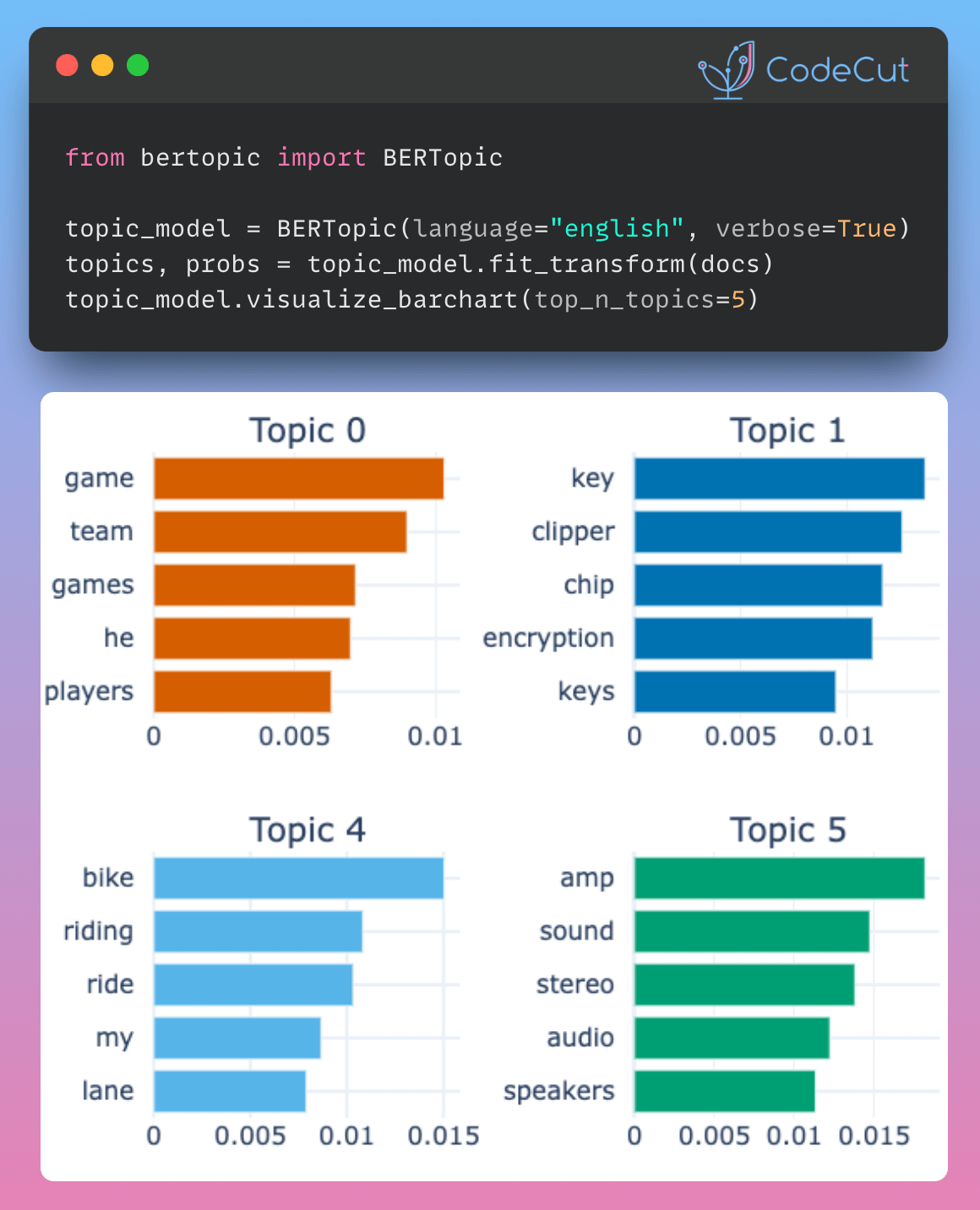
In this example, we will go through the main components of BERTopic and the steps necessary to create a strong topic model.

We start by instantiating BERTopic. We set language to english since our documents are in the English language.

from bertopic import BERTopic

topic_model = BERTopic(language="english", verbose=True)
topics, probs = topic_model.fit_transform(docs)

After fitting our model, we can start by looking at the results. Typically, we look at the most frequent topics first as they best represent the collection of documents.

freq = topic_model.get_topic_info()
freq.head(5)

TopicCountNameRepresentationRepresentative_Docs018230_game_team_games_he[game, team, games, he, players, season, hockey, nhl, league, played][“\n\n”Deeply rooted rivalry?” Ahem, Jokerit has been in the Finnish league for two seasons.\n\n\n\n\n\nThe reason why they’re…]16301_key_clipper_chip_encryption[key, clipper, chip, encryption, keys, escrow, government, secure, privacy, public][“\nI am not an expert in the cryptography science by any means.\nHowever, I have studied the Clipper chip proposal extensively\nand have some thoughts on the matter…\n\n1) The…”]25272_idjits_ites_cheek_dancing[idjits, ites, cheek, dancing, yep, consistently, considered, wrt, miller, observations][“consistently\n\n\n, \nYep.\n, \nDancing With Reality Cheek-to-Cheek to Stay Considered Consistent and On-the-Cheek\n\nSome of Miller’s keener observations (and…”]34463_israel_israeli_jews_arab[israel, israeli, jews, arab, arabs, jewish, palestine, peace, land, occupied][“\nThis a “tried and true” method utilized by the Israelis in\norder to portray anyone who is critical of Israeli policies as\nbeing anti-Semitic…”]-16789-1_to_the_is_of[to, the, is, of, and, you, for, it, in, that][“It’s like refusing ‘God’s kingdom come’.\n\nI often take positions opposite those of mainstream Christianity.\nBut not in this case.\n…”]

-1 refers to all outliers and should typically be ignored. Next, let’s take a look at a frequent topic that were generated:

topic_model.get_topic(0) # Select the most frequent topic

[('game', 0.010318688564543007),
('team', 0.008992489388365084),
('games', 0.0071658097402482355),
('he', 0.006986923839656088),
('players', 0.00631255726099582),
('season', 0.006207025740053),
('hockey', 0.006108581738112714),
('play', 0.0057638598847672895),
('25', 0.005625421684874428),
('year', 0.005577343029862753)]

Access the predicted topics for the first 10 documents:

topic_model.topics_[:10]

[0, -1, 54, 29, 92, -1, -1, 0, 0, -1]

Visualize topics:

-1 refers to all outliers and should typically be ignored. Next, let’s take a look at a frequent topic that were generated:

topic_model.get_topic(0) # Select the most frequent topic

[('game', 0.010318688564543007),
('team', 0.008992489388365084),
('games', 0.0071658097402482355),
('he', 0.006986923839656088),
('players', 0.00631255726099582),
('season', 0.006207025740053),
('hockey', 0.006108581738112714),
('play', 0.0057638598847672895),
('25', 0.005625421684874428),
('year', 0.005577343029862753)]

Access the predicted topics for the first 10 documents:

topic_model.topics_[:10]

[0, -1, 54, 29, 92, -1, -1, 0, 0, -1]

Visualize topics:

topic_model.visualize_topics()

We can visualize the selected terms for a few topics by creating bar charts out of the c-TF-IDF scores for each topic representation. Insights can be gained from the relative c-TF-IDF scores between and within topics. Moreover, you can easily compare topic representations to each other.

fig = topic_model.visualize_barchart(top_n_topics=8)
fig.show()

Link to BertTopic.

BERTopic: Harnessing BERT for Interpretable Topic Modeling Read More »

TextBlob: Processing Text in One Line of Code

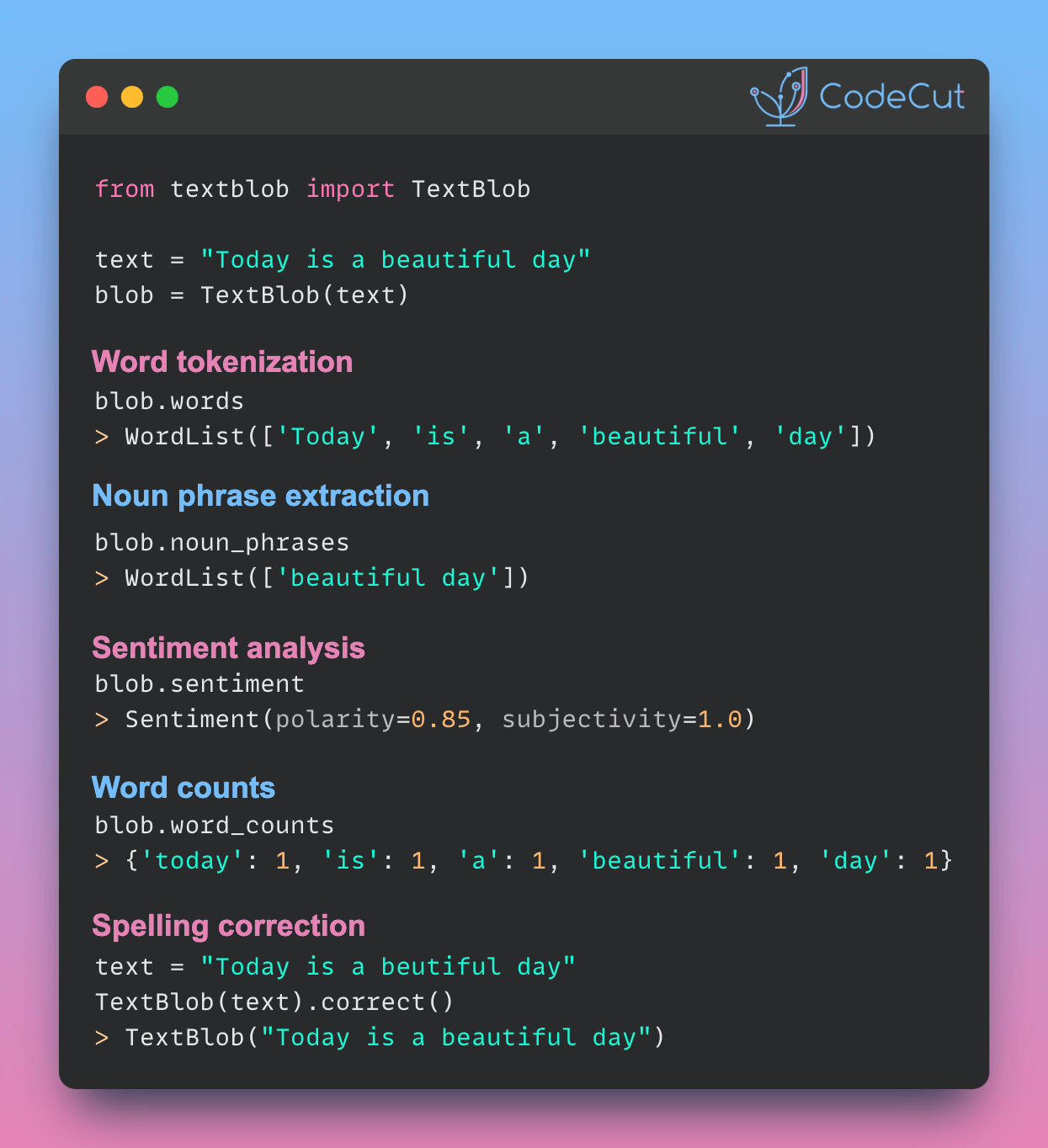
To quickly analyze text, including determining its sentiment, tokenization, noun phrase and word frequency analysis, and spelling correction, use TextBlob.

To use TextBlob, start with creating a new instance of the TextBlob class with the text “Today is a beautiful day”.

from textblob import TextBlob

text = "Today is a beautiful day"
blob = TextBlob(text)

Tokenize words:

blob.words

WordList(['Today', 'is', 'a', 'beautiful', 'day'])

Extract noun phrases:

blob.noun_phrases

WordList(['beautiful day'])

Analyze sentiment:

blob.sentiment

Sentiment(polarity=0.85, subjectivity=1.0)

Count words:

blob.word_counts

defaultdict(int, {'today': 1, 'is': 1, 'a': 1, 'beautiful': 1, 'day': 1})

Correct spelling:

text = "Today is a beutiful day"
blob = TextBlob(text)
blob.correct()

TextBlob("Today is a beautiful day")

Link to TextBlob.

Run in Google Colab.

TextBlob: Processing Text in One Line of Code Read More »

Upgini: Transform Raw Text into Enriched Numeric Features

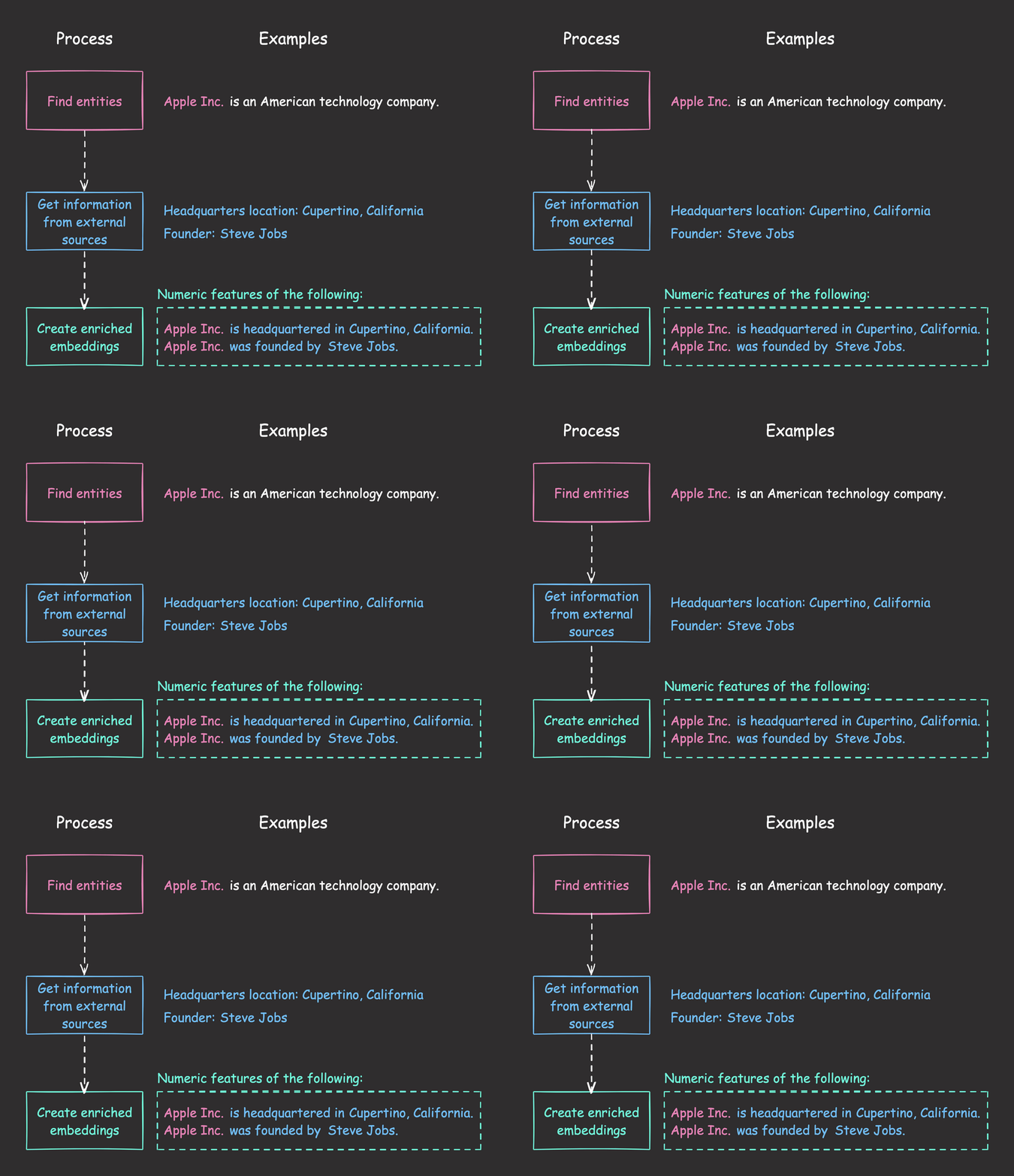
Raw text data can lack the necessary context and factual details required for robust machine learning models. 

Upgini can automatically enrich any text fields with relevant facts from external data sources and generate ready-to-use numeric features from these enriched representations.

Link to Upgini.

Upgini: Transform Raw Text into Enriched Numeric Features Read More »

Scroll to Top

Work with Khuyen Tran

Work with Khuyen Tran