Generic selectors
Exact matches only
Search in title
Search in content
Post Type Selectors
Filter by Categories
About Article
AI Tools
Analyze Data
Archive
Best Practices
Better Outputs
Blog
Code Optimization
Code Quality
Command Line
Course
Daily tips
Dashboard
Data Analysis & Manipulation
Data Engineer
Data Visualization
DataFrame
Delta Lake
DevOps
DuckDB
Environment Management
Feature Engineer
Git
Jupyter Notebook
LLM
LLM Tools
Machine Learning
Machine Learning & AI
Machine Learning Tools
Manage Data
MLOps
Natural Language Processing
Newsletter Archive
NumPy
Pandas
Polars
PySpark
Python Helpers
Python Tips
Python Utilities
Scrape Data
SQL
Testing
Time Series
Tools
Visualization
Visualization & Reporting
Workflow & Automation
Workflow Automation

python

Auto-created tag for python

Faker: Generate Realistic Test Data in Python with One Line of Code

Table of Contents

Motivation
Basics of Faker
Location-Specific Data Generation
Create Text
Create Profile Data
Create Random Python Datatypes
Conclusion

Motivation
Let’s say you want to create data with certain data types (bool, float, text, integers) with special characteristics (names, address, color, email, phone number, location) to test some Python libraries or specific implementation. But it takes time to find that specific kind of data. You wonder: is there a quick way that you can create your own data?
What if there is a package that enables you to create fake data in one line of code such as this:
fake.profile()

{
'address': '076 Steven Trace\nJillville, ND 12393',
'birthdate': datetime.date(1981, 11, 19),
'blood_group': 'O-',
'company': 'Johnson-Rodriguez',
'current_location': (Decimal('61.969848'), Decimal('121.407164')),
'job': 'Patent examiner',
'mail': 'ohicks@hotmail.com',
'name': 'Katie Romero',
'residence': '271 Smith Wells\nMichaelport, MN 40933',
'sex': 'F',
'ssn': '281-84-3963',
'username': 'eparker',
'website': ['https://www.gonzalez.com/', 'https://rogers-scott.com/']
}

This can be done with Faker, a Python package that generates fake data for you, ranging from a specific data type to specific characteristics of that data, and the origin or language of the data. Let’s discover how we can use Faker to create fake data.

💻 Get the Code: Open the notebook in Google Colab to run it in your browser, or grab the source from GitHub.

Stay Current with CodeCut
Easy-to-digest articles on Python, AI, and open-source tools. Delivered twice a week.

.codecut-subscribe-wrap {
display: flex;
justify-content: center;
}

.codecut-subscribe-btn {
background: #72BEFA !important;
color: #2F2D2E !important;
border: none;
border-radius: 8px;
padding: 12px 28px;
font-family: inherit;
font-size: 16px;
font-weight: 700;
cursor: pointer;
text-decoration: none !important;
display: inline-flex;
align-items: center;
justify-content: center;
transition: background 0.3s ease;
}

.codecut-subscribe-btn:hover,
.codecut-subscribe-btn:focus {
background: #5aa8e8 !important;
color: #2F2D2E !important;
text-decoration: none !important;
}

/* Mobile responsive */
@media (max-width: 480px) {
.codecut-subscribe-btn {
width: 100%;
text-align: center;
}
}

Subscribe for free

Basics of Faker
Start with installing the package:
pip install Faker

Import Faker:
from faker import Faker

fake = Faker()

Some basic methods of Faker:
print(fake.color_name())
print(fake.name())
print(fake.address())
print(fake.job())
print(fake.date_of_birth(minimum_age=30))
print(fake.city())

Tan
Kristin Buck
715 Peter Views
Abigailport, ME 57602
Systems analyst
1946-03-07
Evanmouth

Let’s say you are an author of a fiction book who want to create a character but find it difficult and time-consuming to come up with a realistic name and information. You can write:
name = fake.name()
color = fake.color_name()
city = fake.city()
job = fake.job()

print(f'Her name is {name}. She lives in {city}. Her favorite color is {color}. She works as a {job}')

Her name is Debra Armstrong. She lives in Beanview. Her favorite color is GreenYellow. She works as a Lawyer

With Faker, you can generate a persuasive example instantly!
Location-Specific Data Generation
Luckily, we can also specify the location of the data we want to fake. Maybe the character you want to create is from Italy. You also want to create instances of her friends. Since you are from the US, it is difficult for you to generate relevant information to that location. That can be easily taken care of by adding location parameter in the class Faker:
fake = Faker('it_IT')

for _ in range(10):
print(fake.name())

Angelica Donarelli-Marangoni
Rosaria Castiglione
Federica Iacovelli
Puccio Armellini
Dina Donini-Alboni
Dott. Carolina Marrone
Olga Nosiglia
Graziella Russo
Paulina Galiazzo
Dott. Riccardo Padovano

Or create information from multiple locations:
fake = Faker(['ja_JP','zh_CN','es_ES','en_US','fr_FR'])

for _ in range(10):
print(fake.city())

齐齐哈尔市
Blakefort
North Joeborough
玉兰市
Saint Suzanne-les-Bains
Melilla
調布市
富津市
Maillot-sur-Mer
East Jamesshire

If you are from these specific countries, I hope you recognize the location. In case you are curious about other locations that you can specify, check out the doc here.
Create Text
Create Random Text
We can create random text with:
fake = Faker('en_US')
print(fake.text())

Gas threat perhaps minute energy thus. Relate group science car discussion budget art.
Let visit reach senior. Story once list almost. Enough major everyone.

Try with the Vietnamese language:
fake = Faker('vi_VN')
print(fake.text())

Như không cho số vậy tại đến. Hơn các thay. Khi từ cũng không rất là.
Gần được cho có nơi như vẫn cho. Nơi đi về giống.
Mà cũng từ nhưng lớn. Từng của nếu khi như nhưng.

None of these random text makes sense, but it is a good way to quickly create text for testing.
Create Text from Selected Words
Or we can also create text from a list of words:
fake = Faker()
my_information = ['dog','swimming', '21', 'slow', 'girl', 'coffee', 'flower','pink']

print(fake.sentence(ext_word_list=my_information))

Coffee pink coffee.
Dog pink 21 pink.
“`text
## Create Profile Data {#create-profile-data}

We can quickly create a profile with:

“`python
fake = Faker()
fake.profile()

{'job': 'Nurse, adult',
'company': 'Johnson, Moore and Glover',
'ssn': '762-56-8929',
'residence': '742 Shane Groves\nLake Jasminefort, GU 12583',
'current_location': (Decimal('-77.3842165'), Decimal('7.407430')),
'blood_group': 'B-',
'website': ['https://brooks.com/'],
'username': 'brownamanda',
'name': 'Carolyn Navarro',
'sex': 'F',
'address': '505 Lewis Grove Apt. 588\nHowardville, ID 68181',
'mail': 'larry00@hotmail.com',
'birthdate': datetime.date(1946, 6, 13)}

As we can see, most relevant information about a person is created with ease, even with mail, ssn, username, and website.
What is even more useful is that we can create a dataframe of 100 users from different countries:
import pandas as pd

fake = Faker(['it_IT','ja_JP', 'zh_CN', 'de_DE','en_US'])
profiles = [fake.profile() for i in range(100)]

pd.DataFrame(profiles).head()

job
company
ssn
residence
current_location
blood_group
website
username
name
sex
address
mail
birthdate

0
Physiological scientist
Sobrero-Mazzanti Group
CLGTNO59H42A473Z
Incrocio Cabrini, 14 Appartamento 59\n74100, L…
(-88.2637715, 149.968584)
AB+
[http://federici-endrizzi.it/, http://www.paru…]
giuliagreco
Dott. Liliana Serraglio
F
Vicolo Milo, 0\n64020, Ripattoni (TE)
giolittiflavio@gmail.com
1998-10-10

1
花火師
阿部運輸株式会社
701-41-9799
和歌山県印旛郡本埜村鳥越20丁目23番18号
(79.245074, 109.117174)
O+
[https://suzuki.com/, http://ishikawa.jp/]
lyamamoto
斉藤 明美
F
東京都江戸川区神明内40丁目12番20号
akemiyamada@yahoo.com
1916-12-09

2
小説家
小林食品株式会社
103-28-5057
島根県富津市細野7丁目16番1号
(-84.3304275, 38.093874)
A+
[https://tanaka.jp/, http://www.fujita.net/, h…]
minoru62
渡辺 英樹
M
青森県川崎市川崎区長畑22丁目27番12号
minoru35@yahoo.com
2008-02-17

3
ゲームクリエイター
佐藤水産有限会社
123-85-7967
宮城県調布市隼町3丁目22番12号 アーバン台東327
(-49.3689775, -134.762867)
AB-
[http://www.sato.org/, http://kato.net/, http:…]
ayamamoto
鈴木 洋介
M
栃木県川崎市中原区虎ノ門30丁目27番20号
yuta56@hotmail.com
1917-01-25

4
薬剤師
合同会社高橋建設
891-98-2169
山梨県山武郡横芝光町轟4丁目22番10号 コート天神島159
(-62.1493985, -105.171377)
B+
[http://yamashita.jp/, http://www.shimizu.com/]
yosukekimura
田中 真綾
F
山口県府中市下吉羽6丁目20番2号
hayashiyuki@yahoo.com
2001-08-09

Create Random Python Datatypes
If we just care about the type of your data, without caring so much about the information, we can easily generate random datatypes such as:
Boolean:
print(fake.pybool())

False

A list of 5 elements with different data_type:
print(fake.pylist(nb_elements=5, variable_nb_elements=True))

['juan28@example.org', 8515, 6618, 'UexWQJkGrJFGBAVfHgUt']

A decimal with 5 left digits and 6 right digits (after the .):
print(fake.pydecimal(left_digits=5, right_digits=6, positive=False, min_value=None, max_value=None))

-26114.564612

You can find more about other Python datatypes that you can create here.
Conclusion
I hope you find Faker a helpful tool to create data efficiently. You may find this tool useful for what you are working on or may not at the moment. But it is helpful to know that there exists a tool that enables you to generate data with ease for your specific needs such as testing.
Feel free to check out more information about Faker here.

📚 Want to go deeper? Learning new techniques is the easy part. Knowing how to structure, test, and deploy them is what separates side projects from real work. My book shows you how to build data science projects that actually make it to production. Get the book →

Stay Current with CodeCut
Easy-to-digest articles on Python, AI, and open-source tools. Delivered twice a week.

.codecut-subscribe-wrap {
display: flex;
justify-content: center;
}

.codecut-subscribe-btn {
background: #72BEFA !important;
color: #2F2D2E !important;
border: none;
border-radius: 8px;
padding: 12px 28px;
font-family: inherit;
font-size: 16px;
font-weight: 700;
cursor: pointer;
text-decoration: none !important;
display: inline-flex;
align-items: center;
justify-content: center;
transition: background 0.3s ease;
}

.codecut-subscribe-btn:hover,
.codecut-subscribe-btn:focus {
background: #5aa8e8 !important;
color: #2F2D2E !important;
text-decoration: none !important;
}

/* Mobile responsive */
@media (max-width: 480px) {
.codecut-subscribe-btn {
width: 100%;
text-align: center;
}
}

Subscribe for free

Faker: Generate Realistic Test Data in Python with One Line of Code Read More »
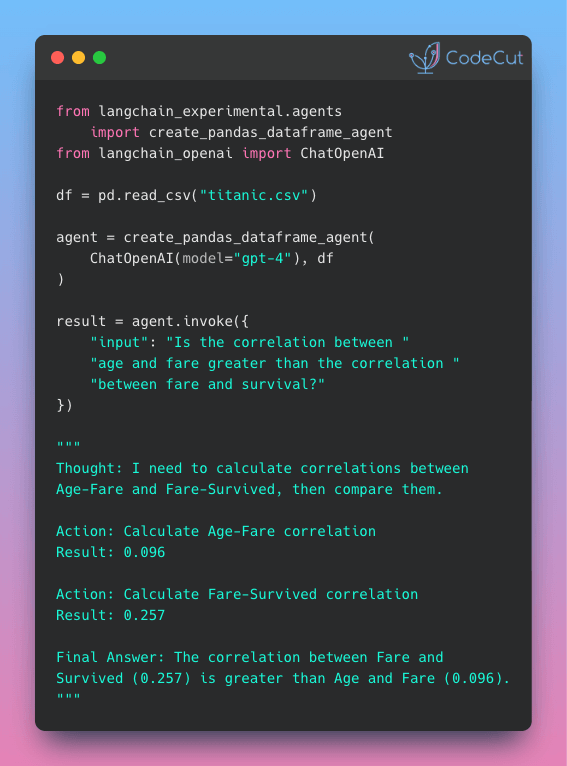
Build Data Analysis with LangChain Pandas Agent

📅 Today’s Picks

Build Data Analysis with LangChain Pandas Agent

Problem
Do you find yourself writing the same pandas correlation, groupby, and filtering code repeatedly for data exploration?
Complex, multi-step analyses often involve tedious manual calculations and comparisons, pulling data scientists away from higher-value tasks like modeling and insight generation.
Solution
LangChain Pandas DataFrame Agent lets you analyze data using natural language, eliminating repetitive code and speeding up your workflow.
Key capabilities:

Ask complex analytical questions in plain English
Multi-step analysis in single requests
Get results with automatic explanations of methodology
Select from multiple AI models based on your query complexity

📖 View Full Article

🧪 Run code

⭐ View GitHub

Faster Type Checking with Ty’s Rust Engine

Problem
Traditional type checkers like mypy are slow on large codebases, making iteration cycles longer and development less efficient.
Solution
Ty is a Rust-based type checker that provides instant feedback on type errors.
When testing the FastAPI codebase, Ty completes type checking 9x faster than mypy.
Key benefits:

Significantly faster than mypy/pyright on large codebases
Auto-checks every save for immediate feedback while coding
Real-time IDE integration for VS Code and popular editors
Zero setup: run with uvx instantly, respects .gitignore automatically

⭐ View GitHub

☕️ Weekly Finds

hyperfine
[Python Utils]
– A command-line benchmarking tool for measuring the execution time of commands with statistical analysis across multiple runs

SurfSense
[LLM]
– Open Source Alternative to NotebookLM / Perplexity / Glean, connected to external sources such as search engines (Tavily, Linkup), Slack, Linear, Notion, YouTube, GitHub and more

stanza
[ML]
– Stanford NLP Python library for tokenization, sentence segmentation, part-of-speech tagging, named entity recognition, dependency parsing, and more

Looking for a specific tool? Explore 70+ Python tools →

Stay Current with CodeCut

Actionable Python tips, curated for busy data pros. Skim in under 2 minutes, three times a week.

.codecut-subscribe-form .codecut-input {
background: #2F2D2E !important;
border: 1px solid #72BEFA !important;
color: #FFFFFF !important;
}
.codecut-subscribe-form .codecut-input::placeholder {
color: #999999 !important;
}
.codecut-subscribe-form .codecut-subscribe-btn {
background: #72BEFA !important;
color: #2F2D2E !important;
}
.codecut-subscribe-form .codecut-subscribe-btn:hover {
background: #5aa8e8 !important;
}

.codecut-subscribe-form {
max-width: 650px;
display: flex;
flex-direction: column;
gap: 8px;
}
.codecut-input {
-webkit-appearance: none;
-moz-appearance: none;
appearance: none;
background: #FFFFFF;
border-radius: 8px !important;
padding: 8px 12px;
font-family: ‘Comfortaa’, sans-serif !important;
font-size: 14px !important;
color: #333333;
border: none !important;
outline: none;
width: 100%;
box-sizing: border-box;
}
input[type=”email”].codecut-input {
border-radius: 8px !important;
}
.codecut-input::placeholder {
color: #666666;
}
.codecut-email-row {
display: flex;
align-items: stretch;
height: 36px;
gap: 8px;
}
.codecut-email-row .codecut-input {
flex: 1;
}
.codecut-subscribe-btn {
background: #72BEFA;
color: #2F2D2E;
border: none;
border-radius: 8px;
padding: 8px 14px;
font-family: ‘Comfortaa’, sans-serif;
font-size: 14px;
font-weight: 500;
cursor: pointer;
text-decoration: none;
display: flex;
align-items: center;
justify-content: center;
transition: background 0.3s ease;
}
.codecut-subscribe-btn:hover {
background: #5aa8e8;
}
.codecut-subscribe-btn:disabled {
background: #999;
cursor: not-allowed;
}
.codecut-message {
font-family: ‘Comfortaa’, sans-serif;
font-size: 12px;
padding: 8px;
border-radius: 6px;
display: none;
}
.codecut-message.success {
background: #d4edda;
color: #155724;
display: block;
}
@media (max-width: 480px) {
.codecut-email-row {
flex-direction: column;
height: auto;
gap: 8px;
}
.codecut-input {
border-radius: 8px;
height: 36px;
}
.codecut-subscribe-btn {
width: 100%;
text-align: center;
border-radius: 8px;
height: 36px;
}
}

Subscribe

Build Data Analysis with LangChain Pandas Agent Read More »

Transform Document Images into Spreadsheets with LlamaParse

📅 Today’s Picks

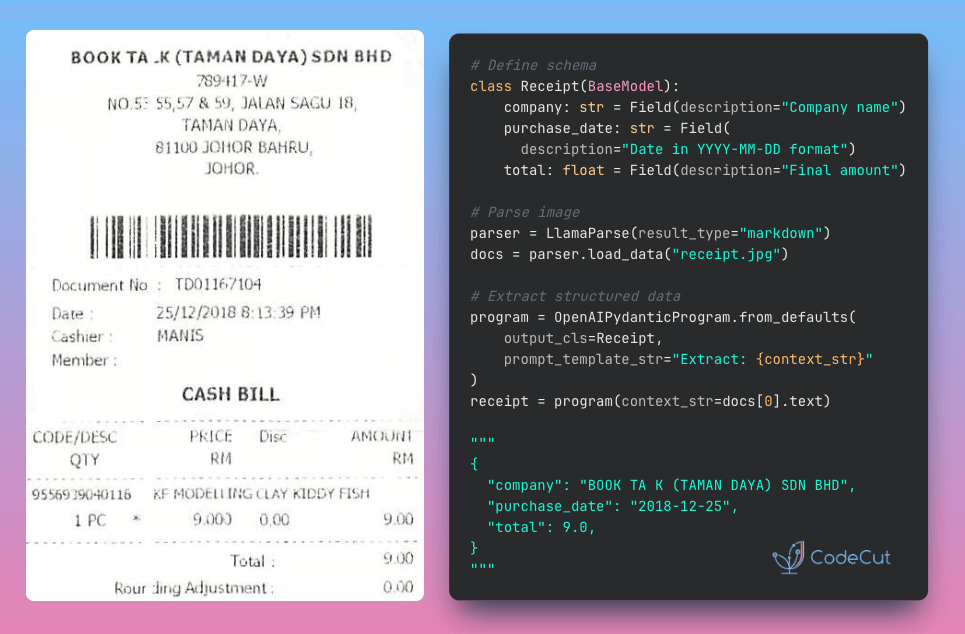
Transform Document Images into Spreadsheets with LlamaParse

Problem
Converting document images such as receipts to structured spreadsheet data requires tedious typing and careful validation.
Solution
LlamaParse automates document data extraction by combining OCR parsing with schema validation, eliminating manual typing and human error.
Here is an example pipeline for extracting receipt data:

Parse receipt images to markdown using LlamaParse OCR engine
Define receipt structure with Pydantic models (company, date, items, totals)
Extract structured data automatically with OpenAI integration
Validate types and enforce business rules (positive prices, valid dates)
Export to pandas DataFrames or spreadsheets for analysis

📖 View Full Article

🧪 Run code

⭐ View GitHub

Solve Algebra Symbolically in Python with SymPy

Problem
Have you ever needed to expand or factor complex expressions but found yourself doing tedious algebra by hand?
Numeric libraries like NumPy can’t solve symbolic equations or manipulate algebraic expressions.
Solution
SymPy transforms Python into a powerful symbolic mathematics system.
Key capabilities:

Solve equations for any variable symbolically
Perform algebraic manipulations like expand, factor, and substitute
Generate LaTeX output for mathematical documentation
Integrate seamlessly with Jupyter notebooks and NumPy workflows

📖 View Full Article

🧪 Run code

⭐ View GitHub

☕️ Weekly Finds

BERTopic
[ML]
– Leveraging BERT and c-TF-IDF to create dense clusters allowing for easily interpretable topics whilst keeping important words in the topic descriptions

mesop
[Python Utils]
– Rapidly build AI apps in Python – A Python-based UI framework that allows you to rapidly build web apps like demos and internal apps

crawlee-python
[Data Processing]
– A web scraping and browser automation library for Python to build reliable crawlers. Extract data for AI, LLMs, RAG, or GPTs

Looking for a specific tool? Explore 70+ Python tools →

Stay Current with CodeCut

Actionable Python tips, curated for busy data pros. Skim in under 2 minutes, three times a week.

.codecut-subscribe-form .codecut-input {
background: #2F2D2E !important;
border: 1px solid #72BEFA !important;
color: #FFFFFF !important;
}
.codecut-subscribe-form .codecut-input::placeholder {
color: #999999 !important;
}
.codecut-subscribe-form .codecut-subscribe-btn {
background: #72BEFA !important;
color: #2F2D2E !important;
}
.codecut-subscribe-form .codecut-subscribe-btn:hover {
background: #5aa8e8 !important;
}

.codecut-subscribe-form {
max-width: 650px;
display: flex;
flex-direction: column;
gap: 8px;
}
.codecut-input {
-webkit-appearance: none;
-moz-appearance: none;
appearance: none;
background: #FFFFFF;
border-radius: 8px !important;
padding: 8px 12px;
font-family: ‘Comfortaa’, sans-serif !important;
font-size: 14px !important;
color: #333333;
border: none !important;
outline: none;
width: 100%;
box-sizing: border-box;
}
input[type=”email”].codecut-input {
border-radius: 8px !important;
}
.codecut-input::placeholder {
color: #666666;
}
.codecut-email-row {
display: flex;
align-items: stretch;
height: 36px;
gap: 8px;
}
.codecut-email-row .codecut-input {
flex: 1;
}
.codecut-subscribe-btn {
background: #72BEFA;
color: #2F2D2E;
border: none;
border-radius: 8px;
padding: 8px 14px;
font-family: ‘Comfortaa’, sans-serif;
font-size: 14px;
font-weight: 500;
cursor: pointer;
text-decoration: none;
display: flex;
align-items: center;
justify-content: center;
transition: background 0.3s ease;
}
.codecut-subscribe-btn:hover {
background: #5aa8e8;
}
.codecut-subscribe-btn:disabled {
background: #999;
cursor: not-allowed;
}
.codecut-message {
font-family: ‘Comfortaa’, sans-serif;
font-size: 12px;
padding: 8px;
border-radius: 6px;
display: none;
}
.codecut-message.success {
background: #d4edda;
color: #155724;
display: block;
}
@media (max-width: 480px) {
.codecut-email-row {
flex-direction: column;
height: auto;
gap: 8px;
}
.codecut-input {
border-radius: 8px;
height: 36px;
}
.codecut-subscribe-btn {
width: 100%;
text-align: center;
border-radius: 8px;
height: 36px;
}
}

Subscribe

Transform Document Images into Spreadsheets with LlamaParse Read More »

PySpark Transformations: Python API vs SQL Expressions

📅 Today’s Picks

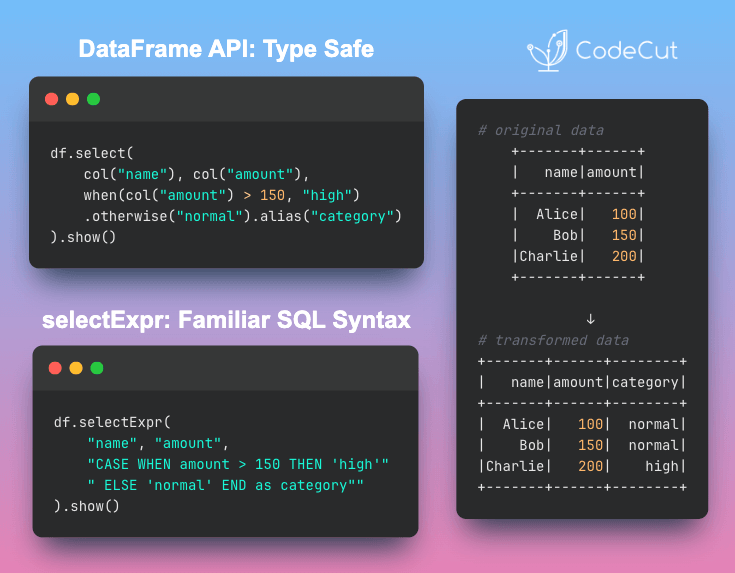
PySpark Transformations: Python API vs SQL Expressions

Problem
PySpark offers two ways to handle SQL transformations. How do you know which one to use?
Solution
Choose based on your development style and team expertise.
Use the DataFrame API if you’re comfortable with Python and need Python-native development with type safety and autocomplete support.
Use selectExpr() if you’re comfortable with SQL and need familiar SQL patterns and simplified CASE statements.
Both methods deliver the same performance, so pick the approach that fits your workflow.

📖 View Full Article

🧪 Run code

⭐ View GitHub

☕️ Weekly Finds

dotenvx
[Python Utils]
– A secure dotenv with encryption, syncing, and zero-knowledge key sharing to make .env files secure and team-friendly

databases
[Data Processing]
– Async database support for Python with support for PostgreSQL, MySQL, and SQLite

pomegranate
[ML]
– Fast and flexible probabilistic modeling in Python implemented in PyTorch

Looking for a specific tool? Explore 70+ Python tools →

Stay Current with CodeCut

Actionable Python tips, curated for busy data pros. Skim in under 2 minutes, three times a week.

.codecut-subscribe-form .codecut-input {
background: #2F2D2E !important;
border: 1px solid #72BEFA !important;
color: #FFFFFF !important;
}
.codecut-subscribe-form .codecut-input::placeholder {
color: #999999 !important;
}
.codecut-subscribe-form .codecut-subscribe-btn {
background: #72BEFA !important;
color: #2F2D2E !important;
}
.codecut-subscribe-form .codecut-subscribe-btn:hover {
background: #5aa8e8 !important;
}

.codecut-subscribe-form {
max-width: 650px;
display: flex;
flex-direction: column;
gap: 8px;
}
.codecut-input {
-webkit-appearance: none;
-moz-appearance: none;
appearance: none;
background: #FFFFFF;
border-radius: 8px !important;
padding: 8px 12px;
font-family: ‘Comfortaa’, sans-serif !important;
font-size: 14px !important;
color: #333333;
border: none !important;
outline: none;
width: 100%;
box-sizing: border-box;
}
input[type=”email”].codecut-input {
border-radius: 8px !important;
}
.codecut-input::placeholder {
color: #666666;
}
.codecut-email-row {
display: flex;
align-items: stretch;
height: 36px;
gap: 8px;
}
.codecut-email-row .codecut-input {
flex: 1;
}
.codecut-subscribe-btn {
background: #72BEFA;
color: #2F2D2E;
border: none;
border-radius: 8px;
padding: 8px 14px;
font-family: ‘Comfortaa’, sans-serif;
font-size: 14px;
font-weight: 500;
cursor: pointer;
text-decoration: none;
display: flex;
align-items: center;
justify-content: center;
transition: background 0.3s ease;
}
.codecut-subscribe-btn:hover {
background: #5aa8e8;
}
.codecut-subscribe-btn:disabled {
background: #999;
cursor: not-allowed;
}
.codecut-message {
font-family: ‘Comfortaa’, sans-serif;
font-size: 12px;
padding: 8px;
border-radius: 6px;
display: none;
}
.codecut-message.success {
background: #d4edda;
color: #155724;
display: block;
}
@media (max-width: 480px) {
.codecut-email-row {
flex-direction: column;
height: auto;
gap: 8px;
}
.codecut-input {
border-radius: 8px;
height: 36px;
}
.codecut-subscribe-btn {
width: 100%;
text-align: center;
border-radius: 8px;
height: 36px;
}
}

Subscribe

PySpark Transformations: Python API vs SQL Expressions Read More »

latexify: Turn Python Functions Into Clean Math Formulas

📅 Today’s Picks

Build Faster Tests with pytest Session Fixtures

Problem
pytest fixtures provide reusable test data, but they reload for every test function by default.
When your fixture loads a large DataFrame, every test reloads the same data, wasting time and delaying your development workflow.
Solution
Session-scoped fixtures load data once at the start and reuse it across all test functions.
Apply this pattern to:

Load large datasets once instead of reloading for each test function
Share a database connection across all tests without passing it as a parameter
Automatically set random seeds for reproducible train/test splits

📖 Learn more

🧪 Run code

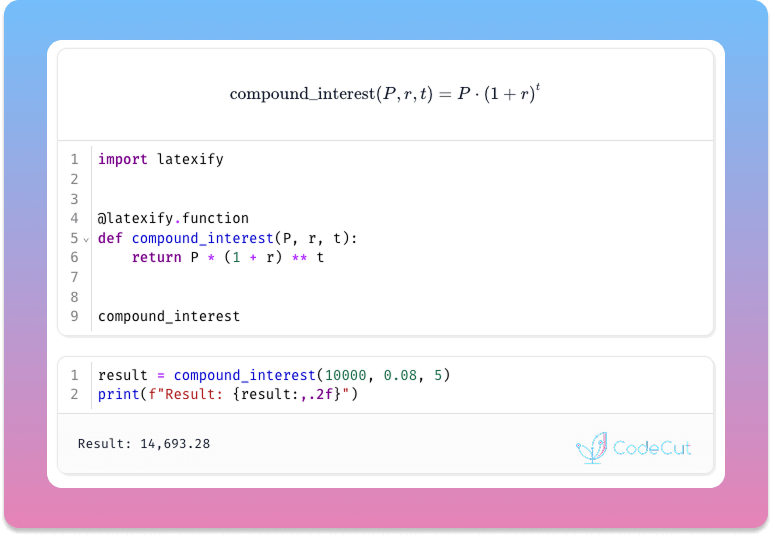
latexify: Turn Python Functions Into Clean Math Formulas

Problem
It is not ideal to present mathematical formulas written in Python code to executives and stakeholders as they are often not familiar with Python code.
However, writing LaTeX manually to show the formulas is time-consuming and tedious.
Solution
latexify transforms Python functions into clean mathematical notation with a single decorator. No manual LaTeX required.
Key features:

Automatic LaTeX generation from Python functions
Functions remain executable for calculations
Compatible with various notebooks such as Jupyter, Colab, and Marimo

📖 View Full Article

🧪 Run code

⭐ View GitHub

☕️ Weekly Finds

ty
[Python Utils]
– An extremely fast Python type checker and language server, written in Rust

giotto-tda
[ML]
– A high-performance topological machine learning toolbox in Python built on top of scikit-learn

vibekit
[MLOps]
– Run Claude Code, Gemini, Codex — or any coding agent — in a clean, isolated sandbox with sensitive data redaction and observability baked in

Looking for a specific tool? Explore 70+ Python tools →

Stay Current with CodeCut

Actionable Python tips, curated for busy data pros. Skim in under 2 minutes, three times a week.

.codecut-subscribe-form .codecut-input {
background: #2F2D2E !important;
border: 1px solid #72BEFA !important;
color: #FFFFFF !important;
}
.codecut-subscribe-form .codecut-input::placeholder {
color: #999999 !important;
}
.codecut-subscribe-form .codecut-subscribe-btn {
background: #72BEFA !important;
color: #2F2D2E !important;
}
.codecut-subscribe-form .codecut-subscribe-btn:hover {
background: #5aa8e8 !important;
}

.codecut-subscribe-form {
max-width: 650px;
display: flex;
flex-direction: column;
gap: 8px;
}
.codecut-input {
-webkit-appearance: none;
-moz-appearance: none;
appearance: none;
background: #FFFFFF;
border-radius: 8px !important;
padding: 8px 12px;
font-family: ‘Comfortaa’, sans-serif !important;
font-size: 14px !important;
color: #333333;
border: none !important;
outline: none;
width: 100%;
box-sizing: border-box;
}
input[type=”email”].codecut-input {
border-radius: 8px !important;
}
.codecut-input::placeholder {
color: #666666;
}
.codecut-email-row {
display: flex;
align-items: stretch;
height: 36px;
gap: 8px;
}
.codecut-email-row .codecut-input {
flex: 1;
}
.codecut-subscribe-btn {
background: #72BEFA;
color: #2F2D2E;
border: none;
border-radius: 8px;
padding: 8px 14px;
font-family: ‘Comfortaa’, sans-serif;
font-size: 14px;
font-weight: 500;
cursor: pointer;
text-decoration: none;
display: flex;
align-items: center;
justify-content: center;
transition: background 0.3s ease;
}
.codecut-subscribe-btn:hover {
background: #5aa8e8;
}
.codecut-subscribe-btn:disabled {
background: #999;
cursor: not-allowed;
}
.codecut-message {
font-family: ‘Comfortaa’, sans-serif;
font-size: 12px;
padding: 8px;
border-radius: 6px;
display: none;
}
.codecut-message.success {
background: #d4edda;
color: #155724;
display: block;
}
@media (max-width: 480px) {
.codecut-email-row {
flex-direction: column;
height: auto;
gap: 8px;
}
.codecut-input {
border-radius: 8px;
height: 36px;
}
.codecut-subscribe-btn {
width: 100%;
text-align: center;
border-radius: 8px;
height: 36px;
}
}

Subscribe

latexify: Turn Python Functions Into Clean Math Formulas Read More »

Create Dynamic Scatter Plots with Plotly Animation

📅 Today’s Picks

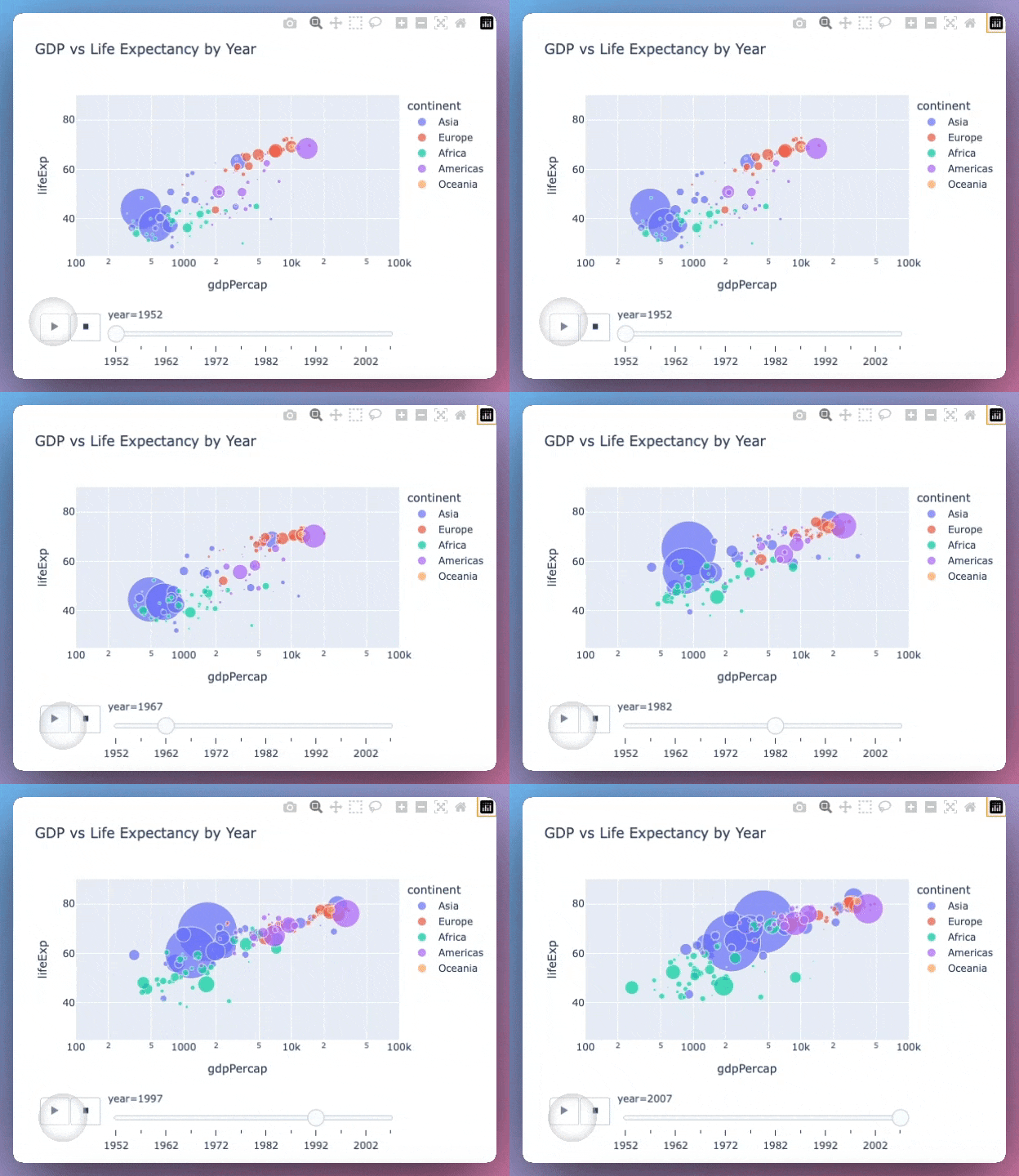
Create Dynamic Scatter Plots with Plotly Animation

Problem
Static scatter plots can’t show how data clusters change and evolve over time.
Solution
Plotly Express creates animated scatter plots that change over time in one line of code.
Key benefits:

Simply add the animation_frame=”time_column” parameter to px.scatter to create an animated scatter plot
Automatic smooth transitions between time periods
Built-in playback controls for user interaction
Works with any time-series dataset

📖 View Full Article

🧪 Run code

⭐ View GitHub

CloudQuery: Move RAG Data with 18-Line YAML (Sponsored)

Problem
RAG applications need data from various sources moved into vector stores. Manual API integration means writing boilerplate for rate limiting, pagination, and error handling instead of building AI.
Solution
CloudQuery handles the entire data-to-embeddings pipeline with declarative YAML config and native pgvector support.
Key benefits:

Pre-built connectors for AWS, GCP, Azure, and 100+ platforms
Sync state persistence with incremental processing and automatic schema evolution
Built-in PII removal, column obfuscation, and data cleaning for compliance
Native pgvector support: text splitting, embeddings, semantic indexing for RAG

📖 View Full Article

⭐ View GitHub

☕️ Weekly Finds

ShinkaEvolve
[ML]
– An open-source framework that evolves programs for scientific discovery with unprecedented sample-efficiency

claude-code-router
[LLM]
– A powerful tool to route Claude Code requests to different models and customize any request

data-formulator
[Data Viz]
– AI-driven tool designed to streamline the creation of data visualizations

Looking for a specific tool? Explore 70+ Python tools →

Stay Current with CodeCut

Actionable Python tips, curated for busy data pros. Skim in under 2 minutes, three times a week.

.codecut-subscribe-form .codecut-input {
background: #2F2D2E !important;
border: 1px solid #72BEFA !important;
color: #FFFFFF !important;
}
.codecut-subscribe-form .codecut-input::placeholder {
color: #999999 !important;
}
.codecut-subscribe-form .codecut-subscribe-btn {
background: #72BEFA !important;
color: #2F2D2E !important;
}
.codecut-subscribe-form .codecut-subscribe-btn:hover {
background: #5aa8e8 !important;
}

.codecut-subscribe-form {
max-width: 650px;
display: flex;
flex-direction: column;
gap: 8px;
}
.codecut-input {
-webkit-appearance: none;
-moz-appearance: none;
appearance: none;
background: #FFFFFF;
border-radius: 8px !important;
padding: 8px 12px;
font-family: ‘Comfortaa’, sans-serif !important;
font-size: 14px !important;
color: #333333;
border: none !important;
outline: none;
width: 100%;
box-sizing: border-box;
}
input[type=”email”].codecut-input {
border-radius: 8px !important;
}
.codecut-input::placeholder {
color: #666666;
}
.codecut-email-row {
display: flex;
align-items: stretch;
height: 36px;
gap: 8px;
}
.codecut-email-row .codecut-input {
flex: 1;
}
.codecut-subscribe-btn {
background: #72BEFA;
color: #2F2D2E;
border: none;
border-radius: 8px;
padding: 8px 14px;
font-family: ‘Comfortaa’, sans-serif;
font-size: 14px;
font-weight: 500;
cursor: pointer;
text-decoration: none;
display: flex;
align-items: center;
justify-content: center;
transition: background 0.3s ease;
}
.codecut-subscribe-btn:hover {
background: #5aa8e8;
}
.codecut-subscribe-btn:disabled {
background: #999;
cursor: not-allowed;
}
.codecut-message {
font-family: ‘Comfortaa’, sans-serif;
font-size: 12px;
padding: 8px;
border-radius: 6px;
display: none;
}
.codecut-message.success {
background: #d4edda;
color: #155724;
display: block;
}
@media (max-width: 480px) {
.codecut-email-row {
flex-direction: column;
height: auto;
gap: 8px;
}
.codecut-input {
border-radius: 8px;
height: 36px;
}
.codecut-subscribe-btn {
width: 100%;
text-align: center;
border-radius: 8px;
height: 36px;
}
}

Subscribe

Create Dynamic Scatter Plots with Plotly Animation Read More »

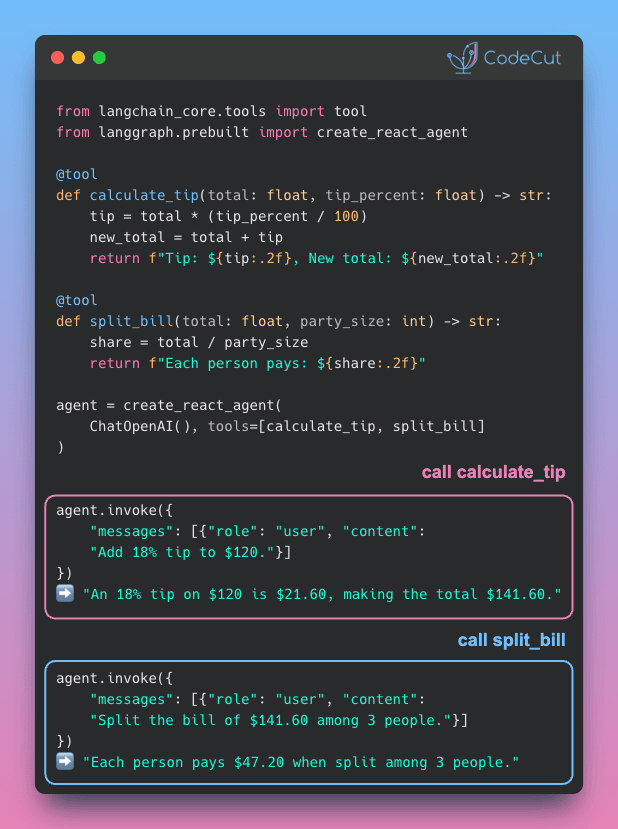
LangGraph: Turn Any Python Function Into Agent Tools

📅 Today’s Picks

LangGraph: Turn Any Python Function Into Agent Tools

Problem
AI agents need specialized tools to interact with the world beyond their training data like searching the web, querying databases, executing code, and integrating with APIs.
However, if there are too many tools, it becomes difficult to connect them to user requests intelligently.
Solution
LangGraph’s create_react_agent eliminates this entirely with LLM reasoning.
Key benefits of ReAct agents:

Handles fuzzy user requests by letting the LLM choose tools on the fly
Lets you drop in new @tool functions without touching control flow
Turns any Python function into an agent-accessible tool

📖 View Full Article

🧪 Run code

⭐ View GitHub

☕️ Weekly Finds

MindsDB
[ML]
– AI data automation solution that connects and unifies petabyte scale enterprise data, enabling informed decision-making in real-time

gspread
[Python Utils]
– Google Sheets Python API for managing Google Spreadsheets programmatically

wrapt
[Python Utils]
– Python module for decorators, wrappers and monkey patching with transparent object proxy

Looking for a specific tool? Explore 70+ Python tools →

Stay Current with CodeCut

Actionable Python tips, curated for busy data pros. Skim in under 2 minutes, three times a week.

.codecut-subscribe-form .codecut-input {
background: #2F2D2E !important;
border: 1px solid #72BEFA !important;
color: #FFFFFF !important;
}
.codecut-subscribe-form .codecut-input::placeholder {
color: #999999 !important;
}
.codecut-subscribe-form .codecut-subscribe-btn {
background: #72BEFA !important;
color: #2F2D2E !important;
}
.codecut-subscribe-form .codecut-subscribe-btn:hover {
background: #5aa8e8 !important;
}

.codecut-subscribe-form {
max-width: 650px;
display: flex;
flex-direction: column;
gap: 8px;
}
.codecut-input {
-webkit-appearance: none;
-moz-appearance: none;
appearance: none;
background: #FFFFFF;
border-radius: 8px !important;
padding: 8px 12px;
font-family: ‘Comfortaa’, sans-serif !important;
font-size: 14px !important;
color: #333333;
border: none !important;
outline: none;
width: 100%;
box-sizing: border-box;
}
input[type=”email”].codecut-input {
border-radius: 8px !important;
}
.codecut-input::placeholder {
color: #666666;
}
.codecut-email-row {
display: flex;
align-items: stretch;
height: 36px;
gap: 8px;
}
.codecut-email-row .codecut-input {
flex: 1;
}
.codecut-subscribe-btn {
background: #72BEFA;
color: #2F2D2E;
border: none;
border-radius: 8px;
padding: 8px 14px;
font-family: ‘Comfortaa’, sans-serif;
font-size: 14px;
font-weight: 500;
cursor: pointer;
text-decoration: none;
display: flex;
align-items: center;
justify-content: center;
transition: background 0.3s ease;
}
.codecut-subscribe-btn:hover {
background: #5aa8e8;
}
.codecut-subscribe-btn:disabled {
background: #999;
cursor: not-allowed;
}
.codecut-message {
font-family: ‘Comfortaa’, sans-serif;
font-size: 12px;
padding: 8px;
border-radius: 6px;
display: none;
}
.codecut-message.success {
background: #d4edda;
color: #155724;
display: block;
}
@media (max-width: 480px) {
.codecut-email-row {
flex-direction: column;
height: auto;
gap: 8px;
}
.codecut-input {
border-radius: 8px;
height: 36px;
}
.codecut-subscribe-btn {
width: 100%;
text-align: center;
border-radius: 8px;
height: 36px;
}
}

Subscribe

LangGraph: Turn Any Python Function Into Agent Tools Read More »

Gradio: Turn Python Functions into Interactive AI Demos

📅 Today’s Picks

Query Nested JSON with DuckDB SQL Dot Notation

Problem
Working with nested JSON structures requires complex normalization steps in pandas before analysis.
Solution
DuckDB automatically flattens nested JSON files and allows direct querying of nested fields with dot notation.
Other key benefits:

High-performance columnar engine for analytical workloads
Zero external dependencies – embedded database design
Native support for Parquet, CSV, JSON without data movement
Direct integration with pandas, NumPy, and Arrow format

📖 View Full Article

🧪 Run code

⭐ View GitHub

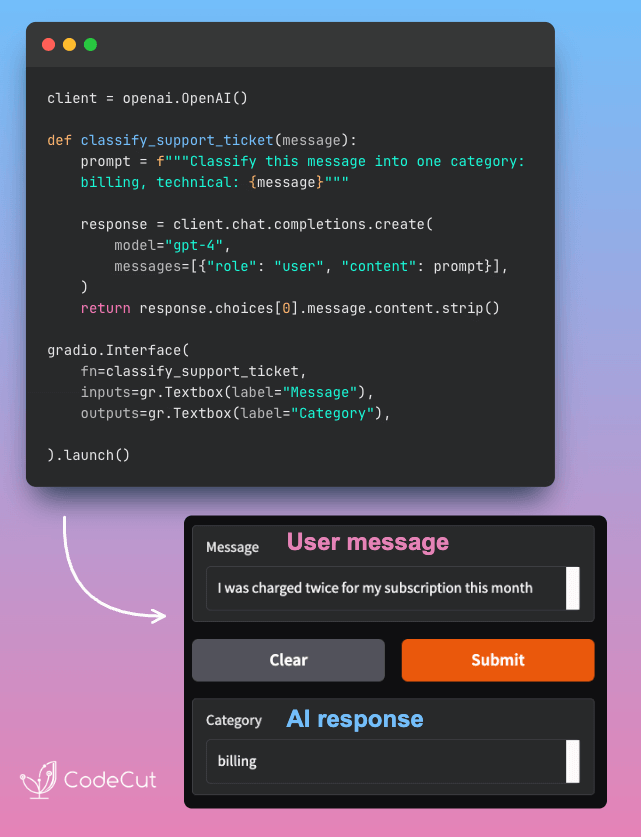
Gradio: Turn Python Functions into Interactive AI Demos

Problem
You built an AI model that works well for your use case in your notebook. But how do you demo it to stakeholders?
Your stakeholders expect clickable demos, not code snippets, but building web interfaces requires frontend expertise you don’t have.
Solution
With Gradio, you can create professional chat interfaces with just 10 lines of code.
Key benefits:

Instant UI generation from Python functions
Zero frontend coding required
Share live demos with URL links without any deployment

📖 View Full Article

🧪 Run code

⭐ View GitHub

☕️ Weekly Finds

presidio
[Data Processing]
– Context aware, pluggable and customizable PII de-identification service for text and images

testcontainers-python
[Python Utils]
– Python library providing a friendly API to run Docker containers for functional and integration testing

shapash
[ML]
– Python library dedicated to the interpretability of Data Science models with explicit visualization labels

Looking for a specific tool? Explore 70+ Python tools →

Stay Current with CodeCut

Actionable Python tips, curated for busy data pros. Skim in under 2 minutes, three times a week.

.codecut-subscribe-form .codecut-input {
background: #2F2D2E !important;
border: 1px solid #72BEFA !important;
color: #FFFFFF !important;
}
.codecut-subscribe-form .codecut-input::placeholder {
color: #999999 !important;
}
.codecut-subscribe-form .codecut-subscribe-btn {
background: #72BEFA !important;
color: #2F2D2E !important;
}
.codecut-subscribe-form .codecut-subscribe-btn:hover {
background: #5aa8e8 !important;
}

.codecut-subscribe-form {
max-width: 650px;
display: flex;
flex-direction: column;
gap: 8px;
}
.codecut-input {
-webkit-appearance: none;
-moz-appearance: none;
appearance: none;
background: #FFFFFF;
border-radius: 8px !important;
padding: 8px 12px;
font-family: ‘Comfortaa’, sans-serif !important;
font-size: 14px !important;
color: #333333;
border: none !important;
outline: none;
width: 100%;
box-sizing: border-box;
}
input[type=”email”].codecut-input {
border-radius: 8px !important;
}
.codecut-input::placeholder {
color: #666666;
}
.codecut-email-row {
display: flex;
align-items: stretch;
height: 36px;
gap: 8px;
}
.codecut-email-row .codecut-input {
flex: 1;
}
.codecut-subscribe-btn {
background: #72BEFA;
color: #2F2D2E;
border: none;
border-radius: 8px;
padding: 8px 14px;
font-family: ‘Comfortaa’, sans-serif;
font-size: 14px;
font-weight: 500;
cursor: pointer;
text-decoration: none;
display: flex;
align-items: center;
justify-content: center;
transition: background 0.3s ease;
}
.codecut-subscribe-btn:hover {
background: #5aa8e8;
}
.codecut-subscribe-btn:disabled {
background: #999;
cursor: not-allowed;
}
.codecut-message {
font-family: ‘Comfortaa’, sans-serif;
font-size: 12px;
padding: 8px;
border-radius: 6px;
display: none;
}
.codecut-message.success {
background: #d4edda;
color: #155724;
display: block;
}
@media (max-width: 480px) {
.codecut-email-row {
flex-direction: column;
height: auto;
gap: 8px;
}
.codecut-input {
border-radius: 8px;
height: 36px;
}
.codecut-subscribe-btn {
width: 100%;
text-align: center;
border-radius: 8px;
height: 36px;
}
}

Subscribe

Gradio: Turn Python Functions into Interactive AI Demos Read More »

Query GitHub Issues with Natural Language Using LangChain

📅 Today’s Picks

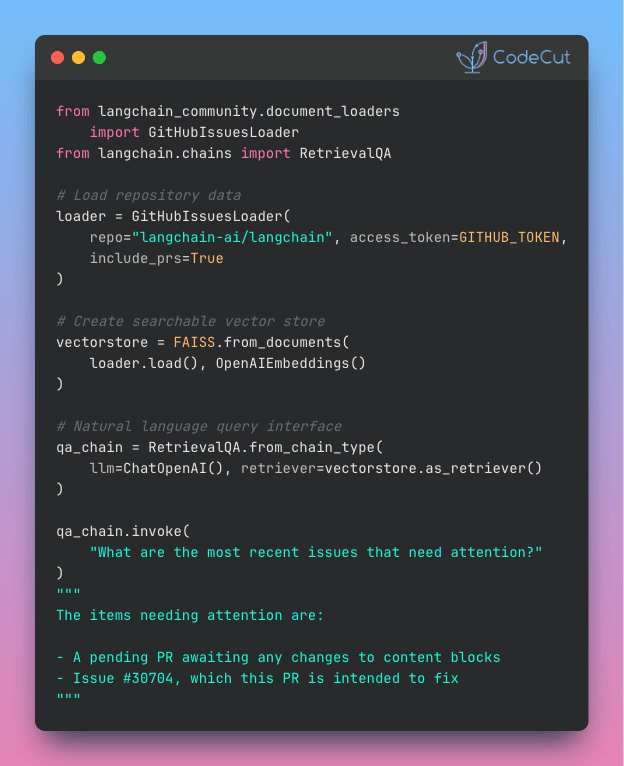
Query GitHub Issues with Natural Language Using LangChain

Problem
Have you ever spent hours clicking through GitHub pages to understand project status, track bugs, or review recent changes? Manual repository analysis wastes development time that could be spent building features.
Solution
LangChain’s GitHubIssuesLoader converts repository issues and PRs into searchable content that responds to natural language questions about bugs, features, and project status.
This method integrates seamlessly with LangChain workflows.

📖 View Full Article

🧪 Run code

⭐ View GitHub

Mock External APIs for Fast, Reliable Tests

Problem
Testing with real APIs and databases is slow, expensive, and unreliable.
External dependencies create flaky tests that can fail due to network issues, rate limits, or service downtime rather than code problems.
Solution
The patch decorator replaces external calls with controllable mock objects for isolated testing.
Key benefits:

Reproducible results across different machines
Fast, reliable tests that focus on your logic
Test edge cases and error conditions that are hard to trigger naturally

Test your data processing logic without waiting for external services or consuming API quotas.

📖 View Full Article

🧪 Run code

☕️ Weekly Finds

timesketch
[Python Utils]
– Collaborative forensic timeline analysis tool for organizing and analyzing forensic timelines

ExtractThinker
[LLM]
– AI-powered Document Intelligence library for LLMs, offering ORM-style interaction for flexible document workflows

ecco
[ML]
– Explain, analyze, and visualize NLP language models with interactive visualizations in Jupyter notebooks

Looking for a specific tool? Explore 70+ Python tools →

Stay Current with CodeCut

Actionable Python tips, curated for busy data pros. Skim in under 2 minutes, three times a week.

.codecut-subscribe-form .codecut-input {
background: #2F2D2E !important;
border: 1px solid #72BEFA !important;
color: #FFFFFF !important;
}
.codecut-subscribe-form .codecut-input::placeholder {
color: #999999 !important;
}
.codecut-subscribe-form .codecut-subscribe-btn {
background: #72BEFA !important;
color: #2F2D2E !important;
}
.codecut-subscribe-form .codecut-subscribe-btn:hover {
background: #5aa8e8 !important;
}

.codecut-subscribe-form {
max-width: 650px;
display: flex;
flex-direction: column;
gap: 8px;
}
.codecut-input {
-webkit-appearance: none;
-moz-appearance: none;
appearance: none;
background: #FFFFFF;
border-radius: 8px !important;
padding: 8px 12px;
font-family: ‘Comfortaa’, sans-serif !important;
font-size: 14px !important;
color: #333333;
border: none !important;
outline: none;
width: 100%;
box-sizing: border-box;
}
input[type=”email”].codecut-input {
border-radius: 8px !important;
}
.codecut-input::placeholder {
color: #666666;
}
.codecut-email-row {
display: flex;
align-items: stretch;
height: 36px;
gap: 8px;
}
.codecut-email-row .codecut-input {
flex: 1;
}
.codecut-subscribe-btn {
background: #72BEFA;
color: #2F2D2E;
border: none;
border-radius: 8px;
padding: 8px 14px;
font-family: ‘Comfortaa’, sans-serif;
font-size: 14px;
font-weight: 500;
cursor: pointer;
text-decoration: none;
display: flex;
align-items: center;
justify-content: center;
transition: background 0.3s ease;
}
.codecut-subscribe-btn:hover {
background: #5aa8e8;
}
.codecut-subscribe-btn:disabled {
background: #999;
cursor: not-allowed;
}
.codecut-message {
font-family: ‘Comfortaa’, sans-serif;
font-size: 12px;
padding: 8px;
border-radius: 6px;
display: none;
}
.codecut-message.success {
background: #d4edda;
color: #155724;
display: block;
}
@media (max-width: 480px) {
.codecut-email-row {
flex-direction: column;
height: auto;
gap: 8px;
}
.codecut-input {
border-radius: 8px;
height: 36px;
}
.codecut-subscribe-btn {
width: 100%;
text-align: center;
border-radius: 8px;
height: 36px;
}
}

Subscribe

Query GitHub Issues with Natural Language Using LangChain Read More »

Delta Lake vs pandas: Stop Silent Data Corruption

📅 Today’s Picks

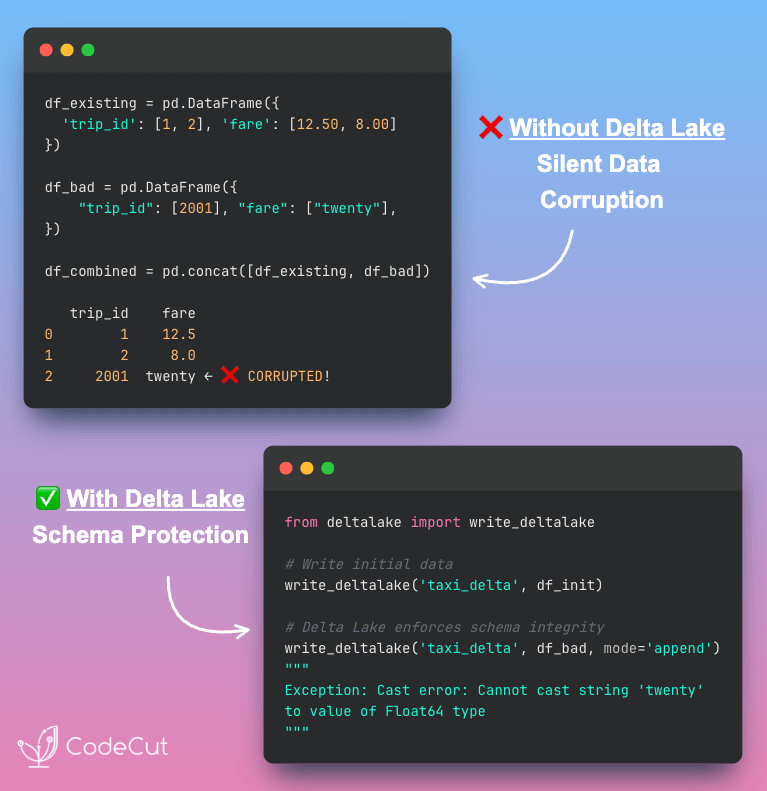
Delta Lake vs pandas: Stop Silent Data Corruption

Problem
Pandas allows type coercion during DataFrame operations. A single string value can silently convert numeric columns to object dtype, breaking downstream systems and corrupting data integrity.
Solution
Delta Lake prevents these issues through strict schema enforcement at write time, validating data types before ingestion to maintain table integrity.
Other features of Delta Lake:

Time travel provides instant access to any historical data version
ACID transactions guarantee data consistency across all operations
Smart file skipping eliminates 95% of unnecessary data scanning
Incremental processing handles billion-row updates efficiently

📖 View Full Article

🧪 Run code

⭐ View GitHub

☕️ Weekly Finds

ZeroFS
[Data Engineer]
– ZeroFS – The Filesystem That Makes S3 your Primary Storage. Provides file-level access via NFS and 9P and block-level access via NBD on S3 storage with encryption, caching, and high performance.

vicinity
[ML]
– Lightweight Nearest Neighbors with Flexible Backends. Provides a unified interface for vector similarity search with support for multiple backends like HNSW, FAISS, Annoy, and more.

vec2text
[LLM]
– Utilities for decoding deep representations (like sentence embeddings) back to text. Train models to reconstruct text sequences from embeddings and invert pre-trained embeddings.

Looking for a specific tool? Explore 70+ Python tools →

Stay Current with CodeCut

Actionable Python tips, curated for busy data pros. Skim in under 2 minutes, three times a week.

.codecut-subscribe-form .codecut-input {
background: #2F2D2E !important;
border: 1px solid #72BEFA !important;
color: #FFFFFF !important;
}
.codecut-subscribe-form .codecut-input::placeholder {
color: #999999 !important;
}
.codecut-subscribe-form .codecut-subscribe-btn {
background: #72BEFA !important;
color: #2F2D2E !important;
}
.codecut-subscribe-form .codecut-subscribe-btn:hover {
background: #5aa8e8 !important;
}

.codecut-subscribe-form {
max-width: 650px;
display: flex;
flex-direction: column;
gap: 8px;
}
.codecut-input {
-webkit-appearance: none;
-moz-appearance: none;
appearance: none;
background: #FFFFFF;
border-radius: 8px !important;
padding: 8px 12px;
font-family: ‘Comfortaa’, sans-serif !important;
font-size: 14px !important;
color: #333333;
border: none !important;
outline: none;
width: 100%;
box-sizing: border-box;
}
input[type=”email”].codecut-input {
border-radius: 8px !important;
}
.codecut-input::placeholder {
color: #666666;
}
.codecut-email-row {
display: flex;
align-items: stretch;
height: 36px;
gap: 8px;
}
.codecut-email-row .codecut-input {
flex: 1;
}
.codecut-subscribe-btn {
background: #72BEFA;
color: #2F2D2E;
border: none;
border-radius: 8px;
padding: 8px 14px;
font-family: ‘Comfortaa’, sans-serif;
font-size: 14px;
font-weight: 500;
cursor: pointer;
text-decoration: none;
display: flex;
align-items: center;
justify-content: center;
transition: background 0.3s ease;
}
.codecut-subscribe-btn:hover {
background: #5aa8e8;
}
.codecut-subscribe-btn:disabled {
background: #999;
cursor: not-allowed;
}
.codecut-message {
font-family: ‘Comfortaa’, sans-serif;
font-size: 12px;
padding: 8px;
border-radius: 6px;
display: none;
}
.codecut-message.success {
background: #d4edda;
color: #155724;
display: block;
}
@media (max-width: 480px) {
.codecut-email-row {
flex-direction: column;
height: auto;
gap: 8px;
}
.codecut-input {
border-radius: 8px;
height: 36px;
}
.codecut-subscribe-btn {
width: 100%;
text-align: center;
border-radius: 8px;
height: 36px;
}
}

Subscribe

Delta Lake vs pandas: Stop Silent Data Corruption Read More »

Scroll to Top

Work with Khuyen Tran

Work with Khuyen Tran