Generic selectors
Exact matches only
Search in title
Search in content
Post Type Selectors
Filter by Categories
About Article
Analyze Data
Archive
Best Practices
Better Outputs
Blog
Code Optimization
Code Quality
Command Line
Daily tips
Dashboard
Data Analysis & Manipulation
Data Engineer
Data Visualization
DataFrame
Delta Lake
DevOps
DuckDB
Environment Management
Feature Engineer
Git
Jupyter Notebook
LLM
LLM Tools
Machine Learning
Machine Learning & AI
Machine Learning Tools
Manage Data
MLOps
Natural Language Processing
Newsletter Archive
NumPy
Pandas
Polars
PySpark
Python Helpers
Python Tips
Python Utilities
Scrape Data
SQL
Testing
Time Series
Tools
Visualization
Visualization & Reporting
Workflow & Automation
Workflow Automation

Newsletter Archive

Automated newsletter archive from Klaviyo campaigns

Code example: PySpark 4.0: Native Plotting API for DataFrames

Newsletter #251: PySpark 4.0: Native Plotting API for DataFrames

📅
Today’s Picks

PySpark 4.0: Native Plotting API for DataFrames

Problem:

Visualizing PySpark DataFrames typically requires converting to Pandas first, adding memory overhead and extra processing steps.

Solution:

PySpark 4.0 adds native Plotly-powered plotting, enabling direct .plot() calls on DataFrames without Pandas conversion.

Full Article:

PySpark 4.0: What’s New

Run Code

View GitHub


Related Post

Batch Process DataFrames with PySpark Pandas UDF Vectorization

Problem:

Traditional UDFs (User-Defined Functions) run your custom Python function on each row individually, which can significantly slow down DataFrame operations.

Solution:

Pandas UDFs solve this by batching data into chunks and applying vectorized pandas transformations across entire columns, rather than looping through rows.As a result, they can be 10 to 100 times faster on large DataFrames.

Full Article:

The Complete PySpark SQL Guide: DataFrames, Aggregations, Window Functions, and Pandas UDFs

Run Code

View GitHub

☕️
Weekly Finds

rembg

Python Utils

Rembg is a tool to remove images background

pyupgrade

Python Utils

A tool (and pre-commit hook) to automatically upgrade syntax for newer versions of the language

py-shiny

Data Viz

Shiny for Python is the best way to build fast, beautiful web applications in Python

Favorite

Newsletter #251: PySpark 4.0: Native Plotting API for DataFrames Read More »

Code example: Extract Text from Any Document Format with Docling

Newsletter #250: Extract Text from Any Document Format with Docling

📅
Today’s Picks

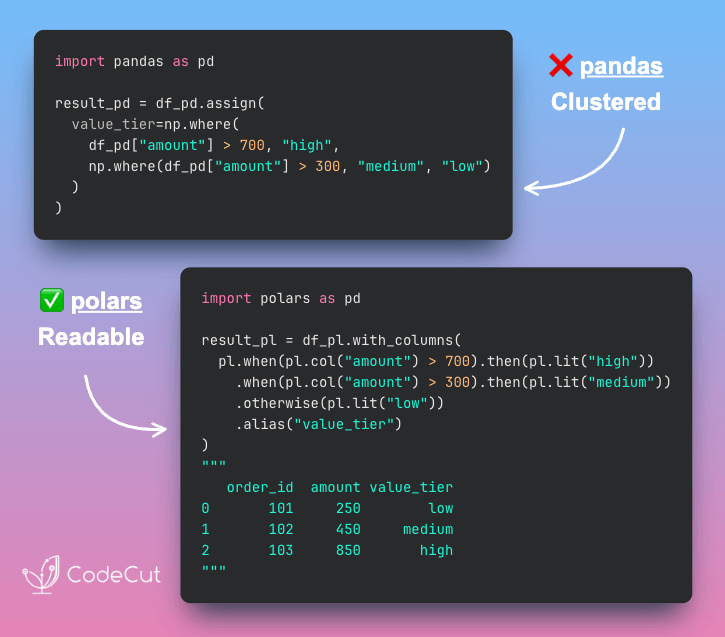
Build Schema-Flexible Pipelines with Polars Selectors

Problem:

Hard-coding column names can break your code when the schema changes.When columns of the same type are added or removed, you must update your code manually.

Solution:

Polars col() function accepts data types to select all matching columns automatically.This keeps your code flexible and robust to schema changes.

Full Article:

Polars vs. Pandas: A Fast, Multi-Core Alternative for DataFrames

Run Code

View GitHub

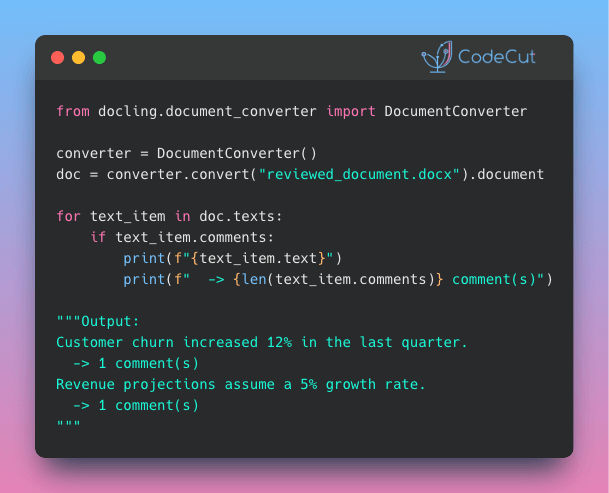
Extract Text from Any Document Format with Docling

Problem:

Have you ever needed to pull text from PDFs, Word files, slide decks, or images for a project? Writing a different parser for each format is slow and error-prone.

Solution:

Docling’s DocumentConverter takes care of that by detecting the file type and applying the right parsing method for PDF, DOCX, PPTX, HTML, and images.Other features of Docling:
AI-powered image descriptions for searchable diagrams
Export to pandas DataFrames, JSON, or Markdown
Structure-preserving output optimized for RAG pipelines
Built-in chunking strategies for vector databases
Parallel processing handles large document batches efficiently

Full Article:

Transform Any PDF into Searchable AI Data with Docling

Run Code

View GitHub

☕️
Weekly Finds

evals

LLM

Framework for evaluating large language models (LLMs) or systems built using LLMs with existing registry of evals and ability to write custom evals

sklearn-bayes

ML

Python package for Bayesian Machine Learning with scikit-learn API

databonsai

Data Processing

Python library that uses LLMs to perform data cleaning tasks for categorization, transformation and curation

Favorite

Newsletter #250: Extract Text from Any Document Format with Docling Read More »

Code example: prek: Faster, Leaner Pre-Commit Hooks (Rust-Powered)

Newsletter #249: prek: Faster, Leaner Pre-Commit Hooks (Rust-Powered)

📅
Today’s Picks

LangChain v1.0: Automate Tool Selection for Faster Agents

Problem:

Agents with many tools waste tokens by sending all tool descriptions with every request.This wastes tokens on irrelevant tool descriptions, making responses slower and more expensive.

Solution:

LangChain v1.0 introduces LLMToolSelectorMiddleware that pre-filters relevant tools using a smaller model.Key features:
Pre-filter tools using cheaper models like GPT-4o-mini
Limit tools sent to main agent (e.g., 3 most relevant)
Preserve critical tools with always_include parameter

Full Article:

Build Production-Ready LLM Agents with LangChain 1.0 Middleware

Run Code

View GitHub

prek: Faster, Leaner Pre-Commit Hooks (Rust-Powered)

Problem:

pre-commit is a framework for managing Git hooks that automatically run code quality checks before commits.However, installing these hook environments (linters, formatters, etc.) can be slow and disk-intensive, especially in CI/CD pipelines where speed matters.

Solution:

prek is a drop-in replacement for pre-commit that installs hook environments significantly faster while using 50% less disk space.Built with Rust for maximum performance, prek reduces cache storage from 1.6GB to 810MB (benchmarked on Apache Airflow repository) without changing your workflow.Key benefits:
Uses your existing .pre-commit-config.yaml files
Commands mirror pre-commit syntax (prek install-hooks, prek run)
Monorepo support with selector syntax for targeting specific projects or hooks
Install as a single binary with no dependencies
No configuration changes needed – just replace the command.

View GitHub

☕️
Weekly Finds

deepagents

LLM

Build advanced AI agents with context isolation through sub-agent delegation. Features virtual file system for context offloading, specialized sub-agents with focused tool sets, and sophisticated agent architecture for real-world research and analysis tasks.

mcp-gateway

MLOps

Docker MCP CLI plugin / MCP Gateway for production-grade AI agent stack. Enables multi-agent orchestration, intelligent interceptors, and enterprise security with Docker integration.

nbQA

Python Utils

Run ruff, isort, pyupgrade, mypy, pylint, flake8, and more on Jupyter Notebooks. Command-line tool to run linters and formatters over Python code in Jupyter notebooks.

Favorite

Newsletter #249: prek: Faster, Leaner Pre-Commit Hooks (Rust-Powered) Read More »

Code example: Build Mathematical Animations with Manim in Python

Newsletter #248: Build Mathematical Animations with Manim in Python

📅
Today’s Picks

Build Mathematical Animations with Manim in Python

Problem:

Static slides can only go so far when you’re explaining complex concepts.Dynamic visuals make abstract ideas clearer, more engaging, and easier to understand.

Solution:

Manim gives you the power to create professional mathematical animations in Python, just like the ones you see in 3Blue1Brown’s videos.In the code below, Manim transforms equations into smooth visual steps:
Define equation steps using MathTex with LaTeX notation
Animate equation transformations with the Transform class
Control animation flow with play() and wait() methods
Render output with simple command: manim -p -ql script.py

Full Article:

Manim: Create Mathematical Animations Like 3Blue1Brown Using Python

View GitHub


Related Post

Build Clean Visualizations with Altair Grammar

Problem:

Matplotlib requires manual data transformation and explicit configuration for every visual element.

Solution:

Altair uses declarative syntax based on Vega-Lite for intuitive, readable visualizations.With Altair, you can describe what you want, not how to create it:
Automatic formatting with type encoding (:T, :Q, :N, :O)
Built-in aggregations: mean(), sum(), count()
No manual groupby or date conversion
Easy chart composition and layering
Interactive features with minimal code

Full Article:

Top 6 Python Libraries for Visualization: Which One to Use

Run Code

View GitHub

☕️
Weekly Finds

fast-langdetect

Python Utils

80x faster and 95% accurate language identification with Fasttext

FuncToWeb

Python Utils

Transform any Python function into a web interface automatically

graphic-walker

Data Viz

An open source alternative to Tableau for data exploration and visualization

Favorite

Newsletter #248: Build Mathematical Animations with Manim in Python Read More »

Code example: whenever: Simple Python Timezone Conversion

Newsletter #247: whenever: Simple Python Timezone Conversion

🤝
COLLABORATION

Build Safer APIs with Buf – Free Workshop

Building APIs is simple. Scaling them across teams and systems isn’t. Ensuring consistency, compatibility, and reliability quickly becomes a challenge as projects grow.Buf provides a toolkit that makes working with Protocol Buffers faster, safer, and more consistent.Join Buf for a live, one-hour workshop on building safer, more consistent APIs.When: Nov 19, 2025 • 9 AM PDT | 12 PM EDT | 5 PM BSTWhat you’ll learn:
How Protobuf makes API development safer and simpler
API design best practices for real-world systems
How to extend Protobuf to data pipelines and streaming systems

Register for the workshop

📅
Today’s Picks

whenever: Simple Python Timezone Conversion

Problem:

Adding 8 hours to 10pm shouldn’t give you the wrong morning time, but with Python’s datetime, it can.The standard library fails during DST transitions, returning incorrect offsets when clocks change for daylight saving.

Solution:

Whenever provides simple, explicit timezone conversion methods with clear semantics.Key benefits:
DST-safe arithmetic with automatic offset adjustment
Type safety prevents naive/aware datetime bugs
Clean timezone conversions with .to_tz()
Nanosecond precision for deltas and timestamps
Pydantic integration for serialization

Run Code

View GitHub

Build Readable Scatter Plots with adjustText Auto-Positioning

Problem:

Text labels in matplotlib scatter plots frequently overlap with each other and data points, creating unreadable visualizations.Manually repositioning each label to avoid overlaps is tedious and time-consuming.

Solution:

adjustText automatically repositions labels to eliminate overlaps while connecting them to data points with arrows.All you need is to collect your text objects and call adjust_text() with optional arrow styling.

Run Code

View GitHub

📢
ANNOUNCEMENTS

Featured on LeanPub: Production-Ready Data Science

My book Production-Ready Data Science was featured on the LeanPub home page!LeanPub is a leading platform for publishing and selling self-published technical books, so it’s truly an honor to see my work highlighted there.The book shares everything I’ve learned about turning data science prototypes into reliable, production-ready systems, from managing dependencies to automating workflows.Thank you to everyone who has purchased or shared it. Your support means everything.The book is currently on sale for 58% off until November 16.

Get Your Copy Now (58% Off)

☕️
Weekly Finds

featuretools

ML

An open source python library for automated feature engineering

datachain

Data Processing

ETL, Analytics, Versioning for Unstructured Data – AI-data warehouse to enrich, transform and analyze data from cloud storages

logfire

Python Utils

Uncomplicated Observability for Python and beyond – an observability platform built on OpenTelemetry from the team behind Pydantic

Favorite

Newsletter #247: whenever: Simple Python Timezone Conversion Read More »

Code example: Faster Polars Queries with Programmatic Expressions

Newsletter #246: Faster Polars Queries with Programmatic Expressions

🤝
COLLABORATION

Build Safer APIs with Buf – Free Workshop

Building APIs is simple. Scaling them across teams and systems isn’t. Ensuring consistency, compatibility, and reliability quickly becomes a challenge as projects grow.Buf provides a toolkit that makes working with Protocol Buffers faster, safer, and more consistent.Join Buf for a live, one-hour workshop on building safer, more consistent APIs.When: Nov 19, 2025 • 9 AM PDT | 12 PM EDT | 5 PM BSTWhat you’ll learn:
How Protobuf makes API development safer and simpler
API design best practices for real-world systems
How to extend Protobuf to data pipelines and streaming systems

Register for the workshop

📅
Today’s Picks

Faster Polars Queries with Programmatic Expressions

Problem:

When you want to use for loops to apply similar transformations, each Polars with_columns() call processes sequentially.This prevents the optimizer from seeing the full computation plan.

Solution:

Instead, generate all Polars expressions programmatically before applying them together.This enables Polars to:
See the complete computation plan upfront
Optimize across all expressions simultaneously
Parallelize operations across CPU cores

Full Article:

Polars vs. Pandas: A Fast, Multi-Core Alternative for DataFrames

Run Code

View GitHub

itertools.chain: Merge Lists Without Intermediate Copies

Problem:

Standard list merging with extend() or concatenation creates intermediate copies.This memory overhead becomes significant when processing large lists.

Solution:

itertools.chain() lazily merges multiple iterables without creating intermediate lists.

Full Article:

5 Essential Itertools for Data Science

Run Code

☕️
Weekly Finds

fiftyone

ML

Open-source tool for building high-quality datasets and computer vision models

llama-stack

LLM

Composable building blocks to build Llama Apps with unified API for inference, RAG, agents, and more

grip

Python Utils

Preview GitHub README.md files locally before committing them using GitHub’s markdown API

Favorite

Newsletter #246: Faster Polars Queries with Programmatic Expressions Read More »

Code example: PySpark: Avoid Double Conversions with applyInArrow

Newsletter #245: PySpark: Avoid Double Conversions with applyInArrow

📅
Today’s Picks

PySpark: Avoid Double Conversions with applyInArrow

Problem:

applyInPandas lets you apply Pandas functions in PySpark by converting data from Arrow→Pandas→Arrow for each operation.This double conversion adds serialization overhead that slows down your transformations.

Solution:

applyInArrow (introduced in PySpark 4.0.0) works directly with PyArrow tables, eliminating the Pandas conversion step entirely.This keeps data in Arrow’s columnar format throughout the pipeline, making operations significantly faster.Trade-off: PyArrow’s syntax is less intuitive than Pandas, but it’s worth it if you’re processing large datasets where performance matters.

Full Article:

PySpark SQL Complete Guide

Run Code

View GitHub


Related Post

Batch Process DataFrames with PySpark Pandas UDF Vectorization

Problem:

Traditional UDFs (User-Defined Functions) run your custom Python function on each row individually, which can significantly slow down DataFrame operations.

Solution:

Pandas UDFs solve this by batching data into chunks and applying vectorized pandas transformations across entire columns, rather than looping through rows.As a result, they can be 10 to 100 times faster on large DataFrames.

Full Article:

The Complete PySpark SQL Guide: DataFrames, Aggregations, Window Functions, and Pandas UDFs

Run Code

View GitHub

☕️
Weekly Finds

causal-learn

ML

Python package for causal discovery that implements both classical and state-of-the-art causal discovery algorithms

POT

ML

Python Optimal Transport library providing solvers for optimization problems related to signal, image processing and machine learning

qdrant

MLOps

High-performance, massive-scale Vector Database and Vector Search Engine for the next generation of AI

Favorite

Newsletter #245: PySpark: Avoid Double Conversions with applyInArrow Read More »

Code example: Handle Large Data with Polars Streaming Mode

Newsletter #244: Handle Large Data with Polars Streaming Mode

📅
Today’s Picks

Handle Large Data with Polars Streaming Mode

Problem:

In Polars, the .collect() method executes a lazy query and loads the entire dataset into memory. This works well for smaller data, but once the dataset grows beyond your available RAM, it can easily crash your process.

Solution:

Add engine=”streaming” to .collect() to process large datasets in small batches without running out of memory.How it works:
Breaks the dataset into smaller, memory-friendly chunks
Processes one batch at a time while freeing memory as it goes
Combines all partial results into a single DataFrame

Full Article:

Polars vs. Pandas: A Fast, Multi-Core Alternative for DataFrames

Run Code

View GitHub

Build Professional Python Packages with UV –package

Problem:

Python packages turn your code into reusable modules you can share across projects.But building them requires complex setup with setuptools, managing build systems, and understanding distribution mechanics.

Solution:

UV, a fast Python package installer and resolver, reduces the entire process to 2 simple commands:
uv init –package sets up your package structure instantly
uv build and uv publish to create and distribute to PyPI

Learn More:

Production-Ready Data Science: From Prototyping to Production with Python

View GitHub

☕️
Weekly Finds

whenever

Python Utils

Modern datetime library for Python that ensures correct and type-checked datetime manipulations. It is DST-safe and way faster than standard datetime libraries.

lancedb

MLOps

Developer-friendly, embedded retrieval database for AI/ML applications. The ultimate multimodal data platform designed for fast, scalable, and production-ready vector search.

grip

Python Utils

Preview GitHub README.md files locally before committing them. A command-line server that uses GitHub’s Markdown API to render local readme files.

Favorite

Newsletter #244: Handle Large Data with Polars Streaming Mode Read More »

Code example: Turn Your ML Tests Into Plain English with Behave

Newsletter #243: Turn Your ML Tests Into Plain English with Behave

📅
Today’s Picks

Turn Your ML Tests Into Plain English with Behave

Problem:

Unit testing matters in data science, but writing tests that business stakeholders can actually understand is a challenge.If they can’t read the tests, they can’t confirm the logic matches business expectations.

Solution:

Behave turns test cases into plain-English specifications using the Given/When/Then format.How to use Behave for readable tests:
Write .feature files with Given/When/Then syntax
Implement steps in Python using @given, @when, @then decorators
Run “behave” to execute tests
This lets technical and business teams stay aligned without confusion.

Full Article:

Behave: Write Readable ML Tests with Behavior-Driven Development

Run Code

View GitHub

Build Powerful Data Pipelines with DuckDB + pandas

Problem:

Pandas is great for data cleaning and feature engineering, while SQL excels at complex aggregations.But moving data from pandas to a database and back can be tedious.

Solution:

DuckDB solves this by letting you run SQL directly on pandas DataFrames and return the results back into pandas for further analysis.

Full Article:

A Deep Dive into DuckDB for Data Scientists

Run Code

View GitHub

☕️
Weekly Finds

feast

MLOps

Open source feature store for machine learning that manages existing infrastructure to productionize ML models with fast data consistency and leakage prevention

git-who

Python Utils

CLI tool for industrial-scale git blaming that shows who is responsible for entire components or subsystems in your codebase, not just individual lines

organize

Python Utils

File management automation tool for safe moving, renaming, copying files with conflict resolution, duplicate detection, and Exif tag extraction

Favorite

Newsletter #243: Turn Your ML Tests Into Plain English with Behave Read More »

Code example: Build Faster Test Workflows with pytest Markers

Newsletter #242: Build Faster Test Workflows with pytest Markers

📅
Today’s Picks

Build Faster Test Workflows with pytest Markers

Problem:

Large projects often contain hundreds of tests, and executing them all for every minor change quickly becomes inefficient.

Solution:

Pytest markers let you group tests by type, speed, or resource usage so you can run only what matters for your current task.Quick guide to pytest markers:
Define markers in pytest.ini
Tag tests, for example: @pytest.mark.fast
Run specific tests: pytest -m fast
Skip certain tests: pytest -m “not slow”

Learn More:

Production-Ready Data Science: From Prototyping to Production with Python

Run Code

📢
ANNOUNCEMENTS

Production-Ready Data Science Is Now on Leanpub

I am excited to share that Production-Ready Data Science is now live on Leanpub!On Leanpub, you can choose your price and get updates as more examples and chapters roll out.This book dives into the real engineering skills behind dependable data systems, including:
Testing
CI and CD
Environments and packaging
Data validation and logging
Reproducible workflows
If you want to take your data work beyond notebooks and into reliable production environments, this is for you.

Get the Book

☕️
Weekly Finds

AutoViz

Data Viz

Automatically Visualize any dataset, any size with a single line of code

cognee

LLM

Memory for AI Agents in 6 lines of code

niquests

Python Utils

Simple, yet elegant, Python HTTP library: a drop-in replacement for python-requests

Favorite

Newsletter #242: Build Faster Test Workflows with pytest Markers Read More »

0
    0
    Your Cart
    Your cart is empty
    Scroll to Top

    Work with Khuyen Tran

    Work with Khuyen Tran