Generic selectors
Exact matches only
Search in title
Search in content
Post Type Selectors
Filter by Categories
About Article
Analyze Data
Archive
Best Practices
Better Outputs
Blog
Code Optimization
Code Quality
Command Line
Course
Daily tips
Dashboard
Data Analysis & Manipulation
Data Engineer
Data Visualization
DataFrame
Delta Lake
DevOps
DuckDB
Environment Management
Feature Engineer
Git
Jupyter Notebook
LLM
LLM Tools
Machine Learning
Machine Learning & AI
Machine Learning Tools
Manage Data
MLOps
Natural Language Processing
Newsletter Archive
NumPy
Pandas
Polars
PySpark
Python Helpers
Python Tips
Python Utilities
Scrape Data
SQL
Testing
Time Series
Tools
Visualization
Visualization & Reporting
Workflow & Automation
Workflow Automation

Newsletter Archive

Automated newsletter archive from Klaviyo campaigns

Newsletter #259: LangChain v1.0: Auto-Protect Sensitive Data with PIIMiddleware

📅 Today’s Picks

LangChain v1.0: Auto-Protect Sensitive Data with PIIMiddleware

Problem
User messages often contain sensitive information like emails and phone numbers.
Logging or storing this data without protection creates compliance and security risks.
Solution
LangChain v1.0 introduces PIIMiddleware to automatically protect sensitive data before model processing.
PIIMiddleware supports multiple protection modes:

5 built-in detectors (email, credit card, IP, MAC, URL)
Custom regex for any PII pattern
Replace with [REDACTED], mask as ****1234, or block entirely

📖 View Full Article

🧪 Run code

⭐ View GitHub

Test File Operations Without Risk Using tmp_path

Problem
Testing file operations requires touching the actual file system, which can be dangerous if not handled carefully. Real data can be overwritten by mistake.
Tests can also leave behind unwanted files across your project.
Solution
The tmp_path fixture provides a safe alternative by creating temporary, isolated directories that clean up themselves after each test.
Here’s how to use tmp_path:

Add tmp_path to your test function signature
Work with it like any pathlib.Path object
pytest handles the rest: isolated directories per test, automatic cleanup

📖 Learn more

🧪 Run code

☕️ Weekly Finds

quarkdown
[Python Utils]
– Modern Markdown-based typesetting system that compiles projects into print-ready books or interactive presentations with live preview and fast compilation

slim
[MLOps]
– Container optimization tool that makes Docker images 10-30x smaller without changing your development workflow

shapiq
[ML]
– Python package for approximating Shapley interactions and explaining feature interactions in machine learning model predictions

Looking for a specific tool? Explore 70+ Python tools →

📚 Latest Deep Dives

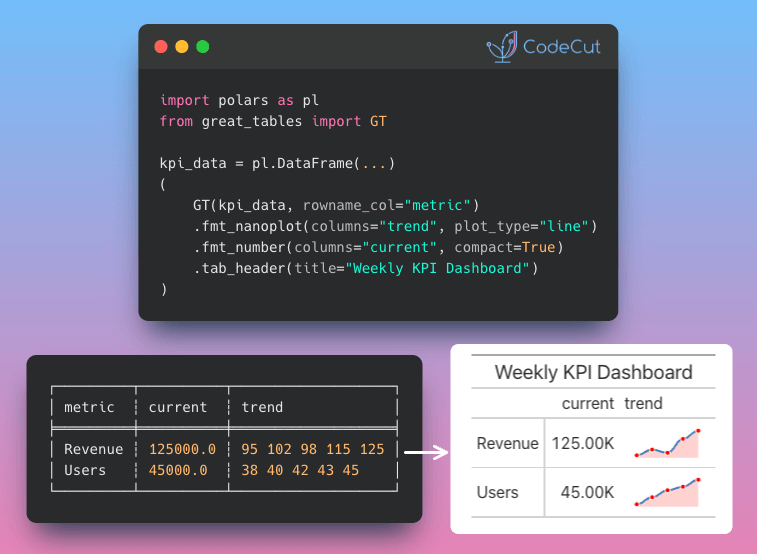
Great Tables: Publication-Ready Tables from Polars and Pandas DataFrames
– Turn Polars and Pandas DataFrames into professional tables with automatic number formatting, visual heatmaps, and sparkline charts. Fully reproducible when data updates.

Stay Current with CodeCut

Actionable Python tips, curated for busy data pros. Skim in under 2 minutes, three times a week.

.codecut-subscribe-form .codecut-input {
background: #2F2D2E !important;
border: 1px solid #72BEFA !important;
color: #FFFFFF !important;
}
.codecut-subscribe-form .codecut-input::placeholder {
color: #999999 !important;
}
.codecut-subscribe-form .codecut-subscribe-btn {
background: #72BEFA !important;
color: #2F2D2E !important;
}
.codecut-subscribe-form .codecut-subscribe-btn:hover {
background: #5aa8e8 !important;
}

.codecut-subscribe-form {
max-width: 650px;
display: flex;
flex-direction: column;
gap: 8px;
}
.codecut-input {
-webkit-appearance: none;
-moz-appearance: none;
appearance: none;
background: #FFFFFF;
border-radius: 8px !important;
padding: 8px 12px;
font-family: ‘Comfortaa’, sans-serif !important;
font-size: 14px !important;
color: #333333;
border: none !important;
outline: none;
width: 100%;
box-sizing: border-box;
}
input[type=”email”].codecut-input {
border-radius: 8px !important;
}
.codecut-input::placeholder {
color: #666666;
}
.codecut-email-row {
display: flex;
align-items: stretch;
height: 36px;
gap: 8px;
}
.codecut-email-row .codecut-input {
flex: 1;
}
.codecut-subscribe-btn {
background: #72BEFA;
color: #2F2D2E;
border: none;
border-radius: 8px;
padding: 8px 14px;
font-family: ‘Comfortaa’, sans-serif;
font-size: 14px;
font-weight: 500;
cursor: pointer;
text-decoration: none;
display: flex;
align-items: center;
justify-content: center;
transition: background 0.3s ease;
}
.codecut-subscribe-btn:hover {
background: #5aa8e8;
}
.codecut-subscribe-btn:disabled {
background: #999;
cursor: not-allowed;
}
.codecut-message {
font-family: ‘Comfortaa’, sans-serif;
font-size: 12px;
padding: 8px;
border-radius: 6px;
display: none;
}
.codecut-message.success {
background: #d4edda;
color: #155724;
display: block;
}
@media (max-width: 480px) {
.codecut-email-row {
flex-direction: column;
height: auto;
gap: 8px;
}
.codecut-input {
border-radius: 8px;
height: 36px;
}
.codecut-subscribe-btn {
width: 100%;
text-align: center;
border-radius: 8px;
height: 36px;
}
}

Subscribe

Newsletter #259: LangChain v1.0: Auto-Protect Sensitive Data with PIIMiddleware Read More »

Newsletter #258: Great Tables: Transform DataFrames into Publication-Ready Reports

📅 Today’s Picks

dataclass vs Pydantic Field(): Declarative Constraints

Problem
dataclass requires manual validation in __post_init__, separating validation rules from field definitions.
As your data model grows, the __post_init__ method fills with if-else statements, becoming harder to read and maintain.
Solution
Pydantic Field() puts constraints directly on field definitions, making your model self-documenting and easier to maintain.
What you can specify with Field():

Numeric bounds (e.g., age must be >= 0 and

Newsletter #258: Great Tables: Transform DataFrames into Publication-Ready Reports Read More »

Newsletter #257: Delta Lake: Sync DataFrames with One Line of Code

📅 Today’s Picks

Delta Lake: Sync DataFrames with One Line of Code

Problem
Updating an entire table with millions of rows just to fix a handful of records is costly and unnecessary.
Solution
Delta Lake’s when_matched_update() modifies only the matching rows, leaving unchanged data untouched.
Delta Lake also gives you:

Atomic updates that fully succeed or fully roll back
Partial file rewrites instead of full dataset copies
Time travel to restore previous versions

📖 View Full Article

🧪 Run code

⭐ View GitHub

📢 ANNOUNCEMENTS

New Way to Explore Python Tools on CodeCut
CodeCut just became a lot more searchable! ☕️
Most developers stick to the same 5-10 Python libraries. Not because others aren’t useful, but because finding them is hard.
CodeCut now organizes 69 tools into eight categories on the homepage:

Developer tools
AI frameworks
Data processing
Databases
Python builtins
Visualization
Utilities
Text processing

Each tool links directly to blogs and code snippets. Browse a new category today. You might find something that changes how you work.
What would make CodeCut more useful for you? Reply and let me know. I’m always looking for ways to improve it.

Explore Tools

☕️ Weekly Finds

deepdoctection
[ML]
– Python library for document extraction and layout analysis using deep learning models

postgresus
[Data Engineer]
– Self-hosted PostgreSQL backup and monitoring tool with web UI

ffn
[Data Processing]
– Financial functions library for quantitative finance in Python

Looking for a specific tool? Explore 70+ Python tools →

Stay Current with CodeCut

Actionable Python tips, curated for busy data pros. Skim in under 2 minutes, three times a week.

.codecut-subscribe-form .codecut-input {
background: #2F2D2E !important;
border: 1px solid #72BEFA !important;
color: #FFFFFF !important;
}
.codecut-subscribe-form .codecut-input::placeholder {
color: #999999 !important;
}
.codecut-subscribe-form .codecut-subscribe-btn {
background: #72BEFA !important;
color: #2F2D2E !important;
}
.codecut-subscribe-form .codecut-subscribe-btn:hover {
background: #5aa8e8 !important;
}

.codecut-subscribe-form {
max-width: 650px;
display: flex;
flex-direction: column;
gap: 8px;
}
.codecut-input {
-webkit-appearance: none;
-moz-appearance: none;
appearance: none;
background: #FFFFFF;
border-radius: 8px !important;
padding: 8px 12px;
font-family: ‘Comfortaa’, sans-serif !important;
font-size: 14px !important;
color: #333333;
border: none !important;
outline: none;
width: 100%;
box-sizing: border-box;
}
input[type=”email”].codecut-input {
border-radius: 8px !important;
}
.codecut-input::placeholder {
color: #666666;
}
.codecut-email-row {
display: flex;
align-items: stretch;
height: 36px;
gap: 8px;
}
.codecut-email-row .codecut-input {
flex: 1;
}
.codecut-subscribe-btn {
background: #72BEFA;
color: #2F2D2E;
border: none;
border-radius: 8px;
padding: 8px 14px;
font-family: ‘Comfortaa’, sans-serif;
font-size: 14px;
font-weight: 500;
cursor: pointer;
text-decoration: none;
display: flex;
align-items: center;
justify-content: center;
transition: background 0.3s ease;
}
.codecut-subscribe-btn:hover {
background: #5aa8e8;
}
.codecut-subscribe-btn:disabled {
background: #999;
cursor: not-allowed;
}
.codecut-message {
font-family: ‘Comfortaa’, sans-serif;
font-size: 12px;
padding: 8px;
border-radius: 6px;
display: none;
}
.codecut-message.success {
background: #d4edda;
color: #155724;
display: block;
}
@media (max-width: 480px) {
.codecut-email-row {
flex-direction: column;
height: auto;
gap: 8px;
}
.codecut-input {
border-radius: 8px;
height: 36px;
}
.codecut-subscribe-btn {
width: 100%;
text-align: center;
border-radius: 8px;
height: 36px;
}
}

Subscribe

Newsletter #257: Delta Lake: Sync DataFrames with One Line of Code Read More »

Newsletter #256: Build Scalable Pipelines with DuckDB Memory Spilling

📅 Today’s Picks

Marimo: Keep All Notebook Cells in Sync Without Manual Reruns

Problem
In Jupyter notebooks, changing an input value doesn’t automatically update dependent cells.
Forget to rerun one cell, and you might make decisions based on outdated results without realizing anything is wrong.
Solution
Marimo automatically detects changes and re-executes all dependent cells.
When you change a variable like threshold from 50 to 30, every downstream cell that uses it updates immediately.

📖 Learn more

🧪 Run code

⭐ View GitHub

Build Scalable Pipelines with DuckDB Memory Spilling

Problem
When datasets exceed available RAM, most tools crash mid-operation.
This forces manual data chunking or expensive hardware upgrades just to complete basic queries.
Solution
DuckDB automatically spills intermediate results to temporary files when data exceeds configured memory limits.
Key benefits:

Process datasets larger than RAM without code changes
Configure memory limits to prevent system crashes
Automatic disk spillover when memory fills
No manual chunking or batching required

📖 View Full Article

🧪 Run code

⭐ View GitHub

📢 ANNOUNCEMENTS

Cyber Monday: 30% Off Production-Ready Data Science
My book Production-Ready Data Science is on sale for Cyber Monday.
Get 58% off the ebook or 10% off the paperback through December 8th.
The book covers everything I’ve learned about taking data science from prototype to production: dependency management, testing, CI/CD, and workflow automation.

Get 58% Off Now

☕️ Weekly Finds

Nano-PDF
[LLM]
– Natural language PDF editing using Gemini with multi-page parallel processing

Codon
[Python Utils]
– High-performance Python compiler that generates native machine code for 10-100x speedups

lm-evaluation-harness
[LLM]
– Unified framework for few-shot evaluation of language models across 200+ tasks

Looking for a specific tool? Explore 70+ Python tools →

Stay Current with CodeCut

Actionable Python tips, curated for busy data pros. Skim in under 2 minutes, three times a week.

.codecut-subscribe-form .codecut-input {
background: #2F2D2E !important;
border: 1px solid #72BEFA !important;
color: #FFFFFF !important;
}
.codecut-subscribe-form .codecut-input::placeholder {
color: #999999 !important;
}
.codecut-subscribe-form .codecut-subscribe-btn {
background: #72BEFA !important;
color: #2F2D2E !important;
}
.codecut-subscribe-form .codecut-subscribe-btn:hover {
background: #5aa8e8 !important;
}

.codecut-subscribe-form {
max-width: 650px;
display: flex;
flex-direction: column;
gap: 8px;
}
.codecut-input {
-webkit-appearance: none;
-moz-appearance: none;
appearance: none;
background: #FFFFFF;
border-radius: 8px !important;
padding: 8px 12px;
font-family: ‘Comfortaa’, sans-serif !important;
font-size: 14px !important;
color: #333333;
border: none !important;
outline: none;
width: 100%;
box-sizing: border-box;
}
input[type=”email”].codecut-input {
border-radius: 8px !important;
}
.codecut-input::placeholder {
color: #666666;
}
.codecut-email-row {
display: flex;
align-items: stretch;
height: 36px;
gap: 8px;
}
.codecut-email-row .codecut-input {
flex: 1;
}
.codecut-subscribe-btn {
background: #72BEFA;
color: #2F2D2E;
border: none;
border-radius: 8px;
padding: 8px 14px;
font-family: ‘Comfortaa’, sans-serif;
font-size: 14px;
font-weight: 500;
cursor: pointer;
text-decoration: none;
display: flex;
align-items: center;
justify-content: center;
transition: background 0.3s ease;
}
.codecut-subscribe-btn:hover {
background: #5aa8e8;
}
.codecut-subscribe-btn:disabled {
background: #999;
cursor: not-allowed;
}
.codecut-message {
font-family: ‘Comfortaa’, sans-serif;
font-size: 12px;
padding: 8px;
border-radius: 6px;
display: none;
}
.codecut-message.success {
background: #d4edda;
color: #155724;
display: block;
}
@media (max-width: 480px) {
.codecut-email-row {
flex-direction: column;
height: auto;
gap: 8px;
}
.codecut-input {
border-radius: 8px;
height: 36px;
}
.codecut-subscribe-btn {
width: 100%;
text-align: center;
border-radius: 8px;
height: 36px;
}
}

Subscribe

Newsletter #256: Build Scalable Pipelines with DuckDB Memory Spilling Read More »

Newsletter #255: Polars v1.35: Native Rolling Rank for Time Series

📅 Today’s Picks

Polars v1.35: Native Rolling Rank for Time Series

Problem
How do you rank values within a rolling window?
For example, you might want to compare today’s sales to the last 3 days to answer: “How does today’s sales compare to the last 3 days?”
Solution
Polars v1.35 introduces rolling_rank() for native window ranking operations.
How it works:

Define a window size (e.g., last 3 values)
Each value gets ranked against others in its window
Rank 1 = lowest, Rank N = highest

This method is useful for tracking performance over time, detecting anomalies, or alerting when metrics underperform.

📖 View Full Article

🧪 Run code

⭐ View GitHub

Coiled: Run Python in the Cloud with One Decorator (Sponsored)

Problem
Imagine you need to run data processing on a file that is larger than your laptop’s RAM. What should you do?
Traditional solutions require buying more RAM, renting expensive cloud VMs, or learning Kubernetes. All of these add complexity and cost.
Solution
Coiled’s serverless functions let you run your Python code on cloud VMs with the memory you need by simply adding a decorator.
Key capabilities:

Use any data framework: pandas, Polars, DuckDB, Dask, and more
Process multiple files in parallel with .map()
Sync local packages to cloud without Docker
Cut costs with spot instances and auto-fallback

📖 View Full Article

🌐 Visit website

📢 ANNOUNCEMENTS

Cyber Monday: 58% Off Production-Ready Data Science
My book Production-Ready Data Science is on sale for Cyber Monday.
Get 58% off the ebook or 10% off the paperback through December 8th.
The book covers everything I’ve learned about taking data science from prototype to production: dependency management, testing, CI/CD, and workflow automation.

Get 58% Off Now

☕️ Weekly Finds

codon
[Python Utils]
– A high-performance, zero-overhead, extensible Python compiler with built-in NumPy support

khoj
[LLM]
– Your AI second brain. Self-hostable personal assistant with RAG, semantic search, and support for PDFs, Markdown, Notion, and more

lm-evaluation-harness
[MLOps]
– A framework for few-shot evaluation of language models. Powers Hugging Face’s Open LLM Leaderboard

Looking for a specific tool? Explore 70+ Python tools →

Stay Current with CodeCut

Actionable Python tips, curated for busy data pros. Skim in under 2 minutes, three times a week.

.codecut-subscribe-form .codecut-input {
background: #2F2D2E !important;
border: 1px solid #72BEFA !important;
color: #FFFFFF !important;
}
.codecut-subscribe-form .codecut-input::placeholder {
color: #999999 !important;
}
.codecut-subscribe-form .codecut-subscribe-btn {
background: #72BEFA !important;
color: #2F2D2E !important;
}
.codecut-subscribe-form .codecut-subscribe-btn:hover {
background: #5aa8e8 !important;
}

.codecut-subscribe-form {
max-width: 650px;
display: flex;
flex-direction: column;
gap: 8px;
}
.codecut-input {
-webkit-appearance: none;
-moz-appearance: none;
appearance: none;
background: #FFFFFF;
border-radius: 8px !important;
padding: 8px 12px;
font-family: ‘Comfortaa’, sans-serif !important;
font-size: 14px !important;
color: #333333;
border: none !important;
outline: none;
width: 100%;
box-sizing: border-box;
}
input[type=”email”].codecut-input {
border-radius: 8px !important;
}
.codecut-input::placeholder {
color: #666666;
}
.codecut-email-row {
display: flex;
align-items: stretch;
height: 36px;
gap: 8px;
}
.codecut-email-row .codecut-input {
flex: 1;
}
.codecut-subscribe-btn {
background: #72BEFA;
color: #2F2D2E;
border: none;
border-radius: 8px;
padding: 8px 14px;
font-family: ‘Comfortaa’, sans-serif;
font-size: 14px;
font-weight: 500;
cursor: pointer;
text-decoration: none;
display: flex;
align-items: center;
justify-content: center;
transition: background 0.3s ease;
}
.codecut-subscribe-btn:hover {
background: #5aa8e8;
}
.codecut-subscribe-btn:disabled {
background: #999;
cursor: not-allowed;
}
.codecut-message {
font-family: ‘Comfortaa’, sans-serif;
font-size: 12px;
padding: 8px;
border-radius: 6px;
display: none;
}
.codecut-message.success {
background: #d4edda;
color: #155724;
display: block;
}
@media (max-width: 480px) {
.codecut-email-row {
flex-direction: column;
height: auto;
gap: 8px;
}
.codecut-input {
border-radius: 8px;
height: 36px;
}
.codecut-subscribe-btn {
width: 100%;
text-align: center;
border-radius: 8px;
height: 36px;
}
}

Subscribe

Newsletter #255: Polars v1.35: Native Rolling Rank for Time Series Read More »

Newsletter #254: Pydantic v2.12: Skip Computed Fields During Serialization

📅 Today’s Picks

Pydantic v2.12: Skip Computed Fields During Serialization

Problem
By default, Pydantic’s model_dump() serializes computed fields alongside the base fields used to derive them.
This duplicates data and increases API response sizes.
Solution
Pydantic v2.12 adds the exclude_computed_fields parameter to model_dump().
This lets you keep computed fields for internal use while excluding them from API responses.

🧪 Run code

⭐ View GitHub

☕️ Weekly Finds

llm-council
[LLM]
– Query multiple LLMs in parallel, anonymize responses, and have them rank each other for better answers

skweak
[ML]
– Build NER models without labeled data using weak supervision for NLP tasks

wrapt
[Python Utils]
– Create transparent decorators, wrappers, and monkey patches in Python

Looking for a specific tool? Explore 70+ Python tools →

Stay Current with CodeCut

Actionable Python tips, curated for busy data pros. Skim in under 2 minutes, three times a week.

.codecut-subscribe-form .codecut-input {
background: #2F2D2E !important;
border: 1px solid #72BEFA !important;
color: #FFFFFF !important;
}
.codecut-subscribe-form .codecut-input::placeholder {
color: #999999 !important;
}
.codecut-subscribe-form .codecut-subscribe-btn {
background: #72BEFA !important;
color: #2F2D2E !important;
}
.codecut-subscribe-form .codecut-subscribe-btn:hover {
background: #5aa8e8 !important;
}

.codecut-subscribe-form {
max-width: 650px;
display: flex;
flex-direction: column;
gap: 8px;
}
.codecut-input {
-webkit-appearance: none;
-moz-appearance: none;
appearance: none;
background: #FFFFFF;
border-radius: 8px !important;
padding: 8px 12px;
font-family: ‘Comfortaa’, sans-serif !important;
font-size: 14px !important;
color: #333333;
border: none !important;
outline: none;
width: 100%;
box-sizing: border-box;
}
input[type=”email”].codecut-input {
border-radius: 8px !important;
}
.codecut-input::placeholder {
color: #666666;
}
.codecut-email-row {
display: flex;
align-items: stretch;
height: 36px;
gap: 8px;
}
.codecut-email-row .codecut-input {
flex: 1;
}
.codecut-subscribe-btn {
background: #72BEFA;
color: #2F2D2E;
border: none;
border-radius: 8px;
padding: 8px 14px;
font-family: ‘Comfortaa’, sans-serif;
font-size: 14px;
font-weight: 500;
cursor: pointer;
text-decoration: none;
display: flex;
align-items: center;
justify-content: center;
transition: background 0.3s ease;
}
.codecut-subscribe-btn:hover {
background: #5aa8e8;
}
.codecut-subscribe-btn:disabled {
background: #999;
cursor: not-allowed;
}
.codecut-message {
font-family: ‘Comfortaa’, sans-serif;
font-size: 12px;
padding: 8px;
border-radius: 6px;
display: none;
}
.codecut-message.success {
background: #d4edda;
color: #155724;
display: block;
}
@media (max-width: 480px) {
.codecut-email-row {
flex-direction: column;
height: auto;
gap: 8px;
}
.codecut-input {
border-radius: 8px;
height: 36px;
}
.codecut-subscribe-btn {
width: 100%;
text-align: center;
border-radius: 8px;
height: 36px;
}
}

Subscribe

Newsletter #254: Pydantic v2.12: Skip Computed Fields During Serialization Read More »

Newsletter #253: Docling: Auto-Annotate PDF Images Locally

📅 Today’s Picks

Docling: Auto-Annotate PDF Images Locally

Problem
Images in PDFs like charts, diagrams, and figures are invisible to search and analysis. Manually writing descriptions for hundreds of figures is impractical.
You could use cloud APIs like Gemini or ChatGPT, but that means API costs at scale and your documents leaving your infrastructure.
Solution
Docling runs local vision language models (Granite Vision, SmolVLM) to automatically generate descriptive annotations for every picture in your documents, keeping data private.
Key benefits:

Privacy: Data stays local, works offline
Cost: No per-image API fees
Flexibility: Customizable prompts, any HuggingFace model

📖 View Full Article

🧪 Run code

⭐ View GitHub

Rembg: Remove Image Backgrounds in 2 Lines of Python

Problem
Removing backgrounds from images typically requires Photoshop, online tools, or AI assistants like ChatGPT.
But these options come with subscription costs, upload limits, or privacy concerns with your images on external servers.
Solution
Rembg uses AI models to remove backgrounds locally with just 2 lines of Python.
It’s also open source and compatible with common Python imaging libraries.

🧪 Run code

⭐ View GitHub

☕️ Weekly Finds

label-studio
[MLOps]
– Multi-type data labeling and annotation tool with standardized output format

reflex
[Python Utils]
– Build full-stack web apps in pure Python – no JavaScript required

TradingAgents
[LLM]
– Multi-agent LLM financial trading framework

Looking for a specific tool? Explore 70+ Python tools →

Stay Current with CodeCut

Actionable Python tips, curated for busy data pros. Skim in under 2 minutes, three times a week.

.codecut-subscribe-form .codecut-input {
background: #2F2D2E !important;
border: 1px solid #72BEFA !important;
color: #FFFFFF !important;
}
.codecut-subscribe-form .codecut-input::placeholder {
color: #999999 !important;
}
.codecut-subscribe-form .codecut-subscribe-btn {
background: #72BEFA !important;
color: #2F2D2E !important;
}
.codecut-subscribe-form .codecut-subscribe-btn:hover {
background: #5aa8e8 !important;
}

.codecut-subscribe-form {
max-width: 650px;
display: flex;
flex-direction: column;
gap: 8px;
}
.codecut-input {
-webkit-appearance: none;
-moz-appearance: none;
appearance: none;
background: #FFFFFF;
border-radius: 8px !important;
padding: 8px 12px;
font-family: ‘Comfortaa’, sans-serif !important;
font-size: 14px !important;
color: #333333;
border: none !important;
outline: none;
width: 100%;
box-sizing: border-box;
}
input[type=”email”].codecut-input {
border-radius: 8px !important;
}
.codecut-input::placeholder {
color: #666666;
}
.codecut-email-row {
display: flex;
align-items: stretch;
height: 36px;
gap: 8px;
}
.codecut-email-row .codecut-input {
flex: 1;
}
.codecut-subscribe-btn {
background: #72BEFA;
color: #2F2D2E;
border: none;
border-radius: 8px;
padding: 8px 14px;
font-family: ‘Comfortaa’, sans-serif;
font-size: 14px;
font-weight: 500;
cursor: pointer;
text-decoration: none;
display: flex;
align-items: center;
justify-content: center;
transition: background 0.3s ease;
}
.codecut-subscribe-btn:hover {
background: #5aa8e8;
}
.codecut-subscribe-btn:disabled {
background: #999;
cursor: not-allowed;
}
.codecut-message {
font-family: ‘Comfortaa’, sans-serif;
font-size: 12px;
padding: 8px;
border-radius: 6px;
display: none;
}
.codecut-message.success {
background: #d4edda;
color: #155724;
display: block;
}
@media (max-width: 480px) {
.codecut-email-row {
flex-direction: column;
height: auto;
gap: 8px;
}
.codecut-input {
border-radius: 8px;
height: 36px;
}
.codecut-subscribe-btn {
width: 100%;
text-align: center;
border-radius: 8px;
height: 36px;
}
}

Subscribe

Newsletter #253: Docling: Auto-Annotate PDF Images Locally Read More »

Newsletter #252: Build Fast Recommendations with Annoy’s Memory-Mapped Indexes

📅 Today’s Picks

Build Fast Recommendations with Annoy’s Memory-Mapped Indexes

Problem
sklearn loads all your item vectors into memory and compares your search vector against every single item in your dataset.
This can take seconds or minutes when you have millions of items.
Solution
Annoy (Approximate Nearest Neighbors Oh Yeah), built by Spotify, speeds up similarity search by organizing your vectors into a searchable tree structure.
How it works:

Pre-builds indexes with “build(n_trees)”, creating multiple trees by recursively splitting your vector space with random hyperplanes
Traverses tree splits to find the n nearest neighbors using “get_nns_by_item(i, n)”
Checks only items in the final region instead of scanning everything

As a result, you can query millions of items in milliseconds instead of seconds.

🧪 Run code

⭐ View GitHub

Build Reliable DataFrame Tests with assert_frame_equal

Problem
Testing numerical code with regular assertions can lead to false failures from floating-point precision.
Your perfectly correct function fails tests because 0.1 + 0.2 doesn’t exactly equal 0.3 in computer arithmetic.
Solution
Use numpy.testing and pandas.testing utilities for robust numerical comparisons.
Key approaches:

assert_array_almost_equal for NumPy arrays with decimal precision control
pd.testing.assert_frame_equal for DataFrame comparisons with tolerance
Handle floating-point arithmetic limitations properly
Get reliable test results for numerical data processing

Professional data science requires proper numerical testing methods.

📖 Learn more

🧪 Run code

☕️ Weekly Finds

sympy
[Python Utils]
– A computer algebra system written in pure Python for symbolic mathematics

qdrant
[LLM]
– High-performance, massive-scale Vector Database and Vector Search Engine for the next generation of AI

mindsdb
[ML]
– Federated query engine for AI – connect to hundreds of data sources and generate intelligent responses using built-in agents

Looking for a specific tool? Explore 70+ Python tools →

Stay Current with CodeCut

Actionable Python tips, curated for busy data pros. Skim in under 2 minutes, three times a week.

.codecut-subscribe-form .codecut-input {
background: #2F2D2E !important;
border: 1px solid #72BEFA !important;
color: #FFFFFF !important;
}
.codecut-subscribe-form .codecut-input::placeholder {
color: #999999 !important;
}
.codecut-subscribe-form .codecut-subscribe-btn {
background: #72BEFA !important;
color: #2F2D2E !important;
}
.codecut-subscribe-form .codecut-subscribe-btn:hover {
background: #5aa8e8 !important;
}

.codecut-subscribe-form {
max-width: 650px;
display: flex;
flex-direction: column;
gap: 8px;
}
.codecut-input {
-webkit-appearance: none;
-moz-appearance: none;
appearance: none;
background: #FFFFFF;
border-radius: 8px !important;
padding: 8px 12px;
font-family: ‘Comfortaa’, sans-serif !important;
font-size: 14px !important;
color: #333333;
border: none !important;
outline: none;
width: 100%;
box-sizing: border-box;
}
input[type=”email”].codecut-input {
border-radius: 8px !important;
}
.codecut-input::placeholder {
color: #666666;
}
.codecut-email-row {
display: flex;
align-items: stretch;
height: 36px;
gap: 8px;
}
.codecut-email-row .codecut-input {
flex: 1;
}
.codecut-subscribe-btn {
background: #72BEFA;
color: #2F2D2E;
border: none;
border-radius: 8px;
padding: 8px 14px;
font-family: ‘Comfortaa’, sans-serif;
font-size: 14px;
font-weight: 500;
cursor: pointer;
text-decoration: none;
display: flex;
align-items: center;
justify-content: center;
transition: background 0.3s ease;
}
.codecut-subscribe-btn:hover {
background: #5aa8e8;
}
.codecut-subscribe-btn:disabled {
background: #999;
cursor: not-allowed;
}
.codecut-message {
font-family: ‘Comfortaa’, sans-serif;
font-size: 12px;
padding: 8px;
border-radius: 6px;
display: none;
}
.codecut-message.success {
background: #d4edda;
color: #155724;
display: block;
}
@media (max-width: 480px) {
.codecut-email-row {
flex-direction: column;
height: auto;
gap: 8px;
}
.codecut-input {
border-radius: 8px;
height: 36px;
}
.codecut-subscribe-btn {
width: 100%;
text-align: center;
border-radius: 8px;
height: 36px;
}
}

Subscribe

Newsletter #252: Build Fast Recommendations with Annoy’s Memory-Mapped Indexes Read More »

Newsletter #251: PySpark 4.0: Native Plotting API for DataFrames

📅 Today’s Picks

PySpark 4.0: Native Plotting API for DataFrames

Problem
Visualizing PySpark DataFrames typically requires converting to Pandas first, adding memory overhead and extra processing steps.
Solution
PySpark 4.0 adds native Plotly-powered plotting, enabling direct .plot() calls on DataFrames without Pandas conversion.

📖 View Full Article

🧪 Run code

⭐ View GitHub

☕️ Weekly Finds

rembg
[Python Utils]
– Rembg is a tool to remove images background

pyupgrade
[Python Utils]
– A tool (and pre-commit hook) to automatically upgrade syntax for newer versions of the language

py-shiny
[Data Viz]
– Shiny for Python is the best way to build fast, beautiful web applications in Python

Looking for a specific tool? Explore 70+ Python tools →

Stay Current with CodeCut

Actionable Python tips, curated for busy data pros. Skim in under 2 minutes, three times a week.

.codecut-subscribe-form .codecut-input {
background: #2F2D2E !important;
border: 1px solid #72BEFA !important;
color: #FFFFFF !important;
}
.codecut-subscribe-form .codecut-input::placeholder {
color: #999999 !important;
}
.codecut-subscribe-form .codecut-subscribe-btn {
background: #72BEFA !important;
color: #2F2D2E !important;
}
.codecut-subscribe-form .codecut-subscribe-btn:hover {
background: #5aa8e8 !important;
}

.codecut-subscribe-form {
max-width: 650px;
display: flex;
flex-direction: column;
gap: 8px;
}
.codecut-input {
-webkit-appearance: none;
-moz-appearance: none;
appearance: none;
background: #FFFFFF;
border-radius: 8px !important;
padding: 8px 12px;
font-family: ‘Comfortaa’, sans-serif !important;
font-size: 14px !important;
color: #333333;
border: none !important;
outline: none;
width: 100%;
box-sizing: border-box;
}
input[type=”email”].codecut-input {
border-radius: 8px !important;
}
.codecut-input::placeholder {
color: #666666;
}
.codecut-email-row {
display: flex;
align-items: stretch;
height: 36px;
gap: 8px;
}
.codecut-email-row .codecut-input {
flex: 1;
}
.codecut-subscribe-btn {
background: #72BEFA;
color: #2F2D2E;
border: none;
border-radius: 8px;
padding: 8px 14px;
font-family: ‘Comfortaa’, sans-serif;
font-size: 14px;
font-weight: 500;
cursor: pointer;
text-decoration: none;
display: flex;
align-items: center;
justify-content: center;
transition: background 0.3s ease;
}
.codecut-subscribe-btn:hover {
background: #5aa8e8;
}
.codecut-subscribe-btn:disabled {
background: #999;
cursor: not-allowed;
}
.codecut-message {
font-family: ‘Comfortaa’, sans-serif;
font-size: 12px;
padding: 8px;
border-radius: 6px;
display: none;
}
.codecut-message.success {
background: #d4edda;
color: #155724;
display: block;
}
@media (max-width: 480px) {
.codecut-email-row {
flex-direction: column;
height: auto;
gap: 8px;
}
.codecut-input {
border-radius: 8px;
height: 36px;
}
.codecut-subscribe-btn {
width: 100%;
text-align: center;
border-radius: 8px;
height: 36px;
}
}

Subscribe

Newsletter #251: PySpark 4.0: Native Plotting API for DataFrames Read More »

Newsletter #250: Extract Text from Any Document Format with Docling

📅 Today’s Picks

Build Schema-Flexible Pipelines with Polars Selectors

Problem
Hard-coding column names can break your code when the schema changes.
When columns of the same type are added or removed, you must update your code manually.
Solution
Polars col() function accepts data types to select all matching columns automatically.
This keeps your code flexible and robust to schema changes.

📖 View Full Article

🧪 Run code

⭐ View GitHub

Extract Text from Any Document Format with Docling

Problem
Have you ever needed to pull text from PDFs, Word files, slide decks, or images for a project? Writing a different parser for each format is slow and error-prone.
Solution
Docling’s DocumentConverter takes care of that by detecting the file type and applying the right parsing method for PDF, DOCX, PPTX, HTML, and images.
Other features of Docling:

AI-powered image descriptions for searchable diagrams
Export to pandas DataFrames, JSON, or Markdown
Structure-preserving output optimized for RAG pipelines
Built-in chunking strategies for vector databases
Parallel processing handles large document batches efficiently

📖 View Full Article

🧪 Run code

⭐ View GitHub

☕️ Weekly Finds

evals
[LLM]
– Framework for evaluating large language models (LLMs) or systems built using LLMs with existing registry of evals and ability to write custom evals

sklearn-bayes
[ML]
– Python package for Bayesian Machine Learning with scikit-learn API

databonsai
[Data Processing]
– Python library that uses LLMs to perform data cleaning tasks for categorization, transformation and curation

Looking for a specific tool? Explore 70+ Python tools →

Stay Current with CodeCut

Actionable Python tips, curated for busy data pros. Skim in under 2 minutes, three times a week.

.codecut-subscribe-form .codecut-input {
background: #2F2D2E !important;
border: 1px solid #72BEFA !important;
color: #FFFFFF !important;
}
.codecut-subscribe-form .codecut-input::placeholder {
color: #999999 !important;
}
.codecut-subscribe-form .codecut-subscribe-btn {
background: #72BEFA !important;
color: #2F2D2E !important;
}
.codecut-subscribe-form .codecut-subscribe-btn:hover {
background: #5aa8e8 !important;
}

.codecut-subscribe-form {
max-width: 650px;
display: flex;
flex-direction: column;
gap: 8px;
}
.codecut-input {
-webkit-appearance: none;
-moz-appearance: none;
appearance: none;
background: #FFFFFF;
border-radius: 8px !important;
padding: 8px 12px;
font-family: ‘Comfortaa’, sans-serif !important;
font-size: 14px !important;
color: #333333;
border: none !important;
outline: none;
width: 100%;
box-sizing: border-box;
}
input[type=”email”].codecut-input {
border-radius: 8px !important;
}
.codecut-input::placeholder {
color: #666666;
}
.codecut-email-row {
display: flex;
align-items: stretch;
height: 36px;
gap: 8px;
}
.codecut-email-row .codecut-input {
flex: 1;
}
.codecut-subscribe-btn {
background: #72BEFA;
color: #2F2D2E;
border: none;
border-radius: 8px;
padding: 8px 14px;
font-family: ‘Comfortaa’, sans-serif;
font-size: 14px;
font-weight: 500;
cursor: pointer;
text-decoration: none;
display: flex;
align-items: center;
justify-content: center;
transition: background 0.3s ease;
}
.codecut-subscribe-btn:hover {
background: #5aa8e8;
}
.codecut-subscribe-btn:disabled {
background: #999;
cursor: not-allowed;
}
.codecut-message {
font-family: ‘Comfortaa’, sans-serif;
font-size: 12px;
padding: 8px;
border-radius: 6px;
display: none;
}
.codecut-message.success {
background: #d4edda;
color: #155724;
display: block;
}
@media (max-width: 480px) {
.codecut-email-row {
flex-direction: column;
height: auto;
gap: 8px;
}
.codecut-input {
border-radius: 8px;
height: 36px;
}
.codecut-subscribe-btn {
width: 100%;
text-align: center;
border-radius: 8px;
height: 36px;
}
}

Subscribe

Newsletter #250: Extract Text from Any Document Format with Docling Read More »

Scroll to Top

Work with Khuyen Tran

Work with Khuyen Tran