
Table of Contents
- Introduction
- Run Group-Bys Faster
- Run Warehouse SQL Directly
- Encrypt Sensitive Columns
- Other Additions in 2.1
- Final Thoughts
Introduction
Polars 2.0 changed how your existing code behaves. The streaming engine became the default, joins stopped keeping row order, and types got stricter. But it had few new features.
Polars 2.1 came out on October 25, 2026, three weeks later. This time, the release is all about new features.
This article continues the Polars 2.0 post and covers the three new features I find most useful, plus a few smaller ones.
- Run group-bys faster and with less memory
- Use common SQL functions that Polars SQL didn’t support before
- Encrypt sensitive columns in a Parquet file
- Smaller additions like full joins in
join_where,approx_quantile, and masked NumPy arrays
💻 Get the Code: The scripts are on GitHub.
Stay Current with CodeCut
Easy-to-digest articles on Python, AI, and open-source tools. Delivered twice a week.
Run Group-Bys Faster
Polars 1.x holds all groups in RAM at once, so a big group-by needs a lot of memory.
Polars 2.1 splits the groups into partitions instead. It keeps one partition in RAM and stores the others on disk until Polars is ready to process them.
 Polars 1.x                          Polars 2.1, low memory

 RAM ┌────────────────────────┐      RAM  ┌──────────┐
     │ all groups             │           │ part 1   │ <- one partition at a time
     │ ██████████████████████ │           └──────────┘
     └────────────────────────┘      disk ┌──────────┬──────────┬──────────┐
                                          │ part 2   │ part 3   │ part 4   │
                                          └──────────┴──────────┴──────────┘
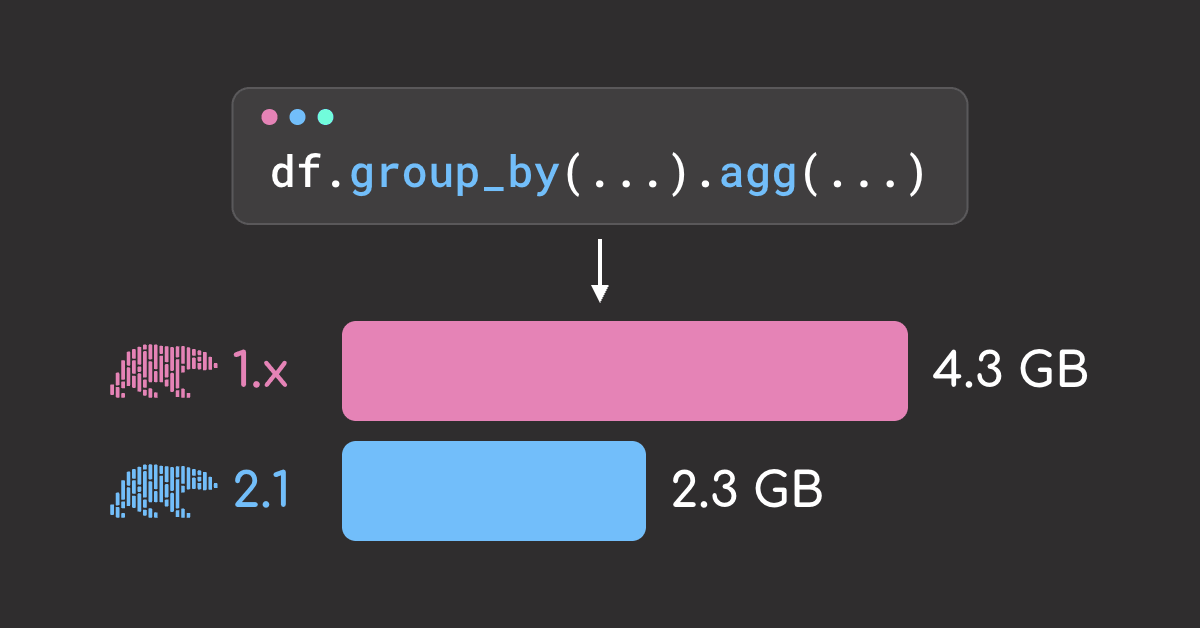
To see the difference on real data, group 10 months of taxi trips by route and hour. With 33 million trips and 12 million groups, this query needs a lot of memory.
months = [f"data/yellow_tripdata_2024-{m:02d}.parquet" for m in range(1, 11)]
trips = pl.scan_parquet(months)

routes_by_hour = (
    trips.group_by(
        "PULocationID",
        "DOLocationID",
        pl.col("tpep_pickup_datetime").dt.truncate("1h").alias("pickup_hour"),
    )
    .agg(
        pl.len().alias("trips"),
        pl.col("fare_amount").mean().alias("avg_fare"),
    )
    .collect()
)
Here is the same code on Polars 1.44.2 and 2.1.0, as the median of 3 runs.
 peak memory                                                        time
 1.44.2         ████████████████████████████████████████ 4,453 MB   0.75 s
 2.1.0          █████████████████████                    2,389 MB   0.34 s
The same code runs twice as fast in 2.1 and uses about half the memory.
Run Warehouse SQL Directly
Many SQL features common in warehouses like Snowflake or BigQuery were not supported in Polars 1.x. You had to rewrite those queries as Polars expressions, or run them in another engine.
Polars 2.1 adds many of these features. Here are three of them on the taxi data.
Read Several Files at Once
In Polars 1.x, read_parquet in SQL took one string, either a path or a glob. In Polars 2.1, it also takes a list of paths, so you can pick exactly which files to read.
three_months = pl.sql(
    """
    SELECT COUNT(*) AS trips
    FROM read_parquet([
        'data/yellow_tripdata_2024-01.parquet',
        'data/yellow_tripdata_2024-02.parquet',
        'data/yellow_tripdata_2024-03.parquet'
    ])
    """,
    eager=True,
)
three_months
Group Rows by Hour with DATE_TRUNC
DATE_TRUNC rounds a timestamp down to a unit such as the hour or the day, which is how you count events per hour in SQL. Polars 2.1 now supports it.
The query below rounds each pickup time down to the hour, for pickups in zone 12 on January 2.
trips = pl.scan_parquet("data/taxi.parquet")

pl.sql(
    """
    SELECT
        tpep_pickup_datetime,
        DATE_TRUNC('hour', tpep_pickup_datetime) AS pickup_hour
    FROM trips
    WHERE PULocationID = 12
      AND CAST(tpep_pickup_datetime AS DATE) = '2024-01-02'
    ORDER BY tpep_pickup_datetime
    LIMIT 4
    """,
    eager=True,
)
Fill Missing Hours with generate_series
generate_series creates one row per step between a start and an end, such as every hour of a day. Polars 2.1 now supports it.
The query below creates one row for each hour from 6 AM to 9 AM on January 2.
pl.sql(
    """
    SELECT *
    FROM generate_series(
        TIMESTAMP '2024-01-02 06:00:00',
        TIMESTAMP '2024-01-02 09:00:00',
        INTERVAL '1 hour'
    ) AS t(pickup_hour)
    """,
    eager=True,
)
2.1 also adds ASOF JOIN, WITH RECURSIVE, CREATE TEMP TABLE, REGEXP_REPLACE, and correlated subqueries in JOIN ... ON. See the release notes for the full list.
Encrypt Sensitive Columns
Sometimes only certain people should see some columns. For example, in the taxi data, only the finance team should see fares and tips, while everyone can see the rest.
Polars 2.1 allows you to encrypt chosen columns in a Parquet file with a specific key.
 trips_encrypted.parquet
 ┌───────────────────────────────────────────────────────┐
 │ pickup time │ zone │ distance │ fare 🔒 │ tip 🔒      │
 └───────────────────────────────────────────────────────┘
   readable by anyone              needs payment_key
To encrypt sensitive columns, use ParquetEncryptionProperties. It takes two kinds of keys:
- The footer key protects the file from being tampered with.
- The column keys lock the sensitive columns, so only people with the key can read them.
trips = pl.read_parquet("data/taxi.parquet")

# Define keys
footer_key = b"footer-key-16byt"  # keys must be 16 or 32 bytes
payment_key = b"payment-key-16by"

# Define sensitive columns
payment_columns = {"fare_amount": payment_key, "tip_amount": payment_key}

# Encrypt the file
encryption = pl.ParquetEncryptionProperties(
    footer_key=footer_key,
    column_keys=payment_columns,
    plaintext_footer=True,  # let readers without keys read the unencrypted columns
)
trips.write_parquet("data/trips_encrypted.parquet", encryption=encryption)
Without the keys, you can only read the unencrypted columns.
pl.read_parquet(
    "data/trips_encrypted.parquet", columns=["PULocationID", "trip_distance"]
).head(3)
Passing the keys with ParquetDecryptionProperties allows you to read the sensitive columns.
decryption = pl.ParquetDecryptionProperties(
    footer_key=footer_key, column_keys=payment_columns
)
pl.read_parquet(
    "data/trips_encrypted.parquet",
    columns=["fare_amount", "tip_amount"],
    decryption=decryption,
).head(3)
Other Additions in 2.1
Here are a few smaller additions worth knowing about.
Full Joins in join_where
join_where joins two tables on conditions like “a value falls within a range”. In Polars 2.1, you can pass how="full" to keep the rows that don’t match on either side.
trips = pl.DataFrame({"pickup_hour": [8, 13]})
rush = pl.DataFrame({"period": ["morning", "evening"], "start": [7, 17], "end": [9, 19]})

joined = trips.join_where(
    rush, pl.col("pickup_hour").is_between("start", "end"), how="full"
)
Estimate Quantiles with approx_quantile
An exact quantile, such as the median, needs every value in the column in memory to find the one in the middle. On large data, that costs time and memory.
approx_quantile estimates the quantile from a sample of the values instead. It runs faster and uses less memory, at the cost of a small error, which is usually good enough.
 fares: 14  7  30  12  9  15  8  13  11

 quantile
   1. keep all 9 fares         14  7  30  12  9  15  8  13  11
   2. sort                      7  8  9  11  12  13  14  15  30
   3. take the middle           7  8  9  11 [12] 13  14  15  30   -> 12

 approx_quantile
   1. sort                      7  8  9  11  12  13  14  15  30
   2. keep every other value    7     9      12      14      30
   3. take the middle           7     9     [12]     14      30   -> ≈ 12
Let’s compare the performance of the two approaches on 33 million fares, using the median of 3 runs.
months = [f"data/yellow_tripdata_2024-{m:02d}.parquet" for m in range(1, 11)]
fares = pl.scan_parquet(months)

fares.select(
    pl.col("fare_amount").quantile(0.5).alias("exact_median"),
    pl.col("fare_amount").approx_quantile(0.5).alias("approx_median"),
).collect()
The estimate matches the exact median. Better yet, it is 2x faster and uses 38% less memory.
 peak memory
 quantile         ██████████████████████████████ 681 MB
 approx_quantile  ███████████████████            422 MB

 time
 quantile         ██████████████████████████████ 0.09 s
 approx_quantile  █████████████                  0.04 s
Convert Masked NumPy Arrays
A NumPy masked array pairs the data with a list of True/False flags, where True marks a value as missing. Polars 2.1 reads the mask and turns each hidden value into a null.
import numpy as np

masked_tips = np.ma.array([3.75, 0.0, 3.0], mask=[False, True, False])
tips = pl.Series("tip_amount", masked_tips)

print(tips.to_list())
Final Thoughts
What I like about Polars 2.1 is that most of the gains need no code changes. The same group-by runs twice as fast as in Polars 1.x with about half the memory, and you can write more of your usual SQL without workarounds.
Joins can’t spill to disk yet, but the Polars team plans to add it. Until then, a very large join needs enough RAM, or an engine like DuckDB.
References
- Polars 2.0 release post (Polars, 2026): spilling to disk starts at about 80% of RAM, with a 64 GB default disk budget.
Related Tutorials
- What’s New in Polars 2.0: the streaming default, row order changes, and stricter types
- pandas vs Polars vs DuckDB: when each DataFrame tool fits best
Stay Current with CodeCut
Easy-to-digest articles on Python, AI, and open-source tools. Delivered twice a week.