
Table of Contents
- Introduction
- Lazy Imports: Load Libraries Only When You Use Them
- frozendict: Immutable Dicts, Built In
- Unpacking in Comprehensions: Flatten and Merge in One Line
- Tachyon: Profile a Running Job Without Restarting It
- Clearer Error Messages
- Smaller Improvements Worth Knowing
- Final Thoughts
- References
Introduction
Python 3.15 was released on October 9, 2026. The changelog is long, so this article picks the five changes you’re most likely to care about as a data scientist.
For each feature, you’ll see the problem with the old way and how the new feature solves it.
Stay Current with CodeCut
Easy-to-digest articles on Python, AI, and open-source tools. Delivered twice a week.
Lazy Imports: Load Libraries Only When You Use Them
A normal import loads a module right when Python reaches the import line:
import pandas as pd  # pandas loads here, even if the script never uses it
print("hello")
The usual workaround is to move import pandas inside the function that needs it. That works, but the imports end up spread across functions. Anyone reading the code has to check every function to see which libraries it uses.
def load_trips(path):
    import pandas as pd
    return pd.read_parquet(path)
In Python 3.15, the lazy keyword (PEP 810) lets the import stay at the top while delaying the load until the module is first used:
lazy import pandas as pd  # nothing loads yet
print("hello")
df = pd.read_parquet("taxi.parquet")  # pandas loads here, on first use
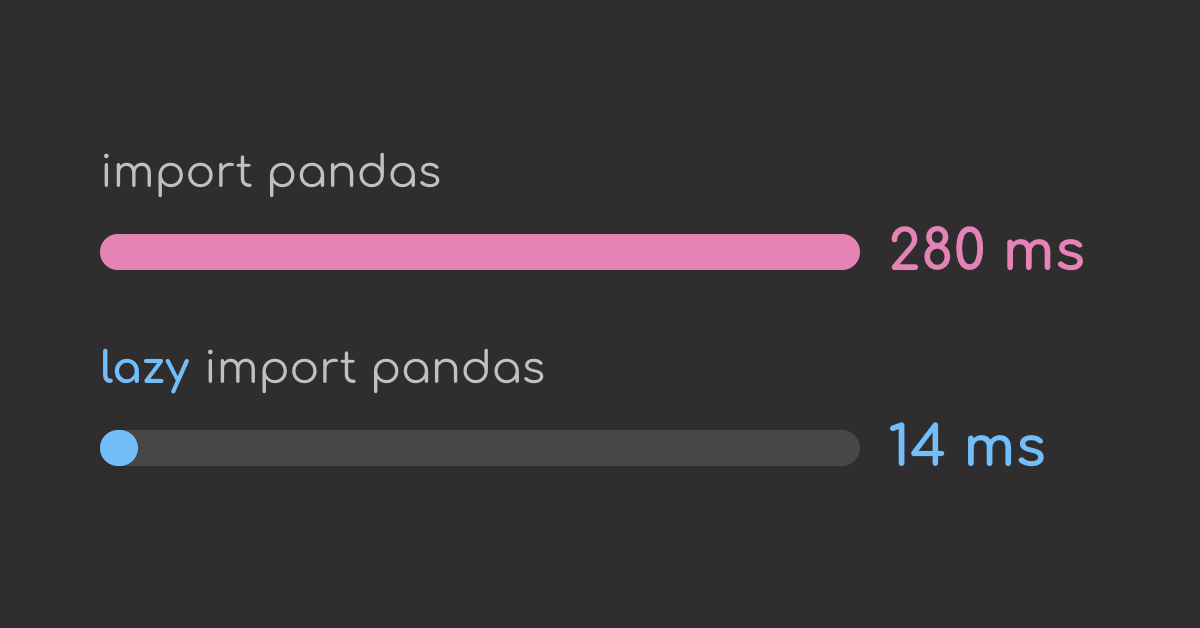
To measure the difference, compare two scripts that differ only in the import line. Neither uses pandas, so the lazy script should skip loading it entirely and run much faster:
# normal.py
import pandas as pd
print("hello")
# lazy.py
lazy import pandas as pd
print("hello")
Running each script 20 times and taking the median gives:
The lazy version starts about 20 times faster. This shows that it never loads pandas.
frozendict: Immutable Dicts, Built In
Plain dicts can be changed by any function they’re passed to. In a pipeline, that means one step can quietly change a setting that later steps rely on.
config = {"min_fare": 0, "max_fare": 500}

def drop_outliers(cfg):
    cfg["max_fare"] = 1000  # meant as a local tweak

print("before:", config)
drop_outliers(config)
print("after: ", config)
Python 3.15 solves this problem with a built-in frozendict (PEP 814), a dict that can’t be changed after it’s created:
config = frozendict(min_fare=0, max_fare=500)

def drop_outliers(cfg):
    cfg["max_fare"] = 1000

drop_outliers(config)
To change a value, create a new frozendict with |. The original stays the same:
strict_config = config | {"max_fare": 300}
print("original:", config)
print("new:     ", strict_config)
Changing a setting now takes a deliberate step, so it can’t happen by accident.
📚 For comprehensive guidance on managing pipeline configs, check out Production-Ready Data Science.
Unpacking in Comprehensions: Flatten and Merge in One Line
You can flatten a list of lists with a double for or itertools.chain.from_iterable. However, the double for is hard to read at a glance.
column_groups = [
    ["fare_amount", "tip_amount"],
    ["trip_distance"],
    ["passenger_count", "payment_type"],
]
print([column for group in column_groups for column in group])
Python 3.15 makes this more readable by allowing * inside comprehensions (PEP 798). It unpacks each inner list, so the items end up in one flat list:
print([*group for group in column_groups])
The same syntax works for sets:
monthly_payment_types = [{1, 2}, {2, 3, 4}, {1, 5}]
print({*types for types in monthly_payment_types})
** allows merging a list of dicts into one. If two dicts share a key, the dict that comes later in the list overrides the earlier one.
layers = [
    {"min_fare": 0, "max_fare": 500},  # defaults
    {"max_fare": 300},                 # overrides max_fare
    {"payment_types": (1, 2)},         # adds a new key
]
print({**layer for layer in layers})
Tachyon: Profile a Running Job Without Restarting It
Tachyon vs cProfile
A profiler tells you which parts of your code take the most time. Python’s built-in profiler, cProfile, times every function call, even when the same function runs millions of times. That extra work makes the program run slower:
call 1   func_1   start timer ... stop timer
call 2   func_1   start timer ... stop timer   <- same function, timed again
call 3   func_2   start timer ... stop timer
...               every call gets timed -> extra work on each one
Tachyon, the new profiler in Python 3.15, doesn’t time every function call. Instead, it checks which function is running once every millisecond. A function that shows up in 3 of 4 checks used about 75% of the time:
1 ms   func_1
2 ms   func_1
3 ms   func_2
4 ms   func_1

func_1   3 of 4 checks = 75% of the time
func_2   1 of 4 checks = 25% of the time
Profile with Tachyon
Let’s try profiling a pipeline with Tachyon. Start by installing pyarrow and downloading one month of NYC Yellow Taxi trip records:
uv pip install pyarrow
curl -o taxi.parquet https://d37ci6vzurychx.cloudfront.net/trip-data/yellow_tripdata_2024-01.parquet
Create a simple data pipeline:
# pipeline.py
import pandas as pd


def load_trips(path):
    columns = ["PULocationID", "fare_amount", "tip_amount", "trip_distance"]
    return pd.read_parquet(path, columns=columns)


def clean_trips(trips):
    return trips[(trips["fare_amount"] > 0) & (trips["trip_distance"] > 0)]


def tip_rate(row):
    return row["tip_amount"] / row["fare_amount"]


def add_tip_rate(trips):
    return trips.assign(tip_rate=trips.apply(tip_rate, axis=1))


def summarize_zones(trips):
    return trips.groupby("PULocationID")["tip_rate"].median()


trips = load_trips("taxi.parquet")
trips = clean_trips(trips)
trips = add_tip_rate(trips)
summary = summarize_zones(trips)
print(summary.sort_values(ascending=False).head(3))
To run profiling with Tachyon, run:
python -m profiling.sampling run --sort cumtime -l 9 pipeline.py
Add the --flamegraph option to write an interactive HTML report:
python -m profiling.sampling run --flamegraph -o flamegraph.html pipeline.py
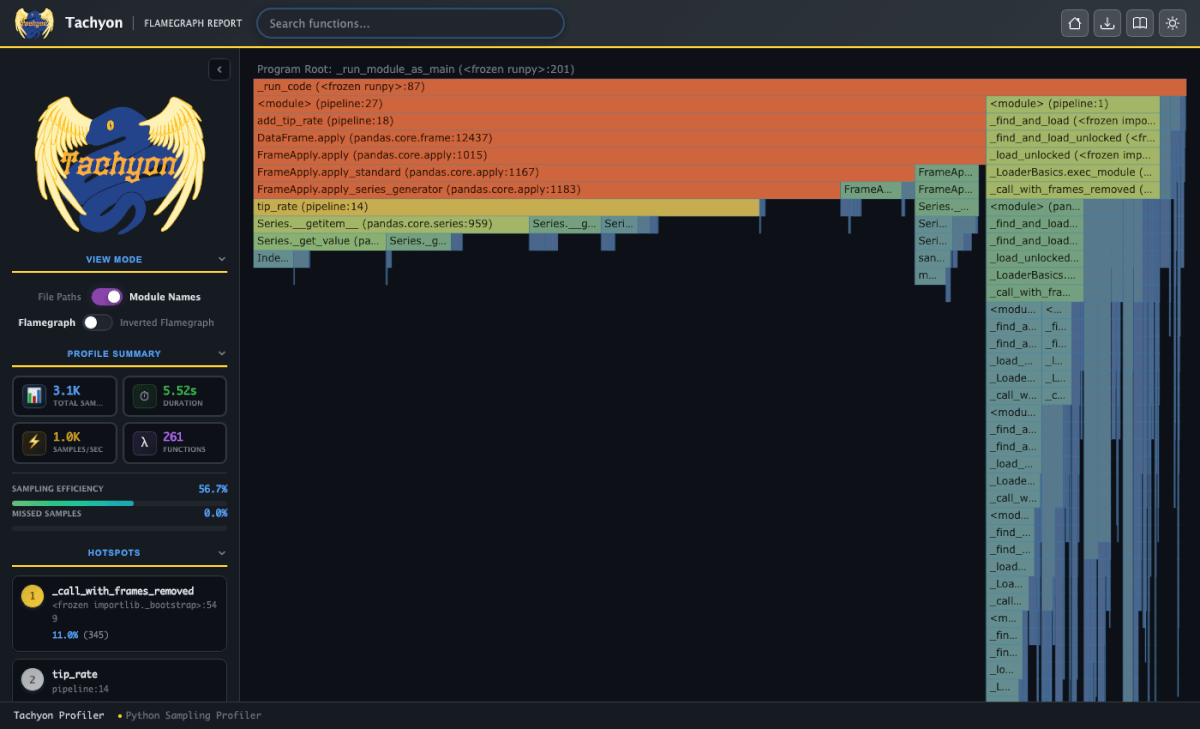
Each bar is a function. Bars below it are the functions it called. A bar’s width and color show how much of the run time it took:
orange-red    60% or more
yellow        35% to 60%
green         18% to 35%
blue          under 18%
Hover over a bar to see its details. add_tip_rate takes 78.5% of the run, so it’s the slow step:
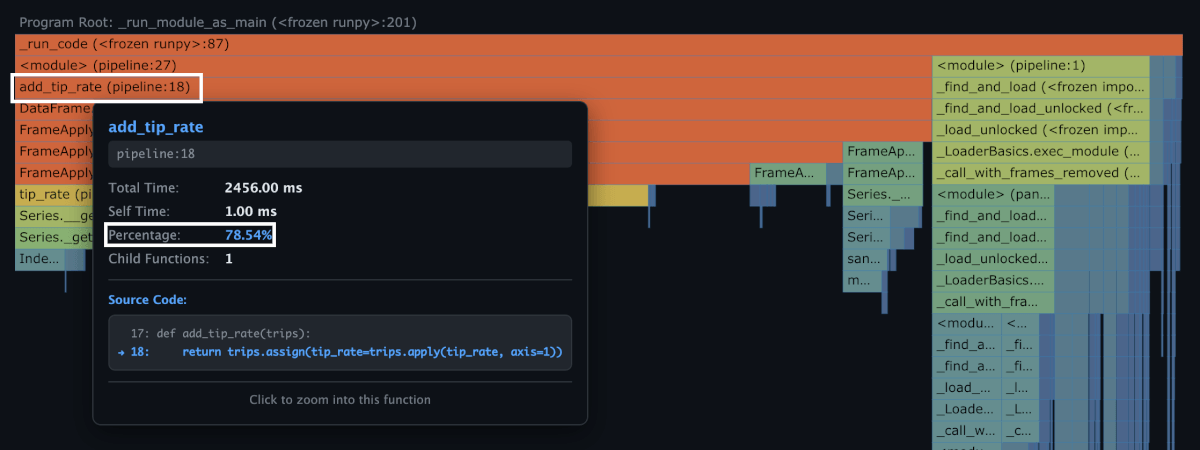
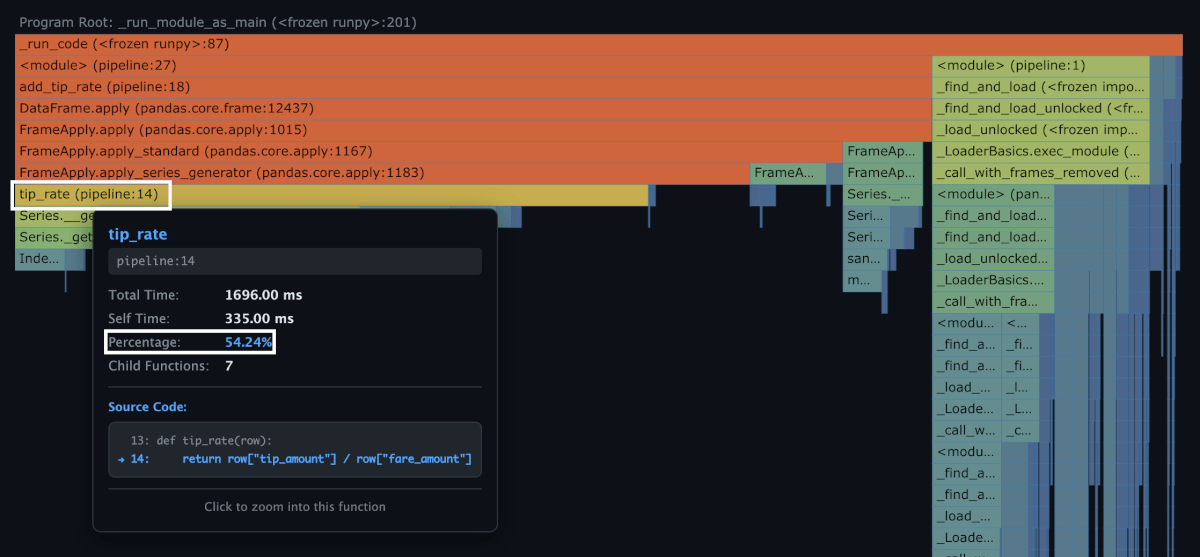
add_tip_rate calls tip_rate through pandas apply, once for every row. tip_rate alone takes 54.2% of the run:
The narrow stack on the right is import pandas as pd, at 18.6% of the run. The import is slow because pandas loads 293 submodules, and each one runs its own setup code:
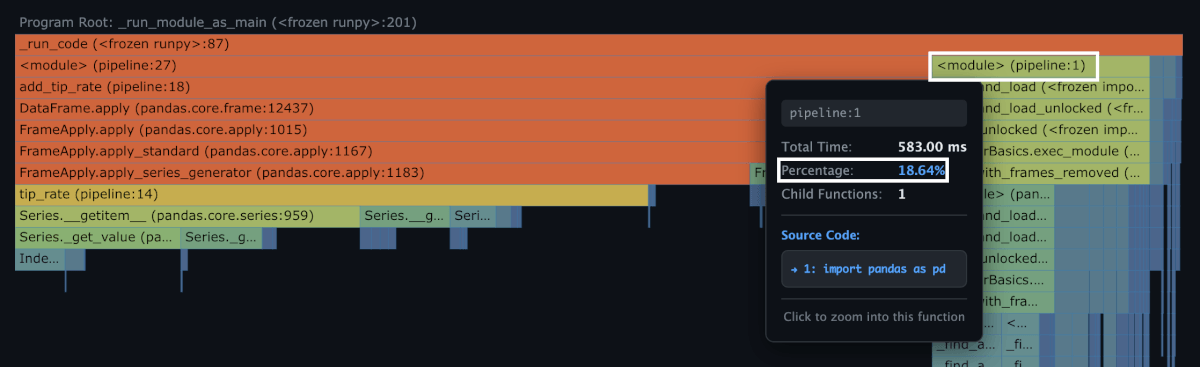
So the slow part of this pipeline is the row-by-row apply in add_tip_rate, not loading the data.
To understand how Tachyon got these results, look at the Profile Summary panel in the sidebar. It shows that Tachyon:
- Collected 3.1K samples in 5.52 seconds
- Saw 261 different functions in those samples
- Succeeded on 56.7% of its checks (sampling efficiency)
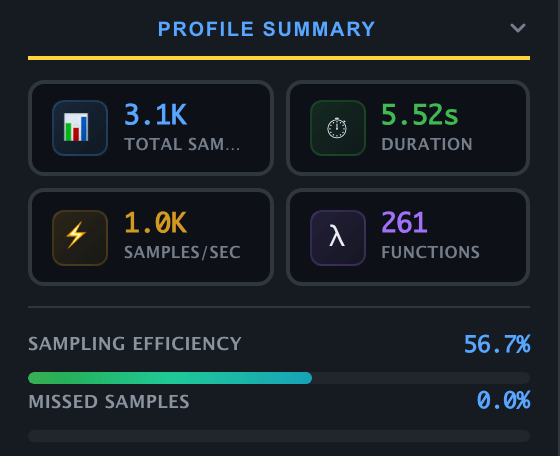
Tachyon also barely slows the program down. It added about 4% to the run time, while cProfile made it more than 3 times slower:
python pipeline.py                              ~4.9 s    no profiler
python -m profiling.sampling run pipeline.py    ~5.1 s    Tachyon: +4%
python -m cProfile pipeline.py                  ~16.7 s   cProfile: 3.4x slower
Attach to a Running Process
cProfile can’t attach to a program that’s already running. To profile a long job with it, you’d have to restart the job.
Tachyon can attach to a job that’s already running, without restarting it.
The command below samples a running job for 5 seconds. Replace <PID> with your job’s process ID:
python -m profiling.sampling attach -d 5 <PID>
To find the process ID, search the running processes for your script’s name with pgrep:
pgrep -af pipeline.py # Linux; on macOS, use pgrep -lf pipeline.py
Clearer Error Messages
Hints for Missing Attributes
Missing-attribute errors now include a suggestion for what you likely meant, not just a note that the attribute is missing.
Let’s say you keep each experiment’s data in a dataclass, then call .shape on the dataclass instead of on its DataFrame. In Python 3.14 and earlier, the error only says the attribute is missing:
from dataclasses import dataclass

import pandas as pd


@dataclass
class Experiment:
    name: str
    data: pd.DataFrame


exp = Experiment(name="baseline", data=pd.DataFrame({"fare": [12.5, 8.0]}))
exp.shape
Python 3.15 points to where the attribute actually is:
Hints for Method Names from Other Languages
Those come from other languages such as JavaScript might get confused of syntax. For example, calling a JavaScript-style push on a list, or append on a tuple:
["fare", "tip"].push("distance")
("fare", "tip").append("distance")
Python 3.14 simply says the method is missing:
Python 3.15 figures out the correct syntax and gives a hint:
Smaller Improvements Worth Knowing
Python 3.15 also includes smaller changes that make everyday work smoother.
UTF-8 by Default: Fewer Cross-Platform CSV Bugs
A file stores bytes, not letters. An encoding is the rule for turning those bytes back into letters. A few common ones:
encoding   characters it covers                   where you see it
--------   ------------------------------------   ----------------------------------
ascii      128: English letters, digits, symbols  old systems; no é, no emoji
cp1252     256: adds Western European letters     default on many Windows machines
utf-8      every character, including 日本 and 🙂   macOS, Linux, and most of the web
Before 3.15, if you called open() without saying which rule to use, Python picked based on the computer. So the same script gives different results on different machines. Code that works on your laptop can quietly misread files on a teammate’s.
same file, saved as UTF-8:   c  a  f  é
                             bytes: 63 61 66 C3 A9    (é takes 2 bytes)

Mac reads it with UTF-8       -> café       correct
Windows reads it with cp1252  -> café      wrong letters
Python 3.15 makes UTF-8 the default on every platform (PEP 686), so open() reads a file the same way on every machine:
same file, saved as UTF-8:     c  a  f  é
                               bytes: 63 61 66 C3 A9

Mac reads it with UTF-8        -> café       correct
Windows reads it with UTF-8    -> café       correct
Tab Completion for Imports
In the interactive shell, pressing Tab after from module import now suggests the names inside the module:
>>> from statistics import me<Tab>
mean            median          median_grouped  median_high     median_low
For a third-party package like pandas, the first Tab offers to import it, and the second Tab shows the names:
>>> from pandas import read_c<Tab>
[ module not imported, press again to import it and propose attributes ]
>>> from pandas import read_c<Tab>
read_clipboard  read_csv
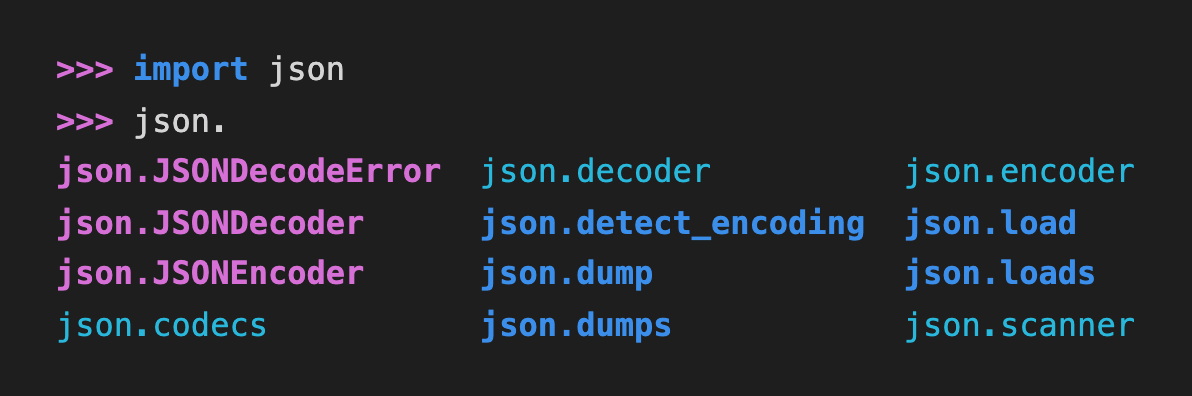
Tab completions are also colored by object kind now, so functions, classes, and modules are easier to tell apart. Here, classes are magenta, functions are blue, and submodules are cyan:
Final Thoughts
After upgrading to Python 3.15, here are some things to try:
- If a script takes a long time to start up, mark heavy imports like
pandas,scikit-learn, andmatplotlibaslazy. - If you pass a config dict between functions and don’t want it changed by accident, freeze it with
frozendict. - If a job is slow, generate a Tachyon flame graph and hover over the widest bars to find the bottleneck.
References
- What’s New in Python 3.15 (Python Software Foundation, 2026): release date and the full list of features covered here.
- profiling.sampling documentation (Python Software Foundation, 2026):
run,attach,dump, modes, and output formats.
Related Tutorials
- What’s New in pandas 3.0: Expressions, Copy-on-Write, and Faster Strings: The biggest pandas changes to know if you’re upgrading pandas along with Python.
- The Hidden Cost of Python Dictionaries (And 3 Safer Alternatives): Covers the bugs that mutable dicts cause, which
frozendictnow helps prevent.
Stay Current with CodeCut
Easy-to-digest articles on Python, AI, and open-source tools. Delivered twice a week.