Generic selectors
Exact matches only
Search in title
Search in content
Post Type Selectors
Filter by Categories
About Article
Analyze Data
Archive
Best Practices
Better Outputs
Blog
Code Optimization
Code Quality
Command Line
Course
Daily tips
Dashboard
Data Analysis & Manipulation
Data Engineer
Data Visualization
DataFrame
Delta Lake
DevOps
DuckDB
Environment Management
Feature Engineer
Git
Jupyter Notebook
LLM
LLM Tools
Machine Learning
Machine Learning & AI
Machine Learning Tools
Manage Data
MLOps
Natural Language Processing
Newsletter Archive
NumPy
Pandas
Polars
PySpark
Python Helpers
Python Tips
Python Utilities
Scrape Data
SQL
Testing
Time Series
Tools
Visualization
Visualization & Reporting
Workflow & Automation
Workflow Automation

python

Auto-created tag for python

Newsletter #225: Query GitHub Issues with Natural Language Using LangChain

📅 Today’s Picks

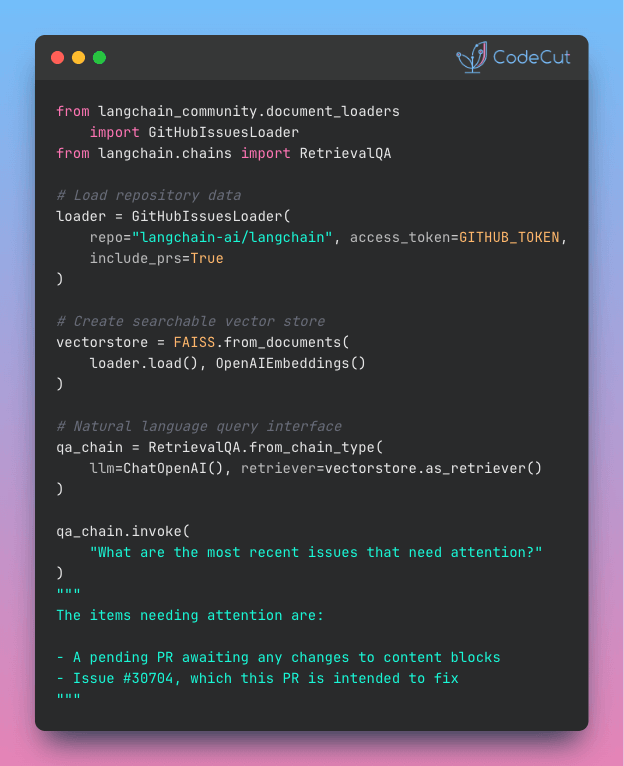
Query GitHub Issues with Natural Language Using LangChain

Problem
Have you ever spent hours clicking through GitHub pages to understand project status, track bugs, or review recent changes? Manual repository analysis wastes development time that could be spent building features.
Solution
LangChain’s GitHubIssuesLoader converts repository issues and PRs into searchable content that responds to natural language questions about bugs, features, and project status.
This method integrates seamlessly with LangChain workflows.

📖 View Full Article

🧪 Run code

⭐ View GitHub

Mock External APIs for Fast, Reliable Tests

Problem
Testing with real APIs and databases is slow, expensive, and unreliable.
External dependencies create flaky tests that can fail due to network issues, rate limits, or service downtime rather than code problems.
Solution
The patch decorator replaces external calls with controllable mock objects for isolated testing.
Key benefits:

Reproducible results across different machines
Fast, reliable tests that focus on your logic
Test edge cases and error conditions that are hard to trigger naturally

Test your data processing logic without waiting for external services or consuming API quotas.

📖 View Full Article

🧪 Run code

☕️ Weekly Finds

timesketch
[Python Utils]
– Collaborative forensic timeline analysis tool for organizing and analyzing forensic timelines

ExtractThinker
[LLM]
– AI-powered Document Intelligence library for LLMs, offering ORM-style interaction for flexible document workflows

ecco
[ML]
– Explain, analyze, and visualize NLP language models with interactive visualizations in Jupyter notebooks

Looking for a specific tool? Explore 70+ Python tools →

Stay Current with CodeCut

Actionable Python tips, curated for busy data pros. Skim in under 2 minutes, three times a week.

.codecut-subscribe-form .codecut-input {
background: #2F2D2E !important;
border: 1px solid #72BEFA !important;
color: #FFFFFF !important;
}
.codecut-subscribe-form .codecut-input::placeholder {
color: #999999 !important;
}
.codecut-subscribe-form .codecut-subscribe-btn {
background: #72BEFA !important;
color: #2F2D2E !important;
}
.codecut-subscribe-form .codecut-subscribe-btn:hover {
background: #5aa8e8 !important;
}

.codecut-subscribe-form {
max-width: 650px;
display: flex;
flex-direction: column;
gap: 8px;
}
.codecut-input {
-webkit-appearance: none;
-moz-appearance: none;
appearance: none;
background: #FFFFFF;
border-radius: 8px !important;
padding: 8px 12px;
font-family: ‘Comfortaa’, sans-serif !important;
font-size: 14px !important;
color: #333333;
border: none !important;
outline: none;
width: 100%;
box-sizing: border-box;
}
input[type=”email”].codecut-input {
border-radius: 8px !important;
}
.codecut-input::placeholder {
color: #666666;
}
.codecut-email-row {
display: flex;
align-items: stretch;
height: 36px;
gap: 8px;
}
.codecut-email-row .codecut-input {
flex: 1;
}
.codecut-subscribe-btn {
background: #72BEFA;
color: #2F2D2E;
border: none;
border-radius: 8px;
padding: 8px 14px;
font-family: ‘Comfortaa’, sans-serif;
font-size: 14px;
font-weight: 500;
cursor: pointer;
text-decoration: none;
display: flex;
align-items: center;
justify-content: center;
transition: background 0.3s ease;
}
.codecut-subscribe-btn:hover {
background: #5aa8e8;
}
.codecut-subscribe-btn:disabled {
background: #999;
cursor: not-allowed;
}
.codecut-message {
font-family: ‘Comfortaa’, sans-serif;
font-size: 12px;
padding: 8px;
border-radius: 6px;
display: none;
}
.codecut-message.success {
background: #d4edda;
color: #155724;
display: block;
}
@media (max-width: 480px) {
.codecut-email-row {
flex-direction: column;
height: auto;
gap: 8px;
}
.codecut-input {
border-radius: 8px;
height: 36px;
}
.codecut-subscribe-btn {
width: 100%;
text-align: center;
border-radius: 8px;
height: 36px;
}
}

Subscribe

Newsletter #225: Query GitHub Issues with Natural Language Using LangChain Read More »

Newsletter #224: Delta Lake vs pandas: Stop Silent Data Corruption

📅 Today’s Picks

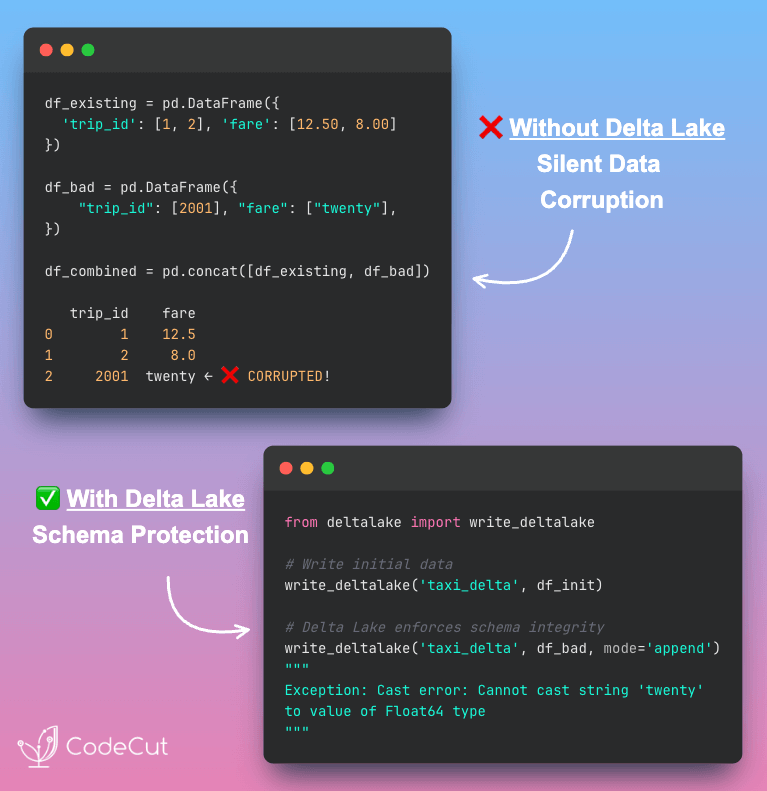
Delta Lake vs pandas: Stop Silent Data Corruption

Problem
Pandas allows type coercion during DataFrame operations. A single string value can silently convert numeric columns to object dtype, breaking downstream systems and corrupting data integrity.
Solution
Delta Lake prevents these issues through strict schema enforcement at write time, validating data types before ingestion to maintain table integrity.
Other features of Delta Lake:

Time travel provides instant access to any historical data version
ACID transactions guarantee data consistency across all operations
Smart file skipping eliminates 95% of unnecessary data scanning
Incremental processing handles billion-row updates efficiently

📖 View Full Article

🧪 Run code

⭐ View GitHub

☕️ Weekly Finds

ZeroFS
[Data Engineer]
– ZeroFS – The Filesystem That Makes S3 your Primary Storage. Provides file-level access via NFS and 9P and block-level access via NBD on S3 storage with encryption, caching, and high performance.

vicinity
[ML]
– Lightweight Nearest Neighbors with Flexible Backends. Provides a unified interface for vector similarity search with support for multiple backends like HNSW, FAISS, Annoy, and more.

vec2text
[LLM]
– Utilities for decoding deep representations (like sentence embeddings) back to text. Train models to reconstruct text sequences from embeddings and invert pre-trained embeddings.

Looking for a specific tool? Explore 70+ Python tools →

Stay Current with CodeCut

Actionable Python tips, curated for busy data pros. Skim in under 2 minutes, three times a week.

.codecut-subscribe-form .codecut-input {
background: #2F2D2E !important;
border: 1px solid #72BEFA !important;
color: #FFFFFF !important;
}
.codecut-subscribe-form .codecut-input::placeholder {
color: #999999 !important;
}
.codecut-subscribe-form .codecut-subscribe-btn {
background: #72BEFA !important;
color: #2F2D2E !important;
}
.codecut-subscribe-form .codecut-subscribe-btn:hover {
background: #5aa8e8 !important;
}

.codecut-subscribe-form {
max-width: 650px;
display: flex;
flex-direction: column;
gap: 8px;
}
.codecut-input {
-webkit-appearance: none;
-moz-appearance: none;
appearance: none;
background: #FFFFFF;
border-radius: 8px !important;
padding: 8px 12px;
font-family: ‘Comfortaa’, sans-serif !important;
font-size: 14px !important;
color: #333333;
border: none !important;
outline: none;
width: 100%;
box-sizing: border-box;
}
input[type=”email”].codecut-input {
border-radius: 8px !important;
}
.codecut-input::placeholder {
color: #666666;
}
.codecut-email-row {
display: flex;
align-items: stretch;
height: 36px;
gap: 8px;
}
.codecut-email-row .codecut-input {
flex: 1;
}
.codecut-subscribe-btn {
background: #72BEFA;
color: #2F2D2E;
border: none;
border-radius: 8px;
padding: 8px 14px;
font-family: ‘Comfortaa’, sans-serif;
font-size: 14px;
font-weight: 500;
cursor: pointer;
text-decoration: none;
display: flex;
align-items: center;
justify-content: center;
transition: background 0.3s ease;
}
.codecut-subscribe-btn:hover {
background: #5aa8e8;
}
.codecut-subscribe-btn:disabled {
background: #999;
cursor: not-allowed;
}
.codecut-message {
font-family: ‘Comfortaa’, sans-serif;
font-size: 12px;
padding: 8px;
border-radius: 6px;
display: none;
}
.codecut-message.success {
background: #d4edda;
color: #155724;
display: block;
}
@media (max-width: 480px) {
.codecut-email-row {
flex-direction: column;
height: auto;
gap: 8px;
}
.codecut-input {
border-radius: 8px;
height: 36px;
}
.codecut-subscribe-btn {
width: 100%;
text-align: center;
border-radius: 8px;
height: 36px;
}
}

Subscribe
Newsletter #224: Delta Lake vs pandas: Stop Silent Data Corruption Read More »

Newsletter #223: ChromaDB’s Automatic Indexing: Fast Vector Search Made Easy

📅 Today’s Picks

Type-Safe Configuration Management with Hydra

Problem
Configuration errors and type mismatches often go undetected until runtime, wasting time and computing resources.
Solution
Hydra’s structured configurations with dataclasses validate types before your code runs, preventing configuration crashes.
What Hydra adds to dataclasses:

Runtime parameter overrides from command line
Configuration composition and inheritance
Built-in experiment management and logging
Run multiple parameters in one command

📖 Learn more

🧪 Run code

⭐ View GitHub

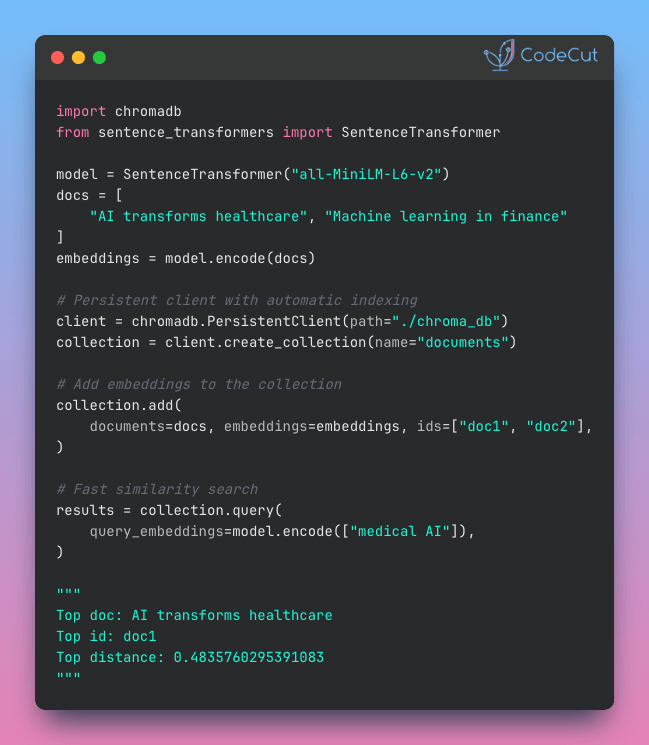
ChromaDB’s Automatic Indexing: Fast Vector Search Made Easy

Problem
Why saving vector embeddings in a file is not enough?
Basic file storage forces you to scan every single embedding for similarity search, creating massive performance bottlenecks as your dataset grows.
Solution
ChromaDB provides persistent vector storage with automatic indexing and metadata filtering capabilities.
Key benefits:

Find relevant content by meaning, not just keyword matching
Handle large datasets without memory crashes using efficient indexing
Complete toolkit included: similarity scoring, deduplication, search ranking, and more

📖 View Full Article

🧪 Run code

⭐ View GitHub

☕️ Weekly Finds

wrapt
[Python Utils]
– A Python module for decorators, wrappers and monkey patching

TabPFN
[ML]
– A transformer-based foundation model for tabular data that outperforms traditional methods

superduperdb
[Data Processing]
– A Python framework for integrating AI models, APIs, and vector search engines directly with your existing databases

Looking for a specific tool? Explore 70+ Python tools →

Stay Current with CodeCut

Actionable Python tips, curated for busy data pros. Skim in under 2 minutes, three times a week.

.codecut-subscribe-form .codecut-input {
background: #2F2D2E !important;
border: 1px solid #72BEFA !important;
color: #FFFFFF !important;
}
.codecut-subscribe-form .codecut-input::placeholder {
color: #999999 !important;
}
.codecut-subscribe-form .codecut-subscribe-btn {
background: #72BEFA !important;
color: #2F2D2E !important;
}
.codecut-subscribe-form .codecut-subscribe-btn:hover {
background: #5aa8e8 !important;
}

.codecut-subscribe-form {
max-width: 650px;
display: flex;
flex-direction: column;
gap: 8px;
}
.codecut-input {
-webkit-appearance: none;
-moz-appearance: none;
appearance: none;
background: #FFFFFF;
border-radius: 8px !important;
padding: 8px 12px;
font-family: ‘Comfortaa’, sans-serif !important;
font-size: 14px !important;
color: #333333;
border: none !important;
outline: none;
width: 100%;
box-sizing: border-box;
}
input[type=”email”].codecut-input {
border-radius: 8px !important;
}
.codecut-input::placeholder {
color: #666666;
}
.codecut-email-row {
display: flex;
align-items: stretch;
height: 36px;
gap: 8px;
}
.codecut-email-row .codecut-input {
flex: 1;
}
.codecut-subscribe-btn {
background: #72BEFA;
color: #2F2D2E;
border: none;
border-radius: 8px;
padding: 8px 14px;
font-family: ‘Comfortaa’, sans-serif;
font-size: 14px;
font-weight: 500;
cursor: pointer;
text-decoration: none;
display: flex;
align-items: center;
justify-content: center;
transition: background 0.3s ease;
}
.codecut-subscribe-btn:hover {
background: #5aa8e8;
}
.codecut-subscribe-btn:disabled {
background: #999;
cursor: not-allowed;
}
.codecut-message {
font-family: ‘Comfortaa’, sans-serif;
font-size: 12px;
padding: 8px;
border-radius: 6px;
display: none;
}
.codecut-message.success {
background: #d4edda;
color: #155724;
display: block;
}
@media (max-width: 480px) {
.codecut-email-row {
flex-direction: column;
height: auto;
gap: 8px;
}
.codecut-input {
border-radius: 8px;
height: 36px;
}
.codecut-subscribe-btn {
width: 100%;
text-align: center;
border-radius: 8px;
height: 36px;
}
}

Subscribe
Newsletter #223: ChromaDB’s Automatic Indexing: Fast Vector Search Made Easy Read More »

Newsletter #222: Build Dynamic AI Prompts with LangChain Templates

📅 Today’s Picks

DuckDB: Zero-Config SQL Database for DataFrames

Problem
Setting up database servers for SQL operations requires complex configuration, service management, and credential setup.
This creates barriers between data scientists and their analytical workflows.
Solution
DuckDB provides an embedded SQL database with zero configuration required.
Key benefits:

No server installation or management needed
Direct SQL operations on DataFrames and files
Compatible with pandas, Polars, and Arrow ecosystems
Fast analytical queries with columnar storage
Open-source with active development community

Query your data instantly without database administration overhead.

📖 View Full Article

🧪 Run code

⭐ View GitHub

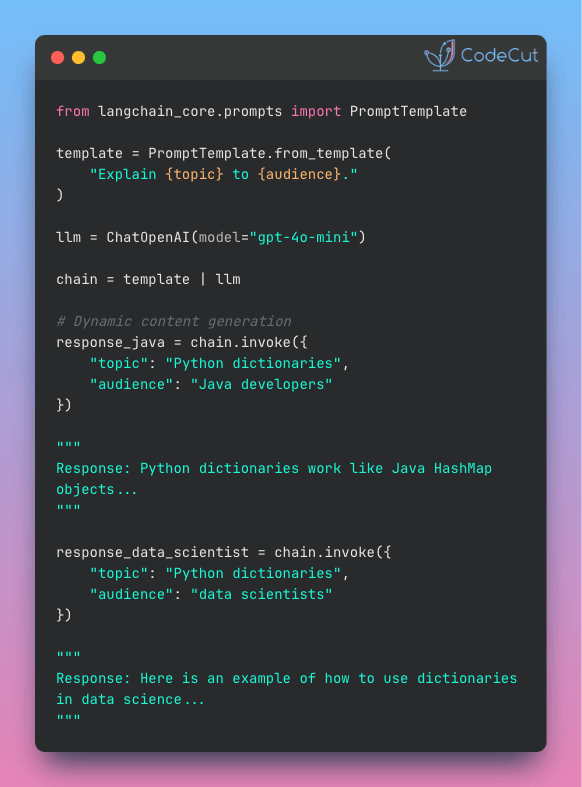
Build Dynamic AI Prompts with LangChain Templates

Problem
Hard-coded prompts limit flexibility and make it difficult to adapt AI applications to different contexts or user inputs.
Creating separate functions for each prompt variation leads to duplicate code with no reusability.
Solution
LangChain’s PromptTemplate enables dynamic, reusable prompts with variable substitution.
Create one template that adapts to multiple contexts:

Variable substitution with {topic}, {audience}, {examples}
Single template for unlimited prompt variations
Clean, maintainable code structure
Compatible with all major LLM providers

Transform repetitive hard-coded prompts into flexible, reusable templates that scale with your AI application needs.

📖 View Full Article

⭐ View GitHub

☕️ Weekly Finds

GHunt
[Python Utils]
– Modulable OSINT tool designed to investigate Google accounts and objects using various techniques

nbQA
[Python Utils]
– Run ruff, isort, pyupgrade, mypy, pylint, flake8, and more on Jupyter Notebooks

pg_vectorize
[LLM]
– Postgres extension that automates the transformation and orchestration of text to embeddings for vector and semantic search

Looking for a specific tool? Explore 70+ Python tools →

Stay Current with CodeCut

Actionable Python tips, curated for busy data pros. Skim in under 2 minutes, three times a week.

.codecut-subscribe-form .codecut-input {
background: #2F2D2E !important;
border: 1px solid #72BEFA !important;
color: #FFFFFF !important;
}
.codecut-subscribe-form .codecut-input::placeholder {
color: #999999 !important;
}
.codecut-subscribe-form .codecut-subscribe-btn {
background: #72BEFA !important;
color: #2F2D2E !important;
}
.codecut-subscribe-form .codecut-subscribe-btn:hover {
background: #5aa8e8 !important;
}

.codecut-subscribe-form {
max-width: 650px;
display: flex;
flex-direction: column;
gap: 8px;
}
.codecut-input {
-webkit-appearance: none;
-moz-appearance: none;
appearance: none;
background: #FFFFFF;
border-radius: 8px !important;
padding: 8px 12px;
font-family: ‘Comfortaa’, sans-serif !important;
font-size: 14px !important;
color: #333333;
border: none !important;
outline: none;
width: 100%;
box-sizing: border-box;
}
input[type=”email”].codecut-input {
border-radius: 8px !important;
}
.codecut-input::placeholder {
color: #666666;
}
.codecut-email-row {
display: flex;
align-items: stretch;
height: 36px;
gap: 8px;
}
.codecut-email-row .codecut-input {
flex: 1;
}
.codecut-subscribe-btn {
background: #72BEFA;
color: #2F2D2E;
border: none;
border-radius: 8px;
padding: 8px 14px;
font-family: ‘Comfortaa’, sans-serif;
font-size: 14px;
font-weight: 500;
cursor: pointer;
text-decoration: none;
display: flex;
align-items: center;
justify-content: center;
transition: background 0.3s ease;
}
.codecut-subscribe-btn:hover {
background: #5aa8e8;
}
.codecut-subscribe-btn:disabled {
background: #999;
cursor: not-allowed;
}
.codecut-message {
font-family: ‘Comfortaa’, sans-serif;
font-size: 12px;
padding: 8px;
border-radius: 6px;
display: none;
}
.codecut-message.success {
background: #d4edda;
color: #155724;
display: block;
}
@media (max-width: 480px) {
.codecut-email-row {
flex-direction: column;
height: auto;
gap: 8px;
}
.codecut-input {
border-radius: 8px;
height: 36px;
}
.codecut-subscribe-btn {
width: 100%;
text-align: center;
border-radius: 8px;
height: 36px;
}
}

Subscribe
Newsletter #222: Build Dynamic AI Prompts with LangChain Templates Read More »

Newsletter #221: handcalcs: Generate LaTeX Step-by-Step Calculations from Python

📅 Today’s Picks

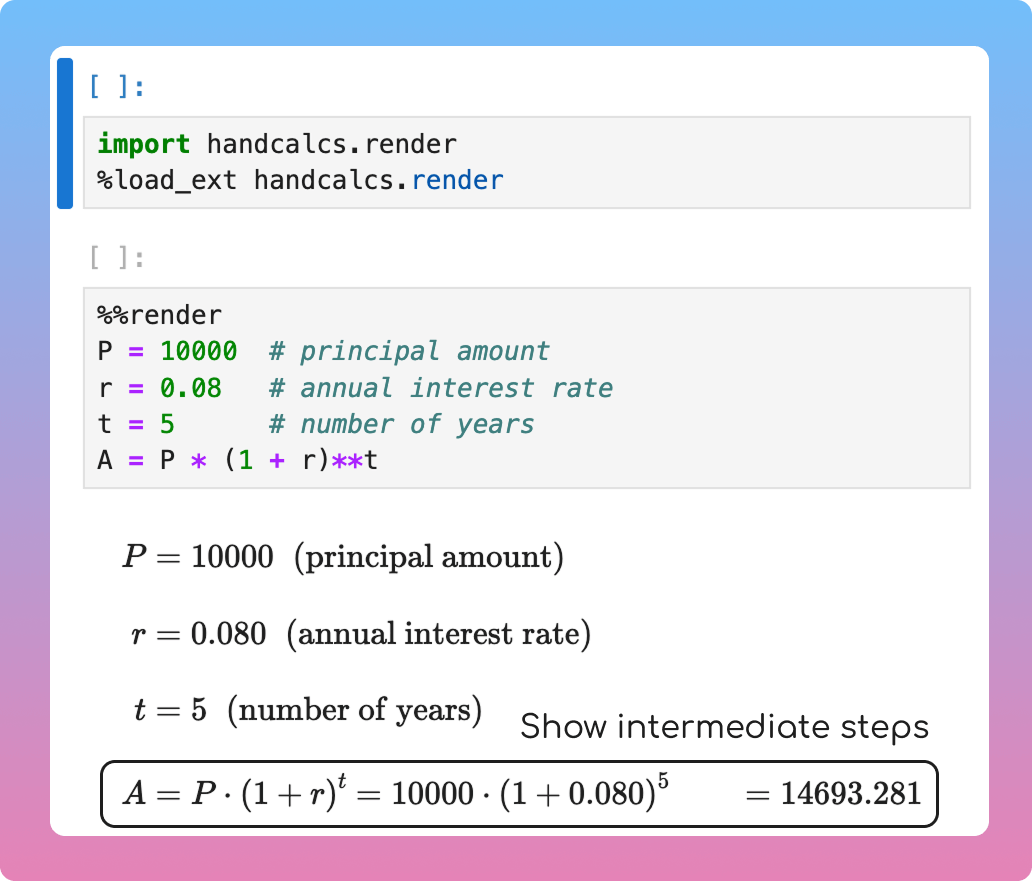
handcalcs: Generate LaTeX Step-by-Step Calculations from Python

Problem
Showing the intermediate steps of the calculation is important for stakeholders to understand the calculation and verify the results.
However, writing LaTeX for each calculation step is manual and time-consuming.
Solution
handcalcs eliminates manual LaTeX writing by auto-generating mathematical documentation from your Python calculations.
Perfect for engineering reports, data science documentation, and educational materials.

📖 View Full Article

🧪 Run code

⭐ View GitHub

☕️ Weekly Finds

nanoGPT
[LLM]
– The simplest, fastest repository for training/finetuning medium-sized GPTs. A clean, minimal implementation of GPT in PyTorch.

GHunt
[Python Utils]
– Modulable OSINT tool designed to evolve over the years, incorporates many techniques to investigate Google accounts.

beartype
[Python Utils]
– Fast, efficient runtime type checking for Python. Open-source pure-Python runtime type checker emphasizing efficiency and portability.

Looking for a specific tool? Explore 70+ Python tools →

Stay Current with CodeCut

Actionable Python tips, curated for busy data pros. Skim in under 2 minutes, three times a week.

.codecut-subscribe-form .codecut-input {
background: #2F2D2E !important;
border: 1px solid #72BEFA !important;
color: #FFFFFF !important;
}
.codecut-subscribe-form .codecut-input::placeholder {
color: #999999 !important;
}
.codecut-subscribe-form .codecut-subscribe-btn {
background: #72BEFA !important;
color: #2F2D2E !important;
}
.codecut-subscribe-form .codecut-subscribe-btn:hover {
background: #5aa8e8 !important;
}

.codecut-subscribe-form {
max-width: 650px;
display: flex;
flex-direction: column;
gap: 8px;
}
.codecut-input {
-webkit-appearance: none;
-moz-appearance: none;
appearance: none;
background: #FFFFFF;
border-radius: 8px !important;
padding: 8px 12px;
font-family: ‘Comfortaa’, sans-serif !important;
font-size: 14px !important;
color: #333333;
border: none !important;
outline: none;
width: 100%;
box-sizing: border-box;
}
input[type=”email”].codecut-input {
border-radius: 8px !important;
}
.codecut-input::placeholder {
color: #666666;
}
.codecut-email-row {
display: flex;
align-items: stretch;
height: 36px;
gap: 8px;
}
.codecut-email-row .codecut-input {
flex: 1;
}
.codecut-subscribe-btn {
background: #72BEFA;
color: #2F2D2E;
border: none;
border-radius: 8px;
padding: 8px 14px;
font-family: ‘Comfortaa’, sans-serif;
font-size: 14px;
font-weight: 500;
cursor: pointer;
text-decoration: none;
display: flex;
align-items: center;
justify-content: center;
transition: background 0.3s ease;
}
.codecut-subscribe-btn:hover {
background: #5aa8e8;
}
.codecut-subscribe-btn:disabled {
background: #999;
cursor: not-allowed;
}
.codecut-message {
font-family: ‘Comfortaa’, sans-serif;
font-size: 12px;
padding: 8px;
border-radius: 6px;
display: none;
}
.codecut-message.success {
background: #d4edda;
color: #155724;
display: block;
}
@media (max-width: 480px) {
.codecut-email-row {
flex-direction: column;
height: auto;
gap: 8px;
}
.codecut-input {
border-radius: 8px;
height: 36px;
}
.codecut-subscribe-btn {
width: 100%;
text-align: center;
border-radius: 8px;
height: 36px;
}
}

Subscribe
Newsletter #221: handcalcs: Generate LaTeX Step-by-Step Calculations from Python Read More »

3 Tools That Automatically Convert Python Code to LaTeX Math

Table of Contents

Introduction
Tool Selection Guide
Setting Up the Environment
IPython.display.Latex: Built-in LaTeX Rendering
handcalcs: Step-by-Step Calculations
latexify-py: Automated Function Conversion
SymPy: Symbolic Mathematics
Final Thoughts

Introduction
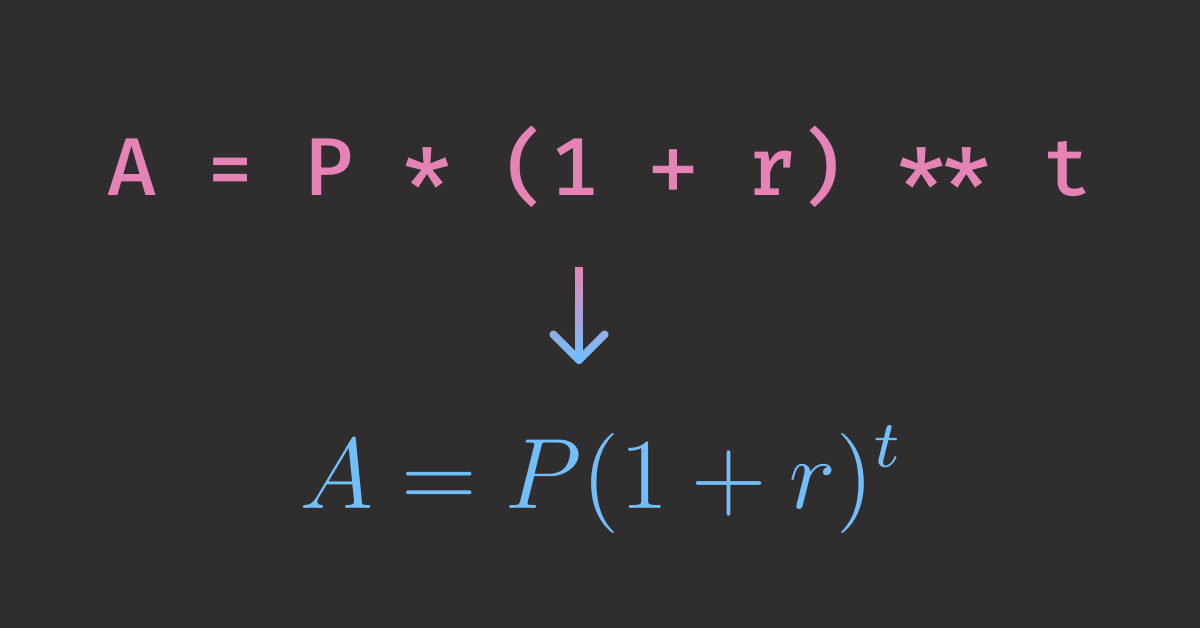
Imagine you are a financial analyst, who is building financial models in Python and need to present them to non-technical executives. Since they are not familiar with Python, you need to show them the mathematical foundations behind your algorithms, not just code blocks. How can you do that?
The best way to present mathematical models is to use LaTeX. It is a powerful tool for writing mathematical notation and equations. It is widely used in academic papers, research papers, and technical reports.
However, writing LaTeX by hand is not easy, especially for complex equations. In this article, you will learn how to convert Python code to LaTeX in Jupyter notebooks using four powerful tools: IPython.display.Latex, handcalcs, latexify-py, and SymPy.

💻 Get the Code: The complete source code and Jupyter notebook for this tutorial are available on GitHub. Clone it to follow along!

Stay Current with CodeCut
Actionable Python tips, curated for busy data pros. Skim in under 2 minutes, three times a week.

.codecut-subscribe-form .codecut-input {
background: #2F2D2E !important;
border: 1px solid #72BEFA !important;
color: #FFFFFF !important;
}
.codecut-subscribe-form .codecut-input::placeholder {
color: #999999 !important;
}
.codecut-subscribe-form .codecut-subscribe-btn {
background: #72BEFA !important;
color: #2F2D2E !important;
}
.codecut-subscribe-form .codecut-subscribe-btn:hover {
background: #5aa8e8 !important;
}

.codecut-subscribe-form {
max-width: 650px;
display: flex;
flex-direction: column;
gap: 8px;
}

.codecut-input {
-webkit-appearance: none;
-moz-appearance: none;
appearance: none;
background: #FFFFFF;
border-radius: 8px !important;
padding: 8px 12px;
font-family: ‘Comfortaa’, sans-serif !important;
font-size: 14px !important;
color: #333333;
border: none !important;
outline: none;
width: 100%;
box-sizing: border-box;
}

input[type=”email”].codecut-input {
border-radius: 8px !important;
}

.codecut-input::placeholder {
color: #666666;
}

.codecut-email-row {
display: flex;
align-items: stretch;
height: 36px;
gap: 8px;
}

.codecut-email-row .codecut-input {
flex: 1;
}

.codecut-subscribe-btn {
background: #72BEFA;
color: #2F2D2E;
border: none;
border-radius: 8px;
padding: 8px 14px;
font-family: ‘Comfortaa’, sans-serif;
font-size: 14px;
font-weight: 500;
cursor: pointer;
text-decoration: none;
display: flex;
align-items: center;
justify-content: center;
transition: background 0.3s ease;
}

.codecut-subscribe-btn:hover {
background: #5aa8e8;
}

.codecut-subscribe-btn:disabled {
background: #999;
cursor: not-allowed;
}

.codecut-message {
font-family: ‘Comfortaa’, sans-serif;
font-size: 12px;
padding: 8px;
border-radius: 6px;
display: none;
}

.codecut-message.success {
background: #d4edda;
color: #155724;
display: block;
}

/* Mobile responsive */
@media (max-width: 480px) {
.codecut-email-row {
flex-direction: column;
height: auto;
gap: 8px;
}

.codecut-input {
border-radius: 8px;
height: 36px;
}

.codecut-subscribe-btn {
width: 100%;
text-align: center;
border-radius: 8px;
height: 36px;
}
}

Subscribe
Key Takeaways
Here’s what you’ll learn:

Transform Python calculations into professional LaTeX equations using four specialized tools
Generate step-by-step mathematical documentation automatically with handcalcs magic commands
Convert Python functions to clean LaTeX notation instantly using latexify-py decorators
Perform symbolic mathematics including equation solving and algebraic manipulation with SymPy

Setting Up the Environment
Install the required packages using pip or uv.
# Using pip
pip install handcalcs latexify-py sympy

# Using uv (recommended)
uv add handcalcs latexify-py sympy

📚 For production-ready notebook workflows and development best practices, check out Production-Ready Data Science.

IPython.display.Latex: Built-in LaTeX Rendering
The simplest approach uses Jupyter’s built-in IPython.display.Latex rendering. It is ideal when you want precise control over mathematical notation.
Let’s create a professional-looking compound interest calculation.
Start with defining the variables, where P is the principal amount, r is the annual interest rate, and t is the number of years.
P = 10000 # principal amount
r = 0.08 # annual interest rate
t = 5 # number of years

Now we are ready to display the calculation in LaTeX. To make the calculation easier to follow, we will break it down into three parts:

Display the formula
Substitute the variables into the formula
Display the result

# Calculate result
A = P * (1 + r) ** t

# Display the calculation with LaTeX
display(Latex(r"$A = P(1 + r)^t$"))
display(Latex(f"$A = {P:,}(1 + {r})^{{{t}}}$"))
display(Latex(f"$A = {A:,.2f}$"))


\displaystyle A = P(1 + r)^t
\displaystyle A = 10{,}000\,(1 + 0.08)^{5}
\displaystyle A = 14{,}693.28
 

This shows step-by-step substitutions, but writing LaTeX for each step is manual and slow.
Wouldn’t it be nice if we could have steps and substitutions and latex code automatically generated when writing Python code? That is where handcalcs comes in.
handcalcs: Step-by-Step Calculations
handcalcs automatically converts Python calculations into step-by-step mathematical documentation. It’s perfect for technical reports and educational content.
Jupyter Magic Command
To use handcals in Jupyter, we need to load the extension first.
import handcalcs.render
from handcalcs import handcalc

# Enable handcalcs in Jupyter
%load_ext handcalcs.render

Now we can use the %%render magic command to render the calculation.
%%render
# Step-by-step substitutions for compound interest
A = P * (1 + r)**t

 
\displaystyle A = P\,\left(1+r\right)^{t} = 10000\,\left(1+0.080\right)^{5} = 14693.281
 

This renders as a complete step-by-step calculation showing all substitutions and intermediate results. All without writing a single line of LaTeX code!
Function Decorator
Use the function decorator to render calculations. Set jupyter_display=True to show the LaTeX in Jupyter.
from handcalcs import handcalc

@handcalc(jupyter_display=True)
def calculate_compound_interest(P, r, t):
A = P * (1 + r)**t
return A

# Calling the function renders the calculation with substitutions
result = calculate_compound_interest(10000, 0.08, 5)

The result is a simple number that can be used for further calculations.
result
print(f"Result: {result:,.2f}")

Output:
Result: 14,693.28

latexify-py: Automated Function Conversion
Unlike handcalcs, which renders step-by-step numeric substitutions, latexify-py focuses on function-level documentation without the intermediate arithmetic. It’s ideal when you want a clean, reusable formula and don’t need to show the intermediate steps.
import latexify

# Simple function conversion
@latexify.function
def A(P, r, t):
return P * (1 + r) ** t

A


\displaystyle A(P, r, t) = P \cdot \mathopen{}\left( 1 + r \mathclose{}\right)^{t}
 

The latexify-py function can be used like a normal Python function to compute the result.
result = A(10000, 0.08, 5)
print(f"Result: {result:,.2f}")

Output:
Result: 14,693.28

SymPy: Symbolic Mathematics
handcalcs and latexify-py excel at rendering clear results from concrete values, but they are not good at symbolic tasks like solving variables, computing derivatives or integrals. For these tasks, use SymPy.
To create a symbolic equation, start with defining the variables and the equation.
from sympy import symbols, Eq, solve

# Define the variables
A, P, r, t = symbols("A P r t", positive=True)

# Define the equation
eq = Eq(A, P * (1 + r) ** t)
eq


\displaystyle A(t) = P(1 + r)^t
 

After setting up the equation, we are ready to perform symbolic calculations.
Substitute Variables
Let’s compute A (amount) from given P (principal), r (interest rate), and t (time) by solving for A and substituting values.
# Solve for A
A_expr = solve(eq, A)[0]

# Substitute the values
A_result = A_expr.subs({P: 10000, r: 0.08, t: 5})
A_result


\displaystyle 14693.280768
 

Solve for a Variable
Let’s solve the equation for t to answer the question: “How many years will it take for the investment to reach A (amount) given P (principal) and r (interest rate)?”
t_sol = solve(eq, t)[0]
t_sol

The result is the formula to solve for t.
 

\displaystyle \frac{\log{\left(A \right)} – \log{\left(P \right)}}{\log{\left(r + 1 \right)}}
 

Now we can substitute the variables into the equation to answer a more specific question: “How many years will it take for the investment to reach $5,000 given a principal of $1,000 and an annual interest rate of 8%?”
t_result = t_sol.subs({P: 1000, r: 0.08, A: 5000}).evalf(2)
t_result


\displaystyle 21.0
 

The result shows that it will take approximately 21 years for the investment to reach $5,000.
Expand and Factor an Expression
We can also use SymPy to expand and factor an expression.
Assume t = 2. With an annual rate r and two compounding periods, the expression becomes:
compound_expr = P * (1 + r) ** 2
compound_expr


\displaystyle P(1 + r)^2
 

Let’s expand the expression using the expand function.
from sympy import expand

expanded_expr = expand(compound_expr)
expanded_expr


\displaystyle P r^{2} + 2 P r + P
 

We can then turn the expression back into a product of factors using the factor function.
from sympy import factor

factored_expr = factor(expanded_expr)
factored_expr


\displaystyle P \left(r + 1\right)^{2}
 

Summary
Converting Python code to LaTeX in Jupyter notebooks transforms your technical documentation from code-heavy to mathematically elegant. Here’s when to use each tool:

Use IPython.display.Latex when: You need precise control over mathematical notation
Use handcalcs when: You want step-by-step calculation documentation
Use latexify-py when: You want automatic function-to-LaTeX conversion
Use SymPy when: You want to solve equations, compute derivatives and integrals

Related Tutorials

Broader Visualization: Top 6 Python Libraries for Visualization: Which One to Use? for comprehensive visualization options beyond mathematical notation
Advanced Mathematical Operations: 5 Essential Itertools for Data Science for complex mathematical workflows and performance optimization

📚 Want to go deeper? Learning new techniques is the easy part. Knowing how to structure, test, and deploy them is what separates side projects from real work. My book shows you how to build data science projects that actually make it to production. Get the book →

Stay Current with CodeCut
Actionable Python tips, curated for busy data pros. Skim in under 2 minutes, three times a week.

.codecut-subscribe-form .codecut-input {
background: #2F2D2E !important;
border: 1px solid #72BEFA !important;
color: #FFFFFF !important;
}
.codecut-subscribe-form .codecut-input::placeholder {
color: #999999 !important;
}
.codecut-subscribe-form .codecut-subscribe-btn {
background: #72BEFA !important;
color: #2F2D2E !important;
}
.codecut-subscribe-form .codecut-subscribe-btn:hover {
background: #5aa8e8 !important;
}

.codecut-subscribe-form {
max-width: 650px;
display: flex;
flex-direction: column;
gap: 8px;
}

.codecut-input {
-webkit-appearance: none;
-moz-appearance: none;
appearance: none;
background: #FFFFFF;
border-radius: 8px !important;
padding: 8px 12px;
font-family: ‘Comfortaa’, sans-serif !important;
font-size: 14px !important;
color: #333333;
border: none !important;
outline: none;
width: 100%;
box-sizing: border-box;
}

input[type=”email”].codecut-input {
border-radius: 8px !important;
}

.codecut-input::placeholder {
color: #666666;
}

.codecut-email-row {
display: flex;
align-items: stretch;
height: 36px;
gap: 8px;
}

.codecut-email-row .codecut-input {
flex: 1;
}

.codecut-subscribe-btn {
background: #72BEFA;
color: #2F2D2E;
border: none;
border-radius: 8px;
padding: 8px 14px;
font-family: ‘Comfortaa’, sans-serif;
font-size: 14px;
font-weight: 500;
cursor: pointer;
text-decoration: none;
display: flex;
align-items: center;
justify-content: center;
transition: background 0.3s ease;
}

.codecut-subscribe-btn:hover {
background: #5aa8e8;
}

.codecut-subscribe-btn:disabled {
background: #999;
cursor: not-allowed;
}

.codecut-message {
font-family: ‘Comfortaa’, sans-serif;
font-size: 12px;
padding: 8px;
border-radius: 6px;
display: none;
}

.codecut-message.success {
background: #d4edda;
color: #155724;
display: block;
}

/* Mobile responsive */
@media (max-width: 480px) {
.codecut-email-row {
flex-direction: column;
height: auto;
gap: 8px;
}

.codecut-input {
border-radius: 8px;
height: 36px;
}

.codecut-subscribe-btn {
width: 100%;
text-align: center;
border-radius: 8px;
height: 36px;
}
}

Subscribe
3 Tools That Automatically Convert Python Code to LaTeX Math Read More »

Newsletter #220: Altair: Multi-Chart Filtering in Pure Python

📅 Today’s Picks

LangChain: Smart Text Chunking Without Breaking Context

Problem
RAG (Retrieval-Augmented Generation) applications require splitting documents into smaller chunks for processing.
However, basic text splitting breaks semantic meaning, making your embeddings less effective for retrieval.
Solution
LangChain’s RecursiveCharacterTextSplitter ensures your document chunks maintain meaning and context for better RAG performance.
It intelligently splits text by trying these separators in order:

Double newlines (paragraphs)
Single newlines
Periods
Spaces
Individual characters (as last resort)

RecursiveCharacterTextSplitter also allows you to configure the chunk size and overlap to your specific use case.

📖 View Full Article

🧪 Run code

⭐ View GitHub

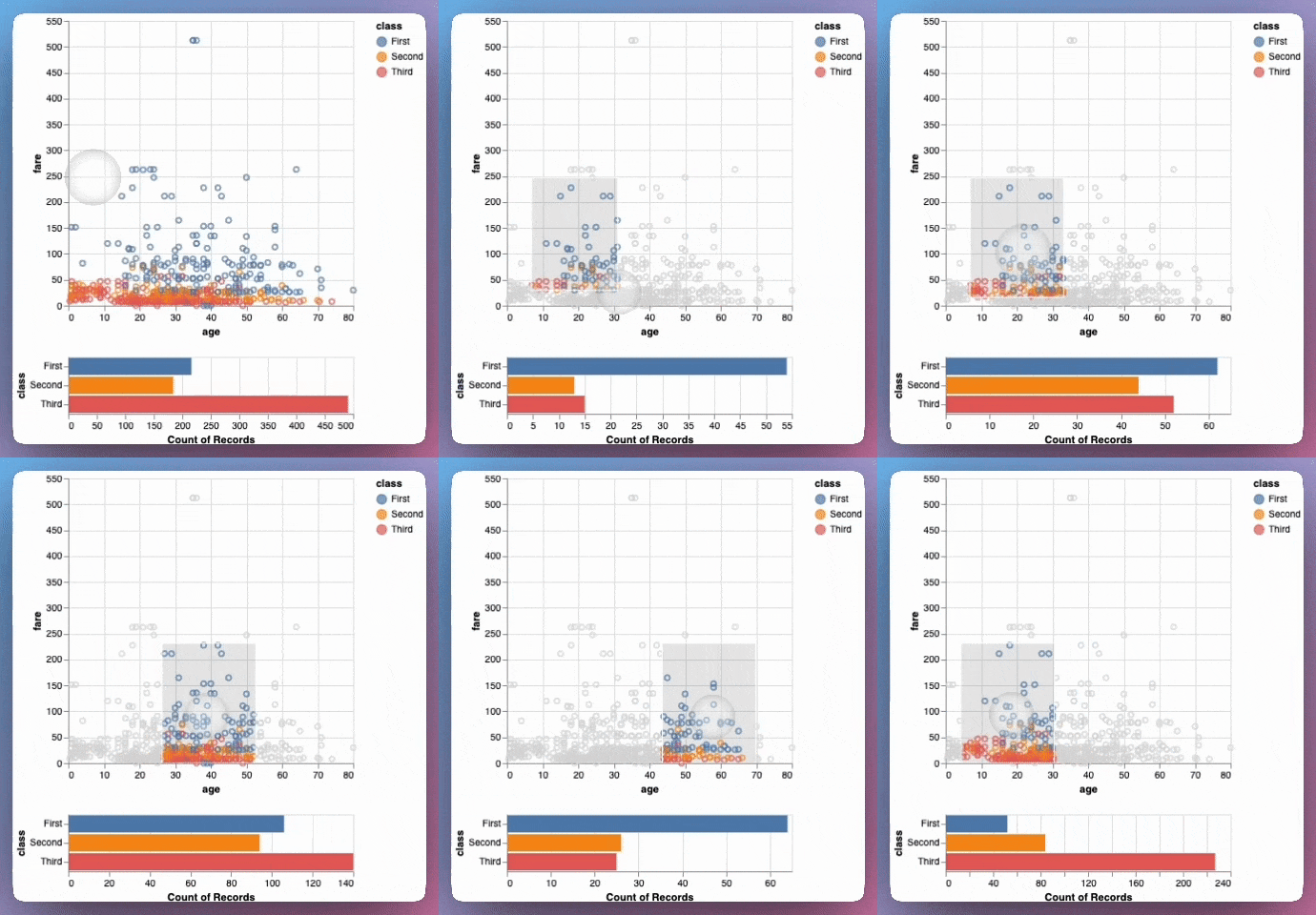
Altair: Multi-Chart Filtering in Pure Python

Problem
Static individual charts fail to show relationships between different data views and perspectives.
Traditional dashboards require complex backend infrastructure for interactive filtering.
Solution
Altair’s linked plots enable interactive selections that dynamically filter multiple connected visualizations.
Other features of Altair:

Declarative syntax that makes visualization intuitive
Built-in data transformations and aggregations
Seamless chart composition and layering

📖 View Full Article

🧪 Run code

⭐ View GitHub

☕️ Weekly Finds

Boruta-Shap
[ML]
– A Tree based feature selection algorithm which combines both the Boruta feature selection algorithm with Shapley values for interpretable feature importance

py-roughviz
[Data Viz]
– A python visualization library for creating sketchy/hand-drawn styled charts that look fun and catchy compared to standard matplotlib graphs

prek
[Python Utils]
– Better pre-commit re-engineered in Rust – automatically installs required Python versions and creates virtual environments with no hassle

Looking for a specific tool? Explore 70+ Python tools →

Stay Current with CodeCut

Actionable Python tips, curated for busy data pros. Skim in under 2 minutes, three times a week.

.codecut-subscribe-form .codecut-input {
background: #2F2D2E !important;
border: 1px solid #72BEFA !important;
color: #FFFFFF !important;
}
.codecut-subscribe-form .codecut-input::placeholder {
color: #999999 !important;
}
.codecut-subscribe-form .codecut-subscribe-btn {
background: #72BEFA !important;
color: #2F2D2E !important;
}
.codecut-subscribe-form .codecut-subscribe-btn:hover {
background: #5aa8e8 !important;
}

.codecut-subscribe-form {
max-width: 650px;
display: flex;
flex-direction: column;
gap: 8px;
}
.codecut-input {
-webkit-appearance: none;
-moz-appearance: none;
appearance: none;
background: #FFFFFF;
border-radius: 8px !important;
padding: 8px 12px;
font-family: ‘Comfortaa’, sans-serif !important;
font-size: 14px !important;
color: #333333;
border: none !important;
outline: none;
width: 100%;
box-sizing: border-box;
}
input[type=”email”].codecut-input {
border-radius: 8px !important;
}
.codecut-input::placeholder {
color: #666666;
}
.codecut-email-row {
display: flex;
align-items: stretch;
height: 36px;
gap: 8px;
}
.codecut-email-row .codecut-input {
flex: 1;
}
.codecut-subscribe-btn {
background: #72BEFA;
color: #2F2D2E;
border: none;
border-radius: 8px;
padding: 8px 14px;
font-family: ‘Comfortaa’, sans-serif;
font-size: 14px;
font-weight: 500;
cursor: pointer;
text-decoration: none;
display: flex;
align-items: center;
justify-content: center;
transition: background 0.3s ease;
}
.codecut-subscribe-btn:hover {
background: #5aa8e8;
}
.codecut-subscribe-btn:disabled {
background: #999;
cursor: not-allowed;
}
.codecut-message {
font-family: ‘Comfortaa’, sans-serif;
font-size: 12px;
padding: 8px;
border-radius: 6px;
display: none;
}
.codecut-message.success {
background: #d4edda;
color: #155724;
display: block;
}
@media (max-width: 480px) {
.codecut-email-row {
flex-direction: column;
height: auto;
gap: 8px;
}
.codecut-input {
border-radius: 8px;
height: 36px;
}
.codecut-subscribe-btn {
width: 100%;
text-align: center;
border-radius: 8px;
height: 36px;
}
}

Subscribe
Newsletter #220: Altair: Multi-Chart Filtering in Pure Python Read More »

langextract vs spaCy: AI-Powered vs Rule-Based Entity Extraction

Table of Contents

Introduction
Tool Selection Criteria
Regular Expressions: Pattern-Based Recognition
spaCy: Production-Grade NER
GLiNER: Zero-Shot Entity Extraction
langextract: AI-Powered Extraction with Source Grounding
Conclusion

Introduction
Unstructured text often hides rich structured information. For instance, financial reports contain company names, monetary figures, executives, dates, and locations used for competitive analysis and executive tracking.
However, extracting these entities manually is time-consuming and error-prone.
A better approach is to use an automated approach to extract the entities. There are several tools that can be used to extract the entities. In this article, we will compare four tools: regular expressions, spaCy, GLiNER, and langextract.
We will start with a straightforward approach then gradually move to more advanced approaches depending on the complexity of the entities.

Interactive Course: Master entity extraction with spaCy and LLMs through hands-on exercises in our interactive entity extraction course.

Tool Selection Criteria
Select your entity extraction method based on these core differentiators:
Regular Expressions: Pattern Matching

Strength: Microsecond latency with zero dependencies
Best for: Structured data with consistent formats (dates, IDs, phone numbers)

spaCy: Production-Ready NER

Strength: 10,000+ entities/second with enterprise reliability
Best for: Standard business entities in high-volume production systems

GLiNER: Custom Entity Flexibility

Strength: Zero-shot custom entity recognition without training data
Best for: Dynamic entity requirements and specialized domains

langextract: Context-Aware AI

Strength: Finds entity relationships (CEO → company) with source citations for verification
Best for: Document analysis requiring transparent, traceable entity extraction

Regular Expressions: Pattern-Based Recognition
Regular expressions excel at extracting entities with consistent formats. Financial documents contain structured patterns perfect for regex recognition. Let’s see how regular expressions can extract these entities.

💡 Tip: While regex is powerful for structured patterns, complex expressions can be hard to read and maintain. For a more intuitive approach, check out PRegEx: Write Human-Readable Regular Expressions in Python to build regex patterns with readable Python syntax.

First, let’s define the earnings report that we will use for extraction:
import re
from pathlib import Path

# Define the earnings report locally for this section
earning_report = """
Apple Inc. (NASDAQ: AAPL) reported third quarter revenue of $81.4 billion,
up 2% year over year. CEO Tim Cook stated that Services revenue reached
a new all-time high of $21.2 billion. The company's board of directors
declared a cash dividend of $0.24 per share.

CFO Luca Maestri mentioned that iPhone revenue was $39.3 billion for
the quarter ending June 30, 2023. The company expects total revenue
between $89 billion and $93 billion for the fourth quarter.

Apple's Cupertino headquarters announced the acquisition of AI startup
WaveOne for an undisclosed amount. The deal is expected to close in
Q4 2023, pending regulatory approval from the SEC.
"""

Define the extraction functions, including:

Financial amounts ($1.2 billion, $39.3 million)
Dates (June 30, 2023)
Stock symbols (NASDAQ: AAPL, NYSE: MSFT)
Percentages (2%, 15%)
Quarters (Q3 2023, Q4 2023)

def extract_financial_amounts(text):
"""Extract financial amounts like $1.2 billion, $39.3 million."""
financial_pattern = r"\$(?:\d{1,3}(?:,\d{3})+|\d+)(?:\.[0-9]+)?(?:\s*(?:billion|million|trillion))?"
return re.findall(financial_pattern, text, re.IGNORECASE)

def extract_dates(text):
"""Extract formatted dates like June 30, 2023."""
date_pattern = r"\b(?:January|February|March|April|May|June|July|August|September|October|November|December)\s+\d{1,2},\s+\d{4}"
return re.findall(date_pattern, text)

def extract_stock_symbols(text):
"""Extract stock symbols like NASDAQ: AAPL, NYSE: MSFT."""
stock_pattern = r"\b(?:NASDAQ|NYSE|NYSEARCA):\s*[A-Z]{2,5}\b"
return re.findall(stock_pattern, text)

def extract_percentages(text):
"""Extract percentage values like 2%, 15.5%."""
percentage_pattern = r"\b\d+(?:\.\d+)?%"
return re.findall(percentage_pattern, text)

def extract_quarters(text):
"""Extract quarterly periods like Q1 2023, Q4 2024."""
quarter_pattern = r"\b(Q[1-4]\s+\d{4})\b"
return re.findall(quarter_pattern, text)

def extract_entities_regex(text):
"""Extract business entities using regular expressions."""
entities = {
"financial_amounts": extract_financial_amounts(text),
"dates": extract_dates(text),
"stock_symbols": extract_stock_symbols(text),
"percentages": extract_percentages(text),
"quarters": extract_quarters(text),
}
return entities

Extract entities:
# Extract entities
regex_entities = extract_entities_regex(earning_report)

print("Regular Expression Entity Extraction:")
for entity_type, values in regex_entities.items():
if values:
print(f" {entity_type}: {values}")

Output:
Regular Expression Entity Extraction:
financial_amounts: ['$81.4 billion', '$21.2 billion', '$39.3 billion', '$89 billion', '$93 billion']
dates: ['June 30, 2023']
stock_symbols: ['AAPL']
percentages: ['2%']
quarters: ['Q4 2023']

Regex reliably captures structured patterns such as financial amounts, dates, stock symbols, percentages, and quarters. However, it only matches numeric quarter formats like “Q4 2023” and misses textual forms such as “third quarter” unless additional exact-match patterns are added.
spaCy: Production-Grade NER
Regex handles fixed formats, but for context-driven entities we use spaCy. With pretrained pipelines, spaCy’s NER identifies and labels types such as PERSON, ORG, MONEY, DATE, and PERCENT.
Let’s start by installing spaCy and downloading a pre-trained English model:
pip install spacy
python -m spacy download en_core_web_sm

First, let’s see how spaCy processes text and identifies entities:
import spacy

# Load the English language model
nlp = spacy.load("en_core_web_sm")

# Process a simple sentence to see how spaCy works
sample_text = "Apple Inc. reported revenue of $81.4 billion with CEO Tim Cook."
doc = nlp(sample_text)

print("Entities found in sample text:")
for ent in doc.ents:
print(f"'{ent.text}' -> {ent.label_} ({ent.label_})")

Output:
Entities found in sample text:
'Apple Inc.' -> ORG (ORG)
'$81.4 billion' -> MONEY (MONEY)
'Tim Cook' -> PERSON (PERSON)

spaCy automatically identified three different entity types from context alone:

Apple Inc. (ORG): Recognized as an organization based on the company suffix and context (subject of “reported”).
$81.4 billion (MONEY): Identified as a monetary value from the currency symbol, number, and magnitude word.
Tim Cook (PERSON): Labeled as a person using proper name patterns, reinforced by nearby role noun “CEO”.

Now let’s build a comprehensive extraction function for our full business document:
from collections import defaultdict

def extract_entities_spacy(text):
"""Extract business entities using spaCy NER with detailed information."""
doc = nlp(text)
entities = defaultdict(list)
for ent in doc.ents:
entities[ent.label_].append(ent.text)
return dict(entities)

Now let’s apply this to our complete business document:
# Define the earnings report locally for this section
earning_report = """
Apple Inc. (NASDAQ: AAPL) reported third quarter revenue of $81.4 billion,
up 2% year over year. CEO Tim Cook stated that Services revenue reached
a new all-time high of $21.2 billion. The company's board of directors
declared a cash dividend of $0.24 per share.

CFO Luca Maestri mentioned that iPhone revenue was $39.3 billion for
the quarter ending June 30, 2023. The company expects total revenue
between $89 billion and $93 billion for the fourth quarter.

Apple's Cupertino headquarters announced the acquisition of AI startup
WaveOne for an undisclosed amount. The deal is expected to close in
Q4 2023, pending regulatory approval from the SEC.
"""

# Extract entities from the full text
spacy_entities = extract_entities_spacy(earning_report)

print("spaCy NER Entity Extraction:")
for entity_type, entities_list in spacy_entities.items():
print(f"\n{entity_type} ({len(entities_list)} found):")
for entity in entities_list:
print(f" {entity}")

Output:
spaCy NER Entity Extraction:

ORG (7 found):
Apple Inc.
NASDAQ
Services
iPhone
Apple
WaveOne
SEC

DATE (4 found):
third quarter
the quarter ending June 30, 2023
the fourth quarter
Q4 2023

MONEY (5 found):
$81.4 billion
$21.2 billion
0.24
$39.3 billion
between $89 billion and $93 billion

PERCENT (1 found):
2%

PERSON (1 found):
Tim Cook

GPE (2 found):
Cupertino
AI

The model correctly identifies key financial entities like revenue figures and dates, but misclassifies some technical terms:

“AI” as GPE (Geopolitical Entity): In the phrase “AI startup WaveOne,” the model treats “AI” as a modifier that could resemble a geographic descriptor, similar to how “Silicon Valley startup” would be parsed
“Services” as ORG: Appearing in “Services revenue reached,” the model lacks context that this refers to Apple’s services division and interprets the capitalized “Services” as a standalone company name
“iPhone” as ORG: Should be classified as a product, but the model sees a capitalized term in a financial context and defaults to organization classification
“WaveOne” as ORG: While technically correct as a startup company, this could also be considered a misclassification if we expect more specific entity types for acquisition targets or startups

These limitations highlight a fundamental challenge: pre-trained models are constrained by their fixed entity categories and training data.
Business documents require more nuanced classifications, distinguishing between products and companies, or identifying specific business roles like “startup” or “regulatory body.”

📚 For taking your data science projects from prototype to production, check out Production-Ready Data Science.

GLiNER: Zero-Shot Entity Extraction
GLiNER (Generalist and Lightweight Named Entity Recognition) addresses these exact limitations through zero-shot learning. Instead of being locked into predetermined categories like ORG or GPE, GLiNER interprets natural language descriptions.
You can define custom entity types like “startup_company” or “product_name” and GLiNER will find them without any training examples.
Let’s install GLiNER and see how zero-shot entity extraction works:
pip install gliner

First, let’s load the GLiNER model and test it with a simple custom entity type:
from gliner import GLiNER

# Load the pre-trained GLiNER model from Hugging Face
model = GLiNER.from_pretrained("urchade/gliner_mediumv2.1")

# Test with a simple example to understand zero-shot capabilities
test_text = "Apple Inc. CEO Tim Cook announced quarterly revenue of $81.4 billion."
simple_entities = ["technology_company", "executive_role"]

# Extract entities using custom descriptions
entities = model.predict_entities(test_text, simple_entities)

for entity in entities:
print(f"'{entity['text']}' -> {entity['label']} (confidence: {entity['score']:.3f})")

Output:
'Apple Inc.' -> technology_company (confidence: 0.959)
'Tim Cook' -> executive_role (confidence: 0.884)

GLiNER excels at zero-shot extraction by understanding descriptive label names like “technology_company” and “executive_role” without additional training. Next, we define a helper to group results by label with offsets and confidence.
from collections import defaultdict

def extract_entities_gliner(text, entity_types):
"""Extract custom business entities using GLiNER zero-shot learning."""
entities = model.predict_entities(text, entity_types)

grouped_entities = defaultdict(list)
for entity in entities:
grouped_entities[entity['label']].append({
'text': entity['text'],
'start': entity['start'],
'end': entity['end'],
'confidence': round(entity['score'], 3)
})

return dict(grouped_entities)

Now declare the custom business entity types and the input text used for extraction.
business_entities = [
"company",
"executive",
"financial_figure",
"product",
"startup",
"regulatory_body",
"quarter",
"location",
"percentage",
"stock_symbol",
"market_reaction",
]

earning_report = """
Apple Inc. (NASDAQ: AAPL) reported third quarter revenue of $81.4 billion,
up 2% year over year. CEO Tim Cook stated that Services revenue reached
a new all-time high of $21.2 billion. The company's board of directors
declared a cash dividend of $0.24 per share.

CFO Luca Maestri mentioned that iPhone revenue was $39.3 billion for
the quarter ending June 30, 2023. The company expects total revenue
between $89 billion and $93 billion for the fourth quarter.

Apple's Cupertino headquarters announced the acquisition of AI startup
WaveOne for an undisclosed amount. The deal is expected to close in
Q4 2023, pending regulatory approval from the SEC.
"""

Finally, run the extraction and print the grouped results with confidence scores.
gliner_entities = extract_entities_gliner(earning_report, business_entities)

print("GLiNER Zero-Shot Entity Extraction:")
for entity_type, entities_list in gliner_entities.items():
if entities_list:
print(f"\n{entity_type.upper()} ({len(entities_list)} found):")
for entity in entities_list:
print(f" '{entity['text']}' (confidence: {entity['confidence']})")

Output:
GLiNER Zero-Shot Entity Extraction:

COMPANY (2 found):
'Apple Inc.' (confidence: 0.94)
'Apple' (confidence: 0.62)

QUARTER (3 found):
'third quarter' (confidence: 0.929)
'fourth quarter' (confidence: 0.948)
'Q4 2023' (confidence: 0.569)

FINANCIAL_FIGURE (5 found):
'$81.4 billion' (confidence: 0.908)
'$21.2 billion' (confidence: 0.827)
'$39.3 billion' (confidence: 0.875)
'$89 billion' (confidence: 0.827)
'$93 billion' (confidence: 0.817)

PERCENTAGE (1 found):
'2%' (confidence: 0.807)

EXECUTIVE (3 found):
'CEO' (confidence: 0.606)
'Tim Cook' (confidence: 0.933)
'Luca Maestri' (confidence: 0.813)

PRODUCT (1 found):
'iPhone' (confidence: 0.697)

LOCATION (1 found):
'Cupertino headquarters' (confidence: 0.657)

STARTUP (1 found):
'WaveOne' (confidence: 0.767)

REGULATORY_BODY (1 found):
'SEC' (confidence: 0.878)

GLiNER outperformed standard NER through zero-shot learning:

Extraction coverage: 18 entities vs spaCy’s mixed-category results
Classification accuracy: correctly distinguished companies from products/services/agencies
Domain adaptation: business-specific categories (startup, regulatory_body) vs generic classifications
Label flexibility: custom entity types defined through natural language descriptions

However, GLiNER missed some complex financial entities that span multiple words:

Stock symbols: Failed to recognize “NASDAQ: AAPL” as a structured financial identifier
Market trends: Captured “2%” but missed the complete context “up 2% year over year” as market_reaction

langextract: AI-Powered Extraction with Source Grounding
GLiNER’s limitations with complex financial entities highlight the need for more sophisticated approaches. langextract addresses these exact challenges by using advanced AI models to understand entity relationships and provide transparent source attribution.
Unlike pattern-based extraction, langextract leverages modern LLMs (Gemini, GPT, or Vertex AI) to capture multi-token entities like “NASDAQ: AAPL” and contextual relationships like “up 2% year over year.”
Setup Instructions
First, install langextract and python-dotenv for environment management:
pip install langextract python-dotenv

Next, get an API key from one of these providers:

AI Studio for Gemini models (recommended for most users)
Vertex AI for enterprise use
OpenAI Platform for OpenAI models

Save your API key in a .env file in your project directory:
# .env file
LANGEXTRACT_API_KEY=your-api-key-here

Now let’s load our API key and define the extraction schema:
import os
from dotenv import load_dotenv
import langextract as lx
from langextract import extract

# Load environment variables from .env file
load_dotenv()

# Load API key
api_key = os.getenv('LANGEXTRACT_API_KEY')

Now we’ll create the extraction function using the real langextract API:
def extract_entities_langextract(text):
"""Extract entities using langextract with proper API usage."""
# Brief prompt – let examples guide the extraction
prompt_description = """Extract business entities: companies, executives, financial figures, quarters, locations, percentages, products, startups, regulatory bodies, stock_symbols, market_reaction. Use exact text."""

# Provide example data to guide extraction with all entity types
examples = [
lx.data.ExampleData(
text="Microsoft Corp. (NYSE: MSFT) CEO Satya Nadella reported Q2 2024 revenue of $65B, down 5% quarter-over-quarter. The Seattle campus announced Azure cloud grew $28B. The firm bought ML startup NeuralFlow pending FTC review.",
extractions=[
lx.data.Extraction(extraction_class="company", extraction_text="Microsoft Corp."),
lx.data.Extraction(extraction_class="executive", extraction_text="CEO Satya Nadella"),
lx.data.Extraction(extraction_class="quarter", extraction_text="Q2 2024"),
lx.data.Extraction(extraction_class="financial_figure", extraction_text="$65B"),
lx.data.Extraction(extraction_class="percentage", extraction_text="5%"),
lx.data.Extraction(extraction_class="market_reaction", extraction_text="down 5% quarter-over-quarter"),
lx.data.Extraction(extraction_class="location", extraction_text="Seattle campus"),
lx.data.Extraction(extraction_class="product", extraction_text="Azure cloud"),
lx.data.Extraction(extraction_class="financial_figure", extraction_text="$28B"),
lx.data.Extraction(extraction_class="startup", extraction_text="NeuralFlow"),
lx.data.Extraction(extraction_class="regulatory_body", extraction_text="FTC"),
lx.data.Extraction(extraction_class="stock_symbol", extraction_text="NYSE: MSFT")
]
)
]

# Extract using proper API
result = extract(
text_or_documents=text,
prompt_description=prompt_description,
examples=examples,
model_id="gemini-2.5-flash"
)
return result

The extract() function takes three key inputs:

text_or_documents: The text or documents to analyze
prompt_description: Brief instruction listing entity types to extract
examples: Training data showing the model exactly what each entity type looks like
model_id: Specifies which AI model to use (Gemini 2.5 Flash)

The function returns a result object containing:

extractions: List of found entities with their text and classification
char_interval: Character positions for each entity in the source text
Source grounding data for verification and visualization

Finally, let’s extract entities from our business document:
# Define the earnings report locally for this section
earning_report = """
Apple Inc. (NASDAQ: AAPL) reported third quarter revenue of $81.4 billion,
up 2% year over year. CEO Tim Cook stated that Services revenue reached
a new all-time high of $21.2 billion. The company's board of directors
declared a cash dividend of $0.24 per share.

CFO Luca Maestri mentioned that iPhone revenue was $39.3 billion for
the quarter ending June 30, 2023. The company expects total revenue
between $89 billion and $93 billion for the fourth quarter.

Apple's Cupertino headquarters announced the acquisition of AI startup
WaveOne for an undisclosed amount. The deal is expected to close in
Q4 2023, pending regulatory approval from the SEC.
"""

# Extract entities with langextract
langextract_entities = extract_entities_langextract(earning_report)

print(f"Extracted {len(langextract_entities.extractions)} entities:")

# Group extractions by class using defaultdict
grouped_extractions = defaultdict(list)
for extraction in langextract_entities.extractions:
grouped_extractions[extraction.extraction_class].append(extraction)

# Display grouped results
for entity_class, extractions in grouped_extractions.items():
print(f"\n{entity_class.upper()} ({len(extractions)} found):")
for extraction in extractions:
print(f" '{extraction.extraction_text}'")

Output:
Extracted 21 entities:

COMPANY (1 found):
'Apple Inc.'

STOCK_SYMBOL (1 found):
'NASDAQ: AAPL'

QUARTER (4 found):
'third quarter'
'quarter ending June 30, 2023'
'fourth quarter'
'Q4 2023'

FINANCIAL_FIGURE (6 found):
'$81.4 billion'
'$21.2 billion'
'$0.24 per share'
'$39.3 billion'
'$89 billion'
'$93 billion'

PERCENTAGE (1 found):
'2%'

MARKET_REACTION (1 found):
'up 2% year over year'

EXECUTIVE (2 found):
'CEO Tim Cook'
'CFO Luca Maestri'

PRODUCT (2 found):
'Services'
'iPhone'

LOCATION (1 found):
'Cupertino headquarters'

STARTUP (1 found):
'WaveOne'

REGULATORY_BODY (1 found):
'SEC'

langextract’s AI-powered approach delivered superior extraction results:

Entity count: 21 entities vs GLiNER’s 17, with richer contextual detail
Sophisticated parsing: Extracted “quarter ending June 30, 2023” for precise temporal context
Business semantics: Understood stock_symbol format and market trend relationships requiring domain knowledge

For visual business documents like charts and graphs, consider multimodal AI approaches that can extract structured data directly from images.
However, GLiNER offers practical advantages for certain use cases:

Local processing: No API calls or internet dependency required
Cost efficiency: Zero usage costs after model download vs API pricing per request
Speed: Faster inference for high-volume document processing
Privacy: Sensitive documents never leave your infrastructure

Conclusion
This article demonstrated four progressive approaches to entity extraction from business documents, each building upon the limitations of the previous method:

Regex: Handles structured patterns (dates, amounts) but fails with variable text formats
spaCy: Processes standard entities reliably but misclassifies business-specific terms
GLiNER: Enables custom entity types without training but misses multi-token relationships
langextract: Captures complex business context and relationships through AI understanding

I recommend starting with regex for simple extraction, spaCy for standard entities, GLiNER for custom categories, and langextract when business context and relationships matter most.

💻 Get the Code: The complete source code and Jupyter notebook for this tutorial are available on GitHub. Clone it to follow along!

Related Tutorials

Text Matching: Build Text Matching That Actually Works (4 Tools Compared) for fuzzy string matching when business entities have variations
Document Processing: Transform Any PDF into Searchable AI Data with Docling for preprocessing PDF business documents before extraction

📚 Want to go deeper? Learning new techniques is the easy part. Knowing how to structure, test, and deploy them is what separates side projects from real work. My book shows you how to build data science projects that actually make it to production. Get the book →

Stay Current with CodeCut
Actionable Python tips, curated for busy data pros. Skim in under 2 minutes, three times a week.

.codecut-subscribe-form .codecut-input {
background: #2F2D2E !important;
border: 1px solid #72BEFA !important;
color: #FFFFFF !important;
}
.codecut-subscribe-form .codecut-input::placeholder {
color: #999999 !important;
}
.codecut-subscribe-form .codecut-subscribe-btn {
background: #72BEFA !important;
color: #2F2D2E !important;
}
.codecut-subscribe-form .codecut-subscribe-btn:hover {
background: #5aa8e8 !important;
}

.codecut-subscribe-form {
max-width: 650px;
display: flex;
flex-direction: column;
gap: 8px;
}

.codecut-input {
-webkit-appearance: none;
-moz-appearance: none;
appearance: none;
background: #FFFFFF;
border-radius: 8px !important;
padding: 8px 12px;
font-family: ‘Comfortaa’, sans-serif !important;
font-size: 14px !important;
color: #333333;
border: none !important;
outline: none;
width: 100%;
box-sizing: border-box;
}

input[type=”email”].codecut-input {
border-radius: 8px !important;
}

.codecut-input::placeholder {
color: #666666;
}

.codecut-email-row {
display: flex;
align-items: stretch;
height: 36px;
gap: 8px;
}

.codecut-email-row .codecut-input {
flex: 1;
}

.codecut-subscribe-btn {
background: #72BEFA;
color: #2F2D2E;
border: none;
border-radius: 8px;
padding: 8px 14px;
font-family: ‘Comfortaa’, sans-serif;
font-size: 14px;
font-weight: 500;
cursor: pointer;
text-decoration: none;
display: flex;
align-items: center;
justify-content: center;
transition: background 0.3s ease;
}

.codecut-subscribe-btn:hover {
background: #5aa8e8;
}

.codecut-subscribe-btn:disabled {
background: #999;
cursor: not-allowed;
}

.codecut-message {
font-family: ‘Comfortaa’, sans-serif;
font-size: 12px;
padding: 8px;
border-radius: 6px;
display: none;
}

.codecut-message.success {
background: #d4edda;
color: #155724;
display: block;
}

/* Mobile responsive */
@media (max-width: 480px) {
.codecut-email-row {
flex-direction: column;
height: auto;
gap: 8px;
}

.codecut-input {
border-radius: 8px;
height: 36px;
}

.codecut-subscribe-btn {
width: 100%;
text-align: center;
border-radius: 8px;
height: 36px;
}
}

Subscribe

langextract vs spaCy: AI-Powered vs Rule-Based Entity Extraction Read More »

Newsletter #219: GLiNER: Zero-Shot Entity Recognition Without Retraining

📅 Today’s Picks

Create Safe Temporary Files with Python tempfile

Problem
Unit tests that create files for testing data processing functions often leave behind test artifacts or fail due to file conflicts.
Running test suites in parallel or repeatedly creates naming conflicts and cluttered test environments.
Solution
Python’s tempfile module ensures test isolation by creating unique temporary files that automatically cleanup after each test.
Key benefits:

Automatic cleanup after test completion
Secure file creation with proper permissions
No naming conflicts between parallel tests
Production-safe workflows for processing large datasets

Use tempfile.NamedTemporaryFile() with context managers to process data in chunks without leaving artifacts behind.

🧪 Run code

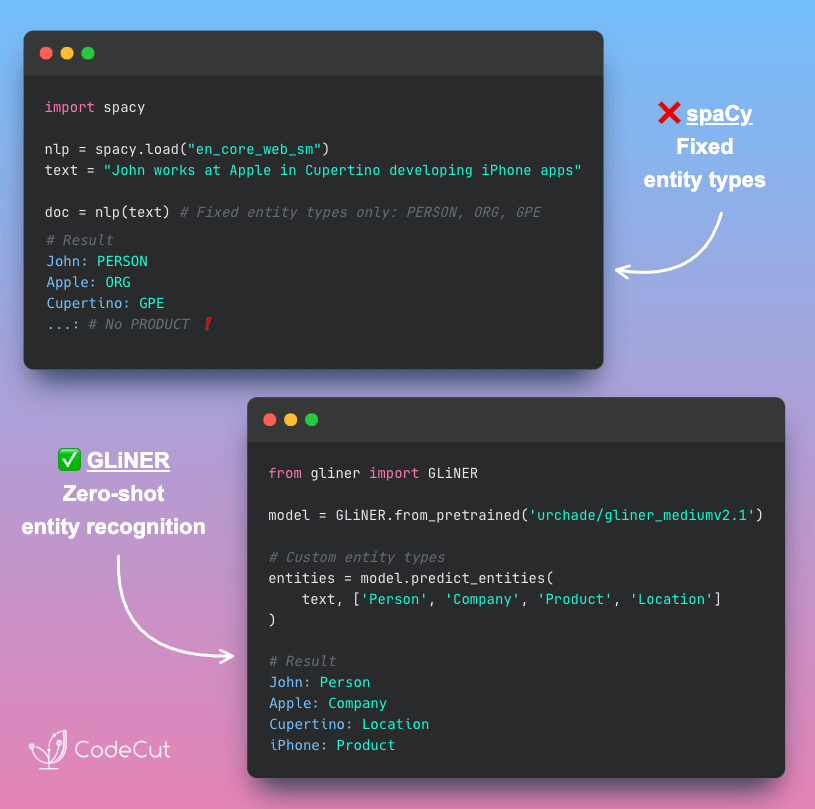
GLiNER: Zero-Shot Entity Recognition Without Retraining

Problem
While spaCy provides excellent NER capabilities, its models need retraining for new entity types, which requires collecting training data, labeling examples, and running expensive model fine-tuning.
This means weeks of model preparation before you can extract custom entities from your text data.
Solution
GLiNER enables zero-shot entity recognition by accepting entity types as runtime parameters.
With GLiNER, you can simply specify your desired entity types and get instant extraction results without any training.

📖 View Full Article

🧪 Run code

⭐ View GitHub

☕️ Weekly Finds

browser-use
[LLM]
– Make websites accessible for AI agents. Automate tasks online with ease.

tiktoken
[LLM]
– tiktoken is a fast BPE tokeniser for use with OpenAI’s models.

FuzzTypes
[Python Utils]
– Pydantic extension for annotating autocorrecting fields.

Looking for a specific tool? Explore 70+ Python tools →

Stay Current with CodeCut

Actionable Python tips, curated for busy data pros. Skim in under 2 minutes, three times a week.

.codecut-subscribe-form .codecut-input {
background: #2F2D2E !important;
border: 1px solid #72BEFA !important;
color: #FFFFFF !important;
}
.codecut-subscribe-form .codecut-input::placeholder {
color: #999999 !important;
}
.codecut-subscribe-form .codecut-subscribe-btn {
background: #72BEFA !important;
color: #2F2D2E !important;
}
.codecut-subscribe-form .codecut-subscribe-btn:hover {
background: #5aa8e8 !important;
}

.codecut-subscribe-form {
max-width: 650px;
display: flex;
flex-direction: column;
gap: 8px;
}
.codecut-input {
-webkit-appearance: none;
-moz-appearance: none;
appearance: none;
background: #FFFFFF;
border-radius: 8px !important;
padding: 8px 12px;
font-family: ‘Comfortaa’, sans-serif !important;
font-size: 14px !important;
color: #333333;
border: none !important;
outline: none;
width: 100%;
box-sizing: border-box;
}
input[type=”email”].codecut-input {
border-radius: 8px !important;
}
.codecut-input::placeholder {
color: #666666;
}
.codecut-email-row {
display: flex;
align-items: stretch;
height: 36px;
gap: 8px;
}
.codecut-email-row .codecut-input {
flex: 1;
}
.codecut-subscribe-btn {
background: #72BEFA;
color: #2F2D2E;
border: none;
border-radius: 8px;
padding: 8px 14px;
font-family: ‘Comfortaa’, sans-serif;
font-size: 14px;
font-weight: 500;
cursor: pointer;
text-decoration: none;
display: flex;
align-items: center;
justify-content: center;
transition: background 0.3s ease;
}
.codecut-subscribe-btn:hover {
background: #5aa8e8;
}
.codecut-subscribe-btn:disabled {
background: #999;
cursor: not-allowed;
}
.codecut-message {
font-family: ‘Comfortaa’, sans-serif;
font-size: 12px;
padding: 8px;
border-radius: 6px;
display: none;
}
.codecut-message.success {
background: #d4edda;
color: #155724;
display: block;
}
@media (max-width: 480px) {
.codecut-email-row {
flex-direction: column;
height: auto;
gap: 8px;
}
.codecut-input {
border-radius: 8px;
height: 36px;
}
.codecut-subscribe-btn {
width: 100%;
text-align: center;
border-radius: 8px;
height: 36px;
}
}

Subscribe
Newsletter #219: GLiNER: Zero-Shot Entity Recognition Without Retraining Read More »

Newsletter #218: Delta Lake: Time Travel Your Data Pipeline

📅 Today’s Picks

Delta Lake: Time Travel Your Data Pipeline

Problem
Once data is overwritten in pandas, previous versions are lost forever.
You can’t debug pipeline issues or rollback bad changes when your data history disappears.
Solution
Delta Lake maintains version history allowing you to query any previous state of your data by timestamp or version number.
Use cases:

Compare today’s sales data with yesterday’s to spot revenue anomalies
Recover accidentally deleted customer records from last week’s backup
Audit financial reports using data exactly as it existed at quarter-end

📖 View Full Article

🧪 Run code

⭐ View GitHub

☕️ Weekly Finds

DALEX
[ML]
– Model Agnostic Language for Exploration and eXplanation – helps explore and explain behavior of complex machine learning models

OpenBB
[Data Processing]
– Investment Research for Everyone, Anywhere – free and open-source financial platform with analytics tools

fastlite
[Python Utils]
– A bit of extra usability for sqlite – quality-of-life improvements for interactive use of sqlite-utils library

Looking for a specific tool? Explore 70+ Python tools →

Stay Current with CodeCut

Actionable Python tips, curated for busy data pros. Skim in under 2 minutes, three times a week.

.codecut-subscribe-form .codecut-input {
background: #2F2D2E !important;
border: 1px solid #72BEFA !important;
color: #FFFFFF !important;
}
.codecut-subscribe-form .codecut-input::placeholder {
color: #999999 !important;
}
.codecut-subscribe-form .codecut-subscribe-btn {
background: #72BEFA !important;
color: #2F2D2E !important;
}
.codecut-subscribe-form .codecut-subscribe-btn:hover {
background: #5aa8e8 !important;
}

.codecut-subscribe-form {
max-width: 650px;
display: flex;
flex-direction: column;
gap: 8px;
}
.codecut-input {
-webkit-appearance: none;
-moz-appearance: none;
appearance: none;
background: #FFFFFF;
border-radius: 8px !important;
padding: 8px 12px;
font-family: ‘Comfortaa’, sans-serif !important;
font-size: 14px !important;
color: #333333;
border: none !important;
outline: none;
width: 100%;
box-sizing: border-box;
}
input[type=”email”].codecut-input {
border-radius: 8px !important;
}
.codecut-input::placeholder {
color: #666666;
}
.codecut-email-row {
display: flex;
align-items: stretch;
height: 36px;
gap: 8px;
}
.codecut-email-row .codecut-input {
flex: 1;
}
.codecut-subscribe-btn {
background: #72BEFA;
color: #2F2D2E;
border: none;
border-radius: 8px;
padding: 8px 14px;
font-family: ‘Comfortaa’, sans-serif;
font-size: 14px;
font-weight: 500;
cursor: pointer;
text-decoration: none;
display: flex;
align-items: center;
justify-content: center;
transition: background 0.3s ease;
}
.codecut-subscribe-btn:hover {
background: #5aa8e8;
}
.codecut-subscribe-btn:disabled {
background: #999;
cursor: not-allowed;
}
.codecut-message {
font-family: ‘Comfortaa’, sans-serif;
font-size: 12px;
padding: 8px;
border-radius: 6px;
display: none;
}
.codecut-message.success {
background: #d4edda;
color: #155724;
display: block;
}
@media (max-width: 480px) {
.codecut-email-row {
flex-direction: column;
height: auto;
gap: 8px;
}
.codecut-input {
border-radius: 8px;
height: 36px;
}
.codecut-subscribe-btn {
width: 100%;
text-align: center;
border-radius: 8px;
height: 36px;
}
}

Subscribe
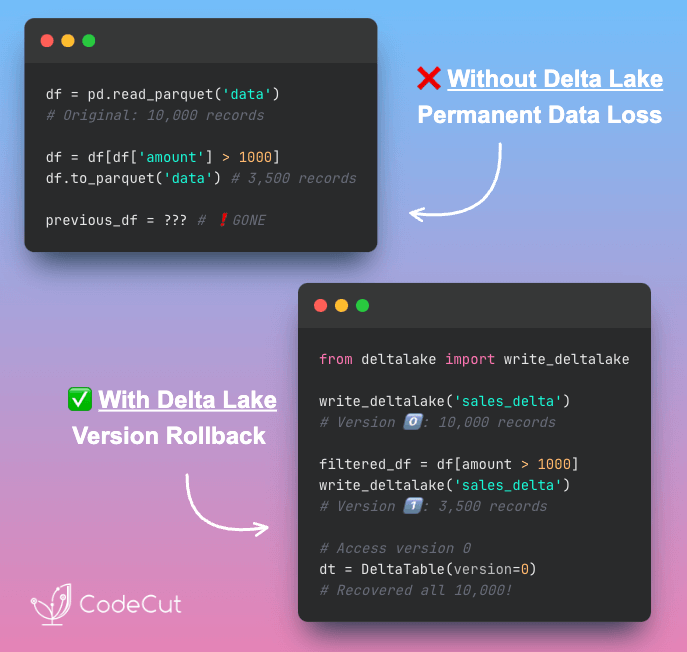
Newsletter #218: Delta Lake: Time Travel Your Data Pipeline Read More »

Scroll to Top

Work with Khuyen Tran

Work with Khuyen Tran