Generic selectors
Exact matches only
Search in title
Search in content
Post Type Selectors
Filter by Categories
About Article
Analyze Data
Archive
Best Practices
Better Outputs
Blog
Code Optimization
Code Quality
Command Line
Course
Daily tips
Dashboard
Data Analysis & Manipulation
Data Engineer
Data Visualization
DataFrame
Delta Lake
DevOps
DuckDB
Environment Management
Feature Engineer
Git
Jupyter Notebook
LLM
LLM Tools
Machine Learning
Machine Learning & AI
Machine Learning Tools
Manage Data
MLOps
Natural Language Processing
Newsletter Archive
NumPy
Pandas
Polars
PySpark
Python Helpers
Python Tips
Python Utilities
Scrape Data
SQL
Testing
Time Series
Tools
Visualization
Visualization & Reporting
Workflow & Automation
Workflow Automation

python

Auto-created tag for python

Newsletter #269: LangChain v1.2.0: Build Multi-Provider Agents with Extras

📅 Today’s Picks

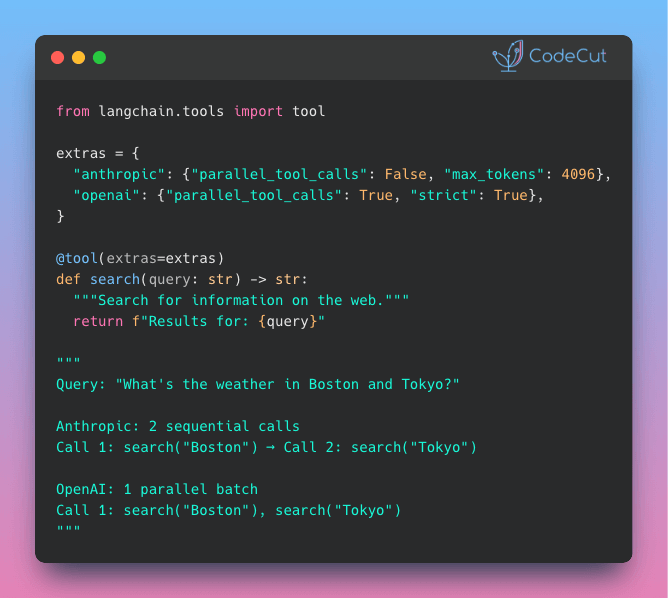
LangChain v1.2.0: Build Multi-Provider Agents with Extras

Problem
Different LLM providers require different tool configurations: parallel vs sequential execution, strict mode, token limits.
This creates scattered configs and manual provider switching throughout your code.
Solution
LangChain v1.2.0 introduces the extras attribute that attaches provider-specific configurations directly to tool definitions.
With extras, you can:

Define all provider configs in one place
Switch providers without touching multiple files
Keep configs in sync across environments

📖 View Full Article

⭐ View GitHub

GLiNER: Extract Any Entity Type with Zero-Shot NER

Problem
Named Entity Recognition (NER) extracts key information like names, dates, and organizations from text. But standard models are limited to predefined entity types like PERSON, ORG, and DATE.
If you need to extract something specific, you’d normally have to train a custom model with thousands of labeled examples.
Solution
GLiNER changes that with zero-shot entity extraction, allowing you to extract any entity type without training.
Key benefits:

Works out-of-the-box with any text domain
Handles multiple entity types in a single pass
Returns confidence scores for each extraction
Integrates with spaCy and other NLP pipelines

📖 View Full Article

🧪 Run code

⭐ View GitHub

☕️ Weekly Finds

timescaledb
[Data Engineer]
– PostgreSQL extension for high-performance real-time analytics on time-series and event data

slim
[MLOps]
– Inspect, optimize, and minify Docker container images without sacrificing functionality

drawdb
[Data Engineer]
– Free, simple, and intuitive online database diagram editor and SQL generator

Looking for a specific tool? Explore 70+ Python tools →

Stay Current with CodeCut

Actionable Python tips, curated for busy data pros. Skim in under 2 minutes, three times a week.

.codecut-subscribe-form .codecut-input {
background: #2F2D2E !important;
border: 1px solid #72BEFA !important;
color: #FFFFFF !important;
}
.codecut-subscribe-form .codecut-input::placeholder {
color: #999999 !important;
}
.codecut-subscribe-form .codecut-subscribe-btn {
background: #72BEFA !important;
color: #2F2D2E !important;
}
.codecut-subscribe-form .codecut-subscribe-btn:hover {
background: #5aa8e8 !important;
}

.codecut-subscribe-form {
max-width: 650px;
display: flex;
flex-direction: column;
gap: 8px;
}
.codecut-input {
-webkit-appearance: none;
-moz-appearance: none;
appearance: none;
background: #FFFFFF;
border-radius: 8px !important;
padding: 8px 12px;
font-family: ‘Comfortaa’, sans-serif !important;
font-size: 14px !important;
color: #333333;
border: none !important;
outline: none;
width: 100%;
box-sizing: border-box;
}
input[type=”email”].codecut-input {
border-radius: 8px !important;
}
.codecut-input::placeholder {
color: #666666;
}
.codecut-email-row {
display: flex;
align-items: stretch;
height: 36px;
gap: 8px;
}
.codecut-email-row .codecut-input {
flex: 1;
}
.codecut-subscribe-btn {
background: #72BEFA;
color: #2F2D2E;
border: none;
border-radius: 8px;
padding: 8px 14px;
font-family: ‘Comfortaa’, sans-serif;
font-size: 14px;
font-weight: 500;
cursor: pointer;
text-decoration: none;
display: flex;
align-items: center;
justify-content: center;
transition: background 0.3s ease;
}
.codecut-subscribe-btn:hover {
background: #5aa8e8;
}
.codecut-subscribe-btn:disabled {
background: #999;
cursor: not-allowed;
}
.codecut-message {
font-family: ‘Comfortaa’, sans-serif;
font-size: 12px;
padding: 8px;
border-radius: 6px;
display: none;
}
.codecut-message.success {
background: #d4edda;
color: #155724;
display: block;
}
@media (max-width: 480px) {
.codecut-email-row {
flex-direction: column;
height: auto;
gap: 8px;
}
.codecut-input {
border-radius: 8px;
height: 36px;
}
.codecut-subscribe-btn {
width: 100%;
text-align: center;
border-radius: 8px;
height: 36px;
}
}

Subscribe

Newsletter #269: LangChain v1.2.0: Build Multi-Provider Agents with Extras Read More »

Newsletter #268: Faster Table Joins with Polars Multi-Threading

📅 Today’s Picks

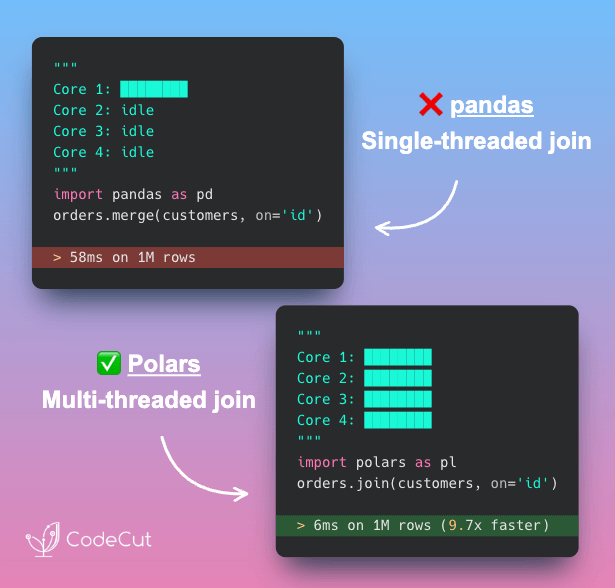
Faster Table Joins with Polars Multi-Threading

Problem
pandas processes joins on a single CPU core, leaving other cores idle during large table operations.
Solution
Polars distributes join operations across all available CPU cores, achieving significantly faster joins than pandas on large datasets.
What makes Polars fast:

Processes rows in parallel batches
Uses all available CPU cores
Zero configuration required

📖 View Full Article

🧪 Run code

⭐ View GitHub

🔄 Worth Revisiting

Faster Polars Queries with Programmatic Expressions

Problem
When you want to use for loops to apply similar transformations, each Polars with_columns() call processes sequentially.
This prevents the optimizer from seeing the full computation plan.
Solution
Instead, generate all Polars expressions programmatically before applying them together.
This enables Polars to:

See the complete computation plan upfront
Optimize across all expressions simultaneously
Parallelize operations across CPU cores

📖 View Full Article

🧪 Run code

⭐ View GitHub

☕️ Weekly Finds

Mole
[Python Utils]
– Deep clean and optimize your Mac with a simple command-line tool.

marker
[LLM]
– Convert PDF, DOCX, PPTX, and other documents to markdown with high speed and accuracy.

pathway
[Data Engineer]
– Python ETL framework for stream processing, real-time analytics, LLM pipelines, and RAG.

Looking for a specific tool? Explore 70+ Python tools →

Stay Current with CodeCut

Actionable Python tips, curated for busy data pros. Skim in under 2 minutes, three times a week.

.codecut-subscribe-form .codecut-input {
background: #2F2D2E !important;
border: 1px solid #72BEFA !important;
color: #FFFFFF !important;
}
.codecut-subscribe-form .codecut-input::placeholder {
color: #999999 !important;
}
.codecut-subscribe-form .codecut-subscribe-btn {
background: #72BEFA !important;
color: #2F2D2E !important;
}
.codecut-subscribe-form .codecut-subscribe-btn:hover {
background: #5aa8e8 !important;
}

.codecut-subscribe-form {
max-width: 650px;
display: flex;
flex-direction: column;
gap: 8px;
}
.codecut-input {
-webkit-appearance: none;
-moz-appearance: none;
appearance: none;
background: #FFFFFF;
border-radius: 8px !important;
padding: 8px 12px;
font-family: ‘Comfortaa’, sans-serif !important;
font-size: 14px !important;
color: #333333;
border: none !important;
outline: none;
width: 100%;
box-sizing: border-box;
}
input[type=”email”].codecut-input {
border-radius: 8px !important;
}
.codecut-input::placeholder {
color: #666666;
}
.codecut-email-row {
display: flex;
align-items: stretch;
height: 36px;
gap: 8px;
}
.codecut-email-row .codecut-input {
flex: 1;
}
.codecut-subscribe-btn {
background: #72BEFA;
color: #2F2D2E;
border: none;
border-radius: 8px;
padding: 8px 14px;
font-family: ‘Comfortaa’, sans-serif;
font-size: 14px;
font-weight: 500;
cursor: pointer;
text-decoration: none;
display: flex;
align-items: center;
justify-content: center;
transition: background 0.3s ease;
}
.codecut-subscribe-btn:hover {
background: #5aa8e8;
}
.codecut-subscribe-btn:disabled {
background: #999;
cursor: not-allowed;
}
.codecut-message {
font-family: ‘Comfortaa’, sans-serif;
font-size: 12px;
padding: 8px;
border-radius: 6px;
display: none;
}
.codecut-message.success {
background: #d4edda;
color: #155724;
display: block;
}
@media (max-width: 480px) {
.codecut-email-row {
flex-direction: column;
height: auto;
gap: 8px;
}
.codecut-input {
border-radius: 8px;
height: 36px;
}
.codecut-subscribe-btn {
width: 100%;
text-align: center;
border-radius: 8px;
height: 36px;
}
}

Subscribe
Newsletter #268: Faster Table Joins with Polars Multi-Threading Read More »

Code example: Build Professional Python Packages with UV --package

Newsletter #267: Build Professional Python Packages with UV –package

🔄 Worth Revisiting

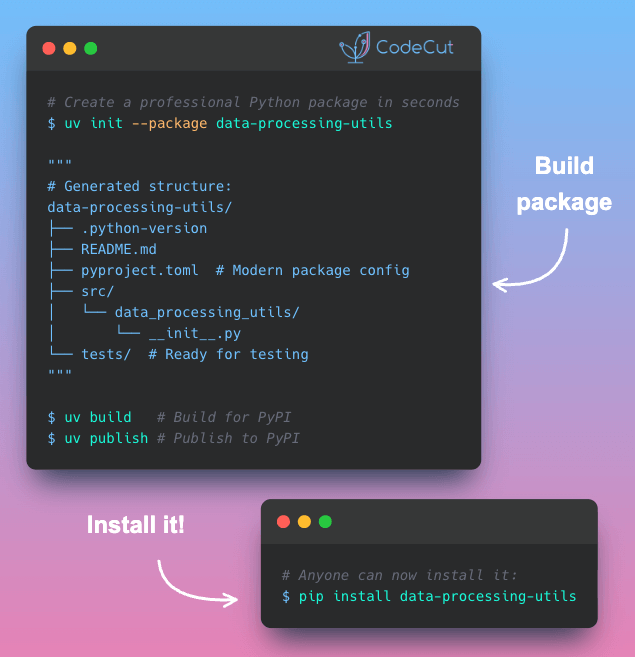
Build Professional Python Packages with UV –package

Problem
Python packages turn your code into reusable modules you can share across projects.
But building them requires complex setup with setuptools, managing build systems, and understanding distribution mechanics.
Solution
UV, a fast Python package installer and resolver, reduces the entire process to 2 simple commands:

uv init –package sets up your package structure instantly
uv build and uv publish to create and distribute to PyPI

📖 Learn more

⭐ View GitHub

Generate Time-Sortable IDs with Python 3.14’s UUID v7

Problem
UUID4 generates purely random identifiers that lack chronological ordering.
Without embedded timestamps, you need separate timestamp fields and custom sorting logic to organize records by creation time.
Solution
Python 3.14 introduces UUID version 7 with built-in timestamp ordering.
Key features:

Determine creation order by comparing two UUIDs directly
Retrieve exact creation time by extracting the embedded timestamp

☕️ Weekly Finds

smolagents
[LLM]
– A barebones library for agents that think in code

rembg
[ML]
– A tool to remove images background

Scrapegraph-ai
[LLM]
– Python scraper based on AI

Looking for a specific tool? Explore 70+ Python tools →

📚 Latest Deep Dives

Visualize Machine Learning Results with Yellowbrick
– Learn to visualize ML model performance with Yellowbrick. Create confusion matrices, ROC curves, and feature importance plots in scikit-learn pipelines.

Stay Current with CodeCut

Actionable Python tips, curated for busy data pros. Skim in under 2 minutes, three times a week.

.codecut-subscribe-form .codecut-input {
background: #2F2D2E !important;
border: 1px solid #72BEFA !important;
color: #FFFFFF !important;
}
.codecut-subscribe-form .codecut-input::placeholder {
color: #999999 !important;
}
.codecut-subscribe-form .codecut-subscribe-btn {
background: #72BEFA !important;
color: #2F2D2E !important;
}
.codecut-subscribe-form .codecut-subscribe-btn:hover {
background: #5aa8e8 !important;
}

.codecut-subscribe-form {
max-width: 650px;
display: flex;
flex-direction: column;
gap: 8px;
}
.codecut-input {
-webkit-appearance: none;
-moz-appearance: none;
appearance: none;
background: #FFFFFF;
border-radius: 8px !important;
padding: 8px 12px;
font-family: ‘Comfortaa’, sans-serif !important;
font-size: 14px !important;
color: #333333;
border: none !important;
outline: none;
width: 100%;
box-sizing: border-box;
}
input[type=”email”].codecut-input {
border-radius: 8px !important;
}
.codecut-input::placeholder {
color: #666666;
}
.codecut-email-row {
display: flex;
align-items: stretch;
height: 36px;
gap: 8px;
}
.codecut-email-row .codecut-input {
flex: 1;
}
.codecut-subscribe-btn {
background: #72BEFA;
color: #2F2D2E;
border: none;
border-radius: 8px;
padding: 8px 14px;
font-family: ‘Comfortaa’, sans-serif;
font-size: 14px;
font-weight: 500;
cursor: pointer;
text-decoration: none;
display: flex;
align-items: center;
justify-content: center;
transition: background 0.3s ease;
}
.codecut-subscribe-btn:hover {
background: #5aa8e8;
}
.codecut-subscribe-btn:disabled {
background: #999;
cursor: not-allowed;
}
.codecut-message {
font-family: ‘Comfortaa’, sans-serif;
font-size: 12px;
padding: 8px;
border-radius: 6px;
display: none;
}
.codecut-message.success {
background: #d4edda;
color: #155724;
display: block;
}
@media (max-width: 480px) {
.codecut-email-row {
flex-direction: column;
height: auto;
gap: 8px;
}
.codecut-input {
border-radius: 8px;
height: 36px;
}
.codecut-subscribe-btn {
width: 100%;
text-align: center;
border-radius: 8px;
height: 36px;
}
}

Subscribe
Newsletter #267: Build Professional Python Packages with UV –package Read More »

Code example: Python 3.14: Type-Safe String Interpolation with t-strings

Newsletter #266: Python 3.14: Type-Safe String Interpolation with t-strings

🔄 Worth Revisiting

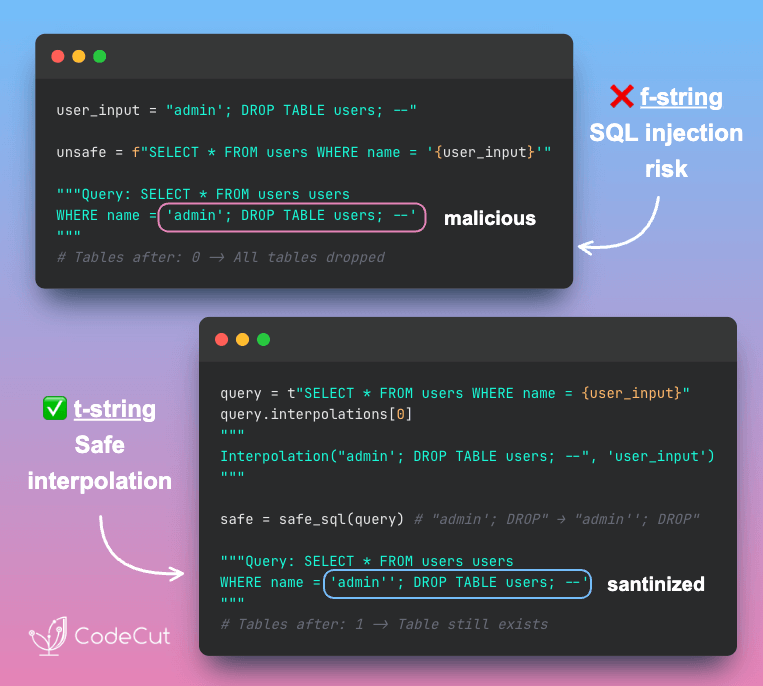
Python 3.14: Type-Safe String Interpolation with t-strings

Problem
Building SQL queries with f-strings directly embeds user input into the query string, allowing attackers to inject malicious SQL commands.
Parameterized queries are secure but require you to maintain query templates and value lists separately.
Solution
Python 3.14 introduces template string literals (t-strings). Instead of returning strings, they return Template objects that safely expose interpolated values.
This lets you validate and sanitize interpolated values before building the final query.

🧪 Run code

Build Self-Documenting Regex with Pregex

Problem
Regex patterns like [a-zA-Z0-9._%+-]+@[a-zA-Z0-9.-]+\.[a-zA-Z]{2,} are difficult to read and intimidating.
Team members without regex expertise might struggle to understand and modify these validation patterns.
Solution
Team members without regex expertise might struggle to understand and modify these validation patterns.
Pregex transforms regex into readable Python code using descriptive components.
Key benefits:

Code that explains its intent without comments
Easy modification without regex expertise
Composable patterns for complex validation
Export to regex format when needed

📖 View Full Article

🧪 Run code

⭐ View GitHub

☕️ Weekly Finds

MindsDB
[LLM]
– AI data automation solution that connects and unifies enterprise data for real-time decision-making.

MarkItDown
[Python Utils]
– Lightweight Python utility for converting various files to Markdown for use with LLMs.

Reflex
[Python Utils]
– Open-source framework empowering Python developers to build web apps faster in a single language.

Looking for a specific tool? Explore 70+ Python tools →

📚 Latest Deep Dives

Visualize Machine Learning Results with Yellowbrick
– Learn to visualize ML model performance with Yellowbrick. Create confusion matrices, ROC curves, and feature importance plots in scikit-learn pipelines.

Stay Current with CodeCut

Actionable Python tips, curated for busy data pros. Skim in under 2 minutes, three times a week.

.codecut-subscribe-form .codecut-input {
background: #2F2D2E !important;
border: 1px solid #72BEFA !important;
color: #FFFFFF !important;
}
.codecut-subscribe-form .codecut-input::placeholder {
color: #999999 !important;
}
.codecut-subscribe-form .codecut-subscribe-btn {
background: #72BEFA !important;
color: #2F2D2E !important;
}
.codecut-subscribe-form .codecut-subscribe-btn:hover {
background: #5aa8e8 !important;
}

.codecut-subscribe-form {
max-width: 650px;
display: flex;
flex-direction: column;
gap: 8px;
}
.codecut-input {
-webkit-appearance: none;
-moz-appearance: none;
appearance: none;
background: #FFFFFF;
border-radius: 8px !important;
padding: 8px 12px;
font-family: ‘Comfortaa’, sans-serif !important;
font-size: 14px !important;
color: #333333;
border: none !important;
outline: none;
width: 100%;
box-sizing: border-box;
}
input[type=”email”].codecut-input {
border-radius: 8px !important;
}
.codecut-input::placeholder {
color: #666666;
}
.codecut-email-row {
display: flex;
align-items: stretch;
height: 36px;
gap: 8px;
}
.codecut-email-row .codecut-input {
flex: 1;
}
.codecut-subscribe-btn {
background: #72BEFA;
color: #2F2D2E;
border: none;
border-radius: 8px;
padding: 8px 14px;
font-family: ‘Comfortaa’, sans-serif;
font-size: 14px;
font-weight: 500;
cursor: pointer;
text-decoration: none;
display: flex;
align-items: center;
justify-content: center;
transition: background 0.3s ease;
}
.codecut-subscribe-btn:hover {
background: #5aa8e8;
}
.codecut-subscribe-btn:disabled {
background: #999;
cursor: not-allowed;
}
.codecut-message {
font-family: ‘Comfortaa’, sans-serif;
font-size: 12px;
padding: 8px;
border-radius: 6px;
display: none;
}
.codecut-message.success {
background: #d4edda;
color: #155724;
display: block;
}
@media (max-width: 480px) {
.codecut-email-row {
flex-direction: column;
height: auto;
gap: 8px;
}
.codecut-input {
border-radius: 8px;
height: 36px;
}
.codecut-subscribe-btn {
width: 100%;
text-align: center;
border-radius: 8px;
height: 36px;
}
}

Subscribe
Newsletter #266: Python 3.14: Type-Safe String Interpolation with t-strings Read More »

Newsletter #265: PySpark 4.0: Query Nested JSON Without StructType

📅 Today’s Picks

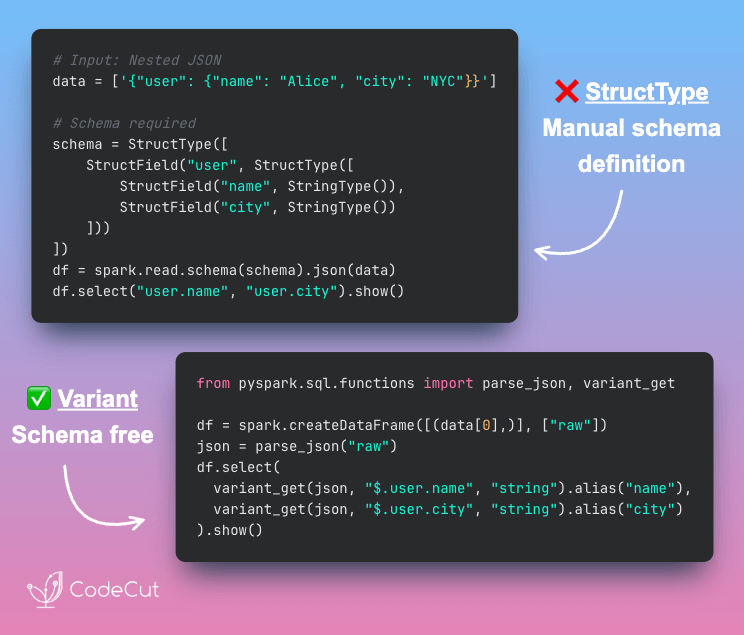
PySpark 4.0: Query Nested JSON Without StructType

Problem
Extracting nested JSON in PySpark requires defining StructType inside StructType inside StructType. This creates verbose, inflexible code that breaks when your JSON structure changes.
Solution
PySpark 4.0’s Variant type lets you skip schema definitions entirely. All you need is parse_json() to load and variant_get() to extract with JSONPath.
Key benefits:

No upfront schema definition
Handle any nesting depth with simple $.path syntax
Schema changes don’t break your code
Extract only the fields you need, when you need them

📖 View Full Article

🧪 Run code

⭐ View GitHub

☕️ Weekly Finds

toon
[LLM]
– Compact, human-readable JSON encoding for LLM prompts with schema-aware Token-Oriented Object Notation

cocoindex
[Data Processing]
– Ultra performant data transformation framework for AI with incremental processing

sqlfluff
[Data Engineer]
– Modular SQL linter and auto-formatter with support for multiple dialects and templated code

Looking for a specific tool? Explore 70+ Python tools →

📚 Latest Deep Dives

Visualize Machine Learning Results with Yellowbrick
– Learn to visualize ML model performance with Yellowbrick. Create confusion matrices, ROC curves, and feature importance plots in scikit-learn pipelines.

Stay Current with CodeCut

Actionable Python tips, curated for busy data pros. Skim in under 2 minutes, three times a week.

.codecut-subscribe-form .codecut-input {
background: #2F2D2E !important;
border: 1px solid #72BEFA !important;
color: #FFFFFF !important;
}
.codecut-subscribe-form .codecut-input::placeholder {
color: #999999 !important;
}
.codecut-subscribe-form .codecut-subscribe-btn {
background: #72BEFA !important;
color: #2F2D2E !important;
}
.codecut-subscribe-form .codecut-subscribe-btn:hover {
background: #5aa8e8 !important;
}

.codecut-subscribe-form {
max-width: 650px;
display: flex;
flex-direction: column;
gap: 8px;
}
.codecut-input {
-webkit-appearance: none;
-moz-appearance: none;
appearance: none;
background: #FFFFFF;
border-radius: 8px !important;
padding: 8px 12px;
font-family: ‘Comfortaa’, sans-serif !important;
font-size: 14px !important;
color: #333333;
border: none !important;
outline: none;
width: 100%;
box-sizing: border-box;
}
input[type=”email”].codecut-input {
border-radius: 8px !important;
}
.codecut-input::placeholder {
color: #666666;
}
.codecut-email-row {
display: flex;
align-items: stretch;
height: 36px;
gap: 8px;
}
.codecut-email-row .codecut-input {
flex: 1;
}
.codecut-subscribe-btn {
background: #72BEFA;
color: #2F2D2E;
border: none;
border-radius: 8px;
padding: 8px 14px;
font-family: ‘Comfortaa’, sans-serif;
font-size: 14px;
font-weight: 500;
cursor: pointer;
text-decoration: none;
display: flex;
align-items: center;
justify-content: center;
transition: background 0.3s ease;
}
.codecut-subscribe-btn:hover {
background: #5aa8e8;
}
.codecut-subscribe-btn:disabled {
background: #999;
cursor: not-allowed;
}
.codecut-message {
font-family: ‘Comfortaa’, sans-serif;
font-size: 12px;
padding: 8px;
border-radius: 6px;
display: none;
}
.codecut-message.success {
background: #d4edda;
color: #155724;
display: block;
}
@media (max-width: 480px) {
.codecut-email-row {
flex-direction: column;
height: auto;
gap: 8px;
}
.codecut-input {
border-radius: 8px;
height: 36px;
}
.codecut-subscribe-btn {
width: 100%;
text-align: center;
border-radius: 8px;
height: 36px;
}
}

Subscribe
Newsletter #265: PySpark 4.0: Query Nested JSON Without StructType Read More »

Visualize Machine Learning Results with Yellowbrick

Table of Contents

Introduction
What is Yellowbrick
Visualize the Data
Rank Features
Class Balance

Visualize the Results of the Model
Confusion Matrix
Classification Report
ROCAUC
Discrimination Threshold

How to Improve the Model
Validation Curve
Learning Curve
Feature Importances

Conclusion

Introduction
Imagine you’re a building manager deploying an occupancy detection system. Sensors throughout the building measure temperature, humidity, light, and CO2 levels.
Your model predicts room occupancy with an f1-score of 98%. This score reflects how well the model balances accurate predictions with catching all occupied rooms. But a single score hides important details.
When the system thinks a room is occupied, how often is it wrong? When people are actually in a room, how often does the system miss them? One wastes energy; the other frustrates occupants.
To improve, you need to see which error your model makes more often. This is where visualization helps. Charts and plots reveal patterns that raw numbers hide. Yellowbrick makes it easy to create these diagnostic plots.

For general-purpose plotting beyond ML diagnostics, see Top 6 Python Libraries for Visualization.
💻 Get the Code: The complete source code and Jupyter notebook for this tutorial are available on GitHub. Clone it to follow along!

Stay Current with CodeCut
Actionable Python tips, curated for busy data pros. Skim in under 2 minutes, three times a week.

.codecut-subscribe-form .codecut-input {
background: #2F2D2E !important;
border: 1px solid #72BEFA !important;
color: #FFFFFF !important;
}
.codecut-subscribe-form .codecut-input::placeholder {
color: #999999 !important;
}
.codecut-subscribe-form .codecut-subscribe-btn {
background: #72BEFA !important;
color: #2F2D2E !important;
}
.codecut-subscribe-form .codecut-subscribe-btn:hover {
background: #5aa8e8 !important;
}

.codecut-subscribe-form {
max-width: 650px;
display: flex;
flex-direction: column;
gap: 8px;
}

.codecut-input {
-webkit-appearance: none;
-moz-appearance: none;
appearance: none;
background: #FFFFFF;
border-radius: 8px !important;
padding: 8px 12px;
font-family: ‘Comfortaa’, sans-serif !important;
font-size: 14px !important;
color: #333333;
border: none !important;
outline: none;
width: 100%;
box-sizing: border-box;
}

input[type=”email”].codecut-input {
border-radius: 8px !important;
}

.codecut-input::placeholder {
color: #666666;
}

.codecut-email-row {
display: flex;
align-items: stretch;
height: 36px;
gap: 8px;
}

.codecut-email-row .codecut-input {
flex: 1;
}

.codecut-subscribe-btn {
background: #72BEFA;
color: #2F2D2E;
border: none;
border-radius: 8px;
padding: 8px 14px;
font-family: ‘Comfortaa’, sans-serif;
font-size: 14px;
font-weight: 500;
cursor: pointer;
text-decoration: none;
display: flex;
align-items: center;
justify-content: center;
transition: background 0.3s ease;
}

.codecut-subscribe-btn:hover {
background: #5aa8e8;
}

.codecut-subscribe-btn:disabled {
background: #999;
cursor: not-allowed;
}

.codecut-message {
font-family: ‘Comfortaa’, sans-serif;
font-size: 12px;
padding: 8px;
border-radius: 6px;
display: none;
}

.codecut-message.success {
background: #d4edda;
color: #155724;
display: block;
}

/* Mobile responsive */
@media (max-width: 480px) {
.codecut-email-row {
flex-direction: column;
height: auto;
gap: 8px;
}

.codecut-input {
border-radius: 8px;
height: 36px;
}

.codecut-subscribe-btn {
width: 100%;
text-align: center;
border-radius: 8px;
height: 36px;
}
}

Subscribe
What is Yellowbrick
Yellowbrick is a machine learning visualization library. Essentially, Yellowbrick makes it easier for you to:

Select features
Tune hyperparameters
Interpret the score of your models
Visualize text data

Visualizing your data and model helps you understand what’s working, what’s not, and what to fix next.
To install Yellowbrick, type:
pip install yellowbrick

We’ll use a room occupancy dataset to explore Yellowbrick’s classification tools. Sensors recorded temperature, humidity, light, and CO2 levels, while cameras captured ground-truth occupancy every minute.
from sklearn.model_selection import train_test_split
from sklearn.tree import DecisionTreeClassifier
from yellowbrick.datasets.loaders import load_occupancy
import warnings
warnings.filterwarnings('ignore')

X, y = load_occupancy()

# Create train/test split
X_train, X_test, y_train, y_test = train_test_split(X, y, random_state=42)

Visualize the Data
Rank Features
Correlated features can hurt your model by adding redundancy without new information. The Rank2D visualizer scores each pair of features using Pearson correlation, helping you spot which ones overlap.
from yellowbrick.features import Rank2D

visualizer = Rank2D(algorithm='pearson')
visualizer.fit(X, y)
visualizer.transform(X)
visualizer.show()

Two feature pairs show strong correlation (dark red cells):

Humidity and relative humidity: The darkest red in the heatmap. Both capture air moisture, one as an absolute measure, the other adjusted for temperature. This likely explains the overlap.
Light and temperature: Also dark red. This may be because daytime brings both sunlight and warmth. Occupied rooms possibly have lights on and more body heat.

Since correlated features carry redundant information, you could potentially drop one from each pair without losing predictive power.
Class Balance
Class imbalance distorts your metrics. When one class dominates the data, a model can score high by always guessing the majority class. A 98% f1-score means little if the model never correctly predicts the minority class.
The ClassBalance visualizer reveals whether your data has this problem:
from yellowbrick.target import ClassBalance

visualizer = ClassBalance(labels=["unoccupied", "occupied"])

visualizer.fit(y) # Fit the data to the visualizer
visualizer.show() # Finalize and render the figure

The chart shows a 3:1 imbalance: roughly 16,000 unoccupied samples versus 5,000 occupied. A model could achieve 75% accuracy by always predicting “unoccupied.”
To address this, consider:

Stratified sampling: Split your data so both train and test sets maintain the same class ratio. This prevents the test set from accidentally having too few minority samples.
Class weighting: Tell the model to penalize mistakes on the minority class more heavily. A missed occupied room costs more than a missed unoccupied one.
Oversampling: Duplicate or synthetically generate more minority class samples to balance the dataset before training.

Visualize the Results of the Model
A single f1-score doesn’t tell you where your model succeeds or fails. These Yellowbrick visualizers break down your model’s performance so you can see exactly what’s happening.
Confusion Matrix
When the model predicts “occupied,” how often is it wrong? When a room is actually occupied, how often does the model miss it? The confusion matrix answers both questions at a glance.
from yellowbrick.classifier import ConfusionMatrix

# Specify the target classes
classes = ["unoccupied", "occupied"]

# Initialize the model
model = DecisionTreeClassifier()

# Fit and score the data
cm = ConfusionMatrix(model, classes=classes, percent=True)
cm.fit(X_train, y_train)
cm.score(X_test, y_test)
cm.show()

The model correctly identifies 99% of unoccupied rooms and 98% of occupied ones. The occupied class has slightly more errors (2% missed vs 1% false alarms).
To improve, focus on reducing missed occupied rooms since leaving people in the dark is worse than wasting a bit of energy.
Classification Report
The classification report answers four questions about your model’s predictions:

Precision: When the model predicts “occupied,” how often is it right?
Recall: Of all the actual “occupied” rooms, how many did the model find?
F1: How well does the model balance precision and recall?
Support: How many test samples are in each class?

from yellowbrick.classifier import ClassificationReport

visualizer = ClassificationReport(model, classes=classes, support=True)
visualizer.fit(X_train, y_train)
visualizer.score(X_test, y_test)
visualizer.show()

The heatmap reveals several insights:

Both classes achieve perfect scores (1.0) for precision, recall, and F1
The support column shows class imbalance: 3,958 unoccupied vs 1,182 occupied samples
Darker cells indicate higher values, making underperforming metrics easy to spot

ROCAUC
Every classifier faces a tradeoff: catch more occupied rooms but risk more false alarms, or reduce false alarms but miss more occupied rooms. The ROC AUC curve shows this tradeoff across all possible thresholds.
The Y-axis shows the true positive rate; the X-axis shows the false positive rate. A model that hugs the top-left corner handles this tradeoff well.
from yellowbrick.classifier import ROCAUC

visualizer = ROCAUC(model, classes=classes)
visualizer.fit(X_train, y_train)
visualizer.score(X_test, y_test)
visualizer.show()

Both curves hug the top-left corner with AUC scores of 0.99. This means the model achieves near-perfect separation between classes with minimal false alarms.
The dotted diagonal represents random guessing (AUC = 0.5). Our curves are far from it, confirming strong performance. When comparing models, choose the one with curves closer to the top-left.
Discrimination Threshold
What if you want to catch every occupied room, even at the cost of some false alarms? Or minimize false alarms, even if you miss a few? The DiscriminationThreshold visualizer shows how each threshold affects precision, recall, and F1 score.
from yellowbrick.classifier import DiscriminationThreshold

visualizer = DiscriminationThreshold(model)
visualizer.fit(X, y)
visualizer.show()

Key observations:

The default threshold (0.50) achieves near-perfect precision and recall for this model
F1 score remains high between thresholds 0.3-0.6, giving flexibility in threshold selection
If minimizing false positives matters more, increase the threshold; if catching all positives matters more, decrease it

How to Improve the Model
Our model performs well, but can we do better? The next visualizers help you:

Detect underfitting or overfitting
Identify which features matter most

Validation Curve
How deep should your decision tree be? The answer depends on two failure modes:

Too shallow (underfitting): The model is too simple to capture patterns. It performs poorly on both training and test data.
Too deep (overfitting): The model memorizes training data instead of learning patterns. It performs well on training data but poorly on new data.

The ValidationCurve visualizer plots scores across different values, helping you find the sweet spot.
from yellowbrick.model_selection import ValidationCurve
import numpy as np

model = DecisionTreeClassifier()
viz = ValidationCurve(
model,
param_name="max_depth",
param_range=np.arange(1, 11),
cv=10,
scoring="f1_weighted",
)
viz.fit(X, y)
viz.show()

Training score improves with depth, but cross-validation score peaks at depth 1 and declines afterward. The growing gap means the model performs well on data it has seen but poorly on new data. This is the definition of overfitting.
Set max_depth=3 or max_depth=4 for good generalization with minimal overfitting.
Learning Curve
More data doesn’t always mean better performance. The LearningCurve shows how training and test scores change as you add more samples. Use it to decide whether collecting more data is worth the effort.
from yellowbrick.model_selection import LearningCurve

model = DecisionTreeClassifier()
viz = LearningCurve(model, cv=10, scoring="f1_weighted")
viz.fit(X, y)
viz.show()

Training score stays flat at 1.0 regardless of sample size. Cross-validation score rises from 0.86 to a peak around 0.94 at ~10,000 samples, then slightly drops and plateaus.
This suggests the model benefits from more data up to a point, but beyond ~10,000 samples, additional data doesn’t improve generalization.
Feature Importances
Not all features contribute equally. Some add noise without improving predictions. The FeatureImportances visualizer ranks features by their contribution to the model, helping you identify which ones to keep and which to drop.
from yellowbrick.model_selection import FeatureImportances

model = DecisionTreeClassifier()
viz = FeatureImportances(model)
viz.fit(X, y)
viz.show()

Light dominates with nearly 100% relative importance. CO2 and temperature contribute minimally, while humidity and relative humidity barely register.
Several factors could explain light’s dominance:

Lights are typically switched on when rooms are occupied
Natural daylight patterns may correlate with occupancy schedules
Light sensors may have less noise than other sensors

For this dataset, you could likely drop humidity features with little impact on performance.
Conclusion
Yellowbrick turns model evaluation from numbers into visuals. You’ve seen how to:

Spot data issues with Rank2D and ClassBalance
Diagnose model errors with confusion matrices and ROC curves
Tune hyperparameters with validation and learning curves
Identify important features to simplify your model

Explore more visualizers in the Yellowbrick documentation.
Related Tutorials

Testing: Pytest for Data Scientists to verify model behavior programmatically
Presentation: Great Tables to present model metrics in publication-ready tables

📚 Want to go deeper? Learning new techniques is the easy part. Knowing how to structure, test, and deploy them is what separates side projects from real work. My book shows you how to build data science projects that actually make it to production. Get the book →

Stay Current with CodeCut
Actionable Python tips, curated for busy data pros. Skim in under 2 minutes, three times a week.

.codecut-subscribe-form .codecut-input {
background: #2F2D2E !important;
border: 1px solid #72BEFA !important;
color: #FFFFFF !important;
}
.codecut-subscribe-form .codecut-input::placeholder {
color: #999999 !important;
}
.codecut-subscribe-form .codecut-subscribe-btn {
background: #72BEFA !important;
color: #2F2D2E !important;
}
.codecut-subscribe-form .codecut-subscribe-btn:hover {
background: #5aa8e8 !important;
}

.codecut-subscribe-form {
max-width: 650px;
display: flex;
flex-direction: column;
gap: 8px;
}

.codecut-input {
-webkit-appearance: none;
-moz-appearance: none;
appearance: none;
background: #FFFFFF;
border-radius: 8px !important;
padding: 8px 12px;
font-family: ‘Comfortaa’, sans-serif !important;
font-size: 14px !important;
color: #333333;
border: none !important;
outline: none;
width: 100%;
box-sizing: border-box;
}

input[type=”email”].codecut-input {
border-radius: 8px !important;
}

.codecut-input::placeholder {
color: #666666;
}

.codecut-email-row {
display: flex;
align-items: stretch;
height: 36px;
gap: 8px;
}

.codecut-email-row .codecut-input {
flex: 1;
}

.codecut-subscribe-btn {
background: #72BEFA;
color: #2F2D2E;
border: none;
border-radius: 8px;
padding: 8px 14px;
font-family: ‘Comfortaa’, sans-serif;
font-size: 14px;
font-weight: 500;
cursor: pointer;
text-decoration: none;
display: flex;
align-items: center;
justify-content: center;
transition: background 0.3s ease;
}

.codecut-subscribe-btn:hover {
background: #5aa8e8;
}

.codecut-subscribe-btn:disabled {
background: #999;
cursor: not-allowed;
}

.codecut-message {
font-family: ‘Comfortaa’, sans-serif;
font-size: 12px;
padding: 8px;
border-radius: 6px;
display: none;
}

.codecut-message.success {
background: #d4edda;
color: #155724;
display: block;
}

/* Mobile responsive */
@media (max-width: 480px) {
.codecut-email-row {
flex-direction: column;
height: auto;
gap: 8px;
}

.codecut-input {
border-radius: 8px;
height: 36px;
}

.codecut-subscribe-btn {
width: 100%;
text-align: center;
border-radius: 8px;
height: 36px;
}
}

Subscribe

Visualize Machine Learning Results with Yellowbrick Read More »

Newsletter #264: Codon: One Decorator to Turn Python into C Speed

📅 Today’s Picks

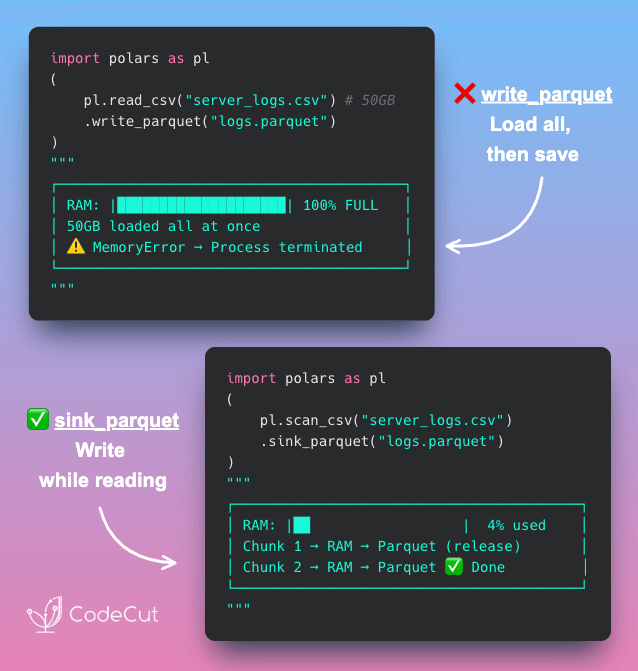
Stream Large CSVs to Parquet with Polars sink_parquet

Problem
Traditional workflows load the full CSV into memory before writing, which crashes when the file is too large.
Solution
Polars sink_parquet() streams data directly from CSV to Parquet without loading the entire file into memory.
Instead of load-then-write, sink_parquet uses read-write-release:

Reads a chunk from CSV
Writes it to Parquet
Releases memory before next chunk
Repeats until complete

📖 View Full Article

🧪 Run code

⭐ View GitHub

Codon: One Decorator to Turn Python into C Speed

Problem
Slow Python functions in large codebases are painful to optimize. You might try Numba or Cython, but Numba only works for numerical code with NumPy arrays.
You might try Cython, but it needs .pyx files, variable type annotations, and build setup. That’s hours of refactoring before you see any speedup.
Solution
Codon solves this with a single @codon.jit decorator that compiles your Python to machine code.
Key benefits:

Works on any Python code, not just NumPy arrays
No type annotations required since types are inferred automatically
Compiled functions are cached for instant repeated calls
Zero code changes beyond adding the decorator

🧪 Run code

⭐ View GitHub

☕️ Weekly Finds

metabase
[Data Viz]
– Open-source Business Intelligence and Embedded Analytics tool that lets everyone work with data

Surprise
[ML]
– Python scikit for building and analyzing recommender systems with SVD, KNN, and more algorithms

highdimensional-decision-boundary-plot
[Data Viz]
– Scikit-learn compatible approach to plot high-dimensional decision boundaries for intuitive model understanding

Looking for a specific tool? Explore 70+ Python tools →

Stay Current with CodeCut

Actionable Python tips, curated for busy data pros. Skim in under 2 minutes, three times a week.

.codecut-subscribe-form .codecut-input {
background: #2F2D2E !important;
border: 1px solid #72BEFA !important;
color: #FFFFFF !important;
}
.codecut-subscribe-form .codecut-input::placeholder {
color: #999999 !important;
}
.codecut-subscribe-form .codecut-subscribe-btn {
background: #72BEFA !important;
color: #2F2D2E !important;
}
.codecut-subscribe-form .codecut-subscribe-btn:hover {
background: #5aa8e8 !important;
}

.codecut-subscribe-form {
max-width: 650px;
display: flex;
flex-direction: column;
gap: 8px;
}
.codecut-input {
-webkit-appearance: none;
-moz-appearance: none;
appearance: none;
background: #FFFFFF;
border-radius: 8px !important;
padding: 8px 12px;
font-family: ‘Comfortaa’, sans-serif !important;
font-size: 14px !important;
color: #333333;
border: none !important;
outline: none;
width: 100%;
box-sizing: border-box;
}
input[type=”email”].codecut-input {
border-radius: 8px !important;
}
.codecut-input::placeholder {
color: #666666;
}
.codecut-email-row {
display: flex;
align-items: stretch;
height: 36px;
gap: 8px;
}
.codecut-email-row .codecut-input {
flex: 1;
}
.codecut-subscribe-btn {
background: #72BEFA;
color: #2F2D2E;
border: none;
border-radius: 8px;
padding: 8px 14px;
font-family: ‘Comfortaa’, sans-serif;
font-size: 14px;
font-weight: 500;
cursor: pointer;
text-decoration: none;
display: flex;
align-items: center;
justify-content: center;
transition: background 0.3s ease;
}
.codecut-subscribe-btn:hover {
background: #5aa8e8;
}
.codecut-subscribe-btn:disabled {
background: #999;
cursor: not-allowed;
}
.codecut-message {
font-family: ‘Comfortaa’, sans-serif;
font-size: 12px;
padding: 8px;
border-radius: 6px;
display: none;
}
.codecut-message.success {
background: #d4edda;
color: #155724;
display: block;
}
@media (max-width: 480px) {
.codecut-email-row {
flex-direction: column;
height: auto;
gap: 8px;
}
.codecut-input {
border-radius: 8px;
height: 36px;
}
.codecut-subscribe-btn {
width: 100%;
text-align: center;
border-radius: 8px;
height: 36px;
}
}

Subscribe
Newsletter #264: Codon: One Decorator to Turn Python into C Speed Read More »

Newsletter #263: Analyze GitHub Repositories with LangChain Document Loaders

📅 Today’s Picks

Build a Simple Portfolio Analyzer in Python with ffn

Problem
If you have ever wanted a simple way to analyze your investment portfolio as a side project, you know how tedious it is to piece together multiple Python libraries.
Solution
ffn consolidates the entire portfolio analysis workflow into one package with a Pandas-like API.
Core features:

Fetch stock prices directly from Yahoo Finance
Calculate returns and risk metrics automatically
Find the best allocation across your assets
Plot performance comparisons and correlations

🧪 Run code

⭐ View GitHub

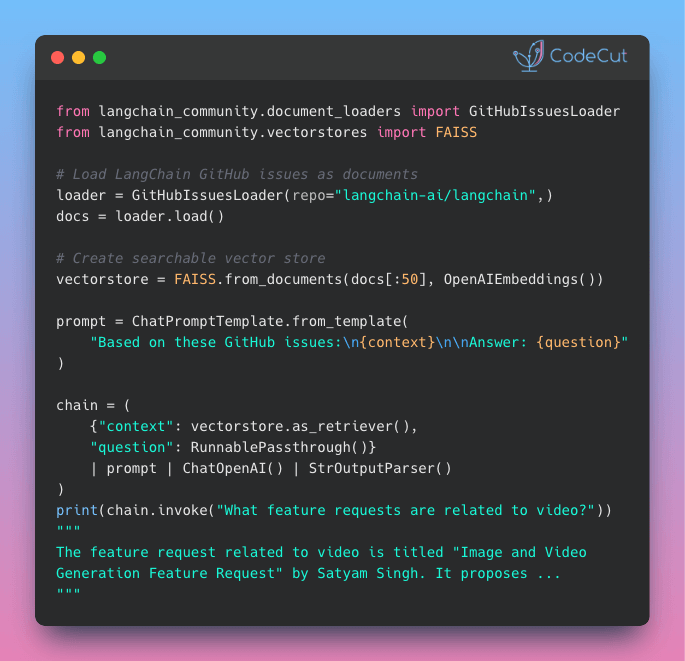
Analyze GitHub Repositories with LangChain Document Loaders

Problem
Are you tired of manually searching through hundreds of GitHub issues with keyword search to find what you need?
Solution
With LangChain’s GitHubIssuesLoader, you can load repository issues into a vector store and query them with natural language instead of exact keywords.
You can ask questions like “What feature requests are related to video?” and get instant, relevant answers from your issue history.

📖 View Full Article

🧪 Run code

⭐ View GitHub

☕️ Weekly Finds

PlotNeuralNet
[Data Viz]
– LaTeX code for drawing publication-quality neural network diagrams for reports and presentations

yellowbrick
[ML]
– Visual analysis and diagnostic tools for machine learning with scikit-learn integration

TPOT
[MLOps]
– Python Automated Machine Learning tool that optimizes ML pipelines using genetic programming

Looking for a specific tool? Explore 70+ Python tools →

Stay Current with CodeCut

Actionable Python tips, curated for busy data pros. Skim in under 2 minutes, three times a week.

.codecut-subscribe-form .codecut-input {
background: #2F2D2E !important;
border: 1px solid #72BEFA !important;
color: #FFFFFF !important;
}
.codecut-subscribe-form .codecut-input::placeholder {
color: #999999 !important;
}
.codecut-subscribe-form .codecut-subscribe-btn {
background: #72BEFA !important;
color: #2F2D2E !important;
}
.codecut-subscribe-form .codecut-subscribe-btn:hover {
background: #5aa8e8 !important;
}

.codecut-subscribe-form {
max-width: 650px;
display: flex;
flex-direction: column;
gap: 8px;
}
.codecut-input {
-webkit-appearance: none;
-moz-appearance: none;
appearance: none;
background: #FFFFFF;
border-radius: 8px !important;
padding: 8px 12px;
font-family: ‘Comfortaa’, sans-serif !important;
font-size: 14px !important;
color: #333333;
border: none !important;
outline: none;
width: 100%;
box-sizing: border-box;
}
input[type=”email”].codecut-input {
border-radius: 8px !important;
}
.codecut-input::placeholder {
color: #666666;
}
.codecut-email-row {
display: flex;
align-items: stretch;
height: 36px;
gap: 8px;
}
.codecut-email-row .codecut-input {
flex: 1;
}
.codecut-subscribe-btn {
background: #72BEFA;
color: #2F2D2E;
border: none;
border-radius: 8px;
padding: 8px 14px;
font-family: ‘Comfortaa’, sans-serif;
font-size: 14px;
font-weight: 500;
cursor: pointer;
text-decoration: none;
display: flex;
align-items: center;
justify-content: center;
transition: background 0.3s ease;
}
.codecut-subscribe-btn:hover {
background: #5aa8e8;
}
.codecut-subscribe-btn:disabled {
background: #999;
cursor: not-allowed;
}
.codecut-message {
font-family: ‘Comfortaa’, sans-serif;
font-size: 12px;
padding: 8px;
border-radius: 6px;
display: none;
}
.codecut-message.success {
background: #d4edda;
color: #155724;
display: block;
}
@media (max-width: 480px) {
.codecut-email-row {
flex-direction: column;
height: auto;
gap: 8px;
}
.codecut-input {
border-radius: 8px;
height: 36px;
}
.codecut-subscribe-btn {
width: 100%;
text-align: center;
border-radius: 8px;
height: 36px;
}
}

Subscribe
Newsletter #263: Analyze GitHub Repositories with LangChain Document Loaders Read More »

Newsletter #261: Build Visual Tables with Great Tables Nanoplots

🤝 COLLABORATION

Data Contracts: Developing Production Grade Pipelines at Scale
Poor data quality can cause major problems for data teams, from disrupting pipelines to losing consumer trust. Many teams struggle with this, especially when data comes from upstream workflows outside their control.
The solution: data contracts. They document expectations, establish ownership, and enforce constraints within CI/CD workflows.
This practical book introduces data contract architecture, explains why the industry needs it, and shares real-world production use cases. You’ll learn to implement components and build a case for adoption in your organization.

Try Chapter 7 in your browser

📅 Today’s Picks

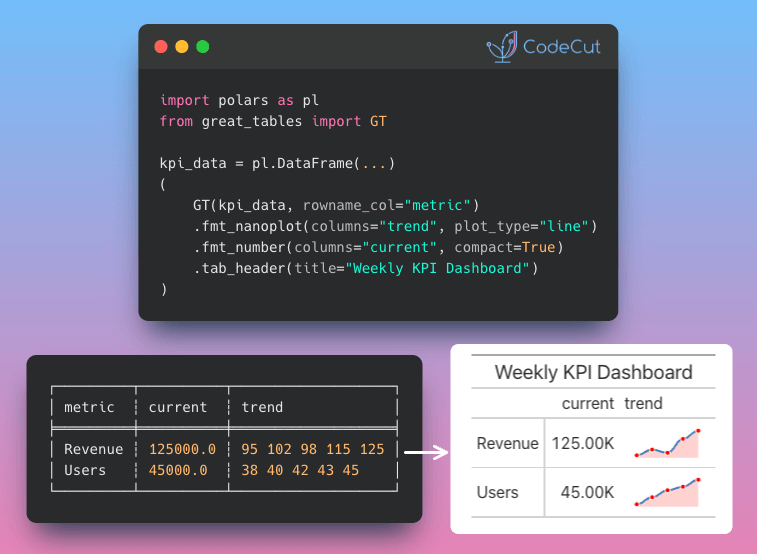
Build Visual Tables with Great Tables Nanoplots

Problem
Data tables with raw numbers lack visual context.
You can’t spot trends or patterns at a glance when looking at columns of digits.
Solution
Great Tables’ fmt_nanoplot() embeds mini line or bar charts directly into table cells.
Key features:

Transform numeric series into scannable visualizations
Customize colors and styles for data points and lines
Switch between line plots and bar charts
Add data area shading for emphasis

📖 View Full Article

🧪 Run code

⭐ View GitHub

☕️ Weekly Finds

TabPFN
[ML]
– Foundation model for tabular data with zero-shot classification and regression capabilities

scikit-survival
[ML]
– Survival analysis built on top of scikit-learn for time-to-event prediction

dedupe
[Data Processing]
– Python library for fuzzy matching, record deduplication and entity resolution using machine learning

Looking for a specific tool? Explore 70+ Python tools →

Stay Current with CodeCut

Actionable Python tips, curated for busy data pros. Skim in under 2 minutes, three times a week.

.codecut-subscribe-form .codecut-input {
background: #2F2D2E !important;
border: 1px solid #72BEFA !important;
color: #FFFFFF !important;
}
.codecut-subscribe-form .codecut-input::placeholder {
color: #999999 !important;
}
.codecut-subscribe-form .codecut-subscribe-btn {
background: #72BEFA !important;
color: #2F2D2E !important;
}
.codecut-subscribe-form .codecut-subscribe-btn:hover {
background: #5aa8e8 !important;
}

.codecut-subscribe-form {
max-width: 650px;
display: flex;
flex-direction: column;
gap: 8px;
}
.codecut-input {
-webkit-appearance: none;
-moz-appearance: none;
appearance: none;
background: #FFFFFF;
border-radius: 8px !important;
padding: 8px 12px;
font-family: ‘Comfortaa’, sans-serif !important;
font-size: 14px !important;
color: #333333;
border: none !important;
outline: none;
width: 100%;
box-sizing: border-box;
}
input[type=”email”].codecut-input {
border-radius: 8px !important;
}
.codecut-input::placeholder {
color: #666666;
}
.codecut-email-row {
display: flex;
align-items: stretch;
height: 36px;
gap: 8px;
}
.codecut-email-row .codecut-input {
flex: 1;
}
.codecut-subscribe-btn {
background: #72BEFA;
color: #2F2D2E;
border: none;
border-radius: 8px;
padding: 8px 14px;
font-family: ‘Comfortaa’, sans-serif;
font-size: 14px;
font-weight: 500;
cursor: pointer;
text-decoration: none;
display: flex;
align-items: center;
justify-content: center;
transition: background 0.3s ease;
}
.codecut-subscribe-btn:hover {
background: #5aa8e8;
}
.codecut-subscribe-btn:disabled {
background: #999;
cursor: not-allowed;
}
.codecut-message {
font-family: ‘Comfortaa’, sans-serif;
font-size: 12px;
padding: 8px;
border-radius: 6px;
display: none;
}
.codecut-message.success {
background: #d4edda;
color: #155724;
display: block;
}
@media (max-width: 480px) {
.codecut-email-row {
flex-direction: column;
height: auto;
gap: 8px;
}
.codecut-input {
border-radius: 8px;
height: 36px;
}
.codecut-subscribe-btn {
width: 100%;
text-align: center;
border-radius: 8px;
height: 36px;
}
}

Subscribe
Newsletter #261: Build Visual Tables with Great Tables Nanoplots Read More »

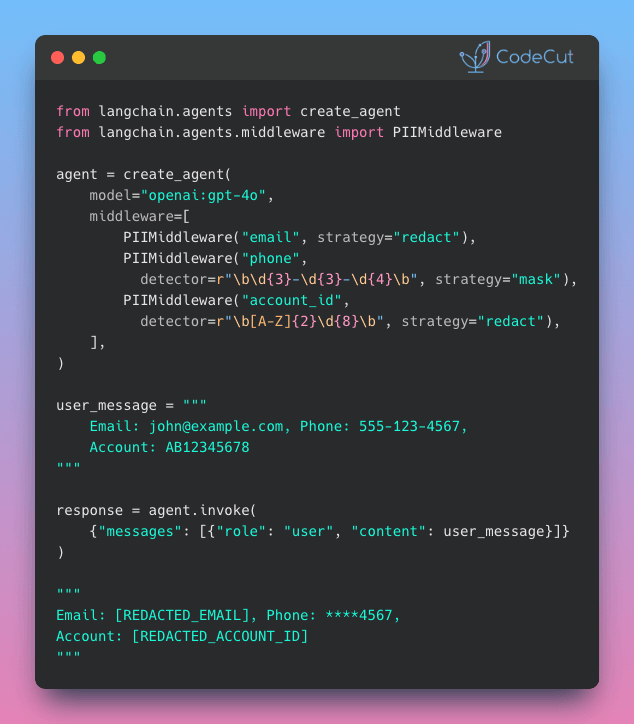
Newsletter #259: LangChain v1.0: Auto-Protect Sensitive Data with PIIMiddleware

📅 Today’s Picks

LangChain v1.0: Auto-Protect Sensitive Data with PIIMiddleware

Problem
User messages often contain sensitive information like emails and phone numbers.
Logging or storing this data without protection creates compliance and security risks.
Solution
LangChain v1.0 introduces PIIMiddleware to automatically protect sensitive data before model processing.
PIIMiddleware supports multiple protection modes:

5 built-in detectors (email, credit card, IP, MAC, URL)
Custom regex for any PII pattern
Replace with [REDACTED], mask as ****1234, or block entirely

📖 View Full Article

🧪 Run code

⭐ View GitHub

Test File Operations Without Risk Using tmp_path

Problem
Testing file operations requires touching the actual file system, which can be dangerous if not handled carefully. Real data can be overwritten by mistake.
Tests can also leave behind unwanted files across your project.
Solution
The tmp_path fixture provides a safe alternative by creating temporary, isolated directories that clean up themselves after each test.
Here’s how to use tmp_path:

Add tmp_path to your test function signature
Work with it like any pathlib.Path object
pytest handles the rest: isolated directories per test, automatic cleanup

📖 Learn more

🧪 Run code

☕️ Weekly Finds

quarkdown
[Python Utils]
– Modern Markdown-based typesetting system that compiles projects into print-ready books or interactive presentations with live preview and fast compilation

slim
[MLOps]
– Container optimization tool that makes Docker images 10-30x smaller without changing your development workflow

shapiq
[ML]
– Python package for approximating Shapley interactions and explaining feature interactions in machine learning model predictions

Looking for a specific tool? Explore 70+ Python tools →

📚 Latest Deep Dives

Great Tables: Publication-Ready Tables from Polars and Pandas DataFrames
– Turn Polars and Pandas DataFrames into professional tables with automatic number formatting, visual heatmaps, and sparkline charts. Fully reproducible when data updates.

Stay Current with CodeCut

Actionable Python tips, curated for busy data pros. Skim in under 2 minutes, three times a week.

.codecut-subscribe-form .codecut-input {
background: #2F2D2E !important;
border: 1px solid #72BEFA !important;
color: #FFFFFF !important;
}
.codecut-subscribe-form .codecut-input::placeholder {
color: #999999 !important;
}
.codecut-subscribe-form .codecut-subscribe-btn {
background: #72BEFA !important;
color: #2F2D2E !important;
}
.codecut-subscribe-form .codecut-subscribe-btn:hover {
background: #5aa8e8 !important;
}

.codecut-subscribe-form {
max-width: 650px;
display: flex;
flex-direction: column;
gap: 8px;
}
.codecut-input {
-webkit-appearance: none;
-moz-appearance: none;
appearance: none;
background: #FFFFFF;
border-radius: 8px !important;
padding: 8px 12px;
font-family: ‘Comfortaa’, sans-serif !important;
font-size: 14px !important;
color: #333333;
border: none !important;
outline: none;
width: 100%;
box-sizing: border-box;
}
input[type=”email”].codecut-input {
border-radius: 8px !important;
}
.codecut-input::placeholder {
color: #666666;
}
.codecut-email-row {
display: flex;
align-items: stretch;
height: 36px;
gap: 8px;
}
.codecut-email-row .codecut-input {
flex: 1;
}
.codecut-subscribe-btn {
background: #72BEFA;
color: #2F2D2E;
border: none;
border-radius: 8px;
padding: 8px 14px;
font-family: ‘Comfortaa’, sans-serif;
font-size: 14px;
font-weight: 500;
cursor: pointer;
text-decoration: none;
display: flex;
align-items: center;
justify-content: center;
transition: background 0.3s ease;
}
.codecut-subscribe-btn:hover {
background: #5aa8e8;
}
.codecut-subscribe-btn:disabled {
background: #999;
cursor: not-allowed;
}
.codecut-message {
font-family: ‘Comfortaa’, sans-serif;
font-size: 12px;
padding: 8px;
border-radius: 6px;
display: none;
}
.codecut-message.success {
background: #d4edda;
color: #155724;
display: block;
}
@media (max-width: 480px) {
.codecut-email-row {
flex-direction: column;
height: auto;
gap: 8px;
}
.codecut-input {
border-radius: 8px;
height: 36px;
}
.codecut-subscribe-btn {
width: 100%;
text-align: center;
border-radius: 8px;
height: 36px;
}
}

Subscribe
Newsletter #259: LangChain v1.0: Auto-Protect Sensitive Data with PIIMiddleware Read More »

Scroll to Top

Work with Khuyen Tran

Work with Khuyen Tran