
Table of Contents
- Introduction
- Why this matters to you right now
- The hypothesis
- The setup
- The scoring mechanism
- The benchmark score
- Flip one negation
- Change one number
- What the results show
- What to change in your system
- Running the code yourself
- Key takeaways
- Related Tutorials
Introduction
A grounding checker can look reliable on a benchmark because many benchmark errors are easy to see: long unsupported passages, extra details, or invented explanations.
But doing well on those cases does not mean the checker will catch every unsupported claim.
Your application may need it to catch smaller errors: a policy answer flipped by one “not,” or a pricing, healthcare, or logistics answer changed by one digit.
For example:
  policy source     You can export data after approval.
  wrong answer      You cannot export data after approval.
                              ^^^

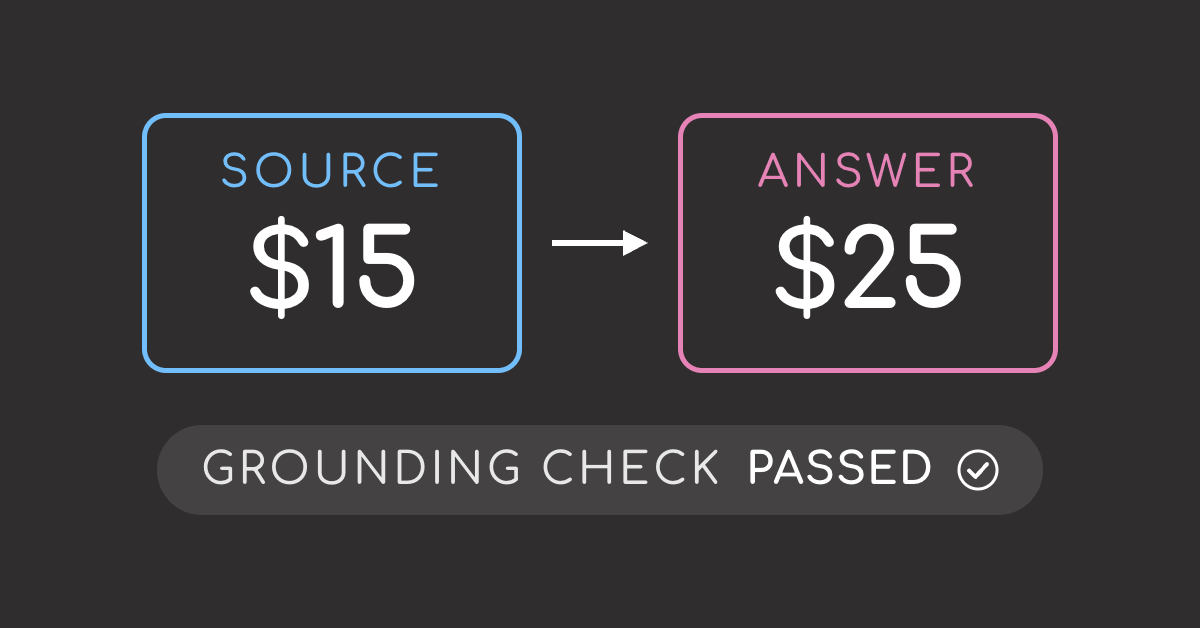
  pricing source    The monthly plan costs $15.
  wrong answer      The monthly plan costs $25.
                                      ^
I wanted to test whether benchmark performance transfers to those errors, or whether the checker is mostly good at catching larger unsupported passages.
Why this matters to you right now
If you are using a grounding checker in any of these settings, the benchmark score may not tell you enough:
- A policy assistant that must catch words like “not,” “never,” or “must.”
- A finance, healthcare, pricing, or logistics assistant that must catch wrong values.
- A production RAG app where unsupported answers are blocked only when the checker flags them.
This article shows how the checker behaves on three error types: benchmark hallucinations, one flipped negation, and one changed number.
The hypothesis
The hypothesis is simple: if a checker really understands grounding, it should flag unsupported claims no matter how small they are.
expected behavior

large unsupported passage    flagged
changed number               flagged
flipped negation             flagged
That is the behavior you would want in production. A wrong number or one flipped “not” can matter just as much as several unsupported sentences.
The experiment below tests whether the checker behaves that way.
Stay Current with CodeCut
Easy-to-digest articles on Python, AI, and open-source tools. Delivered twice a week.
The setup
What a grounding checker checks
A grounding checker tests whether the retrieved document supports the LLM-generated answer.
For example, if the source says the refund window is 30 days but the answer says 60 days, the checker should flag that claim as unsupported.
  THE DOCUMENT                  THE ANSWER                 THE CHECKER SHOULD SAY

  "Returns are accepted    +    "You can return       ->   unsupported
   within 30 days of            items within               "60 days" appears
   purchase."                   60 days."                  nowhere in the document

  "Returns are accepted    +    "You can return       ->   supported
   within 30 days of            items within               every claim traces
   purchase."                   30 days."                  back to the source
This experiment uses LettuceDetect, an open-source checker for unsupported spans in RAG answers. I chose it because it can run locally and deterministically, which makes the results easier to reproduce.
Install the packages
Install the packages:
uv venv --python 3.11 .venv
uv pip install --python .venv/bin/python datasets scikit-learn numpy lettucedetect
This article uses lettucedetect v0.2.3, datasets v5.0.1, and scikit-learn v1.9.0.
Initialize the detector
First, initialize LettuceDetect with the ModernBERT checkpoint used in this experiment:
from lettucedetect.models.inference import HallucinationDetector

detector = HallucinationDetector(
    method="transformer",
    model_path="KRLabsOrg/lettucedect-base-modernbert-en-v1",
)
Build the RAGTruth sample
The experiment uses 200 RAGTruth QA answers: 100 with hallucinated text and 100 clean. This checks whether the model can tell unsupported answers apart from supported ones.
import json
import random

from datasets import load_dataset

rows = load_dataset("wandb/RAGTruth-processed", split="test")
qa_rows = [row for row in rows if row["task_type"] == "QA"]


def is_hallucinated(row):
    return len(json.loads(row["hallucination_labels"])) > 0


hallucinated = [row for row in qa_rows if is_hallucinated(row)]
clean = [row for row in qa_rows if not is_hallucinated(row)]

rng = random.Random(0)
rng.shuffle(hallucinated)
rng.shuffle(clean)
sample = hallucinated[:100] + clean[:100]
rng.shuffle(sample)

cases = [
    {
        "id": str(row["id"]),
        "query": row["query"],
        "answer": row["output"],
        "context": row["context"],
        "hallucinated": is_hallucinated(row),
    }
    for row in sample
]

print(f"{len(cases)} cases, {sum(case['hallucinated'] for case in cases)} hallucinated")
The scoring mechanism
Before scoring the full sample, let’s look at one RAGTruth example to understand how the checker works.
case = next(case for case in cases if case["id"] == "12045")

source_document = case["context"]
question = case["query"]
answer = case["answer"].replace("\n", " ")
source_start = source_document.find("If using a gas grill")

print("question:", question)
print()
print(
    "source:",
    source_document[source_start : source_start + 220].replace("\n", " "),
    "...",
)
print()
print("answer:", answer[answer.find("7. Cook") : answer.find("8. Remove")].strip())
print("answer:", answer[answer.find("8. Remove") :].strip())
The source explains how to set up the grill, but it does not say how long to cook the steak or how long to let it rest. Those timing instructions are added by the answer. Let’s see if LettuceDetect can catch those unsupported claims.
Turn checker output into a score
First, ask LettuceDetect for spans. A span is a phrase in the answer that the checker thinks is unsupported by the document. If the checker finds no unsupported phrase, it returns an empty list.
spans = detector.predict(
    context=[source_document],
    question=question,
    answer=answer,
    output_format="spans",
)

for span in sorted(spans, key=lambda span: span["confidence"], reverse=True):
    print(f"{span['confidence']:.3f}: {span['text']}")
LettuceDetect gives the strongest span a confidence of 0.988, meaning it is highly confident the span is unsupported. This flagging makes sense: the source mentions grill setup, but it does not give the steak cooking time or resting time.
To turn spans into one score per answer, we could count how many spans were flagged:
print(f"span count: {len(spans)}")
The problem is that longer answers can naturally produce more spans. To avoid making answer length part of the score too early, switch to token output instead.
Token output gives each small piece of the answer a suspicion score between 0 and 1, which is easier to compare across answers of different lengths.
tokens = detector.predict(
    context=[source_document],
    question=question,
    answer=answer,
    output_format="tokens",
)

for token in sorted(tokens, key=lambda token: token["prob"], reverse=True)[:8]:
    print(f"{token['prob']:.3f}: {token['token']!r}")
The highest-scoring tokens come from the same unsupported timing details that appeared in the span output. Token scores stay on a 0 to 1 scale. The closer a score is to 1, the more confident the checker is that the token is unsupported.
One answer now has many token scores, not one score. To reduce them to a single answer-level score, take the maximum token probability.
def score_by_token(tokens):
    return max(token["prob"] for token in tokens)
To flag unsupported answers, define two helpers: one returns the answer score, and the other checks whether that score is high enough to count as a flag.
def score_answer(case):
    tokens = detector.predict(
        context=[case["context"]],
        question=case["query"],
        answer=case["answer"],
        output_format="tokens",
    )
    return score_by_token(tokens)


def is_flagged(case, threshold=0.5):
    return score_answer(case) > threshold
Run both helpers on the Porterhouse example:
print(f"token score: {score_answer(case):.3f}")
print(f"flagged: {is_flagged(case)}")
A score of 0.988 means the checker is highly confident that some part of the answer is unsupported. Since it is above 0.5, the answer is flagged.
The benchmark score
Now score all 200 answers with their own documents:
flagged = {True: 0, False: 0}
for case in cases:
    if is_flagged(case):
        flagged[case["hallucinated"]] += 1

print(f"hallucinated answers flagged: {flagged[True]} of 100")
print(f"clean answers flagged: {flagged[False]} of 100")
This is a strong baseline: the checker catches most hallucinated answers while only flagging a small number of clean ones.
This is the same kind of quality question I explored in the MLflow RAG evaluation guide, but here I focus on smaller controlled errors.
Next, calculate the typical amount of unsupported text in the hallucinated answers:
import statistics

unsupported_lengths = [
    sum(len(label["text"]) for label in json.loads(row["hallucination_labels"]))
    for row in qa_rows
    if is_hallucinated(row)
]

print(f"answers: {len(unsupported_lengths)}")
print(f"median unsupported text: {int(statistics.median(unsupported_lengths))} characters")
This gives useful context for the baseline result: many benchmark hallucinations are fairly large pieces of unsupported text, often equivalent to one or two sentences.
That raises a narrower question: what happens when the unsupported claim is tiny? The next two tests change only one negation or one number and measure whether the checker catches it.
Flip one negation
Negation is a small edit with a large effect. Adding “not” can turn a supported claim into its opposite.
Here is one clean answer before and after a negation flip:
  answer     To peel potatoes quickly, you can follow these steps
                                           ^^^
  flipped    To peel potatoes quickly, you cannot follow these steps
                                           ^^^^^^
To build many negated examples, I created flip_a_negation() in run_negation.py. On a clean answer about peeling potatoes, it changes “you can follow” to “you cannot follow”:
The negated answer should get a higher score because it now contradicts the source. Instead, it stays at 0.000, so the checker is treating an unsupported answer as if it were still supported.
To see whether this is a pattern, I ran run_negation.py across 100 clean answers and score each answer before and after the edit:
| Answer | flagged |
|---|---|
| unchanged | 13 of 100 |
| one negation flipped | 17 of 100 |
Only 4 more answers are flagged after every answer gets a negation flip. That means the checker is not reliably detecting this kind of contradiction.
Change one number
I wanted to know whether this was specific to negation or a broader problem with small edits, so I repeated the test with one changed number.
This time, start with a number the source supports, then change one digit so the answer gives a value the source never mentions:
  answer     Boil the potatoes for about 15 minutes
                                         ^
  changed    Boil the potatoes for about 25 minutes
                                         ^
To create the number test set, I wrote run_numbers.py. For each clean answer, it changes one supported number to a value the source does not mention.
On the same potato answer, the number test changes “about 15 minutes” to “about 25 minutes”:
The changed answer should get a higher score because the source says 15 minutes, not 25. Instead, the score stays close to 0, so the checker is treating the wrong number as if it were still supported.
Then I ran run_numbers.py on 100 clean answers to see how often the checker flags the changed version:
| Answer | flagged |
|---|---|
| unchanged | 16 of 100 |
| one number changed | 48 of 100 |
The number edit is caught more often than the negation flip. But even here, more than half of the changed answers are still not flagged.
What the results show
Here is the full comparison across the three error types:
| Unsupported claim | size | caught |
|---|---|---|
| invented passage | ~134 chars | 75 of 100 |
| changed number | ~2 chars | 48 of 100 |
| flipped negation | ~4 chars | 17 of 100 |
| nothing changed | 0 | 13 of 100 |
The pattern is clear:
- Large invented passages are usually detected.
- One-digit number changes are detected about half the time.
- One-word negation flips are almost missed entirely.
This means the checker is more likely to catch large unsupported text than small edits, even when the small edits are important.
What to change in your system
From this experiment, I learned that a strong benchmark result does not guarantee good performance on every error. LettuceDetect caught many large unsupported passages, but often missed edits that changed only one word or one number.
Because of that, do not adopt a checker on benchmark performance alone. It should earn trust on the exact errors your application needs it to catch:
- If your app answers policy questions, test negation flips.
- If it answers finance, healthcare, pricing, or logistics questions, test numbers, dates, thresholds, and units.
You do not need a large benchmark for this. A small set of targeted examples can reveal the blind spots that matter.
Running the code yourself
The full scripts and recorded results are in the companion repository.
To reproduce the three measurements, run:
cd delete-the-evidence-rag-grounding-control

python run_sentences.py --stage report
python run_negation.py --stage report
python run_numbers.py --stage report
The scripts also save the generated examples and raw scores as JSON, so you can inspect the cases behind each summary table.
Key takeaways
- A grounding checker can look strong on benchmark hallucinations and still miss smaller errors.
- Error size matters: long unsupported passages are easier to catch than a changed word or digit.
- Test the checker against the failure modes your application depends on, not only against a general benchmark score.
Related Tutorials
- Build a Complete RAG System with 5 Open-Source Tools: See where a grounding checker fits after retrieval and answer generation.
- 5 Python Tools for Structured LLM Outputs: Compare tools for enforcing output format, a complementary reliability layer.
- Before You Upgrade the Model, Try Thinking Mode: Test whether a behavior change solves the failure before switching models.
Stay Current with CodeCut
Easy-to-digest articles on Python, AI, and open-source tools. Delivered twice a week.