
Table of Contents
- The Problem with Hand-Written Prompts
- What Is DSPy?
- Setup: Banking Query Classification
- Define the Task with a Signature
- Run the Task with DSPy Modules
- Evaluate the Baseline
- Optimize the Classifier with Examples
- Compare Before vs. After
- Save and Reuse the Optimized Program
- Final Thoughts
The Problem with Hand-Written Prompts
Model choice matters, but prompt quality matters too. If the prompt is vague or hard to maintain, the classifier can still produce wrong labels.
A typical example is a prompt written as one string:
prompt = """
Classify this banking query as:
- card_arrival
- card_delivery_estimate
- card_not_working
- card_swallowed

Return only the label.

Query: My new card still has not arrived after two weeks.
Intent:
"""
This works for a simple demo, but real queries quickly reveal cases the prompt does not handle well.
For example:
My new card arrived, but it does not work at the ATM.
Because the prompt does not clarify this edge case, the model may focus on “new card” and return:
But the correct intent is:
You can patch the prompt with another rule, but that creates a new problem: every change needs to be retested. A fix for one visible mistake can hide new failures elsewhere.
Without a dataset and metric, you cannot tell whether the classifier improved overall.
DSPy replaces manual prompt tweaking with four repeatable steps:
- Define the task as a program.
- Evaluate the program with examples and a metric.
- Let an optimizer improve the program.
- Compare the score before and after.
This article walks through that loop by building a small banking intent classifier.
💻 Get the Code: Open the notebook in Google Colab to run it in your browser, or grab the source from GitHub.
Stay Current with CodeCut
Easy-to-digest articles on Python, AI, and open-source tools. Delivered twice a week.
What Is DSPy?
DSPy is a Python framework for programming LLM workflows instead of hand-writing prompts.
It breaks an LLM workflow into explicit parts:
- Signatures define the inputs and outputs.
- Modules run the task with strategies such as
PredictorChainOfThought. - Metrics score the outputs.
- Optimizers improve the program using examples and metrics.
This structure makes prompt engineering measurable. You can compare versions, optimize against a metric, and reuse the improved program.
Manual prompt                    DSPy program
-------------                    ------------
Task description       --->      Signature
Prompting style        --->      Module
Manual inspection      --->      Metric
Prompt tweaking        --->      Optimizer
Setup: Banking Query Classification
Install the libraries used in this tutorial:
pip install -U dspy pandas python-dotenv
This article uses dspy v3.2.1, pandas v2.3.1, and python-dotenv v1.1.1.
This tutorial uses OpenAI’s gpt-4o-mini through DSPy’s language model interface. Store your API key in a .env file:
OPENAI_API_KEY=your-openai-api-key
Then load the environment variables and configure DSPy:
from typing import Literal

import dspy
import pandas as pd
from dotenv import load_dotenv

load_dotenv()

lm = dspy.LM("openai/gpt-4o-mini")
dspy.configure(lm=lm)
We will use BANKING77, a dataset of banking support questions labeled with customer intents. To keep loading simple, this tutorial reads the raw CSV files from the original PolyAI repository.
TRAIN_URL = "https://raw.githubusercontent.com/PolyAI-LDN/task-specific-datasets/master/banking_data/train.csv"
TEST_URL = "https://raw.githubusercontent.com/PolyAI-LDN/task-specific-datasets/master/banking_data/test.csv"

train_df = pd.read_csv(TRAIN_URL)
test_df = pd.read_csv(TEST_URL)

print(train_df.head())
To keep the example small, we will use four card-support intents instead of all 77 labels. The subset is still useful because card_arrival and card_delivery_estimate are similar enough to create meaningful mistakes.
INTENTS = [
    "card_arrival",
    "card_delivery_estimate",
    "card_not_working",
    "card_swallowed",
]


def sample_intents(data: pd.DataFrame, examples_per_intent: int) -> pd.DataFrame:
    return (
        data[data["category"].isin(INTENTS)]
        .groupby("category", group_keys=False)
        .sample(n=examples_per_intent, random_state=42)
        .reset_index(drop=True)
    )


train_sample = sample_intents(train_df, examples_per_intent=8)
dev_sample = sample_intents(test_df, examples_per_intent=10)

print(train_sample["category"].value_counts())
Before evaluation, prepare the data for DSPy:
- Store each query-label pair as a
dspy.Example. - Mark
queryas the input field with.with_inputs("query"). - Keep
intentas the target label DSPy will compare against the prediction.
def to_dspy_examples(data: pd.DataFrame) -> list[dspy.Example]:
    return [
        dspy.Example(query=row.text, intent=row.category).with_inputs("query")
        for row in data.itertuples(index=False)
    ]


trainset = to_dspy_examples(train_sample)
devset = to_dspy_examples(dev_sample)
Let’s inspect one row to confirm that only query is marked as model input:
example = trainset[0]

print("Full example:")
print(example)

print("\nWhat the model receives:")
print(example.inputs())

print("\nExpected answer kept for scoring:")
print(example.intent)
Notice that the full example contains both query and intent, but example.inputs() contains only query. This prevents the model from seeing the expected answer during prediction.
Define the Task with a Signature
A DSPy signature makes the task explicit. Instead of hiding the task inside a prompt string, you define the input fields, output fields, and output constraints in code.
The signature below defines the task schema:
- Input field:
query - Output field:
intent - Allowed outputs:
card_arrival,card_delivery_estimate,card_not_working,card_swallowed - Field descriptions: short hints DSPy can use when prompting the model
class ClassifyBankingIntent(dspy.Signature):
    """Classify a banking support query into one of the allowed intents."""

    query: str = dspy.InputField(desc="Customer support query")
    intent: Literal[
        "card_arrival",
        "card_delivery_estimate",
        "card_not_working",
        "card_swallowed",
    ] = dspy.OutputField(desc="Predicted banking intent")
The typed intent field is how DSPy keeps outputs within the allowed labels. For a dedicated way to enforce and validate typed LLM outputs with Python types, see Enforce Structured Outputs from LLMs with PydanticAI.
Run the Task with DSPy Modules
A DSPy module turns the signature into callable code.
Different modules run the same task in different ways:
Predictreturns the output directly.ChainOfThoughtadds a reasoning step before the output.ReActcan call tools before answering.
Because they can share the same signature, you can switch strategies without redefining the task.
Predict: Direct Prediction
Predict is the simplest module. It asks the model to return the output directly.
predict_classifier = dspy.Predict(ClassifyBankingIntent)

prediction = predict_classifier(
    query="The ATM kept my card and did not return it. How do I get it back?"
)

print(f'Intent: {prediction.intent}')
This matches the query and stays within the allowed intent labels.
ChainOfThought: Reason Before Predicting
ChainOfThought keeps the same input and output fields, but adds a reasoning step before the prediction:
cot_classifier = dspy.ChainOfThought(ClassifyBankingIntent)

prediction = cot_classifier(
    query="The ATM kept my card and did not return it. How do I get it back?"
)

print(f'Reasoning: {prediction.reasoning}')
print(f'Intent: {prediction.intent}')
Unlike Predict, ChainOfThought exposes the reasoning before the final label. The predicted intent is still card_swallowed.
ReAct: Use Tools Before Answering
ReAct is useful when the model needs to use tools before answering. In the example below:
lookup_transfer_statusis a Python tool that retrieves transfer details.dspy.ReActdecides when to call that tool and uses the result to answer.
def lookup_transfer_status(reference_id: str) -> str:
    """Return transfer status for a reference ID."""
    transfers = {
        "TRX-1042": "Completed on March 12. Recipient bank confirmed receipt.",
        "TRX-2048": "Pending review. Expected completion within 1 business day.",
    }
    return transfers.get(reference_id, "Transfer reference not found.")


react_agent = dspy.ReAct(
    signature="query -> answer",  # receive query, return answer
    tools=[lookup_transfer_status],  # allow transfer lookup
    max_iters=3,  # stop after 3 iterations
)

response = react_agent(
    query="Did transfer TRX-1042 reach the recipient?"
)

print(response.answer)
Notice that the model answers using the lookup result instead of guessing from the prompt alone.
Now that the modules are defined, the next step is to score the classifier versions and optimize one of them.
Evaluate the Baseline
Before optimizing the classifier, we need to measure the baseline. Here, the metric is simple: a prediction is correct when the predicted intent matches the expected label.
def intent_exact_match(example: dspy.Example, prediction: dspy.Prediction, trace=None) -> bool:
    return example.intent == prediction.intent
Now create a DSPy evaluator:
evaluate = dspy.Evaluate(
    devset=devset,  # examples to score
    metric=intent_exact_match,  # scoring function
    num_threads=4,  # parallel model calls
    display_progress=True,  # show progress bar
    display_table=5,  # show sample predictions
)
Use the same evaluator to compare Predict and ChainOfThought on the dev set:
predict_score = evaluate(predict_classifier)
print(f"Predict score: {predict_score.score}")
Because display_table=5 is set, the evaluator prints a sample of predictions before the score:
| query | example_intent | pred_intent | intent_exact_match |
|---|---|---|---|
| My card still hasn’t arrived after 2 weeks. Is it lost? | card_arrival | card_arrival | ✅ True |
| I’ve been waiting longer than expected for my card. | card_arrival | card_delivery_estimate | ❌ False |
| I have been waiting longer than expected for my bank card, could you provide information on when it will arrive? | card_arrival | card_delivery_estimate | ❌ False |
| I think something went wrong with my card delivery as I haven’t received it yet. | card_arrival | card_delivery_estimate | ❌ False |
| My card has not arrived yet. | card_arrival | card_arrival | ✅ True |
… 35 more rows not displayed …
Run the same evaluator on ChainOfThought:
cot_score = evaluate(cot_classifier)
print(f"ChainOfThought score: {cot_score.score}")
| query | example_intent | pred_intent | intent_exact_match |
|---|---|---|---|
| My card still hasn’t arrived after 2 weeks. Is it lost? | card_arrival | card_arrival | ✅ True |
| I’ve been waiting longer than expected for my card. | card_arrival | card_arrival | ✅ True |
| I have been waiting longer than expected for my bank card, could you provide information on when it will arrive? | card_arrival | card_delivery_estimate | ❌ False |
| I think something went wrong with my card delivery as I haven’t received it yet. | card_arrival | card_delivery_estimate | ❌ False |
| My card has not arrived yet. | card_arrival | card_arrival | ✅ True |
… 35 more rows not displayed …
The displayed rows make the comparison easier to inspect: you can see which examples matched the expected intent and which ones failed. In this run, ChainOfThought scores higher because the reasoning step helps with some ambiguous delivery queries.
Optimize the Classifier with Examples
Once the metric shows where the baseline fails, DSPy can use training examples to search for a better version of the program.
DSPy provides several optimizer options depending on how much search you want:
BootstrapFewShotimproves the prompt by adding better examples.MIPROv2improves the prompt by tuning both instructions and examples.GEPAimproves the prompt by using feedback from previous attempts.
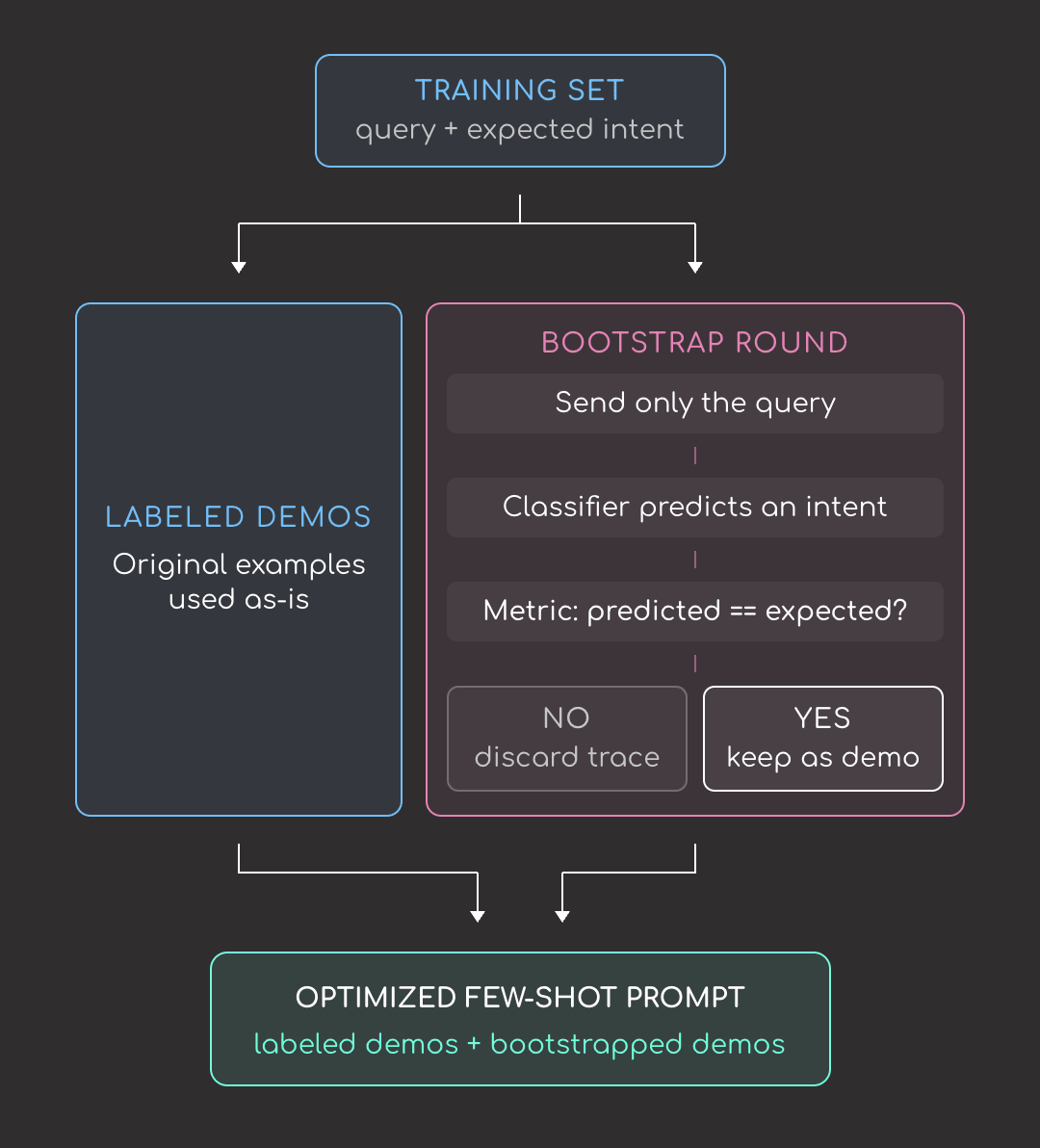
This article uses BootstrapFewShot because it is the simplest optimizer for this setup. It uses the training set and metric to choose examples that make the prompt stronger.
Few-shot examples are useful when the label name alone is not enough.
For example, card_arrival could sound like a successful delivery, but this example shows what it means in the dataset:
Query: My card has not arrived yet.
Intent: card_arrival
The label refers to questions or problems about card delivery. BootstrapFewShot helps find examples like this and add them to the prompt:
from dspy.teleprompt import BootstrapFewShot

optimizer = BootstrapFewShot(
    metric=intent_exact_match,  # score each candidate
    max_bootstrapped_demos=4,  # generated examples to keep
    max_labeled_demos=8,  # labeled examples to include
    max_rounds=1,  # bootstrap attempts per example
)

optimized_classifier = optimizer.compile(
    student=cot_classifier,
    trainset=trainset,
)
Inspect the examples added to the optimized prompt:
predictor = optimized_classifier.predictors()[0]

bootstrapped_demos = [
    demo for demo in predictor.demos
    if getattr(demo, "augmented", False)
]

for i, demo in enumerate(bootstrapped_demos, start=1):
    print(f"Bootstrapped demo {i}")
    print("Query:", demo.query)
    print("Reasoning:", demo.reasoning)
    print("Intent:", demo.intent)
    print()
The demos teach a consistent pattern: when the customer asks whether a new card has arrived, where it is, or what to do after waiting, the expected intent is card_arrival.
Compare Before vs. After
Evaluate the optimized classifier on the same dev set:
optimized_score = evaluate(optimized_classifier)

scores = pd.DataFrame(
    [
        {"program": "Predict", "score": predict_score.score},
        {"program": "ChainOfThought", "score": cot_score.score},
        {"program": "BootstrapFewShot + ChainOfThought", "score": optimized_score.score},
    ]
)

print(scores)
Nice! The optimized classifier performs best in this run, improving from 80.0 with ChainOfThought to 87.5 after adding optimized few-shot examples.
You can also inspect individual misses to understand what still fails:
for example in devset:
    prediction = optimized_classifier(query=example.query)

    if prediction.intent != example.intent:
        print("Query:", example.query)
        print("Expected:", example.intent)
        print("Predicted:", prediction.intent)
        print()
Most misses are between card_arrival and card_delivery_estimate. That makes sense: both intents mention waiting for a card, tracking, or delivery timing.
To improve this, we could add more labeled examples that separate “my card has not arrived” from “how long does delivery take?”
Save and Reuse the Optimized Program
Optimization can take time and spend LLM tokens, so you do not want to run it every time you classify a query. Instead, save the optimized classifier once so it can be loaded later:
save_path = "optimized_banking_classifier.json"
optimized_classifier.save(save_path)
When you need the classifier again, rebuild the same DSPy module and load the saved file:
loaded_classifier = dspy.ChainOfThought(ClassifyBankingIntent)
loaded_classifier.load(path=save_path)

prediction = loaded_classifier(
    query="I have been waiting two weeks and my new card still has not arrived."
)

print(prediction.intent)
This skips optimization and reuses the same saved prompt, making inference faster and reproducible.
Final Thoughts
DSPy is worth using when an LLM workflow will run repeatedly and quality matters. It is especially useful when you have:
- Labeled examples
- A metric
- Several prompt or module versions to compare
- A task that will evolve over time
It is probably too much for one-off prompts, quick brainstorming, or tasks where you do not have examples to evaluate against.
In this article, we followed the core DSPy workflow:
- Define the task
- Run the task with different strategies
- Evaluate each version
- Optimize the workflow with examples
- Save the optimized result for reuse
Once this workflow is familiar, you can extend it with larger dev sets, more intent labels, and richer metrics. For more advanced optimization, explore DSPy’s MIPROv2 and GEPA docs.
Related Tutorials
- Structured Output Tools for LLMs: Instructor, PydanticAI, LangChain, Outlines, and Guidance Compared: Compares libraries that force LLMs to return valid, typed outputs, the same problem DSPy signatures solve.
- Build Production-Ready RAG Systems with MLflow Quality Metrics: Measures LLM output quality with metrics, complementing DSPy’s evaluate-and-optimize loop.
Stay Current with CodeCut
Easy-to-digest articles on Python, AI, and open-source tools. Delivered twice a week.