
Table of Contents
- Introduction
- Architecture
- Setup
- Create a Small Email Dataset
- Redact Email Content with GLiNER
- Store Sanitized Emails in ChromaDB
- Retrieve Relevant Emails
- Answer Locally with Ollama
- Escalate Hard Questions to GPT-4o
- Re-Identify the Final Answer Locally
- Final Thoughts
Introduction
Email search is useful because it can recover details spread across old threads, confirmations, decisions, and follow-ups. But raw email also contains sensitive information: personal details, customer data, account records, addresses, and financial history.
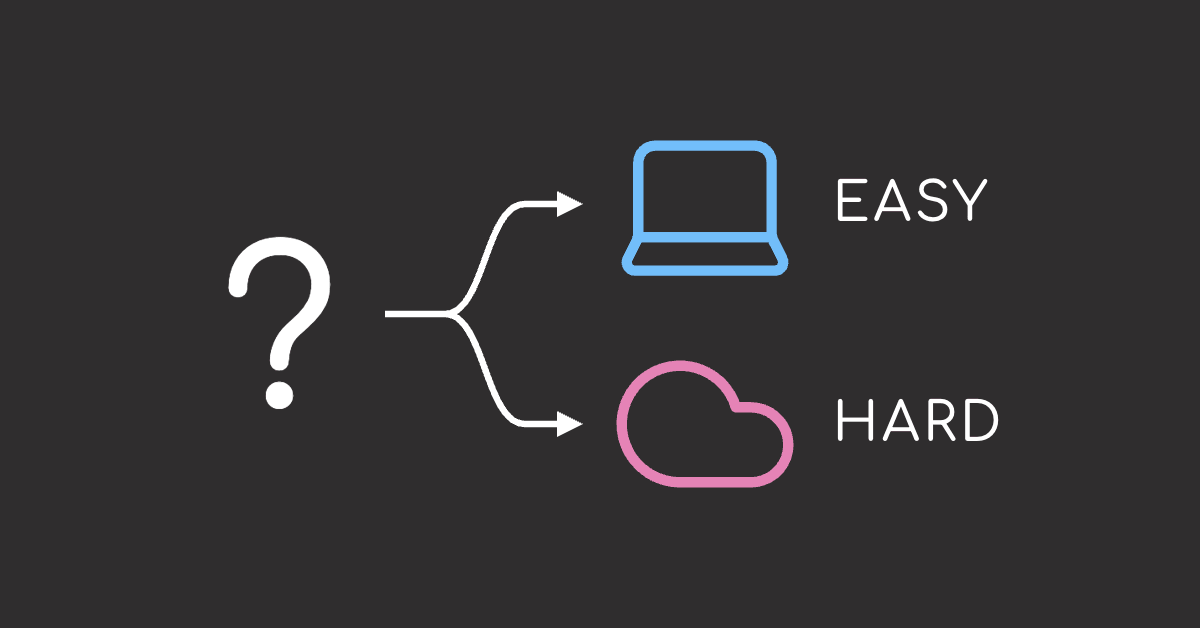
Local models help keep email data on your machine, but they may struggle with broad, ambiguous, or multi-step questions that stronger cloud models handle better. Combining both gives you a practical middle ground.
The hybrid local-and-cloud workflow has three main steps:
- Remove sensitive information from the email text.
- Use a local model to answer easy, grounded questions.
- Send harder or low-confidence questions to a cloud model.
This article builds that workflow with five tools:
- GLiNER: Detects sensitive entities such as names, dates, locations, and financial amounts.
- ChromaDB: Stores and searches the sanitized email content locally.
- Ollama: Runs the local model that answers straightforward questions first.
- DeepEval: Scores each local answer with a local judge to decide what to escalate.
- OpenAI Python SDK: Sends harder questions to GPT-4o using sanitized context.
💻 Get the Code: Open the notebook in Google Colab to run it in your browser, or grab the source from GitHub.
Stay Current with CodeCut
Easy-to-digest articles on Python, AI, and open-source tools. Delivered twice a week.
Architecture
The pipeline has two phases:
- Ingestion: Runs once to prepare and store the email collection.
- Query: Runs every time you ask a question.
Ingestion phase
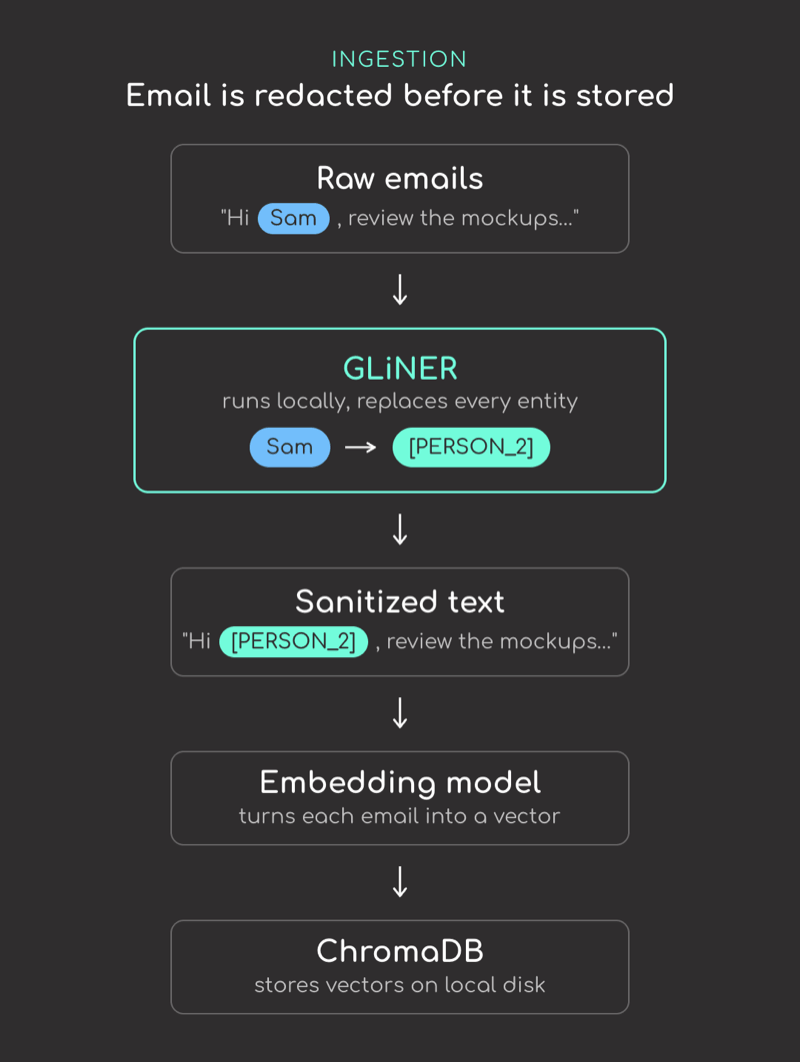
During ingestion, each email is processed locally first so sensitive details are replaced before the text is stored or sent anywhere.
This phase uses three local components:
- GLiNER – Local model for privacy cleanup. It scans each email for sensitive details like names, dates, locations, and financial amounts, then swaps them for placeholders such as [PERSON_1] or [MONEY_1].
- BGE-small embedding model – Converts each sanitized email into a vector, which lets the system search by meaning instead of exact words.
- ChromaDB – Local vector database that stores the sanitized email vectors and retrieves the most relevant emails for each question.
Query phase
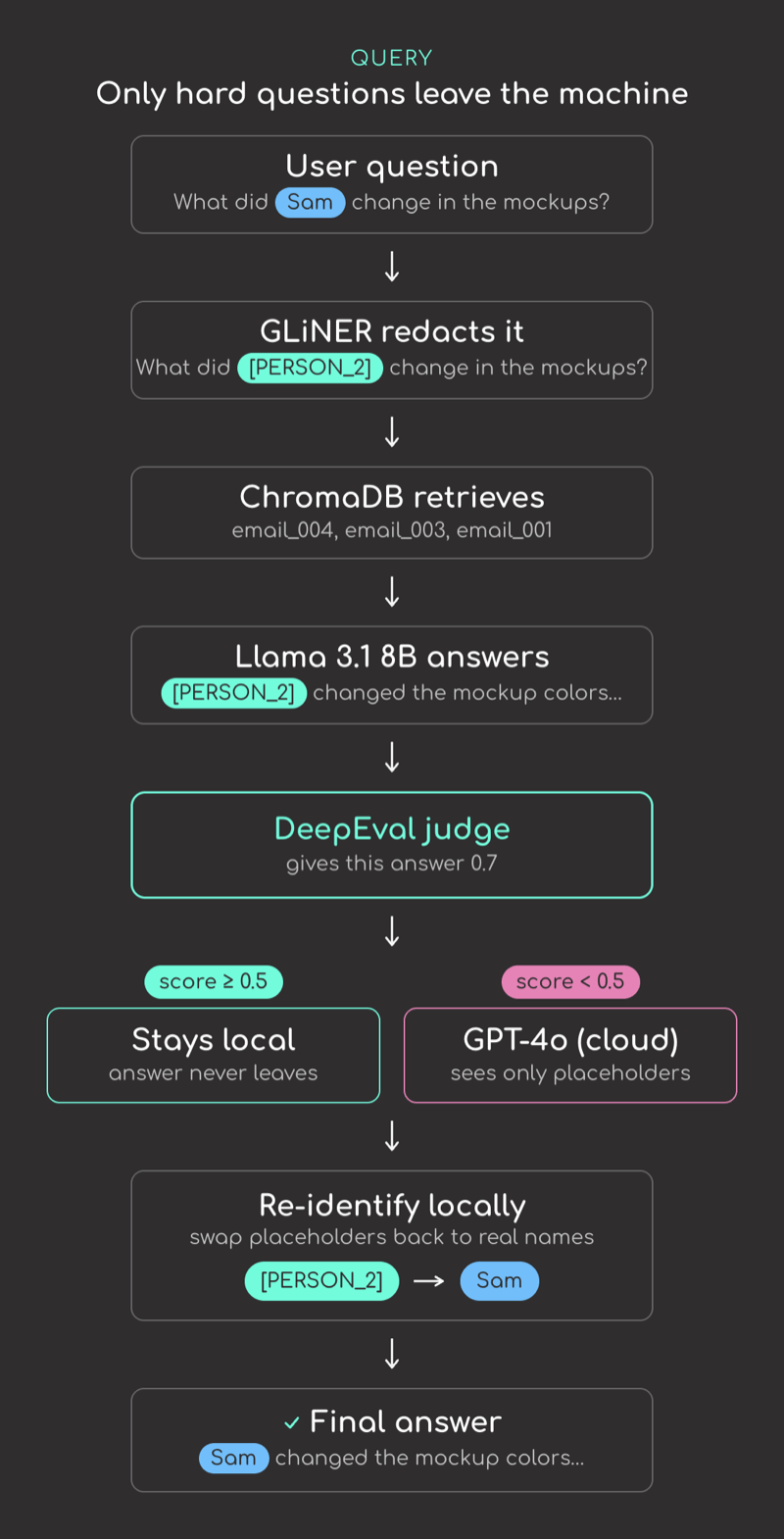
The query phase starts when the user asks a question. The system retrieves relevant sanitized emails, lets the local model answer first, and sends the question to the cloud only if the local answer is uncertain.
- Llama 3.1 8B via Ollama – Local model that answers the question first using the retrieved sanitized emails.
- DeepEval with a local 14B judge – Scores how confidently the local answer resolves the question, so the system can decide whether to trust it. The judge runs locally, so the routing decision never leaves the machine.
- GPT-4o – Stronger cloud model for difficult questions. It receives only the privacy-safe version of the email context, not the raw messages.
- Placeholder map – Stores which placeholder maps to which original detail, such as [PERSON_1] -> “Jordan”. The final answer is restored locally with simple string replacement.
Setup
Install the libraries used in this tutorial:
pip install gliner chromadb sentence-transformers ollama openai deepeval pydantic python-dotenv
This article uses gliner v0.2.22, chromadb v1.0.17, sentence-transformers v5.0.0, ollama v0.6.1, openai v1.82.1, deepeval v4.0.7, and pydantic v2.12.5.
Pull two local models with Ollama:
llama3.1:8b: Answers email questions locally.qwen2.5:14b: Judges whether the local answer is reliable enough.
ollama pull llama3.1:8b
ollama pull qwen2.5:14b
Store your OpenAI API key in a .env file:
OPENAI_API_KEY=your-openai-api-key
Start with the imports used throughout the article:
import json
import urllib.request
from collections import defaultdict
from dataclasses import dataclass

import chromadb
from deepeval.metrics import GEval
from deepeval.models import OllamaModel
from deepeval.test_case import LLMTestCase, LLMTestCaseParams
from dotenv import load_dotenv
from gliner import GLiNER
from ollama import chat
from openai import OpenAI
from pydantic import BaseModel, Field
from sentence_transformers import SentenceTransformer

load_dotenv()
Create a Small Email Dataset
For this tutorial, we will use a small synthetic thread of five emails between a product manager, an engineer, and a designer. It is easier to run than a real inbox, but still includes the sensitive fields that show up in one: names, dates, teams, locations, and amounts.
Each email is a simple dataclass:
@dataclass
class Email:
    email_id: str
    sender: str
    sent_at: str
    subject: str
    body: str
The full sample thread lives in emails.json. The next code block loads it into Email objects:
EMAILS_URL = (
    "https://raw.githubusercontent.com/khuyentran1401/codecut-blog/main/"
    "local_first_email_qa_hybrid_llm/emails.json"
)


def load_emails(url: str) -> list[Email]:
    with urllib.request.urlopen(url) as response:
        return [Email(**row) for row in json.load(response)]


emails = load_emails(EMAILS_URL)
The thread is a back-and-forth. Here are the first two messages, a request from the product manager and the engineer’s reply:
print(emails[0].body)
print()
print(emails[1].body)
The next step is to create a privacy-safe version of each email while keeping enough context for search and answering.
Redact Email Content with GLiNER
GLiNER is a local entity extraction model that supports custom labels without training a new model. Here, we use it to find people, organizations, locations, dates, and money amounts in email text.
If you want a closer look at GLiNER, the langextract vs spaCy guide compares it with spaCy, langextract, and regex-based extraction.
In this workflow, we redact email by replacing private details with placeholders. For example, Jordan becomes [PERSON_1].
Load the model and define the entity labels to detect:
gliner_model = GLiNER.from_pretrained("urchade/gliner_medium-v2.1")

ENTITY_LABELS = [
    "person",
    "organization",
    "location",
    "date",
    "money",
]
Use one shared placeholder map for the whole inbox. This makes sure Sam always becomes [PERSON_2], no matter which email she appears in.
The get_or_create_placeholder function checks the map first. It creates a new placeholder only when the value has not appeared before:
entity_to_placeholder: dict[tuple[str, str], str] = {}
placeholder_to_entity: dict[str, str] = {}
label_counts: defaultdict[str, int] = defaultdict(int)


def get_or_create_placeholder(label: str, text: str) -> str:
    key = (label, text.lower())

    if key in entity_to_placeholder:
        return entity_to_placeholder[key]

    label_counts[label] += 1
    placeholder = f"[{label.upper()}_{label_counts[label]}]"

    entity_to_placeholder[key] = placeholder
    placeholder_to_entity[placeholder] = text

    return placeholder
Calling it twice with the same entity returns the same placeholder; a new entity gets a new one:
print(get_or_create_placeholder("person", "Jordan"))  # first time seen
print(get_or_create_placeholder("person", "Jordan"))  # same entity, same placeholder
print(get_or_create_placeholder("person", "Sam"))     # new entity, new placeholder
Next, redact_text creates the sanitized email text. It scans for sensitive details and swaps each detected span with the matching placeholder:
def redact_text(text: str) -> str:
    # Find sensitive details such as names, dates, locations, and amounts.
    entities = gliner_model.predict_entities(
        text, ENTITY_LABELS, threshold=0.45, flat_ner=True, multi_label=False
    )
    entities.sort(key=lambda entity: entity["start"])

    # Stitch together the gaps between entities and their placeholders.
    result = []
    end = 0
    for entity in entities:
        result.append(text[end:entity["start"]])
        result.append(get_or_create_placeholder(entity["label"], entity["text"]))
        end = entity["end"]
    result.append(text[end:])

    return "".join(result)
Test it on one email:
redacted_body = redact_text(emails[0].body)

print(redacted_body)
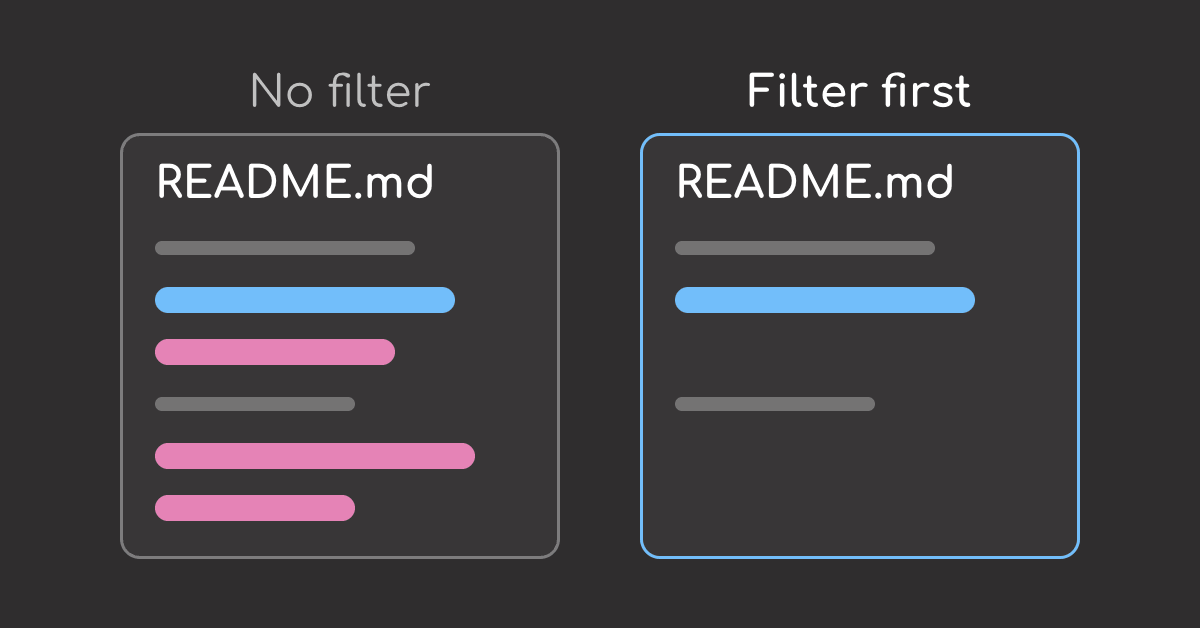
Notice that the action, deadline, and budget question are still readable, while names, dates, locations, organizations, and amounts no longer appear as raw values.
The original values stay in a local placeholder map, which the app uses later to restore the final answer:
print(json.dumps(placeholder_to_entity, indent=2))
Note that GLiNER helps with contextual details such as names and organizations, but it should not be your only safeguard. Structured identifiers such as SSNs, credit card numbers, and account IDs may require pattern-based PII detection.
For high-stakes data, strengthen that with Presidio and review a sample of sanitized emails to ensure sensitive details are not slipping through.
Store Sanitized Emails in ChromaDB
Next, use ChromaDB to store the sanitized emails in a local vector database so they can be searched later.
ChromaDB is a standalone local vector database. If you would rather keep vectors in a database you already run, the pgvector guide does the same semantic search in Postgres with Ollama.
embedding_model = SentenceTransformer("BAAI/bge-small-en-v1.5")

client = chromadb.PersistentClient(path="./email_chroma_db")
collection = client.get_or_create_collection(
    name="sanitized_emails",
    metadata={"description": "Sanitized email summaries for local-first Q&A"},
)
Prepare the sanitized documents and metadata for ChromaDB:
documents: The sanitized email text that ChromaDB will search over.metadatas: Extra fields that identify each email, such as email ID and subject.
documents = []
metadatas = []

for email in emails:
    redacted_subject = redact_text(email.subject)
    redacted_body = redact_text(email.body)

    documents.append(redacted_body)
    metadatas.append(
        {
            "email_id": email.email_id,
            "subject": redacted_subject,
        }
    )
Now embed and store the sanitized emails:
embeddings = embedding_model.encode(documents)

collection.upsert(
    documents=documents,
    embeddings=embeddings.tolist(),
    metadatas=metadatas,
    ids=[email.email_id for email in emails],
)

print(f"Stored {collection.count()} sanitized emails")
Retrieve Relevant Emails
Next, we sanitize the user question before embedding it. This keeps names, projects, and other private details out of search and model calls, while still letting ChromaDB match the question to the right sanitized emails.
def retrieve_sanitized_emails(
    question: str, n_results: int = 3
) -> tuple[str, list[str], str]:
    # Sanitize the question before embedding or model calls.
    redacted_question = redact_text(question)
    query_embedding = embedding_model.encode([redacted_question])

    # Search the local ChromaDB collection with the sanitized question vector.
    results = collection.query(
        query_embeddings=query_embedding.tolist(),
        n_results=n_results,
        include=["documents", "metadatas"],
    )

    retrieved_context = []
    retrieved_ids = []

    # Format retrieved emails as model-ready context.
    for document, metadata in zip(results["documents"][0], results["metadatas"][0]):
        retrieved_ids.append(metadata["email_id"])
        retrieved_context.append(
            f"Email ID: {metadata['email_id']}\n"
            f"Subject: {metadata['subject']}\n"
            f"Body: {document}"
        )

    return redacted_question, retrieved_ids, "\n\n".join(retrieved_context)
Try a question over the sample inbox:
question = "What did Sam change in the updated mockups?"
redacted_question, retrieved_ids, retrieved_context = retrieve_sanitized_emails(question)

print(f"Sanitized question: {redacted_question}")
print(f"Retrieved email IDs: {retrieved_ids}")
The question now uses the same placeholder format as the indexed emails, so ChromaDB can match it to related sanitized messages without seeing the original name.
Answer Locally with Ollama
Next, define the answer model’s output format. It will return a single structured field, answer, so later steps can validate, score, and restore it with the placeholder map.
class LocalAnswer(BaseModel):
    answer: str = Field(description="Answer using only the retrieved context")
Ollama returns the reply as this Pydantic model. For a deeper dive into Pydantic-based structured outputs, see the PydanticAI guide.
For the local pass, use Llama 3.1 8B through Ollama. The 8B size keeps it practical to run on a laptop or workstation, while the 128K context window gives it enough room to read several retrieved emails at once:
LOCAL_MODEL = "llama3.1:8b"


def answer_with_local_model(question: str, context: str) -> LocalAnswer:
    response = chat(
        model=LOCAL_MODEL,
        messages=[
            {
                "role": "system",
                "content": (
                    "Answer email questions using only the provided sanitized "
                    "context. Keep placeholders exactly as written."
                ),
            },
            {
                "role": "user",
                "content": f"Question:\n{question}\n\nContext:\n{context}",
            },
        ],
        format=LocalAnswer.model_json_schema(),
        options={"temperature": 0},
    )
    return LocalAnswer.model_validate_json(response.message.content)
Run the local answer:
local_answer = answer_with_local_model(redacted_question, retrieved_context)

print(f"Sanitized question: {redacted_question}")
print(local_answer.model_dump_json(indent=2))
The local model keeps the answer sanitized, but sanitation does not guarantee quality. Before using the answer, we need to check whether it actually answers the question.
Escalate Hard Questions to GPT-4o
To make routing more reliable, add an evaluation step with DeepEval, an open-source framework for testing LLM outputs.
In this step, GEval acts as the answer-quality judge. It checks whether the response is clear, complete, and grounded in the retrieved email context.
The judge runs on qwen2.5:14b, a larger local model that is better suited for evaluation than the smaller answer model.
judge = OllamaModel("qwen2.5:14b", temperature=0)

confidence_metric = GEval(
    name="Answer Confidence",
    criteria=(
        "Give a high score when the actual output gives a clear, direct, and "
        "definite answer to the input question. Give a low score when the output "
        "hedges, is vague, says the information is unavailable or 'not explicitly "
        "stated', or only partially answers the question."
    ),
    evaluation_params=[LLMTestCaseParams.INPUT, LLMTestCaseParams.ACTUAL_OUTPUT],
    model=judge,
)
Use the judge score as the routing signal. If the score is below 0.5, the answer is not reliable enough to keep local, so we escalate it.
ESCALATION_THRESHOLD = 0.5


def confidence_score(question: str, answer: str) -> float:
    confidence_metric.measure(LLMTestCase(input=question, actual_output=answer))
    return confidence_metric.score
The cloud call receives only placeholders and sanitized email text:
openai_client = OpenAI()


def answer_with_gpt4o(question: str, context: str) -> str:
    response = openai_client.chat.completions.create(
        model="gpt-4o",
        max_tokens=700,
        messages=[
            {
                "role": "user",
                "content": (
                    "Answer the question using only the sanitized email context. "
                    "Keep placeholders exactly as written.\n\n"
                    f"Question:\n{question}\n\nContext:\n{context}"
                ),
            }
        ],
    )
    return response.choices[0].message.content
Test the router on the earlier question first. The judge gives the local answer a score above the threshold, so the answer stays local:
score = confidence_score(redacted_question, local_answer.answer)

if score < ESCALATION_THRESHOLD:
    final_sanitized_answer = answer_with_gpt4o(redacted_question, retrieved_context)
    answering_model = "GPT-4o"
else:
    final_sanitized_answer = local_answer.answer
    answering_model = "Ollama"

print(f"Confidence score: {score}")
print(answering_model)
print(final_sanitized_answer)
Now try a harder question that requires reading across multiple emails. The model has to combine the timeline and identify who is responsible for the next step:
cross_question = (
    "Across the whole thread, what is the feature launch timeline "
    "and who owes the next step?"
)
redacted_cross, cross_ids, cross_context = retrieve_sanitized_emails(cross_question)
cross_local_answer = answer_with_local_model(redacted_cross, cross_context)

print(cross_local_answer.model_dump_json(indent=2))
This answer should be escalated. It does not clearly reconstruct the timeline, and the placeholder format is wrong, which makes it harder to restore the final answer later.
Let’s use the escalation rule to choose between the local answer and GPT-4o:
score = confidence_score(redacted_cross, cross_local_answer.answer)

if score < ESCALATION_THRESHOLD:
    cross_sanitized_answer = answer_with_gpt4o(redacted_cross, cross_context)
    cross_model = "GPT-4o"
else:
    cross_sanitized_answer = cross_local_answer.answer
    cross_model = "Ollama"

print(f"Confidence score: {score}")
print(cross_model)
print(cross_sanitized_answer)
This answer is much clearer: it gives the launch timeline, identifies the next owner, states the next action, and keeps the placeholder format intact.
Re-Identify the Final Answer Locally
Finally, we will restore the placeholders in the selected answer. We will replace placeholders such as [PERSON_1] with their original values using placeholder_to_entity.
def reidentify_text(text: str) -> str:
    restored_text = text

    for placeholder, original_text in placeholder_to_entity.items():
        restored_text = restored_text.replace(placeholder, original_text)

    return restored_text
Apply it to both the local answer and the escalated answer:
print(reidentify_text(final_sanitized_answer))
print()
print(reidentify_text(cross_sanitized_answer))
Nice! The final answers are readable again. Since the original details are restored locally after all model calls finished, privacy is still preserved.
Final Thoughts
Local-first does not have to mean choosing local models over cloud models. In many workflows, the better approach is to use both.
Use local models for sensitive data and lightweight tasks that do not need much compute. Use cloud models when the task needs stronger reasoning, complex synthesis, or higher-quality output.
This article shows one hybrid pattern for email Q&A. For other ways to combine local and cloud models, see Stop Choosing Between Local and Cloud LLMs: A Field Guide to Hybrid Patterns.
Stay Current with CodeCut
Easy-to-digest articles on Python, AI, and open-source tools. Delivered twice a week.