Generic selectors
Exact matches only
Search in title
Search in content
Post Type Selectors
Filter by Categories
About Article
Analyze Data
Archive
Best Practices
Better Outputs
Blog
Code Optimization
Code Quality
Command Line
Course
Daily tips
Dashboard
Data Analysis & Manipulation
Data Engineer
Data Visualization
DataFrame
Delta Lake
DevOps
DuckDB
Environment Management
Feature Engineer
Git
Jupyter Notebook
LLM
LLM Tools
Machine Learning
Machine Learning & AI
Machine Learning Tools
Manage Data
MLOps
Natural Language Processing
Newsletter Archive
NumPy
Pandas
Polars
PySpark
Python Helpers
Python Tips
Python Utilities
Scrape Data
SQL
Testing
Time Series
Tools
Visualization
Visualization & Reporting
Workflow & Automation
Workflow Automation

Newsletter Archive

Automated newsletter archive from Klaviyo campaigns

Code example: Python 3.14: Type-Safe String Interpolation with t-strings

Newsletter #266: Python 3.14: Type-Safe String Interpolation with t-strings

🔄 Worth Revisiting

Python 3.14: Type-Safe String Interpolation with t-strings

Problem
Building SQL queries with f-strings directly embeds user input into the query string, allowing attackers to inject malicious SQL commands.
Parameterized queries are secure but require you to maintain query templates and value lists separately.
Solution
Python 3.14 introduces template string literals (t-strings). Instead of returning strings, they return Template objects that safely expose interpolated values.
This lets you validate and sanitize interpolated values before building the final query.

🧪 Run code

Build Self-Documenting Regex with Pregex

Problem
Regex patterns like [a-zA-Z0-9._%+-]+@[a-zA-Z0-9.-]+\.[a-zA-Z]{2,} are difficult to read and intimidating.
Team members without regex expertise might struggle to understand and modify these validation patterns.
Solution
Team members without regex expertise might struggle to understand and modify these validation patterns.
Pregex transforms regex into readable Python code using descriptive components.
Key benefits:

Code that explains its intent without comments
Easy modification without regex expertise
Composable patterns for complex validation
Export to regex format when needed

📖 View Full Article

🧪 Run code

⭐ View GitHub

☕️ Weekly Finds

MindsDB
[LLM]
– AI data automation solution that connects and unifies enterprise data for real-time decision-making.

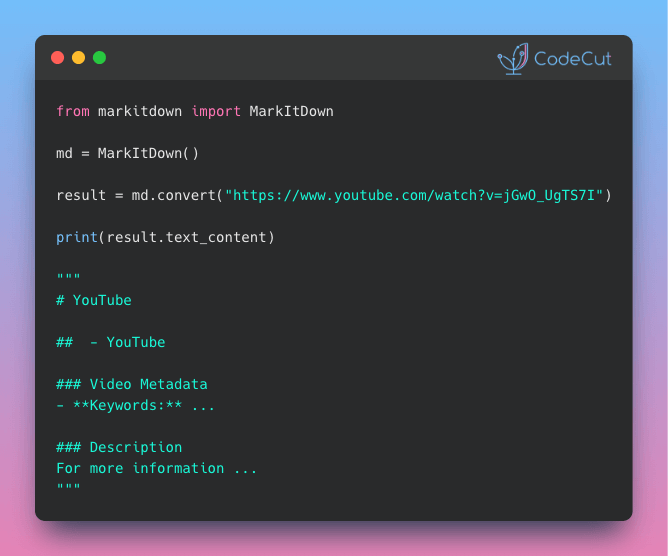
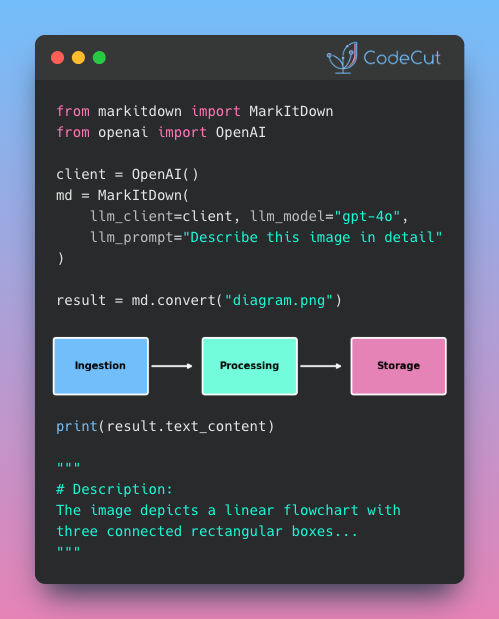
MarkItDown
[Python Utils]
– Lightweight Python utility for converting various files to Markdown for use with LLMs.

Reflex
[Python Utils]
– Open-source framework empowering Python developers to build web apps faster in a single language.

Looking for a specific tool? Explore 70+ Python tools →

📚 Latest Deep Dives

Visualize Machine Learning Results with Yellowbrick
– Learn to visualize ML model performance with Yellowbrick. Create confusion matrices, ROC curves, and feature importance plots in scikit-learn pipelines.

Stay Current with CodeCut

Actionable Python tips, curated for busy data pros. Skim in under 2 minutes, three times a week.

.codecut-subscribe-form .codecut-input {
background: #2F2D2E !important;
border: 1px solid #72BEFA !important;
color: #FFFFFF !important;
}
.codecut-subscribe-form .codecut-input::placeholder {
color: #999999 !important;
}
.codecut-subscribe-form .codecut-subscribe-btn {
background: #72BEFA !important;
color: #2F2D2E !important;
}
.codecut-subscribe-form .codecut-subscribe-btn:hover {
background: #5aa8e8 !important;
}

.codecut-subscribe-form {
max-width: 650px;
display: flex;
flex-direction: column;
gap: 8px;
}
.codecut-input {
-webkit-appearance: none;
-moz-appearance: none;
appearance: none;
background: #FFFFFF;
border-radius: 8px !important;
padding: 8px 12px;
font-family: ‘Comfortaa’, sans-serif !important;
font-size: 14px !important;
color: #333333;
border: none !important;
outline: none;
width: 100%;
box-sizing: border-box;
}
input[type=”email”].codecut-input {
border-radius: 8px !important;
}
.codecut-input::placeholder {
color: #666666;
}
.codecut-email-row {
display: flex;
align-items: stretch;
height: 36px;
gap: 8px;
}
.codecut-email-row .codecut-input {
flex: 1;
}
.codecut-subscribe-btn {
background: #72BEFA;
color: #2F2D2E;
border: none;
border-radius: 8px;
padding: 8px 14px;
font-family: ‘Comfortaa’, sans-serif;
font-size: 14px;
font-weight: 500;
cursor: pointer;
text-decoration: none;
display: flex;
align-items: center;
justify-content: center;
transition: background 0.3s ease;
}
.codecut-subscribe-btn:hover {
background: #5aa8e8;
}
.codecut-subscribe-btn:disabled {
background: #999;
cursor: not-allowed;
}
.codecut-message {
font-family: ‘Comfortaa’, sans-serif;
font-size: 12px;
padding: 8px;
border-radius: 6px;
display: none;
}
.codecut-message.success {
background: #d4edda;
color: #155724;
display: block;
}
@media (max-width: 480px) {
.codecut-email-row {
flex-direction: column;
height: auto;
gap: 8px;
}
.codecut-input {
border-radius: 8px;
height: 36px;
}
.codecut-subscribe-btn {
width: 100%;
text-align: center;
border-radius: 8px;
height: 36px;
}
}

Subscribe

Newsletter #266: Python 3.14: Type-Safe String Interpolation with t-strings Read More »

Newsletter #265: PySpark 4.0: Query Nested JSON Without StructType

📅 Today’s Picks

PySpark 4.0: Query Nested JSON Without StructType

Problem
Extracting nested JSON in PySpark requires defining StructType inside StructType inside StructType. This creates verbose, inflexible code that breaks when your JSON structure changes.
Solution
PySpark 4.0’s Variant type lets you skip schema definitions entirely. All you need is parse_json() to load and variant_get() to extract with JSONPath.
Key benefits:

No upfront schema definition
Handle any nesting depth with simple $.path syntax
Schema changes don’t break your code
Extract only the fields you need, when you need them

📖 View Full Article

🧪 Run code

⭐ View GitHub

☕️ Weekly Finds

toon
[LLM]
– Compact, human-readable JSON encoding for LLM prompts with schema-aware Token-Oriented Object Notation

cocoindex
[Data Processing]
– Ultra performant data transformation framework for AI with incremental processing

sqlfluff
[Data Engineer]
– Modular SQL linter and auto-formatter with support for multiple dialects and templated code

Looking for a specific tool? Explore 70+ Python tools →

📚 Latest Deep Dives

Visualize Machine Learning Results with Yellowbrick
– Learn to visualize ML model performance with Yellowbrick. Create confusion matrices, ROC curves, and feature importance plots in scikit-learn pipelines.

Stay Current with CodeCut

Actionable Python tips, curated for busy data pros. Skim in under 2 minutes, three times a week.

.codecut-subscribe-form .codecut-input {
background: #2F2D2E !important;
border: 1px solid #72BEFA !important;
color: #FFFFFF !important;
}
.codecut-subscribe-form .codecut-input::placeholder {
color: #999999 !important;
}
.codecut-subscribe-form .codecut-subscribe-btn {
background: #72BEFA !important;
color: #2F2D2E !important;
}
.codecut-subscribe-form .codecut-subscribe-btn:hover {
background: #5aa8e8 !important;
}

.codecut-subscribe-form {
max-width: 650px;
display: flex;
flex-direction: column;
gap: 8px;
}
.codecut-input {
-webkit-appearance: none;
-moz-appearance: none;
appearance: none;
background: #FFFFFF;
border-radius: 8px !important;
padding: 8px 12px;
font-family: ‘Comfortaa’, sans-serif !important;
font-size: 14px !important;
color: #333333;
border: none !important;
outline: none;
width: 100%;
box-sizing: border-box;
}
input[type=”email”].codecut-input {
border-radius: 8px !important;
}
.codecut-input::placeholder {
color: #666666;
}
.codecut-email-row {
display: flex;
align-items: stretch;
height: 36px;
gap: 8px;
}
.codecut-email-row .codecut-input {
flex: 1;
}
.codecut-subscribe-btn {
background: #72BEFA;
color: #2F2D2E;
border: none;
border-radius: 8px;
padding: 8px 14px;
font-family: ‘Comfortaa’, sans-serif;
font-size: 14px;
font-weight: 500;
cursor: pointer;
text-decoration: none;
display: flex;
align-items: center;
justify-content: center;
transition: background 0.3s ease;
}
.codecut-subscribe-btn:hover {
background: #5aa8e8;
}
.codecut-subscribe-btn:disabled {
background: #999;
cursor: not-allowed;
}
.codecut-message {
font-family: ‘Comfortaa’, sans-serif;
font-size: 12px;
padding: 8px;
border-radius: 6px;
display: none;
}
.codecut-message.success {
background: #d4edda;
color: #155724;
display: block;
}
@media (max-width: 480px) {
.codecut-email-row {
flex-direction: column;
height: auto;
gap: 8px;
}
.codecut-input {
border-radius: 8px;
height: 36px;
}
.codecut-subscribe-btn {
width: 100%;
text-align: center;
border-radius: 8px;
height: 36px;
}
}

Subscribe

Newsletter #265: PySpark 4.0: Query Nested JSON Without StructType Read More »

Newsletter #264: Codon: One Decorator to Turn Python into C Speed

📅 Today’s Picks

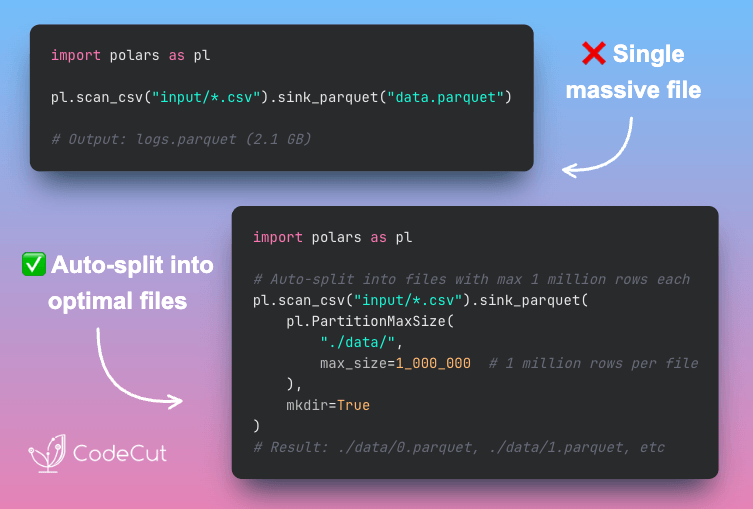
Stream Large CSVs to Parquet with Polars sink_parquet

Problem
Traditional workflows load the full CSV into memory before writing, which crashes when the file is too large.
Solution
Polars sink_parquet() streams data directly from CSV to Parquet without loading the entire file into memory.
Instead of load-then-write, sink_parquet uses read-write-release:

Reads a chunk from CSV
Writes it to Parquet
Releases memory before next chunk
Repeats until complete

📖 View Full Article

🧪 Run code

⭐ View GitHub

Codon: One Decorator to Turn Python into C Speed

Problem
Slow Python functions in large codebases are painful to optimize. You might try Numba or Cython, but Numba only works for numerical code with NumPy arrays.
You might try Cython, but it needs .pyx files, variable type annotations, and build setup. That’s hours of refactoring before you see any speedup.
Solution
Codon solves this with a single @codon.jit decorator that compiles your Python to machine code.
Key benefits:

Works on any Python code, not just NumPy arrays
No type annotations required since types are inferred automatically
Compiled functions are cached for instant repeated calls
Zero code changes beyond adding the decorator

🧪 Run code

⭐ View GitHub

☕️ Weekly Finds

metabase
[Data Viz]
– Open-source Business Intelligence and Embedded Analytics tool that lets everyone work with data

Surprise
[ML]
– Python scikit for building and analyzing recommender systems with SVD, KNN, and more algorithms

highdimensional-decision-boundary-plot
[Data Viz]
– Scikit-learn compatible approach to plot high-dimensional decision boundaries for intuitive model understanding

Looking for a specific tool? Explore 70+ Python tools →

Stay Current with CodeCut

Actionable Python tips, curated for busy data pros. Skim in under 2 minutes, three times a week.

.codecut-subscribe-form .codecut-input {
background: #2F2D2E !important;
border: 1px solid #72BEFA !important;
color: #FFFFFF !important;
}
.codecut-subscribe-form .codecut-input::placeholder {
color: #999999 !important;
}
.codecut-subscribe-form .codecut-subscribe-btn {
background: #72BEFA !important;
color: #2F2D2E !important;
}
.codecut-subscribe-form .codecut-subscribe-btn:hover {
background: #5aa8e8 !important;
}

.codecut-subscribe-form {
max-width: 650px;
display: flex;
flex-direction: column;
gap: 8px;
}
.codecut-input {
-webkit-appearance: none;
-moz-appearance: none;
appearance: none;
background: #FFFFFF;
border-radius: 8px !important;
padding: 8px 12px;
font-family: ‘Comfortaa’, sans-serif !important;
font-size: 14px !important;
color: #333333;
border: none !important;
outline: none;
width: 100%;
box-sizing: border-box;
}
input[type=”email”].codecut-input {
border-radius: 8px !important;
}
.codecut-input::placeholder {
color: #666666;
}
.codecut-email-row {
display: flex;
align-items: stretch;
height: 36px;
gap: 8px;
}
.codecut-email-row .codecut-input {
flex: 1;
}
.codecut-subscribe-btn {
background: #72BEFA;
color: #2F2D2E;
border: none;
border-radius: 8px;
padding: 8px 14px;
font-family: ‘Comfortaa’, sans-serif;
font-size: 14px;
font-weight: 500;
cursor: pointer;
text-decoration: none;
display: flex;
align-items: center;
justify-content: center;
transition: background 0.3s ease;
}
.codecut-subscribe-btn:hover {
background: #5aa8e8;
}
.codecut-subscribe-btn:disabled {
background: #999;
cursor: not-allowed;
}
.codecut-message {
font-family: ‘Comfortaa’, sans-serif;
font-size: 12px;
padding: 8px;
border-radius: 6px;
display: none;
}
.codecut-message.success {
background: #d4edda;
color: #155724;
display: block;
}
@media (max-width: 480px) {
.codecut-email-row {
flex-direction: column;
height: auto;
gap: 8px;
}
.codecut-input {
border-radius: 8px;
height: 36px;
}
.codecut-subscribe-btn {
width: 100%;
text-align: center;
border-radius: 8px;
height: 36px;
}
}

Subscribe

Newsletter #264: Codon: One Decorator to Turn Python into C Speed Read More »

Newsletter #263: Analyze GitHub Repositories with LangChain Document Loaders

📅 Today’s Picks

Build a Simple Portfolio Analyzer in Python with ffn

Problem
If you have ever wanted a simple way to analyze your investment portfolio as a side project, you know how tedious it is to piece together multiple Python libraries.
Solution
ffn consolidates the entire portfolio analysis workflow into one package with a Pandas-like API.
Core features:

Fetch stock prices directly from Yahoo Finance
Calculate returns and risk metrics automatically
Find the best allocation across your assets
Plot performance comparisons and correlations

🧪 Run code

⭐ View GitHub

Analyze GitHub Repositories with LangChain Document Loaders

Problem
Are you tired of manually searching through hundreds of GitHub issues with keyword search to find what you need?
Solution
With LangChain’s GitHubIssuesLoader, you can load repository issues into a vector store and query them with natural language instead of exact keywords.
You can ask questions like “What feature requests are related to video?” and get instant, relevant answers from your issue history.

📖 View Full Article

🧪 Run code

⭐ View GitHub

☕️ Weekly Finds

PlotNeuralNet
[Data Viz]
– LaTeX code for drawing publication-quality neural network diagrams for reports and presentations

yellowbrick
[ML]
– Visual analysis and diagnostic tools for machine learning with scikit-learn integration

TPOT
[MLOps]
– Python Automated Machine Learning tool that optimizes ML pipelines using genetic programming

Looking for a specific tool? Explore 70+ Python tools →

Stay Current with CodeCut

Actionable Python tips, curated for busy data pros. Skim in under 2 minutes, three times a week.

.codecut-subscribe-form .codecut-input {
background: #2F2D2E !important;
border: 1px solid #72BEFA !important;
color: #FFFFFF !important;
}
.codecut-subscribe-form .codecut-input::placeholder {
color: #999999 !important;
}
.codecut-subscribe-form .codecut-subscribe-btn {
background: #72BEFA !important;
color: #2F2D2E !important;
}
.codecut-subscribe-form .codecut-subscribe-btn:hover {
background: #5aa8e8 !important;
}

.codecut-subscribe-form {
max-width: 650px;
display: flex;
flex-direction: column;
gap: 8px;
}
.codecut-input {
-webkit-appearance: none;
-moz-appearance: none;
appearance: none;
background: #FFFFFF;
border-radius: 8px !important;
padding: 8px 12px;
font-family: ‘Comfortaa’, sans-serif !important;
font-size: 14px !important;
color: #333333;
border: none !important;
outline: none;
width: 100%;
box-sizing: border-box;
}
input[type=”email”].codecut-input {
border-radius: 8px !important;
}
.codecut-input::placeholder {
color: #666666;
}
.codecut-email-row {
display: flex;
align-items: stretch;
height: 36px;
gap: 8px;
}
.codecut-email-row .codecut-input {
flex: 1;
}
.codecut-subscribe-btn {
background: #72BEFA;
color: #2F2D2E;
border: none;
border-radius: 8px;
padding: 8px 14px;
font-family: ‘Comfortaa’, sans-serif;
font-size: 14px;
font-weight: 500;
cursor: pointer;
text-decoration: none;
display: flex;
align-items: center;
justify-content: center;
transition: background 0.3s ease;
}
.codecut-subscribe-btn:hover {
background: #5aa8e8;
}
.codecut-subscribe-btn:disabled {
background: #999;
cursor: not-allowed;
}
.codecut-message {
font-family: ‘Comfortaa’, sans-serif;
font-size: 12px;
padding: 8px;
border-radius: 6px;
display: none;
}
.codecut-message.success {
background: #d4edda;
color: #155724;
display: block;
}
@media (max-width: 480px) {
.codecut-email-row {
flex-direction: column;
height: auto;
gap: 8px;
}
.codecut-input {
border-radius: 8px;
height: 36px;
}
.codecut-subscribe-btn {
width: 100%;
text-align: center;
border-radius: 8px;
height: 36px;
}
}

Subscribe

Newsletter #263: Analyze GitHub Repositories with LangChain Document Loaders Read More »

Newsletter #261: Build Visual Tables with Great Tables Nanoplots

🤝 COLLABORATION

Data Contracts: Developing Production Grade Pipelines at Scale
Poor data quality can cause major problems for data teams, from disrupting pipelines to losing consumer trust. Many teams struggle with this, especially when data comes from upstream workflows outside their control.
The solution: data contracts. They document expectations, establish ownership, and enforce constraints within CI/CD workflows.
This practical book introduces data contract architecture, explains why the industry needs it, and shares real-world production use cases. You’ll learn to implement components and build a case for adoption in your organization.

Try Chapter 7 in your browser

📅 Today’s Picks

Build Visual Tables with Great Tables Nanoplots

Problem
Data tables with raw numbers lack visual context.
You can’t spot trends or patterns at a glance when looking at columns of digits.
Solution
Great Tables’ fmt_nanoplot() embeds mini line or bar charts directly into table cells.
Key features:

Transform numeric series into scannable visualizations
Customize colors and styles for data points and lines
Switch between line plots and bar charts
Add data area shading for emphasis

📖 View Full Article

🧪 Run code

⭐ View GitHub

☕️ Weekly Finds

TabPFN
[ML]
– Foundation model for tabular data with zero-shot classification and regression capabilities

scikit-survival
[ML]
– Survival analysis built on top of scikit-learn for time-to-event prediction

dedupe
[Data Processing]
– Python library for fuzzy matching, record deduplication and entity resolution using machine learning

Looking for a specific tool? Explore 70+ Python tools →

Stay Current with CodeCut

Actionable Python tips, curated for busy data pros. Skim in under 2 minutes, three times a week.

.codecut-subscribe-form .codecut-input {
background: #2F2D2E !important;
border: 1px solid #72BEFA !important;
color: #FFFFFF !important;
}
.codecut-subscribe-form .codecut-input::placeholder {
color: #999999 !important;
}
.codecut-subscribe-form .codecut-subscribe-btn {
background: #72BEFA !important;
color: #2F2D2E !important;
}
.codecut-subscribe-form .codecut-subscribe-btn:hover {
background: #5aa8e8 !important;
}

.codecut-subscribe-form {
max-width: 650px;
display: flex;
flex-direction: column;
gap: 8px;
}
.codecut-input {
-webkit-appearance: none;
-moz-appearance: none;
appearance: none;
background: #FFFFFF;
border-radius: 8px !important;
padding: 8px 12px;
font-family: ‘Comfortaa’, sans-serif !important;
font-size: 14px !important;
color: #333333;
border: none !important;
outline: none;
width: 100%;
box-sizing: border-box;
}
input[type=”email”].codecut-input {
border-radius: 8px !important;
}
.codecut-input::placeholder {
color: #666666;
}
.codecut-email-row {
display: flex;
align-items: stretch;
height: 36px;
gap: 8px;
}
.codecut-email-row .codecut-input {
flex: 1;
}
.codecut-subscribe-btn {
background: #72BEFA;
color: #2F2D2E;
border: none;
border-radius: 8px;
padding: 8px 14px;
font-family: ‘Comfortaa’, sans-serif;
font-size: 14px;
font-weight: 500;
cursor: pointer;
text-decoration: none;
display: flex;
align-items: center;
justify-content: center;
transition: background 0.3s ease;
}
.codecut-subscribe-btn:hover {
background: #5aa8e8;
}
.codecut-subscribe-btn:disabled {
background: #999;
cursor: not-allowed;
}
.codecut-message {
font-family: ‘Comfortaa’, sans-serif;
font-size: 12px;
padding: 8px;
border-radius: 6px;
display: none;
}
.codecut-message.success {
background: #d4edda;
color: #155724;
display: block;
}
@media (max-width: 480px) {
.codecut-email-row {
flex-direction: column;
height: auto;
gap: 8px;
}
.codecut-input {
border-radius: 8px;
height: 36px;
}
.codecut-subscribe-btn {
width: 100%;
text-align: center;
border-radius: 8px;
height: 36px;
}
}

Subscribe

Newsletter #261: Build Visual Tables with Great Tables Nanoplots Read More »

Newsletter #259: LangChain v1.0: Auto-Protect Sensitive Data with PIIMiddleware

📅 Today’s Picks

LangChain v1.0: Auto-Protect Sensitive Data with PIIMiddleware

Problem
User messages often contain sensitive information like emails and phone numbers.
Logging or storing this data without protection creates compliance and security risks.
Solution
LangChain v1.0 introduces PIIMiddleware to automatically protect sensitive data before model processing.
PIIMiddleware supports multiple protection modes:

5 built-in detectors (email, credit card, IP, MAC, URL)
Custom regex for any PII pattern
Replace with [REDACTED], mask as ****1234, or block entirely

📖 View Full Article

🧪 Run code

⭐ View GitHub

Test File Operations Without Risk Using tmp_path

Problem
Testing file operations requires touching the actual file system, which can be dangerous if not handled carefully. Real data can be overwritten by mistake.
Tests can also leave behind unwanted files across your project.
Solution
The tmp_path fixture provides a safe alternative by creating temporary, isolated directories that clean up themselves after each test.
Here’s how to use tmp_path:

Add tmp_path to your test function signature
Work with it like any pathlib.Path object
pytest handles the rest: isolated directories per test, automatic cleanup

📖 Learn more

🧪 Run code

☕️ Weekly Finds

quarkdown
[Python Utils]
– Modern Markdown-based typesetting system that compiles projects into print-ready books or interactive presentations with live preview and fast compilation

slim
[MLOps]
– Container optimization tool that makes Docker images 10-30x smaller without changing your development workflow

shapiq
[ML]
– Python package for approximating Shapley interactions and explaining feature interactions in machine learning model predictions

Looking for a specific tool? Explore 70+ Python tools →

📚 Latest Deep Dives

Great Tables: Publication-Ready Tables from Polars and Pandas DataFrames
– Turn Polars and Pandas DataFrames into professional tables with automatic number formatting, visual heatmaps, and sparkline charts. Fully reproducible when data updates.

Stay Current with CodeCut

Actionable Python tips, curated for busy data pros. Skim in under 2 minutes, three times a week.

.codecut-subscribe-form .codecut-input {
background: #2F2D2E !important;
border: 1px solid #72BEFA !important;
color: #FFFFFF !important;
}
.codecut-subscribe-form .codecut-input::placeholder {
color: #999999 !important;
}
.codecut-subscribe-form .codecut-subscribe-btn {
background: #72BEFA !important;
color: #2F2D2E !important;
}
.codecut-subscribe-form .codecut-subscribe-btn:hover {
background: #5aa8e8 !important;
}

.codecut-subscribe-form {
max-width: 650px;
display: flex;
flex-direction: column;
gap: 8px;
}
.codecut-input {
-webkit-appearance: none;
-moz-appearance: none;
appearance: none;
background: #FFFFFF;
border-radius: 8px !important;
padding: 8px 12px;
font-family: ‘Comfortaa’, sans-serif !important;
font-size: 14px !important;
color: #333333;
border: none !important;
outline: none;
width: 100%;
box-sizing: border-box;
}
input[type=”email”].codecut-input {
border-radius: 8px !important;
}
.codecut-input::placeholder {
color: #666666;
}
.codecut-email-row {
display: flex;
align-items: stretch;
height: 36px;
gap: 8px;
}
.codecut-email-row .codecut-input {
flex: 1;
}
.codecut-subscribe-btn {
background: #72BEFA;
color: #2F2D2E;
border: none;
border-radius: 8px;
padding: 8px 14px;
font-family: ‘Comfortaa’, sans-serif;
font-size: 14px;
font-weight: 500;
cursor: pointer;
text-decoration: none;
display: flex;
align-items: center;
justify-content: center;
transition: background 0.3s ease;
}
.codecut-subscribe-btn:hover {
background: #5aa8e8;
}
.codecut-subscribe-btn:disabled {
background: #999;
cursor: not-allowed;
}
.codecut-message {
font-family: ‘Comfortaa’, sans-serif;
font-size: 12px;
padding: 8px;
border-radius: 6px;
display: none;
}
.codecut-message.success {
background: #d4edda;
color: #155724;
display: block;
}
@media (max-width: 480px) {
.codecut-email-row {
flex-direction: column;
height: auto;
gap: 8px;
}
.codecut-input {
border-radius: 8px;
height: 36px;
}
.codecut-subscribe-btn {
width: 100%;
text-align: center;
border-radius: 8px;
height: 36px;
}
}

Subscribe

Newsletter #259: LangChain v1.0: Auto-Protect Sensitive Data with PIIMiddleware Read More »

Newsletter #258: Great Tables: Transform DataFrames into Publication-Ready Reports

📅 Today’s Picks

dataclass vs Pydantic Field(): Declarative Constraints

Problem
dataclass requires manual validation in __post_init__, separating validation rules from field definitions.
As your data model grows, the __post_init__ method fills with if-else statements, becoming harder to read and maintain.
Solution
Pydantic Field() puts constraints directly on field definitions, making your model self-documenting and easier to maintain.
What you can specify with Field():

Numeric bounds (e.g., age must be >= 0 and

Newsletter #258: Great Tables: Transform DataFrames into Publication-Ready Reports Read More »

Newsletter #257: Delta Lake: Sync DataFrames with One Line of Code

📅 Today’s Picks

Delta Lake: Sync DataFrames with One Line of Code

Problem
Updating an entire table with millions of rows just to fix a handful of records is costly and unnecessary.
Solution
Delta Lake’s when_matched_update() modifies only the matching rows, leaving unchanged data untouched.
Delta Lake also gives you:

Atomic updates that fully succeed or fully roll back
Partial file rewrites instead of full dataset copies
Time travel to restore previous versions

📖 View Full Article

🧪 Run code

⭐ View GitHub

📢 ANNOUNCEMENTS

New Way to Explore Python Tools on CodeCut
CodeCut just became a lot more searchable! ☕️
Most developers stick to the same 5-10 Python libraries. Not because others aren’t useful, but because finding them is hard.
CodeCut now organizes 69 tools into eight categories on the homepage:

Developer tools
AI frameworks
Data processing
Databases
Python builtins
Visualization
Utilities
Text processing

Each tool links directly to blogs and code snippets. Browse a new category today. You might find something that changes how you work.
What would make CodeCut more useful for you? Reply and let me know. I’m always looking for ways to improve it.

Explore Tools

☕️ Weekly Finds

deepdoctection
[ML]
– Python library for document extraction and layout analysis using deep learning models

postgresus
[Data Engineer]
– Self-hosted PostgreSQL backup and monitoring tool with web UI

ffn
[Data Processing]
– Financial functions library for quantitative finance in Python

Looking for a specific tool? Explore 70+ Python tools →

Stay Current with CodeCut

Actionable Python tips, curated for busy data pros. Skim in under 2 minutes, three times a week.

.codecut-subscribe-form .codecut-input {
background: #2F2D2E !important;
border: 1px solid #72BEFA !important;
color: #FFFFFF !important;
}
.codecut-subscribe-form .codecut-input::placeholder {
color: #999999 !important;
}
.codecut-subscribe-form .codecut-subscribe-btn {
background: #72BEFA !important;
color: #2F2D2E !important;
}
.codecut-subscribe-form .codecut-subscribe-btn:hover {
background: #5aa8e8 !important;
}

.codecut-subscribe-form {
max-width: 650px;
display: flex;
flex-direction: column;
gap: 8px;
}
.codecut-input {
-webkit-appearance: none;
-moz-appearance: none;
appearance: none;
background: #FFFFFF;
border-radius: 8px !important;
padding: 8px 12px;
font-family: ‘Comfortaa’, sans-serif !important;
font-size: 14px !important;
color: #333333;
border: none !important;
outline: none;
width: 100%;
box-sizing: border-box;
}
input[type=”email”].codecut-input {
border-radius: 8px !important;
}
.codecut-input::placeholder {
color: #666666;
}
.codecut-email-row {
display: flex;
align-items: stretch;
height: 36px;
gap: 8px;
}
.codecut-email-row .codecut-input {
flex: 1;
}
.codecut-subscribe-btn {
background: #72BEFA;
color: #2F2D2E;
border: none;
border-radius: 8px;
padding: 8px 14px;
font-family: ‘Comfortaa’, sans-serif;
font-size: 14px;
font-weight: 500;
cursor: pointer;
text-decoration: none;
display: flex;
align-items: center;
justify-content: center;
transition: background 0.3s ease;
}
.codecut-subscribe-btn:hover {
background: #5aa8e8;
}
.codecut-subscribe-btn:disabled {
background: #999;
cursor: not-allowed;
}
.codecut-message {
font-family: ‘Comfortaa’, sans-serif;
font-size: 12px;
padding: 8px;
border-radius: 6px;
display: none;
}
.codecut-message.success {
background: #d4edda;
color: #155724;
display: block;
}
@media (max-width: 480px) {
.codecut-email-row {
flex-direction: column;
height: auto;
gap: 8px;
}
.codecut-input {
border-radius: 8px;
height: 36px;
}
.codecut-subscribe-btn {
width: 100%;
text-align: center;
border-radius: 8px;
height: 36px;
}
}

Subscribe

Newsletter #257: Delta Lake: Sync DataFrames with One Line of Code Read More »

Newsletter #256: Build Scalable Pipelines with DuckDB Memory Spilling

📅 Today’s Picks

Marimo: Keep All Notebook Cells in Sync Without Manual Reruns

Problem
In Jupyter notebooks, changing an input value doesn’t automatically update dependent cells.
Forget to rerun one cell, and you might make decisions based on outdated results without realizing anything is wrong.
Solution
Marimo automatically detects changes and re-executes all dependent cells.
When you change a variable like threshold from 50 to 30, every downstream cell that uses it updates immediately.

📖 Learn more

🧪 Run code

⭐ View GitHub

Build Scalable Pipelines with DuckDB Memory Spilling

Problem
When datasets exceed available RAM, most tools crash mid-operation.
This forces manual data chunking or expensive hardware upgrades just to complete basic queries.
Solution
DuckDB automatically spills intermediate results to temporary files when data exceeds configured memory limits.
Key benefits:

Process datasets larger than RAM without code changes
Configure memory limits to prevent system crashes
Automatic disk spillover when memory fills
No manual chunking or batching required

📖 View Full Article

🧪 Run code

⭐ View GitHub

📢 ANNOUNCEMENTS

Cyber Monday: 30% Off Production-Ready Data Science
My book Production-Ready Data Science is on sale for Cyber Monday.
Get 58% off the ebook or 10% off the paperback through December 8th.
The book covers everything I’ve learned about taking data science from prototype to production: dependency management, testing, CI/CD, and workflow automation.

Get 58% Off Now

☕️ Weekly Finds

Nano-PDF
[LLM]
– Natural language PDF editing using Gemini with multi-page parallel processing

Codon
[Python Utils]
– High-performance Python compiler that generates native machine code for 10-100x speedups

lm-evaluation-harness
[LLM]
– Unified framework for few-shot evaluation of language models across 200+ tasks

Looking for a specific tool? Explore 70+ Python tools →

Stay Current with CodeCut

Actionable Python tips, curated for busy data pros. Skim in under 2 minutes, three times a week.

.codecut-subscribe-form .codecut-input {
background: #2F2D2E !important;
border: 1px solid #72BEFA !important;
color: #FFFFFF !important;
}
.codecut-subscribe-form .codecut-input::placeholder {
color: #999999 !important;
}
.codecut-subscribe-form .codecut-subscribe-btn {
background: #72BEFA !important;
color: #2F2D2E !important;
}
.codecut-subscribe-form .codecut-subscribe-btn:hover {
background: #5aa8e8 !important;
}

.codecut-subscribe-form {
max-width: 650px;
display: flex;
flex-direction: column;
gap: 8px;
}
.codecut-input {
-webkit-appearance: none;
-moz-appearance: none;
appearance: none;
background: #FFFFFF;
border-radius: 8px !important;
padding: 8px 12px;
font-family: ‘Comfortaa’, sans-serif !important;
font-size: 14px !important;
color: #333333;
border: none !important;
outline: none;
width: 100%;
box-sizing: border-box;
}
input[type=”email”].codecut-input {
border-radius: 8px !important;
}
.codecut-input::placeholder {
color: #666666;
}
.codecut-email-row {
display: flex;
align-items: stretch;
height: 36px;
gap: 8px;
}
.codecut-email-row .codecut-input {
flex: 1;
}
.codecut-subscribe-btn {
background: #72BEFA;
color: #2F2D2E;
border: none;
border-radius: 8px;
padding: 8px 14px;
font-family: ‘Comfortaa’, sans-serif;
font-size: 14px;
font-weight: 500;
cursor: pointer;
text-decoration: none;
display: flex;
align-items: center;
justify-content: center;
transition: background 0.3s ease;
}
.codecut-subscribe-btn:hover {
background: #5aa8e8;
}
.codecut-subscribe-btn:disabled {
background: #999;
cursor: not-allowed;
}
.codecut-message {
font-family: ‘Comfortaa’, sans-serif;
font-size: 12px;
padding: 8px;
border-radius: 6px;
display: none;
}
.codecut-message.success {
background: #d4edda;
color: #155724;
display: block;
}
@media (max-width: 480px) {
.codecut-email-row {
flex-direction: column;
height: auto;
gap: 8px;
}
.codecut-input {
border-radius: 8px;
height: 36px;
}
.codecut-subscribe-btn {
width: 100%;
text-align: center;
border-radius: 8px;
height: 36px;
}
}

Subscribe

Newsletter #256: Build Scalable Pipelines with DuckDB Memory Spilling Read More »

Newsletter #255: Polars v1.35: Native Rolling Rank for Time Series

📅 Today’s Picks

Polars v1.35: Native Rolling Rank for Time Series

Problem
How do you rank values within a rolling window?
For example, you might want to compare today’s sales to the last 3 days to answer: “How does today’s sales compare to the last 3 days?”
Solution
Polars v1.35 introduces rolling_rank() for native window ranking operations.
How it works:

Define a window size (e.g., last 3 values)
Each value gets ranked against others in its window
Rank 1 = lowest, Rank N = highest

This method is useful for tracking performance over time, detecting anomalies, or alerting when metrics underperform.

📖 View Full Article

🧪 Run code

⭐ View GitHub

Coiled: Run Python in the Cloud with One Decorator (Sponsored)

Problem
Imagine you need to run data processing on a file that is larger than your laptop’s RAM. What should you do?
Traditional solutions require buying more RAM, renting expensive cloud VMs, or learning Kubernetes. All of these add complexity and cost.
Solution
Coiled’s serverless functions let you run your Python code on cloud VMs with the memory you need by simply adding a decorator.
Key capabilities:

Use any data framework: pandas, Polars, DuckDB, Dask, and more
Process multiple files in parallel with .map()
Sync local packages to cloud without Docker
Cut costs with spot instances and auto-fallback

📖 View Full Article

🌐 Visit website

📢 ANNOUNCEMENTS

Cyber Monday: 58% Off Production-Ready Data Science
My book Production-Ready Data Science is on sale for Cyber Monday.
Get 58% off the ebook or 10% off the paperback through December 8th.
The book covers everything I’ve learned about taking data science from prototype to production: dependency management, testing, CI/CD, and workflow automation.

Get 58% Off Now

☕️ Weekly Finds

codon
[Python Utils]
– A high-performance, zero-overhead, extensible Python compiler with built-in NumPy support

khoj
[LLM]
– Your AI second brain. Self-hostable personal assistant with RAG, semantic search, and support for PDFs, Markdown, Notion, and more

lm-evaluation-harness
[MLOps]
– A framework for few-shot evaluation of language models. Powers Hugging Face’s Open LLM Leaderboard

Looking for a specific tool? Explore 70+ Python tools →

Stay Current with CodeCut

Actionable Python tips, curated for busy data pros. Skim in under 2 minutes, three times a week.

.codecut-subscribe-form .codecut-input {
background: #2F2D2E !important;
border: 1px solid #72BEFA !important;
color: #FFFFFF !important;
}
.codecut-subscribe-form .codecut-input::placeholder {
color: #999999 !important;
}
.codecut-subscribe-form .codecut-subscribe-btn {
background: #72BEFA !important;
color: #2F2D2E !important;
}
.codecut-subscribe-form .codecut-subscribe-btn:hover {
background: #5aa8e8 !important;
}

.codecut-subscribe-form {
max-width: 650px;
display: flex;
flex-direction: column;
gap: 8px;
}
.codecut-input {
-webkit-appearance: none;
-moz-appearance: none;
appearance: none;
background: #FFFFFF;
border-radius: 8px !important;
padding: 8px 12px;
font-family: ‘Comfortaa’, sans-serif !important;
font-size: 14px !important;
color: #333333;
border: none !important;
outline: none;
width: 100%;
box-sizing: border-box;
}
input[type=”email”].codecut-input {
border-radius: 8px !important;
}
.codecut-input::placeholder {
color: #666666;
}
.codecut-email-row {
display: flex;
align-items: stretch;
height: 36px;
gap: 8px;
}
.codecut-email-row .codecut-input {
flex: 1;
}
.codecut-subscribe-btn {
background: #72BEFA;
color: #2F2D2E;
border: none;
border-radius: 8px;
padding: 8px 14px;
font-family: ‘Comfortaa’, sans-serif;
font-size: 14px;
font-weight: 500;
cursor: pointer;
text-decoration: none;
display: flex;
align-items: center;
justify-content: center;
transition: background 0.3s ease;
}
.codecut-subscribe-btn:hover {
background: #5aa8e8;
}
.codecut-subscribe-btn:disabled {
background: #999;
cursor: not-allowed;
}
.codecut-message {
font-family: ‘Comfortaa’, sans-serif;
font-size: 12px;
padding: 8px;
border-radius: 6px;
display: none;
}
.codecut-message.success {
background: #d4edda;
color: #155724;
display: block;
}
@media (max-width: 480px) {
.codecut-email-row {
flex-direction: column;
height: auto;
gap: 8px;
}
.codecut-input {
border-radius: 8px;
height: 36px;
}
.codecut-subscribe-btn {
width: 100%;
text-align: center;
border-radius: 8px;
height: 36px;
}
}

Subscribe

Newsletter #255: Polars v1.35: Native Rolling Rank for Time Series Read More »

0
    0
    Your Cart
    Your cart is empty
    Scroll to Top

    Work with Khuyen Tran

    Work with Khuyen Tran