Generic selectors
Exact matches only
Search in title
Search in content
Post Type Selectors
Filter by Categories
About Article
Analyze Data
Archive
Best Practices
Better Outputs
Blog
Code Optimization
Code Quality
Command Line
Course
Daily tips
Dashboard
Data Analysis & Manipulation
Data Engineer
Data Visualization
DataFrame
Delta Lake
DevOps
DuckDB
Environment Management
Feature Engineer
Git
Jupyter Notebook
LLM
LLM Tools
Machine Learning
Machine Learning & AI
Machine Learning Tools
Manage Data
MLOps
Natural Language Processing
Newsletter Archive
NumPy
Pandas
Polars
PySpark
Python Helpers
Python Tips
Python Utilities
Scrape Data
SQL
Testing
Time Series
Tools
Visualization
Visualization & Reporting
Workflow & Automation
Workflow Automation

python

Auto-created tag for python

Newsletter #295: Marker: Smart PDF Extraction with Hybrid LLM Mode

Grab your coffee. Here are this week’s highlights.

📅 Today’s Picks

Marker: Smart PDF Extraction with Hybrid LLM Mode

Problem
Standard OCR pipelines often miss inline math, split tables across pages, and lose the relationships between form fields.
Sending the full document to an LLM can improve accuracy, but it’s slow and expensive at scale.
Solution
Marker‘s hybrid mode takes a more targeted approach:

Its deep learning pipeline handles the bulk of conversion
Then an LLM steps in only for the hard parts: table merging, LaTeX formatting, and form extraction

Marker supports OpenAI, Gemini, Claude, Ollama, and Azure out of the box.

📖 View Full Article

Qdrant: Fast Vector Search in Rust with a Python API

Problem
Building semantic search typically starts with storing vectors in Python lists and computing cosine similarity manually.
But brute-force comparison scales linearly with your dataset, making every query slower as your data grows.
Solution
Qdrant is a vector search engine built in Rust that indexes your vectors for fast retrieval.
Key features:

In-memory mode for local prototyping with no server setup
Seamlessly scale to millions of vectors in production with the same Python API
Built-in support for cosine, dot product, and Euclidean distance
Sub-second query times even for millions of vectors

🧪 Run code

📚 Latest Deep Dives

PDF Table Extraction: Docling vs Marker vs LlamaParse Compared

Extracting tables from PDFs can be surprisingly difficult. A table that looks neatly structured in a PDF is actually saved as text placed at specific coordinates on the page. This makes it difficult to preserve the original layout when extracting the table.
This article will introduce three Python tools that attempt to solve this problem: Docling, Marker, and LlamaParse.

📖 View Full Article

☕️ Weekly Finds

Dify
[LLM]
– Open-source LLM app development platform with AI workflow, RAG pipeline, and agent capabilities

PageIndex
[RAG]
– Document index for vectorless, reasoning-based RAG

MCP Server Chart
[Data Visualization]
– A visualization MCP server for generating 25+ visual charts using AntV

Looking for a specific tool? Explore 70+ Python tools →

Stay Current with CodeCut

Actionable Python tips, curated for busy data pros. Skim in under 2 minutes, three times a week.

.codecut-subscribe-form .codecut-input {
background: #2F2D2E !important;
border: 1px solid #72BEFA !important;
color: #FFFFFF !important;
}
.codecut-subscribe-form .codecut-input::placeholder {
color: #999999 !important;
}
.codecut-subscribe-form .codecut-subscribe-btn {
background: #72BEFA !important;
color: #2F2D2E !important;
}
.codecut-subscribe-form .codecut-subscribe-btn:hover {
background: #5aa8e8 !important;
}

.codecut-subscribe-form {
max-width: 650px;
display: flex;
flex-direction: column;
gap: 8px;
}
.codecut-input {
-webkit-appearance: none;
-moz-appearance: none;
appearance: none;
background: #FFFFFF;
border-radius: 8px !important;
padding: 8px 12px;
font-family: ‘Comfortaa’, sans-serif !important;
font-size: 14px !important;
color: #333333;
border: none !important;
outline: none;
width: 100%;
box-sizing: border-box;
}
input[type=”email”].codecut-input {
border-radius: 8px !important;
}
.codecut-input::placeholder {
color: #666666;
}
.codecut-email-row {
display: flex;
align-items: stretch;
height: 36px;
gap: 8px;
}
.codecut-email-row .codecut-input {
flex: 1;
}
.codecut-subscribe-btn {
background: #72BEFA;
color: #2F2D2E;
border: none;
border-radius: 8px;
padding: 8px 14px;
font-family: ‘Comfortaa’, sans-serif;
font-size: 14px;
font-weight: 500;
cursor: pointer;
text-decoration: none;
display: flex;
align-items: center;
justify-content: center;
transition: background 0.3s ease;
}
.codecut-subscribe-btn:hover {
background: #5aa8e8;
}
.codecut-subscribe-btn:disabled {
background: #999;
cursor: not-allowed;
}
.codecut-message {
font-family: ‘Comfortaa’, sans-serif;
font-size: 12px;
padding: 8px;
border-radius: 6px;
display: none;
}
.codecut-message.success {
background: #d4edda;
color: #155724;
display: block;
}
@media (max-width: 480px) {
.codecut-email-row {
flex-direction: column;
height: auto;
gap: 8px;
}
.codecut-input {
border-radius: 8px;
height: 36px;
}
.codecut-subscribe-btn {
width: 100%;
text-align: center;
border-radius: 8px;
height: 36px;
}
}

Subscribe

Newsletter #295: Marker: Smart PDF Extraction with Hybrid LLM Mode Read More »

Newsletter #294: pandas 3.0: 5-10x Faster String Operations with PyArrow

Grab your coffee. Here are this week’s highlights.

📅 Today’s Picks

pandas 3.0: 5-10x Faster String Operations with PyArrow

Problem
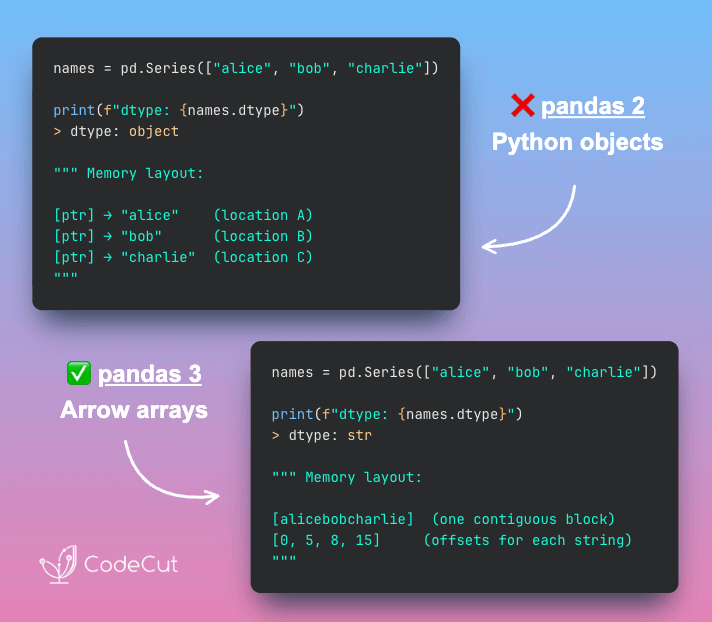
Traditionally, pandas stores strings as object dtype, where each string is a separate Python object scattered across memory.
This makes string operations slow and the dtype ambiguous, since both pure string columns and mixed-type columns show up as object.
Solution
pandas 3.0 introduces a dedicated str dtype backed by PyArrow, which stores strings in contiguous memory blocks instead of individual Python objects.
Key benefits:

5-10x faster string operations because data is stored contiguously
50% lower memory by eliminating Python object overhead
Clear distinction between string and mixed-type columns

📖 View Full Article

🧪 Run code

Build Self-Documenting Regex with Pregex

Problem
Regex patterns like [a-zA-Z0-9._%+-]+@[a-zA-Z0-9.-]+\.[a-zA-Z]{2,} are difficult to read and intimidating.
Team members without regex expertise might struggle to understand and modify these validation patterns.
Solution
Team members without regex expertise might struggle to understand and modify these validation patterns.
Pregex transforms regex into readable Python code using descriptive components.
Key benefits:

Code that explains its intent without comments
Easy modification without regex expertise
Composable patterns for complex validation
Export to regex format when needed

📖 View Full Article

🧪 Run code

📚 Latest Deep Dives

PDF Table Extraction: Docling vs Marker vs LlamaParse Compared

PDF files do not store tables as structured data. Instead, they position text at specific coordinates on the page.
Table extraction tools must reconstruct the structure by determining which values belong in which rows and columns.
The problem becomes even harder when tables include multi-level headers, merged cells, or complex layouts.
To explore this problem, I experimented with three tools designed for PDF table extraction: LlamaParse, Marker, and Docling. Each tool takes a different approach.
Performance overview:

Docling: Fastest local option, but struggles with complex tables
Marker: Handles complex layouts well and runs locally, but is much slower
LlamaParse: Most accurate on complex tables and fastest overall, but requires a cloud API

In this article, I share the code, examples, and results from testing each tool.
📖 View Full Article

☕️ Weekly Finds

Lance
[Data Processing]
– Modern columnar data format for ML with 100x faster random access than Parquet

Mathesar
[Dashboard]
– Spreadsheet-like interface for PostgreSQL that lets anyone view, edit, and query data

dotenvx
[DevOps]
– A better dotenv with encryption, multiple environments, and cross-platform support

Looking for a specific tool? Explore 70+ Python tools →

Stay Current with CodeCut

Actionable Python tips, curated for busy data pros. Skim in under 2 minutes, three times a week.

.codecut-subscribe-form .codecut-input {
background: #2F2D2E !important;
border: 1px solid #72BEFA !important;
color: #FFFFFF !important;
}
.codecut-subscribe-form .codecut-input::placeholder {
color: #999999 !important;
}
.codecut-subscribe-form .codecut-subscribe-btn {
background: #72BEFA !important;
color: #2F2D2E !important;
}
.codecut-subscribe-form .codecut-subscribe-btn:hover {
background: #5aa8e8 !important;
}

.codecut-subscribe-form {
max-width: 650px;
display: flex;
flex-direction: column;
gap: 8px;
}
.codecut-input {
-webkit-appearance: none;
-moz-appearance: none;
appearance: none;
background: #FFFFFF;
border-radius: 8px !important;
padding: 8px 12px;
font-family: ‘Comfortaa’, sans-serif !important;
font-size: 14px !important;
color: #333333;
border: none !important;
outline: none;
width: 100%;
box-sizing: border-box;
}
input[type=”email”].codecut-input {
border-radius: 8px !important;
}
.codecut-input::placeholder {
color: #666666;
}
.codecut-email-row {
display: flex;
align-items: stretch;
height: 36px;
gap: 8px;
}
.codecut-email-row .codecut-input {
flex: 1;
}
.codecut-subscribe-btn {
background: #72BEFA;
color: #2F2D2E;
border: none;
border-radius: 8px;
padding: 8px 14px;
font-family: ‘Comfortaa’, sans-serif;
font-size: 14px;
font-weight: 500;
cursor: pointer;
text-decoration: none;
display: flex;
align-items: center;
justify-content: center;
transition: background 0.3s ease;
}
.codecut-subscribe-btn:hover {
background: #5aa8e8;
}
.codecut-subscribe-btn:disabled {
background: #999;
cursor: not-allowed;
}
.codecut-message {
font-family: ‘Comfortaa’, sans-serif;
font-size: 12px;
padding: 8px;
border-radius: 6px;
display: none;
}
.codecut-message.success {
background: #d4edda;
color: #155724;
display: block;
}
@media (max-width: 480px) {
.codecut-email-row {
flex-direction: column;
height: auto;
gap: 8px;
}
.codecut-input {
border-radius: 8px;
height: 36px;
}
.codecut-subscribe-btn {
width: 100%;
text-align: center;
border-radius: 8px;
height: 36px;
}
}

Subscribe
Newsletter #294: pandas 3.0: 5-10x Faster String Operations with PyArrow Read More »

PDF Table Extraction: Docling vs Marker vs LlamaParse Compared

Table of Contents

Introduction
The Test Document
Docling: TableFormer Deep Learning
Marker: Vision Transformer Pipeline
LlamaParse: LLM-Guided Extraction
Summary
Try It Yourself

Introduction
Have you ever copied a table from a PDF into a spreadsheet only to find the formatting completely broken? These issues include cells shifting, values landing in the wrong columns, and merged headers losing their structure.
This happens because PDFs do not store tables as structured data. They simply place text at specific coordinates on a page.
For example, a table that looks like this on screen:
┌───────┬───────┐
│ Name │ Score │
├───────┼───────┤
│ Alice │ 92 │
│ Bob │ 85 │
└───────┴───────┘

is stored in the PDF as a flat list of positioned text:
"Name" at (x=72, y=710)
"Score" at (x=200, y=710)
"Alice" at (x=72, y=690)
"92" at (x=200, y=690)
"Bob" at (x=72, y=670)
"85" at (x=200, y=670)

A table extraction tool must analyze those positions, determine which text belongs in each cell, and rebuild the table structure.
The challenge becomes even greater with multi-level headers, merged cells, or tables that span multiple pages. Many tools struggle with at least one of these scenarios.
While doing research, I came across three Python tools for extracting tables from PDFs: Docling, Marker, and LlamaParse. To compare them fairly, I ran each tool on the same PDF and evaluated the results.
In this article, I’ll walk through what I found and help you decide which tool may work best for your needs.

💻 Get the Code: The complete source code and Jupyter notebook for this tutorial are available on GitHub. Clone it to follow along!

Stay Current with CodeCut
Actionable Python tips, curated for busy data pros. Skim in under 2 minutes, three times a week.

.codecut-subscribe-form .codecut-input {
background: #2F2D2E !important;
border: 1px solid #72BEFA !important;
color: #FFFFFF !important;
}
.codecut-subscribe-form .codecut-input::placeholder {
color: #999999 !important;
}
.codecut-subscribe-form .codecut-subscribe-btn {
background: #72BEFA !important;
color: #2F2D2E !important;
}
.codecut-subscribe-form .codecut-subscribe-btn:hover {
background: #5aa8e8 !important;
}

.codecut-subscribe-form {
max-width: 650px;
display: flex;
flex-direction: column;
gap: 8px;
}

.codecut-input {
-webkit-appearance: none;
-moz-appearance: none;
appearance: none;
background: #FFFFFF;
border-radius: 8px !important;
padding: 8px 12px;
font-family: ‘Comfortaa’, sans-serif !important;
font-size: 14px !important;
color: #333333;
border: none !important;
outline: none;
width: 100%;
box-sizing: border-box;
}

input[type=”email”].codecut-input {
border-radius: 8px !important;
}

.codecut-input::placeholder {
color: #666666;
}

.codecut-email-row {
display: flex;
align-items: stretch;
height: 36px;
gap: 8px;
}

.codecut-email-row .codecut-input {
flex: 1;
}

.codecut-subscribe-btn {
background: #72BEFA;
color: #2F2D2E;
border: none;
border-radius: 8px;
padding: 8px 14px;
font-family: ‘Comfortaa’, sans-serif;
font-size: 14px;
font-weight: 500;
cursor: pointer;
text-decoration: none;
display: flex;
align-items: center;
justify-content: center;
transition: background 0.3s ease;
}

.codecut-subscribe-btn:hover {
background: #5aa8e8;
}

.codecut-subscribe-btn:disabled {
background: #999;
cursor: not-allowed;
}

.codecut-message {
font-family: ‘Comfortaa’, sans-serif;
font-size: 12px;
padding: 8px;
border-radius: 6px;
display: none;
}

.codecut-message.success {
background: #d4edda;
color: #155724;
display: block;
}

/* Mobile responsive */
@media (max-width: 480px) {
.codecut-email-row {
flex-direction: column;
height: auto;
gap: 8px;
}

.codecut-input {
border-radius: 8px;
height: 36px;
}

.codecut-subscribe-btn {
width: 100%;
text-align: center;
border-radius: 8px;
height: 36px;
}
}

Subscribe
The Test Document
All examples use the same PDF: the Docling Technical Report from arXiv. This paper contains tables with the features that make extraction difficult:

Multi-level headers with sub-columns
Merged cells spanning multiple rows
Numeric data that is easy to misalign

source = "https://arxiv.org/pdf/2408.09869"

Some tools require a local file path instead of a URL, so let’s download the PDF first:
import urllib.request

# Download PDF locally (used by Marker later)
local_pdf = "docling_report.pdf"
urllib.request.urlretrieve(source, local_pdf)

Docling: TableFormer Deep Learning
Docling is IBM’s open-source document converter built specifically for structured extraction. Its table pipeline works in two steps:

Detect table regions using a layout analysis model that finds tables, text, and figures on each page
Reconstruct cell structure using TableFormer, a deep learning model that maps each cell to its row and column position

Here is what that looks like in practice:
PDF page with mixed content
┌─────────────────────┐
│ Text paragraph… │
│ Name Score │
│ Alice 92 │
│ Bob 85 │
│ (figure) │
└─────────────────────┘


Step 1: Layout model detects table region
┌─────────────────────┐
│ ┌─────────────────┐ │
│ │ Name Score │ │
│ │ Alice 92 │ │
│ │ Bob 85 │ │
│ └─────────────────┘ │
└─────────────────────┘


Step 2: TableFormer maps cells to rows and columns
┌───────┬───────┐
│ Name │ Score │
├───────┼───────┤
│ Alice │ 92 │
│ Bob │ 85 │
└───────┴───────┘

The result is a pandas DataFrame for each table, ready for analysis.

For Docling’s full document processing capabilities beyond tables, including chunking and RAG integration, see Transform Any PDF into Searchable AI Data with Docling.

To install Docling, run:
pip install docling

This article uses docling v2.63.0.
Table Extraction
To extract tables from the PDF, we need to first convert it to a Docling document using DocumentConverter:
from docling.document_converter import DocumentConverter

# Convert PDF
converter = DocumentConverter()
result = converter.convert(source)

Once we have the Docling document, we can loop through all detected tables and export each one as a pandas DataFrame:
for i, table in enumerate(result.document.tables):
df = table.export_to_dataframe(doc=result.document)
print(f"Table {i + 1}: {df.shape[0]} rows × {df.shape[1]} columns")

Table 1: 2 rows × 8 columns
Table 2: 1 rows × 5 columns
Table 3: 0 rows × 0 columns

The PDF contains 5 tables, but Docling only detected 3.
Table 3 returned 0 rows. This means the layout model flagged it as a table but TableFormer couldn’t extract any structure from it.
Let’s look at the first table. Here’s the original from the PDF:

And here’s what Docling extracted:
# Export the first table as a DataFrame
table_1 = result.document.tables[0]
df_1 = table_1.export_to_dataframe(doc=result.document)
df_1

CPU
Thread budget
native TTS
native Pages/s
native Mem
pypdfium TTS
pypdfium Pages/s
pypdfium Mem

Apple M3 Max (16 cores)
4 16
177 s 167 s
1.27 1.34
6.20 GB
103 s 92 s
2.18 2.45
2.56 GB

Intel(R) Xeon E5-2690
4 16
375 s 244 s
0.60 0.92
6.16 GB
239 s 143 s
0.94 1.57
2.42 GB

Notice how Docling handles this complex table:

Docling smartly handled the multi-level header by flattening it into separate columns (“native backend” → “native TTS”, “native Pages/s”, “native Mem”).
However, it merged each CPU’s two thread-budget rows into one, packing values like “177 s 167 s” into single cells.

Now the second table. Here’s the original from the PDF:

And here’s what Docling extracted:
# Export the second table as a DataFrame
table_2 = result.document.tables[1]
df_2 = table_2.export_to_dataframe(doc=result.document)
df_2

human
MRCNN R50 R101
FRCNN R101
YOLO v5x6

0
Caption Footnote Formula List-item Page-footer…
84-89 83-91 83-85 87-88 93-94 85-89 69-71 83-8…
68.4 71.5 70.9 71.8 60.1 63.4 81.2 80.8 61.6 5…
70.1 73.7 63.5 81.0 58.9 72.0 72.0 68.4 82.2 8…

We can see that Docling did not handle this table as well as the first one:

Docling merged the MRCNN sub-columns (R50, R101) into a single “MRCNN R50 R101” column instead of two separate ones.
All 13 rows were collapsed into one, concatenating values like “68.4 71.5 70.9…” into a single cell.

Complex tables with multi-level headers and merged cells remain a challenge for Docling’s table extraction.
Performance
Docling took about 28 seconds for the full 6-page PDF on an Apple M1 (16 GB RAM), thanks to its lightweight two-stage pipeline.
Marker: Vision Transformer Pipeline
Marker is an open-source PDF-to-Markdown converter built on the Surya layout engine. Unlike Docling’s two-stage pipeline, Marker runs five stages for table extraction:

Layout detection: a Vision Transformer identifies table regions on each page
OCR error detection: flags misrecognized text
Bounding box detection: locates individual cell boundaries
Table recognition: reconstructs row/column structure from detected cells
Text recognition: extracts text from all detected regions

Here is how the five stages work together:
PDF page
┌─────────────────────┐
│ Text paragraph… │
│ Name Score │
│ Alice 92 │
│ Bob 85 │
└─────────────────────┘


1. Layout detection → finds [TABLE] region
2. OCR error detection → fixes misread text


3. Bounding box detection
┌──────────────────┐
│ [Name] [Score] │
│ [Alice] [92] │
│ [Bob] [85] │
└──────────────────┘


4. Table recognition → maps cells to rows/columns
5. Text recognition → extracts final text


| Name | Score |
|——-|——-|
| Alice | 92 |
| Bob | 85 |

To install Marker, run:
pip install marker-pdf

Table Extraction
Marker provides a dedicated TableConverter that extracts only tables from a document, returning them as Markdown:
from marker.converters.table import TableConverter
from marker.models import create_model_dict
from marker.output import text_from_rendered

models = create_model_dict()
converter = TableConverter(artifact_dict=models)
rendered = converter(local_pdf)
table_md, _, images = text_from_rendered(rendered)

Since TableConverter returns all tables as a single Markdown string, we split them on blank lines:
tables = table_md.strip().split("\n\n")
print(f"Tables found: {len(tables)}")

Tables found: 3

Let’s look at the first table. Here’s the original from the PDF:

And here’s what Marker extracted:
print(tables[0].md)

CPU
Thread

native backend

pypdfium backend

budget
TTS
Pages/s
Mem
TTS
Pages/s
Mem

Apple M3 Max<br>(16 cores)
4<br>16
177 s<br>167 s
1.27<br>1.34
6.20 GB
103 s<br>92 s
2.18<br>2.45
2.56 GB

Intel(R) Xeon<br>E5-2690<br>(16 cores)
4<br>16
375 s<br>244 s
0.60<br>0.92
6.16 GB
239 s<br>143 s
0.94<br>1.57
2.42 GB

Marker preserves the original table format well:

While Docling flattened this into prefixed column names like “native TTS”, Marker preserves the two-tier header (“native backend” → TTS, Pages/s, Mem) as separate rows, keeping the parent header visible.
While Docling packed these into single strings like “177 s 167 s” without separators, Marker preserves the distinction between values by using <br> tags, making it easy to split them programmatically later with a simple string split

Let’s look at the second table. Here’s the original from the PDF:

And here’s what Marker extracted:
print(tables[1].md)

human<br>MRCNN

FRCNN YOLO

R50 R101
R101
v5x6

Caption
84-89 68.4 71.5

70.1
77.7

Footnote
83-91 70.9 71.8

73.7
77.2

Formula
83-85 60.1 63.4

63.5
66.2

List-item
87-88 81.2 80.8

81.0
86.2

Page-footer
93-94 61.6 59.3

58.9
61.1

Page-header
85-89 71.9 70.0

72.0
67.9

Picture
69-71 71.7 72.7

72.0
77.1

Section-header 83-84 67.6 69.3

68.4
74.6

Table
77-81 82.2 82.9

82.2
86.3

Text
84-86 84.6 85.8

85.4
88.1

Title
60-72 76.7 80.4

79.9
82.7

All
82-83 72.4 73.5

73.4
76.8

This table has several column-merging issues:

“human” and “MRCNN” are merged into one header (human<br>MRCNN), and “FRCNN” and “YOLO” are combined into a single header (FRCNN YOLO).
The human, MRCNN R50, and MRCNN R101 values are packed into one cell (“84-89 68.4 71.5”), while the MRCNN R50 and R101 columns are empty.
The R50 and R101 sub-columns collapsed into a single “R50 R101” cell.

Despite these issues, Marker still preserves all 12 rows individually, while Docling collapsed them into one.
Let’s look at the third table. Here’s the original from the PDF:

And here’s what Marker extracted:
print(tables[2].md)

human
MRCNN
MRCNN
FRCNN
YOLO

human
R50
R101
R101
v5x6

Caption
84-89
68.4
71.5
70.1
77.7

Footnote
83-91
70.9
71.8
73.7
77.2

Formula
83-85
60.1
63.4
63.5
66.2

List-item
87-88
81.2
80.8
81.0
86.2

Page-footer
93-94
61.6
59.3
58.9
61.1

Page-header
85-89
71.9
70.0
72.0
67.9

Picture
69-71
71.7
72.7
72.0
77.1

Section-header
83-84
67.6
69.3
68.4
74.6

Table
77-81
82.2
82.9
82.2
86.3

Text
84-86
84.6
85.8
85.4
88.1

Title
60-72
76.7
80.4
79.9
82.7

All
82-83
72.4
73.5
73.4
76.8

Since the layout of this table is simpler, Marker’s vision model correctly separates all columns and preserves all 12 rows. This shows that Marker’s accuracy depends heavily on the visual complexity of the original table.
Performance
TableConverter took about 6 minutes on an Apple M1 (16 GB RAM), roughly 13x slower than Docling. The speed difference comes down to how each tool handles text:

Docling extracts text that is already stored in the PDF, skipping OCR. It only runs its layout model and TableFormer on detected tables.
Marker runs Surya’s full text recognition model on every page, regardless of whether the PDF already contains selectable text.

LlamaParse: LLM-Guided Extraction
LlamaParse is a cloud-hosted document parser by LlamaIndex that takes a different approach:

Cloud-based: the PDF is uploaded to LlamaCloud instead of being processed locally
LLM-guided: an LLM interprets each page and identifies tables, returning structured row data

Here is how it works:
PDF file
┌─────────────────────┐
│ Name Score │
│ Alice 92 │
│ Bob 85 │
└─────────────────────┘

▼ upload
┌─────────────────────┐
│ LlamaCloud │
│ │
│ LLM reads the page │
│ and identifies │
│ table structure │
└─────────────────────┘

▼ response
┌───────┬───────┐
│ Name │ Score │
├───────┼───────┤
│ Alice │ 92 │
│ Bob │ 85 │
└───────┴───────┘

For extracting structured data from images like receipts using the same LlamaIndex ecosystem, see Turn Receipt Images into Spreadsheets with LlamaIndex.

To install LlamaParse, run:
pip install llama-parse

This article uses llama-parse v0.6.54.
LlamaParse requires an API key from LlamaIndex Cloud. The free tier includes 10,000 credits per month (basic parsing costs 1 credit per page; advanced modes like parse_page_with_agent cost more).
Create a .env file with your API key:
LLAMA_CLOUD_API_KEY=llx-…

from dotenv import load_dotenv

load_dotenv()

Table Extraction
To extract tables, we create a LlamaParse instance with two key settings:

parse_page_with_agent: tells LlamaCloud to use an LLM agent that reads each page and returns structured items (tables, text, figures)
output_tables_as_HTML=True: returns tables as HTML instead of Markdown, which better preserves multi-level headers

from llama_cloud_services import LlamaParse

parser = LlamaParse(
parse_mode="parse_page_with_agent",
output_tables_as_HTML=True,
)
result = parser.parse(local_pdf)

We can then iterate through each page’s items and collect only the tables:
all_tables = []
for page in result.pages:
for item in page.items:
if item.type == "table":
all_tables.append(item)

print(f"Items tagged as table: {len(all_tables)}")

Items tagged as table: 5

Not all items tagged as “table” are actual tables. LlamaParse’s LLM sometimes misidentifies non-table content (like the paper’s title page) as a table. We can filter these out by keeping only tables with more than 2 rows:
tables = [t for t in all_tables if len(t.rows) > 2]
print(f"Actual tables: {len(tables)}")

Actual tables: 4

Let’s look at the first table. Here’s the original from the PDF:

And here’s what LlamaParse extracted:
print(tables[0].md)

CPU
Threadbudget
native backend<br/>TTS
native backend<br/>Pages/s
native backend<br/>Mem
pypdfium backend<br/>TTS
pypdfium backend<br/>Pages/s
pypdfium backend<br/>Mem

Apple M3 Max<br/>(16 cores)
4
177 s
1.27
6.20 GB
103 s
2.18
2.56 GB

16
167 s
1.34

92 s
2.45

Intel(R) Xeon<br/>E5-2690<br/>(16 cores)
4
375 s
0.60
6.16 GB
239 s
0.94
2.42 GB

16
244 s
0.92

143 s
1.57

LlamaParse produces the best result for this table among the three tools:

All values are correctly placed in individual cells. Docling packed multiple values like “177 s 167 s” into single strings, and Marker split multi-line CPU names across extra rows.
Multi-line entries like “Apple M3 Max / (16 cores)” stay in one cell via <br/> tags, avoiding Marker’s row-splitting issue.
The two-tier header is flattened into native backend<br/>TTS rather than kept as separate rows like Marker, but the grouping is still readable.

Let’s look at the second table. Here’s the original from the PDF:

And here’s what LlamaParse extracted:
print(tables[1].md)

human
MRCNN<br/>R50
MRCNN<br/>R101
FRCNN<br/>R101
YOLO<br/>v5x6

Caption
84-89
68.4
71.5
70.1
77.7

Footnote
83-91
70.9
71.8
73.7
77.2

Formula
83-85
60.1
63.4
63.5
66.2

List-item
87-88
81.2
80.8
81.0
86.2

Page-footer
93-94
61.6
59.3
58.9
61.1

Page-header
85-89
71.9
70.0
72.0
67.9

Picture
69-71
71.7
72.7
72.0
77.1

Section-header
83-84
67.6
69.3
68.4
74.6

Table
77-81
82.2
82.9
82.2
86.3

Text
84-86
84.6
85.8
85.4
88.1

Title
60-72
76.7
80.4
79.9
82.7

All
82-83
72.4
73.5
73.4
76.8

LlamaParse produces the most accurate extraction of this table among the three tools:

All 12 data rows are preserved with correct values. Docling merged all rows into a single row.
Each column is correctly separated, while Marker merged some into combined headers like “FRCNN YOLO”.
The MRCNN sub-columns (R50, R101) use <br/> tags to keep the parent header visible (e.g., MRCNN<br/>R50), unlike Marker which lost the grouping entirely.

Let’s look at the third table. Here’s the original from the PDF:

And here’s what LlamaParse extracted:
print(tables[2].md)

human
R50
R100
R101
v5x6

Caption
84-89
68.4
71.5
70.1
77.7

Footnote
83-91
70.9
71.8
73.7
77.2

Formula
83-85
60.1
63.4
63.5
66.2

List-item
87-88
81.2
80.8
81.0
86.2

Page-footer
93-94
61.6
59.3
58.9
61.1

Page-header
85-89
71.9
70.0
72.0
67.9

Picture
69-71
71.7
72.7
72.0
77.1

Section-header
83-84
67.6
69.3
68.4
74.6

Table
77-81
82.2
82.9
82.2
86.3

Text
84-86
84.6
85.8
85.4
88.1

Title
60-72
76.7
80.4
79.9
82.7

The data values are correct but header information is partially lost:

Parent model names (MRCNN, FRCNN, YOLO) are stripped from headers, unlike the previous table which used <br/> tags to preserve them.
“MRCNN R101” appears as “R100” (a typo), and the two R101 columns (MRCNN and FRCNN) are indistinguishable.
Marker handled this table better, keeping all 12 rows with proper column names. Docling missed this table entirely.

Unlike Docling and Marker, LlamaParse actually detects the fourth table. Here’s the original from the PDF:

And here’s what LlamaParse extracted:
print(tables[3].md)

class label
Count
% of TotalTrain
% of TotalTest
% of TotalVal
triple inter-annotator mAP @ 0.5-0.95 (%)<br/>All
triple inter-annotator mAP @ 0.5-0.95 (%)<br/>Fin
triple inter-annotator mAP @ 0.5-0.95 (%)<br/>Man
triple inter-annotator mAP @ 0.5-0.95 (%)<br/>Sci
triple inter-annotator mAP @ 0.5-0.95 (%)<br/>Law
triple inter-annotator mAP @ 0.5-0.95 (%)<br/>Pat
triple inter-annotator mAP @ 0.5-0.95 (%)<br/>Ten

Caption
22524
2.04
1.77
2.32
84-89
40-61
86-92
94-99
95-99
69-78
n/a

Footnote
6318
0.60
0.31
0.58
83-91
n/a
100
62-88
85-94
n/a
82-97

Formula
25027
2.25
1.90
2.96
83-85
n/a
n/a
84-87
86-96
n/a
n/a

List-item
185660
17.19
13.34
15.82
87-88
74-83
90-92
97-97
81-85
75-88
93-95

Page-footer
70878
6.51
5.58
6.00
93-94
88-90
95-96
100
92-97
100
96-98

Page-header
58022
5.10
6.70
5.06
85-89
66-76
90-94
98-100
91-92
97-99
81-86

Picture
45976
4.21
2.78
5.31
69-71
56-59
82-86
69-82
80-95
66-71
59-76

Section-header
142884
12.60
15.77
12.85
83-84
76-81
90-92
94-95
87-94
69-73
78-86

Table
34733
3.20
2.27
3.60
77-81
75-80
83-86
98-99
58-80
79-84
70-85

Text
510377
45.82
49.28
45.00
84-86
81-86
88-93
89-93
87-92
71-79
87-95

Title
5071
0.47
0.30
0.50
60-72
24-63
50-63
94-100
82-96
68-79
24-56

Total
1107470
941123
99816
66531
82-83
71-74
79-81
89-94
86-91
71-76
68-85

LlamaParse correctly extracts all 12 data rows plus the Total row with accurate values:

The two-tier headers are flattened into combined names like “% of TotalTrain”, losing the visual grouping but keeping the association.
The “triple inter-annotator mAP” prefix is repeated for every sub-column (All, Fin, Man, etc.), making headers verbose but unambiguous.
All numeric values and n/a entries match the original.

Performance
LlamaParse finished in 17 seconds, roughly 40% faster than Docling (28s) and 20x faster than Marker (6 min).
This is because LlamaParse offloads the work to LlamaCloud’s servers:

The 17-second runtime depends on network speed and server load, not your local hardware.
Summary
The table below summarizes the key differences we found after testing all three tools on the same PDF:

Feature
Docling
Marker
LlamaParse

Table detection
TableFormer
Vision Transformer
LLM (cloud)

Multi-level headers
Flattens into prefixed names
Keeps as separate rows
Preserves with <br/> tags

Row separation
Concatenates into one cell
Separates with <br> tags
Keeps each value in its own cell

Speed (6-page PDF)
~28s
~6 min
~17s

Dependencies
PyTorch + models
PyTorch + models
API key

Pricing
Free (MIT)
Free (GPL-3.0)
Free tier (10k credits/month)

In short:

Docling is the fastest local option and gives you DataFrames out of the box, but it struggles with complex tables, sometimes merging rows and packing values together.
Marker preserves rows reliably and runs locally, but it is the slowest and can merge column headers on tricky layouts.
LlamaParse produces the most accurate tables overall, but it requires a cloud API and the free tier is limited to 10,000 credits per month.

So which one should you use?

For simple tables, start with Docling. It is free, fast, and produces DataFrames that are immediately ready for analysis.
If you must stay local and Docling struggles with the layout, Marker is the better alternative.
Use LlamaParse when accuracy matters most and your documents aren’t sensitive, since all pages are uploaded to LlamaCloud for processing.

Try It Yourself
These benchmarks are based on a single academic PDF tested on an Apple M1 (16 GB RAM). Table complexity, document length, and hardware all affect the results. The best way to pick the right tool is to run each one on a sample of your own PDFs.
Docling and Marker are completely free, and LlamaParse’s free tier gives you 10,000 credits per month to experiment with.
Related Tutorials

From CSS Selectors to Natural Language: Web Scraping with ScrapeGraphAI: Use LLM-guided web scraping to extract structured data from HTML pages without manual selector maintenance
Structured Output Tools for LLMs Compared: Compare tools for enforcing schemas and structured formats on LLM outputs

📚 Want to go deeper? My book shows you how to build data science projects that actually make it to production. Get the book →

Stay Current with CodeCut
Actionable Python tips, curated for busy data pros. Skim in under 2 minutes, three times a week.

.codecut-subscribe-form .codecut-input {
background: #2F2D2E !important;
border: 1px solid #72BEFA !important;
color: #FFFFFF !important;
}
.codecut-subscribe-form .codecut-input::placeholder {
color: #999999 !important;
}
.codecut-subscribe-form .codecut-subscribe-btn {
background: #72BEFA !important;
color: #2F2D2E !important;
}
.codecut-subscribe-form .codecut-subscribe-btn:hover {
background: #5aa8e8 !important;
}

.codecut-subscribe-form {
max-width: 650px;
display: flex;
flex-direction: column;
gap: 8px;
}

.codecut-input {
-webkit-appearance: none;
-moz-appearance: none;
appearance: none;
background: #FFFFFF;
border-radius: 8px !important;
padding: 8px 12px;
font-family: ‘Comfortaa’, sans-serif !important;
font-size: 14px !important;
color: #333333;
border: none !important;
outline: none;
width: 100%;
box-sizing: border-box;
}

input[type=”email”].codecut-input {
border-radius: 8px !important;
}

.codecut-input::placeholder {
color: #666666;
}

.codecut-email-row {
display: flex;
align-items: stretch;
height: 36px;
gap: 8px;
}

.codecut-email-row .codecut-input {
flex: 1;
}

.codecut-subscribe-btn {
background: #72BEFA;
color: #2F2D2E;
border: none;
border-radius: 8px;
padding: 8px 14px;
font-family: ‘Comfortaa’, sans-serif;
font-size: 14px;
font-weight: 500;
cursor: pointer;
text-decoration: none;
display: flex;
align-items: center;
justify-content: center;
transition: background 0.3s ease;
}

.codecut-subscribe-btn:hover {
background: #5aa8e8;
}

.codecut-subscribe-btn:disabled {
background: #999;
cursor: not-allowed;
}

.codecut-message {
font-family: ‘Comfortaa’, sans-serif;
font-size: 12px;
padding: 8px;
border-radius: 6px;
display: none;
}

.codecut-message.success {
background: #d4edda;
color: #155724;
display: block;
}

/* Mobile responsive */
@media (max-width: 480px) {
.codecut-email-row {
flex-direction: column;
height: auto;
gap: 8px;
}

.codecut-input {
border-radius: 8px;
height: 36px;
}

.codecut-subscribe-btn {
width: 100%;
text-align: center;
border-radius: 8px;
height: 36px;
}
}

Subscribe

PDF Table Extraction: Docling vs Marker vs LlamaParse Compared Read More »

Newsletter #293: act: Run GitHub Actions Locally with Docker

Grab your coffee. Here are this week’s highlights.

📅 Today’s Picks

act: Run GitHub Actions Locally with Docker

Problem
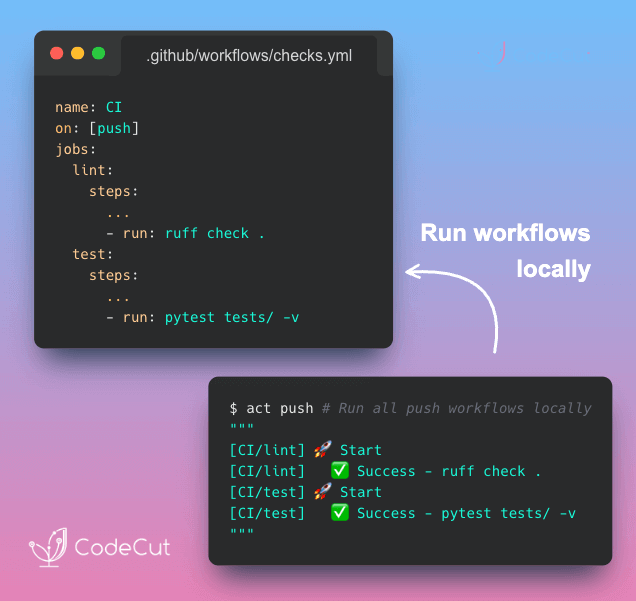
GitHub Actions has no local execution mode. You can’t test a step, inspect an environment variable, or reproduce a runner-specific failure on your own machine.
Each change requires a commit and a wait for the cloud runner. A small mistake like a missing secret means starting the loop again.
Solution
With act, you can execute workflows locally using Docker. Failures surface immediately, making it easier to iterate and commit only when the workflow passes.

ScrapeGraphAI: Research Multiple Sites with One Prompt

Problem
With BeautifulSoup, every site needs its own selectors, and you need to manually combine the results into a unified format.
When any site redesigns its layout, those selectors break and you are back to fixing code.
Solution
ScrapeGraphAI‘s SearchGraph fixes this by replacing selectors with a natural language prompt.
Here’s what it handles:

Automatic web search for relevant pages
AI-powered scraping that adapts to any layout
Structured output with source URLs for verification
Works with any LLM provider (OpenAI, Ollama, etc.)

📖 View Full Article

🎓 Latest Interactive Course

Python Data Modeling with Dataclasses and Pydantic

Choosing between dict, NamedTuple, dataclass, and Pydantic comes down to how much safety you need. In this free interactive course, you’ll learn when to use each:

Dictionary: Flexible, but no built-in field checks. Typos and missing keys only show up at runtime.
NamedTuple: Immutable with fixed fields, helping catch mistakes early.
dataclass: Mutable data containers with defaults and optional validation logic.
Pydantic: Strong type validation, automatic coercion, and detailed error reporting.

All exercises run directly in your browser. No installation required.

☕️ Weekly Finds

agent-browser
[Agents]
– Headless browser automation CLI for AI agents, built on Playwright

pyscn
[Code Quality]
– Intelligent Python code quality analyzer with dead code detection and complexity analysis

pyupgrade
[Code Quality]
– Automatically upgrade Python syntax to newer versions of the language

Looking for a specific tool? Explore 70+ Python tools →

Stay Current with CodeCut

Actionable Python tips, curated for busy data pros. Skim in under 2 minutes, three times a week.

.codecut-subscribe-form .codecut-input {
background: #2F2D2E !important;
border: 1px solid #72BEFA !important;
color: #FFFFFF !important;
}
.codecut-subscribe-form .codecut-input::placeholder {
color: #999999 !important;
}
.codecut-subscribe-form .codecut-subscribe-btn {
background: #72BEFA !important;
color: #2F2D2E !important;
}
.codecut-subscribe-form .codecut-subscribe-btn:hover {
background: #5aa8e8 !important;
}

.codecut-subscribe-form {
max-width: 650px;
display: flex;
flex-direction: column;
gap: 8px;
}
.codecut-input {
-webkit-appearance: none;
-moz-appearance: none;
appearance: none;
background: #FFFFFF;
border-radius: 8px !important;
padding: 8px 12px;
font-family: ‘Comfortaa’, sans-serif !important;
font-size: 14px !important;
color: #333333;
border: none !important;
outline: none;
width: 100%;
box-sizing: border-box;
}
input[type=”email”].codecut-input {
border-radius: 8px !important;
}
.codecut-input::placeholder {
color: #666666;
}
.codecut-email-row {
display: flex;
align-items: stretch;
height: 36px;
gap: 8px;
}
.codecut-email-row .codecut-input {
flex: 1;
}
.codecut-subscribe-btn {
background: #72BEFA;
color: #2F2D2E;
border: none;
border-radius: 8px;
padding: 8px 14px;
font-family: ‘Comfortaa’, sans-serif;
font-size: 14px;
font-weight: 500;
cursor: pointer;
text-decoration: none;
display: flex;
align-items: center;
justify-content: center;
transition: background 0.3s ease;
}
.codecut-subscribe-btn:hover {
background: #5aa8e8;
}
.codecut-subscribe-btn:disabled {
background: #999;
cursor: not-allowed;
}
.codecut-message {
font-family: ‘Comfortaa’, sans-serif;
font-size: 12px;
padding: 8px;
border-radius: 6px;
display: none;
}
.codecut-message.success {
background: #d4edda;
color: #155724;
display: block;
}
@media (max-width: 480px) {
.codecut-email-row {
flex-direction: column;
height: auto;
gap: 8px;
}
.codecut-input {
border-radius: 8px;
height: 36px;
}
.codecut-subscribe-btn {
width: 100%;
text-align: center;
border-radius: 8px;
height: 36px;
}
}

Subscribe
Newsletter #293: act: Run GitHub Actions Locally with Docker Read More »

Newsletter #292: SQLFluff: Auto-Fix Messy SQL with One Command

Grab your coffee. Here are this week’s highlights.

📅 Today’s Picks

Evaluate LLM Apps in One Line with PydanticAI

Problem
Testing LLM apps means validating multiple factors at once: is the answer correct, properly structured, fast enough, and natural sounding?
Rewriting this logic for every project is inefficient and error-prone.
Solution
pydantic-ai includes pydantic-evals, which provides these capabilities out of the box. Simply choose the evaluators you need and add them to your evaluation suite.
Built-in evaluators:

Deterministic: validate that outputs are correct, properly typed, and fast enough
LLM-as-judge: have another LLM grade qualities like helpfulness or tone
Report-level: generate classification metrics across all cases automatically

🧪 Run code

SQLFluff: Auto-Fix Messy SQL with One Command

Problem
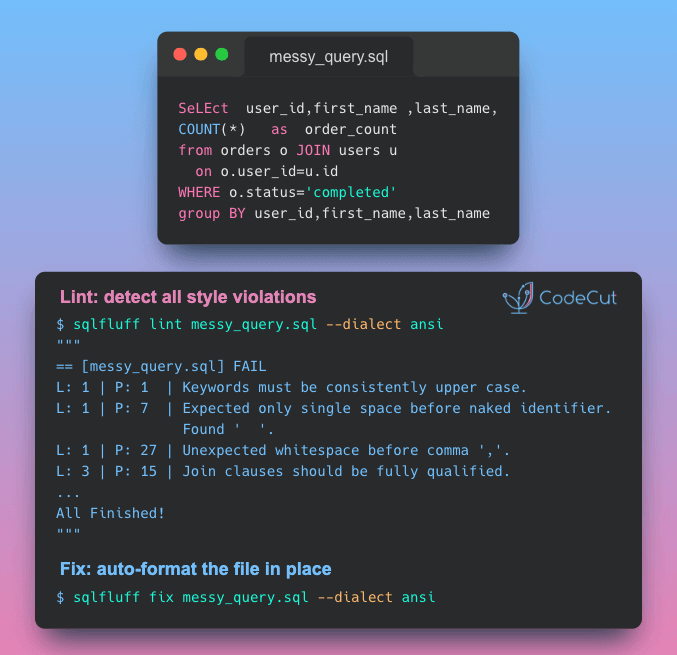
Consistent SQL style matters. It improves readability, speeds up code reviews, and makes bugs easier to identify.
Manual reviews can catch formatting issues, but they’re time-consuming and often inconsistent.
Solution
SQLFluff solves this with automated linting and formatting across 30+ SQL dialects. It identifies violations, applies consistent standards, and auto-corrects many problems.
SQLFluff also supports the following templates:

Jinja
SQL placeholders (e.g. SQLAlchemy parameters)
Python format strings
dbt (requires plugin)

🧪 Run code

🎓 Latest Interactive Course

Python Data Modeling with Dataclasses and Pydantic

Choosing between dict, NamedTuple, dataclass, and Pydantic comes down to how much safety you need. In this free interactive course, you’ll learn when to use each:

Dictionary: Flexible, but no built-in field checks. Typos and missing keys only show up at runtime.
NamedTuple: Immutable with fixed fields, helping catch mistakes early.
dataclass: Mutable data containers with defaults and optional validation logic.
Pydantic: Strong type validation, automatic coercion, and detailed error reporting.

All exercises run directly in your browser. No installation required.

☕️ Weekly Finds

spec-kit
[Dev Tools]
– Toolkit for Spec-Driven Development that helps define specs, generate plans and tasks, and implement code with AI coding tools

ty
[Code Quality]
– Extremely fast Python type checker and language server written in Rust, by the creators of uv and Ruff

nbQA
[Code Quality]
– Run ruff, isort, pyupgrade, mypy, pylint, flake8, and more on Jupyter Notebooks

Looking for a specific tool? Explore 70+ Python tools →

Stay Current with CodeCut

Actionable Python tips, curated for busy data pros. Skim in under 2 minutes, three times a week.

.codecut-subscribe-form .codecut-input {
background: #2F2D2E !important;
border: 1px solid #72BEFA !important;
color: #FFFFFF !important;
}
.codecut-subscribe-form .codecut-input::placeholder {
color: #999999 !important;
}
.codecut-subscribe-form .codecut-subscribe-btn {
background: #72BEFA !important;
color: #2F2D2E !important;
}
.codecut-subscribe-form .codecut-subscribe-btn:hover {
background: #5aa8e8 !important;
}

.codecut-subscribe-form {
max-width: 650px;
display: flex;
flex-direction: column;
gap: 8px;
}
.codecut-input {
-webkit-appearance: none;
-moz-appearance: none;
appearance: none;
background: #FFFFFF;
border-radius: 8px !important;
padding: 8px 12px;
font-family: ‘Comfortaa’, sans-serif !important;
font-size: 14px !important;
color: #333333;
border: none !important;
outline: none;
width: 100%;
box-sizing: border-box;
}
input[type=”email”].codecut-input {
border-radius: 8px !important;
}
.codecut-input::placeholder {
color: #666666;
}
.codecut-email-row {
display: flex;
align-items: stretch;
height: 36px;
gap: 8px;
}
.codecut-email-row .codecut-input {
flex: 1;
}
.codecut-subscribe-btn {
background: #72BEFA;
color: #2F2D2E;
border: none;
border-radius: 8px;
padding: 8px 14px;
font-family: ‘Comfortaa’, sans-serif;
font-size: 14px;
font-weight: 500;
cursor: pointer;
text-decoration: none;
display: flex;
align-items: center;
justify-content: center;
transition: background 0.3s ease;
}
.codecut-subscribe-btn:hover {
background: #5aa8e8;
}
.codecut-subscribe-btn:disabled {
background: #999;
cursor: not-allowed;
}
.codecut-message {
font-family: ‘Comfortaa’, sans-serif;
font-size: 12px;
padding: 8px;
border-radius: 6px;
display: none;
}
.codecut-message.success {
background: #d4edda;
color: #155724;
display: block;
}
@media (max-width: 480px) {
.codecut-email-row {
flex-direction: column;
height: auto;
gap: 8px;
}
.codecut-input {
border-radius: 8px;
height: 36px;
}
.codecut-subscribe-btn {
width: 100%;
text-align: center;
border-radius: 8px;
height: 36px;
}
}

Subscribe
Newsletter #292: SQLFluff: Auto-Fix Messy SQL with One Command Read More »

Newsletter #291: Docling: Turn DOCX Reviewer Feedback into Structured Data

Grab your coffee. Here are this week’s highlights.

📅 Today’s Picks

Narwhals: One Decorator for pandas, Polars, and DuckDB

Problem
Writing a DataFrame function that supports multiple libraries usually means maintaining separate versions of the same logic for each one.
If changes are needed, they need to be applied to every version.
Solution
With Narwhals‘ @narwhalify decorator, you write the logic once using a unified API.
The function then works with whatever DataFrame type is passed in and returns the same type, reducing friction when switching tools.
How is this different from Ibis? Ibis is built for data scientists switching between SQL backends. Narwhals is built for library authors who need their code to work with any DataFrame type.

📖 View Full Article

🧪 Run code

Docling: Turn DOCX Reviewer Feedback into Structured Data

Problem
Pulling comments from Word files turns informal feedback into data you can analyze, manage, and act on in code.
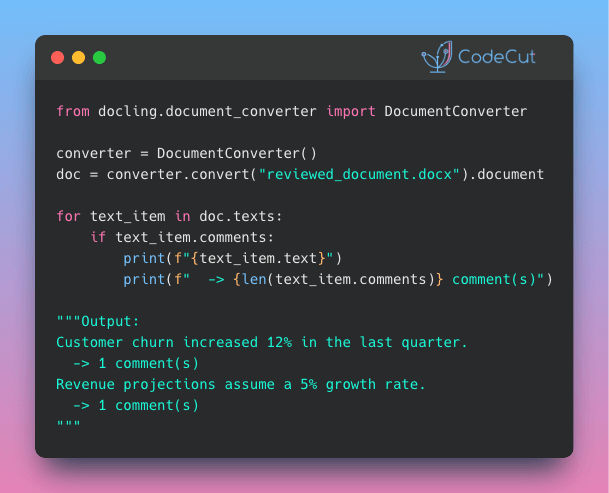
Traditionally, this requires parsing raw XML and manually mapping each comment back to its referenced text.
Solution
Docling v2.71.0 simplifies this process. Converted documents now attach a comments field to every text item, making reviewer annotations accessible without manual XML handling.
This opens up workflows that were previously too tedious to automate:

Flag unresolved comments before merging document versions
Build dashboards tracking reviewer feedback across teams
Feed comment data into LLMs for sentiment analysis or summarization

📖 View Full Article

📚 Latest Deep Dives

Portable DataFrames in Python: When to Use Ibis, Narwhals, or Fugue
– Write your DataFrame logic once and run it on any backend. Compare Ibis, Narwhals, and Fugue to find the right portability strategy for your Python workflow.

☕️ Weekly Finds

pdfGPT
[LLM]
– Chat with the contents of your PDF files using GPT capabilities and semantic search with sentence embeddings

SandDance
[Data Viz]
– Microsoft Research data visualization tool that maps every data row to a visual mark for interactive exploration

trafilatura
[Web Scraping]
– Python package and CLI for web crawling, scraping, and text extraction with output as CSV, JSON, HTML, or XML

Looking for a specific tool? Explore 70+ Python tools →

Stay Current with CodeCut

Actionable Python tips, curated for busy data pros. Skim in under 2 minutes, three times a week.

.codecut-subscribe-form .codecut-input {
background: #2F2D2E !important;
border: 1px solid #72BEFA !important;
color: #FFFFFF !important;
}
.codecut-subscribe-form .codecut-input::placeholder {
color: #999999 !important;
}
.codecut-subscribe-form .codecut-subscribe-btn {
background: #72BEFA !important;
color: #2F2D2E !important;
}
.codecut-subscribe-form .codecut-subscribe-btn:hover {
background: #5aa8e8 !important;
}

.codecut-subscribe-form {
max-width: 650px;
display: flex;
flex-direction: column;
gap: 8px;
}
.codecut-input {
-webkit-appearance: none;
-moz-appearance: none;
appearance: none;
background: #FFFFFF;
border-radius: 8px !important;
padding: 8px 12px;
font-family: ‘Comfortaa’, sans-serif !important;
font-size: 14px !important;
color: #333333;
border: none !important;
outline: none;
width: 100%;
box-sizing: border-box;
}
input[type=”email”].codecut-input {
border-radius: 8px !important;
}
.codecut-input::placeholder {
color: #666666;
}
.codecut-email-row {
display: flex;
align-items: stretch;
height: 36px;
gap: 8px;
}
.codecut-email-row .codecut-input {
flex: 1;
}
.codecut-subscribe-btn {
background: #72BEFA;
color: #2F2D2E;
border: none;
border-radius: 8px;
padding: 8px 14px;
font-family: ‘Comfortaa’, sans-serif;
font-size: 14px;
font-weight: 500;
cursor: pointer;
text-decoration: none;
display: flex;
align-items: center;
justify-content: center;
transition: background 0.3s ease;
}
.codecut-subscribe-btn:hover {
background: #5aa8e8;
}
.codecut-subscribe-btn:disabled {
background: #999;
cursor: not-allowed;
}
.codecut-message {
font-family: ‘Comfortaa’, sans-serif;
font-size: 12px;
padding: 8px;
border-radius: 6px;
display: none;
}
.codecut-message.success {
background: #d4edda;
color: #155724;
display: block;
}
@media (max-width: 480px) {
.codecut-email-row {
flex-direction: column;
height: auto;
gap: 8px;
}
.codecut-input {
border-radius: 8px;
height: 36px;
}
.codecut-subscribe-btn {
width: 100%;
text-align: center;
border-radius: 8px;
height: 36px;
}
}

Subscribe
Newsletter #291: Docling: Turn DOCX Reviewer Feedback into Structured Data Read More »

Newsletter #290: Quarkdown: Build LaTeX-Quality Docs with Just Markdown

Grab your coffee. Here are this week’s highlights.

📅 Today’s Picks

Quarkdown: Build LaTeX-Quality Docs with Just Markdown

Problem
LaTeX produces beautiful academic papers, but its verbose syntax and nested environments make even simple layouts painful to write.
Solution
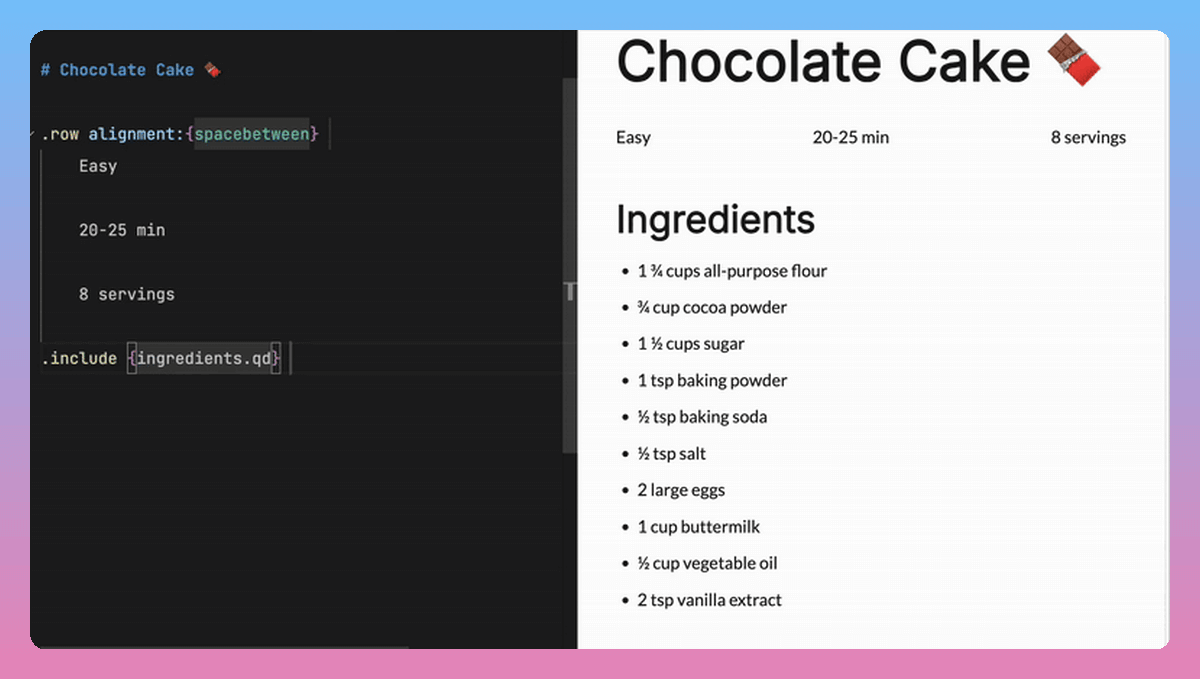
Quarkdown generates the same professional paged output using clean Markdown syntax you already know.
Key features:

Write once, export as paged documents, presentation slides, or websites
Define reusable functions with conditionals and loops inside your documents
Embed Mermaid diagrams and charts without external tools
Live preview in VS Code as you type

Ibis: One Python API for 22+ Database Backends

Problem
Running queries across multiple databases often means rewriting the same logic for each backend’s SQL dialect. A query that works in DuckDB may require syntax changes for PostgreSQL, and another rewrite for BigQuery.
Solution
Ibis removes that friction by compiling Python expressions into each backend’s native SQL. Swap the connection, and the same code runs across 22+ databases.
Key features:

Write once, run on DuckDB, PostgreSQL, BigQuery, Snowflake, and 18+ more
Lazy execution that builds and optimizes the query plan before sending it to the database
Intuitive chaining syntax similar to Polars

📖 View Full Article

📚 Latest Deep Dives

Portable DataFrames in Python: When to Use Ibis, Narwhals, or Fugue
– Write your DataFrame logic once and run it on any backend. Compare Ibis, Narwhals, and Fugue to find the right portability strategy for your Python workflow.

☕️ Weekly Finds

graphiti
[LLM]
– Build real-time, temporally-aware knowledge graphs for AI agents with automatic entity and relationship extraction

doris
[SQL]
– High-performance MPP analytics database with MySQL compatibility that handles real-time ingestion and sub-second queries at scale

smallpond
[Data Processing]
– Lightweight distributed data processing framework by DeepSeek that scales DuckDB to PB-scale datasets using Ray

Looking for a specific tool? Explore 70+ Python tools →

Stay Current with CodeCut

Actionable Python tips, curated for busy data pros. Skim in under 2 minutes, three times a week.

.codecut-subscribe-form .codecut-input {
background: #2F2D2E !important;
border: 1px solid #72BEFA !important;
color: #FFFFFF !important;
}
.codecut-subscribe-form .codecut-input::placeholder {
color: #999999 !important;
}
.codecut-subscribe-form .codecut-subscribe-btn {
background: #72BEFA !important;
color: #2F2D2E !important;
}
.codecut-subscribe-form .codecut-subscribe-btn:hover {
background: #5aa8e8 !important;
}

.codecut-subscribe-form {
max-width: 650px;
display: flex;
flex-direction: column;
gap: 8px;
}
.codecut-input {
-webkit-appearance: none;
-moz-appearance: none;
appearance: none;
background: #FFFFFF;
border-radius: 8px !important;
padding: 8px 12px;
font-family: ‘Comfortaa’, sans-serif !important;
font-size: 14px !important;
color: #333333;
border: none !important;
outline: none;
width: 100%;
box-sizing: border-box;
}
input[type=”email”].codecut-input {
border-radius: 8px !important;
}
.codecut-input::placeholder {
color: #666666;
}
.codecut-email-row {
display: flex;
align-items: stretch;
height: 36px;
gap: 8px;
}
.codecut-email-row .codecut-input {
flex: 1;
}
.codecut-subscribe-btn {
background: #72BEFA;
color: #2F2D2E;
border: none;
border-radius: 8px;
padding: 8px 14px;
font-family: ‘Comfortaa’, sans-serif;
font-size: 14px;
font-weight: 500;
cursor: pointer;
text-decoration: none;
display: flex;
align-items: center;
justify-content: center;
transition: background 0.3s ease;
}
.codecut-subscribe-btn:hover {
background: #5aa8e8;
}
.codecut-subscribe-btn:disabled {
background: #999;
cursor: not-allowed;
}
.codecut-message {
font-family: ‘Comfortaa’, sans-serif;
font-size: 12px;
padding: 8px;
border-radius: 6px;
display: none;
}
.codecut-message.success {
background: #d4edda;
color: #155724;
display: block;
}
@media (max-width: 480px) {
.codecut-email-row {
flex-direction: column;
height: auto;
gap: 8px;
}
.codecut-input {
border-radius: 8px;
height: 36px;
}
.codecut-subscribe-btn {
width: 100%;
text-align: center;
border-radius: 8px;
height: 36px;
}
}

Subscribe
Newsletter #290: Quarkdown: Build LaTeX-Quality Docs with Just Markdown Read More »

Portable DataFrames in Python: When to Use Ibis, Narwhals, or Fugue

Table of Contents

Introduction
Setup
Ibis: Compile Once, Run Anywhere
Narwhals: The Zero-Dependency Compatibility Layer
Fugue: Keep Your Code, Swap the Engine
Summary

Introduction
The backend you start with is not always the backend you finish with. Teams commonly prototype in pandas, scale in Spark, or transition from DuckDB to a warehouse environment. Maintaining separate implementations of the same pipeline across backends can quickly become costly and error-prone.
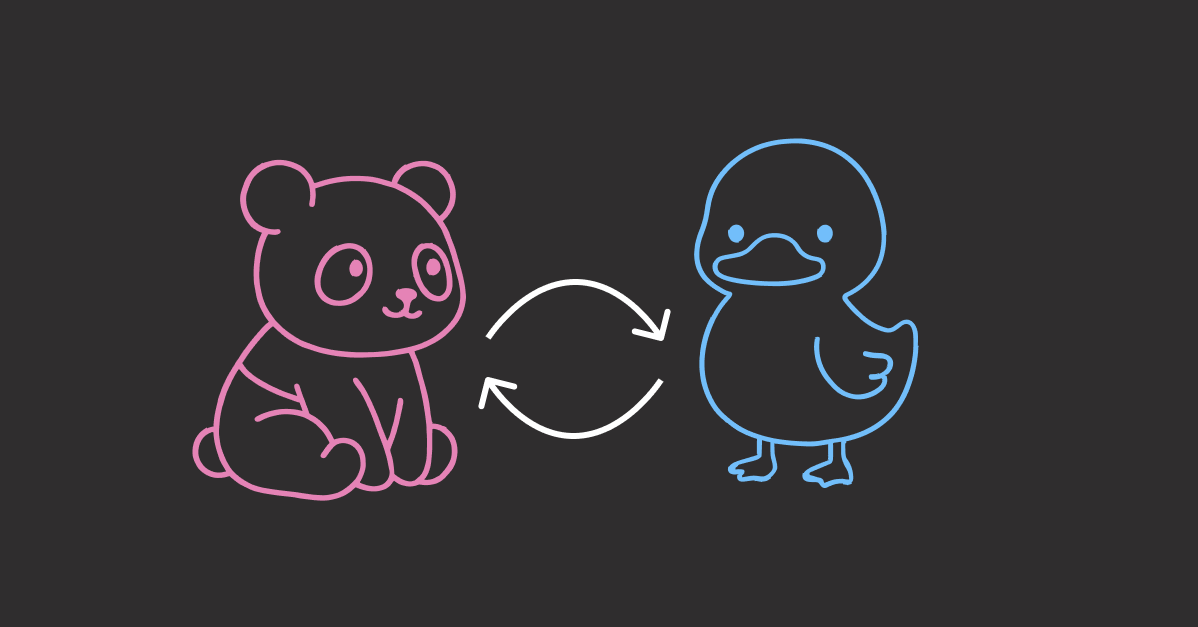
Rather than reimplementing the same pipeline, you can define the logic once and execute it on different backends with one of these tools:

Ibis: Uses its own expression API and compiles it to backend-native SQL. Best for data scientists working across SQL systems.
Narwhals: Exposes a Polars-like API on top of the user’s existing dataframe library. Best for library authors building dataframe-agnostic tools.
Fugue: Runs Python functions and FugueSQL across distributed engines. Best for data engineers scaling pandas workflows to Spark, Dask, or Ray.

In this article, we’ll walk through these three tools side by side so you can choose the portability approach that best fits your workflow.

💻 Get the Code: The complete source code and Jupyter notebook for this tutorial are available on GitHub. Clone it to follow along!

Setup
All examples in this article use the NYC Yellow Taxi dataset (January 2024, ~3M rows). Download the Parquet file before getting started:
curl -O https://d37ci6vzurychx.cloudfront.net/trip-data/yellow_tripdata_2024-01.parquet

Ibis: Compile Once, Run Anywhere
Ibis provides a declarative Python API that compiles to SQL:

What it does: Translates Python expressions into backend-native SQL for DuckDB, PostgreSQL, BigQuery, Snowflake, and 22+ other backends
How it works: Compiles expressions to SQL and delegates execution to the backend engine
Who it’s for: Data scientists working across SQL systems who want one API for all backends

In other words, Ibis compiles your code to SQL for the backend, then lets you collect results as pandas, Polars, or PyArrow:

To get started, install Ibis with the DuckDB backend since DuckDB is fast and needs no server setup:
pip install 'ibis-framework[duckdb]'

This article uses ibis-framework v12.0.0.

Stay Current with CodeCut
Actionable Python tips, curated for busy data pros. Skim in under 2 minutes, three times a week.

.codecut-subscribe-form .codecut-input {
background: #2F2D2E !important;
border: 1px solid #72BEFA !important;
color: #FFFFFF !important;
}
.codecut-subscribe-form .codecut-input::placeholder {
color: #999999 !important;
}
.codecut-subscribe-form .codecut-subscribe-btn {
background: #72BEFA !important;
color: #2F2D2E !important;
}
.codecut-subscribe-form .codecut-subscribe-btn:hover {
background: #5aa8e8 !important;
}

.codecut-subscribe-form {
max-width: 650px;
display: flex;
flex-direction: column;
gap: 8px;
}

.codecut-input {
-webkit-appearance: none;
-moz-appearance: none;
appearance: none;
background: #FFFFFF;
border-radius: 8px !important;
padding: 8px 12px;
font-family: ‘Comfortaa’, sans-serif !important;
font-size: 14px !important;
color: #333333;
border: none !important;
outline: none;
width: 100%;
box-sizing: border-box;
}

input[type=”email”].codecut-input {
border-radius: 8px !important;
}

.codecut-input::placeholder {
color: #666666;
}

.codecut-email-row {
display: flex;
align-items: stretch;
height: 36px;
gap: 8px;
}

.codecut-email-row .codecut-input {
flex: 1;
}

.codecut-subscribe-btn {
background: #72BEFA;
color: #2F2D2E;
border: none;
border-radius: 8px;
padding: 8px 14px;
font-family: ‘Comfortaa’, sans-serif;
font-size: 14px;
font-weight: 500;
cursor: pointer;
text-decoration: none;
display: flex;
align-items: center;
justify-content: center;
transition: background 0.3s ease;
}

.codecut-subscribe-btn:hover {
background: #5aa8e8;
}

.codecut-subscribe-btn:disabled {
background: #999;
cursor: not-allowed;
}

.codecut-message {
font-family: ‘Comfortaa’, sans-serif;
font-size: 12px;
padding: 8px;
border-radius: 6px;
display: none;
}

.codecut-message.success {
background: #d4edda;
color: #155724;
display: block;
}

/* Mobile responsive */
@media (max-width: 480px) {
.codecut-email-row {
flex-direction: column;
height: auto;
gap: 8px;
}

.codecut-input {
border-radius: 8px;
height: 36px;
}

.codecut-subscribe-btn {
width: 100%;
text-align: center;
border-radius: 8px;
height: 36px;
}
}

Subscribe
Expression API and Lazy Execution
Ibis uses lazy evaluation. Nothing executes until you explicitly request results. This allows the backend’s query optimizer to plan the most efficient execution.
First, connect to DuckDB as the execution backend. The read_parquet call registers the file with DuckDB rather than loading it into memory, keeping the workflow lazy from the start:
import ibis

con = ibis.duckdb.connect()
t = con.read_parquet("yellow_tripdata_2024-01.parquet")

Next, define the analysis using Ibis’s expression API. Since Ibis is lazy, this only builds an expression tree without touching the data:
result = (
t.group_by("payment_type")
.aggregate(
total_fare=t.fare_amount.sum(),
avg_fare=t.fare_amount.mean(),
trip_count=t.count(),
)
.order_by(ibis.desc("trip_count"))
)

Finally, call .to_pandas() to trigger execution. DuckDB runs the query and returns the result as a pandas DataFrame:
df = result.to_pandas()
print(df)

payment_type total_fare avg_fare trip_count
0 1 43035538.92 18.557432 2319046
1 2 7846602.79 17.866037 439191
2 0 2805509.77 20.016194 140162
3 4 62243.19 1.334889 46628
4 3 132330.09 6.752569 19597

Inspecting Generated SQL
Because each backend executes native SQL (not Python), Ibis lets you inspect the compiled query with ibis.to_sql(). This is useful for debugging performance or auditing the exact SQL sent to your database:
print(ibis.to_sql(result))

SELECT
*
FROM (
SELECT
"t0"."payment_type",
SUM("t0"."fare_amount") AS "total_fare",
AVG("t0"."fare_amount") AS "avg_fare",
COUNT(*) AS "trip_count"
FROM "ibis_read_parquet_hdy7njbsxfhbjcet43die5ahvu" AS "t0"
GROUP BY
1
) AS "t1"
ORDER BY
"t1"."trip_count" DESC

Backend Switching
To run the same logic on PostgreSQL, you only change the connection. The expression code stays identical:
# Switch to PostgreSQL: only the connection changes
con = ibis.postgres.connect(host="db.example.com", database="taxi")
t = con.table("yellow_tripdata")

# The same expression code works without any changes
result = (
t.group_by("payment_type")
.aggregate(
total_fare=t.fare_amount.sum(),
avg_fare=t.fare_amount.mean(),
trip_count=t.count(),
)
.order_by(ibis.desc("trip_count"))
)

Ibis supports 22+ backends including DuckDB, PostgreSQL, MySQL, SQLite, BigQuery, Snowflake, Databricks, ClickHouse, Trino, PySpark, Polars, DataFusion, and more. Each backend receives SQL optimized for its specific dialect.

For a comprehensive guide to PySpark SQL, see The Complete PySpark SQL Guide.

Filtering and Chaining
Ibis expressions chain naturally. The syntax is close to Polars, with methods like .filter(), .select(), and .order_by():
high_fare_trips = (
t.filter(t.fare_amount > 20)
.filter(t.trip_distance > 5)
.select("payment_type", "fare_amount", "trip_distance", "tip_amount")
.order_by(ibis.desc("fare_amount"))
.limit(5)
)

print(high_fare_trips.to_pandas())

payment_type fare_amount trip_distance tip_amount
0 2 2221.3 31.95 0.0
1 2 1616.5 233.25 0.0
2 2 912.3 142.62 0.0
3 2 899.0 157.25 0.0
4 2 761.1 109.75 0.0

Narwhals: The Zero-Dependency Compatibility Layer
While Ibis compiles to SQL, Narwhals works directly with Python dataframe libraries:

What it does: Wraps existing dataframe libraries (pandas, Polars, PyArrow) with a thin, Polars-like API
How it works: Translates calls directly to the underlying library instead of compiling to SQL
Who it’s for: Library authors who want their package to accept any dataframe type without adding dependencies

If you’re building a library, you don’t control which dataframe library your users prefer. Without Narwhals, you’d maintain separate implementations for each library:

With Narwhals, one code path replaces all three, so every bug fix and feature update applies to all dataframe types at once:

To install Narwhals, run:
pip install narwhals

This article uses narwhals v2.16.0.

For more Narwhals examples across pandas, Polars, and PySpark, see Narwhals: Unified DataFrame Functions for pandas, Polars, and PySpark.

The from_native / to_native Pattern
The core pattern has three steps: convert the incoming dataframe to Narwhals, do your work, and convert back.
First, load a pandas DataFrame and wrap it with nw.from_native(). This gives you a Narwhals DataFrame with a Polars-like API:
import narwhals as nw
import pandas as pd

df_pd = pd.read_parquet("yellow_tripdata_2024-01.parquet")
df = nw.from_native(df_pd)

Next, use Narwhals’ API to define the analysis. The syntax mirrors Polars with nw.col(), .agg(), and .sort():
result = (
df.group_by("payment_type")
.agg(
nw.col("fare_amount").sum().alias("total_fare"),
nw.col("fare_amount").mean().alias("avg_fare"),
nw.col("fare_amount").count().alias("trip_count"),
)
.sort("trip_count", descending=True)
)

Finally, call .to_native() to convert back to the original library. Since we started with pandas, we get a pandas DataFrame back:
print(result.to_native())

payment_type total_fare avg_fare trip_count
1 1 43035538.92 18.557432 2319046
0 2 7846602.79 17.866037 439191
4 0 2805509.77 20.016194 140162
2 4 62243.19 1.334889 46628
3 3 132330.09 6.752569 19597

To see the real benefit, wrap this logic in a reusable function. It accepts any supported dataframe type, and Narwhals handles the rest:
def fare_summary(df_native):
df = nw.from_native(df_native)
return (
df.group_by("payment_type")
.agg(
nw.col("fare_amount").sum().alias("total_fare"),
nw.col("fare_amount").mean().alias("avg_fare"),
nw.col("fare_amount").count().alias("trip_count"),
)
.sort("trip_count", descending=True)
.to_native()
)

Now the same function works with pandas, Polars, and PyArrow:
print(fare_summary(df_pd))

payment_type total_fare avg_fare trip_count
0 1 3.704733e+07 16.689498 2219230
1 2 7.352498e+06 15.411498 477083
2 0 1.396918e+06 19.569349 71382
3 4 1.280650e+05 15.671294 8173
4 3 1.108880e+04 12.906526 859

import polars as pl

df_pl = pl.read_parquet("yellow_tripdata_2024-01.parquet")
print(fare_summary(df_pl))

shape: (5, 4)
┌──────────────┬────────────┬───────────┬────────────┐
│ payment_type ┆ total_fare ┆ avg_fare ┆ trip_count │
│ — ┆ — ┆ — ┆ — │
│ i64 ┆ f64 ┆ f64 ┆ u32 │
╞══════════════╪════════════╪═══════════╪════════════╡
│ 1 ┆ 4.3036e7 ┆ 18.557432 ┆ 2319046 │
│ 2 ┆ 7.8466e6 ┆ 17.866037 ┆ 439191 │
│ 0 ┆ 2.8055e6 ┆ 20.016194 ┆ 140162 │
│ 4 ┆ 62243.19 ┆ 1.334889 ┆ 46628 │
│ 3 ┆ 132330.09 ┆ 6.752569 ┆ 19597 │
└──────────────┴────────────┴───────────┴────────────┘

import duckdb

df_duck = duckdb.sql("SELECT * FROM 'yellow_tripdata_2024-01.parquet'")
print(fare_summary(df_duck))

┌──────────────┬────────────────────┬────────────────────┬────────────┐
│ payment_type │ total_fare │ avg_fare │ trip_count │
│ int64 │ double │ double │ int64 │
├──────────────┼────────────────────┼────────────────────┼────────────┤
│ 1 │ 43035538.92000025 │ 18.557432202724847 │ 2319046 │
│ 2 │ 7846602.7900001 │ 17.86603730495411 │ 439191 │
│ 0 │ 2805509.7700004894 │ 20.016193904200065 │ 140162 │
│ 4 │ 62243.19000000006 │ 1.3348886934888922 │ 46628 │
│ 3 │ 132330.08999999985 │ 6.752568760524563 │ 19597 │
└──────────────┴────────────────────┴────────────────────┴────────────┘

Notice that the output type always matches the input. This is what makes Narwhals practical for library authors: users keep working with their preferred dataframe library, and your code stays the same.

For a detailed comparison of pandas, Polars, and DuckDB themselves, see pandas vs Polars vs DuckDB: A Data Scientist’s Guide.

The @narwhalify Decorator
For simpler cases, the @nw.narwhalify decorator handles the from_native/to_native boilerplate:
@nw.narwhalify
def high_fare_filter(df, threshold: float = 20.0):
return (
df.filter(nw.col("fare_amount") > threshold)
.select("payment_type", "fare_amount", "trip_distance", "tip_amount")
.sort("fare_amount", descending=True)
.head(5)
)

print(high_fare_filter(df_pd, threshold=50.0))

payment_type fare_amount trip_distance tip_amount
0 2 401200.0 42.39 0.00
1 1 398.0 39.49 50.00
2 1 397.5 42.83 50.00
3 1 384.5 45.33 77.60
4 1 363.0 32.43 73.30

Real-World Adoption
Narwhals has seen wide adoption across the Python ecosystem. Over 25 libraries use it, including:

Visualization: Altair, Plotly, Bokeh
ML: scikit-lego, fairlearn
Interactive: marimo
Forecasting: darts, hierarchicalforecast

These libraries accept any dataframe type from users because Narwhals handles the compatibility layer with zero additional dependencies.
Fugue: Keep Your Code, Swap the Engine
Fugue focuses on scaling existing code to distributed engines:

What it does: Ships your pandas functions to Spark, Dask, or Ray without rewriting them
How it works: Uses type annotations to infer input/output schemas, then translates execution to the target engine
Who it’s for: Data engineers who already have pandas pipelines and need to scale them

In other words, your existing pandas code runs as-is on distributed engines:

To install Fugue, run:
pip install fugue

This article uses fugue v0.9.6.
The transform() Pattern
With Fugue, you begin with a regular pandas function. No Fugue imports or special decorators needed. The only requirement is type annotations, which tell Fugue how to handle the data when it runs on a different engine:
import pandas as pd

def fare_summary(df: pd.DataFrame) -> pd.DataFrame:
return (
df.groupby("payment_type")
.agg(
total_fare=("fare_amount", "sum"),
avg_fare=("fare_amount", "mean"),
trip_count=("fare_amount", "count"),
)
.reset_index()
.sort_values("trip_count", ascending=False)
)

Since this is plain pandas, you can test it locally as you normally would:
input_df = pd.read_parquet("yellow_tripdata_2024-01.parquet")
result = fare_summary(input_df)
print(result)

payment_type total_fare avg_fare trip_count
1 1 43035538.92 18.557432 2319046
2 2 7846602.79 17.866037 439191
0 0 2805509.77 20.016194 140162
4 4 62243.19 1.334889 46628
3 3 132330.09 6.752569 19597

To scale this to Spark, pass the function through Fugue’s transform() with a different engine:
from fugue import transform

# Scale to Spark: same function, different engine
result_spark = transform(
input_df,
fare_summary,
schema="payment_type:int,total_fare:double,avg_fare:double,trip_count:long",
engine="spark",
)

result_spark.show()

+————+———-+——–+———-+
|payment_type|total_fare|avg_fare|trip_count|
+————+———-+——–+———-+
| 1| 43035539 | 18.56 | 2319046|
| 2| 7846603 | 17.87 | 439191|
| 0| 2805510 | 20.02 | 140162|
| 4| 62243 | 1.33 | 46628|
| 3| 132330 | 6.75 | 19597|
+————+———-+——–+———-+

The schema parameter is required for distributed engines because frameworks like Spark need to know column types before execution. This is a constraint of distributed computing, not Fugue itself.
Scaling to DuckDB
For local speedups without distributed infrastructure, Fugue also supports DuckDB as an engine:
result_duck = transform(
input_df,
fare_summary,
schema="payment_type:int,total_fare:double,avg_fare:double,trip_count:long",
engine="duckdb",
)
print(result_duck)

payment_type total_fare avg_fare trip_count
0 1 43035538.92 18.557432 2319046
1 2 7846602.79 17.866037 439191
2 0 2805509.77 20.016194 140162
3 4 62243.19 1.334889 46628
4 3 132330.09 6.752569 19597

Notice that the function never changes. Fugue handles the conversion between pandas and each engine automatically.
FugueSQL
Fugue also includes FugueSQL, which lets you write SQL that calls Python functions. To use it, install Fugue with the SQL extra:
pip install 'fugue[sql]'

This article uses fugue v0.9.6.
This is useful for teams that prefer SQL but need custom transformations:
from fugue.api import fugue_sql

result = fugue_sql("""
SELECT payment_type, fare_amount, trip_distance
FROM input_df
WHERE fare_amount > 50
ORDER BY fare_amount DESC
LIMIT 5
""")
print(result)

payment_type fare_amount trip_distance
1714869 3 5000.0 0.0
1714870 3 5000.0 0.0
1714871 3 2500.0 0.0
1714873 1 2500.0 0.0
2084560 1 2500.0 0.0

Summary

Tool
Choose when you need to…
Strengths

Ibis
Query SQL databases, deploy from local to cloud, or want one API across 22+ backends
Compiles to native SQL; DuckDB locally, BigQuery/Snowflake in production

Narwhals
Build a library that accepts any dataframe type
Zero dependencies, negligible overhead, battle-tested in 25+ libraries

Fugue
Scale existing pandas code to Spark, Dask, or Ray, or mix SQL with Python
Keep your functions unchanged, just swap the engine

The key distinction is the type of backend each tool targets: SQL databases (Ibis), dataframe libraries (Narwhals), or distributed engines (Fugue). Once you know which backend type you need, the choice becomes straightforward.
Related Tutorials

Cloud Scaling: Coiled: Scale Python Data Pipeline to the Cloud in Minutes for deploying Dask workloads to the cloud

📚 Want to go deeper? My book shows you how to build data science projects that actually make it to production. Get the book →

Stay Current with CodeCut
Actionable Python tips, curated for busy data pros. Skim in under 2 minutes, three times a week.

.codecut-subscribe-form .codecut-input {
background: #2F2D2E !important;
border: 1px solid #72BEFA !important;
color: #FFFFFF !important;
}
.codecut-subscribe-form .codecut-input::placeholder {
color: #999999 !important;
}
.codecut-subscribe-form .codecut-subscribe-btn {
background: #72BEFA !important;
color: #2F2D2E !important;
}
.codecut-subscribe-form .codecut-subscribe-btn:hover {
background: #5aa8e8 !important;
}

.codecut-subscribe-form {
max-width: 650px;
display: flex;
flex-direction: column;
gap: 8px;
}

.codecut-input {
-webkit-appearance: none;
-moz-appearance: none;
appearance: none;
background: #FFFFFF;
border-radius: 8px !important;
padding: 8px 12px;
font-family: ‘Comfortaa’, sans-serif !important;
font-size: 14px !important;
color: #333333;
border: none !important;
outline: none;
width: 100%;
box-sizing: border-box;
}

input[type=”email”].codecut-input {
border-radius: 8px !important;
}

.codecut-input::placeholder {
color: #666666;
}

.codecut-email-row {
display: flex;
align-items: stretch;
height: 36px;
gap: 8px;
}

.codecut-email-row .codecut-input {
flex: 1;
}

.codecut-subscribe-btn {
background: #72BEFA;
color: #2F2D2E;
border: none;
border-radius: 8px;
padding: 8px 14px;
font-family: ‘Comfortaa’, sans-serif;
font-size: 14px;
font-weight: 500;
cursor: pointer;
text-decoration: none;
display: flex;
align-items: center;
justify-content: center;
transition: background 0.3s ease;
}

.codecut-subscribe-btn:hover {
background: #5aa8e8;
}

.codecut-subscribe-btn:disabled {
background: #999;
cursor: not-allowed;
}

.codecut-message {
font-family: ‘Comfortaa’, sans-serif;
font-size: 12px;
padding: 8px;
border-radius: 6px;
display: none;
}

.codecut-message.success {
background: #d4edda;
color: #155724;
display: block;
}

/* Mobile responsive */
@media (max-width: 480px) {
.codecut-email-row {
flex-direction: column;
height: auto;
gap: 8px;
}

.codecut-input {
border-radius: 8px;
height: 36px;
}

.codecut-subscribe-btn {
width: 100%;
text-align: center;
border-radius: 8px;
height: 36px;
}
}

Subscribe
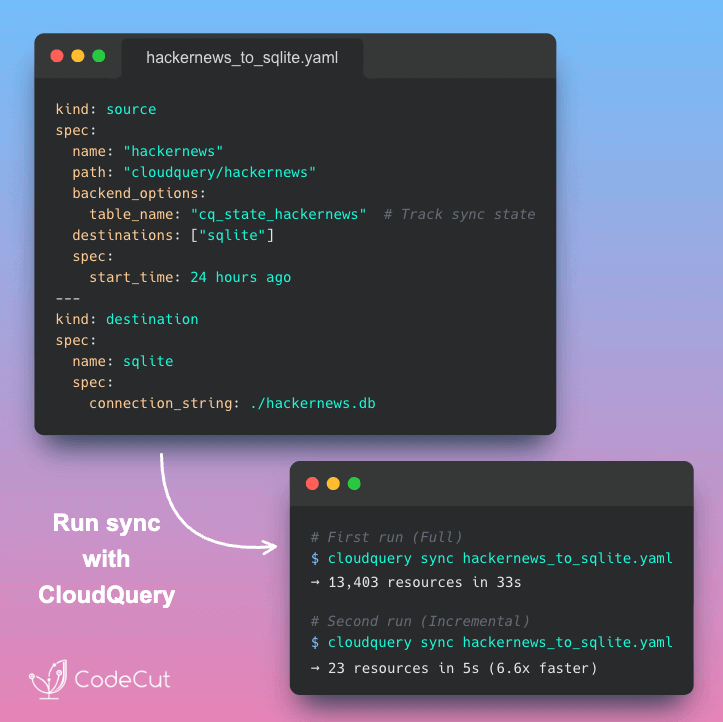
Portable DataFrames in Python: When to Use Ibis, Narwhals, or Fugue Read More »

Newsletter #289: Python 3.14: Type-Safe String Interpolation with t-strings

Grab your coffee. Here are this week’s highlights.

📅 Today’s Picks

Loguru: From Print Statements to Production Logging in One Line

Problem
Data scientists often rely on print statements to monitor data processing pipelines during development.
But print provides no timestamps or severity levels.
Python’s built-in logging fixes that, but demands boilerplate: handlers, formatters, and log-level configuration just to get started.
Solution
Loguru replaces both with a single import: one line gives you structured, colored logging with no setup required.
Key features:

Modern {} formatting that matches Python f-string syntax
One-line file logging with automatic rotation and retention
Readable tracebacks that show variable values at each stack level
Custom sinks to route logs to Slack, email, or databases

📖 View Full Article

🧪 Run code

Python 3.14: Type-Safe String Interpolation with t-strings

Problem
Building SQL queries with f-strings directly embeds user input into the query string, allowing attackers to inject malicious SQL commands.
Parameterized queries are secure but require you to maintain query templates and value lists separately.
Solution
Python 3.14 introduces template string literals (t-strings). Instead of returning strings, they return Template objects that safely expose interpolated values.
This lets you validate and sanitize interpolated values before building the final query.

🧪 Run code

☕️ Weekly Finds

mistune
[Python Utilities]
– Fast Python Markdown parser with custom renderers and plugins that converts Markdown to HTML with minimal overhead

pyparsing
[Python Utilities]
– Python library for creating readable PEG parsers that handles whitespace, quoted strings, and comments without regex complexity

fastlite
[SQL]
– Lightweight SQLite wrapper by Jeremy Howard that adds Pythonic syntax, dataclass support, and diagram visualization for interactive use

Looking for a specific tool? Explore 70+ Python tools →

Stay Current with CodeCut

Actionable Python tips, curated for busy data pros. Skim in under 2 minutes, three times a week.

.codecut-subscribe-form .codecut-input {
background: #2F2D2E !important;
border: 1px solid #72BEFA !important;
color: #FFFFFF !important;
}
.codecut-subscribe-form .codecut-input::placeholder {
color: #999999 !important;
}
.codecut-subscribe-form .codecut-subscribe-btn {
background: #72BEFA !important;
color: #2F2D2E !important;
}
.codecut-subscribe-form .codecut-subscribe-btn:hover {
background: #5aa8e8 !important;
}

.codecut-subscribe-form {
max-width: 650px;
display: flex;
flex-direction: column;
gap: 8px;
}
.codecut-input {
-webkit-appearance: none;
-moz-appearance: none;
appearance: none;
background: #FFFFFF;
border-radius: 8px !important;
padding: 8px 12px;
font-family: ‘Comfortaa’, sans-serif !important;
font-size: 14px !important;
color: #333333;
border: none !important;
outline: none;
width: 100%;
box-sizing: border-box;
}
input[type=”email”].codecut-input {
border-radius: 8px !important;
}
.codecut-input::placeholder {
color: #666666;
}
.codecut-email-row {
display: flex;
align-items: stretch;
height: 36px;
gap: 8px;
}
.codecut-email-row .codecut-input {
flex: 1;
}
.codecut-subscribe-btn {
background: #72BEFA;
color: #2F2D2E;
border: none;
border-radius: 8px;
padding: 8px 14px;
font-family: ‘Comfortaa’, sans-serif;
font-size: 14px;
font-weight: 500;
cursor: pointer;
text-decoration: none;
display: flex;
align-items: center;
justify-content: center;
transition: background 0.3s ease;
}
.codecut-subscribe-btn:hover {
background: #5aa8e8;
}
.codecut-subscribe-btn:disabled {
background: #999;
cursor: not-allowed;
}
.codecut-message {
font-family: ‘Comfortaa’, sans-serif;
font-size: 12px;
padding: 8px;
border-radius: 6px;
display: none;
}
.codecut-message.success {
background: #d4edda;
color: #155724;
display: block;
}
@media (max-width: 480px) {
.codecut-email-row {
flex-direction: column;
height: auto;
gap: 8px;
}
.codecut-input {
border-radius: 8px;
height: 36px;
}
.codecut-subscribe-btn {
width: 100%;
text-align: center;
border-radius: 8px;
height: 36px;
}
}

Subscribe
Newsletter #289: Python 3.14: Type-Safe String Interpolation with t-strings Read More »

Newsletter #288: MLflow: Track Every LLM API Call with 1 Line of Code

Grab your coffee. Here are this week’s highlights.

📅 Today’s Picks

MLflow: Track Every LLM API Call with 1 Line of Code

Problem
Most teams building LLM apps don’t set up tracking because they see API calls as simple request-response operations.
But every API call costs money, and without token-level visibility, you can’t tell where your budget is going until it’s already spent.
Solution
MLflow‘s autolog traces every OpenAI API call with just one line of code, so you always know what was sent, what came back, and how many tokens it used.
Key capabilities:

Track token usage per call to identify which requests consume the most
View full prompt and response content for every call
Measure latency per call to find which requests are slowing down your app
Works with OpenAI, Anthropic, LangChain, LlamaIndex, and DSPy

Rembg: Remove Image Backgrounds in 2 Lines of Python

Problem
Removing backgrounds from images typically requires Photoshop, online tools, or AI assistants like ChatGPT.
But these options come with subscription costs, upload limits, or privacy concerns with your images on external servers.
Solution
Rembg uses AI models to remove backgrounds locally with just 2 lines of Python.
It’s also open source and compatible with common Python imaging libraries.

🧪 Run code

☕️ Weekly Finds

awesome-claude-skills
[AI Tools]
– Curated list of Claude Skills, resources, and tools for customizing Claude AI workflows with community-contributed templates and integrations

zvec
[Vector Database]
– In-process vector database built on Alibaba’s Proxima engine that searches billions of vectors in milliseconds with zero server setup

langflow
[AI Agents]
– Visual platform for building and deploying AI-powered agents and workflows with drag-and-drop interface, multi-agent orchestration, and MCP server support

Looking for a specific tool? Explore 70+ Python tools →

Stay Current with CodeCut

Actionable Python tips, curated for busy data pros. Skim in under 2 minutes, three times a week.

.codecut-subscribe-form .codecut-input {
background: #2F2D2E !important;
border: 1px solid #72BEFA !important;
color: #FFFFFF !important;
}
.codecut-subscribe-form .codecut-input::placeholder {
color: #999999 !important;
}
.codecut-subscribe-form .codecut-subscribe-btn {
background: #72BEFA !important;
color: #2F2D2E !important;
}
.codecut-subscribe-form .codecut-subscribe-btn:hover {
background: #5aa8e8 !important;
}

.codecut-subscribe-form {
max-width: 650px;
display: flex;
flex-direction: column;
gap: 8px;
}
.codecut-input {
-webkit-appearance: none;
-moz-appearance: none;
appearance: none;
background: #FFFFFF;
border-radius: 8px !important;
padding: 8px 12px;
font-family: ‘Comfortaa’, sans-serif !important;
font-size: 14px !important;
color: #333333;
border: none !important;
outline: none;
width: 100%;
box-sizing: border-box;
}
input[type=”email”].codecut-input {
border-radius: 8px !important;
}
.codecut-input::placeholder {
color: #666666;
}
.codecut-email-row {
display: flex;
align-items: stretch;
height: 36px;
gap: 8px;
}
.codecut-email-row .codecut-input {
flex: 1;
}
.codecut-subscribe-btn {
background: #72BEFA;
color: #2F2D2E;
border: none;
border-radius: 8px;
padding: 8px 14px;
font-family: ‘Comfortaa’, sans-serif;
font-size: 14px;
font-weight: 500;
cursor: pointer;
text-decoration: none;
display: flex;
align-items: center;
justify-content: center;
transition: background 0.3s ease;
}
.codecut-subscribe-btn:hover {
background: #5aa8e8;
}
.codecut-subscribe-btn:disabled {
background: #999;
cursor: not-allowed;
}
.codecut-message {
font-family: ‘Comfortaa’, sans-serif;
font-size: 12px;
padding: 8px;
border-radius: 6px;
display: none;
}
.codecut-message.success {
background: #d4edda;
color: #155724;
display: block;
}
@media (max-width: 480px) {
.codecut-email-row {
flex-direction: column;
height: auto;
gap: 8px;
}
.codecut-input {
border-radius: 8px;
height: 36px;
}
.codecut-subscribe-btn {
width: 100%;
text-align: center;
border-radius: 8px;
height: 36px;
}
}

Subscribe

Newsletter #288: MLflow: Track Every LLM API Call with 1 Line of Code Read More »

Scroll to Top

Work with Khuyen Tran

Work with Khuyen Tran