Generic selectors
Exact matches only
Search in title
Search in content
Post Type Selectors
Filter by Categories
About Article
Analyze Data
Archive
Best Practices
Better Outputs
Blog
Code Optimization
Code Quality
Command Line
Course
Daily tips
Dashboard
Data Analysis & Manipulation
Data Engineer
Data Visualization
DataFrame
Delta Lake
DevOps
DuckDB
Environment Management
Feature Engineer
Git
Jupyter Notebook
LLM
LLM Tools
Machine Learning
Machine Learning & AI
Machine Learning Tools
Manage Data
MLOps
Natural Language Processing
Newsletter Archive
NumPy
Pandas
Polars
PySpark
Python Helpers
Python Tips
Python Utilities
Scrape Data
SQL
Testing
Time Series
Tools
Visualization
Visualization & Reporting
Workflow & Automation
Workflow Automation

python

Auto-created tag for python

Newsletter #204: Build Fuzzy Text Matching with difflib Over regex

📅 Today’s Picks

Build Fuzzy Text Matching with difflib Over regex

Problem
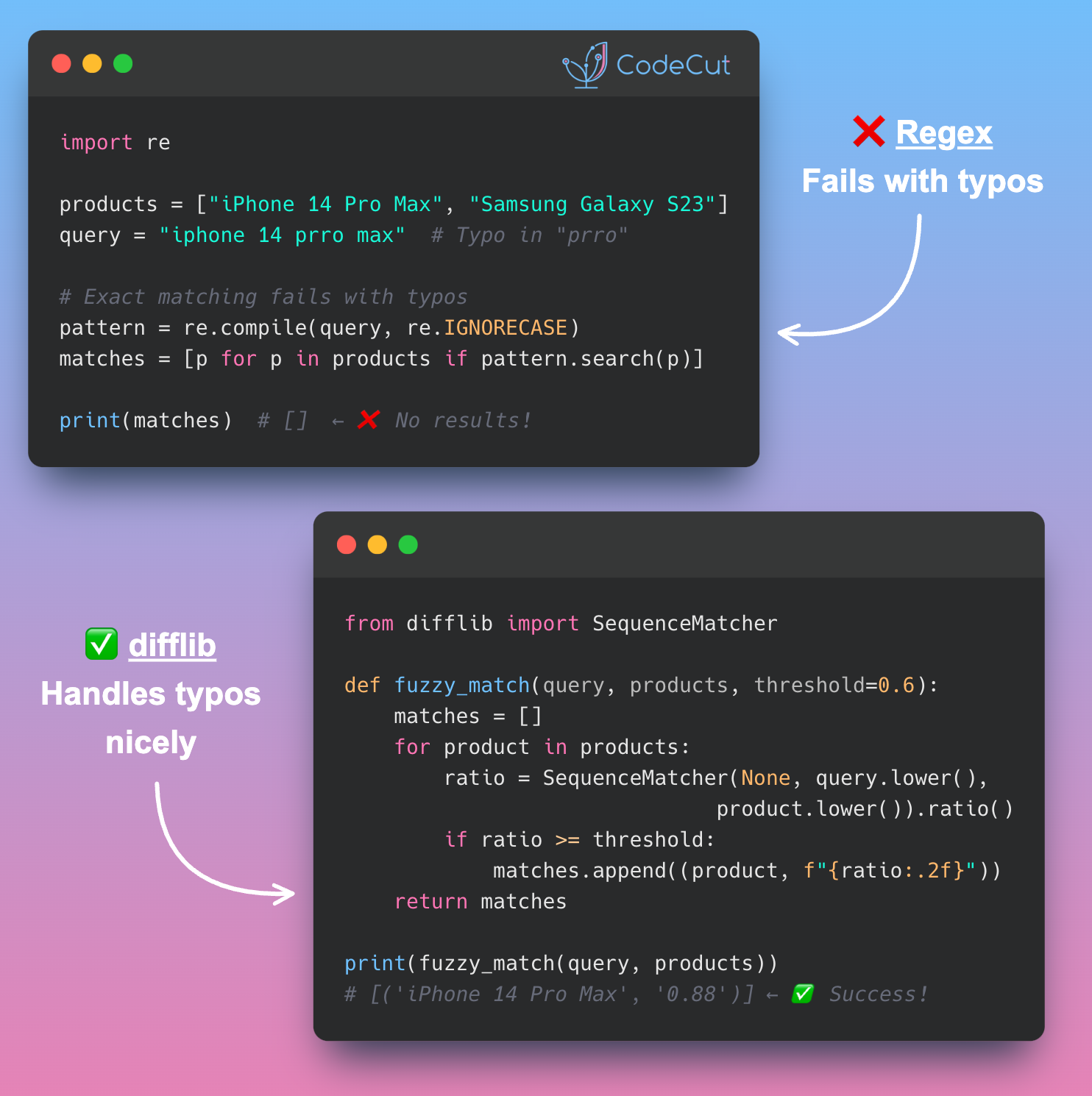
Have you ever spent hours cleaning text data with regex, only to find that “iPhone 14 Pro Max” still doesn’t match “iPhone 14 Prro Max”?
Regex preprocessing achieves only exact matching after cleaning, failing completely with typos and character variations that exact matching cannot handle.
Solution
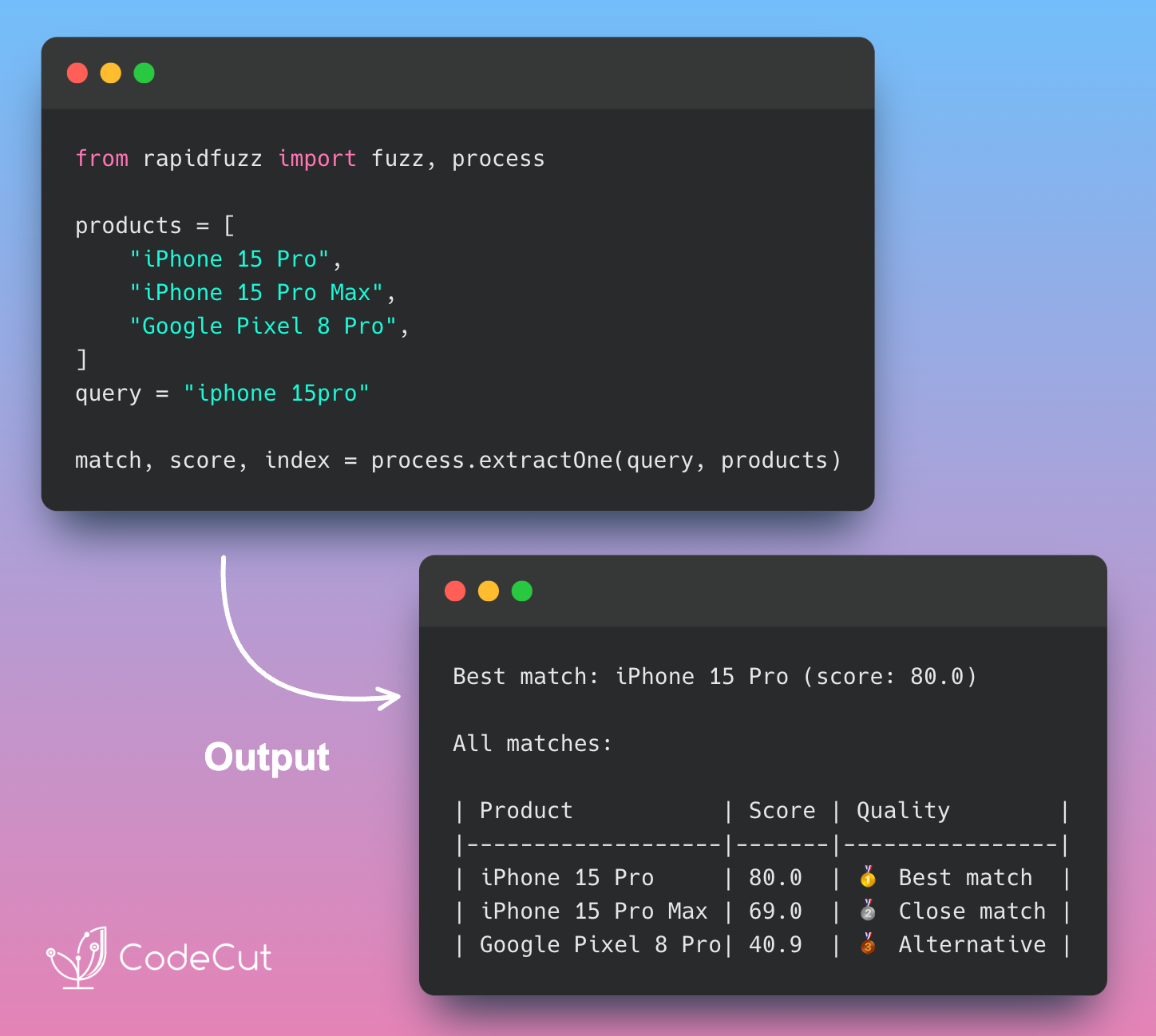
difflib provides similarity scoring that tolerates typos and character variations, enabling approximate matching where regex fails.
The library calculates similarity ratios between strings:

Handles typos like “Prro” vs “Pro” automatically
Returns similarity scores from 0.0 to 1.0 for ranking matches
Works with character-level variations without preprocessing
Enables fuzzy matching for real-world messy data

Perfect for product matching, name deduplication, and any scenario where exact matches aren’t realistic.

📖 View Full Article

Build Portable Python Scripts with uv PEP 723

Problem
Python scripts break when moved between environments because dependencies are scattered across requirements.txt files, virtual environments, or undocumented assumptions.
Solution
uv enables PEP 723 inline script dependencies, embedding all requirements directly in the script header for true portability.
Use uv add –script script.py dependency to automatically add metadata to any Python file.
Key benefits:

Self-contained scripts with zero external files
Easy command-line dependency management
Perfect for sharing data analysis code across teams

📖 View Full Article

Stay Current with CodeCut

Actionable Python tips, curated for busy data pros. Skim in under 2 minutes, three times a week.

.codecut-subscribe-form .codecut-input {
background: #2F2D2E !important;
border: 1px solid #72BEFA !important;
color: #FFFFFF !important;
}
.codecut-subscribe-form .codecut-input::placeholder {
color: #999999 !important;
}
.codecut-subscribe-form .codecut-subscribe-btn {
background: #72BEFA !important;
color: #2F2D2E !important;
}
.codecut-subscribe-form .codecut-subscribe-btn:hover {
background: #5aa8e8 !important;
}

.codecut-subscribe-form {
max-width: 650px;
display: flex;
flex-direction: column;
gap: 8px;
}
.codecut-input {
-webkit-appearance: none;
-moz-appearance: none;
appearance: none;
background: #FFFFFF;
border-radius: 8px !important;
padding: 8px 12px;
font-family: ‘Comfortaa’, sans-serif !important;
font-size: 14px !important;
color: #333333;
border: none !important;
outline: none;
width: 100%;
box-sizing: border-box;
}
input[type=”email”].codecut-input {
border-radius: 8px !important;
}
.codecut-input::placeholder {
color: #666666;
}
.codecut-email-row {
display: flex;
align-items: stretch;
height: 36px;
gap: 8px;
}
.codecut-email-row .codecut-input {
flex: 1;
}
.codecut-subscribe-btn {
background: #72BEFA;
color: #2F2D2E;
border: none;
border-radius: 8px;
padding: 8px 14px;
font-family: ‘Comfortaa’, sans-serif;
font-size: 14px;
font-weight: 500;
cursor: pointer;
text-decoration: none;
display: flex;
align-items: center;
justify-content: center;
transition: background 0.3s ease;
}
.codecut-subscribe-btn:hover {
background: #5aa8e8;
}
.codecut-subscribe-btn:disabled {
background: #999;
cursor: not-allowed;
}
.codecut-message {
font-family: ‘Comfortaa’, sans-serif;
font-size: 12px;
padding: 8px;
border-radius: 6px;
display: none;
}
.codecut-message.success {
background: #d4edda;
color: #155724;
display: block;
}
@media (max-width: 480px) {
.codecut-email-row {
flex-direction: column;
height: auto;
gap: 8px;
}
.codecut-input {
border-radius: 8px;
height: 36px;
}
.codecut-subscribe-btn {
width: 100%;
text-align: center;
border-radius: 8px;
height: 36px;
}
}

Subscribe

Newsletter #204: Build Fuzzy Text Matching with difflib Over regex Read More »

4 Text Similarity Tools: When Regex Isn’t Enough

Table of Contents

Introduction
Text Preprocessing with regex
difflib: Python’s Built-in Sequence Matching
RapidFuzz: High-Performance Fuzzy String Matching
Sentence Transformers: AI-Powered Semantic Similarity
When to Use Each Tool
Final Thoughts

Introduction
Text similarity is a fundamental challenge in data science. Whether you’re detecting duplicates, clustering content, or building search systems, the core question remains: how do you determine when different text strings represent the same concept?
Traditional exact matching fails with real-world data. Consider these common text similarity challenges:

Formatting variations: “iPhone® 14 Pro Max” vs “IPHONE 14 pro max” – identical products with different capitalization and symbols.
Missing spaces: “iPhone14ProMax” vs “iPhone 14 Pro Max” – same product name, completely different character sequences.
Extra information: “Apple iPhone 14 Pro Max 256GB” vs “iPhone 14 Pro Max” – additional details that obscure the core product.
Semantic equivalence: “wireless headphones” vs “bluetooth earbuds” – different words describing similar concepts.

These challenges require different approaches:

Regex preprocessing cleans formatting inconsistencies
difflib provides character-level similarity scoring
RapidFuzz handles fuzzy matching at scale
Sentence Transformers understands semantic relationships

Stay Current with CodeCut
Actionable Python tips, curated for busy data pros. Skim in under 2 minutes, three times a week.

.codecut-subscribe-form .codecut-input {
background: #2F2D2E !important;
border: 1px solid #72BEFA !important;
color: #FFFFFF !important;
}
.codecut-subscribe-form .codecut-input::placeholder {
color: #999999 !important;
}
.codecut-subscribe-form .codecut-subscribe-btn {
background: #72BEFA !important;
color: #2F2D2E !important;
}
.codecut-subscribe-form .codecut-subscribe-btn:hover {
background: #5aa8e8 !important;
}

.codecut-subscribe-form {
max-width: 650px;
display: flex;
flex-direction: column;
gap: 8px;
}

.codecut-input {
-webkit-appearance: none;
-moz-appearance: none;
appearance: none;
background: #FFFFFF;
border-radius: 8px !important;
padding: 8px 12px;
font-family: ‘Comfortaa’, sans-serif !important;
font-size: 14px !important;
color: #333333;
border: none !important;
outline: none;
width: 100%;
box-sizing: border-box;
}

input[type=”email”].codecut-input {
border-radius: 8px !important;
}

.codecut-input::placeholder {
color: #666666;
}

.codecut-email-row {
display: flex;
align-items: stretch;
height: 36px;
gap: 8px;
}

.codecut-email-row .codecut-input {
flex: 1;
}

.codecut-subscribe-btn {
background: #72BEFA;
color: #2F2D2E;
border: none;
border-radius: 8px;
padding: 8px 14px;
font-family: ‘Comfortaa’, sans-serif;
font-size: 14px;
font-weight: 500;
cursor: pointer;
text-decoration: none;
display: flex;
align-items: center;
justify-content: center;
transition: background 0.3s ease;
}

.codecut-subscribe-btn:hover {
background: #5aa8e8;
}

.codecut-subscribe-btn:disabled {
background: #999;
cursor: not-allowed;
}

.codecut-message {
font-family: ‘Comfortaa’, sans-serif;
font-size: 12px;
padding: 8px;
border-radius: 6px;
display: none;
}

.codecut-message.success {
background: #d4edda;
color: #155724;
display: block;
}

/* Mobile responsive */
@media (max-width: 480px) {
.codecut-email-row {
flex-direction: column;
height: auto;
gap: 8px;
}

.codecut-input {
border-radius: 8px;
height: 36px;
}

.codecut-subscribe-btn {
width: 100%;
text-align: center;
border-radius: 8px;
height: 36px;
}
}

Subscribe
Key Takeaways
Here’s what you’ll learn:

Handle 90% of text variations with regex preprocessing and RapidFuzz matching
Achieve 5× faster fuzzy matching compared to difflib with production-grade algorithms
Unlock semantic understanding with Sentence Transformers for conceptual similarity
Navigate decision trees from simple string matching to AI-powered text analysis
Implement scalable text similarity pipelines for real-world data challenges

Text Preprocessing with regex
Raw text data contains special characters, inconsistent capitalization, and formatting variations. Regular expressions provide the first line of defense by normalizing text.
These pattern-matching tools, accessed through Python’s re module, excel at finding and replacing text patterns like symbols, whitespace, and formatting inconsistencies.
Let’s start with a realistic dataset that demonstrates common text similarity challenges:
import re

# Sample messy text data
messy_products = [
"iPhone® 14 Pro Max",
"IPHONE 14 pro max",
"Apple iPhone 14 Pro Max 256GB",
"iPhone14ProMax",
"i-Phone 14 Pro Max",
"Samsung Galaxy S23 Ultra",
"SAMSUNG Galaxy S23 Ultra 5G",
"Galaxy S23 Ultra (512GB)",
"Samsung S23 Ultra",
"wireless headphones",
"bluetooth earbuds",
"Sony WH-1000XM4 Headphones",
"WH-1000XM4 Wireless Headphones",
]

With our test data established, we can build a comprehensive preprocessing function to handle these variations:
def preprocess_product_name(text):
"""Clean product names for better similarity matching."""
# Convert to lowercase
text = text.lower()

# Remove special characters and symbols
text = re.sub(r"[®™©]", "", text)
text = re.sub(r"[^\w\s-]", " ", text)

# Normalize spaces and hyphens
text = re.sub(r"[-_]+", " ", text)
text = re.sub(r"\s+", " ", text)

# Remove size/capacity info in parentheses
text = re.sub(r"\([^)]*\)", "", text)

return text.strip()

> 📖 **Related**: These regex patterns use traditional syntax for maximum compatibility. For more readable pattern construction, explore [PRegEx for human-friendly regex syntax](https://codecut.ai/pregex-write-human-readable-regular-expressions-in-python-2/).

# Apply preprocessing to sample data
print("Before and after preprocessing:")
print("-" * 50)
for product in messy_products[:8]:
cleaned = preprocess_product_name(product)
print(f"Original: {product}")
print(f"Cleaned: {cleaned}")
print()

Output:
Before and after preprocessing:
————————————————–
Original: iPhone® 14 Pro Max
Cleaned: iphone 14 pro max

Original: IPHONE 14 pro max
Cleaned: iphone 14 pro max

Original: Apple iPhone 14 Pro Max 256GB
Cleaned: apple iphone 14 pro max 256gb

Original: iPhone14ProMax
Cleaned: iphone14promax

Original: i-Phone 14 Pro Max
Cleaned: i phone 14 pro max

Original: Samsung Galaxy S23 Ultra
Cleaned: samsung galaxy s23 ultra

Original: SAMSUNG Galaxy S23 Ultra 5G
Cleaned: samsung galaxy s23 ultra 5g

Original: Galaxy S23 Ultra (512GB)
Cleaned: galaxy s23 ultra

Perfect matches emerge after cleaning formatting inconsistencies. Products 1 and 2 now match exactly, demonstrating regex’s power for standardization.
However, regex preprocessing fails with critical variations. Let’s test exact matching after preprocessing:
# Test exact matching after regex preprocessing
test_cases = [
("iPhone® 14 Pro Max", "IPHONE 14 pro max", "Case + symbols"),
("iPhone® 14 Pro Max", "Apple iPhone 14 Pro Max 256GB", "Extra words"),
("iPhone® 14 Pro Max", "iPhone14ProMax", "Missing spaces"),
("Apple iPhone 14 Pro Max", "iPhone 14 Pro Max Apple", "Word order"),
("wireless headphones", "bluetooth earbuds", "Semantic gap")
]

# Test each case
for product1, product2, issue_type in test_cases:
cleaned1 = preprocess_product_name(product1)
cleaned2 = preprocess_product_name(product2)
is_match = cleaned1 == cleaned2
result = "✓" if is_match else "✗"
print(f"{result} {issue_type}: {is_match}")

Output:
✓ Case + symbols: True
✗ Extra words: False
✗ Missing spaces: False
✗ Word order: False
✗ Semantic gap: False

Regex achieves only 1/5 exact matches despite preprocessing. Success: case and symbol standardization. Failures:

Extra words: “apple iphone” vs “iphone” remain different
Missing spaces: “iphone14promax” vs “iphone 14 pro max” fail matching
Word reordering: Different arrangements of identical words don’t match
Semantic gaps: No shared text patterns between conceptually similar products

These limitations require character-level similarity measurement instead of exact matching. Python’s built-in difflib module provides the solution by analyzing character sequences and calculating similarity ratios.
difflib: Python’s Built-in Sequence Matching
difflib is a Python built-in module that provides similarity ratios. It analyzes character sequences to calculate similarity scores between text strings.
from difflib import SequenceMatcher

def calculate_similarity(text1, text2):
"""Calculate similarity ratio between two strings."""
return SequenceMatcher(None, text1, text2).ratio()

# Test difflib on key similarity challenges
test_cases = [
("iphone 14 pro max", "iphone 14 pro max", "Exact match"),
("iphone 14 pro max", "i phone 14 pro max", "Spacing variation"),
("iphone 14 pro max", "apple iphone 14 pro max 256gb", "Extra words"),
("iphone 14 pro max", "iphone14promax", "Missing spaces"),
("iphone 14 pro max", "iphone 14 prro max", "Typo"),
("apple iphone 14 pro max", "iphone 14 pro max apple", "Word order"),
("wireless headphones", "bluetooth earbuds", "Semantic gap")
]

for text1, text2, test_type in test_cases:
score = calculate_similarity(text1, text2)
result = "✓" if score >= 0.85 else "✗"
print(f"{result} {test_type}: {score:.3f}")

Output:
✓ Exact match: 1.000
✓ Spacing variation: 0.971
✗ Extra words: 0.739
✓ Missing spaces: 0.903
✓ Typo: 0.971
✗ Word order: 0.739
✗ Semantic gap: 0.333

difflib achieves 4/7 successful matches (≥0.85 threshold). Successes: exact matches, spacing variations, typos, and missing spaces. Failures:

Word reordering: “Apple iPhone” vs “iPhone Apple” drops to 0.739
Extra content: Additional words reduce scores to 0.739
Semantic gaps: Different words for same concept score only 0.333

These results highlight difflib’s core limitation: sensitivity to word order and poor handling of extra content. RapidFuzz tackles word reordering and extra content issues with sophisticated matching algorithms that understand token relationships beyond simple character comparison.
RapidFuzz: High-Performance Fuzzy String Matching
RapidFuzz is a high-performance fuzzy string matching library with C++ optimization. It addresses word reordering and complex text variations that difflib cannot handle effectively.
To install RapidFuzz, run:
pip install rapidfuzz

Let’s test RapidFuzz on the same test cases:
from rapidfuzz import fuzz

# Test RapidFuzz using WRatio algorithm
test_cases = [
("iphone 14 pro max", "iphone 14 pro max", "Exact match"),
("iphone 14 pro max", "i phone 14 pro max", "Spacing variation"),
("iphone 14 pro max", "apple iphone 14 pro max 256gb", "Extra words"),
("iphone 14 pro max", "iphone14promax", "Missing spaces"),
("iphone 14 pro max", "iphone 14 prro max", "Typo"),
("apple iphone 14 pro max", "iphone 14 pro max apple", "Word order"),
("wireless headphones", "bluetooth earbuds", "Semantic gap"),
("macbook pro", "laptop computer", "Conceptual gap")
]

for text1, text2, test_type in test_cases:
score = fuzz.WRatio(text1, text2) / 100 # Convert to 0-1 scale
result = "✓" if score >= 0.85 else "✗"
print(f"{result} {test_type}: {score:.3f}")

Output:
✓ Exact match: 1.000
✓ Spacing variation: 0.971
✓ Extra words: 0.900
✓ Missing spaces: 0.903
✓ Typo: 0.971
✓ Word order: 0.950
✗ Semantic gap: 0.389
✗ Conceptual gap: 0.385

RapidFuzz achieves 6/8 successful matches (≥0.85 threshold). Successes: exact matches, spacing, extra words, missing spaces, typos, and word order. Failures:

Semantic gaps: “wireless headphones” vs “bluetooth earbuds” scores only 0.389
Conceptual relationships: “macbook pro” vs “laptop computer” achieves just 0.385
Pattern-only matching: Cannot understand that different words describe same products

These failures reveal RapidFuzz’s fundamental limitation: it excels at text-level variations but cannot understand meaning. When products serve identical purposes using different terminology, we need semantic understanding rather than pattern matching.
Sentence Transformers addresses this gap through neural language models that comprehend conceptual relationships.
Sentence Transformers: AI-Powered Semantic Similarity
Surface-level text matching misses semantic relationships. Sentence Transformers, a library built on transformer neural networks, can understand that “wireless headphones” and “bluetooth earbuds” serve identical purposes by analyzing meaning rather than just character patterns.
To install Sentence Transformers, run:
pip install sentence-transformers

Let’s test Sentence Transformers on the same test cases:
from sentence_transformers import SentenceTransformer
from sklearn.metrics.pairwise import cosine_similarity

# Test semantic understanding capabilities
model = SentenceTransformer('all-MiniLM-L6-v2')

test_cases = [
("iphone 14 pro max", "iphone 14 pro max", "Exact match"),
("iphone 14 pro max", "i phone 14 pro max", "Spacing variation"),
("iphone 14 pro max", "apple iphone 14 pro max 256gb", "Extra words"),
("apple iphone 14 pro max", "iphone 14 pro max apple", "Word order"),
("wireless headphones", "bluetooth earbuds", "Semantic match"),
("macbook pro", "laptop computer", "Conceptual match"),
("gaming console", "video game system", "Synonym match"),
("smartphone", "feature phone", "Related concepts")
]

for text1, text2, test_type in test_cases:
embeddings = model.encode([text1, text2])
score = cosine_similarity([embeddings[0]], [embeddings[1]])[0][0]
result = "✓" if score >= 0.65 else "✗"
print(f"{result} {test_type}: {score:.3f}")

Output:
✓ Exact match: 1.000
✓ Spacing variation: 0.867
✓ Extra words: 0.818
✓ Word order: 0.988
✗ Semantic match: 0.618
✓ Conceptual match: 0.652
✓ Synonym match: 0.651
✗ Related concepts: 0.600

Sentence Transformers achieves 7/8 successful matches (≥0.65 threshold). Successes: all text variations plus semantic relationships. Failures:

Edge case semantics: “smartphone” vs “feature phone” scores only 0.600
Processing overhead: Neural inference requires significantly more computation than string algorithms
Memory requirements: Models need substantial RAM (100MB+ for basic models, GBs for advanced ones)
Resource scaling: Large datasets may require GPU acceleration for reasonable performance

Sentence Transformers unlocks semantic understanding at computational cost. The decision depends on whether conceptual relationships provide sufficient business value to justify resource overhead.
For implementing semantic search at production scale, see our pgvector and Ollama integration guide.
When to Use Each Tool
Data Preprocessing (Always Start Here)
Use regex for:

Removing special characters and symbols
Standardizing case and formatting
Cleaning messy product names
Preparing text for similarity analysis

Character-Level Similarity
Use difflib when:

Learning text similarity concepts
Working with small datasets (<1000 records)
External dependencies not allowed
Simple typo detection is sufficient

Production Fuzzy Matching
Use RapidFuzz when:

Processing thousands of records
Need fast approximate matching
Handling abbreviations and variations
Text-level similarity is sufficient

Semantic Understanding
Use Sentence Transformers when:

Conceptual relationships matter
“wireless headphones” should match “bluetooth earbuds”
Building recommendation systems
Multilingual content similarity
Compute resources are available

Performance vs Accuracy Tradeoff

Requirement
Recommended Tool

Speed > Accuracy
RapidFuzz

Accuracy > Speed
Sentence Transformers

No Dependencies
difflib

Preprocessing Only
regex

Decision Tree
When facing a new text similarity project, use this visual guide to navigate from problem requirements to the optimal tool selection:

Final Thoughts
When facing complex challenges, start with the most basic solution first, identify where it fails through testing, then strategically upgrade the failing component. This article demonstrates exactly this progression – from simple regex preprocessing to sophisticated semantic understanding.
Build complexity incrementally based on real limitations, not anticipated ones.

📚 For comprehensive production-ready data science practices, check out Production-Ready Data Science.

📚 Want to go deeper? Learning new techniques is the easy part. Knowing how to structure, test, and deploy them is what separates side projects from real work. My book shows you how to build data science projects that actually make it to production. Get the book →

Stay Current with CodeCut
Actionable Python tips, curated for busy data pros. Skim in under 2 minutes, three times a week.

.codecut-subscribe-form .codecut-input {
background: #2F2D2E !important;
border: 1px solid #72BEFA !important;
color: #FFFFFF !important;
}
.codecut-subscribe-form .codecut-input::placeholder {
color: #999999 !important;
}
.codecut-subscribe-form .codecut-subscribe-btn {
background: #72BEFA !important;
color: #2F2D2E !important;
}
.codecut-subscribe-form .codecut-subscribe-btn:hover {
background: #5aa8e8 !important;
}

.codecut-subscribe-form {
max-width: 650px;
display: flex;
flex-direction: column;
gap: 8px;
}

.codecut-input {
-webkit-appearance: none;
-moz-appearance: none;
appearance: none;
background: #FFFFFF;
border-radius: 8px !important;
padding: 8px 12px;
font-family: ‘Comfortaa’, sans-serif !important;
font-size: 14px !important;
color: #333333;
border: none !important;
outline: none;
width: 100%;
box-sizing: border-box;
}

input[type=”email”].codecut-input {
border-radius: 8px !important;
}

.codecut-input::placeholder {
color: #666666;
}

.codecut-email-row {
display: flex;
align-items: stretch;
height: 36px;
gap: 8px;
}

.codecut-email-row .codecut-input {
flex: 1;
}

.codecut-subscribe-btn {
background: #72BEFA;
color: #2F2D2E;
border: none;
border-radius: 8px;
padding: 8px 14px;
font-family: ‘Comfortaa’, sans-serif;
font-size: 14px;
font-weight: 500;
cursor: pointer;
text-decoration: none;
display: flex;
align-items: center;
justify-content: center;
transition: background 0.3s ease;
}

.codecut-subscribe-btn:hover {
background: #5aa8e8;
}

.codecut-subscribe-btn:disabled {
background: #999;
cursor: not-allowed;
}

.codecut-message {
font-family: ‘Comfortaa’, sans-serif;
font-size: 12px;
padding: 8px;
border-radius: 6px;
display: none;
}

.codecut-message.success {
background: #d4edda;
color: #155724;
display: block;
}

/* Mobile responsive */
@media (max-width: 480px) {
.codecut-email-row {
flex-direction: column;
height: auto;
gap: 8px;
}

.codecut-input {
border-radius: 8px;
height: 36px;
}

.codecut-subscribe-btn {
width: 100%;
text-align: center;
border-radius: 8px;
height: 36px;
}
}

Subscribe
4 Text Similarity Tools: When Regex Isn’t Enough Read More »

Newsletter #203: Semantic Search Without Complex Setup Headaches

📅 Today’s Picks

Semantic Search Without Complex Setup Headaches

Problem
Have you ever found yourself looking up SQL syntax when you just want to query your database?
Complex joins and subqueries create friction between you and your data insights.
Solution
The semantic search workflow connects natural language questions to your existing PostgreSQL tables.
The complete workflow includes:

Database setup with PostgreSQL and pgvector extension
Content preprocessing for optimal embeddings
Embedding pipeline using Ollama models
Vector storage with SQLAlchemy integration
Query interface for natural language searches
Response generation combining retrieval and LLMs

Query your database with plain English instead of SQL syntax.

📖 View Full Article

Stay Current with CodeCut

Actionable Python tips, curated for busy data pros. Skim in under 2 minutes, three times a week.

.codecut-subscribe-form .codecut-input {
background: #2F2D2E !important;
border: 1px solid #72BEFA !important;
color: #FFFFFF !important;
}
.codecut-subscribe-form .codecut-input::placeholder {
color: #999999 !important;
}
.codecut-subscribe-form .codecut-subscribe-btn {
background: #72BEFA !important;
color: #2F2D2E !important;
}
.codecut-subscribe-form .codecut-subscribe-btn:hover {
background: #5aa8e8 !important;
}

.codecut-subscribe-form {
max-width: 650px;
display: flex;
flex-direction: column;
gap: 8px;
}
.codecut-input {
-webkit-appearance: none;
-moz-appearance: none;
appearance: none;
background: #FFFFFF;
border-radius: 8px !important;
padding: 8px 12px;
font-family: ‘Comfortaa’, sans-serif !important;
font-size: 14px !important;
color: #333333;
border: none !important;
outline: none;
width: 100%;
box-sizing: border-box;
}
input[type=”email”].codecut-input {
border-radius: 8px !important;
}
.codecut-input::placeholder {
color: #666666;
}
.codecut-email-row {
display: flex;
align-items: stretch;
height: 36px;
gap: 8px;
}
.codecut-email-row .codecut-input {
flex: 1;
}
.codecut-subscribe-btn {
background: #72BEFA;
color: #2F2D2E;
border: none;
border-radius: 8px;
padding: 8px 14px;
font-family: ‘Comfortaa’, sans-serif;
font-size: 14px;
font-weight: 500;
cursor: pointer;
text-decoration: none;
display: flex;
align-items: center;
justify-content: center;
transition: background 0.3s ease;
}
.codecut-subscribe-btn:hover {
background: #5aa8e8;
}
.codecut-subscribe-btn:disabled {
background: #999;
cursor: not-allowed;
}
.codecut-message {
font-family: ‘Comfortaa’, sans-serif;
font-size: 12px;
padding: 8px;
border-radius: 6px;
display: none;
}
.codecut-message.success {
background: #d4edda;
color: #155724;
display: block;
}
@media (max-width: 480px) {
.codecut-email-row {
flex-direction: column;
height: auto;
gap: 8px;
}
.codecut-input {
border-radius: 8px;
height: 36px;
}
.codecut-subscribe-btn {
width: 100%;
text-align: center;
border-radius: 8px;
height: 36px;
}
}

Subscribe
Newsletter #203: Semantic Search Without Complex Setup Headaches Read More »

Newsletter #202: Automate Code Quality Without Manual Checking

📅 Today’s Picks

Automate Code Quality Without Manual Checking

Problem
Code quality is essential for data science projects, but manual checking consumes valuable time that could be spent on analysis and insights.
Solution
Pre-commit automates code quality validation before every commit.
Key benefits:

Automatic formatting validation
Comprehensive linting checks
Type checking before commits

And all you need is a simple .pre-commit-config.yaml configuration file.

📖 View Full Article

Deploy ML Models Without Docker Hub Costs

Problem
Docker Hub forces you into an expensive choice: pay mounting fees for private repositories or risk exposing your proprietary code publicly.
Plus, Docker transfers entire multi-gigabyte images even for small code changes, wasting time and bandwidth.
Solution
Unregistry eliminates registries entirely with docker pussh – push images directly to remote servers over SSH.
Key benefits:

Smart transfers: only sends changed parts, not the whole image
No registry infrastructure to set up or maintain
Works with existing SSH connections
Faster deployments by avoiding duplicate data transfers

📖 View Full Article

Stay Current with CodeCut

Actionable Python tips, curated for busy data pros. Skim in under 2 minutes, three times a week.

.codecut-subscribe-form .codecut-input {
background: #2F2D2E !important;
border: 1px solid #72BEFA !important;
color: #FFFFFF !important;
}
.codecut-subscribe-form .codecut-input::placeholder {
color: #999999 !important;
}
.codecut-subscribe-form .codecut-subscribe-btn {
background: #72BEFA !important;
color: #2F2D2E !important;
}
.codecut-subscribe-form .codecut-subscribe-btn:hover {
background: #5aa8e8 !important;
}

.codecut-subscribe-form {
max-width: 650px;
display: flex;
flex-direction: column;
gap: 8px;
}
.codecut-input {
-webkit-appearance: none;
-moz-appearance: none;
appearance: none;
background: #FFFFFF;
border-radius: 8px !important;
padding: 8px 12px;
font-family: ‘Comfortaa’, sans-serif !important;
font-size: 14px !important;
color: #333333;
border: none !important;
outline: none;
width: 100%;
box-sizing: border-box;
}
input[type=”email”].codecut-input {
border-radius: 8px !important;
}
.codecut-input::placeholder {
color: #666666;
}
.codecut-email-row {
display: flex;
align-items: stretch;
height: 36px;
gap: 8px;
}
.codecut-email-row .codecut-input {
flex: 1;
}
.codecut-subscribe-btn {
background: #72BEFA;
color: #2F2D2E;
border: none;
border-radius: 8px;
padding: 8px 14px;
font-family: ‘Comfortaa’, sans-serif;
font-size: 14px;
font-weight: 500;
cursor: pointer;
text-decoration: none;
display: flex;
align-items: center;
justify-content: center;
transition: background 0.3s ease;
}
.codecut-subscribe-btn:hover {
background: #5aa8e8;
}
.codecut-subscribe-btn:disabled {
background: #999;
cursor: not-allowed;
}
.codecut-message {
font-family: ‘Comfortaa’, sans-serif;
font-size: 12px;
padding: 8px;
border-radius: 6px;
display: none;
}
.codecut-message.success {
background: #d4edda;
color: #155724;
display: block;
}
@media (max-width: 480px) {
.codecut-email-row {
flex-direction: column;
height: auto;
gap: 8px;
}
.codecut-input {
border-radius: 8px;
height: 36px;
}
.codecut-subscribe-btn {
width: 100%;
text-align: center;
border-radius: 8px;
height: 36px;
}
}

Subscribe
Newsletter #202: Automate Code Quality Without Manual Checking Read More »

Newsletter #201: itertools.combinations() for Feature Interactions

📅 Today’s Picks

itertools.combinations() for Feature Interactions

Problem
Writing nested loops for all feature pair combinations gets messy with more features and easily introduces bugs.
Solution
itertools.combinations() automatically generates all unique pairs without the complexity and bugs.

📖 View Full Article

Production-Ready RAG Evaluation Workflow

Problem
Many teams deploy RAG systems without systematic evaluation, missing critical quality issues that only become visible with real users.
Solution
MLflow evaluation framework validates RAG systems through systematic checks:

Faithfulness metrics – Ensures answers align with retrieved documents
Answer relevancy scoring – Matches responses to user queries
Context recall – Verifies all relevant information was retrieved from documents

📖 View Full Article

Stay Current with CodeCut

Actionable Python tips, curated for busy data pros. Skim in under 2 minutes, three times a week.

.codecut-subscribe-form .codecut-input {
background: #2F2D2E !important;
border: 1px solid #72BEFA !important;
color: #FFFFFF !important;
}
.codecut-subscribe-form .codecut-input::placeholder {
color: #999999 !important;
}
.codecut-subscribe-form .codecut-subscribe-btn {
background: #72BEFA !important;
color: #2F2D2E !important;
}
.codecut-subscribe-form .codecut-subscribe-btn:hover {
background: #5aa8e8 !important;
}

.codecut-subscribe-form {
max-width: 650px;
display: flex;
flex-direction: column;
gap: 8px;
}
.codecut-input {
-webkit-appearance: none;
-moz-appearance: none;
appearance: none;
background: #FFFFFF;
border-radius: 8px !important;
padding: 8px 12px;
font-family: ‘Comfortaa’, sans-serif !important;
font-size: 14px !important;
color: #333333;
border: none !important;
outline: none;
width: 100%;
box-sizing: border-box;
}
input[type=”email”].codecut-input {
border-radius: 8px !important;
}
.codecut-input::placeholder {
color: #666666;
}
.codecut-email-row {
display: flex;
align-items: stretch;
height: 36px;
gap: 8px;
}
.codecut-email-row .codecut-input {
flex: 1;
}
.codecut-subscribe-btn {
background: #72BEFA;
color: #2F2D2E;
border: none;
border-radius: 8px;
padding: 8px 14px;
font-family: ‘Comfortaa’, sans-serif;
font-size: 14px;
font-weight: 500;
cursor: pointer;
text-decoration: none;
display: flex;
align-items: center;
justify-content: center;
transition: background 0.3s ease;
}
.codecut-subscribe-btn:hover {
background: #5aa8e8;
}
.codecut-subscribe-btn:disabled {
background: #999;
cursor: not-allowed;
}
.codecut-message {
font-family: ‘Comfortaa’, sans-serif;
font-size: 12px;
padding: 8px;
border-radius: 6px;
display: none;
}
.codecut-message.success {
background: #d4edda;
color: #155724;
display: block;
}
@media (max-width: 480px) {
.codecut-email-row {
flex-direction: column;
height: auto;
gap: 8px;
}
.codecut-input {
border-radius: 8px;
height: 36px;
}
.codecut-subscribe-btn {
width: 100%;
text-align: center;
border-radius: 8px;
height: 36px;
}
}

Subscribe
Newsletter #201: itertools.combinations() for Feature Interactions Read More »

5 Essential Itertools for Data Science

Table of Contents

Introduction
Feature Interactions: From Nested Loops to Combinations
Custom Code
With Itertools

Polynomial Features: From Manual Assignments to Automated Generation
Custom Code
With Itertools

Sequence Patterns: From Manual Tracking to Permutations
Custom Code
With Itertools

Cartesian Products: From Nested Loops to Product
Custom Code
With Itertools

Efficient Sampling: From Full Data Loading to Islice
Custom Code
With Itertools

Final Thoughts

Introduction
Imagine you write nested loops for combinatorial features and they work great initially. However, as your feature engineering scales, this custom code becomes buggy and nearly impossible to debug or extend.
for i in range(len(numerical_features)):
for j in range(i + 1, len(numerical_features)):
df[f"{numerical_features[i]}_x_{numerical_features[j]}"] = (
df[numerical_features[i]] * df[numerical_features[j]]
)

Itertools provides battle-tested, efficient functions that make data science code faster and more reliable. Here are the five most useful functions for data science projects:

combinations() – Generate unique pairs from lists without repetition
combinations_with_replacement() – Generate combinations including self-pairs
permutations() – Generate all possible orderings
product() – Create all possible pairings across multiple lists
islice() – Extract slices from iterators without loading full datasets

Stay Current with CodeCut
Actionable Python tips, curated for busy data pros. Skim in under 2 minutes, three times a week.

.codecut-subscribe-form .codecut-input {
background: #2F2D2E !important;
border: 1px solid #72BEFA !important;
color: #FFFFFF !important;
}
.codecut-subscribe-form .codecut-input::placeholder {
color: #999999 !important;
}
.codecut-subscribe-form .codecut-subscribe-btn {
background: #72BEFA !important;
color: #2F2D2E !important;
}
.codecut-subscribe-form .codecut-subscribe-btn:hover {
background: #5aa8e8 !important;
}

.codecut-subscribe-form {
max-width: 650px;
display: flex;
flex-direction: column;
gap: 8px;
}

.codecut-input {
-webkit-appearance: none;
-moz-appearance: none;
appearance: none;
background: #FFFFFF;
border-radius: 8px !important;
padding: 8px 12px;
font-family: ‘Comfortaa’, sans-serif !important;
font-size: 14px !important;
color: #333333;
border: none !important;
outline: none;
width: 100%;
box-sizing: border-box;
}

input[type=”email”].codecut-input {
border-radius: 8px !important;
}

.codecut-input::placeholder {
color: #666666;
}

.codecut-email-row {
display: flex;
align-items: stretch;
height: 36px;
gap: 8px;
}

.codecut-email-row .codecut-input {
flex: 1;
}

.codecut-subscribe-btn {
background: #72BEFA;
color: #2F2D2E;
border: none;
border-radius: 8px;
padding: 8px 14px;
font-family: ‘Comfortaa’, sans-serif;
font-size: 14px;
font-weight: 500;
cursor: pointer;
text-decoration: none;
display: flex;
align-items: center;
justify-content: center;
transition: background 0.3s ease;
}

.codecut-subscribe-btn:hover {
background: #5aa8e8;
}

.codecut-subscribe-btn:disabled {
background: #999;
cursor: not-allowed;
}

.codecut-message {
font-family: ‘Comfortaa’, sans-serif;
font-size: 12px;
padding: 8px;
border-radius: 6px;
display: none;
}

.codecut-message.success {
background: #d4edda;
color: #155724;
display: block;
}

/* Mobile responsive */
@media (max-width: 480px) {
.codecut-email-row {
flex-direction: column;
height: auto;
gap: 8px;
}

.codecut-input {
border-radius: 8px;
height: 36px;
}

.codecut-subscribe-btn {
width: 100%;
text-align: center;
border-radius: 8px;
height: 36px;
}
}

Subscribe

Key Takeaways
Here’s what you’ll learn:

Replace complex nested loops with battle-tested itertools functions for feature interactions
Generate polynomial features systematically using combinations_with_replacement
Create sequence patterns and categorical combinations without manual index management
Sample large datasets efficiently with islice to avoid memory waste
Eliminate feature engineering bugs with mathematically precise combinatorial functions

Setup
Before we dive into the examples, let’s set up the sample dataset.
import pandas as pd
from itertools import (
combinations,
combinations_with_replacement,
product,
islice,
permutations,
)
import numpy as np

# Create simple sample dataset
np.random.seed(42)
data = {
"age": np.random.randint(20, 65, 20),
"income": np.random.randint(30000, 120000, 20),
"experience": np.random.randint(0, 40, 20),
"education_years": np.random.randint(12, 20, 20),
}
df = pd.DataFrame(data)
numerical_features = ["age", "income", "experience", "education_years"]
print(df.head())

age
income
experience
education_years

58
94925
2
15

48
97969
36
13

34
35311
6
19

62
113104
20
15

27
83707
8
13

Feature Interactions: From Nested Loops to Combinations
Custom Code
Creating feature interactions manually requires careful index management to avoid duplicates and self-interactions. While possible, this approach becomes error-prone and complex as the number of features grows.
# Manual approach – proper nested loops with index management
df_manual = df.copy()

for i in range(len(numerical_features)):
for j in range(i + 1, len(numerical_features)):
feature1, feature2 = numerical_features[i], numerical_features[j]
interaction_name = f"{feature1}_x_{feature2}"
df_manual[interaction_name] = df_manual[feature1] * df_manual[feature2]

print(f"First few: {list(df_manual.columns[4:7])}")

First few: ['age_x_income', 'age_x_experience', 'age_x_education_years']

With Itertools
Use combinations() to generate unique pairs from a list without repetition or order dependency.
For example, combinations(['A','B','C'], 2) yields (A,B), (A,C), (B,C).

Let’s apply this to feature interactions:
# Automated approach with itertools.combinations
df_itertools = df.copy()

for feature1, feature2 in combinations(numerical_features, 2):
interaction_name = f"{feature1}_x_{feature2}"
df_itertools[interaction_name] = df_itertools[feature1] * df_itertools[feature2]

print(f"First few: {list(df_itertools.columns[4:7])}")

First few: ['age_x_income', 'age_x_experience', 'age_x_education_years']

📚 For comprehensive production practices in data science, check out Production-Ready Data Science.

Polynomial Features: From Manual Assignments to Automated Generation
Custom Code
Creating polynomial features manually requires separate handling of squared terms and interaction terms, involving complex logic to generate all degree-2 polynomial combinations.
df_manual_poly = df.copy()

# Create squared features
for feature in numerical_features:
df_manual_poly[f"{feature}_squared"] = df_manual_poly[feature] ** 2

# Create interaction features with list slicing
for i, feature1 in enumerate(numerical_features):
for feature2 in numerical_features[i + 1:]:
df_manual_poly[f"{feature1}_x_{feature2}"] = df_manual_poly[feature1] * df_manual_poly[feature2]

# Show polynomial features created
polynomial_features = list(df_manual_poly.columns[4:])
print(f"First few polynomial features: {polynomial_features[:6]}")

First few polynomial features: ['age_squared', 'income_squared', 'experience_squared', 'education_years_squared', 'age_x_income', 'age_x_experience']

With Itertools
Use combinations_with_replacement() to generate combinations where items can repeat.
For example, combinations_with_replacement(['A','B','C'], 2) yields (A,A), (A,B), (A,C), (B,B), (B,C), (C,C).

With this method, we can eliminate separate logic for squared terms and interaction terms in polynomial feature generation.
# Automated approach with combinations_with_replacement
df_poly = df.copy()

# Create features using the same combinations logic
for feature1, feature2 in combinations_with_replacement(numerical_features, 2):
if feature1 == feature2:
# Squared feature
df_poly[f"{feature1}_squared"] = df_poly[feature1] ** 2
else:
# Interaction feature
df_poly[f"{feature1}_x_{feature2}"] = df_poly[feature1] * df_poly[feature2]

# Show polynomial features created
polynomial_features = list(df_poly.columns[4:])
print(f"First few polynomial features: {polynomial_features[:6]}")

First few polynomial features: ['age_squared', 'age_x_income', 'age_x_experience', 'age_x_education_years', 'income_squared', 'income_x_experience']

Sequence Patterns: From Manual Tracking to Permutations
Custom Code
Creating features from ordered sequences requires manual permutation logic with nested loops. This becomes complex and error-prone as sequences grow larger.
# Manual approach – implementing permutation logic
actions = ['login', 'browse', 'purchase']
sequence_patterns = []

# Manual permutation generation for 3 items
for i in range(len(actions)):
for j in range(len(actions)):
if i != j: # Ensure different first and second
for k in range(len(actions)):
if k != i and k != j: # Ensure all different
pattern = f"{actions[i]}_{actions[j]}_{actions[k]}"
sequence_patterns.append(pattern)

print(f"First few: {sequence_patterns[:3]}")

First few: ['login_browse_purchase', 'login_purchase_browse', 'browse_login_purchase']

With Itertools
Use permutations() to generate all possible orderings where sequence matters.
For example, permutations(['A','B','C']) yields (A,B,C), (A,C,B), (B,A,C), (B,C,A), (C,A,B), (C,B,A).

Let’s apply this to user behavior sequences:
# Automated approach with itertools.permutations
actions = ['login', 'browse', 'purchase']

# Generate all sequence permutations
sequence_patterns = ['_'.join(perm) for perm in permutations(actions)]

print(f"Permutations created: {len(sequence_patterns)} patterns")
print(f"First few: {sequence_patterns[:3]}")

Permutations created: 6 patterns
First few: ['login_browse_purchase', 'login_purchase_browse', 'browse_login_purchase']

Cartesian Products: From Nested Loops to Product
Custom Code
Creating combinations between multiple categorical variables requires nested loops for each variable. The code complexity grows exponentially as more variables are added.
# Manual approach – nested loops for categorical combinations
education_levels = ['bachelor', 'master', 'phd']
locations = ['urban', 'suburban', 'rural']
age_groups = ['young', 'middle', 'senior']

categorical_combinations = []
for edu in education_levels:
for loc in locations:
for age in age_groups:
combination = f"{edu}_{loc}_{age}"
categorical_combinations.append(combination)

print(f"Manual nested loops created {len(categorical_combinations)} combinations")
print(f"First few: {categorical_combinations[:3]}")

Manual nested loops created 27 combinations
First few: ['bachelor_urban_young', 'bachelor_urban_middle', 'bachelor_urban_senior']

With Itertools
Use product() to generate all possible combinations across multiple lists.
For example, product(['A','B'], ['1','2']) yields (A,1), (A,2), (B,1), (B,2).

Let’s apply this to categorical features:
# Automated approach with itertools.product
education_levels = ['bachelor', 'master', 'phd']
locations = ['urban', 'suburban', 'rural']
age_groups = ['young', 'middle', 'senior']

# Generate all combinations
combinations_list = list(product(education_levels, locations, age_groups))
categorical_features = [f"{edu}_{loc}_{age}" for edu, loc, age in combinations_list]

print(f"Product created {len(categorical_features)} combinations")
print(f"First few: {categorical_features[:3]}")

Product created 27 combinations
First few: ['bachelor_urban_young', 'bachelor_urban_middle', 'bachelor_urban_senior']

Efficient Sampling: From Full Data Loading to Islice
Custom Code
Sampling data for prototyping typically requires loading the entire dataset into memory first. This wastes memory and time when you only need a small subset for initial feature exploration.
import sys

# Load entire dataset into memory
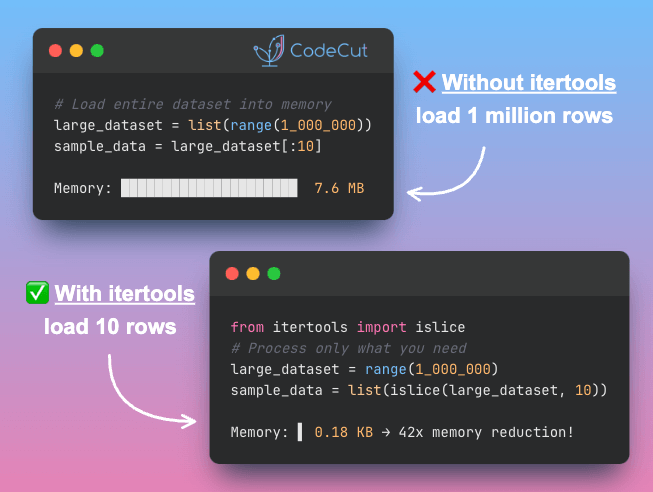
large_dataset = list(range(1_000_000))

# Calculate memory usage
dataset_mb = sys.getsizeof(large_dataset) / 1024 / 1024

# Sample only what we need
sample_data = large_dataset[:10]

# Print results
print(f"Loaded dataset: {len(large_dataset)} items ({dataset_mb:.1f} MB)")
print(f"Sample data: {sample_data}")

Loaded dataset: 1000000 items (7.6 MB)
Sample data: [0, 1, 2, 3, 4, 5, 6, 7, 8, 9]

With Itertools
Use islice() to extract a slice from an iterator without loading the full dataset.
For example, islice(large_data, 5, 10) yields items 5-9.

Let’s apply this to dataset sampling:
# Process only what you need
sample_data = list(islice(large_dataset, 10))

# Calculate memory usage
sample_kb = sys.getsizeof(sample_data) / 1024

# Print results
print(f"Processed dataset: {len(sample_data)} items ({sample_kb:.2f} KB)")
print(f"Sample data: {sample_data}")

Processed dataset: 10 items (0.18 KB)
Sample data: [0, 1, 2, 3, 4, 5, 6, 7, 8, 9]

For even greater memory efficiency with large-scale feature engineering, consider Polars vs. Pandas: A Fast, Multi-Core Alternative for DataFrames.
Final Thoughts
Manual feature engineering requires complex index management and becomes error-prone as feature sets grow. These five itertools methods provide cleaner alternatives that express mathematical intent clearly:

combinations() generates feature interactions without nested loops
combinations_with_replacement() creates polynomial features systematically
permutations() creates sequence-based features from ordered data
product() builds categorical feature crosses efficiently
islice() samples large datasets without memory waste

Master combinations() and combinations_with_replacement() first – they solve the most common feature engineering challenges. The other three methods handle specialized tasks that become essential as your workflows grow more sophisticated.
For scaling feature engineering beyond memory limits with SQL-based approaches, explore A Deep Dive into DuckDB for Data Scientists.

📚 Want to go deeper? Learning new techniques is the easy part. Knowing how to structure, test, and deploy them is what separates side projects from real work. My book shows you how to build data science projects that actually make it to production. Get the book →

Stay Current with CodeCut
Actionable Python tips, curated for busy data pros. Skim in under 2 minutes, three times a week.

.codecut-subscribe-form .codecut-input {
background: #2F2D2E !important;
border: 1px solid #72BEFA !important;
color: #FFFFFF !important;
}
.codecut-subscribe-form .codecut-input::placeholder {
color: #999999 !important;
}
.codecut-subscribe-form .codecut-subscribe-btn {
background: #72BEFA !important;
color: #2F2D2E !important;
}
.codecut-subscribe-form .codecut-subscribe-btn:hover {
background: #5aa8e8 !important;
}

.codecut-subscribe-form {
max-width: 650px;
display: flex;
flex-direction: column;
gap: 8px;
}

.codecut-input {
-webkit-appearance: none;
-moz-appearance: none;
appearance: none;
background: #FFFFFF;
border-radius: 8px !important;
padding: 8px 12px;
font-family: ‘Comfortaa’, sans-serif !important;
font-size: 14px !important;
color: #333333;
border: none !important;
outline: none;
width: 100%;
box-sizing: border-box;
}

input[type=”email”].codecut-input {
border-radius: 8px !important;
}

.codecut-input::placeholder {
color: #666666;
}

.codecut-email-row {
display: flex;
align-items: stretch;
height: 36px;
gap: 8px;
}

.codecut-email-row .codecut-input {
flex: 1;
}

.codecut-subscribe-btn {
background: #72BEFA;
color: #2F2D2E;
border: none;
border-radius: 8px;
padding: 8px 14px;
font-family: ‘Comfortaa’, sans-serif;
font-size: 14px;
font-weight: 500;
cursor: pointer;
text-decoration: none;
display: flex;
align-items: center;
justify-content: center;
transition: background 0.3s ease;
}

.codecut-subscribe-btn:hover {
background: #5aa8e8;
}

.codecut-subscribe-btn:disabled {
background: #999;
cursor: not-allowed;
}

.codecut-message {
font-family: ‘Comfortaa’, sans-serif;
font-size: 12px;
padding: 8px;
border-radius: 6px;
display: none;
}

.codecut-message.success {
background: #d4edda;
color: #155724;
display: block;
}

/* Mobile responsive */
@media (max-width: 480px) {
.codecut-email-row {
flex-direction: column;
height: auto;
gap: 8px;
}

.codecut-input {
border-radius: 8px;
height: 36px;
}

.codecut-subscribe-btn {
width: 100%;
text-align: center;
border-radius: 8px;
height: 36px;
}
}

Subscribe
5 Essential Itertools for Data Science Read More »

Python-Magic: Reliable File Type Detection Beyond Extensions

Table of Contents

Motivation
Introduction to Python-Magic
Data Setup
Accurate File Type Detection
Practical Applications
Conclusion

Python-Magic: Reliable File Type Detection Beyond Extensions
Motivation
File extensions can be misleading or missing entirely. Data processing workflows often receive files from various sources with incorrect extensions, renamed files, or files without extensions altogether.
Traditional approaches rely on file extensions, which can be easily manipulated or missing:
import os

# Traditional approach – unreliable
def get_file_type_by_extension(filename):
_, ext = os.path.splitext(filename)
return ext.lower()

# Examples of problematic files
files = ["document.txt", "data", "image.jpg.exe"]
for file in files:
ext = get_file_type_by_extension(file)
print(f"{file}: {ext if ext else 'No extension'}")

document.txt: .txt
data: No extension
image.jpg.exe: .exe

This approach fails when:

Files lack extensions
Extensions are incorrect or misleading
Malicious files masquerade as safe file types

Introduction to Python-Magic
Python-magic provides reliable file type detection by analyzing file headers rather than relying on extensions. It interfaces with libmagic, the same library used by the Unix file command.
Install python-magic and the required system library:
pip install python-magic

# Install libmagic system library
# macOS: brew install libmagic
# Ubuntu/Debian: sudo apt-get install libmagic1

Data Setup
To demonstrate python-magic’s capabilities, we’ll create test files with misleading extensions that highlight the limitations of extension-based file type detection:
import magic

# Create standard test files
with open("data/sample.txt", "w") as f:
f.write("This is a sample text file for demonstration purposes.")

with open("data/sample.py", "w") as f:
f.write("import pandas as pd; df = pd.DataFrame({'a': [1, 2, 3]}); print(df)")

# Create test files with misleading extensions
with open("data/fake_image.txt", "wb") as f:
# Write PNG header
f.write(b'\x89PNG\r\n\x1a\n')

with open("data/real_text.jpg", "w") as f:
f.write("This is actually a text file")

These test files will demonstrate how python-magic detects actual file types regardless of their extensions.
Accurate File Type Detection
Python-magic examines file headers to determine actual file types:
# Detect actual file types
files = [
"data/sample.txt",
"data/sample.py",
"data/fake_image.txt",
"data/real_text.jpg",
]

for file in files:
file_type = magic.from_file(file)
mime_type = magic.from_file(file, mime=True)
print(f"{file}:")
print(f" Type: {file_type}")
print(f" MIME: {mime_type}")
print()

data/sample.txt:
Type: ASCII text, with no line terminators
MIME: text/plain

data/sample.py:
Type: ASCII text, with no line terminators
MIME: text/plain

data/fake_image.txt:
Type: data
MIME: application/octet-stream

data/real_text.jpg:
Type: ASCII text, with no line terminators
MIME: text/plain

Python-magic correctly identifies:

fake_image.txt as a PNG image despite the .txt extension
real_text.jpg as plain text despite the .jpg extension

📚 For comprehensive production data validation practices, check out Production-Ready Data Science.

Practical Applications
With python-magic, we can build a validation function that verifies uploaded files match expected formats and rejects files with misleading extensions.
Before creating a validation function, let’s set up a sample CSV file for our validation example:
# Create sample CSV file for validation example
import pandas as pd

sample_data = pd.DataFrame({
'ticket_id': [1, 2, 3, 4, 5],
'customer_type': ['premium', 'basic', 'premium', 'basic', 'premium'],
'issue_category': ['billing', 'technical', 'account', 'billing', 'technical'],
'resolution_time': [24, 48, 12, 36, 18]
})

sample_data.to_csv('data/customer_support_eval.csv', index=False)

Next, create a file validation function for data processing pipelines:
def validate_uploaded_file(filepath, expected_types):
"""Validate file type matches expectations"""
try:
actual_mime = magic.from_file(filepath, mime=True)

if actual_mime in expected_types:
return True, f"Valid {actual_mime} file"
else:
return False, f"Expected {expected_types}, got {actual_mime}"
except Exception as e:
return False, f"Error reading file: {e}"

# Example usage for data analysis workflow
csv_file = "data/customer_support_eval.csv"
result, message = validate_uploaded_file(csv_file, ["text/csv", "text/plain"])
print(f"CSV validation: {message}")

# Check for potentially dangerous files
suspicious_file = "data/fake_image.txt"
result, message = validate_uploaded_file(suspicious_file, ["text/plain"])
print(f"Text validation: {message}")

CSV validation: Valid text/csv file
Text validation: Expected ['text/plain'], got application/octet-stream

The validation correctly accepts the CSV file while rejecting the fake image file despite its .txt extension.

For robust logging in production file validation workflows, see our Loguru: Simple as Print, Powerful as Logging.

Conclusion
Python-magic provides reliable file type detection by examining file content rather than trusting extensions. This approach prevents security vulnerabilities and ensures data processing workflows handle files correctly.

For managing file validation configurations across different environments, see our Hydra for Python Configuration: Build Modular and Maintainable Pipelines.

Python-Magic: Reliable File Type Detection Beyond Extensions Read More »

Build Production-Ready RAG Systems with MLflow Quality Metrics

Table of Contents

What is MLflow GenAI?
Article Overview
Quick Setup
Installation
Environment Configuration
Importing Libraries
RAG System with Ollama Llama3.2
Evaluation Dataset

Core RAG Metrics
Faithfulness Evaluation
Answer Relevance Evaluation

Running and Interpreting Results
Comprehensive Evaluation with MLflow
Viewing Results in MLflow Dashboard

Interpreting the Results
Next Steps

How do you know if your AI model actually works? AI model outputs can be inconsistent – sometimes providing inaccurate responses, irrelevant information, or answers that don’t align with the input context. Manual evaluation of these issues is time-consuming and doesn’t scale as your system grows.
MLflow for GenAI solves this problem by automating evaluation across two critical areas:

Faithfulness: Ensuring responses match retrieved context
Answer Relevance: Verifying outputs address user questions

Key Takeaways
Here’s what you’ll learn:

Automate RAG quality assessment with faithfulness and relevance scoring using MLflow
Build production-ready evaluation pipelines that scale from prototype to enterprise
Track experiment results in interactive MLflow dashboards with zero manual scoring
Implement AI judges powered by GPT-4 for consistent evaluation at scale
Identify low-performing questions with scores below 3.0 for targeted improvements

Stay Current with CodeCut
Actionable Python tips, curated for busy data pros. Skim in under 2 minutes, three times a week.

.codecut-subscribe-form .codecut-input {
background: #2F2D2E !important;
border: 1px solid #72BEFA !important;
color: #FFFFFF !important;
}
.codecut-subscribe-form .codecut-input::placeholder {
color: #999999 !important;
}
.codecut-subscribe-form .codecut-subscribe-btn {
background: #72BEFA !important;
color: #2F2D2E !important;
}
.codecut-subscribe-form .codecut-subscribe-btn:hover {
background: #5aa8e8 !important;
}

.codecut-subscribe-form {
max-width: 650px;
display: flex;
flex-direction: column;
gap: 8px;
}

.codecut-input {
-webkit-appearance: none;
-moz-appearance: none;
appearance: none;
background: #FFFFFF;
border-radius: 8px !important;
padding: 8px 12px;
font-family: ‘Comfortaa’, sans-serif !important;
font-size: 14px !important;
color: #333333;
border: none !important;
outline: none;
width: 100%;
box-sizing: border-box;
}

input[type=”email”].codecut-input {
border-radius: 8px !important;
}

.codecut-input::placeholder {
color: #666666;
}

.codecut-email-row {
display: flex;
align-items: stretch;
height: 36px;
gap: 8px;
}

.codecut-email-row .codecut-input {
flex: 1;
}

.codecut-subscribe-btn {
background: #72BEFA;
color: #2F2D2E;
border: none;
border-radius: 8px;
padding: 8px 14px;
font-family: ‘Comfortaa’, sans-serif;
font-size: 14px;
font-weight: 500;
cursor: pointer;
text-decoration: none;
display: flex;
align-items: center;
justify-content: center;
transition: background 0.3s ease;
}

.codecut-subscribe-btn:hover {
background: #5aa8e8;
}

.codecut-subscribe-btn:disabled {
background: #999;
cursor: not-allowed;
}

.codecut-message {
font-family: ‘Comfortaa’, sans-serif;
font-size: 12px;
padding: 8px;
border-radius: 6px;
display: none;
}

.codecut-message.success {
background: #d4edda;
color: #155724;
display: block;
}

/* Mobile responsive */
@media (max-width: 480px) {
.codecut-email-row {
flex-direction: column;
height: auto;
gap: 8px;
}

.codecut-input {
border-radius: 8px;
height: 36px;
}

.codecut-subscribe-btn {
width: 100%;
text-align: center;
border-radius: 8px;
height: 36px;
}
}

Subscribe
What is MLflow GenAI?
MLflow is an open-source platform for managing machine learning lifecycles – tracking experiments, packaging models, and managing deployments. Traditional MLflow focuses on numerical metrics like accuracy and loss.
MLflow for GenAI extends this foundation specifically for generative AI applications. It evaluates subjective qualities that numerical metrics can’t capture:

Response relevance: Measures whether outputs address user questions
Factual accuracy: Checks if responses stay truthful to source material
Context adherence: Evaluates whether answers stick to retrieved information
Automated scoring: Uses AI judges instead of manual evaluation
Scalable assessment: Handles large datasets without human reviewers

Article Overview
This article walks you through a complete AI evaluation workflow. You’ll build a RAG (Retrieval-Augmented Generation) system, test it with real data, and measure its performance using automated tools. For comprehensive RAG fundamentals, see our LangChain and Ollama guide.
What you’ll build:

RAG system: Create a question-answering system using Ollama’s Llama3.
Test dataset: Design evaluation data that reveals system strengths and weaknesses
Automated evaluation: Use OpenAI-powered metrics to score response quality
MLflow interface: Track experiments and visualize results in an interactive dashboard
Results analysis: Interpret scores and identify areas for improvement

Quick Setup
Installation
Start by installing the necessary packages for this guide.
pip install 'mlflow>=3.0.0rc0' langchain-ollama pandas

Environment Configuration
We’ll use Ollama to run Llama3.2 locally for our RAG system. Ollama lets you download and run AI models on your computer, keeping your question-answering data private while eliminating API costs.
Ensure you have Ollama installed locally and the Llama3.2 model downloaded.
# Install Ollama (if not already installed)
# Visit https://ollama.ai for installation instructions

# Pull the Llama3.2 model
ollama pull llama3.2

Importing Libraries
Import the necessary libraries for our RAG system and MLflow evaluation.
import os
import pandas as pd
import mlflow
from mlflow.metrics.genai import faithfulness, answer_relevance, make_genai_metric
from langchain_ollama import ChatOllama
from langchain_core.prompts import ChatPromptTemplate
from langchain_core.output_parsers import StrOutputParser

# Note: Ensure Ollama is installed and llama3.2 model is available
# Run: ollama pull llama3.2

RAG System with Ollama Llama3.2
We’ll create a real RAG (Retrieval-Augmented Generation) system using Ollama’s Llama3.2 model that retrieves context and generates answers.
This function creates a question-answering system that:

Takes a question and available documents as input
Uses the most relevant documents to provide context
Generates accurate answers using the Llama3.2 model
Returns both the answer and the sources used

def ollama_rag_system(question, context_docs):
"""Real RAG system using Ollama Llama3.2"""
# Retrieve top 2 most relevant documents
retrieved_context = "\n".join(context_docs[:2])

# Create prompt template
prompt = ChatPromptTemplate.from_template(
"""Answer the question based on the provided context.
Be concise and accurate.

Context: {context}
Question: {question}

Answer:"""
)

# Initialize Llama3.2 model
llm = ChatOllama(model="llama3.2", temperature=0)

# Create chain and get response
chain = prompt | llm | StrOutputParser()
answer = chain.invoke({"context": retrieved_context, "question": question})

return {
"answer": answer,
"retrieved_context": retrieved_context,
"retrieved_docs": context_docs[:2],
}

For implementing vector databases with Pinecone, see our Pinecone and Ollama semantic search guide.
Evaluation Dataset
An evaluation dataset helps you measure system quality systematically. It reveals how well your RAG system handles different question types and identifies areas for improvement.
To create an evaluation dataset, start with a knowledge base of documents that answer questions. Build the dataset with questions, expected answers, and context from this knowledge base.

For processing complex PDFs into RAG-ready data, explore our Docling document processing guide.

knowledge_base = [
"MLflow is an open-source platform for managing the end-to-end machine learning lifecycle. It provides experiment tracking, model packaging, versioning, and deployment capabilities.",
"RAG systems combine retrieval and generation to provide accurate, contextual responses. They first retrieve relevant documents then generate answers.",
"Vector databases store document embeddings for efficient similarity search. They enable fast retrieval of relevant information."
]

eval_data = pd.DataFrame({
"question": [
"What is MLflow?",
"How does RAG work?",
"What are vector databases used for?"
],
"expected_answer": [
"MLflow is an open-source platform for managing machine learning workflows",
"RAG combines retrieval and generation for contextual responses",
"Vector databases store embeddings for similarity search"
],
"context": [
knowledge_base[0],
knowledge_base[1],
knowledge_base[2]
]
})

eval_data

Index
Question
Expected Answer
Context

0
What is MLflow?
Open-source ML workflow platform
MLflow manages ML lifecycles with tracking, packaging…

1
How does RAG work?
Combines retrieval and generation
RAG systems retrieve documents then generate answers…

2
What are vector databases used for?
Store embeddings for similarity search
Vector databases enable fast retrieval of information…

Generate answers for each question using the RAG system. This creates the responses we’ll evaluate for quality and accuracy.
# Generate answers for evaluation
def generate_answers(row):
result = ollama_rag_system(row['question'], [row['context']])
return result['answer']

eval_data['generated_answer'] = eval_data.apply(generate_answers, axis=1)

Print the first row to see the question, context, and generated answer.
# Display the first row to see question, context, and answer
print(f"Question: {eval_data.iloc[0]['question']}")
print(f"Context: {eval_data.iloc[0]['context']}")
print(f"Generated Answer: {eval_data.iloc[0]['generated_answer']}")

The output displays three key components:

The question shows what we asked.
The context shows which documents the system used to generate the answer.
The answer contains the RAG system’s response.

Question: What is MLflow?
Context: MLflow is an open-source platform for managing the end-to-end machine learning lifecycle. It provides experiment tracking, model packaging, versioning, and deployment capabilities.
Generated Answer: MLflow is an open-source platform for managing the end-to-end machine learning lifecycle, providing features such as experiment tracking, model packaging, versioning, and deployment capabilities.

Core RAG Metrics
Faithfulness Evaluation
Faithfulness measures whether the generated answer stays true to the retrieved context, preventing hallucination:
In the code below, we define the function evaluate_faithfulness that:

Creates an AI judge using GPT-4 to evaluate faithfulness.
Takes the generated answer, question, and context as input.
Returns a score from 1-5, where 5 indicates perfect faithfulness.

We then apply this function to the evaluation dataset to get the faithfulness score for each question.
# Evaluate faithfulness for each answer
def evaluate_faithfulness(row):
# Initialize faithfulness metric with OpenAI GPT-4 as judge
faithfulness_metric = faithfulness(model="openai:/gpt-4")
score = faithfulness_metric(
predictions=[row['generated_answer']],
inputs=[row['question']],
context=[row['context']],
)
return score.scores[0]

eval_data['faithfulness_score'] = eval_data.apply(evaluate_faithfulness, axis=1)
print("Faithfulness Evaluation Results:")
print(eval_data[['question', 'faithfulness_score']])

Faithfulness Evaluation Results:

Question
Faithfulness Score

What is MLflow?
5

How does RAG work?
5

What are vector databases used for?
5

Perfect scores of 5 show the RAG system answers remain faithful to the source material. No hallucination or unsupported claims were detected.
Answer Relevance Evaluation
Answer relevance measures whether the response actually addresses the question asked:
# Evaluate answer relevance
def evaluate_relevance(row):
# Initialize answer relevance metric
relevance_metric = answer_relevance(model="openai:/gpt-4")
score = relevance_metric(
predictions=[row['generated_answer']],
inputs=[row['question']]
)
return score.scores[0]

eval_data['relevance_score'] = eval_data.apply(evaluate_relevance, axis=1)
print("Answer Relevance Results:")
print(eval_data[['question', 'relevance_score']])

Answer Relevance Results:

Question
Relevance Score

What is MLflow?
5

How does RAG work?
5

What are vector databases used for?
5

Perfect scores of 5 show the RAG system’s responses directly address the questions asked. No irrelevant or off-topic answers were generated.
Running and Interpreting Results
We’ll now combine individual metrics into a comprehensive MLflow evaluation. This creates detailed reports, tracks experiments, and enables result comparison. Finally, we’ll analyze the scores to identify areas for improvement.
Comprehensive Evaluation with MLflow
Start by using MLflow’s evaluation framework to run all metrics together.
The following code:

Defines a model function that MLflow can evaluate systematically
Takes a DataFrame of questions and processes them through the RAG system
Converts results to a list format required by MLflow
Combines all metrics into a single evaluation run for comprehensive reporting

# Prepare data for MLflow evaluation
def rag_model_function(input_df):
"""Model function for MLflow evaluation"""
def process_row(row):
result = ollama_rag_system(row["question"], [row["context"]])
return result["answer"]

return input_df.apply(process_row, axis=1).tolist()

# Run comprehensive evaluation
with mlflow.start_run() as run:
evaluation_results = mlflow.evaluate(
model=rag_model_function,
data=eval_data[
["question", "context", "expected_answer"]
], # Include expected_answer column
targets="expected_answer",
extra_metrics=[faithfulness_metric, relevance_metric],
evaluator_config={
"col_mapping": {
"inputs": "question",
"context": "context",
"predictions": "predictions",
"targets": "expected_answer",
}
},
)

After running the code, the evaluation results get stored in MLflow’s tracking system. You can now compare different runs and analyze performance metrics through the dashboard.
Viewing Results in MLflow Dashboard
Launch the MLflow UI to explore evaluation results interactively:
mlflow ui

Navigate to http://localhost:5000 to access the dashboard.
The MLflow dashboard shows the Experiments table with two evaluation runs. Each run displays the run name (like “bold-slug-816”), creation time, dataset information, and duration. You can select runs to compare their performance metrics.

Click on any experiment to see the details of the evaluation. When you scroll down to the Metrics section, you will see detailed evaluation metrics including faithfulness and relevance scores for each question.

Clicking on “Traces” will show you the detailed request-response pairs for each evaluation question for debugging and analysis.

Clicking on “Artifacts” reveals the evaluation results table containing the complete evaluation data, metric scores, and a downloadable format for external analysis.

Interpreting the Results
Raw scores need interpretation to drive improvements. Use MLflow’s evaluation data to identify specific areas for enhancement.
The analysis:

Extracts performance metrics from comprehensive evaluation results
Calculates mean scores across all questions for both metrics
Identifies underperforming questions that require attention
Generates targeted feedback for systematic improvement

def interpret_evaluation_results(evaluation_results):
"""Analyze MLflow evaluation results"""

# Extract metrics and data
metrics = evaluation_results.metrics
eval_table = evaluation_results.tables['eval_results_table']

# Overall performance
avg_faithfulness = metrics.get('faithfulness/v1/mean', 0)
avg_relevance = metrics.get('answer_relevance/v1/mean', 0)

print(f"Average Scores:")
print(f"Faithfulness: {avg_faithfulness:.2f}")
print(f"Answer Relevance: {avg_relevance:.2f}")

# Identify problematic questions
low_performing = eval_table[
(eval_table['faithfulness/v1/score'] < 3) |
(eval_table['answer_relevance/v1/score'] < 3)
]

if not low_performing.empty:
print(f"\nQuestions needing improvement: {len(low_performing)}")
for _, row in low_performing.iterrows():
print(f"- {row['inputs']}")
else:
print("\nAll questions performing well!")

# Usage
interpret_evaluation_results(evaluation_results)

Average Scores:
Faithfulness: 5.00
Answer Relevance: 5.00

All questions performing well!

Perfect scores indicate the RAG system generates accurate, contextual responses without hallucination. This baseline establishes a benchmark for future system modifications and more complex evaluation datasets.
Next Steps
This evaluation framework provides the foundation for systematically improving your RAG system:

Regular Evaluation: Run these metrics on your test dataset with each system change
Threshold Setting: Establish minimum acceptable scores for each metric based on your requirements
Automated Monitoring: Integrate these evaluations into your CI/CD pipeline
Iterative Improvement: Use the insights to guide retrieval improvements, prompt engineering, and model selection

For versioning your ML experiments and models systematically, see our DVC version control guide.
The combination of faithfulness, answer relevance, and retrieval quality metrics gives you a comprehensive view of your RAG system’s performance, enabling data-driven improvements and reliable quality assurance.

📚 Want to go deeper? Learning new techniques is the easy part. Knowing how to structure, test, and deploy them is what separates side projects from real work. My book shows you how to build data science projects that actually make it to production. Get the book →

Stay Current with CodeCut
Actionable Python tips, curated for busy data pros. Skim in under 2 minutes, three times a week.

.codecut-subscribe-form .codecut-input {
background: #2F2D2E !important;
border: 1px solid #72BEFA !important;
color: #FFFFFF !important;
}
.codecut-subscribe-form .codecut-input::placeholder {
color: #999999 !important;
}
.codecut-subscribe-form .codecut-subscribe-btn {
background: #72BEFA !important;
color: #2F2D2E !important;
}
.codecut-subscribe-form .codecut-subscribe-btn:hover {
background: #5aa8e8 !important;
}

.codecut-subscribe-form {
max-width: 650px;
display: flex;
flex-direction: column;
gap: 8px;
}

.codecut-input {
-webkit-appearance: none;
-moz-appearance: none;
appearance: none;
background: #FFFFFF;
border-radius: 8px !important;
padding: 8px 12px;
font-family: ‘Comfortaa’, sans-serif !important;
font-size: 14px !important;
color: #333333;
border: none !important;
outline: none;
width: 100%;
box-sizing: border-box;
}

input[type=”email”].codecut-input {
border-radius: 8px !important;
}

.codecut-input::placeholder {
color: #666666;
}

.codecut-email-row {
display: flex;
align-items: stretch;
height: 36px;
gap: 8px;
}

.codecut-email-row .codecut-input {
flex: 1;
}

.codecut-subscribe-btn {
background: #72BEFA;
color: #2F2D2E;
border: none;
border-radius: 8px;
padding: 8px 14px;
font-family: ‘Comfortaa’, sans-serif;
font-size: 14px;
font-weight: 500;
cursor: pointer;
text-decoration: none;
display: flex;
align-items: center;
justify-content: center;
transition: background 0.3s ease;
}

.codecut-subscribe-btn:hover {
background: #5aa8e8;
}

.codecut-subscribe-btn:disabled {
background: #999;
cursor: not-allowed;
}

.codecut-message {
font-family: ‘Comfortaa’, sans-serif;
font-size: 12px;
padding: 8px;
border-radius: 6px;
display: none;
}

.codecut-message.success {
background: #d4edda;
color: #155724;
display: block;
}

/* Mobile responsive */
@media (max-width: 480px) {
.codecut-email-row {
flex-direction: column;
height: auto;
gap: 8px;
}

.codecut-input {
border-radius: 8px;
height: 36px;
}

.codecut-subscribe-btn {
width: 100%;
text-align: center;
border-radius: 8px;
height: 36px;
}
}

Subscribe
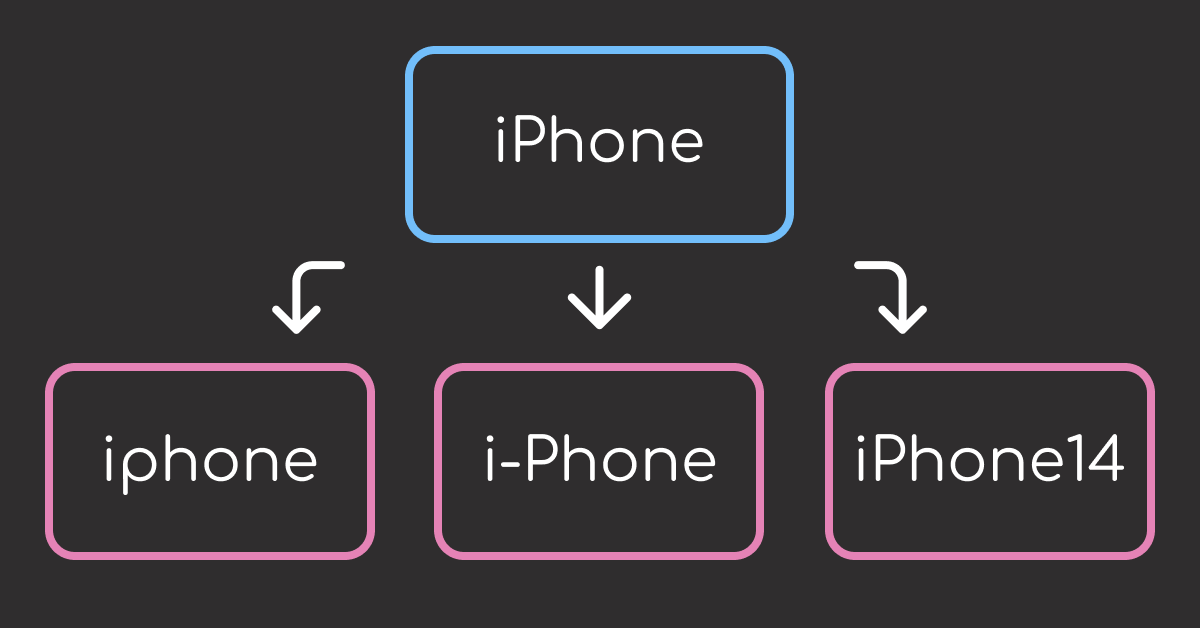
Build Production-Ready RAG Systems with MLflow Quality Metrics Read More »

Stop Writing SQL for AI Agents: Build Direct Database Access with FastMCP

Table of Contents

The Copy-Paste Database Problem
What is Model Context Protocol (MCP)?
What is FastMCP?
Installation and Database Setup
Installation

Database Setup: Sample E-commerce Data
Building Your First Database Tools
Connect to the Database
List Tables
Flexible Query Execution Tool
Data Export Tool

Schema Discovery with Resources
Table Schema Resource with URI Patterns
Sample Data Resource
Table Statistics Resource

Connect to MCP Clients
Create the Server File
Install Dependencies

Connect with MCP Clients
Connect to Claude Code
Connect to Claude Desktop
Connect to other MCP clients

Test the Server
Conclusion

The Copy-Paste Database Problem
AI has revolutionized how we write code, making complex database queries accessible to anyone who can describe what they need. But the workflow becomes frustrating when you’re trapped in this repetitive cycle: ask your AI for SQL, copy the query, paste it into your database tool, run it, copy the results, and paste them back to your AI for analysis.
Here’s what this workflow looks like in practice:
# 1. Ask AI for SQL
"Can you write a query to find high-value customers?"

# 2. Copy AI's response
SELECT customer_id, total_spent FROM customers WHERE total_spent > 1000

# 3. Paste into database tool, run query, copy results
# 4. Paste results back to AI for analysis

This manual approach creates several challenges:

Switching between AI and database tools breaks your analytical flow
Copying and pasting introduces transcription errors
AI can’t explore data independently or learn from previous queries

What if your AI could connect directly to your database, run queries autonomously, and provide insights without you ever copying and pasting SQL? That’s exactly what you’ll build in this article using MCP.

Stay Current with CodeCut
Actionable Python tips, curated for busy data pros. Skim in under 2 minutes, three times a week.

.codecut-subscribe-form .codecut-input {
background: #2F2D2E !important;
border: 1px solid #72BEFA !important;
color: #FFFFFF !important;
}
.codecut-subscribe-form .codecut-input::placeholder {
color: #999999 !important;
}
.codecut-subscribe-form .codecut-subscribe-btn {
background: #72BEFA !important;
color: #2F2D2E !important;
}
.codecut-subscribe-form .codecut-subscribe-btn:hover {
background: #5aa8e8 !important;
}

.codecut-subscribe-form {
max-width: 650px;
display: flex;
flex-direction: column;
gap: 8px;
}

.codecut-input {
-webkit-appearance: none;
-moz-appearance: none;
appearance: none;
background: #FFFFFF;
border-radius: 8px !important;
padding: 8px 12px;
font-family: ‘Comfortaa’, sans-serif !important;
font-size: 14px !important;
color: #333333;
border: none !important;
outline: none;
width: 100%;
box-sizing: border-box;
}

input[type=”email”].codecut-input {
border-radius: 8px !important;
}

.codecut-input::placeholder {
color: #666666;
}

.codecut-email-row {
display: flex;
align-items: stretch;
height: 36px;
gap: 8px;
}

.codecut-email-row .codecut-input {
flex: 1;
}

.codecut-subscribe-btn {
background: #72BEFA;
color: #2F2D2E;
border: none;
border-radius: 8px;
padding: 8px 14px;
font-family: ‘Comfortaa’, sans-serif;
font-size: 14px;
font-weight: 500;
cursor: pointer;
text-decoration: none;
display: flex;
align-items: center;
justify-content: center;
transition: background 0.3s ease;
}

.codecut-subscribe-btn:hover {
background: #5aa8e8;
}

.codecut-subscribe-btn:disabled {
background: #999;
cursor: not-allowed;
}

.codecut-message {
font-family: ‘Comfortaa’, sans-serif;
font-size: 12px;
padding: 8px;
border-radius: 6px;
display: none;
}

.codecut-message.success {
background: #d4edda;
color: #155724;
display: block;
}

/* Mobile responsive */
@media (max-width: 480px) {
.codecut-email-row {
flex-direction: column;
height: auto;
gap: 8px;
}

.codecut-input {
border-radius: 8px;
height: 36px;
}

.codecut-subscribe-btn {
width: 100%;
text-align: center;
border-radius: 8px;
height: 36px;
}
}

Subscribe
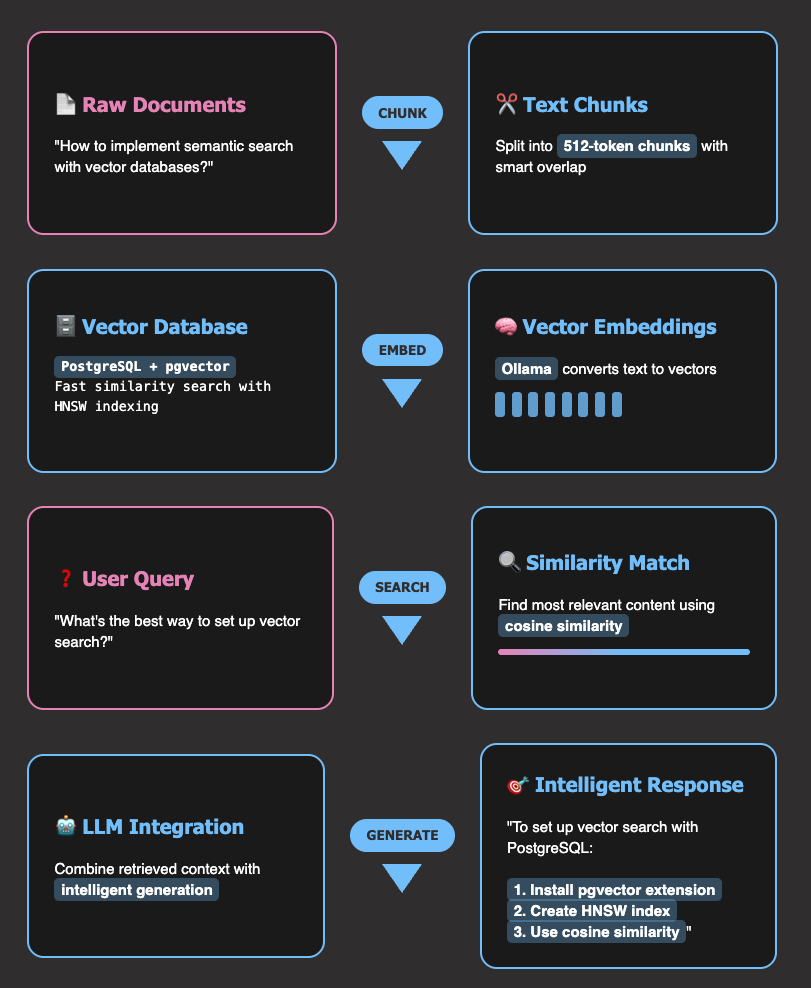
Key Takeaways
Here’s what you’ll learn:

Eliminate copy-paste SQL workflows by building direct database access for AI agents
Create FastMCP servers with database tools using just decorators and 10 lines of code
Implement read-only query execution with automatic safety validation and transaction handling
Build schema discovery resources that provide table structures without query overhead
Connect to multiple MCP clients including Claude Code, Claude Desktop, and Cursor for autonomous data analysis

What is Model Context Protocol (MCP)?
Model Context Protocol (MCP) is a standard that allows AI models to connect directly to external systems like databases, APIs, and file systems. Instead of being limited to generating code or text, MCP enables AI models to take actions and access real data.
Think of MCP as a bridge between your AI assistant and your database. When you ask AI to “find high-value customers,” the assistant discovers your database tools, calls the appropriate functions, and provides actionable insights, all without you leaving the conversation.

MCP works through two key components:

Tools: Functions that AI models can call to perform actions and modify system state (like executing SQL queries, inserting data, exporting files)
Resources: Data sources that AI models can access for information only (like table schemas, sample data, or documentation)

This direct connection eliminates the copy-paste cycle and enables truly autonomous data analysis.
What is FastMCP?
FastMCP is a Python framework that makes building MCP servers incredibly simple. While you could build MCP servers from scratch, FastMCP provides decorators and utilities that reduce the complexity to just a few lines of code.
In this article, you’ll build a database assistant that:

Connects to SQLite databases and executes queries automatically
Exports results to CSV files with full schema discovery
Provides sample data and calculates database statistics

This complete solution transforms any AI assistant into a powerful database analytics tool. For large-scale analytics workloads, consider our DuckDB deep dive which offers superior performance for analytical queries.
Installation and Database Setup
Installation
To install fastmcp, type the following command:
pip install fastmcp

Other dependencies you’ll need for this article are:
pip install sqlalchemy pandas

SQLAlchemy is the Python SQL toolkit and Object-Relational Mapping (ORM) library we’ll use for database operations.
Database Setup: Sample E-commerce Data
Before building FastMCP tools, let’s create a realistic e-commerce database that we’ll use throughout all examples. The complete database setup code is available in setup_database.py.
from setup_database import create_sample_database

# Create the database we'll use throughout the article
db_path = create_sample_database("ecommerce.db")

Building Your First Database Tools
In this section, you’ll create FastMCP tools that:

Connect to databases and manage connections
Discover tables and database structure
Execute queries with proper transaction handling
Export results to CSV files

Connect to the Database
Start with creating a tool called connect_db to connect to the SQLite database. To create a tool, you need to:

Initialize FastMCP server
Write a Python function with your tool logic
Add the @mcp.tool decorator

from fastmcp import FastMCP
from sqlalchemy import create_engine, text
from sqlalchemy.orm import sessionmaker
import pandas as pd

# Global database connection
db_engine = None
db_session_factory = None

# Initialize FastMCP server
mcp = FastMCP("Database Analytics Assistant")

@mcp.tool
def connect_db(database_path: str) -> dict:
"""Connect to an SQLite database file"""
global db_engine, db_session_factory

# Create new engine and session factory
db_engine = create_engine(f"sqlite:///{database_path}")
db_session_factory = sessionmaker(bind=db_engine)

return {"success": True, "database_path": database_path}

FastMCP tools return JSON responses that AI assistants convert into user-friendly text. This structured approach ensures reliable data exchange between your database and AI systems. For type-safe AI responses, check out our PydanticAI guide.
Here’s what you’ll see when calling the connect_db tool with the ecommerce.db path:
JSON output:
{
"success": true,
"database_path": "ecommerce.db"
}

AI-generated summary:
Connected to the database at ecommerce.db

List Tables
The list_tables tool uses SQLAlchemy’s inspector to discover all tables in the connected database. This gives the AI a complete view of your database structure.
@mcp.tool
def list_tables() -> dict:
"""List all tables in the connected database"""
global db_engine
from sqlalchemy import inspect

inspector = inspect(db_engine)
table_names = inspector.get_table_names()

return {"success": True, "tables": table_names}

Here’s the response you’ll get when calling the list_tables tool:
Human input:
Show me all tables in the ecommerce database

AI converts this to tool call: list_tables()
JSON output:
{
"success": true,
"tables": ["users", "orders"]
}

AI-generated summary:
The database has two tables: users and orders.

Flexible Query Execution Tool
The execute_query tool executes only SELECT queries on the connected database for security. This read-only approach prevents accidental data modification or deletion while allowing powerful data analysis and exploration.
Start by creating a helper function to check if the query is safe.
def _is_safe_query(sql: str) -> bool:
"""Check if a SQL query is safe to execute. Only SELECT queries are allowed."""
sql_lower = sql.lower().strip()
return sql_lower.startswith("select")

Then, create the execute_query tool.
@mcp.tool
def execute_query(sql: str, ctx: Context = None) -> Dict[str, Any]:
"""Execute a SQL query on the connected database."""
global db_session_factory

# Check if query is safe before execution
if not _is_safe_query(sql):
return {
"success": False,
"error": "Potentially dangerous SQL operations are not allowed. Only SELECT queries are permitted."
}

with db_session_factory() as session:
# Execute the SQL query
result = session.execute(text(sql))
rows = result.fetchall()
return {"success": True, "results": [dict(row._mapping) for row in rows]}

Here’s the response you’ll get when calling the execute_query tool with the SQL query:
Human input:
Show me statistics for the users table

AI converts this to:
SELECT
COUNT(*) as total_users,
AVG(age) as average_age,
MIN(age) as youngest_age,
MAX(age) as oldest_age,
COUNT(CASE WHEN age < 30 THEN 1 END) as users_under_30,
COUNT(CASE WHEN age >= 30 THEN 1 END) as users_30_and_over
FROM users

JSON output:
{
"success": true,
"results": [
{
"total_users": 5,
"average_age": 32.0,
"youngest_age": 22,
"oldest_age": 45,
"users_under_30": 2,
"users_30_and_over": 3
}
]
}

AI-generated summary:
Users table statistics:

Metric
Value

Total Users
5

Average Age
32.0

Youngest User
22

Oldest User
45

Users Under 30
2

Users 30 and Over
3

Data Export Tool
The export_to_csv tool executes a SQL query and exports the results to a CSV file. This is useful for creating reports or sharing data with others.
import pandas as pd

@mcp.tool
def export_to_csv(sql: str, filename: str) -> dict:
"""Execute a SQL query and export results to CSV file"""
global db_engine

# Execute query and export to CSV using pandas
df = pd.read_sql(sql, db_engine)
df.to_csv(filename, index=False)

return {"success": True, "filename": filename, "rows_exported": len(df)}

Here’s the response you’ll get when calling the export_to_csv tool:
Human input:
Export product sales data to a CSV file called sales_report.csv

AI converts this to:
SELECT product_name, SUM(quantity) as total_sold, SUM(price * quantity) as total_revenue
FROM orders
GROUP BY product_name
ORDER BY total_revenue DESC

JSON output:
{
"success": true,
"filename": "sales_report.csv",
"rows_exported": 7
}

AI-generated summary:
Successfully exported 7 rows of product sales data to sales_report.csv

Schema Discovery with Resources
Tools require complex security validation and can fail due to database errors or malformed queries. Resources eliminate these risks by providing read-only access to metadata like schemas and sample data without query execution overhead.
In this section, you’ll create FastMCP resources that:

Provide schema information for tables
Provide sample data for tables
Provide statistics for tables

Table Schema Resource with URI Patterns
The get_table_schema resource uses URI patterns to provide flexible access to table schemas. The AI can request schema information for any table by using the URI pattern schema://tables/{table_name}.
from sqlalchemy import inspect

@mcp.resource("schema://tables/{table_name}")
def get_table_schema(table_name: str) -> dict:
"""Get column information for a specific table"""
global db_engine

# Get database inspector
inspector = inspect(db_engine)

# Get column information
columns = inspector.get_columns(table_name)

# Build column info list
column_info = []
for col in columns:
column_info.append({
"name": col["name"],
"type": str(col["type"]),
"nullable": col["nullable"],
})

return {"table_name": table_name, "columns": column_info}

Here’s the response you’ll get when calling the get_table_schema resource:
Human input:
Show me the schema for the users table

AI accesses the resource using URI: schema://tables/users
JSON output:
{
"table_name": "users",
"columns": [
{
"name": "id",
"type": "INTEGER",
"nullable": false
},
{
"name": "name",
"type": "TEXT",
"nullable": false
},
{
"name": "email",
"type": "TEXT",
"nullable": false
},
{
"name": "age",
"type": "INTEGER",
"nullable": true
},
{
"name": "created_at",
"type": "TIMESTAMP",
"nullable": true
}
]
}

AI-generated summary:
The users table schema:

Column
Type
Required

id
INTEGER
Yes

name
TEXT
Yes

email
TEXT
Yes

age
INTEGER
No

created_at
TIMESTAMP
No

Sample Data Resource
The get_table_data resource provides sample data with pagination support. This helps the AI understand the actual data structure and content without overwhelming it with large datasets.
@mcp.resource("data://tables/{table_name}")
def get_table_data(table_name: str, limit: int = 10, offset: int = 0) -> dict:
"""Get sample rows from a specific table with pagination"""
global db_session_factory

with db_session_factory() as session:
# Get sample data with pagination
result = session.execute(
text(f"SELECT * FROM {table_name} LIMIT :limit OFFSET :offset"),
{"limit": limit, "offset": offset},
)
rows = result.fetchall()

# Convert to dict
data = [dict(row._mapping) for row in rows]

return {"table_name": table_name, "sample_data": data, "rows_returned": len(data)}

Here’s the response you’ll get when calling the get_table_data resource:
Human input:
Show me sample data from the users table

AI accesses the resource using URI: data://tables/users
JSON output:
{
"table_name": "users",
"sample_data": [
{
"id": 1,
"name": "Alice Johnson",
"email": "alice@example.com",
"age": 28,
"created_at": "2023-01-15 10:30:00"
},
{
"id": 2,
"name": "Bob Smith",
"email": "bob@example.com",
"age": 35,
"created_at": "2023-02-20 14:15:00"
},
{
"id": 3,
"name": "Charlie Brown",
"email": "charlie@example.com",
"age": 22,
"created_at": "2023-03-10 09:45:00"
}
],
"rows_returned": 3
}

AI-generated summary:
Sample data from the users table:

User ID
Name
Email
Age
Created

1
Alice Johnson
alice@example.com
28
2023-01-15

2
Bob Smith
bob@example.com
35
2023-02-20

3
Charlie Brown
charlie@example.com
22
2023-03-10

Table Statistics Resource
The get_table_stats resource provides comprehensive statistics for a specific table. This helps the AI understand the size and composition of the table.
@mcp.resource("stats://tables/{table_name}")
def get_table_stats(table_name: str) -> dict:
"""Get comprehensive statistics for a specific table"""
global db_engine, db_session_factory

with db_session_factory() as session:
# Get basic table statistics
total_rows = session.execute(
text(f"SELECT COUNT(*) FROM {table_name}")
).scalar()

# Get column information
inspector = inspect(db_engine)
columns = inspector.get_columns(table_name)

return {
"table_name": table_name,
"total_rows": total_rows,
"column_count": len(columns),
}

Here’s the response you’ll get when calling the get_table_stats resource:
Human input:
Show me statistics for the users table

AI accesses the resource using URI: stats://tables/users
JSON output:
{
"table_name": "users",
"total_rows": 5,
"column_count": 5
}

AI-generated summary:
The users table contains 5 rows and has 5 columns (id, name, email, age, created_at).
Connect to MCP Clients
Now that you’ve built all the tools and resources, let’s deploy your FastMCP database server and connect it to an MCP client.
An MCP client is any application that can communicate with MCP servers to access tools and resources, such as Claude Code, Claude Desktop, Cursor, Zed, Continue, and other MCP-compatible development tools.
Create the Server File
First, combine all the code from this article into a single file called database_mcp_server.py. You can find the complete implementation in the example repository.
Install Dependencies
Install UV (the fast Python package manager) if you haven’t already:
curl -LsSf https://astral.sh/uv/install.sh | sh

Use uv (the fast Python package manager) to install all dependencies:
uv sync

Connect with MCP Clients
This FastMCP server works with any MCP-compatible client. Here’s how to connect it to Claude Code and other MCP clients.
Connect to Claude Code
Add your server to Claude Code’s MCP configuration:
claude mcp add database-analytics — uv run database_mcp_server.py

Verify the server is registered:
claude mcp list

Connect to Claude Desktop
Add this configuration to your Claude Desktop config file:
{
"mcpServers": {
"database-analytics": {
"command": "uv",
"args": ["run", "database_mcp_server.py"],
"cwd": "/path/to/your/project"
}
}
}

Connect to other MCP clients
Popular MCP-compatible clients include Cursor, Zed, Continue, and Codeium. Each client has its own configuration format but uses the same server command: uv run database_mcp_server.py. For client-specific setup guides, visit the Model Context Protocol documentation.
Test the Server
Once your FastMCP server is running and connected to an MCP client, you can test all the database functionality through natural language commands. Here are practical examples to verify everything works:
Connect to the database:
Connect to my SQLite database at ./ecommerce.db

Output:
✅ Connected to the database at ./ecommerce.db

Explore the schema:
What tables are available in this database?

Output:
The database has 2 tables: users and orders.

Examine the table structure:
Show me the schema for the users table

Output:
The users table has 5 columns: id (INTEGER, required), name (TEXT, required), email (TEXT, required), age (INTEGER, optional), and created_at (TIMESTAMP, optional).

Preview the data:
Show me some sample data from the users table

Output:
Here are 3 sample users:
– Alice Johnson (alice@example.com, age 28)
– Bob Smith (bob@example.com, age 35)
– Charlie Brown (charlie@example.com, age 22)

Run analytics queries:
Calculate total sales by product category

Output:
Product sales summary:
– Laptop: $999.99 (1 sold)
– Tablet: $499.99 (1 sold)
– Monitor: $299.99 (1 sold)
– Headphones: $149.99 (1 sold)

Export the results:
Export the query "SELECT product_name, SUM(quantity) as total_sold FROM orders GROUP BY product_name" to CSV file called sales_report.csv

Output:
✅ Successfully exported 7 rows of product sales data to sales_report.csv

Get table statistics:
Show me statistics for the users table

Output:
Users table statistics: 5 total rows, 5 columns

Conclusion
You’ve successfully built a complete FastMCP database server that transforms how AI assistants interact with databases. Your server delivers:

Direct database connectivity for AI assistants
Flexible query execution with proper transaction handling
Automated data export to CSV files
Comprehensive schema discovery and data exploration
Real-time database statistics and analysis

The best way to learn is to build. Try building your own FastMCP server with different database types, tools, and resources. Here are some ideas to get you started:

Extend the server with additional database operations (INSERT, UPDATE, DELETE)
Add support for multiple database types (PostgreSQL, MySQL, etc.)
Implement advanced analytics tools for statistical analysis such as data visualization, clustering, and anomaly detection
Coordinate multiple AI agents for complex data workflows using LangGraph

📚 Want to go deeper? Learning new techniques is the easy part. Knowing how to structure, test, and deploy them is what separates side projects from real work. My book shows you how to build data science projects that actually make it to production. Get the book →

Stay Current with CodeCut
Actionable Python tips, curated for busy data pros. Skim in under 2 minutes, three times a week.

.codecut-subscribe-form .codecut-input {
background: #2F2D2E !important;
border: 1px solid #72BEFA !important;
color: #FFFFFF !important;
}
.codecut-subscribe-form .codecut-input::placeholder {
color: #999999 !important;
}
.codecut-subscribe-form .codecut-subscribe-btn {
background: #72BEFA !important;
color: #2F2D2E !important;
}
.codecut-subscribe-form .codecut-subscribe-btn:hover {
background: #5aa8e8 !important;
}

.codecut-subscribe-form {
max-width: 650px;
display: flex;
flex-direction: column;
gap: 8px;
}

.codecut-input {
-webkit-appearance: none;
-moz-appearance: none;
appearance: none;
background: #FFFFFF;
border-radius: 8px !important;
padding: 8px 12px;
font-family: ‘Comfortaa’, sans-serif !important;
font-size: 14px !important;
color: #333333;
border: none !important;
outline: none;
width: 100%;
box-sizing: border-box;
}

input[type=”email”].codecut-input {
border-radius: 8px !important;
}

.codecut-input::placeholder {
color: #666666;
}

.codecut-email-row {
display: flex;
align-items: stretch;
height: 36px;
gap: 8px;
}

.codecut-email-row .codecut-input {
flex: 1;
}

.codecut-subscribe-btn {
background: #72BEFA;
color: #2F2D2E;
border: none;
border-radius: 8px;
padding: 8px 14px;
font-family: ‘Comfortaa’, sans-serif;
font-size: 14px;
font-weight: 500;
cursor: pointer;
text-decoration: none;
display: flex;
align-items: center;
justify-content: center;
transition: background 0.3s ease;
}

.codecut-subscribe-btn:hover {
background: #5aa8e8;
}

.codecut-subscribe-btn:disabled {
background: #999;
cursor: not-allowed;
}

.codecut-message {
font-family: ‘Comfortaa’, sans-serif;
font-size: 12px;
padding: 8px;
border-radius: 6px;
display: none;
}

.codecut-message.success {
background: #d4edda;
color: #155724;
display: block;
}

/* Mobile responsive */
@media (max-width: 480px) {
.codecut-email-row {
flex-direction: column;
height: auto;
gap: 8px;
}

.codecut-input {
border-radius: 8px;
height: 36px;
}

.codecut-subscribe-btn {
width: 100%;
text-align: center;
border-radius: 8px;
height: 36px;
}
}

Subscribe

Stop Writing SQL for AI Agents: Build Direct Database Access with FastMCP Read More »

Polars vs. Pandas: A Fast, Multi-Core Alternative for DataFrames

Table of Contents

Introduction
Why Consider Polars?
Setup
Multi-Core Performance
Timing Decorator
Plotting Setup
Reading CSV Files
Groupby Mean
Filter Rows
Sort by Column
Observations

Lazy Evaluation (Only in Polars)
Syntax Comparison
Filtering rows
Selecting columns
Chained operations

Memory Efficiency
Missing Features (Where Pandas Wins)
Summary
When to Use Polars vs. Pandas

Final Thoughts

Introduction
Pandas has been the standard tool for working with tabular data in Python for many years. But as datasets get larger and performance becomes more important, Polars (an increasingly popular choice for handling data in Polars Python) is a faster alternative that uses multiple CPU cores.
This guide compares Polars and Pandas, highlighting where Polars shines and showing how to get started with it.

💻 Get the Code: The complete source code and Jupyter notebook for this tutorial are available on GitHub. Clone it to follow along!

Stay Current with CodeCut
Actionable Python tips, curated for busy data pros. Skim in under 2 minutes, three times a week.

.codecut-subscribe-form .codecut-input {
background: #2F2D2E !important;
border: 1px solid #72BEFA !important;
color: #FFFFFF !important;
}
.codecut-subscribe-form .codecut-input::placeholder {
color: #999999 !important;
}
.codecut-subscribe-form .codecut-subscribe-btn {
background: #72BEFA !important;
color: #2F2D2E !important;
}
.codecut-subscribe-form .codecut-subscribe-btn:hover {
background: #5aa8e8 !important;
}

.codecut-subscribe-form {
max-width: 650px;
display: flex;
flex-direction: column;
gap: 8px;
}

.codecut-input {
-webkit-appearance: none;
-moz-appearance: none;
appearance: none;
background: #FFFFFF;
border-radius: 8px !important;
padding: 8px 12px;
font-family: ‘Comfortaa’, sans-serif !important;
font-size: 14px !important;
color: #333333;
border: none !important;
outline: none;
width: 100%;
box-sizing: border-box;
}

input[type=”email”].codecut-input {
border-radius: 8px !important;
}

.codecut-input::placeholder {
color: #666666;
}

.codecut-email-row {
display: flex;
align-items: stretch;
height: 36px;
gap: 8px;
}

.codecut-email-row .codecut-input {
flex: 1;
}

.codecut-subscribe-btn {
background: #72BEFA;
color: #2F2D2E;
border: none;
border-radius: 8px;
padding: 8px 14px;
font-family: ‘Comfortaa’, sans-serif;
font-size: 14px;
font-weight: 500;
cursor: pointer;
text-decoration: none;
display: flex;
align-items: center;
justify-content: center;
transition: background 0.3s ease;
}

.codecut-subscribe-btn:hover {
background: #5aa8e8;
}

.codecut-subscribe-btn:disabled {
background: #999;
cursor: not-allowed;
}

.codecut-message {
font-family: ‘Comfortaa’, sans-serif;
font-size: 12px;
padding: 8px;
border-radius: 6px;
display: none;
}

.codecut-message.success {
background: #d4edda;
color: #155724;
display: block;
}

/* Mobile responsive */
@media (max-width: 480px) {
.codecut-email-row {
flex-direction: column;
height: auto;
gap: 8px;
}

.codecut-input {
border-radius: 8px;
height: 36px;
}

.codecut-subscribe-btn {
width: 100%;
text-align: center;
border-radius: 8px;
height: 36px;
}
}

Subscribe

Key Takeaways
Here’s what you’ll learn:

Achieve 9× faster CSV reading with Polars’ multi-threaded architecture
Reduce memory usage by 30-50% using Apache Arrow backend optimization
Enable lazy evaluation for automatic query optimization and predicate pushdown
Implement seamless migration from Pandas with similar API patterns
Scale data processing without changing code using built-in parallel execution

Why Consider Polars?
Polars is a DataFrame library written in Rust, designed for high performance. Key advantages:

Multi-threaded by default
Lazy execution for optimization
Low memory usage
Strong support for Arrow and Parquet

Let’s explore how Polars improves upon Pandas with practical examples.
Setup
Install both libraries and generate a sample dataset for testing:
pip install pandas polars

To follow along with the examples, you can generate a large CSV file like this:
import pandas as pd
import numpy as np

# Create a large dataset
n_rows = 10_000_000
data = {
"category": np.random.choice(["A", "B", "C", "D"], size=n_rows),
"value": np.random.rand(n_rows) * 1000
}
df = pd.DataFrame(data)

This will create a large_file.csv with 10 million rows for performance testing.
Multi-Core Performance
Pandas uses multiple CPU cores for data processing, while Pandas relies on a single core. Thus, Polars manages larger datasets more efficiently and often performs operations faster than Pandas.

Let’s benchmark a few common operations using Pandas and Polars: reading CSVs, groupby, filter, and sort.
Timing Decorator
We define a reusable timing decorator to simplify benchmarking in this section:
import time
from functools import wraps

def timeit(operation_name):
def decorator(func):
@wraps(func)
def wrapper(*args, **kwargs):
start_time = time.time()
result = func(*args, **kwargs)
end_time = time.time()
execution_time = end_time – start_time
print(f"{operation_name} took {execution_time:.2f} seconds")
return result, execution_time
return wrapper
return decorator

Plotting Setup
Let’s define a helper function to simplify chart creation for each operation.
import matplotlib.pyplot as plt
import seaborn as sns

def create_comparison_plot(pandas_time, polars_time, title, plt, sns):
sns.barplot(
hue=["Pandas", "Polars"],
y=[pandas_time, polars_time],
palette=["#E583B6", "#72BEFA"],
)
plt.title(f"{title} (seconds)")
plt.ylabel("Time (s)")
plt.show()

Reading CSV Files
Pandas:
@timeit("Pandas read_csv")
def read_pandas():
return pd.read_csv("large_file.csv")

pandas_df, pandas_read_time = read_pandas()

Output:
Pandas read_csv took 1.38 seconds

Polars:
import polars as pl

@timeit("Polars read_csv")
def read_polars():
return pl.read_csv("large_file.csv")

polars_df, polars_read_time = read_polars()

Output:
Polars read_csv took 0.15 seconds

create_comparison_plot(pandas_read_time, polars_read_time, "CSV Read Time")

Groupby Mean
Pandas:
@timeit("Pandas groupby")
def pandas_groupby(df):
return df.groupby("category")["value"].mean()

pandas_result, pandas_groupby_time = pandas_groupby(pandas_df)

Output:
Pandas groupby took 0.53 seconds

Polars:
@timeit("Polars groupby")
def polars_groupby(df):
return df.group_by("category").agg(pl.col("value").mean())

polars_result, polars_groupby_time = polars_groupby(polars_df)

Output:
Polars groupby took 0.20 seconds

create_comparison_plot(pandas_groupby_time, polars_groupby_time, "Groupby Mean Time")

Filter Rows
Pandas:
@timeit("Pandas filter")
def pandas_filter(df):
return df[df["value"] > 500]

pandas_filtered, pandas_filter_time = pandas_filter(pandas_df)

Output:
Pandas filter took 0.15 seconds

Polars:
@timeit("Polars filter")
def polars_filter(df):
return df.filter(pl.col("value") > 500)

polars_filtered, polars_filter_time = polars_filter(polars_df)

Output:
Polars filter took 0.03 seconds

create_comparison_plot(pandas_filter_time, polars_filter_time, "Filter Rows Time")

Sort by Column
Pandas:
@timeit("Pandas sort")
def pandas_sort(df):
return df.sort_values("value")

pandas_sorted, pandas_sort_time = pandas_sort(pandas_df)

Output:
Pandas sort took 2.74 seconds

Polars:
@timeit("Polars sort")
def polars_sort(df):
return df.sort("value")

polars_sorted, polars_sort_time = polars_sort(polars_df)

Output:
Polars sort took 0.49 seconds

create_comparison_plot(pandas_sort_time, polars_sort_time, "Sort Time")

Observations
Polars consistently outperformed Pandas across all operations:

CSV Reading: 9× faster
Groupby: Over 2.5× faster
Filtering: 5× faster
Sorting: 5.5× faster

This performance advantage is largely due to Polars’ native Rust engine and multi-threaded execution. It’s especially valuable for large-scale data processing pipelines.
For SQL-based analytics that complement Polars’ performance advantages, see our DuckDB deep dive guide.
Lazy Evaluation (Only in Polars)
Pandas executes operations eagerly, which can be inefficient for large pipelines. For example:
(
pd.read_csv("large_file.csv")
.query('value > 100')
.groupby('category', as_index=False)['value']
.mean()
.rename(columns={"value": "avg_value"})
)

This code is inefficient because:

Full CSV Load: Pandas loads the entire file into memory, even rows or columns we won’t use.
No Predicate Pushdown: The .query() filter is applied after reading all rows, not during the read.
No Projection Pushdown: All columns are read from disk, even if we only use value and category.

Polars supports lazy evaluation, which plans and optimizes the entire computation graph before execution:
query = (
pl.read_csv("large_file.csv").lazy()
.filter(pl.col("value") > 100)
.group_by("category")
.agg(pl.col("value").mean().alias("avg_value"))
)

print(query.explain())

Output:
FILTER [(col("avg_value")) > (100.0)]
FROM
AGGREGATE
[col("value").mean().alias("avg_value")] BY [col("category")]
FROM
DF ["category", "value"]; PROJECT["value", "category"] 2/2 COLUMNS

Optimizations used by Polars:

Lazy Execution: The computation is deferred and optimized before execution.
Predicate Pushdown: Filters like value > 100 are applied during the scan, skipping irrelevant rows.
Projection Pushdown: Only necessary columns ( category and value) are read.
Single-Pass Execution: Operations can be executed in a streaming manner, improving performance.

The pipeline is only executed when .collect() is called:
result = query.collect()
result.head()

Output:
shape: (4, 2)
┌──────────┬────────────┐
│ category ┆ avg_value │
│ — ┆ — │
│ str ┆ f64 │
╞══════════╪════════════╡
│ A ┆ 550.245739 │
│ C ┆ 549.985808 │
│ D ┆ 549.649933 │
│ B ┆ 550.055504 │
└──────────┴────────────┘

Syntax Comparison
Both libraries offer expressive APIs, but Polars’ syntax is more functional and chainable, which makes it easier to write pipelines with multiple operations in a single expression.
Filtering rows
Pandas:
df_pd.query("value > 1000")

Polars:
df_pl.filter(pl.col("value") > 1000)

Selecting columns
Pandas:
df_pd[["category", "value"]]

Polars:
df_pl.select(["category", "value"])

Polars feels more like writing SQL pipelines, especially in lazy mode.
Chained operations
Pandas:
(df_pd.query("value > 1000")
.groupby("category")["value"]
.mean()
.reset_index())

Polars:
(df_pl
.filter(pl.col("value") > 1000)
.group_by("category")
.agg(pl.col("value").mean().alias("avg_value")))

Polars lets you chain operations together, which often makes code more readable and efficient.
Memory Efficiency
Polars has its own columnar and compact implementation optimized for performance. This design avoids Python object overhead, unlike Pandas.
df_pd.memory_usage(deep=True).sum() / 1e6 # MB
df_pl.estimated_size() / 1e6 # MB

Polars usually consumes less memory, especially with strings or categorical data.
Missing Features (Where Pandas Wins)
While Polars is fast, Pandas is still better at:

Interoperability with other Python libraries (e.g., matplotlib, scikit-learn)
Rich ecosystem (e.g., pandas-profiling, pandasql)
More mature and flexible time series tools

Summary
When to Use Polars vs. Pandas

Scenario
Use Polars ✅
Use Pandas ✅

Large datasets and file sizes
✅ Yes
⚠️ May struggle with memory

Fast CSV/Parquet I/O
✅ Much faster
🚫 Slower for large files

Multi-core performance
✅ Built-in multi-threading
🚫 Single-threaded by default

Lazy evaluation for optimized pipelines
✅ Supported
🚫 Not available

Low memory consumption
✅ Apache Arrow backend
🚫 Higher memory overhead

Integration with scikit-learn, statsmodels, etc.
🚫 Limited
✅ Excellent ecosystem integration

Flexible time series handling
🚫 Basic support
✅ Advanced and robust

Small-to-medium datasets
⚠️ May be overkill
✅ Simple and effective

For scaling beyond single-machine processing, see our PySpark Pandas API guide.
Final Thoughts
Polars is not here to replace Pandas, but it’s an excellent choice when performance matters. If your workflows are slow or memory-bound, Polars can drastically reduce execution time without compromising expressiveness.
Tip: You can even mix both libraries. Load and process large files with Polars, then convert to Pandas when needed:
df_pd = df_pl.to_pandas()

For modern Python development best practices that complement Polars’ performance focus, see our UV package manager guide.

📚 Want to go deeper? Learning new techniques is the easy part. Knowing how to structure, test, and deploy them is what separates side projects from real work. My book shows you how to build data science projects that actually make it to production. Get the book →

Stay Current with CodeCut
Actionable Python tips, curated for busy data pros. Skim in under 2 minutes, three times a week.

.codecut-subscribe-form .codecut-input {
background: #2F2D2E !important;
border: 1px solid #72BEFA !important;
color: #FFFFFF !important;
}
.codecut-subscribe-form .codecut-input::placeholder {
color: #999999 !important;
}
.codecut-subscribe-form .codecut-subscribe-btn {
background: #72BEFA !important;
color: #2F2D2E !important;
}
.codecut-subscribe-form .codecut-subscribe-btn:hover {
background: #5aa8e8 !important;
}

.codecut-subscribe-form {
max-width: 650px;
display: flex;
flex-direction: column;
gap: 8px;
}

.codecut-input {
-webkit-appearance: none;
-moz-appearance: none;
appearance: none;
background: #FFFFFF;
border-radius: 8px !important;
padding: 8px 12px;
font-family: ‘Comfortaa’, sans-serif !important;
font-size: 14px !important;
color: #333333;
border: none !important;
outline: none;
width: 100%;
box-sizing: border-box;
}

input[type=”email”].codecut-input {
border-radius: 8px !important;
}

.codecut-input::placeholder {
color: #666666;
}

.codecut-email-row {
display: flex;
align-items: stretch;
height: 36px;
gap: 8px;
}

.codecut-email-row .codecut-input {
flex: 1;
}

.codecut-subscribe-btn {
background: #72BEFA;
color: #2F2D2E;
border: none;
border-radius: 8px;
padding: 8px 14px;
font-family: ‘Comfortaa’, sans-serif;
font-size: 14px;
font-weight: 500;
cursor: pointer;
text-decoration: none;
display: flex;
align-items: center;
justify-content: center;
transition: background 0.3s ease;
}

.codecut-subscribe-btn:hover {
background: #5aa8e8;
}

.codecut-subscribe-btn:disabled {
background: #999;
cursor: not-allowed;
}

.codecut-message {
font-family: ‘Comfortaa’, sans-serif;
font-size: 12px;
padding: 8px;
border-radius: 6px;
display: none;
}

.codecut-message.success {
background: #d4edda;
color: #155724;
display: block;
}

/* Mobile responsive */
@media (max-width: 480px) {
.codecut-email-row {
flex-direction: column;
height: auto;
gap: 8px;
}

.codecut-input {
border-radius: 8px;
height: 36px;
}

.codecut-subscribe-btn {
width: 100%;
text-align: center;
border-radius: 8px;
height: 36px;
}
}

Subscribe

Polars vs. Pandas: A Fast, Multi-Core Alternative for DataFrames Read More »

Scroll to Top

Work with Khuyen Tran

Work with Khuyen Tran