Generic selectors
Exact matches only
Search in title
Search in content
Post Type Selectors
Filter by Categories
About Article
Analyze Data
Archive
Best Practices
Better Outputs
Blog
Code Optimization
Code Quality
Command Line
Course
Daily tips
Dashboard
Data Analysis & Manipulation
Data Engineer
Data Visualization
DataFrame
Delta Lake
DevOps
DuckDB
Environment Management
Feature Engineer
Git
Jupyter Notebook
LLM
LLM Tools
Machine Learning
Machine Learning & AI
Machine Learning Tools
Manage Data
MLOps
Natural Language Processing
Newsletter Archive
NumPy
Pandas
Polars
PySpark
Python Helpers
Python Tips
Python Utilities
Scrape Data
SQL
Testing
Time Series
Tools
Visualization
Visualization & Reporting
Workflow & Automation
Workflow Automation

python

Auto-created tag for python

Newsletter #236: Build Grammar Rules with PyParsing Without Regex Maintenance

📅 Today’s Picks

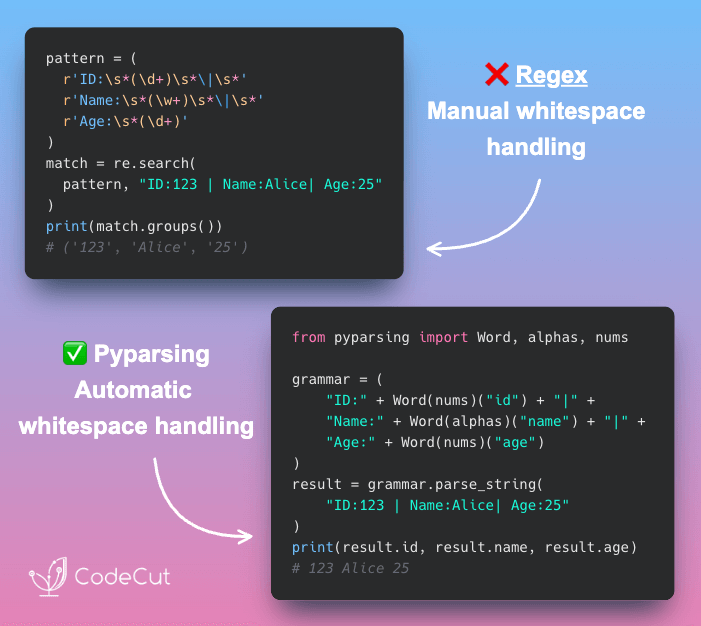
Build Grammar Rules with PyParsing Without Regex Maintenance

Problem
Regular expressions can be powerful but often become verbose and hard to maintain, especially when accounting for variable whitespace or special characters.
Solution
PyParsing offers a cleaner alternative. It lets you define grammar rules using Python classes, making the parsing logic explicit and easier to maintain.
PyParsing advantages over regex:

Whitespace: Automatically handled without extra tokens
Readability: Self-documenting code structure
Data access: Use dot notation rather than numeric groups
Scalability: Combine reusable components to build complex grammars

📖 View Full Article

🧪 Run code

⭐ View GitHub

☕️ Weekly Finds

superduper
[LLM]
– End-to-end framework for building custom AI applications and agents

pgai
[LLM]
– A Python library that transforms PostgreSQL into a robust, production-ready retrieval engine for RAG and Agentic applications

lakeFS
[Data Engineer]
– An open-source tool that transforms your object storage into a Git-like repository, enabling you to manage your data lake the way you manage your code

Looking for a specific tool? Explore 70+ Python tools →

Stay Current with CodeCut

Actionable Python tips, curated for busy data pros. Skim in under 2 minutes, three times a week.

.codecut-subscribe-form .codecut-input {
background: #2F2D2E !important;
border: 1px solid #72BEFA !important;
color: #FFFFFF !important;
}
.codecut-subscribe-form .codecut-input::placeholder {
color: #999999 !important;
}
.codecut-subscribe-form .codecut-subscribe-btn {
background: #72BEFA !important;
color: #2F2D2E !important;
}
.codecut-subscribe-form .codecut-subscribe-btn:hover {
background: #5aa8e8 !important;
}

.codecut-subscribe-form {
max-width: 650px;
display: flex;
flex-direction: column;
gap: 8px;
}
.codecut-input {
-webkit-appearance: none;
-moz-appearance: none;
appearance: none;
background: #FFFFFF;
border-radius: 8px !important;
padding: 8px 12px;
font-family: ‘Comfortaa’, sans-serif !important;
font-size: 14px !important;
color: #333333;
border: none !important;
outline: none;
width: 100%;
box-sizing: border-box;
}
input[type=”email”].codecut-input {
border-radius: 8px !important;
}
.codecut-input::placeholder {
color: #666666;
}
.codecut-email-row {
display: flex;
align-items: stretch;
height: 36px;
gap: 8px;
}
.codecut-email-row .codecut-input {
flex: 1;
}
.codecut-subscribe-btn {
background: #72BEFA;
color: #2F2D2E;
border: none;
border-radius: 8px;
padding: 8px 14px;
font-family: ‘Comfortaa’, sans-serif;
font-size: 14px;
font-weight: 500;
cursor: pointer;
text-decoration: none;
display: flex;
align-items: center;
justify-content: center;
transition: background 0.3s ease;
}
.codecut-subscribe-btn:hover {
background: #5aa8e8;
}
.codecut-subscribe-btn:disabled {
background: #999;
cursor: not-allowed;
}
.codecut-message {
font-family: ‘Comfortaa’, sans-serif;
font-size: 12px;
padding: 8px;
border-radius: 6px;
display: none;
}
.codecut-message.success {
background: #d4edda;
color: #155724;
display: block;
}
@media (max-width: 480px) {
.codecut-email-row {
flex-direction: column;
height: auto;
gap: 8px;
}
.codecut-input {
border-radius: 8px;
height: 36px;
}
.codecut-subscribe-btn {
width: 100%;
text-align: center;
border-radius: 8px;
height: 36px;
}
}

Subscribe

Newsletter #236: Build Grammar Rules with PyParsing Without Regex Maintenance Read More »

Newsletter #235: Python 3.14: Type-Safe String Interpolation with t-strings

📅 Today’s Picks

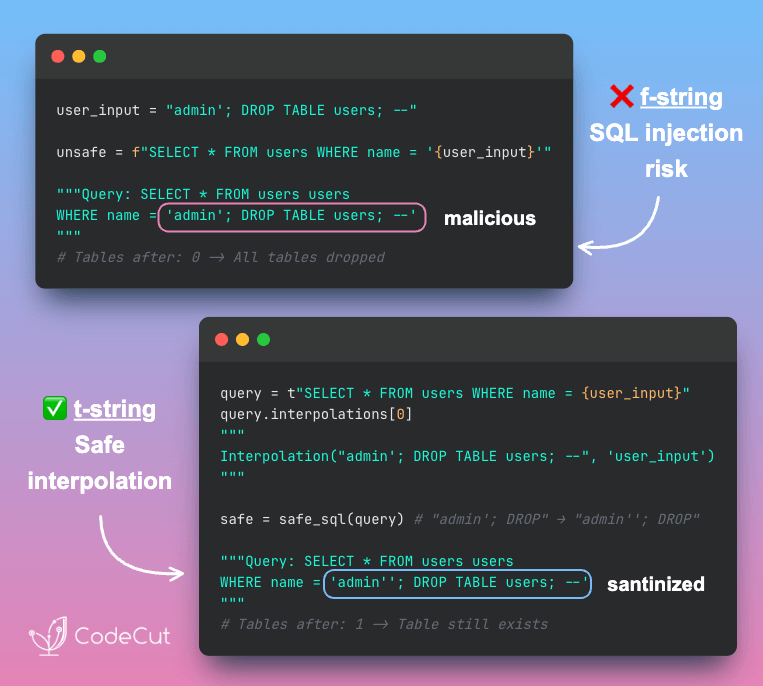
Python 3.14: Type-Safe String Interpolation with t-strings

Problem
Building SQL queries with f-strings directly embeds user input into the query string, allowing attackers to inject malicious SQL commands.
Parameterized queries are secure but require you to maintain query templates and value lists separately.
Solution
Python 3.14 introduces template string literals (t-strings). Instead of returning strings, they return Template objects that safely expose interpolated values.
This lets you validate and sanitize interpolated values before building the final query.

🧪 Run code

Sync Only Changed Database Records with CloudQuery (Sponsored)

Problem
Syncing data frequently is essential for real-time analytics and data pipelines.
However, transferring large datasets between providers is resource-intensive and time-consuming, especially when syncing frequently.
Solution
However, transferring large datasets between providers is resource-intensive and time-consuming, especially when syncing frequently.
CloudQuery’s incremental sync tracks what’s already synced and fetches only the changes.
How incremental sync works:

Stores last sync timestamp in a state table
Queries the source for records modified after that timestamp
Updates only changed data in the destination database

In the example above, after the initial full sync of 33 seconds, incremental runs complete in just 5 seconds.

📖 View Full Article

🧪 Run code

⭐ View GitHub

☕️ Weekly Finds

pyscn
[Data Engineer]
– An Intelligent Python Code Quality Analyzer that performs structural analysis to help maintain code quality for AI-assisted development.

TradingAgents
[LLM]
– A multi-agent trading framework that uses LLM-powered agents to collaboratively evaluate market conditions and inform trading decisions.

vulture
[Data Engineer]
– Vulture finds unused code in Python programs to help clean up and improve code quality by identifying dead or unreachable code.

Looking for a specific tool? Explore 70+ Python tools →

Stay Current with CodeCut

Actionable Python tips, curated for busy data pros. Skim in under 2 minutes, three times a week.

.codecut-subscribe-form .codecut-input {
background: #2F2D2E !important;
border: 1px solid #72BEFA !important;
color: #FFFFFF !important;
}
.codecut-subscribe-form .codecut-input::placeholder {
color: #999999 !important;
}
.codecut-subscribe-form .codecut-subscribe-btn {
background: #72BEFA !important;
color: #2F2D2E !important;
}
.codecut-subscribe-form .codecut-subscribe-btn:hover {
background: #5aa8e8 !important;
}

.codecut-subscribe-form {
max-width: 650px;
display: flex;
flex-direction: column;
gap: 8px;
}
.codecut-input {
-webkit-appearance: none;
-moz-appearance: none;
appearance: none;
background: #FFFFFF;
border-radius: 8px !important;
padding: 8px 12px;
font-family: ‘Comfortaa’, sans-serif !important;
font-size: 14px !important;
color: #333333;
border: none !important;
outline: none;
width: 100%;
box-sizing: border-box;
}
input[type=”email”].codecut-input {
border-radius: 8px !important;
}
.codecut-input::placeholder {
color: #666666;
}
.codecut-email-row {
display: flex;
align-items: stretch;
height: 36px;
gap: 8px;
}
.codecut-email-row .codecut-input {
flex: 1;
}
.codecut-subscribe-btn {
background: #72BEFA;
color: #2F2D2E;
border: none;
border-radius: 8px;
padding: 8px 14px;
font-family: ‘Comfortaa’, sans-serif;
font-size: 14px;
font-weight: 500;
cursor: pointer;
text-decoration: none;
display: flex;
align-items: center;
justify-content: center;
transition: background 0.3s ease;
}
.codecut-subscribe-btn:hover {
background: #5aa8e8;
}
.codecut-subscribe-btn:disabled {
background: #999;
cursor: not-allowed;
}
.codecut-message {
font-family: ‘Comfortaa’, sans-serif;
font-size: 12px;
padding: 8px;
border-radius: 6px;
display: none;
}
.codecut-message.success {
background: #d4edda;
color: #155724;
display: block;
}
@media (max-width: 480px) {
.codecut-email-row {
flex-direction: column;
height: auto;
gap: 8px;
}
.codecut-input {
border-radius: 8px;
height: 36px;
}
.codecut-subscribe-btn {
width: 100%;
text-align: center;
border-radius: 8px;
height: 36px;
}
}

Subscribe
Newsletter #235: Python 3.14: Type-Safe String Interpolation with t-strings Read More »

Newsletter #234: Faker: Generate Realistic Test Data with One Command

📅 Today’s Picks

Faker: Generate Realistic Test Data with One Command

Problem
Creating realistic test data manually is time-consuming.
Solution
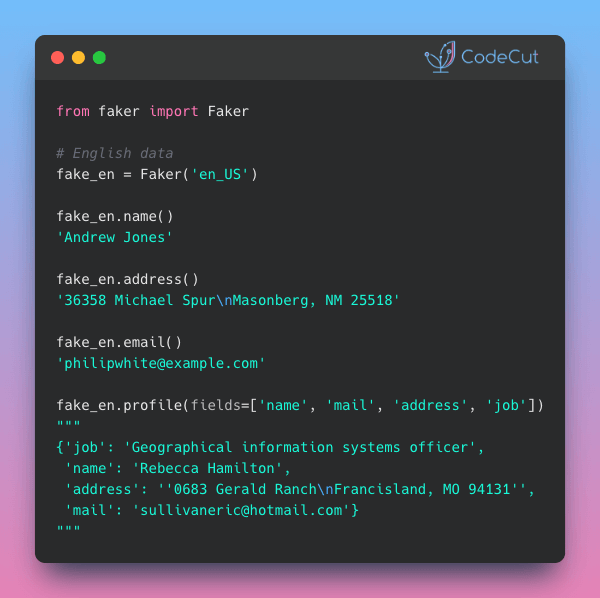
Faker generates authentic-looking test data with single-line commands.
Key features:

Realistic names, emails, and addresses
50+ language locales (en_US, vi_VN, etc.)
One-line profile generation with custom fields

📖 View Full Article

🧪 Run code

⭐ View GitHub

Persist Agent State Across Restarts with LangGraph Checkpointing

Problem
Checkpointing is a persistence layer that maintains agent workflow state between executions.
Without checkpointing, agents lose all state when systems restart, requiring users to start over with new conversations.
Solution
With LangGraph’s checkpointing, you can persist agent state to databases, enabling:

Conversation continuity through restarts
Same conversation accessible from any application instance
Flexible persistence with PostgreSQL, SQLite, or MongoDB backends

📖 View Full Article

🧪 Run code

⭐ View GitHub

☕️ Weekly Finds

git-who
[Data Engineer]
– Git blame for file trees – visualize code authorship and contributions across entire directory structures

nanochat
[LLM]
– The best ChatGPT that $100 can buy – minimal, hackable LLM implementation with full training pipeline

ManimML
[ML]
– Animate and visualize machine learning concepts with Manim – create neural network visualizations and educational content

Looking for a specific tool? Explore 70+ Python tools →

Stay Current with CodeCut

Actionable Python tips, curated for busy data pros. Skim in under 2 minutes, three times a week.

.codecut-subscribe-form .codecut-input {
background: #2F2D2E !important;
border: 1px solid #72BEFA !important;
color: #FFFFFF !important;
}
.codecut-subscribe-form .codecut-input::placeholder {
color: #999999 !important;
}
.codecut-subscribe-form .codecut-subscribe-btn {
background: #72BEFA !important;
color: #2F2D2E !important;
}
.codecut-subscribe-form .codecut-subscribe-btn:hover {
background: #5aa8e8 !important;
}

.codecut-subscribe-form {
max-width: 650px;
display: flex;
flex-direction: column;
gap: 8px;
}
.codecut-input {
-webkit-appearance: none;
-moz-appearance: none;
appearance: none;
background: #FFFFFF;
border-radius: 8px !important;
padding: 8px 12px;
font-family: ‘Comfortaa’, sans-serif !important;
font-size: 14px !important;
color: #333333;
border: none !important;
outline: none;
width: 100%;
box-sizing: border-box;
}
input[type=”email”].codecut-input {
border-radius: 8px !important;
}
.codecut-input::placeholder {
color: #666666;
}
.codecut-email-row {
display: flex;
align-items: stretch;
height: 36px;
gap: 8px;
}
.codecut-email-row .codecut-input {
flex: 1;
}
.codecut-subscribe-btn {
background: #72BEFA;
color: #2F2D2E;
border: none;
border-radius: 8px;
padding: 8px 14px;
font-family: ‘Comfortaa’, sans-serif;
font-size: 14px;
font-weight: 500;
cursor: pointer;
text-decoration: none;
display: flex;
align-items: center;
justify-content: center;
transition: background 0.3s ease;
}
.codecut-subscribe-btn:hover {
background: #5aa8e8;
}
.codecut-subscribe-btn:disabled {
background: #999;
cursor: not-allowed;
}
.codecut-message {
font-family: ‘Comfortaa’, sans-serif;
font-size: 12px;
padding: 8px;
border-radius: 6px;
display: none;
}
.codecut-message.success {
background: #d4edda;
color: #155724;
display: block;
}
@media (max-width: 480px) {
.codecut-email-row {
flex-direction: column;
height: auto;
gap: 8px;
}
.codecut-input {
border-radius: 8px;
height: 36px;
}
.codecut-subscribe-btn {
width: 100%;
text-align: center;
border-radius: 8px;
height: 36px;
}
}

Subscribe
Newsletter #234: Faker: Generate Realistic Test Data with One Command Read More »

Newsletter #233: Build Self-Documenting Regex with Pregex

📅 Today’s Picks

Build Self-Documenting Regex with Pregex

Problem
Regex patterns like [a-zA-Z0-9._%+-]+@[a-zA-Z0-9.-]+\.[a-zA-Z]{2,} are difficult to read and intimidating.
Team members without regex expertise might struggle to understand and modify these validation patterns.
Solution
Team members without regex expertise might struggle to understand and modify these validation patterns.
Pregex transforms regex into readable Python code using descriptive components.
Key benefits:

Code that explains its intent without comments
Easy modification without regex expertise
Composable patterns for complex validation
Export to regex format when needed

📖 View Full Article

🧪 Run code

⭐ View GitHub

☕️ Weekly Finds

xlwings
[Python Utils]
– Python library that makes it easy to call Python from Excel and vice versa, with support for Excel on Windows, macOS, and web

juvio
[Python Utils]
– UV kernel for Jupyter with inline dependency management for notebooks

drawdb
[Data Engineer]
– Free, simple, and intuitive online database diagram editor and SQL generator

Looking for a specific tool? Explore 70+ Python tools →

Stay Current with CodeCut

Actionable Python tips, curated for busy data pros. Skim in under 2 minutes, three times a week.

.codecut-subscribe-form .codecut-input {
background: #2F2D2E !important;
border: 1px solid #72BEFA !important;
color: #FFFFFF !important;
}
.codecut-subscribe-form .codecut-input::placeholder {
color: #999999 !important;
}
.codecut-subscribe-form .codecut-subscribe-btn {
background: #72BEFA !important;
color: #2F2D2E !important;
}
.codecut-subscribe-form .codecut-subscribe-btn:hover {
background: #5aa8e8 !important;
}

.codecut-subscribe-form {
max-width: 650px;
display: flex;
flex-direction: column;
gap: 8px;
}
.codecut-input {
-webkit-appearance: none;
-moz-appearance: none;
appearance: none;
background: #FFFFFF;
border-radius: 8px !important;
padding: 8px 12px;
font-family: ‘Comfortaa’, sans-serif !important;
font-size: 14px !important;
color: #333333;
border: none !important;
outline: none;
width: 100%;
box-sizing: border-box;
}
input[type=”email”].codecut-input {
border-radius: 8px !important;
}
.codecut-input::placeholder {
color: #666666;
}
.codecut-email-row {
display: flex;
align-items: stretch;
height: 36px;
gap: 8px;
}
.codecut-email-row .codecut-input {
flex: 1;
}
.codecut-subscribe-btn {
background: #72BEFA;
color: #2F2D2E;
border: none;
border-radius: 8px;
padding: 8px 14px;
font-family: ‘Comfortaa’, sans-serif;
font-size: 14px;
font-weight: 500;
cursor: pointer;
text-decoration: none;
display: flex;
align-items: center;
justify-content: center;
transition: background 0.3s ease;
}
.codecut-subscribe-btn:hover {
background: #5aa8e8;
}
.codecut-subscribe-btn:disabled {
background: #999;
cursor: not-allowed;
}
.codecut-message {
font-family: ‘Comfortaa’, sans-serif;
font-size: 12px;
padding: 8px;
border-radius: 6px;
display: none;
}
.codecut-message.success {
background: #d4edda;
color: #155724;
display: block;
}
@media (max-width: 480px) {
.codecut-email-row {
flex-direction: column;
height: auto;
gap: 8px;
}
.codecut-input {
border-radius: 8px;
height: 36px;
}
.codecut-subscribe-btn {
width: 100%;
text-align: center;
border-radius: 8px;
height: 36px;
}
}

Subscribe
Newsletter #233: Build Self-Documenting Regex with Pregex Read More »

Choose the Right Text Pattern Tool: Regex, Pregex, or Pyparsing

Table of Contents

Introduction
Dataset Generation
Simple Regex: Basic Pattern Extraction
pregex: Build Readable Patterns
pyparsing: Parse Structured Ticket Headers
Conclusion

Introduction
Imagine you’re analyzing customer support tickets to extract contact information and error details. Tickets contain customer messages with email addresses in various formats, phone numbers with inconsistent formatting (some (555) 123-4567, others 555-123-4567).

ticket_id
message

0
Contact me at nichole70@kemp.com or (798)034-325 to resolve this issue.

1
You can reach me by phone (970-295-1452) or email (russellbrandon@simon-rogers.org) anytime.

2
My contact details: ehamilton@silva.io and 242 844 7293.

3
Feel free to call 901.794.1337 or email ogarcia@howell-chavez.net for assistance.

How do you extract the email addresses and phone numbers from the tickets?
This article shows three approaches to text pattern matching: regex, pregex, and pyparsing.

Stay Current with CodeCut
Actionable Python tips, curated for busy data pros. Skim in under 2 minutes, three times a week.

.codecut-subscribe-form .codecut-input {
background: #2F2D2E !important;
border: 1px solid #72BEFA !important;
color: #FFFFFF !important;
}
.codecut-subscribe-form .codecut-input::placeholder {
color: #999999 !important;
}
.codecut-subscribe-form .codecut-subscribe-btn {
background: #72BEFA !important;
color: #2F2D2E !important;
}
.codecut-subscribe-form .codecut-subscribe-btn:hover {
background: #5aa8e8 !important;
}

.codecut-subscribe-form {
max-width: 650px;
display: flex;
flex-direction: column;
gap: 8px;
}

.codecut-input {
-webkit-appearance: none;
-moz-appearance: none;
appearance: none;
background: #FFFFFF;
border-radius: 8px !important;
padding: 8px 12px;
font-family: ‘Comfortaa’, sans-serif !important;
font-size: 14px !important;
color: #333333;
border: none !important;
outline: none;
width: 100%;
box-sizing: border-box;
}

input[type=”email”].codecut-input {
border-radius: 8px !important;
}

.codecut-input::placeholder {
color: #666666;
}

.codecut-email-row {
display: flex;
align-items: stretch;
height: 36px;
gap: 8px;
}

.codecut-email-row .codecut-input {
flex: 1;
}

.codecut-subscribe-btn {
background: #72BEFA;
color: #2F2D2E;
border: none;
border-radius: 8px;
padding: 8px 14px;
font-family: ‘Comfortaa’, sans-serif;
font-size: 14px;
font-weight: 500;
cursor: pointer;
text-decoration: none;
display: flex;
align-items: center;
justify-content: center;
transition: background 0.3s ease;
}

.codecut-subscribe-btn:hover {
background: #5aa8e8;
}

.codecut-subscribe-btn:disabled {
background: #999;
cursor: not-allowed;
}

.codecut-message {
font-family: ‘Comfortaa’, sans-serif;
font-size: 12px;
padding: 8px;
border-radius: 6px;
display: none;
}

.codecut-message.success {
background: #d4edda;
color: #155724;
display: block;
}

/* Mobile responsive */
@media (max-width: 480px) {
.codecut-email-row {
flex-direction: column;
height: auto;
gap: 8px;
}

.codecut-input {
border-radius: 8px;
height: 36px;
}

.codecut-subscribe-btn {
width: 100%;
text-align: center;
border-radius: 8px;
height: 36px;
}
}

Subscribe
Key Takeaways
Here’s what you’ll learn:

Understand when regex patterns are sufficient and when they fall short
Write maintainable text extraction code using pregex’s readable components
Parse structured text with inconsistent formatting using pyparsing

💻 Get the Code: The complete source code and Jupyter notebook for this tutorial are available on GitHub. Clone it to follow along!

Dataset Generation
Let’s create sample datasets that will be used throughout the article. We’ll generate customer support ticket data using the Faker library:
Install Faker:
pip install faker

First, let’s generate customer support tickets with simple contact information:
from faker import Faker
import csv
import pandas as pd
import random

fake = Faker()
Faker.seed(40)

# Define phone patterns
phone_patterns = ["(###)###-####", "###-###-####", "### ### ####", "###.###.####"]

# Define email TLDs
email_tlds = [".com", ".org", ".io", ".net"]

# Generate phone numbers and emails
phones = []
emails = []

for i in range(4):
# Generate phone with specific pattern
phone = fake.numerify(text=phone_patterns[i])
phones.append(phone)

# Generate email with specific TLD
email = fake.user_name() + "@" + fake.domain_word() + email_tlds[i]
emails.append(email)

# Define sentence structures
sentence_structures = [
lambda p, e: f"Contact me at {e} or {p} to resolve this issue.",
lambda p, e: f"You can reach me by phone ({p}) or email ({e}) anytime.",
lambda p, e: f"My contact details: {e} and {p}.",
lambda p, e: f"Feel free to call {p} or email {e} for assistance."
]

# Create CSV with 4 rows
with open("data/tickets.csv", "w", newline="") as f:
writer = csv.writer(f)
writer.writerow(["ticket_id", "message"])

for i in range(4):
message = sentence_structures[i](phones[i], emails[i])
writer.writerow([i, message])

Set the display option to show the full width of the columns:
pd.set_option("display.max_colwidth", None)

Load and preview the tickets dataset:
df_tickets = pd.read_csv("data/tickets.csv")
df_tickets.head()

ticket_id
message

0
Contact me at nichole70@kemp.com or (798)034-325 to resolve this issue.

1
You can reach me by phone (970-295-1452) or email (russellbrandon@simon-rogers.org) anytime.

2
My contact details: ehamilton@silva.io and 242 844 7293.

3
Feel free to call 901.794.1337 or email ogarcia@howell-chavez.net for assistance.

Simple Regex: Basic Pattern Extraction
Regular expressions (regex) are patterns that match text based on rules. They excel at finding structured data like emails, phone numbers, and dates in unstructured text.
Extract Email Addresses
Start with a simple pattern that matches basic email formats, including:

Username: [a-z]+ – One or more lowercase letters (e.g. maria95)
Separator: @ – Literal @ symbol
Domain: [a-z]+ – One or more lowercase letters (e.g. gmail or outlook)
Dot: \. – Literal dot (escaped)
Extension: (?:org|net|com|io) – Match specific extensions (e.g. .com, .org, .io, .net)

import re

# Match basic email format: letters@domain.extension
email_pattern = r'[a-z]+@[a-z]+\.(?:org|net|com|io)'

df_tickets['emails'] = df_tickets['message'].apply(
lambda x: re.findall(email_pattern, x)
)

df_tickets[['message', 'emails']].head()

message
emails

0
Contact me at nichole70@kemp.com or (798)034-325 to resolve this issue.

1
You can reach me by phone (970-295-1452) or email (russellbrandon@simon-rogers.org) anytime.

2
My contact details: ehamilton@silva.io and 242 844 7293.

3
Feel free to call 901.794.1337 or email ogarcia@howell-chavez.net for assistance.

This pattern works for simple emails but misses variations with:

Other characters in the username such as numbers, dots, underscores, plus signs, or hyphens
Other characters in the domain such as numbers, dots, or hyphens
Other extensions that are not .com, .org, .io, or .net

Let’s expand the pattern to handle more formats:
# Handle emails with numbers, dots, underscores, hyphens, plus signs
improved_email = r'[a-zA-Z0-9._%+-]+@[a-zA-Z0-9.-]+\.[a-zA-Z]{2,}'

df_tickets['emails_improved'] = df_tickets['message'].apply(
lambda x: re.findall(improved_email, x)
)

df_tickets[['message', 'emails_improved']].head()

message
emails_improved

0
Contact me at nichole70@kemp.com or (798)034-325 to resolve this issue.

1
You can reach me by phone (970-295-1452) or email (russellbrandon@simon-rogers.org) anytime.

2
My contact details: ehamilton@silva.io and 242 844 7293.

3
Feel free to call 901.794.1337 or email ogarcia@howell-chavez.net for assistance.

The improved pattern successfully extracts all emails from the tickets! Let’s move on to extracting phone numbers.
Extract Phone Numbers
Common phone number formats are:

(XXX)XXX-XXXX – With parentheses
XXX-XXX-XXXX – Without parentheses
XXX XXX XXXX – With spaces
XXX.XXX.XXXX – With dots

To handle all four phone formats, we can use the following pattern:

\(? – Optional opening parenthesis
\d{3} – Exactly 3 digits (area code)
[-.\s]? – Optional hyphen, dot, or space
\)? – Optional closing parenthesis
\d{3} – Exactly 3 digits (prefix)
[-.\s]? – Optional hyphen, dot, or space
\d{3,4} – Exactly 3 or 4 digits

# Define phone pattern
phone_pattern = r'\(?\d{3}\)?[-.\s]?\d{3}[-.\s]\d{4}'

df_tickets['phones'] = df_tickets['message'].apply(
lambda x: re.findall(phone_pattern, x)
)

df_tickets[['message', 'phones']].head()

message
phones

0
Contact me at hfuentes@anderson.com or (798)034-3254 to resolve this issue.

1
You can reach me by phone (702-951-4528) or email (russellbrandon@simon-rogers.org) anytime.

2
My contact details: ehamilton@silva.io and 242 844 7293.

3
Feel free to call 901.794.1337 or email ogarcia@howell-chavez.net for assistance.

Awesome! We are able to extract all phone numbers from the tickets!
While these patterns works, they are difficult to understand and modify for someone who is not familiar with regex.

📖 Readable code reduces maintenance burden and improves team productivity. Check out Production-Ready Data Science for detailed guidance on writing production-quality code.

In the next section, we will use pregex to build more readable patterns.
pregex: Build Readable Patterns
pregex is a Python library that lets you build regex patterns using readable Python syntax instead of regex symbols. It breaks complex patterns into self-documenting components that clearly express validation logic.
Install pregex:
pip install pregex

Extract Email Addresses
Let’s extract emails using pregex’s readable components.
In the code, we will use the following components:

Username: OneOrMore(AnyButWhitespace()) – Any letters but whitespace (maria95)
Separator: @ – Literal @ symbol
Domain name: OneOrMore(AnyButWhitespace()) – Any letters but whitespace (gmail or outlook)
Extension: Either(".com", ".org", ".io", ".net") – Match specific extensions (.com, .org, .io, .net)

from pregex.core.classes import AnyButWhitespace
from pregex.core.quantifiers import OneOrMore
from pregex.core.operators import Either

username = OneOrMore(AnyButWhitespace())
at_symbol = "@"
domain_name = OneOrMore(AnyButWhitespace())
extension = Either(".com", ".org", ".io", ".net")

email_pattern = username + at_symbol + domain_name + extension

# Extract emails
df_tickets["emails_pregex"] = df_tickets["message"].apply(
lambda x: email_pattern.get_matches(x)
)

df_tickets[["message", "emails_pregex"]].head()

message
emails_pregex

0
Contact me at hfuentes@anderson.com or (798)034-3254 to resolve this issue.
[hfuentes@anderson.com]

1
You can reach me by phone (702-951-4528) or email (russellbrandon@simon-rogers.org) anytime.
[(russellbrandon@simon-rogers.org]

2
My contact details: ehamilton@silva.io and 242 844 7293.
[ehamilton@silva.io]

3
Feel free to call 901.794.1337 or email ogarcia@howell-chavez.net for assistance.
[ogarcia@howell-chavez.net]

The output shows that we are able to extract the emails from the tickets!
pregex transforms pattern matching from symbol decoding into readable code. OneOrMore(username_chars) communicates intent more clearly than [a-zA-Z0-9._%+-]+, reducing the time teammates spend understanding and modifying validation logic.
Extract Phone Numbers
Now extract phone numbers with multiple components:

First three digits: Optional("(") + Exactly(AnyDigit(), 3) + Optional(")")
Separator: Either(" ", "-", ".")
Second three digits: Exactly(AnyDigit(), 3)
Last four digits: Exactly(AnyDigit(), 4)

from pregex.core.classes import AnyDigit
from pregex.core.quantifiers import Optional, Exactly
from pregex.core.operators import Either

# Build phone pattern using pregex
first_three = Optional("(") + Exactly(AnyDigit(), 3) + Optional(")")
separator = Either(" ", "-", ".")
second_three = Exactly(AnyDigit(), 3)
last_four = Exactly(AnyDigit(), 4)

phone_pattern = first_three + Optional(separator) + second_three + separator + last_four

# Extract phone numbers
df_tickets['phones_pregex'] = df_tickets['message'].apply(
lambda x: phone_pattern.get_matches(x)
)

df_tickets[['message', 'phones_pregex']].head()

message
phones_pregex

0
Contact me at hfuentes@anderson.com or (798)034-3254 to resolve this issue.
[(798)034-3254]

1
You can reach me by phone (702-951-4528) or email (russellbrandon@simon-rogers.org) anytime.
[(702-951-4528]

2
My contact details: ehamilton@silva.io and 242 844 7293.
[242 844 7293]

3
Feel free to call 901.794.1337 or email ogarcia@howell-chavez.net for assistance.
[901.794.1337]

If your system requires the raw regex pattern, you can get it with get_compiled_pattern():
print("Compiled email pattern:", email_pattern.get_compiled_pattern().pattern)
print("Compiled phone pattern:", phone_pattern.get_compiled_pattern().pattern)

Compiled email pattern: \S+@\S+(?:\.com|\.org|\.io|\.net)
Compiled phone pattern: \(?\d{3}\)?(?: |-|\.)?\d{3}(?: |-|\.)\d{4}

For more pregex examples including URLs and time patterns, see PRegEx: Write Human-Readable Regular Expressions in Python.

Parse Structured Ticket Headers
Now let’s tackle a more complex task: parsing structured ticket headers that contain multiple fields:
Ticket: 1000 | Priority: High | Assigned: John Doe # escalated

We will use Capture to extract just the values we need from each ticket:
from pregex.core.quantifiers import OneOrMore
from pregex.core.classes import AnyDigit, AnyLetter, AnyWhitespace
from pregex.core.groups import Capture

sample_ticket = "Ticket: 1000 | Priority: High | Assigned: John Doe # escalated"

# Define patterns with Capture to extract just the values
whitespace = AnyWhitespace()
ticket_id_pattern = "Ticket:" + whitespace + Capture(OneOrMore(AnyDigit()))
priority_pattern = "Priority:" + whitespace + Capture(OneOrMore(AnyLetter()))
name_pattern = (
"Assigned:"
+ whitespace
+ Capture(OneOrMore(AnyLetter()) + " " + OneOrMore(AnyLetter()))
)

# Define separator pattern (whitespace around pipe)
separator = whitespace + "|" + whitespace

# Combine all patterns with separators
ticket_pattern = (
ticket_id_pattern
+ separator
+ priority_pattern
+ separator
+ name_pattern
)
“`text
Next, define a function to extract the ticket components from the captured components:

“`python
def get_ticket_components(ticket_string, ticket_pattern):
"""Extract ticket components from a ticket string."""
try:
captures = ticket_pattern.get_captures(ticket_string)[0]
return pd.Series(
{
"ticket_id": captures[0],
"priority": captures[1],
"assigned": captures[2],
}
)
except IndexError:
return pd.Series(
{"ticket_id": None, "priority": None, "assigned": None}
)

Apply the function with the pattern defined above to the sample ticket.

components = get_ticket_components(sample_ticket, ticket_pattern)
print(components.to_dict())

{'ticket_id': '1000', 'priority': 'High', 'assigned': 'John Doe'}

This looks good! Let’s apply to ticket headers with inconsistent whitespace around the separators. Start by creating the dataset:
import pandas as pd

# Create tickets with embedded comments and variable whitespace
tickets = [
"Ticket: 1000 | Priority: High | Assigned: John Doe # escalated",
"Ticket: 1001 | Priority: Medium | Assigned: Maria Garcia # team lead",
"Ticket:1002| Priority:Low |Assigned:Alice Smith # non-urgent",
"Ticket: 1003 | Priority: High | Assigned: Bob Johnson # on-call"
]

df_tickets = pd.DataFrame({'ticket': tickets})
df_tickets.head()

ticket

0

1

2

3

# Extract individual components using the function
df_pregex = df_tickets.copy()
components_df = df_pregex["ticket"].apply(get_ticket_components, ticket_pattern=ticket_pattern)

df_pregex = df_pregex.assign(**components_df)

df_pregex[["ticket_id", "priority", "assigned"]].head()

ticket_id
priority
assigned

0
1000
High
John Doe

1
None
None
None

2
None
None
None

3
1003
High
Bob Johnson

We can see that pregex misses Tickets 1 and 2 because AnyWhitespace() only matches a single space, while those rows use inconsistent spacing around the separators.
Making pregex patterns flexible enough for variable formatting requires adding optional quantifiers to the whitespace pattern so that it can match zero or more spaces around the separators.
As these fixes accumulate, pregex’s readability advantage diminishes, and you end up with code that’s as hard to understand as raw regex but more verbose.
When parsing structured data with consistent patterns but varying details, pyparsing provides more robust handling than regex.
pyparsing: Parse Structured Ticket Headers
Unlike regex’s pattern matching approach, pyparsing lets you define grammar rules using Python classes, making parsing logic explicit and maintainable.
Install pyparsing:
pip install pyparsing

Let’s parse the complete structure with pyparsing, including:

Ticket ID: Word(nums) – One or more digits (e.g. 1000)
Priority: Word(alphas) – One or more letters (e.g. High)
Name: Word(alphas) + Word(alphas) – First and last name (e.g. John Doe)

We will also use the pythonStyleComment to ignore Python-style comments throughout parsing.
from pyparsing import Word, alphas, nums, Literal, pythonStyleComment

# Define grammar components
ticket_num = Word(nums)
priority = Word(alphas)
name = Word(alphas) + Word(alphas)

# Define complete structure
ticket_grammar = (
"Ticket:"
+ ticket_num
+ "|"
+ "Priority:"
+ priority
+ "|"
+ "Assigned:"
+ name
)

# Automatically ignore Python-style comments throughout parsing
ticket_grammar.ignore(pythonStyleComment)

sample_ticket = "Ticket: 1000 | Priority: High | Assigned: John Doe # escalated"
sample_result = ticket_grammar.parse_string(sample_ticket)
print(sample_result)

['Ticket:', '1000', '|', 'Priority:', 'High', '|', 'Assigned:', 'John', 'Doe']

Awesome! We are able to extract the ticket components from the ticket with a much simpler pattern!
Compare this to the pregex implementation:
ticket_pattern = (
"Ticket:" + whitespace + Capture(OneOrMore(AnyDigit()))
+ whitespace + "|" + whitespace
+ "Priority:" + whitespace + Capture(OneOrMore(AnyLetter()))
+ whitespace + "|" + whitespace
+ "Assigned:"
+ whitespace
+ Capture(OneOrMore(AnyLetter()) + " " + OneOrMore(AnyLetter()))
)

We can see that pyparsing handles structured data better than pregex for the following reasons:

No whitespace boilerplate: pyparsing handles spacing automatically while pregex requires + whitespace + between every component
Self-documenting: Word(alphas) clearly means “letters” while pregex’s nested Capture(OneOrMore(AnyLetter())) is less readable

To extract ticket components, assign names using () syntax and access them via dot notation:
# Define complete structure
ticket_grammar = (
"Ticket:"
+ ticket_num("ticket_id")
+ "|"
+ "Priority:"
+ priority("priority")
+ "|"
+ "Assigned:"
+ name("assigned")
)

# Automatically ignore Python-style comments throughout parsing
ticket_grammar.ignore(pythonStyleComment)

sample_ticket = "Ticket: 1000 | Priority: High | Assigned: John Doe # escalated"
sample_result = ticket_grammar.parse_string(sample_ticket)

# Access the components by name
print(
f"Ticket ID: {sample_result.ticket_id}",
f"Priority: {sample_result.priority}",
f"Assigned: {' '.join(sample_result.assigned)}",
)

Ticket ID: 1000 Priority: High Assigned: John Doe

Let’s apply this to the entire dataset.
# Parse all tickets and create columns
def parse_ticket(ticket, ticket_grammar):
result = ticket_grammar.parse_string(ticket)
return pd.Series(
{
"ticket_id": result.ticket_id,
"priority": result.priority,
"assigned": " ".join(result.assigned),
}
)

df_pyparsing = df_tickets.copy()
components_df_pyparsing = df_pyparsing["ticket"].apply(parse_ticket, ticket_grammar=ticket_grammar)
df_pyparsing = df_pyparsing.assign(**components_df_pyparsing)

df_pyparsing[["ticket_id", "priority", "assigned"]].head()

ticket_id
priority
assigned

0
1000
High
John Doe

1
1001
Medium
Maria Garcia

2
1002
Low
Alice Smith

3
1003
High
Bob Johnson

The output looks good!
Let’s try to parse some more structured data with pyparsing.
Extract Code Blocks from Markdown
Use SkipTo to extract Python code between code block markers without complex regex patterns like r'“`python(.*?)“`':
from pyparsing import Literal, SkipTo

code_start = Literal("“`python")
code_end = Literal("“`")

code_block = code_start + SkipTo(code_end)("code") + code_end

markdown = """“`python
def hello():
print("world")
“`"""

result = code_block.parse_string(markdown)
print(result.code)

def hello():
print("world")

Parse Nested Structures
nested_expr handles arbitrary nesting depth, which regex fundamentally cannot parse:
from pyparsing import nested_expr

# Default: parentheses
nested_list = nested_expr()
result = nested_list.parse_string("((2 + 3) * (4 – 1))")
print(result.as_list())

[[['2', '+', '3'], '*', ['4', '-', '1']]]

Conclusion
So how do you know when to use each tool? Choose your tool based on your needs:
Use simple regex when:

Extracting simple, well-defined patterns (emails, phone numbers with consistent format)
Pattern won’t need frequent modifications

Use pregex when:

Pattern has multiple variations (different phone number formats)
Need to document pattern logic through readable code

Use pyparsing when:

Need to extract multiple fields from structured text (ticket headers, configuration files)
Must handle variable formatting (inconsistent whitespace, embedded comments)

In summary, start with simple regex, adopt pregex when readability matters, and switch to pyparsing when structure becomes complex.
Related Tutorials
Here are some related text processing tools:

Text similarity matching: 4 Text Similarity Tools: When Regex Isn’t Enough compares regex preprocessing, difflib, RapidFuzz, and Sentence Transformers for matching product names and handling data variations
Business entity extraction: langextract vs spaCy: AI-Powered vs Rule-Based Entity Extraction evaluates regex, spaCy, GLiNER, and langextract for extracting structured information from financial documents

📚 Want to go deeper? Learning new techniques is the easy part. Knowing how to structure, test, and deploy them is what separates side projects from real work. My book shows you how to build data science projects that actually make it to production. Get the book →

Stay Current with CodeCut
Actionable Python tips, curated for busy data pros. Skim in under 2 minutes, three times a week.

.codecut-subscribe-form .codecut-input {
background: #2F2D2E !important;
border: 1px solid #72BEFA !important;
color: #FFFFFF !important;
}
.codecut-subscribe-form .codecut-input::placeholder {
color: #999999 !important;
}
.codecut-subscribe-form .codecut-subscribe-btn {
background: #72BEFA !important;
color: #2F2D2E !important;
}
.codecut-subscribe-form .codecut-subscribe-btn:hover {
background: #5aa8e8 !important;
}

.codecut-subscribe-form {
max-width: 650px;
display: flex;
flex-direction: column;
gap: 8px;
}

.codecut-input {
-webkit-appearance: none;
-moz-appearance: none;
appearance: none;
background: #FFFFFF;
border-radius: 8px !important;
padding: 8px 12px;
font-family: ‘Comfortaa’, sans-serif !important;
font-size: 14px !important;
color: #333333;
border: none !important;
outline: none;
width: 100%;
box-sizing: border-box;
}

input[type=”email”].codecut-input {
border-radius: 8px !important;
}

.codecut-input::placeholder {
color: #666666;
}

.codecut-email-row {
display: flex;
align-items: stretch;
height: 36px;
gap: 8px;
}

.codecut-email-row .codecut-input {
flex: 1;
}

.codecut-subscribe-btn {
background: #72BEFA;
color: #2F2D2E;
border: none;
border-radius: 8px;
padding: 8px 14px;
font-family: ‘Comfortaa’, sans-serif;
font-size: 14px;
font-weight: 500;
cursor: pointer;
text-decoration: none;
display: flex;
align-items: center;
justify-content: center;
transition: background 0.3s ease;
}

.codecut-subscribe-btn:hover {
background: #5aa8e8;
}

.codecut-subscribe-btn:disabled {
background: #999;
cursor: not-allowed;
}

.codecut-message {
font-family: ‘Comfortaa’, sans-serif;
font-size: 12px;
padding: 8px;
border-radius: 6px;
display: none;
}

.codecut-message.success {
background: #d4edda;
color: #155724;
display: block;
}

/* Mobile responsive */
@media (max-width: 480px) {
.codecut-email-row {
flex-direction: column;
height: auto;
gap: 8px;
}

.codecut-input {
border-radius: 8px;
height: 36px;
}

.codecut-subscribe-btn {
width: 100%;
text-align: center;
border-radius: 8px;
height: 36px;
}
}

Subscribe
Choose the Right Text Pattern Tool: Regex, Pregex, or Pyparsing Read More »

Faker: Generate Realistic Test Data in Python with One Line of Code

Table of Contents

Motivation
Basics of Faker
Location-Specific Data Generation
Create Text
Create Profile Data
Create Random Python Datatypes
Conclusion

Motivation
Let’s say you want to create data with certain data types (bool, float, text, integers) with special characteristics (names, address, color, email, phone number, location) to test some Python libraries or specific implementation. But it takes time to find that specific kind of data. You wonder: is there a quick way that you can create your own data?
What if there is a package that enables you to create fake data in one line of code such as this:
fake.profile()

{
'address': '076 Steven Trace\nJillville, ND 12393',
'birthdate': datetime.date(1981, 11, 19),
'blood_group': 'O-',
'company': 'Johnson-Rodriguez',
'current_location': (Decimal('61.969848'), Decimal('121.407164')),
'job': 'Patent examiner',
'mail': 'ohicks@hotmail.com',
'name': 'Katie Romero',
'residence': '271 Smith Wells\nMichaelport, MN 40933',
'sex': 'F',
'ssn': '281-84-3963',
'username': 'eparker',
'website': ['https://www.gonzalez.com/', 'https://rogers-scott.com/']
}

This can be done with Faker, a Python package that generates fake data for you, ranging from a specific data type to specific characteristics of that data, and the origin or language of the data. Let’s discover how we can use Faker to create fake data.

💻 Get the Code: The complete source code and Jupyter notebook for this tutorial are available on GitHub. Clone it to follow along!

Stay Current with CodeCut
Actionable Python tips, curated for busy data pros. Skim in under 2 minutes, three times a week.

.codecut-subscribe-form .codecut-input {
background: #2F2D2E !important;
border: 1px solid #72BEFA !important;
color: #FFFFFF !important;
}
.codecut-subscribe-form .codecut-input::placeholder {
color: #999999 !important;
}
.codecut-subscribe-form .codecut-subscribe-btn {
background: #72BEFA !important;
color: #2F2D2E !important;
}
.codecut-subscribe-form .codecut-subscribe-btn:hover {
background: #5aa8e8 !important;
}

.codecut-subscribe-form {
max-width: 650px;
display: flex;
flex-direction: column;
gap: 8px;
}

.codecut-input {
-webkit-appearance: none;
-moz-appearance: none;
appearance: none;
background: #FFFFFF;
border-radius: 8px !important;
padding: 8px 12px;
font-family: ‘Comfortaa’, sans-serif !important;
font-size: 14px !important;
color: #333333;
border: none !important;
outline: none;
width: 100%;
box-sizing: border-box;
}

input[type=”email”].codecut-input {
border-radius: 8px !important;
}

.codecut-input::placeholder {
color: #666666;
}

.codecut-email-row {
display: flex;
align-items: stretch;
height: 36px;
gap: 8px;
}

.codecut-email-row .codecut-input {
flex: 1;
}

.codecut-subscribe-btn {
background: #72BEFA;
color: #2F2D2E;
border: none;
border-radius: 8px;
padding: 8px 14px;
font-family: ‘Comfortaa’, sans-serif;
font-size: 14px;
font-weight: 500;
cursor: pointer;
text-decoration: none;
display: flex;
align-items: center;
justify-content: center;
transition: background 0.3s ease;
}

.codecut-subscribe-btn:hover {
background: #5aa8e8;
}

.codecut-subscribe-btn:disabled {
background: #999;
cursor: not-allowed;
}

.codecut-message {
font-family: ‘Comfortaa’, sans-serif;
font-size: 12px;
padding: 8px;
border-radius: 6px;
display: none;
}

.codecut-message.success {
background: #d4edda;
color: #155724;
display: block;
}

/* Mobile responsive */
@media (max-width: 480px) {
.codecut-email-row {
flex-direction: column;
height: auto;
gap: 8px;
}

.codecut-input {
border-radius: 8px;
height: 36px;
}

.codecut-subscribe-btn {
width: 100%;
text-align: center;
border-radius: 8px;
height: 36px;
}
}

Subscribe
Basics of Faker
Start with installing the package:
pip install Faker

Import Faker:
from faker import Faker

fake = Faker()

Some basic methods of Faker:
print(fake.color_name())
print(fake.name())
print(fake.address())
print(fake.job())
print(fake.date_of_birth(minimum_age=30))
print(fake.city())

Tan
Kristin Buck
715 Peter Views
Abigailport, ME 57602
Systems analyst
1946-03-07
Evanmouth

Let’s say you are an author of a fiction book who want to create a character but find it difficult and time-consuming to come up with a realistic name and information. You can write:
name = fake.name()
color = fake.color_name()
city = fake.city()
job = fake.job()

print(f'Her name is {name}. She lives in {city}. Her favorite color is {color}. She works as a {job}')

Her name is Debra Armstrong. She lives in Beanview. Her favorite color is GreenYellow. She works as a Lawyer

With Faker, you can generate a persuasive example instantly!
Location-Specific Data Generation
Luckily, we can also specify the location of the data we want to fake. Maybe the character you want to create is from Italy. You also want to create instances of her friends. Since you are from the US, it is difficult for you to generate relevant information to that location. That can be easily taken care of by adding location parameter in the class Faker:
fake = Faker('it_IT')

for _ in range(10):
print(fake.name())

Angelica Donarelli-Marangoni
Rosaria Castiglione
Federica Iacovelli
Puccio Armellini
Dina Donini-Alboni
Dott. Carolina Marrone
Olga Nosiglia
Graziella Russo
Paulina Galiazzo
Dott. Riccardo Padovano

Or create information from multiple locations:
fake = Faker(['ja_JP','zh_CN','es_ES','en_US','fr_FR'])

for _ in range(10):
print(fake.city())

齐齐哈尔市
Blakefort
North Joeborough
玉兰市
Saint Suzanne-les-Bains
Melilla
調布市
富津市
Maillot-sur-Mer
East Jamesshire

If you are from these specific countries, I hope you recognize the location. In case you are curious about other locations that you can specify, check out the doc here.
Create Text
Create Random Text
We can create random text with:
fake = Faker('en_US')
print(fake.text())

Gas threat perhaps minute energy thus. Relate group science car discussion budget art.
Let visit reach senior. Story once list almost. Enough major everyone.

Try with the Vietnamese language:
fake = Faker('vi_VN')
print(fake.text())

Như không cho số vậy tại đến. Hơn các thay. Khi từ cũng không rất là.
Gần được cho có nơi như vẫn cho. Nơi đi về giống.
Mà cũng từ nhưng lớn. Từng của nếu khi như nhưng.

None of these random text makes sense, but it is a good way to quickly create text for testing.
Create Text from Selected Words
Or we can also create text from a list of words:
fake = Faker()
my_information = ['dog','swimming', '21', 'slow', 'girl', 'coffee', 'flower','pink']

print(fake.sentence(ext_word_list=my_information))

Coffee pink coffee.
Dog pink 21 pink.
“`text
## Create Profile Data {#create-profile-data}

We can quickly create a profile with:

“`python
fake = Faker()
fake.profile()

{'job': 'Nurse, adult',
'company': 'Johnson, Moore and Glover',
'ssn': '762-56-8929',
'residence': '742 Shane Groves\nLake Jasminefort, GU 12583',
'current_location': (Decimal('-77.3842165'), Decimal('7.407430')),
'blood_group': 'B-',
'website': ['https://brooks.com/'],
'username': 'brownamanda',
'name': 'Carolyn Navarro',
'sex': 'F',
'address': '505 Lewis Grove Apt. 588\nHowardville, ID 68181',
'mail': 'larry00@hotmail.com',
'birthdate': datetime.date(1946, 6, 13)}

As we can see, most relevant information about a person is created with ease, even with mail, ssn, username, and website.
What is even more useful is that we can create a dataframe of 100 users from different countries:
import pandas as pd

fake = Faker(['it_IT','ja_JP', 'zh_CN', 'de_DE','en_US'])
profiles = [fake.profile() for i in range(100)]

pd.DataFrame(profiles).head()

job
company
ssn
residence
current_location
blood_group
website
username
name
sex
address
mail
birthdate

0
Physiological scientist
Sobrero-Mazzanti Group
CLGTNO59H42A473Z
Incrocio Cabrini, 14 Appartamento 59\n74100, L…
(-88.2637715, 149.968584)
AB+
[http://federici-endrizzi.it/, http://www.paru…]
giuliagreco
Dott. Liliana Serraglio
F
Vicolo Milo, 0\n64020, Ripattoni (TE)
giolittiflavio@gmail.com
1998-10-10

1
花火師
阿部運輸株式会社
701-41-9799
和歌山県印旛郡本埜村鳥越20丁目23番18号
(79.245074, 109.117174)
O+
[https://suzuki.com/, http://ishikawa.jp/]
lyamamoto
斉藤 明美
F
東京都江戸川区神明内40丁目12番20号
akemiyamada@yahoo.com
1916-12-09

2
小説家
小林食品株式会社
103-28-5057
島根県富津市細野7丁目16番1号
(-84.3304275, 38.093874)
A+
[https://tanaka.jp/, http://www.fujita.net/, h…]
minoru62
渡辺 英樹
M
青森県川崎市川崎区長畑22丁目27番12号
minoru35@yahoo.com
2008-02-17

3
ゲームクリエイター
佐藤水産有限会社
123-85-7967
宮城県調布市隼町3丁目22番12号 アーバン台東327
(-49.3689775, -134.762867)
AB-
[http://www.sato.org/, http://kato.net/, http:…]
ayamamoto
鈴木 洋介
M
栃木県川崎市中原区虎ノ門30丁目27番20号
yuta56@hotmail.com
1917-01-25

4
薬剤師
合同会社高橋建設
891-98-2169
山梨県山武郡横芝光町轟4丁目22番10号 コート天神島159
(-62.1493985, -105.171377)
B+
[http://yamashita.jp/, http://www.shimizu.com/]
yosukekimura
田中 真綾
F
山口県府中市下吉羽6丁目20番2号
hayashiyuki@yahoo.com
2001-08-09

Create Random Python Datatypes
If we just care about the type of your data, without caring so much about the information, we can easily generate random datatypes such as:
Boolean:
print(fake.pybool())

False

A list of 5 elements with different data_type:
print(fake.pylist(nb_elements=5, variable_nb_elements=True))

['juan28@example.org', 8515, 6618, 'UexWQJkGrJFGBAVfHgUt']

A decimal with 5 left digits and 6 right digits (after the .):
print(fake.pydecimal(left_digits=5, right_digits=6, positive=False, min_value=None, max_value=None))

-26114.564612

You can find more about other Python datatypes that you can create here.
Conclusion
I hope you find Faker a helpful tool to create data efficiently. You may find this tool useful for what you are working on or may not at the moment. But it is helpful to know that there exists a tool that enables you to generate data with ease for your specific needs such as testing.
Feel free to check out more information about Faker here.

📚 Want to go deeper? Learning new techniques is the easy part. Knowing how to structure, test, and deploy them is what separates side projects from real work. My book shows you how to build data science projects that actually make it to production. Get the book →

Stay Current with CodeCut
Actionable Python tips, curated for busy data pros. Skim in under 2 minutes, three times a week.

.codecut-subscribe-form .codecut-input {
background: #2F2D2E !important;
border: 1px solid #72BEFA !important;
color: #FFFFFF !important;
}
.codecut-subscribe-form .codecut-input::placeholder {
color: #999999 !important;
}
.codecut-subscribe-form .codecut-subscribe-btn {
background: #72BEFA !important;
color: #2F2D2E !important;
}
.codecut-subscribe-form .codecut-subscribe-btn:hover {
background: #5aa8e8 !important;
}

.codecut-subscribe-form {
max-width: 650px;
display: flex;
flex-direction: column;
gap: 8px;
}

.codecut-input {
-webkit-appearance: none;
-moz-appearance: none;
appearance: none;
background: #FFFFFF;
border-radius: 8px !important;
padding: 8px 12px;
font-family: ‘Comfortaa’, sans-serif !important;
font-size: 14px !important;
color: #333333;
border: none !important;
outline: none;
width: 100%;
box-sizing: border-box;
}

input[type=”email”].codecut-input {
border-radius: 8px !important;
}

.codecut-input::placeholder {
color: #666666;
}

.codecut-email-row {
display: flex;
align-items: stretch;
height: 36px;
gap: 8px;
}

.codecut-email-row .codecut-input {
flex: 1;
}

.codecut-subscribe-btn {
background: #72BEFA;
color: #2F2D2E;
border: none;
border-radius: 8px;
padding: 8px 14px;
font-family: ‘Comfortaa’, sans-serif;
font-size: 14px;
font-weight: 500;
cursor: pointer;
text-decoration: none;
display: flex;
align-items: center;
justify-content: center;
transition: background 0.3s ease;
}

.codecut-subscribe-btn:hover {
background: #5aa8e8;
}

.codecut-subscribe-btn:disabled {
background: #999;
cursor: not-allowed;
}

.codecut-message {
font-family: ‘Comfortaa’, sans-serif;
font-size: 12px;
padding: 8px;
border-radius: 6px;
display: none;
}

.codecut-message.success {
background: #d4edda;
color: #155724;
display: block;
}

/* Mobile responsive */
@media (max-width: 480px) {
.codecut-email-row {
flex-direction: column;
height: auto;
gap: 8px;
}

.codecut-input {
border-radius: 8px;
height: 36px;
}

.codecut-subscribe-btn {
width: 100%;
text-align: center;
border-radius: 8px;
height: 36px;
}
}

Subscribe
Faker: Generate Realistic Test Data in Python with One Line of Code Read More »

Newsletter #232: Build Data Analysis with LangChain Pandas Agent

📅 Today’s Picks

Build Data Analysis with LangChain Pandas Agent

Problem
Do you find yourself writing the same pandas correlation, groupby, and filtering code repeatedly for data exploration?
Complex, multi-step analyses often involve tedious manual calculations and comparisons, pulling data scientists away from higher-value tasks like modeling and insight generation.
Solution
LangChain Pandas DataFrame Agent lets you analyze data using natural language, eliminating repetitive code and speeding up your workflow.
Key capabilities:

Ask complex analytical questions in plain English
Multi-step analysis in single requests
Get results with automatic explanations of methodology
Select from multiple AI models based on your query complexity

📖 View Full Article

🧪 Run code

⭐ View GitHub

Faster Type Checking with Ty’s Rust Engine

Problem
Traditional type checkers like mypy are slow on large codebases, making iteration cycles longer and development less efficient.
Solution
Ty is a Rust-based type checker that provides instant feedback on type errors.
When testing the FastAPI codebase, Ty completes type checking 9x faster than mypy.
Key benefits:

Significantly faster than mypy/pyright on large codebases
Auto-checks every save for immediate feedback while coding
Real-time IDE integration for VS Code and popular editors
Zero setup: run with uvx instantly, respects .gitignore automatically

⭐ View GitHub

☕️ Weekly Finds

hyperfine
[Python Utils]
– A command-line benchmarking tool for measuring the execution time of commands with statistical analysis across multiple runs

SurfSense
[LLM]
– Open Source Alternative to NotebookLM / Perplexity / Glean, connected to external sources such as search engines (Tavily, Linkup), Slack, Linear, Notion, YouTube, GitHub and more

stanza
[ML]
– Stanford NLP Python library for tokenization, sentence segmentation, part-of-speech tagging, named entity recognition, dependency parsing, and more

Looking for a specific tool? Explore 70+ Python tools →

Stay Current with CodeCut

Actionable Python tips, curated for busy data pros. Skim in under 2 minutes, three times a week.

.codecut-subscribe-form .codecut-input {
background: #2F2D2E !important;
border: 1px solid #72BEFA !important;
color: #FFFFFF !important;
}
.codecut-subscribe-form .codecut-input::placeholder {
color: #999999 !important;
}
.codecut-subscribe-form .codecut-subscribe-btn {
background: #72BEFA !important;
color: #2F2D2E !important;
}
.codecut-subscribe-form .codecut-subscribe-btn:hover {
background: #5aa8e8 !important;
}

.codecut-subscribe-form {
max-width: 650px;
display: flex;
flex-direction: column;
gap: 8px;
}
.codecut-input {
-webkit-appearance: none;
-moz-appearance: none;
appearance: none;
background: #FFFFFF;
border-radius: 8px !important;
padding: 8px 12px;
font-family: ‘Comfortaa’, sans-serif !important;
font-size: 14px !important;
color: #333333;
border: none !important;
outline: none;
width: 100%;
box-sizing: border-box;
}
input[type=”email”].codecut-input {
border-radius: 8px !important;
}
.codecut-input::placeholder {
color: #666666;
}
.codecut-email-row {
display: flex;
align-items: stretch;
height: 36px;
gap: 8px;
}
.codecut-email-row .codecut-input {
flex: 1;
}
.codecut-subscribe-btn {
background: #72BEFA;
color: #2F2D2E;
border: none;
border-radius: 8px;
padding: 8px 14px;
font-family: ‘Comfortaa’, sans-serif;
font-size: 14px;
font-weight: 500;
cursor: pointer;
text-decoration: none;
display: flex;
align-items: center;
justify-content: center;
transition: background 0.3s ease;
}
.codecut-subscribe-btn:hover {
background: #5aa8e8;
}
.codecut-subscribe-btn:disabled {
background: #999;
cursor: not-allowed;
}
.codecut-message {
font-family: ‘Comfortaa’, sans-serif;
font-size: 12px;
padding: 8px;
border-radius: 6px;
display: none;
}
.codecut-message.success {
background: #d4edda;
color: #155724;
display: block;
}
@media (max-width: 480px) {
.codecut-email-row {
flex-direction: column;
height: auto;
gap: 8px;
}
.codecut-input {
border-radius: 8px;
height: 36px;
}
.codecut-subscribe-btn {
width: 100%;
text-align: center;
border-radius: 8px;
height: 36px;
}
}

Subscribe
Newsletter #232: Build Data Analysis with LangChain Pandas Agent Read More »

Newsletter #231: Transform Document Images into Spreadsheets with LlamaParse

📅 Today’s Picks

Transform Document Images into Spreadsheets with LlamaParse

Problem
Converting document images such as receipts to structured spreadsheet data requires tedious typing and careful validation.
Solution
LlamaParse automates document data extraction by combining OCR parsing with schema validation, eliminating manual typing and human error.
Here is an example pipeline for extracting receipt data:

Parse receipt images to markdown using LlamaParse OCR engine
Define receipt structure with Pydantic models (company, date, items, totals)
Extract structured data automatically with OpenAI integration
Validate types and enforce business rules (positive prices, valid dates)
Export to pandas DataFrames or spreadsheets for analysis

📖 View Full Article

🧪 Run code

⭐ View GitHub

Solve Algebra Symbolically in Python with SymPy

Problem
Have you ever needed to expand or factor complex expressions but found yourself doing tedious algebra by hand?
Numeric libraries like NumPy can’t solve symbolic equations or manipulate algebraic expressions.
Solution
SymPy transforms Python into a powerful symbolic mathematics system.
Key capabilities:

Solve equations for any variable symbolically
Perform algebraic manipulations like expand, factor, and substitute
Generate LaTeX output for mathematical documentation
Integrate seamlessly with Jupyter notebooks and NumPy workflows

📖 View Full Article

🧪 Run code

⭐ View GitHub

☕️ Weekly Finds

BERTopic
[ML]
– Leveraging BERT and c-TF-IDF to create dense clusters allowing for easily interpretable topics whilst keeping important words in the topic descriptions

mesop
[Python Utils]
– Rapidly build AI apps in Python – A Python-based UI framework that allows you to rapidly build web apps like demos and internal apps

crawlee-python
[Data Processing]
– A web scraping and browser automation library for Python to build reliable crawlers. Extract data for AI, LLMs, RAG, or GPTs

Looking for a specific tool? Explore 70+ Python tools →

Stay Current with CodeCut

Actionable Python tips, curated for busy data pros. Skim in under 2 minutes, three times a week.

.codecut-subscribe-form .codecut-input {
background: #2F2D2E !important;
border: 1px solid #72BEFA !important;
color: #FFFFFF !important;
}
.codecut-subscribe-form .codecut-input::placeholder {
color: #999999 !important;
}
.codecut-subscribe-form .codecut-subscribe-btn {
background: #72BEFA !important;
color: #2F2D2E !important;
}
.codecut-subscribe-form .codecut-subscribe-btn:hover {
background: #5aa8e8 !important;
}

.codecut-subscribe-form {
max-width: 650px;
display: flex;
flex-direction: column;
gap: 8px;
}
.codecut-input {
-webkit-appearance: none;
-moz-appearance: none;
appearance: none;
background: #FFFFFF;
border-radius: 8px !important;
padding: 8px 12px;
font-family: ‘Comfortaa’, sans-serif !important;
font-size: 14px !important;
color: #333333;
border: none !important;
outline: none;
width: 100%;
box-sizing: border-box;
}
input[type=”email”].codecut-input {
border-radius: 8px !important;
}
.codecut-input::placeholder {
color: #666666;
}
.codecut-email-row {
display: flex;
align-items: stretch;
height: 36px;
gap: 8px;
}
.codecut-email-row .codecut-input {
flex: 1;
}
.codecut-subscribe-btn {
background: #72BEFA;
color: #2F2D2E;
border: none;
border-radius: 8px;
padding: 8px 14px;
font-family: ‘Comfortaa’, sans-serif;
font-size: 14px;
font-weight: 500;
cursor: pointer;
text-decoration: none;
display: flex;
align-items: center;
justify-content: center;
transition: background 0.3s ease;
}
.codecut-subscribe-btn:hover {
background: #5aa8e8;
}
.codecut-subscribe-btn:disabled {
background: #999;
cursor: not-allowed;
}
.codecut-message {
font-family: ‘Comfortaa’, sans-serif;
font-size: 12px;
padding: 8px;
border-radius: 6px;
display: none;
}
.codecut-message.success {
background: #d4edda;
color: #155724;
display: block;
}
@media (max-width: 480px) {
.codecut-email-row {
flex-direction: column;
height: auto;
gap: 8px;
}
.codecut-input {
border-radius: 8px;
height: 36px;
}
.codecut-subscribe-btn {
width: 100%;
text-align: center;
border-radius: 8px;
height: 36px;
}
}

Subscribe
Newsletter #231: Transform Document Images into Spreadsheets with LlamaParse Read More »

Newsletter #230: PySpark Transformations: Python API vs SQL Expressions

📅 Today’s Picks

PySpark Transformations: Python API vs SQL Expressions

Problem
PySpark offers two ways to handle SQL transformations. How do you know which one to use?
Solution
Choose based on your development style and team expertise.
Use the DataFrame API if you’re comfortable with Python and need Python-native development with type safety and autocomplete support.
Use selectExpr() if you’re comfortable with SQL and need familiar SQL patterns and simplified CASE statements.
Both methods deliver the same performance, so pick the approach that fits your workflow.

📖 View Full Article

🧪 Run code

⭐ View GitHub

☕️ Weekly Finds

dotenvx
[Python Utils]
– A secure dotenv with encryption, syncing, and zero-knowledge key sharing to make .env files secure and team-friendly

databases
[Data Processing]
– Async database support for Python with support for PostgreSQL, MySQL, and SQLite

pomegranate
[ML]
– Fast and flexible probabilistic modeling in Python implemented in PyTorch

Looking for a specific tool? Explore 70+ Python tools →

Stay Current with CodeCut

Actionable Python tips, curated for busy data pros. Skim in under 2 minutes, three times a week.

.codecut-subscribe-form .codecut-input {
background: #2F2D2E !important;
border: 1px solid #72BEFA !important;
color: #FFFFFF !important;
}
.codecut-subscribe-form .codecut-input::placeholder {
color: #999999 !important;
}
.codecut-subscribe-form .codecut-subscribe-btn {
background: #72BEFA !important;
color: #2F2D2E !important;
}
.codecut-subscribe-form .codecut-subscribe-btn:hover {
background: #5aa8e8 !important;
}

.codecut-subscribe-form {
max-width: 650px;
display: flex;
flex-direction: column;
gap: 8px;
}
.codecut-input {
-webkit-appearance: none;
-moz-appearance: none;
appearance: none;
background: #FFFFFF;
border-radius: 8px !important;
padding: 8px 12px;
font-family: ‘Comfortaa’, sans-serif !important;
font-size: 14px !important;
color: #333333;
border: none !important;
outline: none;
width: 100%;
box-sizing: border-box;
}
input[type=”email”].codecut-input {
border-radius: 8px !important;
}
.codecut-input::placeholder {
color: #666666;
}
.codecut-email-row {
display: flex;
align-items: stretch;
height: 36px;
gap: 8px;
}
.codecut-email-row .codecut-input {
flex: 1;
}
.codecut-subscribe-btn {
background: #72BEFA;
color: #2F2D2E;
border: none;
border-radius: 8px;
padding: 8px 14px;
font-family: ‘Comfortaa’, sans-serif;
font-size: 14px;
font-weight: 500;
cursor: pointer;
text-decoration: none;
display: flex;
align-items: center;
justify-content: center;
transition: background 0.3s ease;
}
.codecut-subscribe-btn:hover {
background: #5aa8e8;
}
.codecut-subscribe-btn:disabled {
background: #999;
cursor: not-allowed;
}
.codecut-message {
font-family: ‘Comfortaa’, sans-serif;
font-size: 12px;
padding: 8px;
border-radius: 6px;
display: none;
}
.codecut-message.success {
background: #d4edda;
color: #155724;
display: block;
}
@media (max-width: 480px) {
.codecut-email-row {
flex-direction: column;
height: auto;
gap: 8px;
}
.codecut-input {
border-radius: 8px;
height: 36px;
}
.codecut-subscribe-btn {
width: 100%;
text-align: center;
border-radius: 8px;
height: 36px;
}
}

Subscribe
Newsletter #230: PySpark Transformations: Python API vs SQL Expressions Read More »

Newsletter #229: latexify: Turn Python Functions Into Clean Math Formulas

📅 Today’s Picks

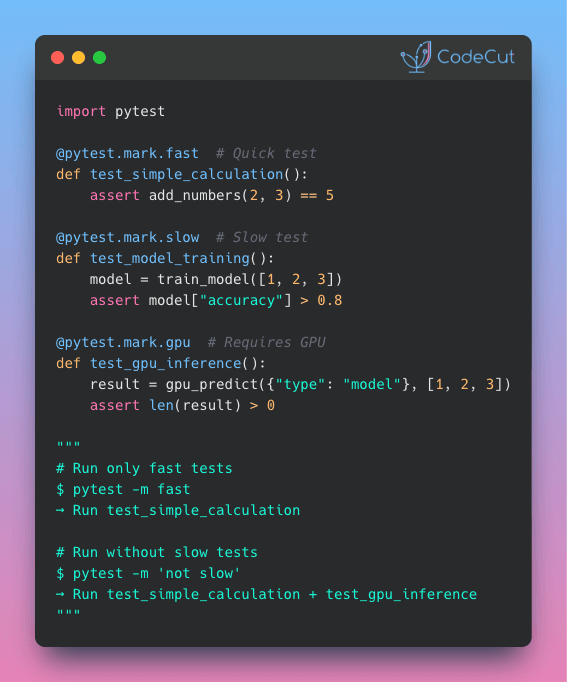
Build Faster Tests with pytest Session Fixtures

Problem
pytest fixtures provide reusable test data, but they reload for every test function by default.
When your fixture loads a large DataFrame, every test reloads the same data, wasting time and delaying your development workflow.
Solution
Session-scoped fixtures load data once at the start and reuse it across all test functions.
Apply this pattern to:

Load large datasets once instead of reloading for each test function
Share a database connection across all tests without passing it as a parameter
Automatically set random seeds for reproducible train/test splits

📖 Learn more

🧪 Run code

latexify: Turn Python Functions Into Clean Math Formulas

Problem
It is not ideal to present mathematical formulas written in Python code to executives and stakeholders as they are often not familiar with Python code.
However, writing LaTeX manually to show the formulas is time-consuming and tedious.
Solution
latexify transforms Python functions into clean mathematical notation with a single decorator. No manual LaTeX required.
Key features:

Automatic LaTeX generation from Python functions
Functions remain executable for calculations
Compatible with various notebooks such as Jupyter, Colab, and Marimo

📖 View Full Article

🧪 Run code

⭐ View GitHub

☕️ Weekly Finds

ty
[Python Utils]
– An extremely fast Python type checker and language server, written in Rust

giotto-tda
[ML]
– A high-performance topological machine learning toolbox in Python built on top of scikit-learn

vibekit
[MLOps]
– Run Claude Code, Gemini, Codex — or any coding agent — in a clean, isolated sandbox with sensitive data redaction and observability baked in

Looking for a specific tool? Explore 70+ Python tools →

Stay Current with CodeCut

Actionable Python tips, curated for busy data pros. Skim in under 2 minutes, three times a week.

.codecut-subscribe-form .codecut-input {
background: #2F2D2E !important;
border: 1px solid #72BEFA !important;
color: #FFFFFF !important;
}
.codecut-subscribe-form .codecut-input::placeholder {
color: #999999 !important;
}
.codecut-subscribe-form .codecut-subscribe-btn {
background: #72BEFA !important;
color: #2F2D2E !important;
}
.codecut-subscribe-form .codecut-subscribe-btn:hover {
background: #5aa8e8 !important;
}

.codecut-subscribe-form {
max-width: 650px;
display: flex;
flex-direction: column;
gap: 8px;
}
.codecut-input {
-webkit-appearance: none;
-moz-appearance: none;
appearance: none;
background: #FFFFFF;
border-radius: 8px !important;
padding: 8px 12px;
font-family: ‘Comfortaa’, sans-serif !important;
font-size: 14px !important;
color: #333333;
border: none !important;
outline: none;
width: 100%;
box-sizing: border-box;
}
input[type=”email”].codecut-input {
border-radius: 8px !important;
}
.codecut-input::placeholder {
color: #666666;
}
.codecut-email-row {
display: flex;
align-items: stretch;
height: 36px;
gap: 8px;
}
.codecut-email-row .codecut-input {
flex: 1;
}
.codecut-subscribe-btn {
background: #72BEFA;
color: #2F2D2E;
border: none;
border-radius: 8px;
padding: 8px 14px;
font-family: ‘Comfortaa’, sans-serif;
font-size: 14px;
font-weight: 500;
cursor: pointer;
text-decoration: none;
display: flex;
align-items: center;
justify-content: center;
transition: background 0.3s ease;
}
.codecut-subscribe-btn:hover {
background: #5aa8e8;
}
.codecut-subscribe-btn:disabled {
background: #999;
cursor: not-allowed;
}
.codecut-message {
font-family: ‘Comfortaa’, sans-serif;
font-size: 12px;
padding: 8px;
border-radius: 6px;
display: none;
}
.codecut-message.success {
background: #d4edda;
color: #155724;
display: block;
}
@media (max-width: 480px) {
.codecut-email-row {
flex-direction: column;
height: auto;
gap: 8px;
}
.codecut-input {
border-radius: 8px;
height: 36px;
}
.codecut-subscribe-btn {
width: 100%;
text-align: center;
border-radius: 8px;
height: 36px;
}
}

Subscribe

Newsletter #229: latexify: Turn Python Functions Into Clean Math Formulas Read More »

Scroll to Top

Work with Khuyen Tran

Work with Khuyen Tran