Generic selectors
Exact matches only
Search in title
Search in content
Post Type Selectors
Filter by Categories
About Article
Analyze Data
Archive
Best Practices
Better Outputs
Blog
Code Optimization
Code Quality
Command Line
Course
Daily tips
Dashboard
Data Analysis & Manipulation
Data Engineer
Data Visualization
DataFrame
Delta Lake
DevOps
DuckDB
Environment Management
Feature Engineer
Git
Jupyter Notebook
LLM
LLM Tools
Machine Learning
Machine Learning & AI
Machine Learning Tools
Manage Data
MLOps
Natural Language Processing
Newsletter Archive
NumPy
Pandas
Polars
PySpark
Python Helpers
Python Tips
Python Utilities
Scrape Data
SQL
Testing
Time Series
Tools
Visualization
Visualization & Reporting
Workflow & Automation
Workflow Automation

python

Auto-created tag for python

Newsletter #217: Whenever: Python DateTime Done Right

🤝 COLLABORATION

Get Apache Airflow® 3 certified (for free)
On September 16, Beyond Analytics kicks off with a live Airflow 3 Certification Crash Course, where you can ask questions and prepare for the Airflow 3 certification exam.
Join “Data with Marc’s” creator Marc Lamberti for a live session where you will:

Learn about the Airflow 3 features that will be covered in the exam, such as scheduling, DAG versioning, and backfills
Get your certification questions answered live
Receive a $150 voucher for the official Airflow 3 certification exam

Register here

📅 Today’s Picks

Build Dynamic Log Filters with Loguru Callables

Problem
Logging is informative, but unnecessary logs can distract from the important ones. While you can filter by log level, sometimes you need to filter by some specific metric values.
Solution
Loguru allows you to add a custom callable filter to your logger based on your specific criteria. This is significantly easier than setting up a custom filter class with standard logging.
Other features of Loguru:

Beautiful logging output out of the box
Significantly simpler to use than standard logging
Rich exception tracebacks with variable values

📖 View Full Article

🧪 Run code

⭐ View GitHub

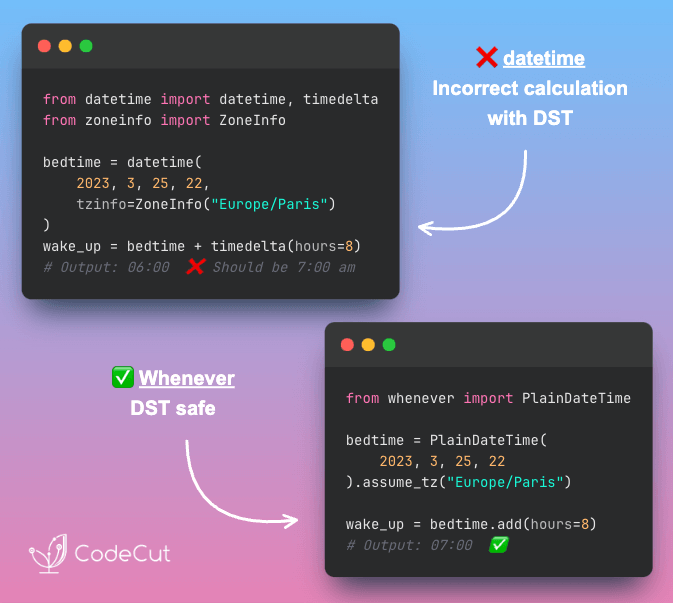
Whenever: Python DateTime Done Right

Problem
Standard library datetime arithmetic ignores Daylight Saving Time (DST) transitions, producing incorrect results.
Your time calculations can be off by an hour during DST changes.
Solution
Whenever’s ZonedDateTime automatically accounts for Daylight Saving Time during time calculations.
Why use Whenever:

Type-safe datetime operations prevent mixing errors
DST transitions handled automatically (no surprises)
Faster performance than standard library, Arrow and Pendulum
Drop-in replacement for standard library

🧪 Run code

⭐ View GitHub

☕️ Weekly Finds

ExtractThinker
[LLM]
– Document Intelligence library for LLMs offering ORM-style interaction for flexible and powerful document workflows

pytest-mock
[Python Utils]
– Thin-wrapper around the mock package for easier use with pytest

ecco
[LLM]
– Explain, analyze, and visualize NLP language models with interactive visualizations for Transformer models

Looking for a specific tool? Explore 70+ Python tools →

Stay Current with CodeCut

Actionable Python tips, curated for busy data pros. Skim in under 2 minutes, three times a week.

.codecut-subscribe-form .codecut-input {
background: #2F2D2E !important;
border: 1px solid #72BEFA !important;
color: #FFFFFF !important;
}
.codecut-subscribe-form .codecut-input::placeholder {
color: #999999 !important;
}
.codecut-subscribe-form .codecut-subscribe-btn {
background: #72BEFA !important;
color: #2F2D2E !important;
}
.codecut-subscribe-form .codecut-subscribe-btn:hover {
background: #5aa8e8 !important;
}

.codecut-subscribe-form {
max-width: 650px;
display: flex;
flex-direction: column;
gap: 8px;
}
.codecut-input {
-webkit-appearance: none;
-moz-appearance: none;
appearance: none;
background: #FFFFFF;
border-radius: 8px !important;
padding: 8px 12px;
font-family: ‘Comfortaa’, sans-serif !important;
font-size: 14px !important;
color: #333333;
border: none !important;
outline: none;
width: 100%;
box-sizing: border-box;
}
input[type=”email”].codecut-input {
border-radius: 8px !important;
}
.codecut-input::placeholder {
color: #666666;
}
.codecut-email-row {
display: flex;
align-items: stretch;
height: 36px;
gap: 8px;
}
.codecut-email-row .codecut-input {
flex: 1;
}
.codecut-subscribe-btn {
background: #72BEFA;
color: #2F2D2E;
border: none;
border-radius: 8px;
padding: 8px 14px;
font-family: ‘Comfortaa’, sans-serif;
font-size: 14px;
font-weight: 500;
cursor: pointer;
text-decoration: none;
display: flex;
align-items: center;
justify-content: center;
transition: background 0.3s ease;
}
.codecut-subscribe-btn:hover {
background: #5aa8e8;
}
.codecut-subscribe-btn:disabled {
background: #999;
cursor: not-allowed;
}
.codecut-message {
font-family: ‘Comfortaa’, sans-serif;
font-size: 12px;
padding: 8px;
border-radius: 6px;
display: none;
}
.codecut-message.success {
background: #d4edda;
color: #155724;
display: block;
}
@media (max-width: 480px) {
.codecut-email-row {
flex-direction: column;
height: auto;
gap: 8px;
}
.codecut-input {
border-radius: 8px;
height: 36px;
}
.codecut-subscribe-btn {
width: 100%;
text-align: center;
border-radius: 8px;
height: 36px;
}
}

Subscribe

Newsletter #217: Whenever: Python DateTime Done Right Read More »

Newsletter #216: Milvus: Unified Search Across Text, Images, and Audio

🤝 COLLABORATION

Get Apache Airflow® 3 certified (for free)
On September 16, Beyond Analytics kicks off with a live Airflow 3 Certification Crash Course, where you can ask questions and prepare for the Airflow 3 certification exam.
Join “Data with Marc’s” creator Marc Lamberti for a live session where you will:

Learn about the Airflow 3 features that will be covered in the exam, such as scheduling, DAG versioning, and backfills
Get your certification questions answered live
Receive a $150 voucher for the official Airflow 3 certification exam

Register here

📅 Today’s Picks

Create Compelling Animated Visualizations with Matplotlib Animation

Problem
Static charts can’t reveal how data patterns and relationships change over time.
Solution
With Matplotlib’s animation module, you can transform static plots into dynamic, interactive data stories.
Some use cases of Matplotlib animation:

Time series data visualization showing trends over periods
Machine learning model convergence and training progress
Scientific simulations and mathematical function behavior
Business metrics dashboards with real-time updates

📖 View Full Article

🧪 Run code

⭐ View GitHub

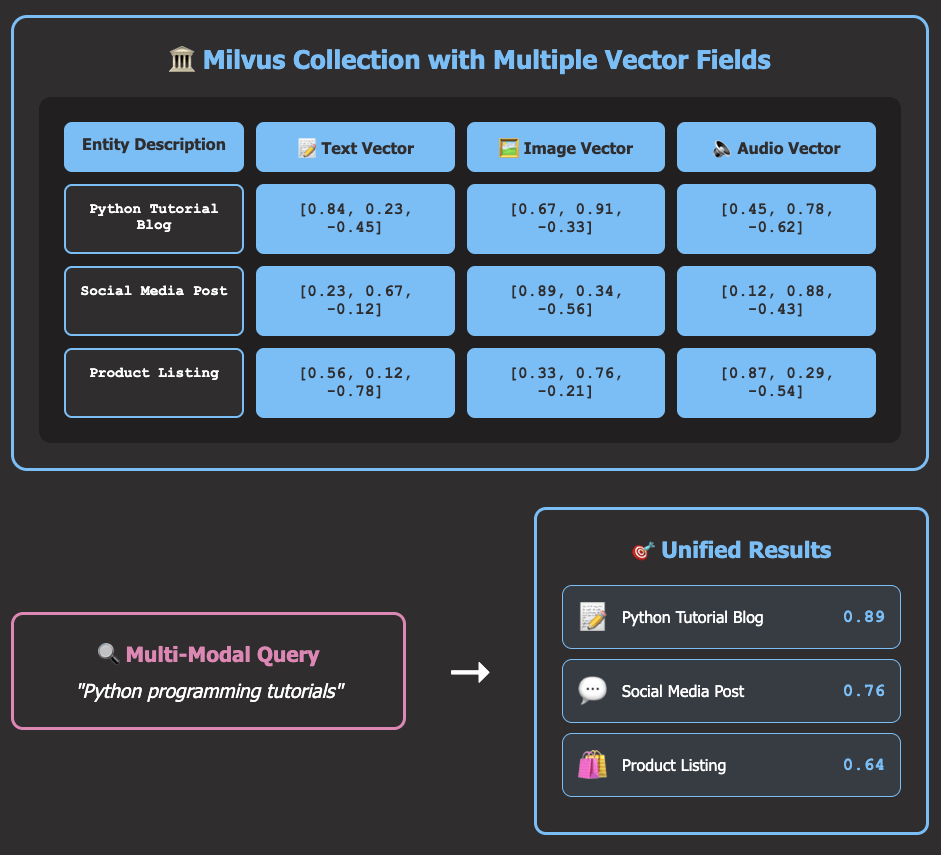
Milvus: Unified Search Across Text, Images, and Audio

Problem
It is a pain to search across text documents, images, and audio files in different search systems. Traditional search engines excel at text but struggle with visual content, while media-specific tools can’t understand textual context.
Solution
Milvus supports multi-modal search by storing embeddings from different data types in a single collection. This allows you to query text, images, and audio simultaneously.
Here’s how Milvus works:

Generate embeddings for text, images, and audio using specialized models
Store all embeddings in unified Milvus collection with metadata
Execute similarity searches across all content types simultaneously
Return ranked results regardless of original data format

🧪 Run code

⭐ View GitHub

☕️ Weekly Finds

phoenix
[MLOps]
– Open-source AI observability platform for experimentation, evaluation, and troubleshooting of LLM applications

mesop
[Python Utils]
– Python-based UI framework for rapidly building web apps and ML/AI demos

crawlee-python
[Python Utils]
– Web scraping and browser automation library

Looking for a specific tool? Explore 70+ Python tools →

Stay Current with CodeCut

Actionable Python tips, curated for busy data pros. Skim in under 2 minutes, three times a week.

.codecut-subscribe-form .codecut-input {
background: #2F2D2E !important;
border: 1px solid #72BEFA !important;
color: #FFFFFF !important;
}
.codecut-subscribe-form .codecut-input::placeholder {
color: #999999 !important;
}
.codecut-subscribe-form .codecut-subscribe-btn {
background: #72BEFA !important;
color: #2F2D2E !important;
}
.codecut-subscribe-form .codecut-subscribe-btn:hover {
background: #5aa8e8 !important;
}

.codecut-subscribe-form {
max-width: 650px;
display: flex;
flex-direction: column;
gap: 8px;
}
.codecut-input {
-webkit-appearance: none;
-moz-appearance: none;
appearance: none;
background: #FFFFFF;
border-radius: 8px !important;
padding: 8px 12px;
font-family: ‘Comfortaa’, sans-serif !important;
font-size: 14px !important;
color: #333333;
border: none !important;
outline: none;
width: 100%;
box-sizing: border-box;
}
input[type=”email”].codecut-input {
border-radius: 8px !important;
}
.codecut-input::placeholder {
color: #666666;
}
.codecut-email-row {
display: flex;
align-items: stretch;
height: 36px;
gap: 8px;
}
.codecut-email-row .codecut-input {
flex: 1;
}
.codecut-subscribe-btn {
background: #72BEFA;
color: #2F2D2E;
border: none;
border-radius: 8px;
padding: 8px 14px;
font-family: ‘Comfortaa’, sans-serif;
font-size: 14px;
font-weight: 500;
cursor: pointer;
text-decoration: none;
display: flex;
align-items: center;
justify-content: center;
transition: background 0.3s ease;
}
.codecut-subscribe-btn:hover {
background: #5aa8e8;
}
.codecut-subscribe-btn:disabled {
background: #999;
cursor: not-allowed;
}
.codecut-message {
font-family: ‘Comfortaa’, sans-serif;
font-size: 12px;
padding: 8px;
border-radius: 6px;
display: none;
}
.codecut-message.success {
background: #d4edda;
color: #155724;
display: block;
}
@media (max-width: 480px) {
.codecut-email-row {
flex-direction: column;
height: auto;
gap: 8px;
}
.codecut-input {
border-radius: 8px;
height: 36px;
}
.codecut-subscribe-btn {
width: 100%;
text-align: center;
border-radius: 8px;
height: 36px;
}
}

Subscribe
Newsletter #216: Milvus: Unified Search Across Text, Images, and Audio Read More »

Newsletter #215: All or Nothing: DuckDB Transaction Guarantee

🤝 COLLABORATION

Beyond Analytics: Get Apache Airflow® 3 certified (for free)
On September 16, Beyond Analytics kicks off with a live Airflow 3 Certification Crash Course, where you can ask questions and prepare for the Airflow 3 certification exam.
Join “Data with Marc’s” creator Marc Lamberti for a live session where you will:

Learn about the Airflow 3 features that will be covered in the exam, such as scheduling, DAG versioning, and backfills
Get your certification questions answered live
Receive a $150 voucher for the official Airflow 3 certification exam

Register here

📅 Today’s Picks

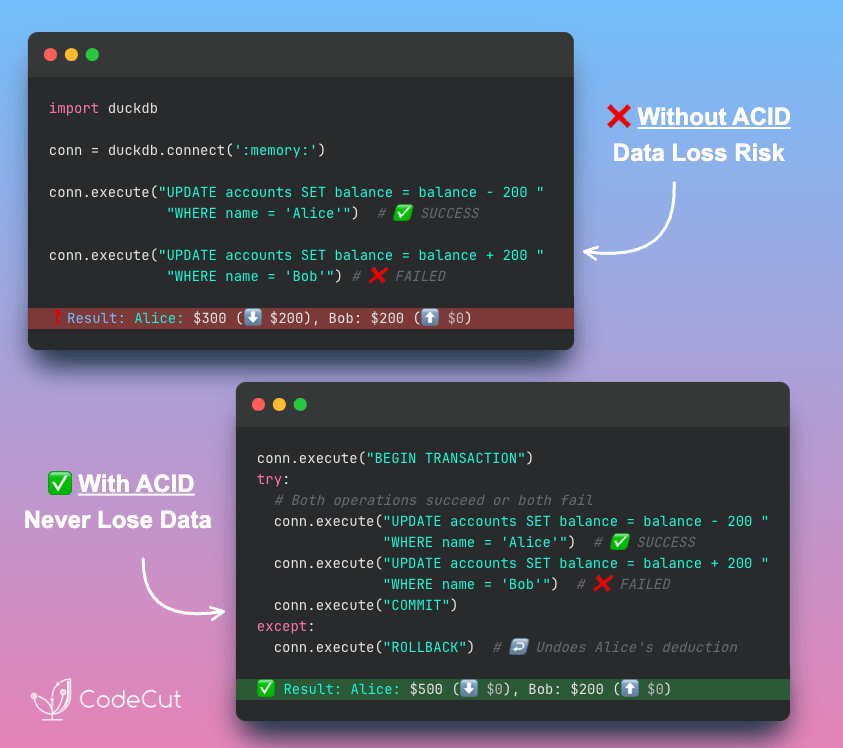
All or Nothing: DuckDB Transaction Guarantee

Problem
Data operations can fail partway through, leaving databases in inconsistent states.
Money transfers, inventory updates, and other critical operations need guaranteed atomicity.
Solution
DuckDB uses ACID transactions to maintain data integrity. Operations either complete fully or roll back completely using BEGIN, COMMIT, and ROLLBACK commands.
Why ACID transactions matter:

Atomicity: prevents half-completed operations
Consistency: maintains database integrity rules
Isolation: stops concurrent operations from conflicting
Durability: ensures committed data survives system failures

📖 View Full Article

🧪 Run code

⭐ View GitHub

☕️ Weekly Finds

gpt-migrate
[AI Tools]
– Easily migrate your codebase from one framework or language to another using AI

lmql
[LLM]
– A query language for programming large language models with structured outputs

respx
[Python Utils]
– Mock HTTPX with awesome request patterns and response side effects for testing

Looking for a specific tool? Explore 70+ Python tools →

Stay Current with CodeCut

Actionable Python tips, curated for busy data pros. Skim in under 2 minutes, three times a week.

.codecut-subscribe-form .codecut-input {
background: #2F2D2E !important;
border: 1px solid #72BEFA !important;
color: #FFFFFF !important;
}
.codecut-subscribe-form .codecut-input::placeholder {
color: #999999 !important;
}
.codecut-subscribe-form .codecut-subscribe-btn {
background: #72BEFA !important;
color: #2F2D2E !important;
}
.codecut-subscribe-form .codecut-subscribe-btn:hover {
background: #5aa8e8 !important;
}

.codecut-subscribe-form {
max-width: 650px;
display: flex;
flex-direction: column;
gap: 8px;
}
.codecut-input {
-webkit-appearance: none;
-moz-appearance: none;
appearance: none;
background: #FFFFFF;
border-radius: 8px !important;
padding: 8px 12px;
font-family: ‘Comfortaa’, sans-serif !important;
font-size: 14px !important;
color: #333333;
border: none !important;
outline: none;
width: 100%;
box-sizing: border-box;
}
input[type=”email”].codecut-input {
border-radius: 8px !important;
}
.codecut-input::placeholder {
color: #666666;
}
.codecut-email-row {
display: flex;
align-items: stretch;
height: 36px;
gap: 8px;
}
.codecut-email-row .codecut-input {
flex: 1;
}
.codecut-subscribe-btn {
background: #72BEFA;
color: #2F2D2E;
border: none;
border-radius: 8px;
padding: 8px 14px;
font-family: ‘Comfortaa’, sans-serif;
font-size: 14px;
font-weight: 500;
cursor: pointer;
text-decoration: none;
display: flex;
align-items: center;
justify-content: center;
transition: background 0.3s ease;
}
.codecut-subscribe-btn:hover {
background: #5aa8e8;
}
.codecut-subscribe-btn:disabled {
background: #999;
cursor: not-allowed;
}
.codecut-message {
font-family: ‘Comfortaa’, sans-serif;
font-size: 12px;
padding: 8px;
border-radius: 6px;
display: none;
}
.codecut-message.success {
background: #d4edda;
color: #155724;
display: block;
}
@media (max-width: 480px) {
.codecut-email-row {
flex-direction: column;
height: auto;
gap: 8px;
}
.codecut-input {
border-radius: 8px;
height: 36px;
}
.codecut-subscribe-btn {
width: 100%;
text-align: center;
border-radius: 8px;
height: 36px;
}
}

Subscribe
Newsletter #215: All or Nothing: DuckDB Transaction Guarantee Read More »

Newsletter #214: Create Compelling Animated Visualizations with Matplotlib Animation

📅 Today’s Picks

Create Compelling Animated Visualizations with Matplotlib Animation

Problem
Static charts can’t reveal how data patterns and relationships change over time.
Solution
With Matplotlib’s animation module, you can transform static plots into dynamic, interactive data stories.
Some use cases of Matplotlib animation:

Time series data visualization showing trends over periods
Machine learning model convergence and training progress
Scientific simulations and mathematical function behavior
Business metrics dashboards with real-time updates

📖 View Full Article

🧪 Run code

⭐ View GitHub

☕️ Weekly Finds

implicit
[Machine Learning]
– Fast Python implementations of several different popular recommendation algorithms for implicit feedback datasets

developer
[AI Development]
– AI-powered code generation tool designed to automate software development processes and build entire codebases with prompts

datasets-server
[Data Infrastructure]
– Backend API for visualizing and exploring all types of datasets – computer vision, speech, text, and tabular – stored on Hugging Face Hub

Looking for a specific tool? Explore 70+ Python tools →

Stay Current with CodeCut

Actionable Python tips, curated for busy data pros. Skim in under 2 minutes, three times a week.

.codecut-subscribe-form .codecut-input {
background: #2F2D2E !important;
border: 1px solid #72BEFA !important;
color: #FFFFFF !important;
}
.codecut-subscribe-form .codecut-input::placeholder {
color: #999999 !important;
}
.codecut-subscribe-form .codecut-subscribe-btn {
background: #72BEFA !important;
color: #2F2D2E !important;
}
.codecut-subscribe-form .codecut-subscribe-btn:hover {
background: #5aa8e8 !important;
}

.codecut-subscribe-form {
max-width: 650px;
display: flex;
flex-direction: column;
gap: 8px;
}
.codecut-input {
-webkit-appearance: none;
-moz-appearance: none;
appearance: none;
background: #FFFFFF;
border-radius: 8px !important;
padding: 8px 12px;
font-family: ‘Comfortaa’, sans-serif !important;
font-size: 14px !important;
color: #333333;
border: none !important;
outline: none;
width: 100%;
box-sizing: border-box;
}
input[type=”email”].codecut-input {
border-radius: 8px !important;
}
.codecut-input::placeholder {
color: #666666;
}
.codecut-email-row {
display: flex;
align-items: stretch;
height: 36px;
gap: 8px;
}
.codecut-email-row .codecut-input {
flex: 1;
}
.codecut-subscribe-btn {
background: #72BEFA;
color: #2F2D2E;
border: none;
border-radius: 8px;
padding: 8px 14px;
font-family: ‘Comfortaa’, sans-serif;
font-size: 14px;
font-weight: 500;
cursor: pointer;
text-decoration: none;
display: flex;
align-items: center;
justify-content: center;
transition: background 0.3s ease;
}
.codecut-subscribe-btn:hover {
background: #5aa8e8;
}
.codecut-subscribe-btn:disabled {
background: #999;
cursor: not-allowed;
}
.codecut-message {
font-family: ‘Comfortaa’, sans-serif;
font-size: 12px;
padding: 8px;
border-radius: 6px;
display: none;
}
.codecut-message.success {
background: #d4edda;
color: #155724;
display: block;
}
@media (max-width: 480px) {
.codecut-email-row {
flex-direction: column;
height: auto;
gap: 8px;
}
.codecut-input {
border-radius: 8px;
height: 36px;
}
.codecut-subscribe-btn {
width: 100%;
text-align: center;
border-radius: 8px;
height: 36px;
}
}

Subscribe
Newsletter #214: Create Compelling Animated Visualizations with Matplotlib Animation Read More »

Newsletter #213: Query GitHub Issues with Natural Language Using LangChain

📅 Today’s Picks

Query GitHub Issues with Natural Language Using LangChain

Problem
Have you ever spent hours clicking through GitHub pages to understand project status, track bugs, or review recent changes? Manual repository analysis wastes development time that could be spent building features.
Solution
LangChain’s GitHubIssuesLoader converts repository issues and PRs into searchable content that responds to natural language questions about bugs, features, and project status.
This method integrates seamlessly with LangChain workflows.

📖 View Full Article

🧪 Run code

⭐ View GitHub

Mock External APIs for Fast, Reliable Tests

Problem
Testing with real APIs and databases is slow, expensive, and unreliable.
External dependencies create flaky tests that can fail due to network issues, rate limits, or service downtime rather than code problems.
Solution
The patch decorator replaces external calls with controllable mock objects for isolated testing.
Key benefits:

Reproducible results across different machines
Fast, reliable tests that focus on your logic
Test edge cases and error conditions that are hard to trigger naturally

Test your data processing logic without waiting for external services or consuming API quotas.

📖 View Full Article

🧪 Run code

☕️ Weekly Finds

filprofiler
[Performance Profiling]
– A Python memory profiler for data processing applications with native Jupyter support

organize
[Automation]
– The file management automation tool for sorting, renaming, and organizing files

plotnine
[Data Visualization]
– A Grammar of Graphics for Python based on ggplot2 for data visualization

Looking for a specific tool? Explore 70+ Python tools →

Stay Current with CodeCut

Actionable Python tips, curated for busy data pros. Skim in under 2 minutes, three times a week.

.codecut-subscribe-form .codecut-input {
background: #2F2D2E !important;
border: 1px solid #72BEFA !important;
color: #FFFFFF !important;
}
.codecut-subscribe-form .codecut-input::placeholder {
color: #999999 !important;
}
.codecut-subscribe-form .codecut-subscribe-btn {
background: #72BEFA !important;
color: #2F2D2E !important;
}
.codecut-subscribe-form .codecut-subscribe-btn:hover {
background: #5aa8e8 !important;
}

.codecut-subscribe-form {
max-width: 650px;
display: flex;
flex-direction: column;
gap: 8px;
}
.codecut-input {
-webkit-appearance: none;
-moz-appearance: none;
appearance: none;
background: #FFFFFF;
border-radius: 8px !important;
padding: 8px 12px;
font-family: ‘Comfortaa’, sans-serif !important;
font-size: 14px !important;
color: #333333;
border: none !important;
outline: none;
width: 100%;
box-sizing: border-box;
}
input[type=”email”].codecut-input {
border-radius: 8px !important;
}
.codecut-input::placeholder {
color: #666666;
}
.codecut-email-row {
display: flex;
align-items: stretch;
height: 36px;
gap: 8px;
}
.codecut-email-row .codecut-input {
flex: 1;
}
.codecut-subscribe-btn {
background: #72BEFA;
color: #2F2D2E;
border: none;
border-radius: 8px;
padding: 8px 14px;
font-family: ‘Comfortaa’, sans-serif;
font-size: 14px;
font-weight: 500;
cursor: pointer;
text-decoration: none;
display: flex;
align-items: center;
justify-content: center;
transition: background 0.3s ease;
}
.codecut-subscribe-btn:hover {
background: #5aa8e8;
}
.codecut-subscribe-btn:disabled {
background: #999;
cursor: not-allowed;
}
.codecut-message {
font-family: ‘Comfortaa’, sans-serif;
font-size: 12px;
padding: 8px;
border-radius: 6px;
display: none;
}
.codecut-message.success {
background: #d4edda;
color: #155724;
display: block;
}
@media (max-width: 480px) {
.codecut-email-row {
flex-direction: column;
height: auto;
gap: 8px;
}
.codecut-input {
border-radius: 8px;
height: 36px;
}
.codecut-subscribe-btn {
width: 100%;
text-align: center;
border-radius: 8px;
height: 36px;
}
}

Subscribe

Newsletter #213: Query GitHub Issues with Natural Language Using LangChain Read More »

Newsletter #212: Delta Lake: Never Lose Data to Failed Writes Again

📅 Today’s Picks

Delta Lake: Never Lose Data to Failed Writes Again

Problem
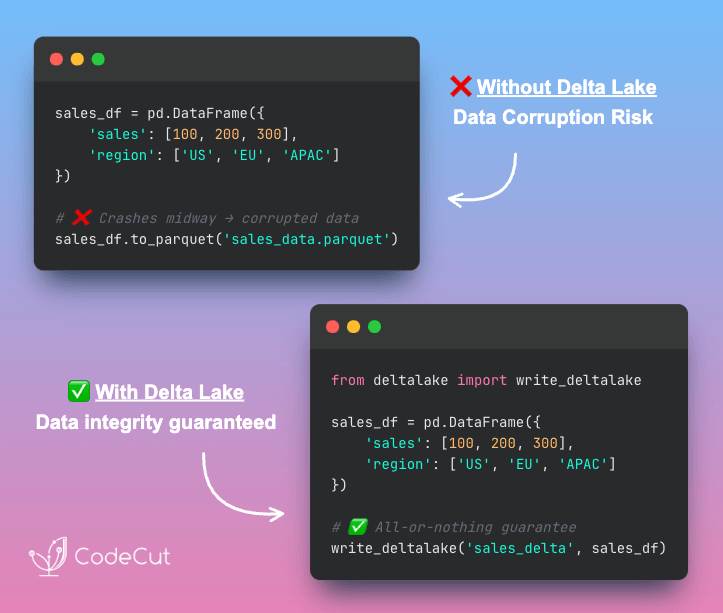
Have you ever had a pandas operation fail midway through writing data, leaving you with corrupted datasets?
Partial writes create inconsistent data states that can break downstream analysis and reporting workflows.
Solution
Delta Lake provides ACID transactions that guarantee all-or-nothing writes with automatic rollback on failures.
ACID properties:

Atomicity: Complete transaction success or automatic rollback
Consistency: Data consistency guaranteed
Isolation: Safe concurrent operations
Durability: Version history with time travel

📖 View Full Article

⭐ View GitHub

☕️ Weekly Finds

TinyDB
[Database]
– Lightweight, document-oriented database written in pure Python with no external dependencies. Designed to be simple and developer-friendly, storing data in JSON format by default.

ollama-python
[LLM]
– Python library that provides the easiest way to integrate Python 3.8+ projects with Ollama, an open-source large language model platform. Offers both synchronous and asynchronous client interfaces for seamless AI model interaction.

PyMC
[ML]
– Python package for Bayesian statistical modeling that focuses on advanced Markov chain Monte Carlo (MCMC) and variational inference (VI) algorithms. Enables researchers and data scientists to build sophisticated Bayesian models with minimal algorithmic complexity.

Looking for a specific tool? Explore 70+ Python tools →

Stay Current with CodeCut

Actionable Python tips, curated for busy data pros. Skim in under 2 minutes, three times a week.

.codecut-subscribe-form .codecut-input {
background: #2F2D2E !important;
border: 1px solid #72BEFA !important;
color: #FFFFFF !important;
}
.codecut-subscribe-form .codecut-input::placeholder {
color: #999999 !important;
}
.codecut-subscribe-form .codecut-subscribe-btn {
background: #72BEFA !important;
color: #2F2D2E !important;
}
.codecut-subscribe-form .codecut-subscribe-btn:hover {
background: #5aa8e8 !important;
}

.codecut-subscribe-form {
max-width: 650px;
display: flex;
flex-direction: column;
gap: 8px;
}
.codecut-input {
-webkit-appearance: none;
-moz-appearance: none;
appearance: none;
background: #FFFFFF;
border-radius: 8px !important;
padding: 8px 12px;
font-family: ‘Comfortaa’, sans-serif !important;
font-size: 14px !important;
color: #333333;
border: none !important;
outline: none;
width: 100%;
box-sizing: border-box;
}
input[type=”email”].codecut-input {
border-radius: 8px !important;
}
.codecut-input::placeholder {
color: #666666;
}
.codecut-email-row {
display: flex;
align-items: stretch;
height: 36px;
gap: 8px;
}
.codecut-email-row .codecut-input {
flex: 1;
}
.codecut-subscribe-btn {
background: #72BEFA;
color: #2F2D2E;
border: none;
border-radius: 8px;
padding: 8px 14px;
font-family: ‘Comfortaa’, sans-serif;
font-size: 14px;
font-weight: 500;
cursor: pointer;
text-decoration: none;
display: flex;
align-items: center;
justify-content: center;
transition: background 0.3s ease;
}
.codecut-subscribe-btn:hover {
background: #5aa8e8;
}
.codecut-subscribe-btn:disabled {
background: #999;
cursor: not-allowed;
}
.codecut-message {
font-family: ‘Comfortaa’, sans-serif;
font-size: 12px;
padding: 8px;
border-radius: 6px;
display: none;
}
.codecut-message.success {
background: #d4edda;
color: #155724;
display: block;
}
@media (max-width: 480px) {
.codecut-email-row {
flex-direction: column;
height: auto;
gap: 8px;
}
.codecut-input {
border-radius: 8px;
height: 36px;
}
.codecut-subscribe-btn {
width: 100%;
text-align: center;
border-radius: 8px;
height: 36px;
}
}

Subscribe
Newsletter #212: Delta Lake: Never Lose Data to Failed Writes Again Read More »

Newsletter #211: Secure Database Queries with DuckDB Parameters

🤝 COLLABORATION

How to write better DAGs in Airflow
DAGs (Directed Acyclic Graphs) are Airflow’s workflow definition format. They specify how data tasks connect and execute in sequence.
Well-designed DAGs handle edge cases, scale with data volume changes, and remain maintainable as your pipeline complexity grows.
What you’ll learn:

Design DAGs that are easier to read, test, and maintain
Make your pipelines adapt to your data at runtime with dynamic task mapping
Avoid common pitfalls that can cause performance issues
Create data-aware pipelines with XComs and event-driven scheduling
Learn proven DAG writing best practices including Airflow 3’s latest features

This covers practical patterns for building production-ready workflows that handle failures gracefully and scale with your data infrastructure needs.
Speakers:

Kenten Danas – Senior Manager, Developer Relations at Astronomer
Tamara Fingerlin – Developer Advocate at Astronomer

Register here

📅 Today’s Picks

Secure Database Queries with DuckDB Parameters

Problem
F-strings create SQL injection vulnerabilities by inserting values directly into queries.
Solution
DuckDB’s parameterized queries use placeholders to safely pass parameters and prevent SQL injection attacks.
Other key features of DuckDB:

In-Process Analytics – No external database needed
Fast Performance – Columnar storage for speed
Zero Setup – Works instantly in Python
DataFrame Integration – Native pandas support

📖 View Full Article

⭐ View GitHub

Build Semantic Text Matching with Sentence Transformers

Problem
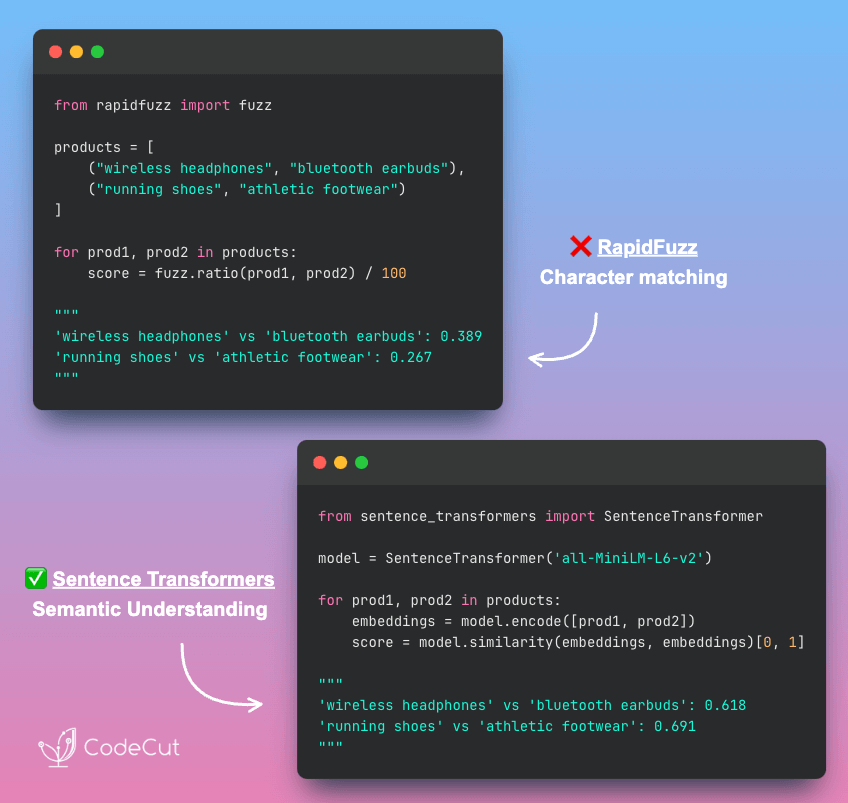
RapidFuzz, which I introduced in my previous post, excels at lightning-fast string matching.
However, it cannot understand semantic relationships. It scores ‘running shoes’ vs ‘athletic footwear’ at only 0.267 despite describing similar product categories.
RapidFuzz compares characters, not meaning, so different words describing identical concepts get low scores.
Solution
Sentence Transformers comprehends conceptual similarity by analyzing word meanings.
Sentence Transformers follows this process:

Creates embedding vectors that represent word concepts
Similar meanings produce similar embedding patterns
Compares these concept embeddings to identify semantically similar text
Recognizes synonyms and related terminology automatically

📖 View Full Article

⭐ View GitHub

☕️ Weekly Finds

tenacity
[Testing & Reliability]
– Apache 2.0 licensed general-purpose retrying library for Python to simplify adding retry behavior to just about anything

ParadeDB
[Database & Search]
– Modern Elasticsearch alternative built on Postgres for real-time, update-heavy workloads with full-text search capabilities

responses
[Testing & Mocking]
– Utility library for mocking out the Python Requests library, making it easy to test HTTP API interactions

Looking for a specific tool? Explore 70+ Python tools →

Stay Current with CodeCut

Actionable Python tips, curated for busy data pros. Skim in under 2 minutes, three times a week.

.codecut-subscribe-form .codecut-input {
background: #2F2D2E !important;
border: 1px solid #72BEFA !important;
color: #FFFFFF !important;
}
.codecut-subscribe-form .codecut-input::placeholder {
color: #999999 !important;
}
.codecut-subscribe-form .codecut-subscribe-btn {
background: #72BEFA !important;
color: #2F2D2E !important;
}
.codecut-subscribe-form .codecut-subscribe-btn:hover {
background: #5aa8e8 !important;
}

.codecut-subscribe-form {
max-width: 650px;
display: flex;
flex-direction: column;
gap: 8px;
}
.codecut-input {
-webkit-appearance: none;
-moz-appearance: none;
appearance: none;
background: #FFFFFF;
border-radius: 8px !important;
padding: 8px 12px;
font-family: ‘Comfortaa’, sans-serif !important;
font-size: 14px !important;
color: #333333;
border: none !important;
outline: none;
width: 100%;
box-sizing: border-box;
}
input[type=”email”].codecut-input {
border-radius: 8px !important;
}
.codecut-input::placeholder {
color: #666666;
}
.codecut-email-row {
display: flex;
align-items: stretch;
height: 36px;
gap: 8px;
}
.codecut-email-row .codecut-input {
flex: 1;
}
.codecut-subscribe-btn {
background: #72BEFA;
color: #2F2D2E;
border: none;
border-radius: 8px;
padding: 8px 14px;
font-family: ‘Comfortaa’, sans-serif;
font-size: 14px;
font-weight: 500;
cursor: pointer;
text-decoration: none;
display: flex;
align-items: center;
justify-content: center;
transition: background 0.3s ease;
}
.codecut-subscribe-btn:hover {
background: #5aa8e8;
}
.codecut-subscribe-btn:disabled {
background: #999;
cursor: not-allowed;
}
.codecut-message {
font-family: ‘Comfortaa’, sans-serif;
font-size: 12px;
padding: 8px;
border-radius: 6px;
display: none;
}
.codecut-message.success {
background: #d4edda;
color: #155724;
display: block;
}
@media (max-width: 480px) {
.codecut-email-row {
flex-direction: column;
height: auto;
gap: 8px;
}
.codecut-input {
border-radius: 8px;
height: 36px;
}
.codecut-subscribe-btn {
width: 100%;
text-align: center;
border-radius: 8px;
height: 36px;
}
}

Subscribe
Newsletter #211: Secure Database Queries with DuckDB Parameters Read More »

Build a Complete RAG System with 5 Open-Source Tools

Table of Contents

Introduction to RAG Systems
Document Ingestion with MarkItDown
Intelligent Chunking with LangChain
Creating Searchable Embeddings with SentenceTransformers
Building Your Knowledge Database with ChromaDB
Enhanced Answer Generation with Open-Source LLMs
Building a Simple Application with Gradio
Conclusion

Introduction
Have you ever spent 30 minutes searching through Slack threads, email attachments, and shared drives just to find that one technical specification your colleague mentioned last week?
It is a common scenario that repeats daily across organizations worldwide. Knowledge workers spend valuable time searching for information that should be instantly accessible, leading to decreased productivity.
Retrieval-Augmented Generation (RAG) systems solve this problem by transforming your documents into an intelligent, queryable knowledge base. Ask questions in natural language and receive instant answers with source citations, eliminating time-consuming manual searches.
In this article, we’ll build a complete RAG pipeline that turns document collections into an AI-powered question-answering system.

Stay Current with CodeCut
Actionable Python tips, curated for busy data pros. Skim in under 2 minutes, three times a week.

.codecut-subscribe-form .codecut-input {
background: #2F2D2E !important;
border: 1px solid #72BEFA !important;
color: #FFFFFF !important;
}
.codecut-subscribe-form .codecut-input::placeholder {
color: #999999 !important;
}
.codecut-subscribe-form .codecut-subscribe-btn {
background: #72BEFA !important;
color: #2F2D2E !important;
}
.codecut-subscribe-form .codecut-subscribe-btn:hover {
background: #5aa8e8 !important;
}

.codecut-subscribe-form {
max-width: 650px;
display: flex;
flex-direction: column;
gap: 8px;
}

.codecut-input {
-webkit-appearance: none;
-moz-appearance: none;
appearance: none;
background: #FFFFFF;
border-radius: 8px !important;
padding: 8px 12px;
font-family: ‘Comfortaa’, sans-serif !important;
font-size: 14px !important;
color: #333333;
border: none !important;
outline: none;
width: 100%;
box-sizing: border-box;
}

input[type=”email”].codecut-input {
border-radius: 8px !important;
}

.codecut-input::placeholder {
color: #666666;
}

.codecut-email-row {
display: flex;
align-items: stretch;
height: 36px;
gap: 8px;
}

.codecut-email-row .codecut-input {
flex: 1;
}

.codecut-subscribe-btn {
background: #72BEFA;
color: #2F2D2E;
border: none;
border-radius: 8px;
padding: 8px 14px;
font-family: ‘Comfortaa’, sans-serif;
font-size: 14px;
font-weight: 500;
cursor: pointer;
text-decoration: none;
display: flex;
align-items: center;
justify-content: center;
transition: background 0.3s ease;
}

.codecut-subscribe-btn:hover {
background: #5aa8e8;
}

.codecut-subscribe-btn:disabled {
background: #999;
cursor: not-allowed;
}

.codecut-message {
font-family: ‘Comfortaa’, sans-serif;
font-size: 12px;
padding: 8px;
border-radius: 6px;
display: none;
}

.codecut-message.success {
background: #d4edda;
color: #155724;
display: block;
}

/* Mobile responsive */
@media (max-width: 480px) {
.codecut-email-row {
flex-direction: column;
height: auto;
gap: 8px;
}

.codecut-input {
border-radius: 8px;
height: 36px;
}

.codecut-subscribe-btn {
width: 100%;
text-align: center;
border-radius: 8px;
height: 36px;
}
}

Subscribe
Key Takeaways
Here’s what you’ll learn:

Convert documents with MarkItDown in 3 lines
Chunk text intelligently using LangChain RecursiveCharacterTextSplitter
Generate embeddings locally with SentenceTransformers model
Store vectors in ChromaDB persistent database
Generate answers using Ollama local LLMs
Deploy web interface with Gradio streaming

💻 Get the Code: The complete source code and Jupyter notebook for this tutorial are available on GitHub. Clone it to follow along!

Introduction to RAG Systems
RAG (Retrieval-Augmented Generation) combines document retrieval with language generation to create intelligent Q&A systems. Instead of relying solely on training data, RAG systems search through your documents to find relevant information, then use that context to generate accurate, source-backed responses.
Environment Setup
Install the required libraries for building your RAG pipeline:
pip install markitdown[pdf] sentence-transformers langchain-text-splitters chromadb gradio langchain-ollama ollama

These libraries provide:

markitdown: Microsoft’s document conversion tool that transforms PDFs, Word docs, and other formats into clean markdown
sentence-transformers: Local embedding generation for converting text into searchable vectors
langchain-text-splitters: Intelligent text chunking that preserves semantic meaning
chromadb: Self-hosted vector database for storing and querying document embeddings
gradio: Web interface builder for creating user-friendly Q&A applications
langchain-ollama: LangChain integration for local LLM inference

Install Ollama and download a model:
curl -fsSL https://ollama.com/install.sh | sh
ollama pull llama3.2

Next, create a project directory structure to organize your files:
mkdir processed_docs documents

These directories organize your project:

processed_docs: Stores converted markdown files
documents: Contains original source files (PDFs, Word docs, etc.)

Create these directories in your current working path with appropriate read/write permissions.
Dataset Setup: Python Technical Documentation
To demonstrate the RAG pipeline, we’ll use “Think Python” by Allen Downey, a comprehensive programming guide freely available under Creative Commons.
We’ll download the Python guide and save it in the documents directory.
import requests
from pathlib import Path

# Get the file path
output_folder = "documents"
filename = "think_python_guide.pdf"
url = "https://greenteapress.com/thinkpython/thinkpython.pdf"
file_path = Path(output_folder) / filename

def download_file(url: str, file_path: Path):
response = requests.get(url, stream=True, timeout=30)
response.raise_for_status()
file_path.write_bytes(response.content)

# Download the file if it doesn't exist
if not file_path.exists():
download_file(
url=url,
file_path=file_path,
)

Next, let’s convert this PDF into a format that our RAG system can process and search through.
Document Ingestion with MarkItDown
RAG systems need documents in a structured format that AI models can understand and process effectively.
MarkItDown solves this challenge by converting any document format into clean markdown while preserving the original structure and meaning.
Converting Your Python Guide
Start by converting the Python guide to understand how MarkItDown works:
from markitdown import MarkItDown

# Initialize the converter
md = MarkItDown()

# Convert the Python guide to markdown
result = md.convert(file_path)
python_guide_content = result.text_content

# Display the conversion results
print("First 300 characters:")
print(python_guide_content[:300] + "…")

In this code:

MarkItDown() creates a document converter that handles multiple file formats automatically
convert() processes the PDF and returns a result object containing the extracted text
text_content provides the clean markdown text ready for processing

Output:
First 300 characters:
Think Python

How to Think Like a Computer Scientist

Version 2.0.17

Think Python

How to Think Like a Computer Scientist

Version 2.0.17

Allen Downey

Green Tea Press

Needham, Massachusetts

Copyright © 2012 Allen Downey.

Green Tea Press
9 Washburn Ave
Needham MA 02492

Permission is granted…

MarkItDown automatically detects the PDF format and extracts clean text while preserving the book’s structure, including chapters, sections, and code examples.
Preparing Document for Processing
Now that you understand the basic conversion, let’s prepare the document content for processing. We’ll store the guide’s content with source information for later use in chunking and retrieval:
# Organize the converted document
processed_document = {
'source': file_path,
'content': python_guide_content
}

# Create a list containing our single document for consistency with downstream processing
documents = [processed_document]

# Document is now ready for chunking and embedding
print(f"Document ready: {len(processed_document['content']):,} characters")

Output:
Document ready: 460,251 characters

With our document successfully converted to markdown, the next step is breaking it into smaller, searchable pieces.
Intelligent Chunking with LangChain
AI models can’t process entire documents due to limited context windows. Chunking breaks documents into smaller, searchable pieces while preserving semantic meaning.
Understanding Text Chunking with a Simple Example
Let’s see how text chunking works with a simple document:
from langchain_text_splitters import RecursiveCharacterTextSplitter

# Create a simple example that will be split
sample_text = """
Machine learning transforms data processing. It enables pattern recognition without explicit programming.

Deep learning uses neural networks with multiple layers. These networks discover complex patterns automatically.

Natural language processing combines ML with linguistics. It helps computers understand human language effectively.
"""

# Apply chunking with smaller size to demonstrate splitting
demo_splitter = RecursiveCharacterTextSplitter(
chunk_size=150, # Small size to force splitting
chunk_overlap=30,
separators=["\n\n", "\n", ". ", " ", ""], # Split hierarchy
)

sample_chunks = demo_splitter.split_text(sample_text.strip())

print(f"Original: {len(sample_text.strip())} chars → {len(sample_chunks)} chunks")

# Show chunks
for i, chunk in enumerate(sample_chunks):
print(f"Chunk {i+1}: {chunk}")

Output:
Original: 336 chars → 3 chunks
Chunk 1: Machine learning transforms data processing. It enables pattern recognition without explicit programming.
Chunk 2: Deep learning uses neural networks with multiple layers. These networks discover complex patterns automatically.
Chunk 3: Natural language processing combines ML with linguistics. It helps computers understand human language effectively.

Notice how the text splitter:

Split the 336-character text into 3 chunks, each under the 150-character limit
Applied 30-character overlap between adjacent chunks
Separators prioritize semantic boundaries: paragraphs (\n\n) → sentences (.) → words () → characters

Processing Multiple Documents at Scale
Now let’s a text splitter with larger chunks and apply it to all our converted documents:
# Configure the text splitter with Q&A-optimized settings
text_splitter = RecursiveCharacterTextSplitter(
chunk_size=600, # Optimal chunk size for Q&A scenarios
chunk_overlap=120, # 20% overlap to preserve context
separators=["\n\n", "\n", ". ", " ", ""] # Split hierarchy
)

Next, use the text splitter to process all our documents:
def process_document(doc, text_splitter):
"""Process a single document into chunks."""
doc_chunks = text_splitter.split_text(doc["content"])
return [{"content": chunk, "source": doc["source"]} for chunk in doc_chunks]

# Process all documents and create chunks
all_chunks = []
for doc in documents:
doc_chunks = process_document(doc, text_splitter)
all_chunks.extend(doc_chunks)

Examine how the chunking process distributed content across our documents:
from collections import Counter

source_counts = Counter(chunk["source"] for chunk in all_chunks)
chunk_lengths = [len(chunk["content"]) for chunk in all_chunks]

print(f"Total chunks created: {len(all_chunks)}")
print(f"Chunk length: {min(chunk_lengths)}-{max(chunk_lengths)} characters")
print(f"Source document: {Path(documents[0]['source']).name}")

Output:
Total chunks created: 1007
Chunk length: 68-598 characters
Source document: think_python_guide.pdf

Our text chunks are ready. Next, we’ll transform them into a format that enables intelligent similarity search.
Creating Searchable Embeddings with SentenceTransformers
RAG systems need to understand text meaning, not just match keywords. SentenceTransformers converts your text into numerical vectors that capture semantic relationships, allowing the system to find truly relevant information even when exact words don’t match.
Generate Embeddings
Let’s generate embeddings for our text chunks:
from sentence_transformers import SentenceTransformer

# Load Q&A-optimized embedding model (downloads automatically on first use)
model = SentenceTransformer('multi-qa-mpnet-base-dot-v1')

# Extract documents and create embeddings
documents = [chunk["content"] for chunk in all_chunks]
embeddings = model.encode(documents)

print(f"Embedding generation results:")
print(f" – Embeddings shape: {embeddings.shape}")
print(f" – Vector dimensions: {embeddings.shape[1]}")

In this code:

SentenceTransformer() loads the Q&A-optimized model that converts text to 768-dimensional vectors
multi-qa-mpnet-base-dot-v1 is specifically trained on 215M question-answer pairs for superior Q&A performance
model.encode() transforms all text chunks into numerical embeddings in a single batch operation

The output shows 1007 chunks converted to 768-dimensional vectors:
Embedding generation results:
– Embeddings shape: (1007, 768)
– Vector dimensions: 768

Test Semantic Similarity
Let’s test semantic similarity by querying for Python programming concepts:
# Test how one query finds relevant Python programming content
from sentence_transformers import util

query = "How do you define functions in Python?"
document_chunks = [
"Variables store data values that can be used later in your program.",
"A function is a block of code that performs a specific task when called.",
"Loops allow you to repeat code multiple times efficiently.",
"Functions can accept parameters and return values to the calling code."
]

# Encode query and documents
query_embedding = model.encode(query)
doc_embeddings = model.encode(document_chunks)

Now we’ll calculate similarity scores and rank the results. The util.cos_sim() function computes cosine similarity between vectors, returning values from 0 (no similarity) to 1 (identical meaning):
# Calculate similarities using SentenceTransformers util
similarities = util.cos_sim(query_embedding, doc_embeddings)[0]

# Create ranked results
ranked_results = sorted(
zip(document_chunks, similarities),
key=lambda x: x[1],
reverse=True
)

print(f"Query: '{query}'")
print("Document chunks ranked by relevance:")
for i, (chunk, score) in enumerate(ranked_results, 1):
print(f"{i}. ({score:.3f}): '{chunk}'")

Output:
Query: 'How do you define functions in Python?'
Document chunks ranked by relevance:
1. (0.674): 'A function is a block of code that performs a specific task when called.'
2. (0.607): 'Functions can accept parameters and return values to the calling code.'
3. (0.461): 'Loops allow you to repeat code multiple times efficiently.'
4. (0.448): 'Variables store data values that can be used later in your program.'

The similarity scores demonstrate semantic understanding: function-related chunks achieve high scores (0.7+) while unrelated programming concepts score much lower (0.2-).
Building Your Knowledge Database with ChromaDB
These embeddings demonstrate semantic search capability, but memory storage has scalability limitations. Large vector collections quickly exhaust system resources.
Vector databases provide essential production capabilities:

Persistent storage: Data survives system restarts and crashes
Optimized indexing: Fast similarity search using HNSW algorithms
Memory efficiency: Handles millions of vectors without RAM exhaustion
Concurrent access: Multiple users query simultaneously
Metadata filtering: Search by document properties and attributes

ChromaDB delivers these features with a Python-native API that integrates seamlessly into your existing data pipeline.
Initialize Vector Database
First, we’ll set up the ChromaDB client and create a collection to store our document vectors.
import chromadb

# Create persistent client for data storage
client = chromadb.PersistentClient(path="./chroma_db")

# Create collection for business documents (or get existing)
collection = client.get_or_create_collection(
name="python_guide",
metadata={"description": "Python programming guide"}
)

print(f"Created collection: {collection.name}")
print(f"Collection ID: {collection.id}")

Created collection: python_guide
Collection ID: 42d23900-6c2a-47b0-8253-0a9b6dad4f41

In this code:

PersistentClient(path="./chroma_db") creates a local vector database that persists data to disk
get_or_create_collection() creates a new collection or returns an existing one with the same name

Store Documents with Metadata
Now we’ll store our document chunks with basic metadata in ChromaDB with the add() method.
# Prepare metadata and add documents to collection
metadatas = [{"document": Path(chunk["source"]).name} for chunk in all_chunks]

collection.add(
documents=documents,
embeddings=embeddings.tolist(), # Convert numpy array to list
metadatas=metadatas, # Metadata for each document
ids=[f"doc_{i}" for i in range(len(documents))], # Unique identifiers for each document
)

print(f"Collection count: {collection.count()}")

Output:
Collection count: 1007

The database now contains 1007 searchable document chunks with their vector embeddings. ChromaDB persists this data to disk, enabling instant queries without reprocessing documents on restart.
Query the Knowledge Base
Let’s search the vector database using natural language questions and retrieve relevant document chunks.
def format_query_results(question, query_embedding, documents, metadatas):
"""Format and print the search results with similarity scores"""
from sentence_transformers import util

print(f"Question: {question}\n")

for i, doc in enumerate(documents):
# Calculate accurate similarity using sentence-transformers util
doc_embedding = model.encode([doc])
similarity = util.cos_sim(query_embedding, doc_embedding)[0][0].item()
source = metadatas[i].get("document", "Unknown")

print(f"Result {i+1} (similarity: {similarity:.3f}):")
print(f"Document: {source}")
print(f"Content: {doc[:300]}…")
print()

def query_knowledge_base(question, n_results=2):
"""Query the knowledge base with natural language"""
# Encode the query using our SentenceTransformer model
query_embedding = model.encode([question])

results = collection.query(
query_embeddings=query_embedding.tolist(),
n_results=n_results,
include=["documents", "metadatas", "distances"],
)

# Extract results and format them
documents = results["documents"][0]
metadatas = results["metadatas"][0]

format_query_results(question, query_embedding, documents, metadatas)

In this code:

collection.query() performs vector similarity search using the question text as input
query_texts accepts a list of natural language questions for batch processing
n_results limits the number of most similar documents returned
include specifies which data to return: document text, metadata, and similarity distances

Let’s test the query function with a question:
query_knowledge_base("How do if-else statements work in Python?")

Output:
Question: How do if-else statements work in Python?

Result 1 (similarity: 0.636):
Document: think_python_guide.pdf
Content: 5.6 Chained conditionals

Sometimes there are more than two possibilities and we need more than two branches.
One way to express a computation like that is a chained conditional:

if x < y:
print

elif x > y:

print

x is less than y

x is greater than y

else:

print

x and y are equa…

Result 2 (similarity: 0.605):
Document: think_python_guide.pdf
Content: 5. An unclosed opening operator ((, {, or [) makes Python continue with the next line
as part of the current statement. Generally, an error occurs almost immediately in the
next line.

6. Check for the classic = instead of == inside a conditional.

7. Check the indentation to make sure it lines up the…

The search finds relevant content with strong similarity scores (0.636 and 0.605).
Enhanced Answer Generation with Open-Source LLMs
Vector similarity search retrieves related content, but the results may be scattered across multiple chunks without forming a complete answer.
LLMs solve this by weaving retrieved context into unified responses that directly address user questions.
In this section, we’ll integrate Ollama‘s local LLMs with our vector search to generate coherent answers from retrieved chunks.
Answer Generation Implementation
First, set up the components for LLM-powered answer generation:
from langchain_ollama import OllamaLLM
from langchain.prompts import PromptTemplate

# Initialize the local LLM
llm = OllamaLLM(model="llama3.2:latest", temperature=0.1)

Next, create a focused prompt template for technical documentation queries:
prompt_template = PromptTemplate(
input_variables=["context", "question"],
template="""You are a Python programming expert. Based on the provided documentation, answer the question clearly and accurately.

Documentation:
{context}

Question: {question}

Answer (be specific about syntax, keywords, and provide examples when helpful):"""
)

# Create the processing chain
chain = prompt_template | llm

Create a function to retrieve relevant context given a question:
def retrieve_context(question, n_results=5):
"""Retrieve relevant context using embeddings"""
query_embedding = model.encode([question])
results = collection.query(
query_embeddings=query_embedding.tolist(),
n_results=n_results,
include=["documents", "metadatas", "distances"],
)

documents = results["documents"][0]
context = "\n\n—SECTION—\n\n".join(documents)
return context, documents

def get_llm_answer(question, context):
"""Generate answer using retrieved context"""
answer = chain.invoke(
{
"context": context[:2000],
"question": question,
}
)
return answer

def format_response(question, answer, source_chunks):
"""Format the final response with sources"""
response = f"**Question:** {question}\n\n"
response += f"**Answer:** {answer}\n\n"
response += "**Sources:**\n"

for i, chunk in enumerate(source_chunks[:3], 1):
preview = chunk[:100].replace("\n", " ") + "…"
response += f"{i}. {preview}\n"

return response

def enhanced_query_with_llm(question, n_results=5):
"""Query function combining retrieval with LLM generation"""
context, documents = retrieve_context(question, n_results)
answer = get_llm_answer(question, context)
return format_response(question, answer, documents)

Testing Enhanced Answer Generation
Let’s test the enhanced system with our challenging question:
# Test the enhanced query system
enhanced_response = enhanced_query_with_llm("How do if-else statements work in Python?")
print(enhanced_response)

Output:
**Question:** How do if-else statements work in Python?

**Answer:** If-else statements in Python are used for conditional execution of code. Here's a breakdown of how they work:

**Syntax**

The basic syntax of an if-else statement is as follows:
“`text
if condition:
# code to execute if condition is true
elif condition2:
# code to execute if condition1 is false and condition2 is true
else:
# code to execute if both conditions are false
“`text
**Keywords**

The keywords used in an if-else statement are:

* `if`: used to check a condition
* `elif` (short for "else if"): used to check another condition if the first one is false
* `else`: used to specify code to execute if all conditions are false

**How it works**

Here's how an if-else statement works:

1. The interpreter evaluates the condition inside the `if` block.
2. If the condition is true, the code inside the `if` block is executed.
3. If the condition is false, the interpreter moves on to the next line and checks the condition in the `elif` block.
4. If the condition in the `elif` block is true, the code inside that block is executed.
5. If both conditions are false, the interpreter executes the code inside the `else` block.

**Sources:**
1. 5.6 Chained conditionals Sometimes there are more than two possibilities and we need more than two …
2. 5. An unclosed opening operator ((, {, or [) makes Python continue with the next line as part of the c…
3. if x == y: print else: ’ x and y are equal ’ if x < y: 44 Chapter 5. Conditionals and recur…

Notice how the LLM organizes multiple chunks into logical sections with syntax examples and step-by-step explanations. This transformation turns raw retrieval into actionable programming guidance.
Streaming Interface Implementation
Users now expect the real-time streaming experience from ChatGPT and Claude. Static responses that appear all at once feel outdated and create an impression of poor performance.
Token-by-token streaming bridges this gap by creating the familiar typing effect that signals active processing.
To implement a streaming interface, we’ll use the chain.stream() method to generate tokens one at a time.
def stream_llm_answer(question, context):
"""Stream LLM answer generation token by token"""
for chunk in chain.stream({
"context": context[:2000],
"question": question,
}):
yield getattr(chunk, "content", str(chunk))

Let’s see how streaming works by combining our modular functions:
import time

# Test the streaming functionality
question = "What are Python loops?"
context, documents = retrieve_context(question, n_results=3)

print("Question:", question)
print("Answer: ", end="", flush=True)

# Stream the answer token by token
for token in stream_llm_answer(question, context):
print(token, end="", flush=True)
time.sleep(0.05) # Simulate real-time typing effect

Output:
Question: What are Python loops?
Answer: Python → loops → are → structures → that → repeat → code…

[Each token appears with typing animation]
Final: "Python loops are structures that repeat code blocks."

This creates the familiar ChatGPT-style typing animation where tokens appear progressively.
Building a Simple Application with Gradio
Now that we have a complete RAG system with enhanced answer generation, let’s make it accessible through a web interface.
Your RAG system needs an intuitive interface that non-technical users can access easily. Gradio provides this solution with:

Zero web development required: Create interfaces directly from Python functions
Automatic UI generation: Input fields and buttons generated automatically
Instant deployment: Launch web apps with a single line of code

Interface Function
Let’s create the complete Gradio interface that combines the functions we’ve built into a streaming RAG system:
import gradio as gr

def rag_interface(question):
"""Gradio interface reusing existing format_response function"""
if not question.strip():
yield "Please enter a question."
return

# Use modular retrieval and streaming
context, documents = retrieve_context(question, n_results=5)

response_start = f"**Question:** {question}\n\n**Answer:** "
answer = ""

# Stream the answer progressively
for token in stream_llm_answer(question, context):
answer += token
yield response_start + answer

# Use existing formatting function for final response
yield format_response(question, answer, documents)

Application Setup and Launch
Now, we’ll configure the Gradio web interface with sample questions and launch the application for user access.
# Create Gradio interface with streaming support
demo = gr.Interface(
fn=rag_interface,
inputs=gr.Textbox(
label="Ask a question about Python programming",
placeholder="How do if-else statements work in Python?",
lines=2,
),
outputs=gr.Markdown(label="Answer"),
title="Intelligent Document Q&A System",
description="Ask questions about Python programming concepts and get instant answers with source citations.",
examples=[
"How do if-else statements work in Python?",
"What are the different types of loops in Python?",
"How do you handle errors in Python?",
],
allow_flagging="never",
)

# Launch the interface with queue enabled for streaming
if __name__ == "__main__":
demo.queue().launch(share=True)

In this code:

gr.Interface() creates a clean web application with automatic UI generation
fn specifies the function called when users submit questions (includes streaming output)
inputs/outputs define UI components (textbox for questions, markdown for formatted answers)
examples provides clickable sample questions that demonstrate system capabilities
demo.queue().launch(share=True) enables streaming output and creates both local and public URLs

Running the application produces the following output:
* Running on local URL: http://127.0.0.1:7861
* Running on public URL: https://bb9a9fc06531d49927.gradio.live

Test the interface locally or share the public URL to demonstrate your RAG system’s capabilities.

The public URL expires in 72 hours. For persistent access, deploy to Hugging Face Spaces:
gradio deploy

You now have a complete, streaming-enabled RAG system ready for production use with real-time token generation and source citations.
Conclusion
In this article, we’ve built a complete RAG pipeline that turns your documents into an AI-powered question-answering system.
We’ve used the following tools:

MarkItDown for document conversion
LangChain for text chunking and embedding generation
ChromaDB for vector storage
Ollama for local LLM inference
Gradio for web interface

Since all of these tools are open-source, you can easily deploy this system in your own infrastructure.

📚 For comprehensive production deployment practices including configuration management, logging, and data validation, check out Production-Ready Data Science.

The best way to learn is to build, so go ahead and try it out!
Related Tutorials

Alternative Vector Database: Implement Semantic Search in Postgres Using pgvector and Ollama for PostgreSQL-based vector storage
Advanced Document Processing: Transform Any PDF into Searchable AI Data with Docling for specialized PDF parsing and RAG optimization
LangChain Fundamentals: Run Private AI Workflows with LangChain and Ollama for comprehensive LangChain and Ollama integration guide

📚 Want to go deeper? Learning new techniques is the easy part. Knowing how to structure, test, and deploy them is what separates side projects from real work. My book shows you how to build data science projects that actually make it to production. Get the book →

Stay Current with CodeCut
Actionable Python tips, curated for busy data pros. Skim in under 2 minutes, three times a week.

.codecut-subscribe-form .codecut-input {
background: #2F2D2E !important;
border: 1px solid #72BEFA !important;
color: #FFFFFF !important;
}
.codecut-subscribe-form .codecut-input::placeholder {
color: #999999 !important;
}
.codecut-subscribe-form .codecut-subscribe-btn {
background: #72BEFA !important;
color: #2F2D2E !important;
}
.codecut-subscribe-form .codecut-subscribe-btn:hover {
background: #5aa8e8 !important;
}

.codecut-subscribe-form {
max-width: 650px;
display: flex;
flex-direction: column;
gap: 8px;
}

.codecut-input {
-webkit-appearance: none;
-moz-appearance: none;
appearance: none;
background: #FFFFFF;
border-radius: 8px !important;
padding: 8px 12px;
font-family: ‘Comfortaa’, sans-serif !important;
font-size: 14px !important;
color: #333333;
border: none !important;
outline: none;
width: 100%;
box-sizing: border-box;
}

input[type=”email”].codecut-input {
border-radius: 8px !important;
}

.codecut-input::placeholder {
color: #666666;
}

.codecut-email-row {
display: flex;
align-items: stretch;
height: 36px;
gap: 8px;
}

.codecut-email-row .codecut-input {
flex: 1;
}

.codecut-subscribe-btn {
background: #72BEFA;
color: #2F2D2E;
border: none;
border-radius: 8px;
padding: 8px 14px;
font-family: ‘Comfortaa’, sans-serif;
font-size: 14px;
font-weight: 500;
cursor: pointer;
text-decoration: none;
display: flex;
align-items: center;
justify-content: center;
transition: background 0.3s ease;
}

.codecut-subscribe-btn:hover {
background: #5aa8e8;
}

.codecut-subscribe-btn:disabled {
background: #999;
cursor: not-allowed;
}

.codecut-message {
font-family: ‘Comfortaa’, sans-serif;
font-size: 12px;
padding: 8px;
border-radius: 6px;
display: none;
}

.codecut-message.success {
background: #d4edda;
color: #155724;
display: block;
}

/* Mobile responsive */
@media (max-width: 480px) {
.codecut-email-row {
flex-direction: column;
height: auto;
gap: 8px;
}

.codecut-input {
border-radius: 8px;
height: 36px;
}

.codecut-subscribe-btn {
width: 100%;
text-align: center;
border-radius: 8px;
height: 36px;
}
}

Subscribe
Build a Complete RAG System with 5 Open-Source Tools Read More »

Newsletter #210: MarkItDown: Convert PDFs to Clean Markdown in 3 Lines

🤝 COLLABORATION

How to write better DAGs in Airflow
DAGs (Directed Acyclic Graphs) are Airflow’s workflow definition format. They specify how data tasks connect and execute in sequence.
Well-designed DAGs handle edge cases, scale with data volume changes, and remain maintainable as your pipeline complexity grows.
What you’ll learn:

Design DAGs that are easier to read, test, and maintain
Make your pipelines adapt to your data at runtime with dynamic task mapping
Avoid common pitfalls that can cause performance issues
Create data-aware pipelines with XComs and event-driven scheduling
Learn proven DAG writing best practices including Airflow 3’s latest features

This covers practical patterns for building production-ready workflows that handle failures gracefully and scale with your data infrastructure needs.
Speakers:

Kenten Danas – Senior Manager, Developer Relations at Astronomer
Tamara Fingerlin – Developer Advocate at Astronomer

Register here

📅 Today’s Picks

Feature Engineering Without Complex Nested Loops

Problem
Nested loops for sequence permutations create exponential complexity that becomes unmanageable as data grows.
Solution
The itertools.permutations() function automatically generates all ordered arrangements of items from your sequences.
Perfect for generating interaction features that preserve temporal or logical ordering in your feature set.

📖 View Full Article

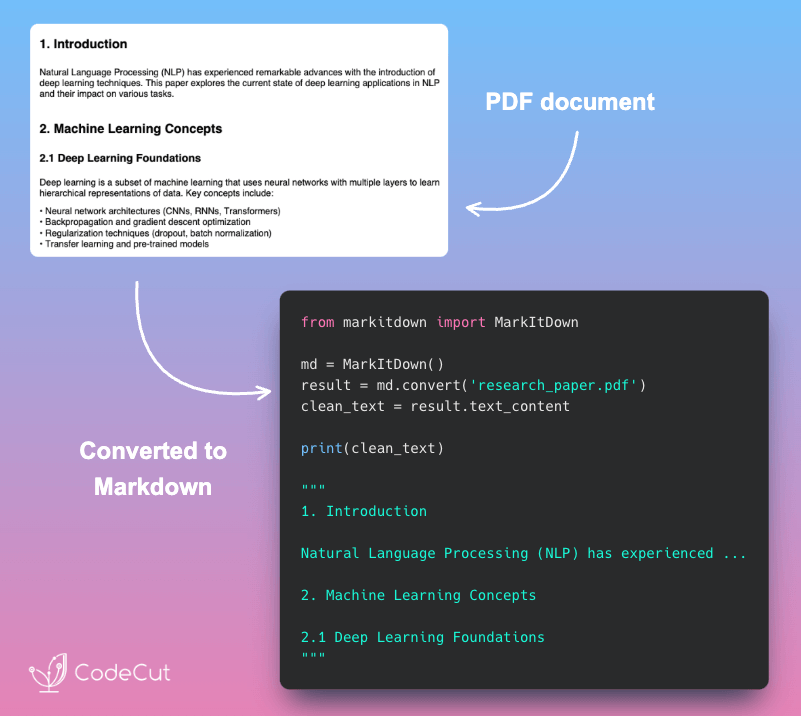
MarkItDown: Convert PDFs to Clean Markdown in 3 Lines

Problem
Have you ever wanted to convert PDFs to text for analysis and search but find it hard to do so?
While there are many tools to convert PDFs to text, they often lose structure and readability.
Solution
Microsoft MarkItDown preserves document structure while converting PDFs to clean markdown format.
The library handles multiple file types and maintains formatting hierarchy:

Clean markdown output with preserved headers and structure
Support for PDFs, Word docs, PowerPoint, and Excel files
Simple three-line implementation for any document type
Seamless integration with existing RAG pipelines

📖 View Full Article

⭐ View GitHub

☕️ Weekly Finds

scalene
[Performance & Profiling]
– A high-performance, high-precision CPU, GPU, and memory profiler for Python with AI-powered optimization proposals

bandit
[Security & Code Quality]
– A tool designed to find common security issues in Python code through static code analysis

river
[Machine Learning]
– Online machine learning in Python – enabling incremental learning algorithms for streaming data

Looking for a specific tool? Explore 70+ Python tools →

Stay Current with CodeCut

Actionable Python tips, curated for busy data pros. Skim in under 2 minutes, three times a week.

.codecut-subscribe-form .codecut-input {
background: #2F2D2E !important;
border: 1px solid #72BEFA !important;
color: #FFFFFF !important;
}
.codecut-subscribe-form .codecut-input::placeholder {
color: #999999 !important;
}
.codecut-subscribe-form .codecut-subscribe-btn {
background: #72BEFA !important;
color: #2F2D2E !important;
}
.codecut-subscribe-form .codecut-subscribe-btn:hover {
background: #5aa8e8 !important;
}

.codecut-subscribe-form {
max-width: 650px;
display: flex;
flex-direction: column;
gap: 8px;
}
.codecut-input {
-webkit-appearance: none;
-moz-appearance: none;
appearance: none;
background: #FFFFFF;
border-radius: 8px !important;
padding: 8px 12px;
font-family: ‘Comfortaa’, sans-serif !important;
font-size: 14px !important;
color: #333333;
border: none !important;
outline: none;
width: 100%;
box-sizing: border-box;
}
input[type=”email”].codecut-input {
border-radius: 8px !important;
}
.codecut-input::placeholder {
color: #666666;
}
.codecut-email-row {
display: flex;
align-items: stretch;
height: 36px;
gap: 8px;
}
.codecut-email-row .codecut-input {
flex: 1;
}
.codecut-subscribe-btn {
background: #72BEFA;
color: #2F2D2E;
border: none;
border-radius: 8px;
padding: 8px 14px;
font-family: ‘Comfortaa’, sans-serif;
font-size: 14px;
font-weight: 500;
cursor: pointer;
text-decoration: none;
display: flex;
align-items: center;
justify-content: center;
transition: background 0.3s ease;
}
.codecut-subscribe-btn:hover {
background: #5aa8e8;
}
.codecut-subscribe-btn:disabled {
background: #999;
cursor: not-allowed;
}
.codecut-message {
font-family: ‘Comfortaa’, sans-serif;
font-size: 12px;
padding: 8px;
border-radius: 6px;
display: none;
}
.codecut-message.success {
background: #d4edda;
color: #155724;
display: block;
}
@media (max-width: 480px) {
.codecut-email-row {
flex-direction: column;
height: auto;
gap: 8px;
}
.codecut-input {
border-radius: 8px;
height: 36px;
}
.codecut-subscribe-btn {
width: 100%;
text-align: center;
border-radius: 8px;
height: 36px;
}
}

Subscribe
Newsletter #210: MarkItDown: Convert PDFs to Clean Markdown in 3 Lines Read More »

Scroll to Top

Work with Khuyen Tran

Work with Khuyen Tran