Generic selectors
Exact matches only
Search in title
Search in content
Post Type Selectors
Filter by Categories
About Article
Analyze Data
Archive
Best Practices
Better Outputs
Blog
Code Optimization
Code Quality
Command Line
Course
Daily tips
Dashboard
Data Analysis & Manipulation
Data Engineer
Data Visualization
DataFrame
Delta Lake
DevOps
DuckDB
Environment Management
Feature Engineer
Git
Jupyter Notebook
LLM
LLM Tools
Machine Learning
Machine Learning & AI
Machine Learning Tools
Manage Data
MLOps
Natural Language Processing
Newsletter Archive
NumPy
Pandas
Polars
PySpark
Python Helpers
Python Tips
Python Utilities
Scrape Data
SQL
Testing
Time Series
Tools
Visualization
Visualization & Reporting
Workflow & Automation
Workflow Automation

python

Auto-created tag for python

Newsletter #293: act: Run GitHub Actions Locally with Docker

Grab your coffee. Here are this week’s highlights.

📅 Today’s Picks

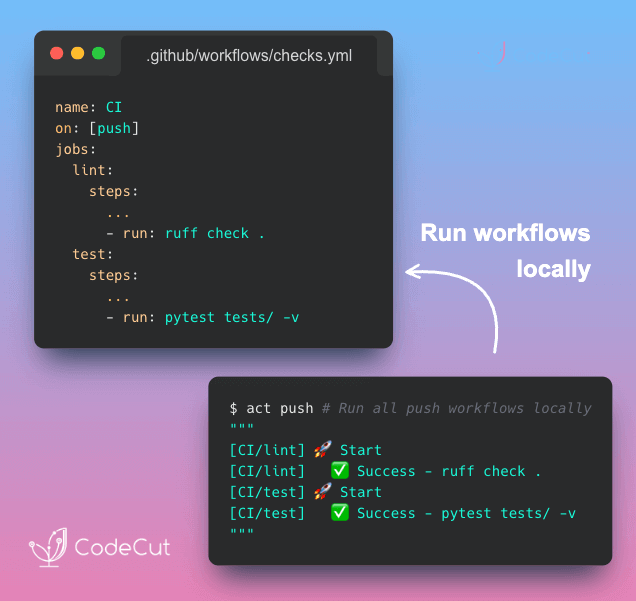
act: Run GitHub Actions Locally with Docker

Problem
GitHub Actions has no local execution mode. You can’t test a step, inspect an environment variable, or reproduce a runner-specific failure on your own machine.
Each change requires a commit and a wait for the cloud runner. A small mistake like a missing secret means starting the loop again.
Solution
With act, you can execute workflows locally using Docker. Failures surface immediately, making it easier to iterate and commit only when the workflow passes.

ScrapeGraphAI: Research Multiple Sites with One Prompt

Problem
With BeautifulSoup, every site needs its own selectors, and you need to manually combine the results into a unified format.
When any site redesigns its layout, those selectors break and you are back to fixing code.
Solution
ScrapeGraphAI‘s SearchGraph fixes this by replacing selectors with a natural language prompt.
Here’s what it handles:

Automatic web search for relevant pages
AI-powered scraping that adapts to any layout
Structured output with source URLs for verification
Works with any LLM provider (OpenAI, Ollama, etc.)

📖 View Full Article

🎓 Latest Interactive Course

Python Data Modeling with Dataclasses and Pydantic

Choosing between dict, NamedTuple, dataclass, and Pydantic comes down to how much safety you need. In this free interactive course, you’ll learn when to use each:

Dictionary: Flexible, but no built-in field checks. Typos and missing keys only show up at runtime.
NamedTuple: Immutable with fixed fields, helping catch mistakes early.
dataclass: Mutable data containers with defaults and optional validation logic.
Pydantic: Strong type validation, automatic coercion, and detailed error reporting.

All exercises run directly in your browser. No installation required.

☕️ Weekly Finds

agent-browser
[Agents]
– Headless browser automation CLI for AI agents, built on Playwright

pyscn
[Code Quality]
– Intelligent Python code quality analyzer with dead code detection and complexity analysis

pyupgrade
[Code Quality]
– Automatically upgrade Python syntax to newer versions of the language

Looking for a specific tool? Explore 70+ Python tools →

Stay Current with CodeCut

Actionable Python tips, curated for busy data pros. Skim in under 2 minutes, three times a week.

.codecut-subscribe-form .codecut-input {
background: #2F2D2E !important;
border: 1px solid #72BEFA !important;
color: #FFFFFF !important;
}
.codecut-subscribe-form .codecut-input::placeholder {
color: #999999 !important;
}
.codecut-subscribe-form .codecut-subscribe-btn {
background: #72BEFA !important;
color: #2F2D2E !important;
}
.codecut-subscribe-form .codecut-subscribe-btn:hover {
background: #5aa8e8 !important;
}

.codecut-subscribe-form {
max-width: 650px;
display: flex;
flex-direction: column;
gap: 8px;
}
.codecut-input {
-webkit-appearance: none;
-moz-appearance: none;
appearance: none;
background: #FFFFFF;
border-radius: 8px !important;
padding: 8px 12px;
font-family: ‘Comfortaa’, sans-serif !important;
font-size: 14px !important;
color: #333333;
border: none !important;
outline: none;
width: 100%;
box-sizing: border-box;
}
input[type=”email”].codecut-input {
border-radius: 8px !important;
}
.codecut-input::placeholder {
color: #666666;
}
.codecut-email-row {
display: flex;
align-items: stretch;
height: 36px;
gap: 8px;
}
.codecut-email-row .codecut-input {
flex: 1;
}
.codecut-subscribe-btn {
background: #72BEFA;
color: #2F2D2E;
border: none;
border-radius: 8px;
padding: 8px 14px;
font-family: ‘Comfortaa’, sans-serif;
font-size: 14px;
font-weight: 500;
cursor: pointer;
text-decoration: none;
display: flex;
align-items: center;
justify-content: center;
transition: background 0.3s ease;
}
.codecut-subscribe-btn:hover {
background: #5aa8e8;
}
.codecut-subscribe-btn:disabled {
background: #999;
cursor: not-allowed;
}
.codecut-message {
font-family: ‘Comfortaa’, sans-serif;
font-size: 12px;
padding: 8px;
border-radius: 6px;
display: none;
}
.codecut-message.success {
background: #d4edda;
color: #155724;
display: block;
}
@media (max-width: 480px) {
.codecut-email-row {
flex-direction: column;
height: auto;
gap: 8px;
}
.codecut-input {
border-radius: 8px;
height: 36px;
}
.codecut-subscribe-btn {
width: 100%;
text-align: center;
border-radius: 8px;
height: 36px;
}
}

Subscribe

Newsletter #293: act: Run GitHub Actions Locally with Docker Read More »

Newsletter #292: SQLFluff: Auto-Fix Messy SQL with One Command

Grab your coffee. Here are this week’s highlights.

📅 Today’s Picks

Evaluate LLM Apps in One Line with PydanticAI

Problem
Testing LLM apps means validating multiple factors at once: is the answer correct, properly structured, fast enough, and natural sounding?
Rewriting this logic for every project is inefficient and error-prone.
Solution
pydantic-ai includes pydantic-evals, which provides these capabilities out of the box. Simply choose the evaluators you need and add them to your evaluation suite.
Built-in evaluators:

Deterministic: validate that outputs are correct, properly typed, and fast enough
LLM-as-judge: have another LLM grade qualities like helpfulness or tone
Report-level: generate classification metrics across all cases automatically

🧪 Run code

SQLFluff: Auto-Fix Messy SQL with One Command

Problem
Consistent SQL style matters. It improves readability, speeds up code reviews, and makes bugs easier to identify.
Manual reviews can catch formatting issues, but they’re time-consuming and often inconsistent.
Solution
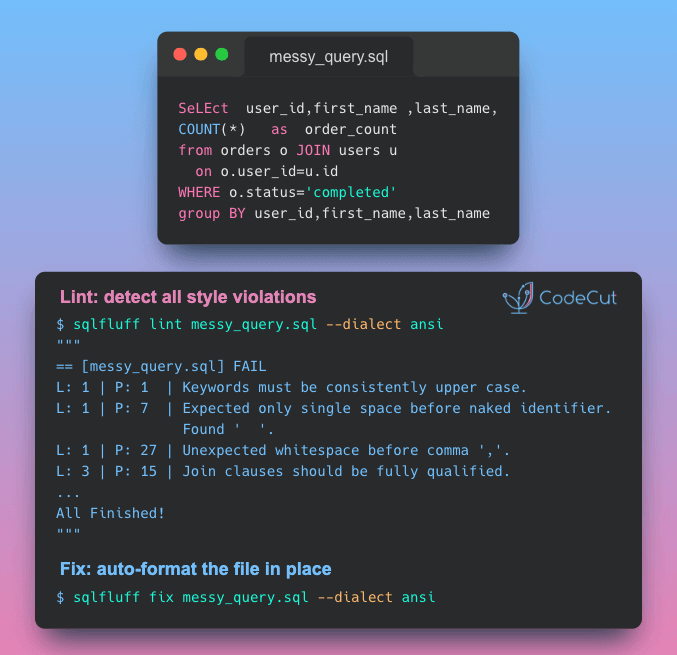
SQLFluff solves this with automated linting and formatting across 30+ SQL dialects. It identifies violations, applies consistent standards, and auto-corrects many problems.
SQLFluff also supports the following templates:

Jinja
SQL placeholders (e.g. SQLAlchemy parameters)
Python format strings
dbt (requires plugin)

🧪 Run code

🎓 Latest Interactive Course

Python Data Modeling with Dataclasses and Pydantic

Choosing between dict, NamedTuple, dataclass, and Pydantic comes down to how much safety you need. In this free interactive course, you’ll learn when to use each:

Dictionary: Flexible, but no built-in field checks. Typos and missing keys only show up at runtime.
NamedTuple: Immutable with fixed fields, helping catch mistakes early.
dataclass: Mutable data containers with defaults and optional validation logic.
Pydantic: Strong type validation, automatic coercion, and detailed error reporting.

All exercises run directly in your browser. No installation required.

☕️ Weekly Finds

spec-kit
[Dev Tools]
– Toolkit for Spec-Driven Development that helps define specs, generate plans and tasks, and implement code with AI coding tools

ty
[Code Quality]
– Extremely fast Python type checker and language server written in Rust, by the creators of uv and Ruff

nbQA
[Code Quality]
– Run ruff, isort, pyupgrade, mypy, pylint, flake8, and more on Jupyter Notebooks

Looking for a specific tool? Explore 70+ Python tools →

Stay Current with CodeCut

Actionable Python tips, curated for busy data pros. Skim in under 2 minutes, three times a week.

.codecut-subscribe-form .codecut-input {
background: #2F2D2E !important;
border: 1px solid #72BEFA !important;
color: #FFFFFF !important;
}
.codecut-subscribe-form .codecut-input::placeholder {
color: #999999 !important;
}
.codecut-subscribe-form .codecut-subscribe-btn {
background: #72BEFA !important;
color: #2F2D2E !important;
}
.codecut-subscribe-form .codecut-subscribe-btn:hover {
background: #5aa8e8 !important;
}

.codecut-subscribe-form {
max-width: 650px;
display: flex;
flex-direction: column;
gap: 8px;
}
.codecut-input {
-webkit-appearance: none;
-moz-appearance: none;
appearance: none;
background: #FFFFFF;
border-radius: 8px !important;
padding: 8px 12px;
font-family: ‘Comfortaa’, sans-serif !important;
font-size: 14px !important;
color: #333333;
border: none !important;
outline: none;
width: 100%;
box-sizing: border-box;
}
input[type=”email”].codecut-input {
border-radius: 8px !important;
}
.codecut-input::placeholder {
color: #666666;
}
.codecut-email-row {
display: flex;
align-items: stretch;
height: 36px;
gap: 8px;
}
.codecut-email-row .codecut-input {
flex: 1;
}
.codecut-subscribe-btn {
background: #72BEFA;
color: #2F2D2E;
border: none;
border-radius: 8px;
padding: 8px 14px;
font-family: ‘Comfortaa’, sans-serif;
font-size: 14px;
font-weight: 500;
cursor: pointer;
text-decoration: none;
display: flex;
align-items: center;
justify-content: center;
transition: background 0.3s ease;
}
.codecut-subscribe-btn:hover {
background: #5aa8e8;
}
.codecut-subscribe-btn:disabled {
background: #999;
cursor: not-allowed;
}
.codecut-message {
font-family: ‘Comfortaa’, sans-serif;
font-size: 12px;
padding: 8px;
border-radius: 6px;
display: none;
}
.codecut-message.success {
background: #d4edda;
color: #155724;
display: block;
}
@media (max-width: 480px) {
.codecut-email-row {
flex-direction: column;
height: auto;
gap: 8px;
}
.codecut-input {
border-radius: 8px;
height: 36px;
}
.codecut-subscribe-btn {
width: 100%;
text-align: center;
border-radius: 8px;
height: 36px;
}
}

Subscribe
Newsletter #292: SQLFluff: Auto-Fix Messy SQL with One Command Read More »

Newsletter #291: Docling: Turn DOCX Reviewer Feedback into Structured Data

Grab your coffee. Here are this week’s highlights.

📅 Today’s Picks

Narwhals: One Decorator for pandas, Polars, and DuckDB

Problem
Writing a DataFrame function that supports multiple libraries usually means maintaining separate versions of the same logic for each one.
If changes are needed, they need to be applied to every version.
Solution
With Narwhals‘ @narwhalify decorator, you write the logic once using a unified API.
The function then works with whatever DataFrame type is passed in and returns the same type, reducing friction when switching tools.
How is this different from Ibis? Ibis is built for data scientists switching between SQL backends. Narwhals is built for library authors who need their code to work with any DataFrame type.

📖 View Full Article

🧪 Run code

Docling: Turn DOCX Reviewer Feedback into Structured Data

Problem
Pulling comments from Word files turns informal feedback into data you can analyze, manage, and act on in code.
Traditionally, this requires parsing raw XML and manually mapping each comment back to its referenced text.
Solution
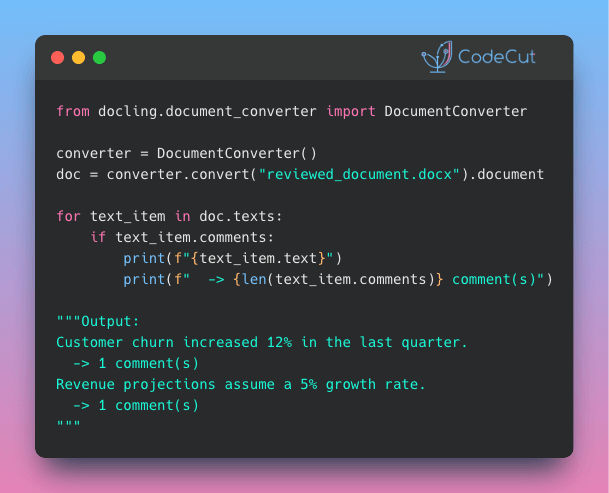
Docling v2.71.0 simplifies this process. Converted documents now attach a comments field to every text item, making reviewer annotations accessible without manual XML handling.
This opens up workflows that were previously too tedious to automate:

Flag unresolved comments before merging document versions
Build dashboards tracking reviewer feedback across teams
Feed comment data into LLMs for sentiment analysis or summarization

📖 View Full Article

📚 Latest Deep Dives

Portable DataFrames in Python: When to Use Ibis, Narwhals, or Fugue
– Write your DataFrame logic once and run it on any backend. Compare Ibis, Narwhals, and Fugue to find the right portability strategy for your Python workflow.

☕️ Weekly Finds

pdfGPT
[LLM]
– Chat with the contents of your PDF files using GPT capabilities and semantic search with sentence embeddings

SandDance
[Data Viz]
– Microsoft Research data visualization tool that maps every data row to a visual mark for interactive exploration

trafilatura
[Web Scraping]
– Python package and CLI for web crawling, scraping, and text extraction with output as CSV, JSON, HTML, or XML

Looking for a specific tool? Explore 70+ Python tools →

Stay Current with CodeCut

Actionable Python tips, curated for busy data pros. Skim in under 2 minutes, three times a week.

.codecut-subscribe-form .codecut-input {
background: #2F2D2E !important;
border: 1px solid #72BEFA !important;
color: #FFFFFF !important;
}
.codecut-subscribe-form .codecut-input::placeholder {
color: #999999 !important;
}
.codecut-subscribe-form .codecut-subscribe-btn {
background: #72BEFA !important;
color: #2F2D2E !important;
}
.codecut-subscribe-form .codecut-subscribe-btn:hover {
background: #5aa8e8 !important;
}

.codecut-subscribe-form {
max-width: 650px;
display: flex;
flex-direction: column;
gap: 8px;
}
.codecut-input {
-webkit-appearance: none;
-moz-appearance: none;
appearance: none;
background: #FFFFFF;
border-radius: 8px !important;
padding: 8px 12px;
font-family: ‘Comfortaa’, sans-serif !important;
font-size: 14px !important;
color: #333333;
border: none !important;
outline: none;
width: 100%;
box-sizing: border-box;
}
input[type=”email”].codecut-input {
border-radius: 8px !important;
}
.codecut-input::placeholder {
color: #666666;
}
.codecut-email-row {
display: flex;
align-items: stretch;
height: 36px;
gap: 8px;
}
.codecut-email-row .codecut-input {
flex: 1;
}
.codecut-subscribe-btn {
background: #72BEFA;
color: #2F2D2E;
border: none;
border-radius: 8px;
padding: 8px 14px;
font-family: ‘Comfortaa’, sans-serif;
font-size: 14px;
font-weight: 500;
cursor: pointer;
text-decoration: none;
display: flex;
align-items: center;
justify-content: center;
transition: background 0.3s ease;
}
.codecut-subscribe-btn:hover {
background: #5aa8e8;
}
.codecut-subscribe-btn:disabled {
background: #999;
cursor: not-allowed;
}
.codecut-message {
font-family: ‘Comfortaa’, sans-serif;
font-size: 12px;
padding: 8px;
border-radius: 6px;
display: none;
}
.codecut-message.success {
background: #d4edda;
color: #155724;
display: block;
}
@media (max-width: 480px) {
.codecut-email-row {
flex-direction: column;
height: auto;
gap: 8px;
}
.codecut-input {
border-radius: 8px;
height: 36px;
}
.codecut-subscribe-btn {
width: 100%;
text-align: center;
border-radius: 8px;
height: 36px;
}
}

Subscribe
Newsletter #291: Docling: Turn DOCX Reviewer Feedback into Structured Data Read More »

Newsletter #290: Quarkdown: Build LaTeX-Quality Docs with Just Markdown

Grab your coffee. Here are this week’s highlights.

📅 Today’s Picks

Quarkdown: Build LaTeX-Quality Docs with Just Markdown

Problem
LaTeX produces beautiful academic papers, but its verbose syntax and nested environments make even simple layouts painful to write.
Solution
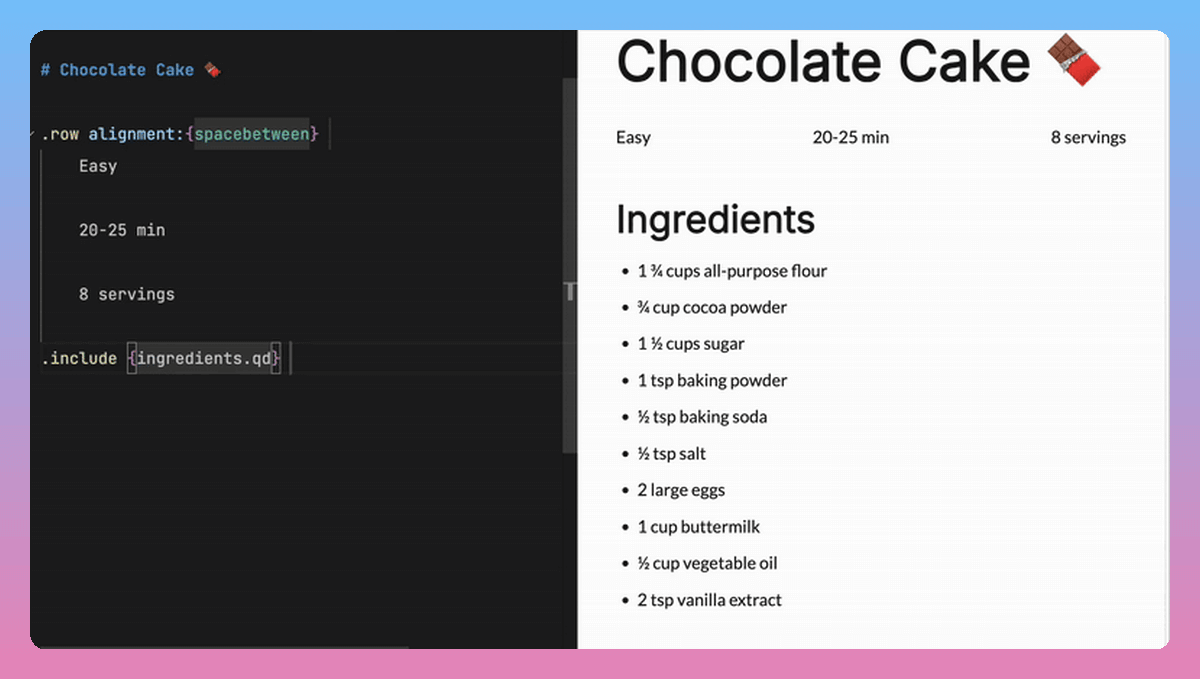
Quarkdown generates the same professional paged output using clean Markdown syntax you already know.
Key features:

Write once, export as paged documents, presentation slides, or websites
Define reusable functions with conditionals and loops inside your documents
Embed Mermaid diagrams and charts without external tools
Live preview in VS Code as you type

Ibis: One Python API for 22+ Database Backends

Problem
Running queries across multiple databases often means rewriting the same logic for each backend’s SQL dialect. A query that works in DuckDB may require syntax changes for PostgreSQL, and another rewrite for BigQuery.
Solution
Ibis removes that friction by compiling Python expressions into each backend’s native SQL. Swap the connection, and the same code runs across 22+ databases.
Key features:

Write once, run on DuckDB, PostgreSQL, BigQuery, Snowflake, and 18+ more
Lazy execution that builds and optimizes the query plan before sending it to the database
Intuitive chaining syntax similar to Polars

📖 View Full Article

📚 Latest Deep Dives

Portable DataFrames in Python: When to Use Ibis, Narwhals, or Fugue
– Write your DataFrame logic once and run it on any backend. Compare Ibis, Narwhals, and Fugue to find the right portability strategy for your Python workflow.

☕️ Weekly Finds

graphiti
[LLM]
– Build real-time, temporally-aware knowledge graphs for AI agents with automatic entity and relationship extraction

doris
[SQL]
– High-performance MPP analytics database with MySQL compatibility that handles real-time ingestion and sub-second queries at scale

smallpond
[Data Processing]
– Lightweight distributed data processing framework by DeepSeek that scales DuckDB to PB-scale datasets using Ray

Looking for a specific tool? Explore 70+ Python tools →

Stay Current with CodeCut

Actionable Python tips, curated for busy data pros. Skim in under 2 minutes, three times a week.

.codecut-subscribe-form .codecut-input {
background: #2F2D2E !important;
border: 1px solid #72BEFA !important;
color: #FFFFFF !important;
}
.codecut-subscribe-form .codecut-input::placeholder {
color: #999999 !important;
}
.codecut-subscribe-form .codecut-subscribe-btn {
background: #72BEFA !important;
color: #2F2D2E !important;
}
.codecut-subscribe-form .codecut-subscribe-btn:hover {
background: #5aa8e8 !important;
}

.codecut-subscribe-form {
max-width: 650px;
display: flex;
flex-direction: column;
gap: 8px;
}
.codecut-input {
-webkit-appearance: none;
-moz-appearance: none;
appearance: none;
background: #FFFFFF;
border-radius: 8px !important;
padding: 8px 12px;
font-family: ‘Comfortaa’, sans-serif !important;
font-size: 14px !important;
color: #333333;
border: none !important;
outline: none;
width: 100%;
box-sizing: border-box;
}
input[type=”email”].codecut-input {
border-radius: 8px !important;
}
.codecut-input::placeholder {
color: #666666;
}
.codecut-email-row {
display: flex;
align-items: stretch;
height: 36px;
gap: 8px;
}
.codecut-email-row .codecut-input {
flex: 1;
}
.codecut-subscribe-btn {
background: #72BEFA;
color: #2F2D2E;
border: none;
border-radius: 8px;
padding: 8px 14px;
font-family: ‘Comfortaa’, sans-serif;
font-size: 14px;
font-weight: 500;
cursor: pointer;
text-decoration: none;
display: flex;
align-items: center;
justify-content: center;
transition: background 0.3s ease;
}
.codecut-subscribe-btn:hover {
background: #5aa8e8;
}
.codecut-subscribe-btn:disabled {
background: #999;
cursor: not-allowed;
}
.codecut-message {
font-family: ‘Comfortaa’, sans-serif;
font-size: 12px;
padding: 8px;
border-radius: 6px;
display: none;
}
.codecut-message.success {
background: #d4edda;
color: #155724;
display: block;
}
@media (max-width: 480px) {
.codecut-email-row {
flex-direction: column;
height: auto;
gap: 8px;
}
.codecut-input {
border-radius: 8px;
height: 36px;
}
.codecut-subscribe-btn {
width: 100%;
text-align: center;
border-radius: 8px;
height: 36px;
}
}

Subscribe
Newsletter #290: Quarkdown: Build LaTeX-Quality Docs with Just Markdown Read More »

Portable DataFrames in Python: When to Use Ibis, Narwhals, or Fugue

Table of Contents

Introduction
Setup
Ibis: Compile Once, Run Anywhere
Narwhals: The Zero-Dependency Compatibility Layer
Fugue: Keep Your Code, Swap the Engine
Summary

Introduction
The backend you start with is not always the backend you finish with. Teams commonly prototype in pandas, scale in Spark, or transition from DuckDB to a warehouse environment. Maintaining separate implementations of the same pipeline across backends can quickly become costly and error-prone.
Rather than reimplementing the same pipeline, you can define the logic once and execute it on different backends with one of these tools:

Ibis: Uses its own expression API and compiles it to backend-native SQL. Best for data scientists working across SQL systems.
Narwhals: Exposes a Polars-like API on top of the user’s existing dataframe library. Best for library authors building dataframe-agnostic tools.
Fugue: Runs Python functions and FugueSQL across distributed engines. Best for data engineers scaling pandas workflows to Spark, Dask, or Ray.

In this article, we’ll walk through these three tools side by side so you can choose the portability approach that best fits your workflow.

💻 Get the Code: The complete source code and Jupyter notebook for this tutorial are available on GitHub. Clone it to follow along!

Setup
All examples in this article use the NYC Yellow Taxi dataset (January 2024, ~3M rows). Download the Parquet file before getting started:
curl -O https://d37ci6vzurychx.cloudfront.net/trip-data/yellow_tripdata_2024-01.parquet

Ibis: Compile Once, Run Anywhere
Ibis provides a declarative Python API that compiles to SQL:

What it does: Translates Python expressions into backend-native SQL for DuckDB, PostgreSQL, BigQuery, Snowflake, and 22+ other backends
How it works: Compiles expressions to SQL and delegates execution to the backend engine
Who it’s for: Data scientists working across SQL systems who want one API for all backends

In other words, Ibis compiles your code to SQL for the backend, then lets you collect results as pandas, Polars, or PyArrow:

To get started, install Ibis with the DuckDB backend since DuckDB is fast and needs no server setup:
pip install 'ibis-framework[duckdb]'

This article uses ibis-framework v12.0.0.

Stay Current with CodeCut
Actionable Python tips, curated for busy data pros. Skim in under 2 minutes, three times a week.

.codecut-subscribe-form .codecut-input {
background: #2F2D2E !important;
border: 1px solid #72BEFA !important;
color: #FFFFFF !important;
}
.codecut-subscribe-form .codecut-input::placeholder {
color: #999999 !important;
}
.codecut-subscribe-form .codecut-subscribe-btn {
background: #72BEFA !important;
color: #2F2D2E !important;
}
.codecut-subscribe-form .codecut-subscribe-btn:hover {
background: #5aa8e8 !important;
}

.codecut-subscribe-form {
max-width: 650px;
display: flex;
flex-direction: column;
gap: 8px;
}

.codecut-input {
-webkit-appearance: none;
-moz-appearance: none;
appearance: none;
background: #FFFFFF;
border-radius: 8px !important;
padding: 8px 12px;
font-family: ‘Comfortaa’, sans-serif !important;
font-size: 14px !important;
color: #333333;
border: none !important;
outline: none;
width: 100%;
box-sizing: border-box;
}

input[type=”email”].codecut-input {
border-radius: 8px !important;
}

.codecut-input::placeholder {
color: #666666;
}

.codecut-email-row {
display: flex;
align-items: stretch;
height: 36px;
gap: 8px;
}

.codecut-email-row .codecut-input {
flex: 1;
}

.codecut-subscribe-btn {
background: #72BEFA;
color: #2F2D2E;
border: none;
border-radius: 8px;
padding: 8px 14px;
font-family: ‘Comfortaa’, sans-serif;
font-size: 14px;
font-weight: 500;
cursor: pointer;
text-decoration: none;
display: flex;
align-items: center;
justify-content: center;
transition: background 0.3s ease;
}

.codecut-subscribe-btn:hover {
background: #5aa8e8;
}

.codecut-subscribe-btn:disabled {
background: #999;
cursor: not-allowed;
}

.codecut-message {
font-family: ‘Comfortaa’, sans-serif;
font-size: 12px;
padding: 8px;
border-radius: 6px;
display: none;
}

.codecut-message.success {
background: #d4edda;
color: #155724;
display: block;
}

/* Mobile responsive */
@media (max-width: 480px) {
.codecut-email-row {
flex-direction: column;
height: auto;
gap: 8px;
}

.codecut-input {
border-radius: 8px;
height: 36px;
}

.codecut-subscribe-btn {
width: 100%;
text-align: center;
border-radius: 8px;
height: 36px;
}
}

Subscribe
Expression API and Lazy Execution
Ibis uses lazy evaluation. Nothing executes until you explicitly request results. This allows the backend’s query optimizer to plan the most efficient execution.
First, connect to DuckDB as the execution backend. The read_parquet call registers the file with DuckDB rather than loading it into memory, keeping the workflow lazy from the start:
import ibis

con = ibis.duckdb.connect()
t = con.read_parquet("yellow_tripdata_2024-01.parquet")

Next, define the analysis using Ibis’s expression API. Since Ibis is lazy, this only builds an expression tree without touching the data:
result = (
t.group_by("payment_type")
.aggregate(
total_fare=t.fare_amount.sum(),
avg_fare=t.fare_amount.mean(),
trip_count=t.count(),
)
.order_by(ibis.desc("trip_count"))
)

Finally, call .to_pandas() to trigger execution. DuckDB runs the query and returns the result as a pandas DataFrame:
df = result.to_pandas()
print(df)

payment_type total_fare avg_fare trip_count
0 1 43035538.92 18.557432 2319046
1 2 7846602.79 17.866037 439191
2 0 2805509.77 20.016194 140162
3 4 62243.19 1.334889 46628
4 3 132330.09 6.752569 19597

Inspecting Generated SQL
Because each backend executes native SQL (not Python), Ibis lets you inspect the compiled query with ibis.to_sql(). This is useful for debugging performance or auditing the exact SQL sent to your database:
print(ibis.to_sql(result))

SELECT
*
FROM (
SELECT
"t0"."payment_type",
SUM("t0"."fare_amount") AS "total_fare",
AVG("t0"."fare_amount") AS "avg_fare",
COUNT(*) AS "trip_count"
FROM "ibis_read_parquet_hdy7njbsxfhbjcet43die5ahvu" AS "t0"
GROUP BY
1
) AS "t1"
ORDER BY
"t1"."trip_count" DESC

Backend Switching
To run the same logic on PostgreSQL, you only change the connection. The expression code stays identical:
# Switch to PostgreSQL: only the connection changes
con = ibis.postgres.connect(host="db.example.com", database="taxi")
t = con.table("yellow_tripdata")

# The same expression code works without any changes
result = (
t.group_by("payment_type")
.aggregate(
total_fare=t.fare_amount.sum(),
avg_fare=t.fare_amount.mean(),
trip_count=t.count(),
)
.order_by(ibis.desc("trip_count"))
)

Ibis supports 22+ backends including DuckDB, PostgreSQL, MySQL, SQLite, BigQuery, Snowflake, Databricks, ClickHouse, Trino, PySpark, Polars, DataFusion, and more. Each backend receives SQL optimized for its specific dialect.

For a comprehensive guide to PySpark SQL, see The Complete PySpark SQL Guide.

Filtering and Chaining
Ibis expressions chain naturally. The syntax is close to Polars, with methods like .filter(), .select(), and .order_by():
high_fare_trips = (
t.filter(t.fare_amount > 20)
.filter(t.trip_distance > 5)
.select("payment_type", "fare_amount", "trip_distance", "tip_amount")
.order_by(ibis.desc("fare_amount"))
.limit(5)
)

print(high_fare_trips.to_pandas())

payment_type fare_amount trip_distance tip_amount
0 2 2221.3 31.95 0.0
1 2 1616.5 233.25 0.0
2 2 912.3 142.62 0.0
3 2 899.0 157.25 0.0
4 2 761.1 109.75 0.0

Narwhals: The Zero-Dependency Compatibility Layer
While Ibis compiles to SQL, Narwhals works directly with Python dataframe libraries:

What it does: Wraps existing dataframe libraries (pandas, Polars, PyArrow) with a thin, Polars-like API
How it works: Translates calls directly to the underlying library instead of compiling to SQL
Who it’s for: Library authors who want their package to accept any dataframe type without adding dependencies

If you’re building a library, you don’t control which dataframe library your users prefer. Without Narwhals, you’d maintain separate implementations for each library:

With Narwhals, one code path replaces all three, so every bug fix and feature update applies to all dataframe types at once:

To install Narwhals, run:
pip install narwhals

This article uses narwhals v2.16.0.

For more Narwhals examples across pandas, Polars, and PySpark, see Narwhals: Unified DataFrame Functions for pandas, Polars, and PySpark.

The from_native / to_native Pattern
The core pattern has three steps: convert the incoming dataframe to Narwhals, do your work, and convert back.
First, load a pandas DataFrame and wrap it with nw.from_native(). This gives you a Narwhals DataFrame with a Polars-like API:
import narwhals as nw
import pandas as pd

df_pd = pd.read_parquet("yellow_tripdata_2024-01.parquet")
df = nw.from_native(df_pd)

Next, use Narwhals’ API to define the analysis. The syntax mirrors Polars with nw.col(), .agg(), and .sort():
result = (
df.group_by("payment_type")
.agg(
nw.col("fare_amount").sum().alias("total_fare"),
nw.col("fare_amount").mean().alias("avg_fare"),
nw.col("fare_amount").count().alias("trip_count"),
)
.sort("trip_count", descending=True)
)

Finally, call .to_native() to convert back to the original library. Since we started with pandas, we get a pandas DataFrame back:
print(result.to_native())

payment_type total_fare avg_fare trip_count
1 1 43035538.92 18.557432 2319046
0 2 7846602.79 17.866037 439191
4 0 2805509.77 20.016194 140162
2 4 62243.19 1.334889 46628
3 3 132330.09 6.752569 19597

To see the real benefit, wrap this logic in a reusable function. It accepts any supported dataframe type, and Narwhals handles the rest:
def fare_summary(df_native):
df = nw.from_native(df_native)
return (
df.group_by("payment_type")
.agg(
nw.col("fare_amount").sum().alias("total_fare"),
nw.col("fare_amount").mean().alias("avg_fare"),
nw.col("fare_amount").count().alias("trip_count"),
)
.sort("trip_count", descending=True)
.to_native()
)

Now the same function works with pandas, Polars, and PyArrow:
print(fare_summary(df_pd))

payment_type total_fare avg_fare trip_count
0 1 3.704733e+07 16.689498 2219230
1 2 7.352498e+06 15.411498 477083
2 0 1.396918e+06 19.569349 71382
3 4 1.280650e+05 15.671294 8173
4 3 1.108880e+04 12.906526 859

import polars as pl

df_pl = pl.read_parquet("yellow_tripdata_2024-01.parquet")
print(fare_summary(df_pl))

shape: (5, 4)
┌──────────────┬────────────┬───────────┬────────────┐
│ payment_type ┆ total_fare ┆ avg_fare ┆ trip_count │
│ — ┆ — ┆ — ┆ — │
│ i64 ┆ f64 ┆ f64 ┆ u32 │
╞══════════════╪════════════╪═══════════╪════════════╡
│ 1 ┆ 4.3036e7 ┆ 18.557432 ┆ 2319046 │
│ 2 ┆ 7.8466e6 ┆ 17.866037 ┆ 439191 │
│ 0 ┆ 2.8055e6 ┆ 20.016194 ┆ 140162 │
│ 4 ┆ 62243.19 ┆ 1.334889 ┆ 46628 │
│ 3 ┆ 132330.09 ┆ 6.752569 ┆ 19597 │
└──────────────┴────────────┴───────────┴────────────┘

import duckdb

df_duck = duckdb.sql("SELECT * FROM 'yellow_tripdata_2024-01.parquet'")
print(fare_summary(df_duck))

┌──────────────┬────────────────────┬────────────────────┬────────────┐
│ payment_type │ total_fare │ avg_fare │ trip_count │
│ int64 │ double │ double │ int64 │
├──────────────┼────────────────────┼────────────────────┼────────────┤
│ 1 │ 43035538.92000025 │ 18.557432202724847 │ 2319046 │
│ 2 │ 7846602.7900001 │ 17.86603730495411 │ 439191 │
│ 0 │ 2805509.7700004894 │ 20.016193904200065 │ 140162 │
│ 4 │ 62243.19000000006 │ 1.3348886934888922 │ 46628 │
│ 3 │ 132330.08999999985 │ 6.752568760524563 │ 19597 │
└──────────────┴────────────────────┴────────────────────┴────────────┘

Notice that the output type always matches the input. This is what makes Narwhals practical for library authors: users keep working with their preferred dataframe library, and your code stays the same.

For a detailed comparison of pandas, Polars, and DuckDB themselves, see pandas vs Polars vs DuckDB: A Data Scientist’s Guide.

The @narwhalify Decorator
For simpler cases, the @nw.narwhalify decorator handles the from_native/to_native boilerplate:
@nw.narwhalify
def high_fare_filter(df, threshold: float = 20.0):
return (
df.filter(nw.col("fare_amount") > threshold)
.select("payment_type", "fare_amount", "trip_distance", "tip_amount")
.sort("fare_amount", descending=True)
.head(5)
)

print(high_fare_filter(df_pd, threshold=50.0))

payment_type fare_amount trip_distance tip_amount
0 2 401200.0 42.39 0.00
1 1 398.0 39.49 50.00
2 1 397.5 42.83 50.00
3 1 384.5 45.33 77.60
4 1 363.0 32.43 73.30

Real-World Adoption
Narwhals has seen wide adoption across the Python ecosystem. Over 25 libraries use it, including:

Visualization: Altair, Plotly, Bokeh
ML: scikit-lego, fairlearn
Interactive: marimo
Forecasting: darts, hierarchicalforecast

These libraries accept any dataframe type from users because Narwhals handles the compatibility layer with zero additional dependencies.
Fugue: Keep Your Code, Swap the Engine
Fugue focuses on scaling existing code to distributed engines:

What it does: Ships your pandas functions to Spark, Dask, or Ray without rewriting them
How it works: Uses type annotations to infer input/output schemas, then translates execution to the target engine
Who it’s for: Data engineers who already have pandas pipelines and need to scale them

In other words, your existing pandas code runs as-is on distributed engines:

To install Fugue, run:
pip install fugue

This article uses fugue v0.9.6.
The transform() Pattern
With Fugue, you begin with a regular pandas function. No Fugue imports or special decorators needed. The only requirement is type annotations, which tell Fugue how to handle the data when it runs on a different engine:
import pandas as pd

def fare_summary(df: pd.DataFrame) -> pd.DataFrame:
return (
df.groupby("payment_type")
.agg(
total_fare=("fare_amount", "sum"),
avg_fare=("fare_amount", "mean"),
trip_count=("fare_amount", "count"),
)
.reset_index()
.sort_values("trip_count", ascending=False)
)

Since this is plain pandas, you can test it locally as you normally would:
input_df = pd.read_parquet("yellow_tripdata_2024-01.parquet")
result = fare_summary(input_df)
print(result)

payment_type total_fare avg_fare trip_count
1 1 43035538.92 18.557432 2319046
2 2 7846602.79 17.866037 439191
0 0 2805509.77 20.016194 140162
4 4 62243.19 1.334889 46628
3 3 132330.09 6.752569 19597

To scale this to Spark, pass the function through Fugue’s transform() with a different engine:
from fugue import transform

# Scale to Spark: same function, different engine
result_spark = transform(
input_df,
fare_summary,
schema="payment_type:int,total_fare:double,avg_fare:double,trip_count:long",
engine="spark",
)

result_spark.show()

+————+———-+——–+———-+
|payment_type|total_fare|avg_fare|trip_count|
+————+———-+——–+———-+
| 1| 43035539 | 18.56 | 2319046|
| 2| 7846603 | 17.87 | 439191|
| 0| 2805510 | 20.02 | 140162|
| 4| 62243 | 1.33 | 46628|
| 3| 132330 | 6.75 | 19597|
+————+———-+——–+———-+

The schema parameter is required for distributed engines because frameworks like Spark need to know column types before execution. This is a constraint of distributed computing, not Fugue itself.
Scaling to DuckDB
For local speedups without distributed infrastructure, Fugue also supports DuckDB as an engine:
result_duck = transform(
input_df,
fare_summary,
schema="payment_type:int,total_fare:double,avg_fare:double,trip_count:long",
engine="duckdb",
)
print(result_duck)

payment_type total_fare avg_fare trip_count
0 1 43035538.92 18.557432 2319046
1 2 7846602.79 17.866037 439191
2 0 2805509.77 20.016194 140162
3 4 62243.19 1.334889 46628
4 3 132330.09 6.752569 19597

Notice that the function never changes. Fugue handles the conversion between pandas and each engine automatically.
FugueSQL
Fugue also includes FugueSQL, which lets you write SQL that calls Python functions. To use it, install Fugue with the SQL extra:
pip install 'fugue[sql]'

This article uses fugue v0.9.6.
This is useful for teams that prefer SQL but need custom transformations:
from fugue.api import fugue_sql

result = fugue_sql("""
SELECT payment_type, fare_amount, trip_distance
FROM input_df
WHERE fare_amount > 50
ORDER BY fare_amount DESC
LIMIT 5
""")
print(result)

payment_type fare_amount trip_distance
1714869 3 5000.0 0.0
1714870 3 5000.0 0.0
1714871 3 2500.0 0.0
1714873 1 2500.0 0.0
2084560 1 2500.0 0.0

Summary

Tool
Choose when you need to…
Strengths

Ibis
Query SQL databases, deploy from local to cloud, or want one API across 22+ backends
Compiles to native SQL; DuckDB locally, BigQuery/Snowflake in production

Narwhals
Build a library that accepts any dataframe type
Zero dependencies, negligible overhead, battle-tested in 25+ libraries

Fugue
Scale existing pandas code to Spark, Dask, or Ray, or mix SQL with Python
Keep your functions unchanged, just swap the engine

The key distinction is the type of backend each tool targets: SQL databases (Ibis), dataframe libraries (Narwhals), or distributed engines (Fugue). Once you know which backend type you need, the choice becomes straightforward.
Related Tutorials

Cloud Scaling: Coiled: Scale Python Data Pipeline to the Cloud in Minutes for deploying Dask workloads to the cloud

📚 Want to go deeper? My book shows you how to build data science projects that actually make it to production. Get the book →

Stay Current with CodeCut
Actionable Python tips, curated for busy data pros. Skim in under 2 minutes, three times a week.

.codecut-subscribe-form .codecut-input {
background: #2F2D2E !important;
border: 1px solid #72BEFA !important;
color: #FFFFFF !important;
}
.codecut-subscribe-form .codecut-input::placeholder {
color: #999999 !important;
}
.codecut-subscribe-form .codecut-subscribe-btn {
background: #72BEFA !important;
color: #2F2D2E !important;
}
.codecut-subscribe-form .codecut-subscribe-btn:hover {
background: #5aa8e8 !important;
}

.codecut-subscribe-form {
max-width: 650px;
display: flex;
flex-direction: column;
gap: 8px;
}

.codecut-input {
-webkit-appearance: none;
-moz-appearance: none;
appearance: none;
background: #FFFFFF;
border-radius: 8px !important;
padding: 8px 12px;
font-family: ‘Comfortaa’, sans-serif !important;
font-size: 14px !important;
color: #333333;
border: none !important;
outline: none;
width: 100%;
box-sizing: border-box;
}

input[type=”email”].codecut-input {
border-radius: 8px !important;
}

.codecut-input::placeholder {
color: #666666;
}

.codecut-email-row {
display: flex;
align-items: stretch;
height: 36px;
gap: 8px;
}

.codecut-email-row .codecut-input {
flex: 1;
}

.codecut-subscribe-btn {
background: #72BEFA;
color: #2F2D2E;
border: none;
border-radius: 8px;
padding: 8px 14px;
font-family: ‘Comfortaa’, sans-serif;
font-size: 14px;
font-weight: 500;
cursor: pointer;
text-decoration: none;
display: flex;
align-items: center;
justify-content: center;
transition: background 0.3s ease;
}

.codecut-subscribe-btn:hover {
background: #5aa8e8;
}

.codecut-subscribe-btn:disabled {
background: #999;
cursor: not-allowed;
}

.codecut-message {
font-family: ‘Comfortaa’, sans-serif;
font-size: 12px;
padding: 8px;
border-radius: 6px;
display: none;
}

.codecut-message.success {
background: #d4edda;
color: #155724;
display: block;
}

/* Mobile responsive */
@media (max-width: 480px) {
.codecut-email-row {
flex-direction: column;
height: auto;
gap: 8px;
}

.codecut-input {
border-radius: 8px;
height: 36px;
}

.codecut-subscribe-btn {
width: 100%;
text-align: center;
border-radius: 8px;
height: 36px;
}
}

Subscribe
Portable DataFrames in Python: When to Use Ibis, Narwhals, or Fugue Read More »

Newsletter #289: Python 3.14: Type-Safe String Interpolation with t-strings

Grab your coffee. Here are this week’s highlights.

📅 Today’s Picks

Loguru: From Print Statements to Production Logging in One Line

Problem
Data scientists often rely on print statements to monitor data processing pipelines during development.
But print provides no timestamps or severity levels.
Python’s built-in logging fixes that, but demands boilerplate: handlers, formatters, and log-level configuration just to get started.
Solution
Loguru replaces both with a single import: one line gives you structured, colored logging with no setup required.
Key features:

Modern {} formatting that matches Python f-string syntax
One-line file logging with automatic rotation and retention
Readable tracebacks that show variable values at each stack level
Custom sinks to route logs to Slack, email, or databases

📖 View Full Article

🧪 Run code

Python 3.14: Type-Safe String Interpolation with t-strings

Problem
Building SQL queries with f-strings directly embeds user input into the query string, allowing attackers to inject malicious SQL commands.
Parameterized queries are secure but require you to maintain query templates and value lists separately.
Solution
Python 3.14 introduces template string literals (t-strings). Instead of returning strings, they return Template objects that safely expose interpolated values.
This lets you validate and sanitize interpolated values before building the final query.

🧪 Run code

☕️ Weekly Finds

mistune
[Python Utilities]
– Fast Python Markdown parser with custom renderers and plugins that converts Markdown to HTML with minimal overhead

pyparsing
[Python Utilities]
– Python library for creating readable PEG parsers that handles whitespace, quoted strings, and comments without regex complexity

fastlite
[SQL]
– Lightweight SQLite wrapper by Jeremy Howard that adds Pythonic syntax, dataclass support, and diagram visualization for interactive use

Looking for a specific tool? Explore 70+ Python tools →

Stay Current with CodeCut

Actionable Python tips, curated for busy data pros. Skim in under 2 minutes, three times a week.

.codecut-subscribe-form .codecut-input {
background: #2F2D2E !important;
border: 1px solid #72BEFA !important;
color: #FFFFFF !important;
}
.codecut-subscribe-form .codecut-input::placeholder {
color: #999999 !important;
}
.codecut-subscribe-form .codecut-subscribe-btn {
background: #72BEFA !important;
color: #2F2D2E !important;
}
.codecut-subscribe-form .codecut-subscribe-btn:hover {
background: #5aa8e8 !important;
}

.codecut-subscribe-form {
max-width: 650px;
display: flex;
flex-direction: column;
gap: 8px;
}
.codecut-input {
-webkit-appearance: none;
-moz-appearance: none;
appearance: none;
background: #FFFFFF;
border-radius: 8px !important;
padding: 8px 12px;
font-family: ‘Comfortaa’, sans-serif !important;
font-size: 14px !important;
color: #333333;
border: none !important;
outline: none;
width: 100%;
box-sizing: border-box;
}
input[type=”email”].codecut-input {
border-radius: 8px !important;
}
.codecut-input::placeholder {
color: #666666;
}
.codecut-email-row {
display: flex;
align-items: stretch;
height: 36px;
gap: 8px;
}
.codecut-email-row .codecut-input {
flex: 1;
}
.codecut-subscribe-btn {
background: #72BEFA;
color: #2F2D2E;
border: none;
border-radius: 8px;
padding: 8px 14px;
font-family: ‘Comfortaa’, sans-serif;
font-size: 14px;
font-weight: 500;
cursor: pointer;
text-decoration: none;
display: flex;
align-items: center;
justify-content: center;
transition: background 0.3s ease;
}
.codecut-subscribe-btn:hover {
background: #5aa8e8;
}
.codecut-subscribe-btn:disabled {
background: #999;
cursor: not-allowed;
}
.codecut-message {
font-family: ‘Comfortaa’, sans-serif;
font-size: 12px;
padding: 8px;
border-radius: 6px;
display: none;
}
.codecut-message.success {
background: #d4edda;
color: #155724;
display: block;
}
@media (max-width: 480px) {
.codecut-email-row {
flex-direction: column;
height: auto;
gap: 8px;
}
.codecut-input {
border-radius: 8px;
height: 36px;
}
.codecut-subscribe-btn {
width: 100%;
text-align: center;
border-radius: 8px;
height: 36px;
}
}

Subscribe
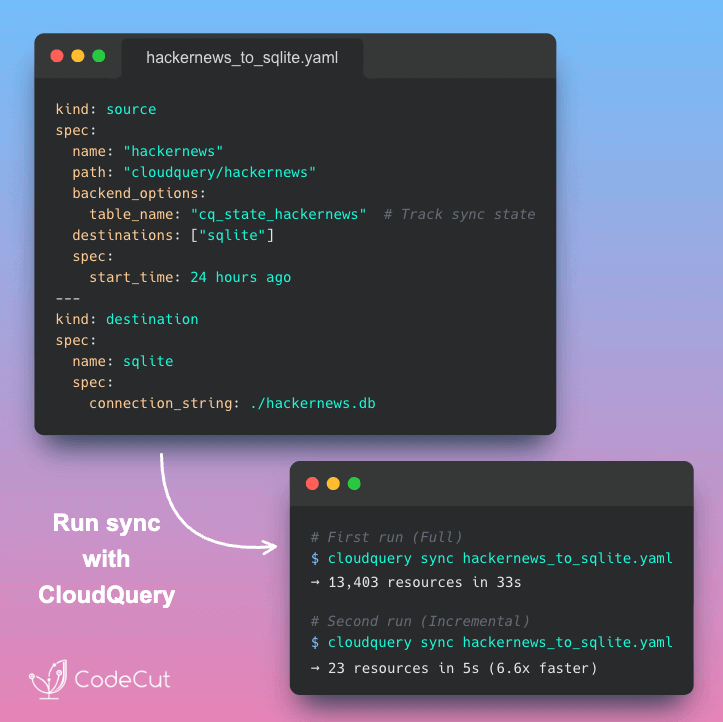
Newsletter #289: Python 3.14: Type-Safe String Interpolation with t-strings Read More »

Newsletter #288: MLflow: Track Every LLM API Call with 1 Line of Code

Grab your coffee. Here are this week’s highlights.

📅 Today’s Picks

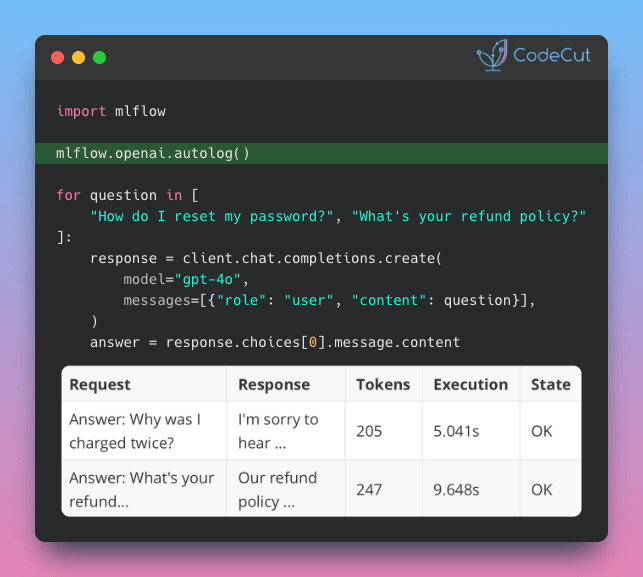
MLflow: Track Every LLM API Call with 1 Line of Code

Problem
Most teams building LLM apps don’t set up tracking because they see API calls as simple request-response operations.
But every API call costs money, and without token-level visibility, you can’t tell where your budget is going until it’s already spent.
Solution
MLflow‘s autolog traces every OpenAI API call with just one line of code, so you always know what was sent, what came back, and how many tokens it used.
Key capabilities:

Track token usage per call to identify which requests consume the most
View full prompt and response content for every call
Measure latency per call to find which requests are slowing down your app
Works with OpenAI, Anthropic, LangChain, LlamaIndex, and DSPy

Rembg: Remove Image Backgrounds in 2 Lines of Python

Problem
Removing backgrounds from images typically requires Photoshop, online tools, or AI assistants like ChatGPT.
But these options come with subscription costs, upload limits, or privacy concerns with your images on external servers.
Solution
Rembg uses AI models to remove backgrounds locally with just 2 lines of Python.
It’s also open source and compatible with common Python imaging libraries.

🧪 Run code

☕️ Weekly Finds

awesome-claude-skills
[AI Tools]
– Curated list of Claude Skills, resources, and tools for customizing Claude AI workflows with community-contributed templates and integrations

zvec
[Vector Database]
– In-process vector database built on Alibaba’s Proxima engine that searches billions of vectors in milliseconds with zero server setup

langflow
[AI Agents]
– Visual platform for building and deploying AI-powered agents and workflows with drag-and-drop interface, multi-agent orchestration, and MCP server support

Looking for a specific tool? Explore 70+ Python tools →

Stay Current with CodeCut

Actionable Python tips, curated for busy data pros. Skim in under 2 minutes, three times a week.

.codecut-subscribe-form .codecut-input {
background: #2F2D2E !important;
border: 1px solid #72BEFA !important;
color: #FFFFFF !important;
}
.codecut-subscribe-form .codecut-input::placeholder {
color: #999999 !important;
}
.codecut-subscribe-form .codecut-subscribe-btn {
background: #72BEFA !important;
color: #2F2D2E !important;
}
.codecut-subscribe-form .codecut-subscribe-btn:hover {
background: #5aa8e8 !important;
}

.codecut-subscribe-form {
max-width: 650px;
display: flex;
flex-direction: column;
gap: 8px;
}
.codecut-input {
-webkit-appearance: none;
-moz-appearance: none;
appearance: none;
background: #FFFFFF;
border-radius: 8px !important;
padding: 8px 12px;
font-family: ‘Comfortaa’, sans-serif !important;
font-size: 14px !important;
color: #333333;
border: none !important;
outline: none;
width: 100%;
box-sizing: border-box;
}
input[type=”email”].codecut-input {
border-radius: 8px !important;
}
.codecut-input::placeholder {
color: #666666;
}
.codecut-email-row {
display: flex;
align-items: stretch;
height: 36px;
gap: 8px;
}
.codecut-email-row .codecut-input {
flex: 1;
}
.codecut-subscribe-btn {
background: #72BEFA;
color: #2F2D2E;
border: none;
border-radius: 8px;
padding: 8px 14px;
font-family: ‘Comfortaa’, sans-serif;
font-size: 14px;
font-weight: 500;
cursor: pointer;
text-decoration: none;
display: flex;
align-items: center;
justify-content: center;
transition: background 0.3s ease;
}
.codecut-subscribe-btn:hover {
background: #5aa8e8;
}
.codecut-subscribe-btn:disabled {
background: #999;
cursor: not-allowed;
}
.codecut-message {
font-family: ‘Comfortaa’, sans-serif;
font-size: 12px;
padding: 8px;
border-radius: 6px;
display: none;
}
.codecut-message.success {
background: #d4edda;
color: #155724;
display: block;
}
@media (max-width: 480px) {
.codecut-email-row {
flex-direction: column;
height: auto;
gap: 8px;
}
.codecut-input {
border-radius: 8px;
height: 36px;
}
.codecut-subscribe-btn {
width: 100%;
text-align: center;
border-radius: 8px;
height: 36px;
}
}

Subscribe
Newsletter #288: MLflow: Track Every LLM API Call with 1 Line of Code Read More »

Newsletter #287: Granite Vision: Convert Chart Images to CSV with Transformers

Grab your coffee. Here are this week’s highlights.

📅 Today’s Picks

Granite Vision: Convert Chart Images to CSV with Transformers

Problem
Chart data often contains valuable insights, but extracting numbers from these charts manually is time-consuming and tedious.
Solution
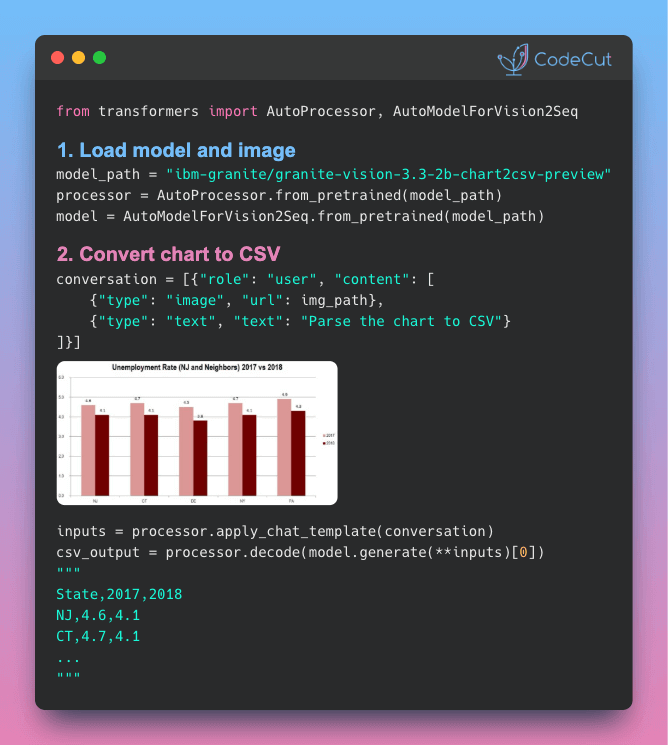
IBM’s Granite Vision 3.3 2B converts chart images directly into structured CSV data using Hugging Face Transformers.
Here’s how to extract structured data from any chart image in three steps.
1. Load the Model
Load the chart-to-CSV model from HuggingFace using the transformers library.

<span class="kn">from</span> <span class="nn">transformers</span> <span class="kn">import</span> <span class="n">AutoProcessor</span><span class="p">,</span> <span class="n">AutoModelForVision2Seq</span>
<span class="kn">from</span> <span class="nn">huggingface_hub</span> <span class="kn">import</span> <span class="n">hf_hub_download</span>
<span class="kn">from</span> <span class="nn">PIL</span> <span class="kn">import</span> <span class="n">Image</span>
<span class="kn">import</span> <span class="nn">torch</span>

<span class="n">model_path</span> <span class="o">=</span> <span class="s2">"ibm-granite/granite-vision-3.3-2b-chart2csv-preview"</span>
<span class="n">device</span> <span class="o">=</span> <span class="s2">"cuda"</span> <span class="k">if</span> <span class="n">torch</span><span class="o">.</span><span class="n">cuda</span><span class="o">.</span><span class="n">is_available</span><span class="p">()</span> <span class="k">else</span> <span class="s2">"cpu"</span>

<span class="n">processor</span> <span class="o">=</span> <span class="n">AutoProcessor</span><span class="o">.</span><span class="n">from_pretrained</span><span class="p">(</span><span class="n">model_path</span><span class="p">)</span>
<span class="n">model</span> <span class="o">=</span> <span class="n">AutoModelForVision2Seq</span><span class="o">.</span><span class="n">from_pretrained</span><span class="p">(</span><span class="n">model_path</span><span class="p">)</span><span class="o">.</span><span class="n">to</span><span class="p">(</span><span class="n">device</span><span class="p">)</span>

2. Prepare Your Chart
Define the chart image and task instruction in a conversation format.

<span class="c1"># Load a chart image</span>
<span class="n">img_path</span> <span class="o">=</span> <span class="n">hf_hub_download</span><span class="p">(</span>
<span class="n">repo_id</span><span class="o">=</span><span class="n">model_path</span><span class="p">,</span> <span class="n">filename</span><span class="o">=</span><span class="s2">"example.jpg"</span>
<span class="p">)</span>
<span class="n">img</span> <span class="o">=</span> <span class="n">Image</span><span class="o">.</span><span class="n">open</span><span class="p">(</span><span class="n">img_path</span><span class="p">)</span>

<span class="c1"># Use the chart-to-CSV prompt</span>
<span class="n">conversation</span> <span class="o">=</span> <span class="p">[</span>
<span class="p">{</span><span class="s2">"role"</span><span class="p">:</span> <span class="s2">"user"</span><span class="p">,</span> <span class="s2">"content"</span><span class="p">:</span> <span class="p">[</span>
<span class="p">{</span><span class="s2">"type"</span><span class="p">:</span> <span class="s2">"image"</span><span class="p">,</span> <span class="s2">"url"</span><span class="p">:</span> <span class="n">img_path</span><span class="p">},</span>
<span class="p">{</span><span class="s2">"type"</span><span class="p">:</span> <span class="s2">"text"</span><span class="p">,</span> <span class="s2">"text"</span><span class="p">:</span> <span class="s2">"Parse the chart in the image to CSV format."</span><span class="p">}</span>
<span class="p">]}</span>
<span class="p">]</span>

3. Generate CSV Output
Apply the chat template, generate tokens, and decode back to CSV text.

<span class="n">inputs</span> <span class="o">=</span> <span class="n">processor</span><span class="o">.</span><span class="n">apply_chat_template</span><span class="p">(</span>
<span class="n">conversation</span><span class="p">,</span>
<span class="n">add_generation_prompt</span><span class="o">=</span><span class="kc">True</span><span class="p">,</span>
<span class="n">tokenize</span><span class="o">=</span><span class="kc">True</span><span class="p">,</span>
<span class="n">return_dict</span><span class="o">=</span><span class="kc">True</span><span class="p">,</span>
<span class="n">return_tensors</span><span class="o">=</span><span class="s2">"pt"</span>
<span class="p">)</span><span class="o">.</span><span class="n">to</span><span class="p">(</span><span class="n">device</span><span class="p">)</span>

<span class="n">output</span> <span class="o">=</span> <span class="n">model</span><span class="o">.</span><span class="n">generate</span><span class="p">(</span><span class="o">**</span><span class="n">inputs</span><span class="p">,</span> <span class="n">max_new_tokens</span><span class="o">=</span><span class="mi">500</span><span class="p">)</span>
<span class="n">csv_output</span> <span class="o">=</span> <span class="n">processor</span><span class="o">.</span><span class="n">decode</span><span class="p">(</span><span class="n">output</span><span class="p">[</span><span class="mi">0</span><span class="p">],</span> <span class="n">skip_special_tokens</span><span class="o">=</span><span class="kc">True</span><span class="p">)</span>
<span class="nb">print</span><span class="p">(</span><span class="n">csv_output</span><span class="p">)</span>

Output:

State,2017,2018
NJ,4.6,4.1
CT,4.7,4.1
DE,4.5,3.8
NY,4.7,4.1
PA,4.9,4.3


PydanticAI: Control OpenAI Data Retention with openai_store

Problem
By default, OpenAI may retain your API request data for internal review and model improvement. For healthcare, finance, and legal applications, this default creates compliance risks you can’t afford.
Solution
PydanticAI v1.52.0 introduces the openai_store setting to explicitly disable data retention in one line.
 

☕️ Weekly Finds
msgvault [Data Management] – Archive a lifetime of email and chat locally with full Gmail backup, search, DuckDB-powered analytics, an interactive TUI, and an MCP server for querying messages with AI
monty [Developer Tools] – Minimal, secure Python interpreter written in Rust designed for use by AI agents, providing sandboxed code execution with safety guarantees
baserow [No-Code Platform] – Open-source no-code platform for building databases, applications, automations, and AI agents with enterprise-grade security and self-hosted deployment options
Looking for a specific tool? Explore 70+ Python tools →

Stay Current with CodeCut
Actionable Python tips, curated for busy data pros. Skim in under 2 minutes, three times a week.

.codecut-subscribe-form .codecut-input {
background: #2F2D2E !important;
border: 1px solid #72BEFA !important;
color: #FFFFFF !important;
}
.codecut-subscribe-form .codecut-input::placeholder {
color: #999999 !important;
}
.codecut-subscribe-form .codecut-subscribe-btn {
background: #72BEFA !important;
color: #2F2D2E !important;
}
.codecut-subscribe-form .codecut-subscribe-btn:hover {
background: #5aa8e8 !important;
}

.codecut-subscribe-form {
max-width: 650px;
display: flex;
flex-direction: column;
gap: 8px;
}
.codecut-input {
-webkit-appearance: none;
-moz-appearance: none;
appearance: none;
background: #FFFFFF;
border-radius: 8px !important;
padding: 8px 12px;
font-family: ‘Comfortaa’, sans-serif !important;
font-size: 14px !important;
color: #333333;
border: none !important;
outline: none;
width: 100%;
box-sizing: border-box;
}
input[type=”email”].codecut-input {
border-radius: 8px !important;
}
.codecut-input::placeholder {
color: #666666;
}
.codecut-email-row {
display: flex;
align-items: stretch;
height: 36px;
gap: 8px;
}
.codecut-email-row .codecut-input {
flex: 1;
}
.codecut-subscribe-btn {
background: #72BEFA;
color: #2F2D2E;
border: none;
border-radius: 8px;
padding: 8px 14px;
font-family: ‘Comfortaa’, sans-serif;
font-size: 14px;
font-weight: 500;
cursor: pointer;
text-decoration: none;
display: flex;
align-items: center;
justify-content: center;
transition: background 0.3s ease;
}
.codecut-subscribe-btn:hover {
background: #5aa8e8;
}
.codecut-subscribe-btn:disabled {
background: #999;
cursor: not-allowed;
}
.codecut-message {
font-family: ‘Comfortaa’, sans-serif;
font-size: 12px;
padding: 8px;
border-radius: 6px;
display: none;
}
.codecut-message.success {
background: #d4edda;
color: #155724;
display: block;
}
@media (max-width: 480px) {
.codecut-email-row {
flex-direction: column;
height: auto;
gap: 8px;
}
.codecut-input {
border-radius: 8px;
height: 36px;
}
.codecut-subscribe-btn {
width: 100%;
text-align: center;
border-radius: 8px;
height: 36px;
}
}

 
Subscribe
Newsletter #287: Granite Vision: Convert Chart Images to CSV with Transformers Read More »

Newsletter #286: Write Readable Multi-Condition Logic with Polars when-then-otherwise

Grab your coffee. Here are this week’s highlights.

📅 Today’s Picks

Write Readable Multi-Condition Logic with Polars when-then-otherwise

Problem
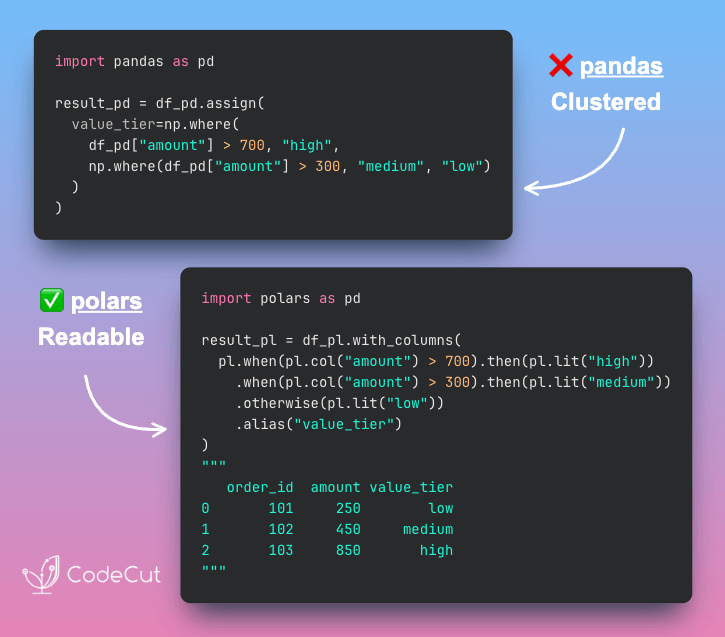
pandas requires np.where() for simple conditions which breaks method chaining and becomes nested and hard to read for multiple conditions.
The apply() alternative is slow and also breaks the DataFrame workflow.
Solution
Polars provides when().then().otherwise() chains that integrate naturally with method chaining.
With pandas, nested np.where() calls stack up for each additional condition, creating deeply nested expressions. Polars replaces this with readable chains where each condition appears sequentially.
Key benefits:

Natural flow with method chaining
Each condition stands on its own line
No nested function calls
Maintains data transformation workflow

The pattern scales cleanly from two conditions to ten without sacrificing readability.

📖 View Full Article

🧪 Run code

Extract Text from Any Document Format with Docling

Problem
Have you ever needed to pull text from PDFs, Word files, slide decks, or images for a project? Writing a different parser for each format is slow and error-prone.
Solution
Docling‘s DocumentConverter takes care of that by detecting the file type and applying the right parsing method for PDF, DOCX, PPTX, HTML, and images.
Other features of Docling:

AI-powered image descriptions for searchable diagrams
Export to pandas DataFrames, JSON, or Markdown
Structure-preserving output optimized for RAG pipelines
Built-in chunking strategies for vector databases
Parallel processing handles large document batches efficiently

📖 View Full Article

🧪 Run code

☕️ Weekly Finds

lm-evaluation-harness
[Machine Learning]
– Unified framework for testing and evaluating generative language models across a wide range of benchmarks and tasks with support for local models and custom metrics

PyMC
[Probabilistic Programming]
– Probabilistic programming library for Python that allows users to build Bayesian models with a simple Python API and fit them using state-of-the-art methods

Quarkdown
[Documentation]
– Modern Markdown typesetting system with powerful extensions for creating books, articles, and presentations. Supports function calls, custom functions, and outputs HTML, PDF, and slides

Looking for a specific tool? Explore 70+ Python tools →

Stay Current with CodeCut

Actionable Python tips, curated for busy data pros. Skim in under 2 minutes, three times a week.

.codecut-subscribe-form .codecut-input {
background: #2F2D2E !important;
border: 1px solid #72BEFA !important;
color: #FFFFFF !important;
}
.codecut-subscribe-form .codecut-input::placeholder {
color: #999999 !important;
}
.codecut-subscribe-form .codecut-subscribe-btn {
background: #72BEFA !important;
color: #2F2D2E !important;
}
.codecut-subscribe-form .codecut-subscribe-btn:hover {
background: #5aa8e8 !important;
}

.codecut-subscribe-form {
max-width: 650px;
display: flex;
flex-direction: column;
gap: 8px;
}
.codecut-input {
-webkit-appearance: none;
-moz-appearance: none;
appearance: none;
background: #FFFFFF;
border-radius: 8px !important;
padding: 8px 12px;
font-family: ‘Comfortaa’, sans-serif !important;
font-size: 14px !important;
color: #333333;
border: none !important;
outline: none;
width: 100%;
box-sizing: border-box;
}
input[type=”email”].codecut-input {
border-radius: 8px !important;
}
.codecut-input::placeholder {
color: #666666;
}
.codecut-email-row {
display: flex;
align-items: stretch;
height: 36px;
gap: 8px;
}
.codecut-email-row .codecut-input {
flex: 1;
}
.codecut-subscribe-btn {
background: #72BEFA;
color: #2F2D2E;
border: none;
border-radius: 8px;
padding: 8px 14px;
font-family: ‘Comfortaa’, sans-serif;
font-size: 14px;
font-weight: 500;
cursor: pointer;
text-decoration: none;
display: flex;
align-items: center;
justify-content: center;
transition: background 0.3s ease;
}
.codecut-subscribe-btn:hover {
background: #5aa8e8;
}
.codecut-subscribe-btn:disabled {
background: #999;
cursor: not-allowed;
}
.codecut-message {
font-family: ‘Comfortaa’, sans-serif;
font-size: 12px;
padding: 8px;
border-radius: 6px;
display: none;
}
.codecut-message.success {
background: #d4edda;
color: #155724;
display: block;
}
@media (max-width: 480px) {
.codecut-email-row {
flex-direction: column;
height: auto;
gap: 8px;
}
.codecut-input {
border-radius: 8px;
height: 36px;
}
.codecut-subscribe-btn {
width: 100%;
text-align: center;
border-radius: 8px;
height: 36px;
}
}

Subscribe
Newsletter #286: Write Readable Multi-Condition Logic with Polars when-then-otherwise Read More »

Newsletter #285: Narwhals: One Function for pandas, Polars, and DuckDB

Grab your coffee. Here are this week’s highlights.

📅 Today’s Picks

Narwhals: One Function for pandas, Polars, and DuckDB

Problem
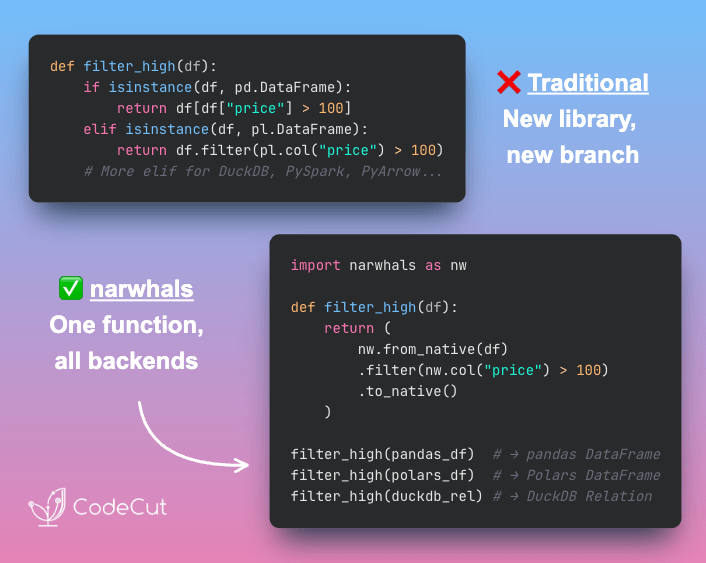
Teams today use multiple DataFrame libraries side by side. Each backend has its own syntax, so your utility functions end up full of if/elif chains checking types.
This makes even small logic changes expensive, since every backend implementation must be updated.
Solution
Narwhals removes this complexity by providing a unified DataFrame API.
How it works:

Wrap any DataFrame with nw.from_native() (pandas, Polars, DuckDB, PySpark, PyArrow)
Write transformations once using Polars-style operations
Convert back to the original type with nw.to_native()
Zero extra dependencies. Each backend keeps its native performance

📖 View Full Article

🧪 Run code

⭐ View GitHub

uv: Switch Python Versions Without Rebuilding Environments

Problem
Switching Python versions typically requires recreating virtual environments and reinstalling all dependencies from scratch.
This workflow wastes time and can introduce version conflicts when dependencies need to be resolved again.
Solution
UV allows seamless Python version upgrades with uv python pin while preserving existing dependencies.
The process is simple:

Pin the version with uv python pin 3.x
Sync dependencies with uv sync
All cached packages are preserved automatically

📖 View Full Article

⭐ View GitHub

☕️ Weekly Finds

Airbyte
[Data Engineering]
– Data integration platform with 600+ connectors for ETL/ELT pipelines from APIs, databases, and files to warehouses and lakes

act
[DevOps]
– Run GitHub Actions locally for fast feedback without commit/push cycles, using Docker containers

Dash
[AI Agents]
– Self-learning text-to-SQL agent that grounds answers in six layers of context and improves automatically from failures

Looking for a specific tool? Explore 70+ Python tools →

📚 Latest Deep Dives

5 Python Tools for Structured LLM Outputs: A Practical Comparison
– Compare 5 Python tools for structured LLM outputs. Learn when to use Instructor, PydanticAI, LangChain, Outlines, or Guidance for JSON extraction.

Stay Current with CodeCut

Actionable Python tips, curated for busy data pros. Skim in under 2 minutes, three times a week.

.codecut-subscribe-form .codecut-input {
background: #2F2D2E !important;
border: 1px solid #72BEFA !important;
color: #FFFFFF !important;
}
.codecut-subscribe-form .codecut-input::placeholder {
color: #999999 !important;
}
.codecut-subscribe-form .codecut-subscribe-btn {
background: #72BEFA !important;
color: #2F2D2E !important;
}
.codecut-subscribe-form .codecut-subscribe-btn:hover {
background: #5aa8e8 !important;
}

.codecut-subscribe-form {
max-width: 650px;
display: flex;
flex-direction: column;
gap: 8px;
}
.codecut-input {
-webkit-appearance: none;
-moz-appearance: none;
appearance: none;
background: #FFFFFF;
border-radius: 8px !important;
padding: 8px 12px;
font-family: ‘Comfortaa’, sans-serif !important;
font-size: 14px !important;
color: #333333;
border: none !important;
outline: none;
width: 100%;
box-sizing: border-box;
}
input[type=”email”].codecut-input {
border-radius: 8px !important;
}
.codecut-input::placeholder {
color: #666666;
}
.codecut-email-row {
display: flex;
align-items: stretch;
height: 36px;
gap: 8px;
}
.codecut-email-row .codecut-input {
flex: 1;
}
.codecut-subscribe-btn {
background: #72BEFA;
color: #2F2D2E;
border: none;
border-radius: 8px;
padding: 8px 14px;
font-family: ‘Comfortaa’, sans-serif;
font-size: 14px;
font-weight: 500;
cursor: pointer;
text-decoration: none;
display: flex;
align-items: center;
justify-content: center;
transition: background 0.3s ease;
}
.codecut-subscribe-btn:hover {
background: #5aa8e8;
}
.codecut-subscribe-btn:disabled {
background: #999;
cursor: not-allowed;
}
.codecut-message {
font-family: ‘Comfortaa’, sans-serif;
font-size: 12px;
padding: 8px;
border-radius: 6px;
display: none;
}
.codecut-message.success {
background: #d4edda;
color: #155724;
display: block;
}
@media (max-width: 480px) {
.codecut-email-row {
flex-direction: column;
height: auto;
gap: 8px;
}
.codecut-input {
border-radius: 8px;
height: 36px;
}
.codecut-subscribe-btn {
width: 100%;
text-align: center;
border-radius: 8px;
height: 36px;
}
}

Subscribe
Newsletter #285: Narwhals: One Function for pandas, Polars, and DuckDB Read More »

Scroll to Top

Work with Khuyen Tran

Work with Khuyen Tran