
Table of Contents
Introduction
Imagine this scenario: You change one sentence, keep everything else fixed, and the result improves.
But is it real improvement, or is it just noise?
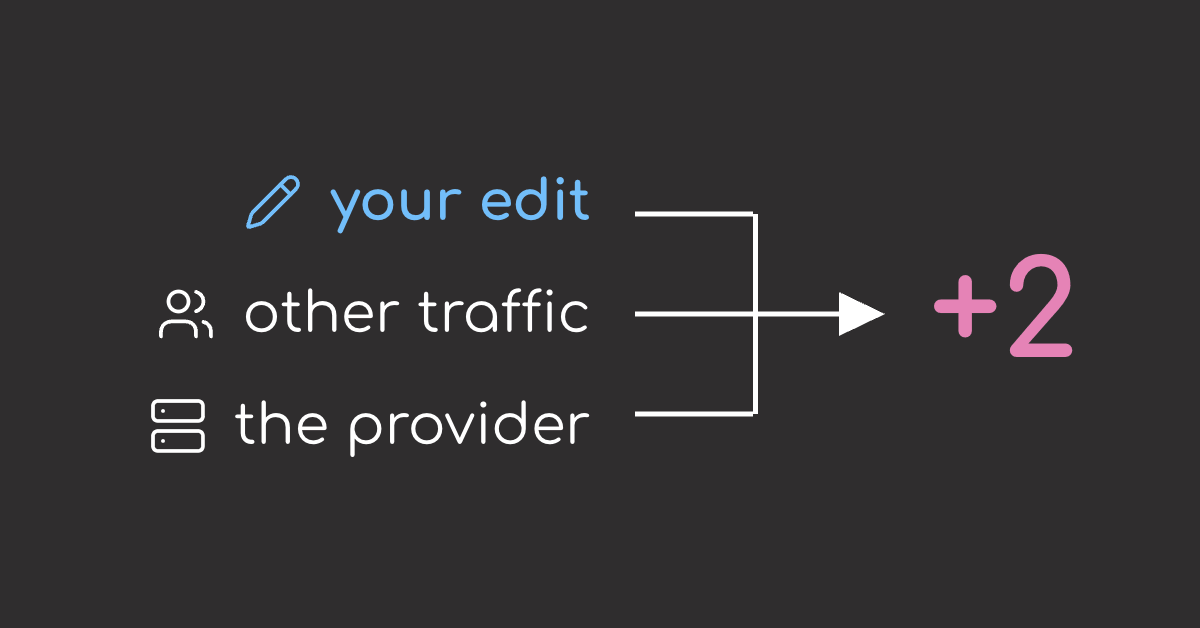
A small gain does not always come from the prompt. It can also come from the provider, the hosted endpoint, or the test sample.
In this article, I test a small prompt edit on 100 tool-calling cases and repeat the same setup to separate the prompt effect from normal run-to-run noise.
TL;DR
- The small prompt edit helped with the mistake it targeted, but the overall score was too close to show that the new prompt was better.
- The same pinned setup still produced different scores across runs. Because the prompt gain was small, it was hard to tell whether the prompt or the run caused it.
Stay Current with CodeCut
Easy-to-digest articles on Python, AI, and open-source tools. Delivered twice a week.
How I Ran It
I tested the prompts on 100 single-call tool-calling cases from BFCL V4, a UC Berkeley benchmark for function calling.
Each case had a known correct tool call. A response counted as correct only when it used the right function and filled the arguments with accepted values.
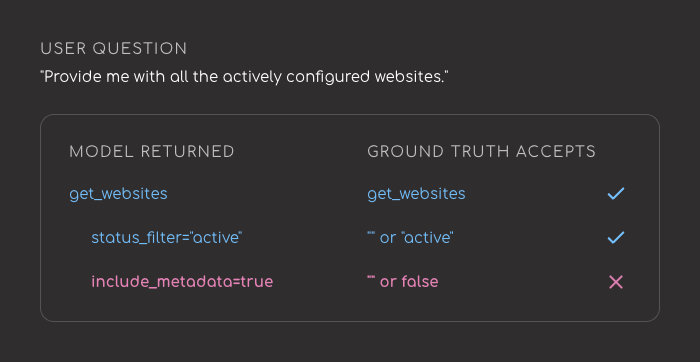
I ran deepseek/deepseek-v4-flash-0731 through OpenRouter. Every request used temperature=0, top_p=1, and max_tokens=1024.
The goal was to see whether a small prompt change could improve tool-call accuracy. Prompt A was the original prompt. Prompt B changed one part of the prompt to reduce a recurring mistake.
Prompt A:
You are a helpful assistant with access to tools. Call the appropriate function.

Prompt B:
You are a helpful assistant with access to tools. Call the appropriate function.
If a parameter is not specified in the request, omit it rather than guessing a value.
I ran two checks:
- Run Prompt A multiple times with each provider pinned, to see how much the result changed even when the prompt stayed the same.
- Run Prompt A and Prompt B on the same pinned provider,
deepinfra/fp8, to see whether Prompt B looked better under the same setup.
The Results
Prompt B Helped With Invented Optional Arguments
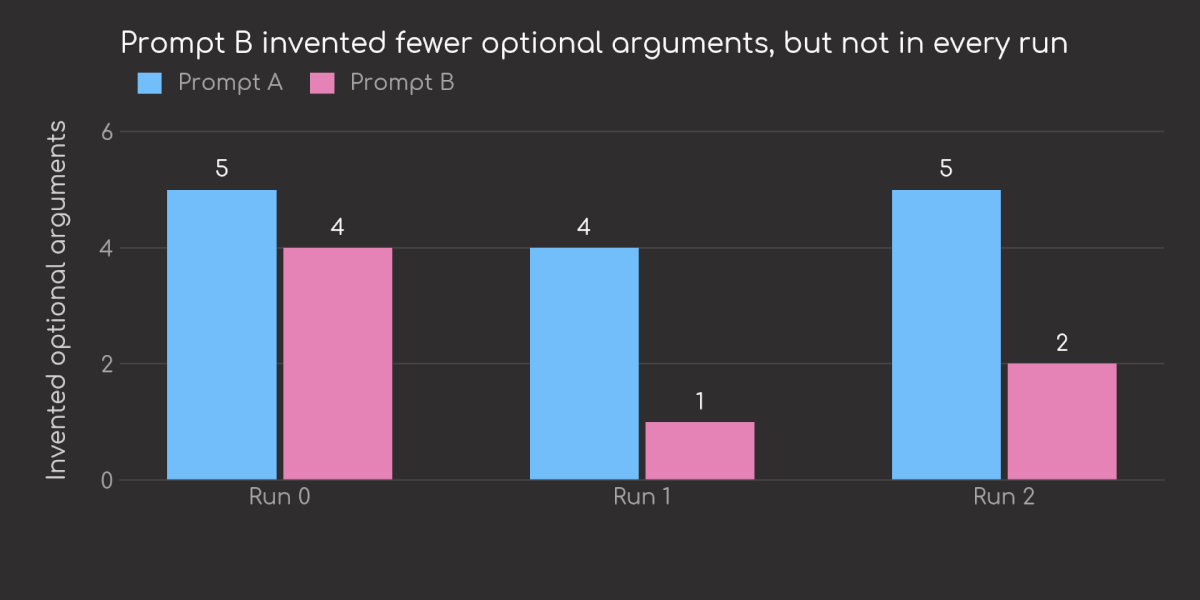
One recurring mistake was extra arguments. The user asked for a tool call, but the model sometimes filled in optional fields that were never mentioned. Prompt B was meant to reduce that.
user asks: "Get API tokens for user 12345"

before Prompt B:
get_shareable_api_tokens(user_id="12345",
                         include_revoked=true)  # not requested by the user

after Prompt B:
get_shareable_api_tokens(user_id="12345")
Prompt B made fewer of these mistakes. Across three runs, invented optional arguments fell from 14 to 7.
The Overall Score Gain Was Not Significant Enough
Prompt B fixed the targeted mistake more often, but that was not enough to make the overall result clearly better.
For the prompt comparison, I used one pinned provider, deepinfra/fp8, the same 100 cases, and three runs per prompt.
| Prompt | Run 0 | Run 1 | Run 2 |
|---|---|---|---|
| Prompt A | 79 | 82 | 79 |
| Prompt B | 81 | 81 | 82 |
Prompt B looked a little better, but the gap was too small to call it a real improvement. It fixed some of Prompt A’s failures, but also made new mistakes, so the overall gain stayed small.
Pinning the Provider Did Not Make the Results Repeatable
Does pinning the provider make the results repeatable? To test that, I ran Prompt A three times on the same 100 cases. The model, scorer, decoding settings, and provider stayed fixed.
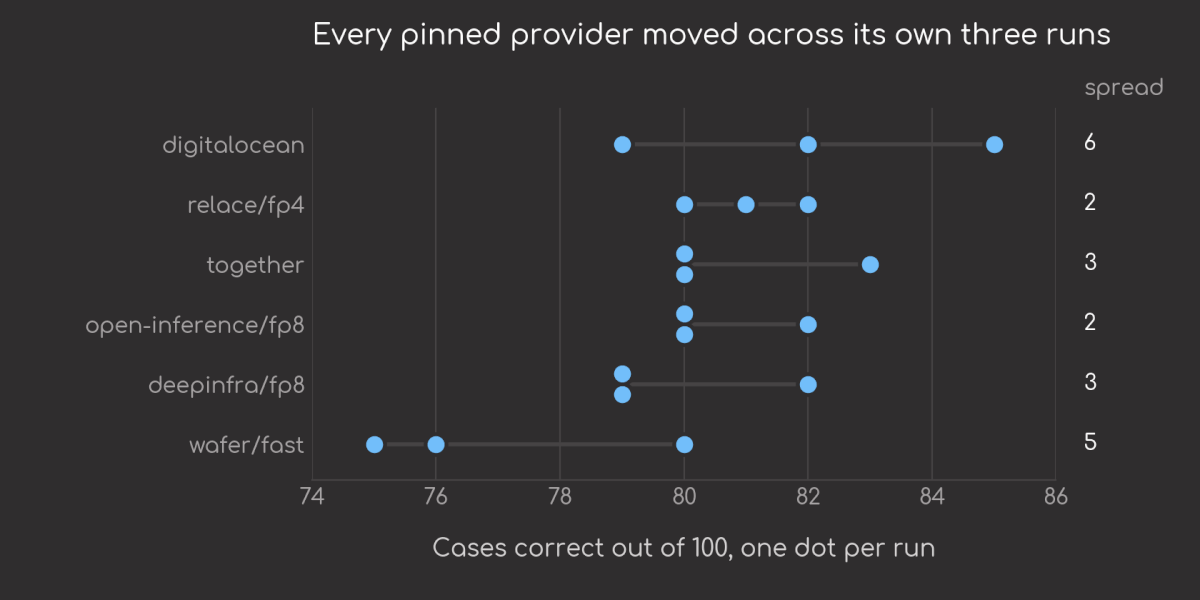
It did not. Every pinned provider still produced different scores across the three runs.
One Provider Was Clearly Weaker
Were some providers better than others?
In this experiment, yes.
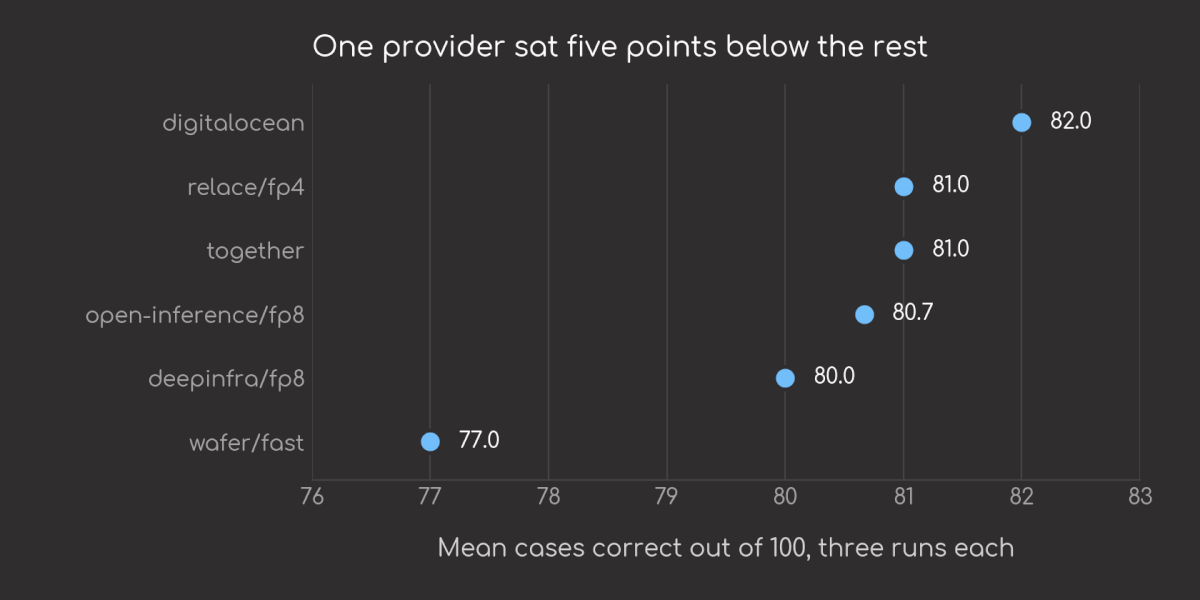
The provider scores were not all the same. wafer/fast was the outlier, averaging 77.0 while every other provider averaged at least 80.0.
Quantization Did Not Predict Quality
Did lower precision hurt performance?
I expected fp4 to be weaker because it uses fewer bits than fp8. Fewer bits can make serving cheaper or faster, but it can also lose detail.
The result did not match that expectation. relace/fp4 was slightly above the two fp8 providers.
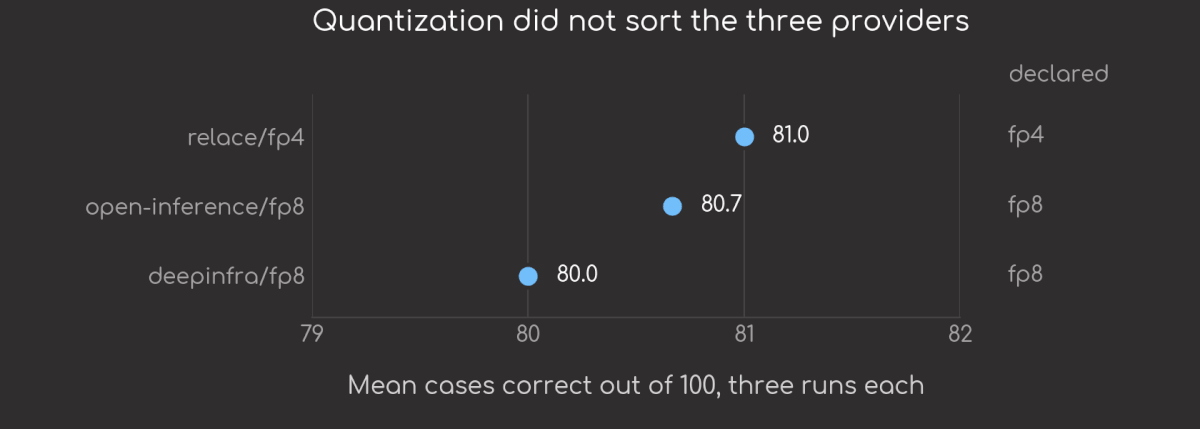
This does not prove that fp4 is better. It only shows that the quantization label was not enough to predict which provider is better.
Input Price Did Not Predict Quality
Did price predict quality?
Not here.
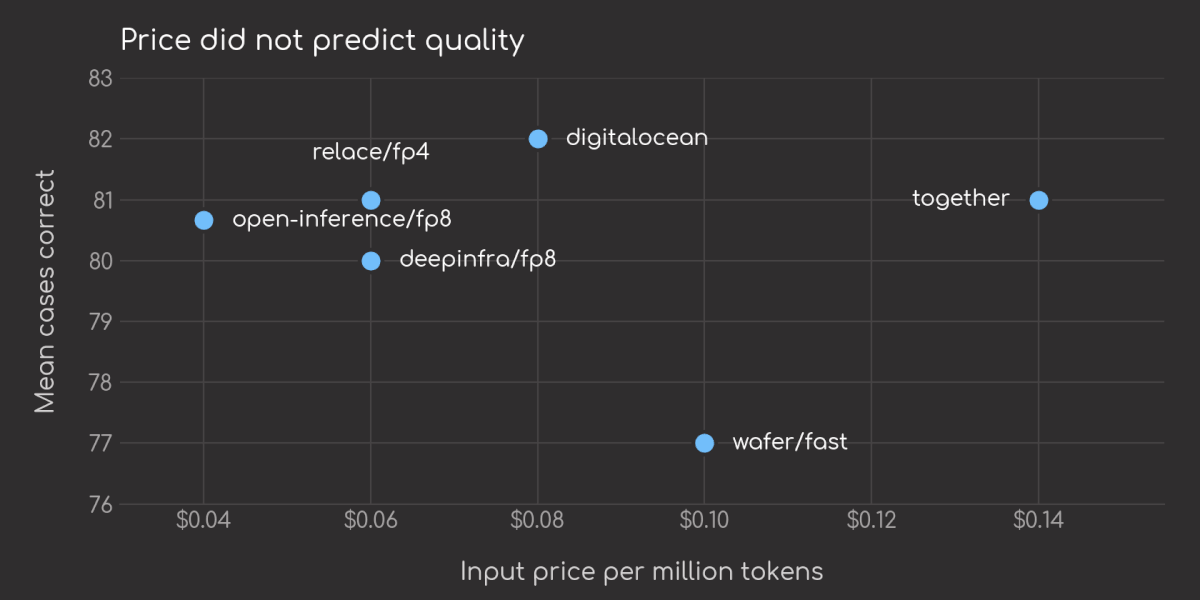
together had the highest input price, but it was not the top scorer. wafer/fast also cost more than several providers that scored higher.
Key Takeaways
This does not mean prompt edits are useless. Prompt B did reduce the mistake it was written for.
The problem is the size of the effect. When the prompt change is small, the measured gain can get mixed with provider choice, endpoint variation, and the test sample. A larger prompt change may show a clearer effect.
For small prompt edits, I would check three things:
- Run the current prompt more than once so you know how much the score moves before changing anything.
- Keep the provider fixed when comparing prompts. Keep the prompt fixed when comparing providers.
- Look at both the targeted mistake and the overall result. A prompt can fix one behavior while leaving the full score mostly unchanged.
If you want to move beyond manual prompt edits, the DSPy guide walks through optimizing an LLM classifier with examples and evaluation metrics.
Run the Experiment
The source code and recorded results are in the companion folder on GitHub: prompt-ab-test-phantom-gains.
To generate the article tables from the recorded results:
cd notebooks/prompt-ab-test-phantom-gains
scripts/run_prompt_ab_eval.sh
To rerun the API experiment from scratch, set OPENROUTER_API_KEY in the repo root .env, then run:
cd notebooks/prompt-ab-test-phantom-gains
scripts/run_prompt_ab_eval.sh --rerun
The script prints the same provider comparison and prompt A/B tables shown above.
References
- So you want to use OpenRouter? (Mo Moustafa, 2026): the reported TAU-Bench Airline spread across providers of one model, which motivated testing provider variation on this task set.
- Provider Failover vs Model Fallbacks Explained (OpenRouter): the distinction between provider-layer failover and model fallback, and why
allow_fallbacks: Falsematters for pinning. - Defeating Nondeterminism in LLM Inference (Thinking Machines, 2025): the batch-invariance explanation for temperature-0 nondeterminism and the 1,000-prompt endpoint test.
- BFCL V4: Format Sensitivity (Mao et al., UC Berkeley, 2025): the format-sensitivity case selection used to build this experiment.
- Berkeley Function Calling Leaderboard dataset (UC Berkeley, Apache-2.0): the source cases, ground-truth answers, and AST-style matching rule reimplemented for this experiment.
Related Tutorials
- Enforce Structured Outputs from LLMs with PydanticAI: Shows how to validate LLM outputs with Pydantic models instead of relying only on prompt instructions.
- Make Your Coding Agent Answers Easier to Scan with i-have-adhd: Another small instruction-change experiment, focused on whether coding-agent answers become easier to scan.
- Before You Upgrade the Model, Try Thinking Mode
- Stop Treating Your RAG Grounding Score as a Safety Net
Stay Current with CodeCut
Easy-to-digest articles on Python, AI, and open-source tools. Delivered twice a week.